Updating AdGuard Pro for iOS: What has changed

A month ago we presented AdGuard 4.0 for iOS. Today we do the same for AdGuard Pro. And it inevitably leads to a lot of questions, which is quite fair. What's the difference between these apps? Is AdGuard Pro still 'pro'? We have gathered all the frequently asked questions and answered them in this article — and, of course, reviewed all major changes.

Regular AdGuard for iOS and AdGuard Pro

Before we dive into the intricacies of the new update, we'd like to preemptively give answers to all those questions that you might have now, or that might appear later.

What are the differences?

Long time ago, AdGuard Pro was our only app that offered premium functionality, in contrast to the free AdGuard for iOS app that was only intended to block ads in Safari. But then App Store's policies had become much stricter, and we were forced to virtually freeze the development of AdGuard Pro in order to keep what features it had by that moment.

Instead, we switched focus to AdGuard for iOS and saturated it with as many features as we could under the new restrictions. Until one day, Apple decided to revert the policy back to where it was before. We were once again allowed to add more DNS-related features. But this time we had two different apps, each having its own userbase, and a need to update both. A mess, in other words.

For the entire story, check out this link to an older article that explains the whole situation in detail. What's important,

Now AdGuard Pro and AdGuard for iOS are the same in terms of functionality.

And this takes us to the next question.

I already have AdGuard for iOS/AdGuard Pro, do I need to install another app?

No, you absolutely don't. One app is enough! And it doesn't really matter which one you have, feel free to stick to it and be sure that you don't miss on anything.

Why another article then? Why not simply quote our own post from last month? True, you'll see almost the same changelog here as for AdGuard v4.0 for iOS, but the two apps arrived here differently. For users of AdGuard Pro some features will stand out and other seem familiar, and vice versa.

What has changed?

All major changes can be grouped into three categories: UI, Safari content blocking and DNS-related. Let's start with the most obvious one.

Completely new UI

  • General design

Traditionally, a major version increase heralds a lot of changes regarding the UI. This time is not an exception. And considering the app jumped from v2.1 staright to v4.0, the transformation is drastic. The style, menu logic, and icons are new – the app looks so different you might not even recognize it. One thing stays the same though: you can switch to dark mode.
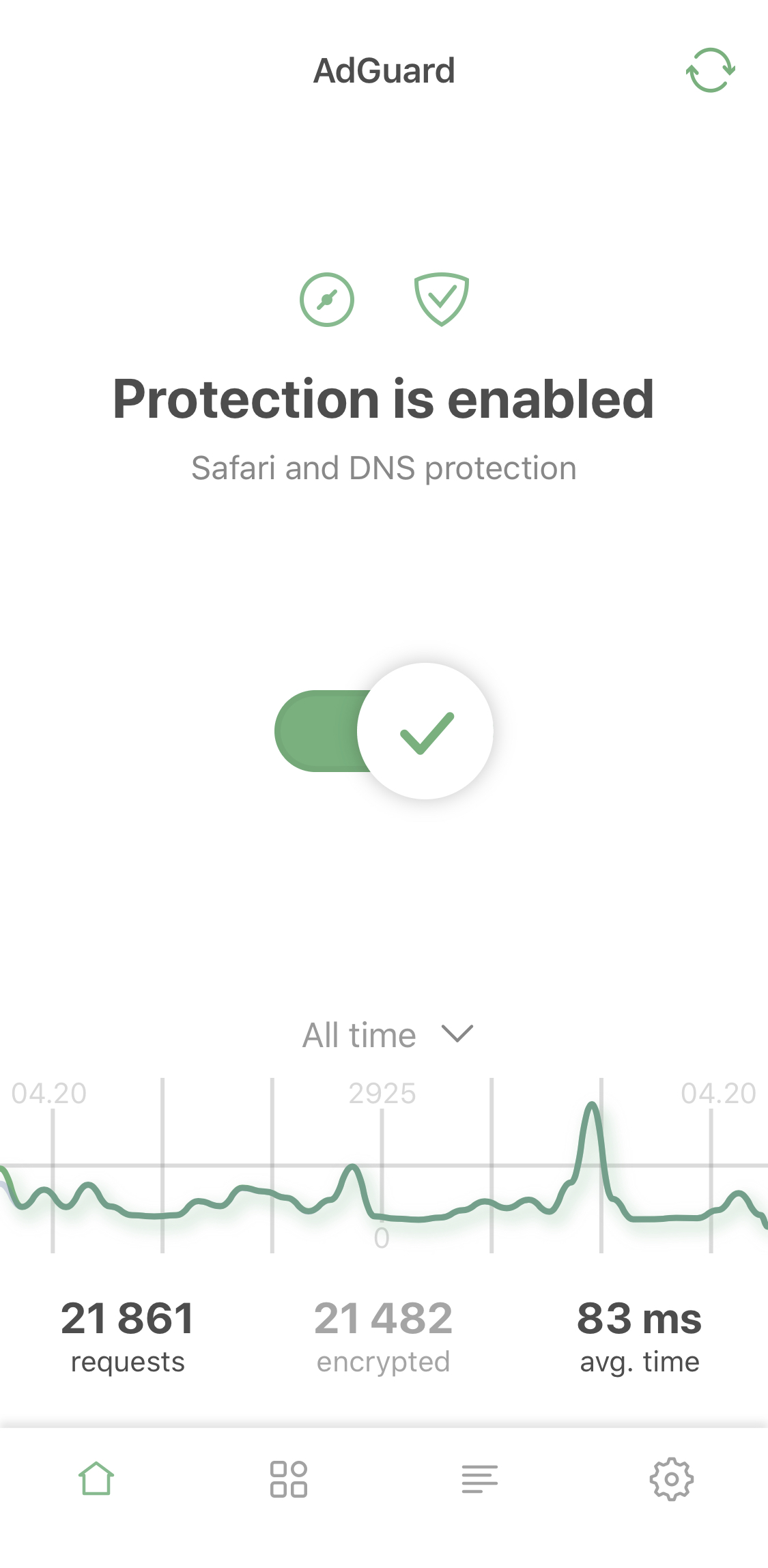
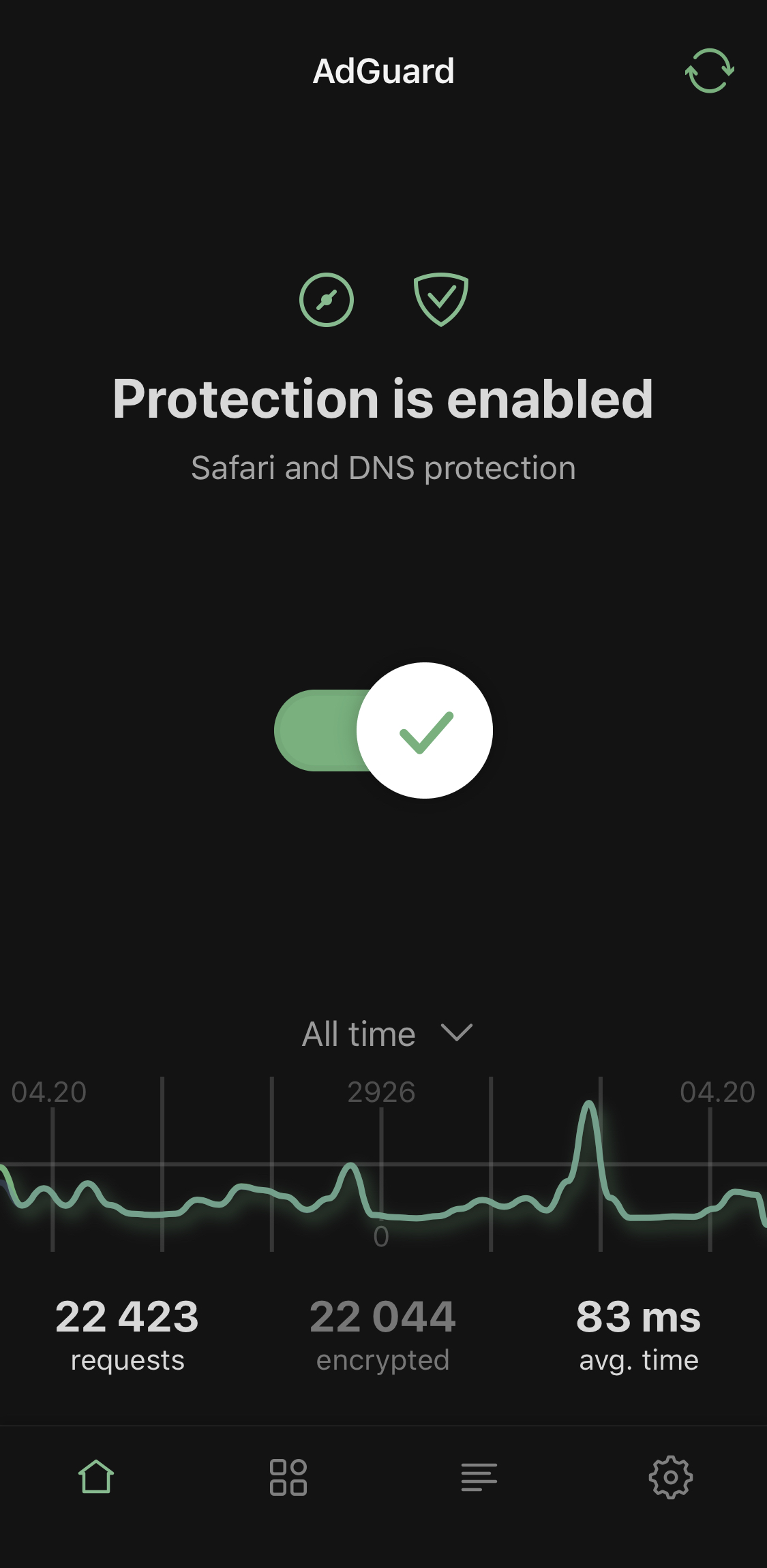
Light and dark themes

  • Advanced mode

We've added additional settings for advanced users. Use them at your own risk! However, the app isn't called 'AdGuard Pro' for nothing: if you've been using it for a while, these advanced settings probably won't scare you off.
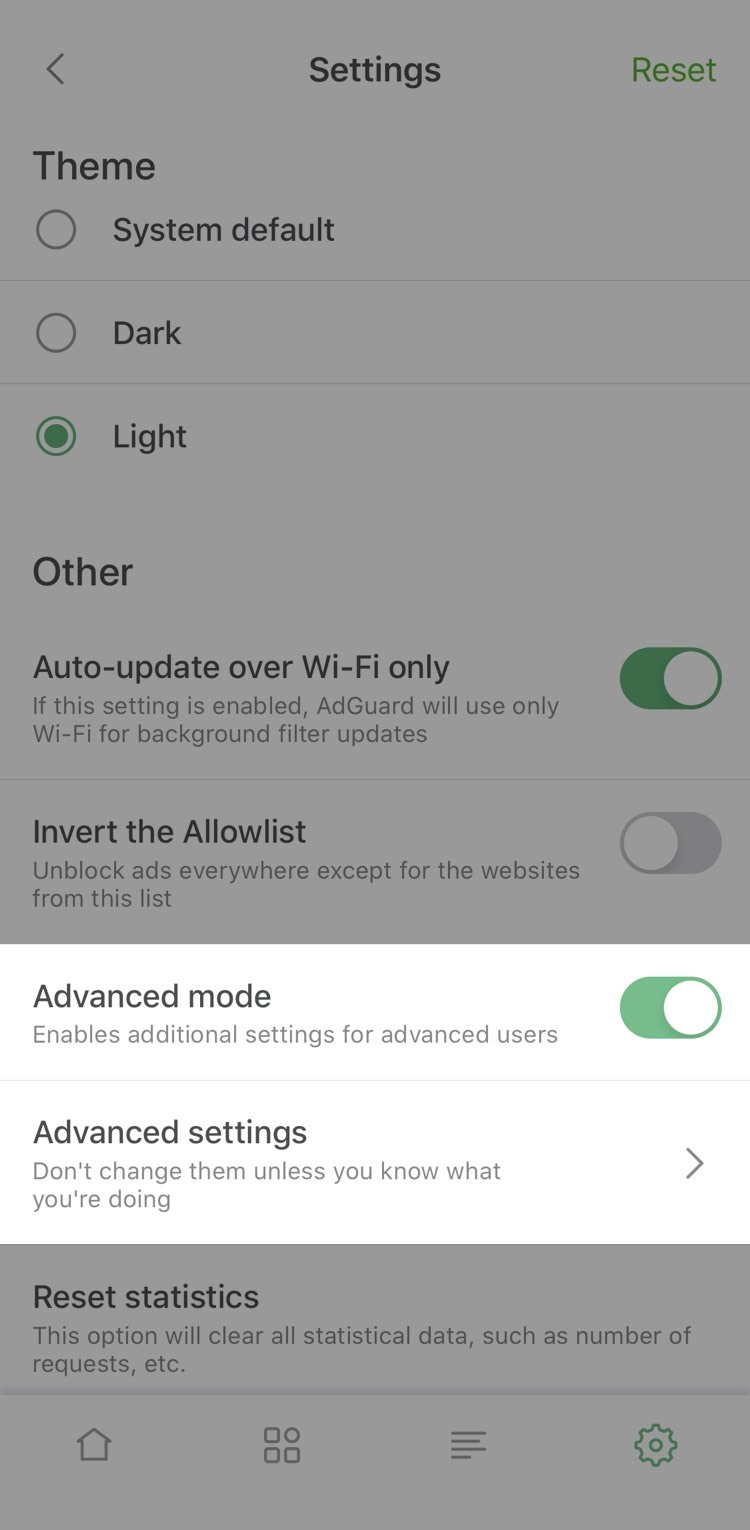
Advanced mode

By the way, now you have to enable Advanced mode to add your own DNS filter*. Let's illustrate this by an example of adding our AdGuard SDN filter.

*⠀Don't confuse it with adding a custom filter to Safari, the option we only added in this version.

Simplified domain names (SDN) filter is composed from several other filters (English filter, Social media filter, Spyware filter, Mobile ads filter, EasyList and EasyPrivacy) and simplified specifically to be better compatible with DNS-level ad blocking.

To enable it in AdGuard Pro, you need to take three steps:

  1. Open AdGuard Pro Settings —> General —> Enable Advanced mode
  2. Go to DNS protection —> DNS filtering —> DNS filters —> Add filter
  3. Paste this link to add AdGuard SDN filter (or use a link to any other filter you want to add).

That's it! You've successfully added a custom filter!

  • Activity feed

If we're being completely honest, it's a fancy name for the familiar DNS requests log, but better looking and more detailed. For example, it'll tell you the origin of most DNS requests.
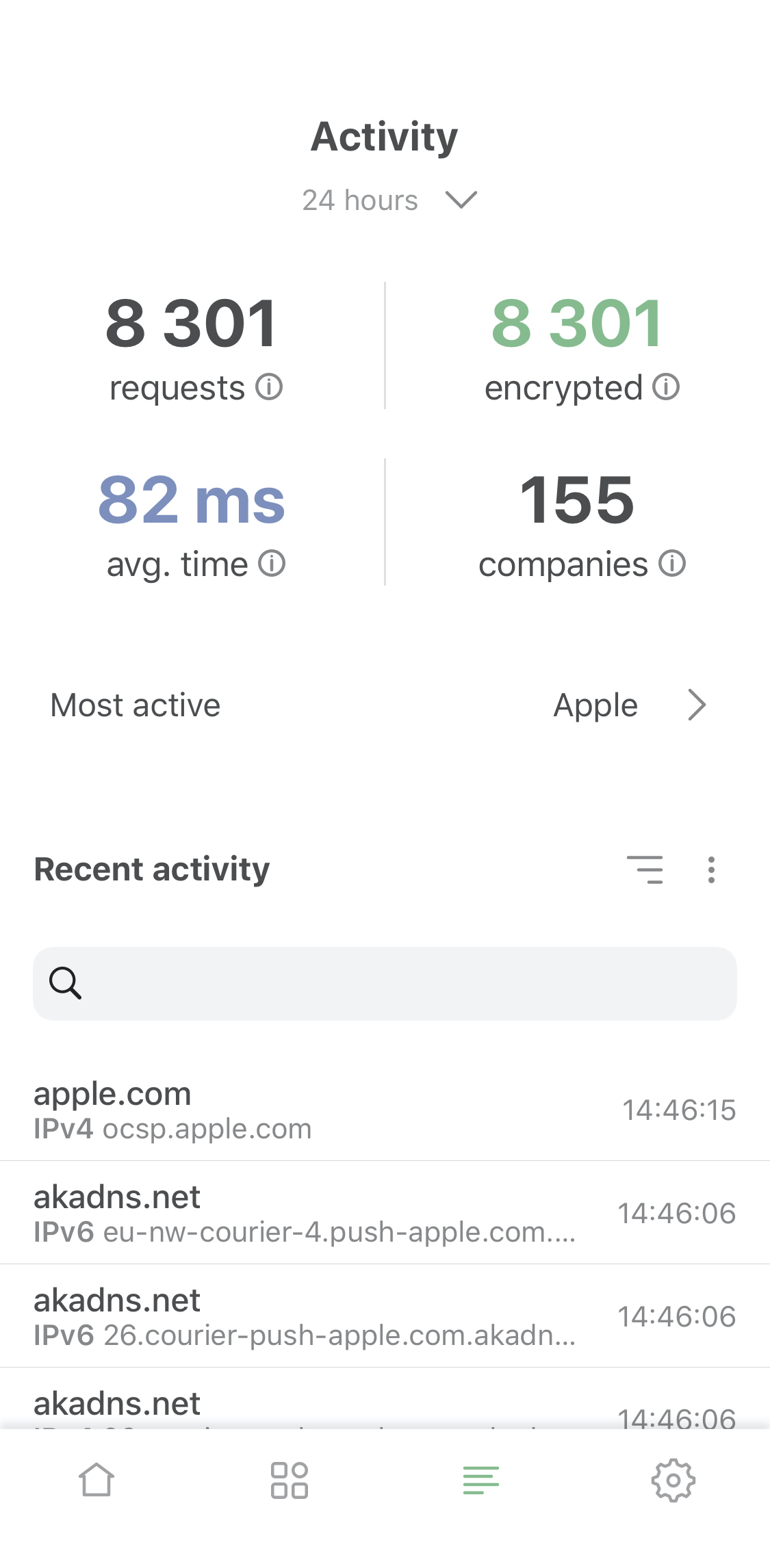
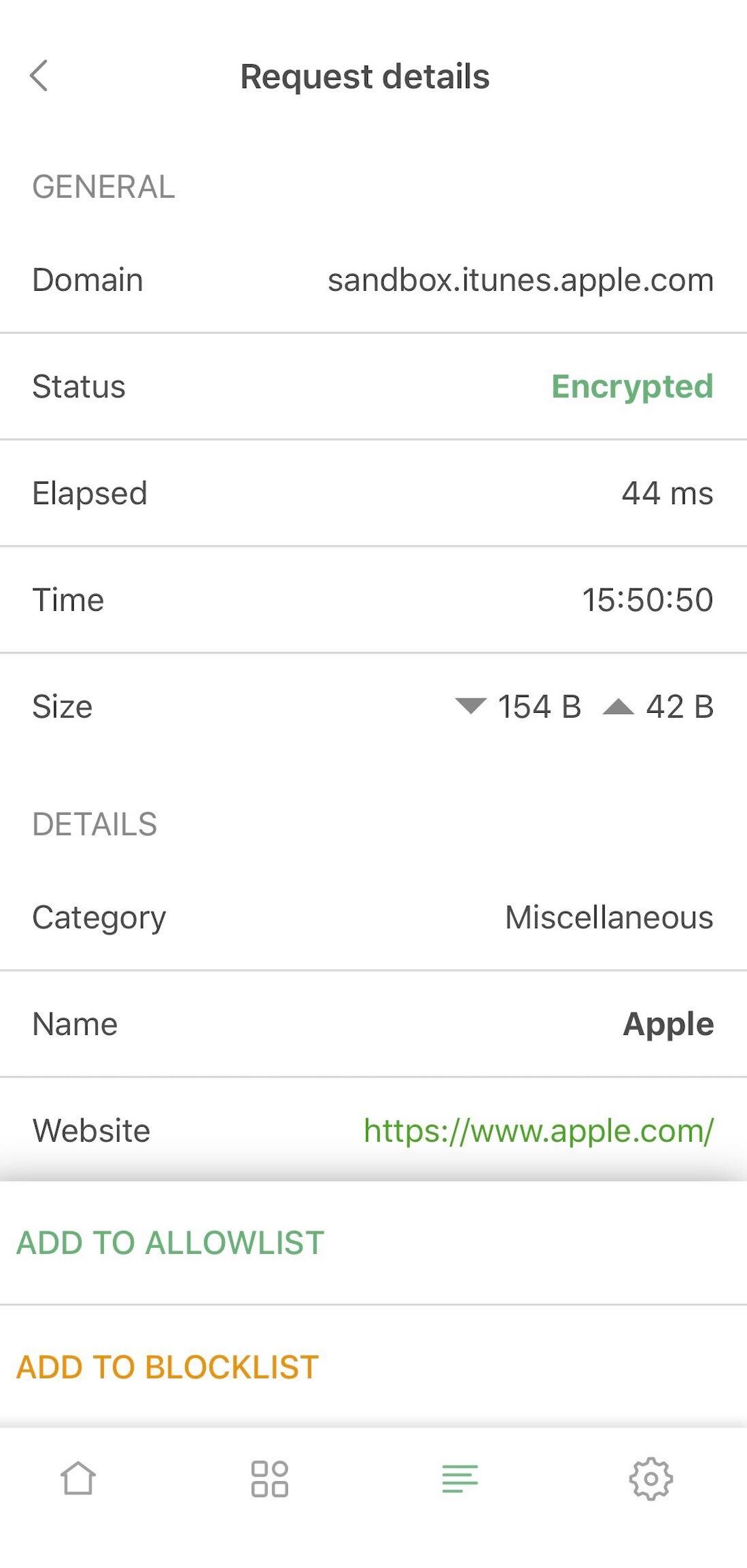
Activity screen and request details

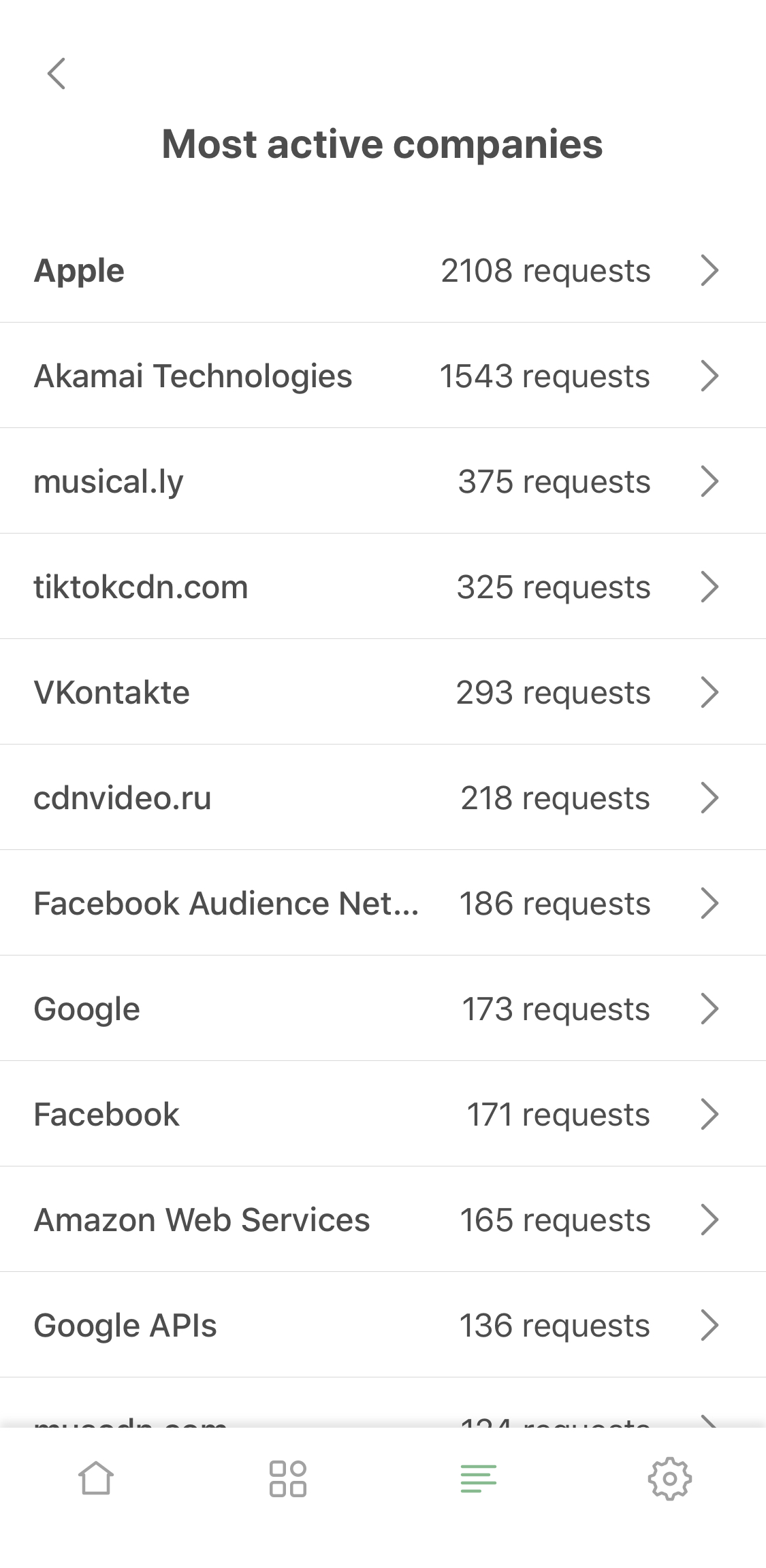
  • Most active companies

Now you can not only see which company this or that DNS request belongs to, you can view the "leaderboard" on the 'Most active companies' screen, accessible from the activity feed.
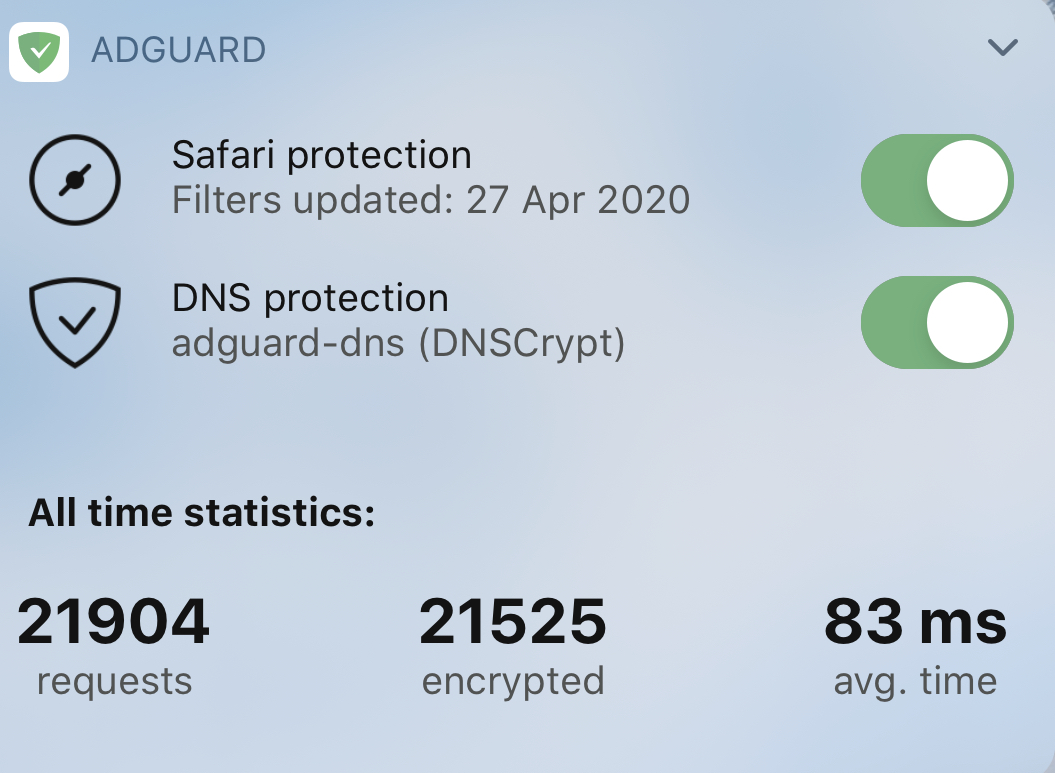
  • Requests statistic

Last but not least! Now you can switch between all-time, monthly, weekly or daily stats. You'll find it on the main screen and in widgets.
Content blocking

Speaking of changes that should really impress the old-timers. Safari content blocking went a long way since the last AdGuard Pro update. In v4.0 it has improved manyfold compared to v2.1, check it out:

  • Max rules count raised to 300k

Safari is notoriously known for its harsh 50k max limit for filtering rules in content blockers. This number is laughably low, and for ages we were struggling with it. Now we've implemented a workaround: split AdGuard Pro into six content blockers. Each of them has the same 50k restriction but in total they add up to a much more reasonable 300k rules cap. You don't have to seek weird compromises anymore and can enable all your favorite filters at once!
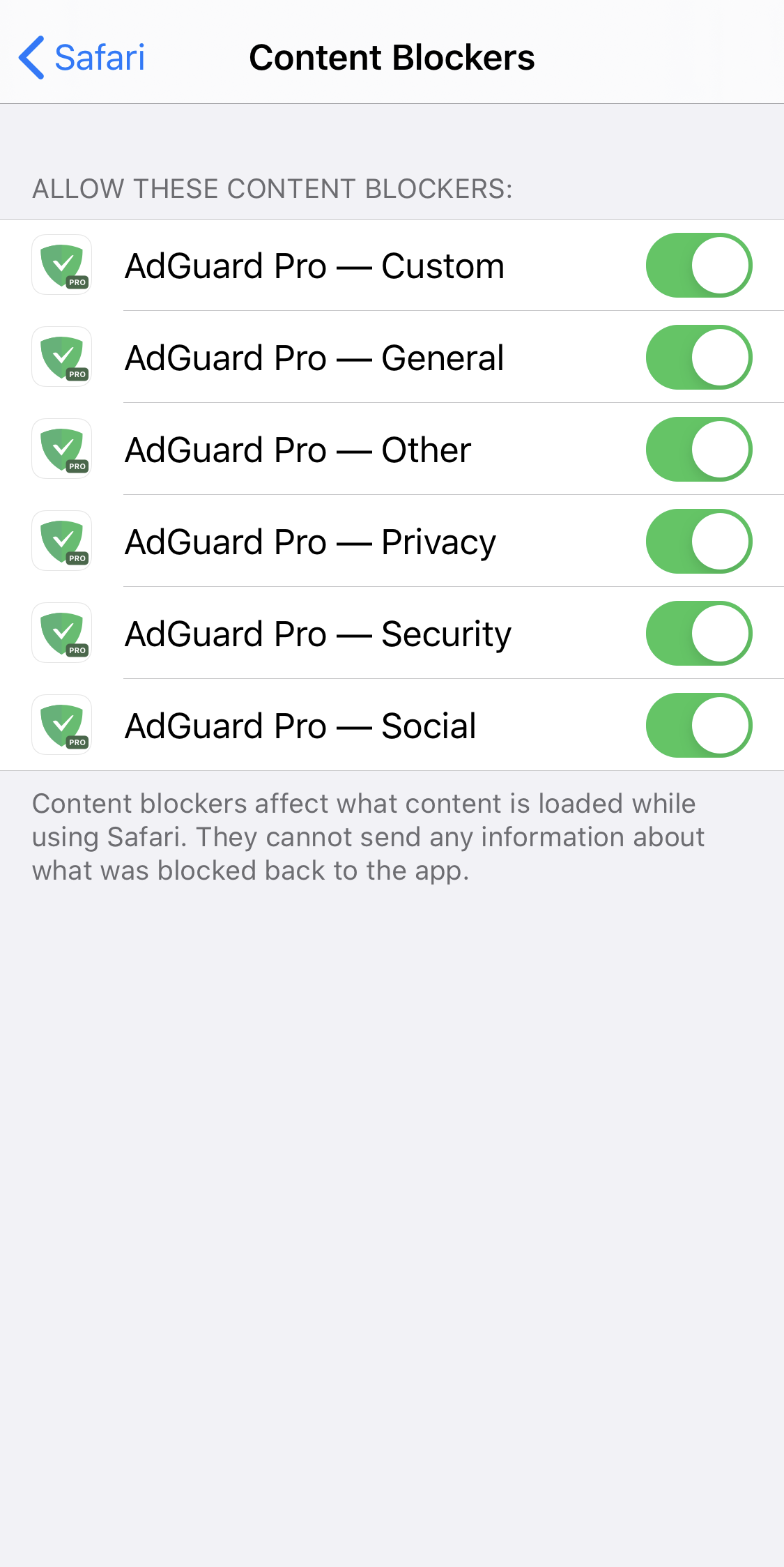
Content blockers — the avengers of Safari ad blocking

  • 'Content blockers' screen

Continuing on this topic, it would be rather annoying to go to Safari settings each time you want to check which content blockers and filters are enabled. We know this from personal experience. The logical solution was to add a new screen right to AdGuard Pro settings, which we did. Go to General settings > Content blockers to see the current state. You’ll even find there which content blockers exactly are enabled and how many rules each of them has used up.
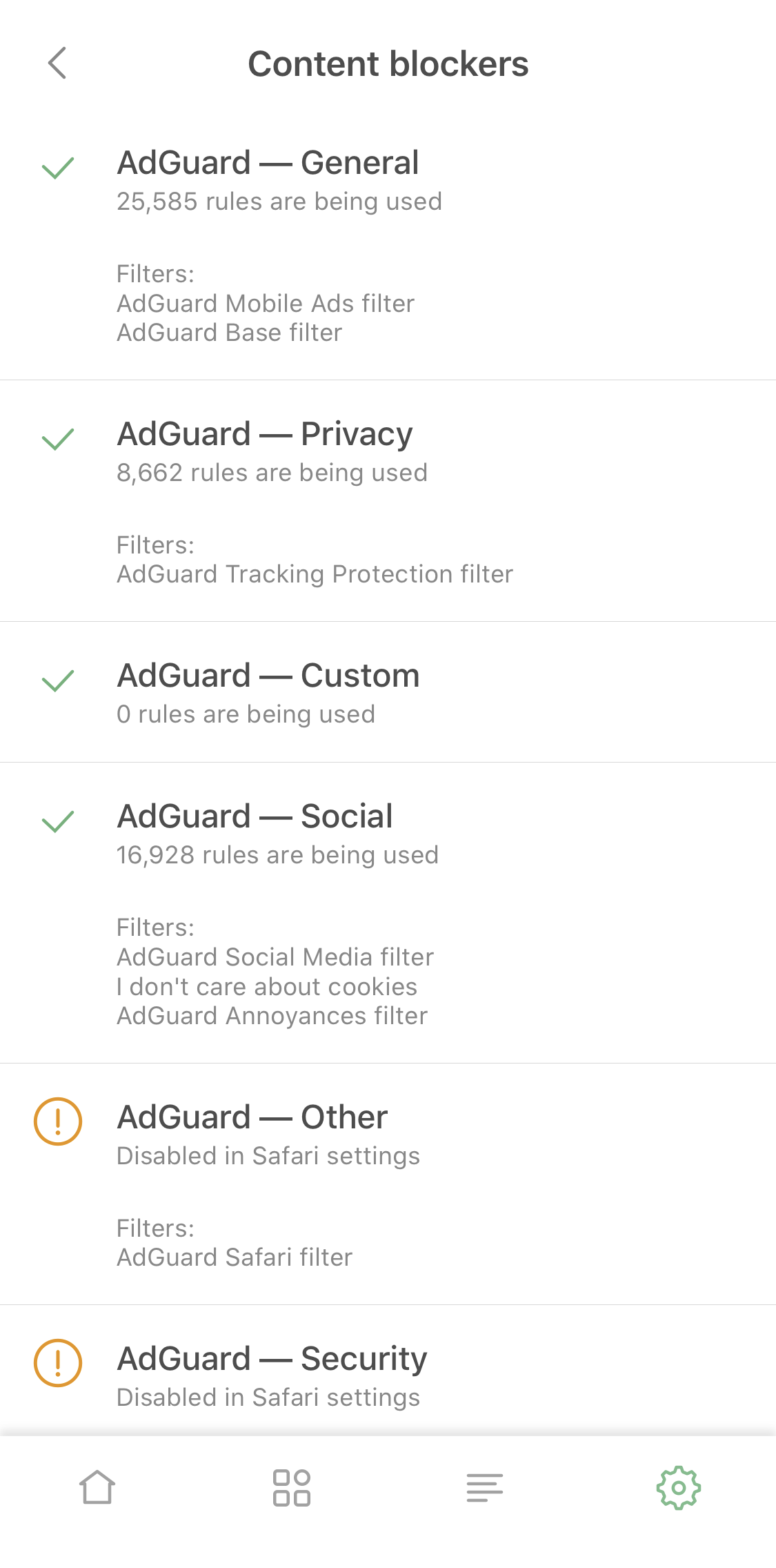
  • Content blocker affinity

Some filtering rules depend on each other or work better together. There’s a problem in cases when such rules belong to different content blockers. Normally they wouldn't always work as intended, even if both content blockers were enabled. But we put in extra work to achieve cross-content blocker compatibility, so the quality of ad blocking went further up.

  • Adding custom filters

This option will be very useful for those who support their own filters, or just have a favorite filter that wasn't included by default. Add it by URL and it will be kept updated just as any other filter!
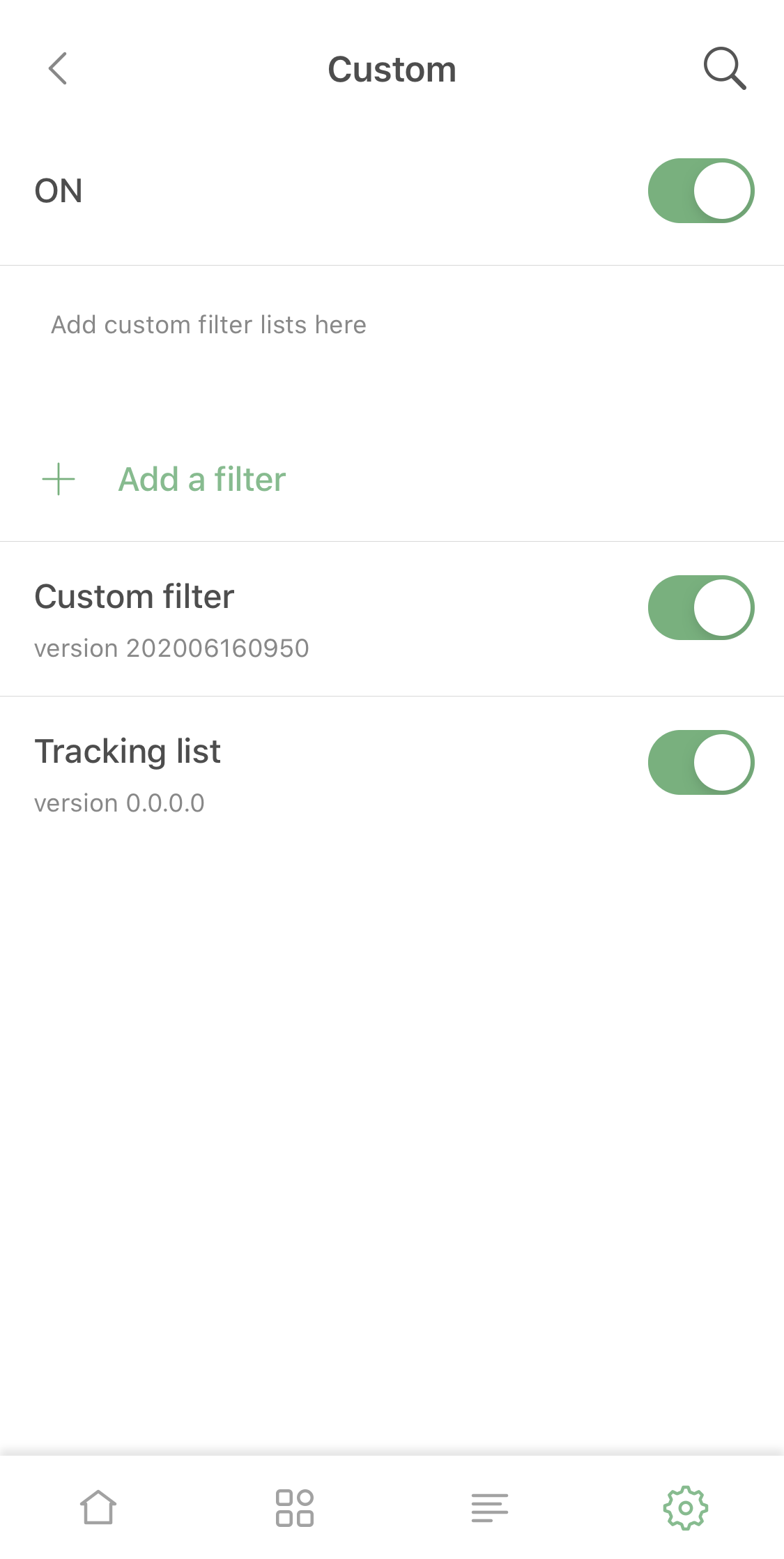
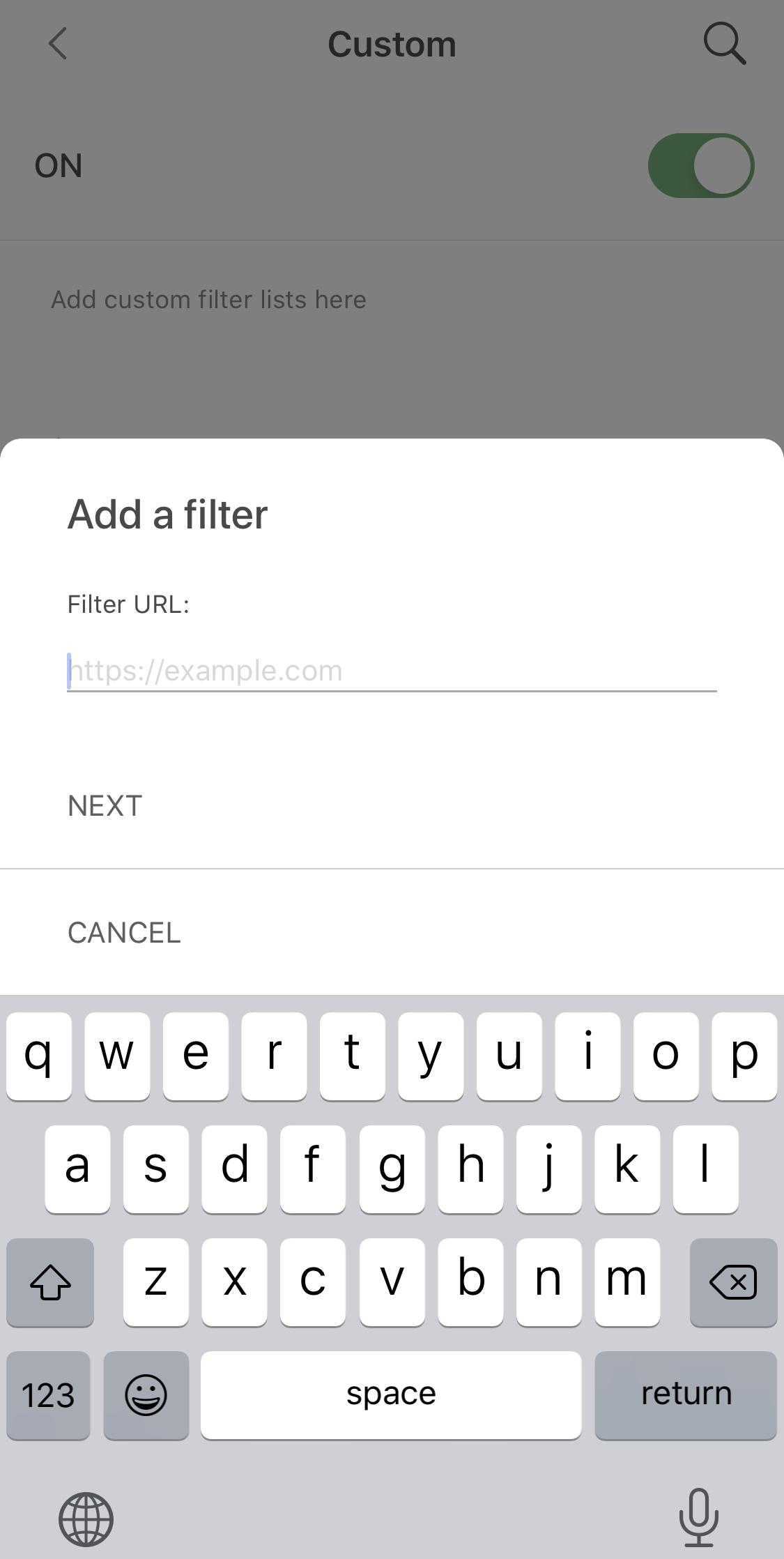
Adding a custom filter

DNS protection

Actually, despite it's been so long, DNS-related functionality in the old AdGuard Pro versions wasn't that much behind. However, we found some ways to improve it (aside from the obvious bugfixing).
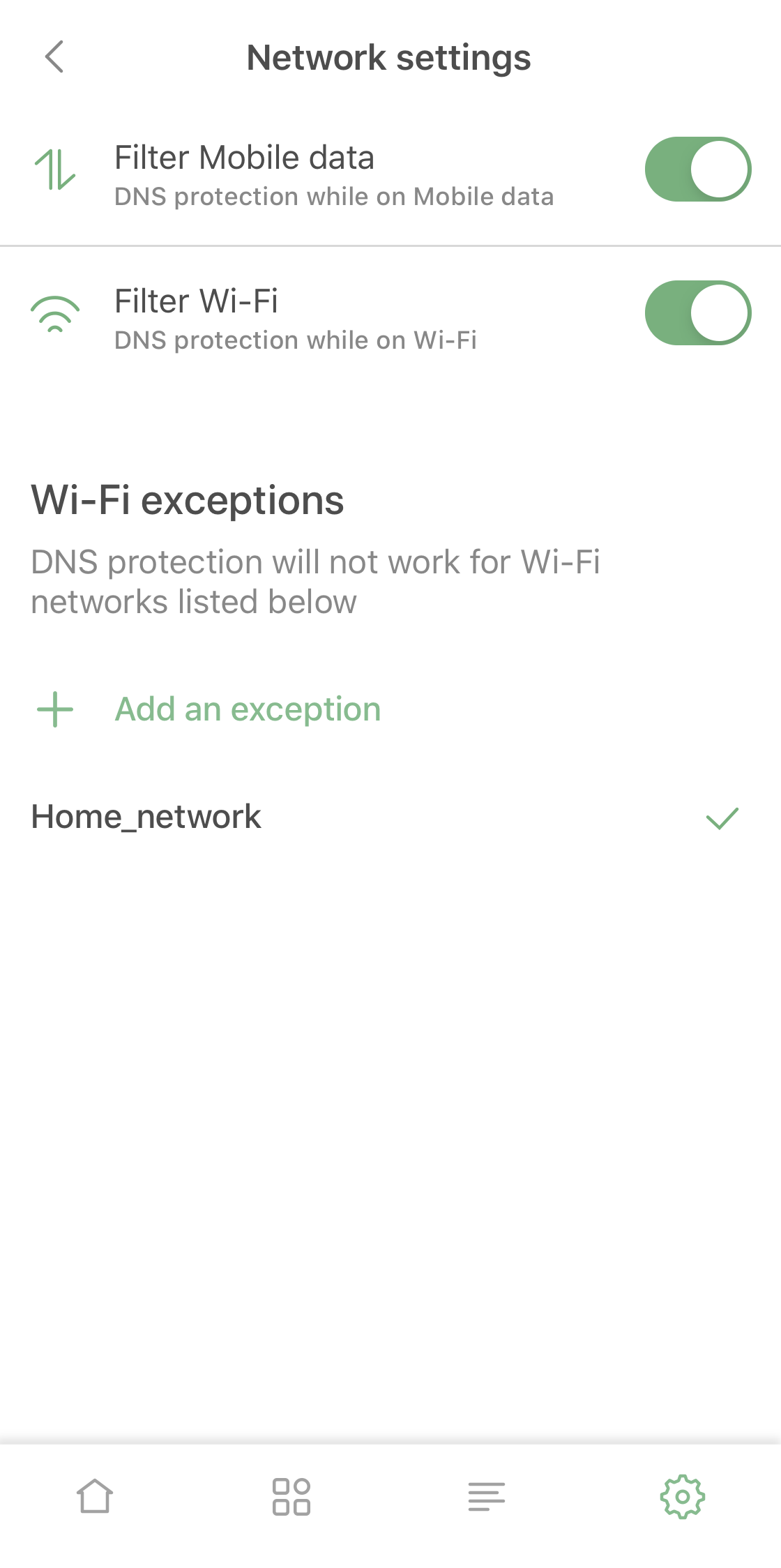
New Network Settings screen

Firstly, we made it so it's possible now to enable and disable DNS protection for Wi-Fi or mobile data separately, a feature that should be useful for many AdGuard Pro users.

Besides that, in addition to familiar DNS functionality you now can add mobile network or certain Wi-Fi networks to exclusions. For example, you can use it if you have AdGuard Home set up for your home Wi-Fi.

There are several lesser changes related to DNS functionality that are too technical or too minor to include here, but together they make the DNS protection suite quite a lot better compared to the previous version.

Pricing policy

Unlike AdGuard for iOS (that's subscription-based), AdGuard Pro has always been a one-time purchase app. Its price has stayed the same (and relatively low) for a long time for apparent reasons.

Now, when AdGuard Pro and AdGuard for iOS wield the same arsenal, it wouldn't be fair to have different prices. In the near future we're going to increase the price of AdGuard Pro to be in line with the lifetime subscription of AdGuard for iOS. You still have time to purchase it for the old price, though!

Summing it up

AdGuard Pro caught up with AdGuard for iOS and the two apps are now functionally equivalent and can completely replace one another. If you already have AdGuard Pro, you don't need the regular AdGuard version, and it works the other way around too.

If you have neither, hurry up and visit the App Store to take advantage of the low price, it won't stay that way for long!


We hope you'll enjoy using AdGuard Pro – it will be a completely new experience compared to v2.1. Traditionally, all the changes and bugfixes are available on GitHub. Share your feedback of using the app with us – right here in the comments, in the App Store or in social media!


این پست را دوست داشتید؟
AdGuard VPN AdGuard DNS AdGuard Mail AdGuard Wallet
صفحه اصلی AdGuard برای Windows
صفحه محافظت AdGuard برای Windows که ویژگی‌ها و تنظيمات محافظت را نشان می‌دهد
صفحه آمار AdGuard برای Windows که آمار تبلیغات و رَدیاب‌های مسدود شده را نشان می‌دهد
صفحه مدیریت برنامه AdGuard برای Windows که گزینه‌های مدیریت محافظت برای برنامک‌های نصب‌شده روی دستگاه را نشان می‌دهد
۲۰٬۴۴۳ 20443 بررسی
بسیار عالی!

AdGuard برای Windows: مسدودکننده تبلیغات برای رایانه شخصی

AdGuard برای ویندوز چیزی فراتر از یک مسدودکننده تبلیغات است. این یک ابزار چندمنظوره است که تبلیغات را مسدود می‌کند، دسترسی به سایت‌های خطرناک را کنترل می‌کند، بارگذاری صفحات را سریع‌تر می‌کند و از کودکان در برابر محتوای نامناسب محافظت می‌کند
با دانلود برنامه شما شرایط توافقنامه مجوز را قبول می کنید
Microsoft Store
با دانلود برنامه شما شرایط توافقنامه مجوز را قبول می کنید
AdGuard برای Windows v8.0، دوره آزمایشی 14روزه
صفحه اصلی AdGuard برای Mac
صفحه حالت نهان AdGuard برای Mac
۲۰٬۴۴۳ 20443 بررسی
بسیار عالی!

AdGuard برای مک: مسدودکنندهٔ تبلیغات در سطح سیستم

AdGuard برای Mac یک مسدودکنندهٔ تبلیغات منحصربه‌فرد است که با در نظر گرفتن macOS طراحی شده است. علاوه بر محافظت از شما در برابر تبلیغات آزاردهنده در مرورگرها و برنامه‌ها، شما را در برابر ردیابی، فیشینگ و کلاهبرداری نیز محافظت می‌کند
با دانلود برنامه شما شرایط توافقنامه مجوز را قبول می کنید
بیشتر بخوانید
AdGuard برای Mac v2.19، دوره آزمایشی 14روزه
صفحه اصلی AdGuard برای Android
صفحه حفاظت در برابر ردیابی AdGuard برای Android
صفحه مدیریت برنامه AdGuard برای Android که گزینه‌های مدیریت محافظت برای برنامک‌های نصب‌شده روی دستگاه را نشان می‌دهد
صفحه آمار AdGuard برای Android که آمار تبلیغات و رَدیاب‌های مسدود شده را نشان می‌دهد
صفحه اصلی مرورگر خصوصی AdGuard برای Android
کد QR برای بارگیری AdGuard برای Android
۲۰٬۴۴۳ 20443 بررسی
بسیار عالی!

ادگارد برای اندروید: مسدودکنندهٔ تبلیغات برای همهٔ برنامه‌ها

تبلیغات و ردیاب‌ها را در همه مرورگرها، بازی‌ها و سایر برنامه‌ها مسدود می‌کند. از حریم خصوصی شما محافظت می‌کند و به شما امکان می‌دهد کنترل کنید برنامه‌هایتان چگونه از اینترنت استفاده می‌کنند. از طریق APK نصب می‌شود
با دانلود برنامه شما شرایط توافقنامه مجوز را قبول می کنید
بیشتر بخوانید
اسکن برای دانلود
استفاده از هر کد خوان QR موجود در دستگاه شما
AdGuard برای اندروید v4.14، دوره آزمایشی 14روزه
صفحه اصلی AdGuard برای iOS
صفحه محافظت AdGuard برای iOS که ویژگی‌ها و تنظيمات محافظت را نشان می‌دهد
صفحه آمار AdGuard برای iOS که آمار تبلیغات و رَدیاب‌های مسدود شده را نشان می‌دهد
کد QR برای بارگیری AdGuard برای iOS
۲۰٬۴۴۳ 20443 بررسی
بسیار عالی!

AdGuard برای iOS: مسدودکنندهٔ تبلیغات فراتر از Safari

بهترین مسدودکننده تبلیغات iOS برای iPhone و iPad. AdGuard همه انواع تبلیغات و ردیاب‌ها را در Safari حذف می‌کند و از حریم خصوصی شما در همه برنامه‌ها در سطح DNS محافظت می‌کند
با دانلود برنامه شما شرایط توافقنامه مجوز را قبول می کنید
بیشتر بخوانید
اسکن برای دانلود
استفاده از هر کد خوان QR موجود در دستگاه شما
AdGuard برای iOS نسخه 4.5
صفحه اصلی AdGuard Content Blocker
صفحه فیلترها در AdGuard Content Blocker
صفحه تنظيمات در AdGuard Content Blocker
۲۰٬۴۴۳ 20443 بررسی
بسیار عالی!

مسدودساز محتوای AdGuard

AdGuard Content Blocker انواع تبلیغات را در مرورگرهای تلفن همراه که از فناوری مسدود کردن محتوا پشتیبانی می کنند حذف می کند - یعنی اینترنت سامسونگ و مرورگر Yandex. ویژگی های آن در مقایسه با AdGuard برای اندروید محدود است، اما رایگان، نصب آسان و کارآمد است
با دانلود برنامه شما شرایط توافقنامه مجوز را قبول می کنید
بیشتر بخوانید
مسدودساز محتوای AdGuard نسخه 2.8
صفحه اصلی افزونه مرورگر AdGuard
صفحه حفاظت در برابر ردیابی افزونه مرورگر AdGuard
۲۰٬۴۴۳ 20443 بررسی
بسیار عالی!

افزونه مرورگر AdGuard

AdGuard سریع ترین و سبک ترین افزونه ای است که انواع تبلیغات را در صفحات وب مسدود می کند! AdGuard را برای مرورگری که میخواهید انتخاب کنید و وب گردی امن و سریع را تجربه کنید.
نصب
با دانلود برنامه شما شرایط توافقنامه مجوز را قبول می کنید
نصب
با دانلود برنامه شما شرایط توافقنامه مجوز را قبول می کنید
نصب
با دانلود برنامه شما شرایط توافقنامه مجوز را قبول می کنید
نصب
با دانلود برنامه شما شرایط توافقنامه مجوز را قبول می کنید
نصب
با دانلود برنامه شما شرایط توافقنامه مجوز را قبول می کنید
بیشتر بخوانید
نصب
با دانلود برنامه شما شرایط توافقنامه مجوز را قبول می کنید
بیشتر بخوانید
افزونه مرورگر AdGuard نسخه 5.5
صفحه اصلی AdGuard Assistant
۲۰٬۴۴۳ 20443 بررسی
بسیار عالی!

AdGuard دستیار

افزونه مرورگر همراه برای برنامه های دسکتاپ AdGuard. این امکان را به شما می دهد که آیتم های سفارشی را در وب سایت ها مسدود کنید، وب سایت ها را به لیست مجاز اضافه کنید و گزارش ها را مستقیما از مرورگر خود ارسال کنید
AdGuard دستیار نسخه 1.4
۲۰٬۴۴۳ 20443 بررسی
بسیار عالی!

AdGuard Home

AdGuard Home یک راه حل مبتنی بر شبکه برای مسدود کردن تبلیغات و ردیاب ها است. آن را یک بار روی روتر خود نصب کنید تا همه دستگاه های موجود در شبکه خانگی خود را پوشش دهید - بدون نیاز به نرم افزار مشتری اضافی. این امر به ویژه برای دستگاه های مختلف اینترنت اشیا که اغلب حریم خصوصی شما را تهدید می کنند بسیار مهم است
AdGuard Home نسخه 0.107
صفحه اصلی AdGuard Pro برای iOS
صفحه محافظت AdGuard Pro برای iOS که قابلیت‌ها و تنظيمات محافظت را نشان می‌دهد
صفحه آمار AdGuard Pro برای iOS که آمار تبلیغات و رَدیاب‌های مسدود شده را نشان می‌دهد
۲۰٬۴۴۳ 20443 بررسی
بسیار عالی!

AdGuard Pro برای iOS

AdGuard Pro برای iOS با تمام ویژگی‌های پیشرفته محافظت در برابر مسدود کردن تبلیغات ارائه می‌شود. این نسخه همان ابزارهای نسخه پولی AdGuard برای iOS را ارائه می‌دهد. این نسخه در مسدود کردن تبلیغات در سافاری عالی عمل می‌کند و به شما امکان می‌دهد تنظیمات DNS را برای محافظت متناسب با نیاز خود سفارشی کنید. این نسخه تبلیغات را در مرورگرها و برنامه‌ها مسدود می‌کند، از فرزندان شما در برابر محتوای نامناسب محافظت می‌کند و اطلاعات شخصی شما را ایمن نگه می‌دارد.
با دانلود برنامه شما شرایط توافقنامه مجوز را قبول می کنید
بیشتر بخوانید
AdGuard Pro برای iOS نسخه 4.5
صفحه اصلی AdGuard Mini برای Mac
صفحه محافظت Safari در AdGuard Mini برای Mac
صفحه ایجاد رویه در AdGuard Mini برای Mac
۲۰٬۴۴۳ 20443 بررسی
بسیار عالی!

AdGuard Mini برای Mac — مسدود کننده تبلیغات Safari

AdGuard Mini برای Mac یک مسدودکنندهٔ قدرتمند تبلیغات برای Safari است. این برنامک سبک، تبلیغات را حذف می‌کند، ردیاب‌ها را مسدود می‌کند و بارگذاری صفحه را سریع‌تر می‌کند. این ابزار به شما کمک می‌کند تا بدون حواس‌پرتی در Safari گشت‌و‌گذار کنید و داده‌های خود را خصوصی نگه دارید
نصب
با دانلود برنامه شما شرایط توافقنامه مجوز را قبول می کنید
بیشتر بخوانید
AdGuard Mini برای Mac نسخه 2.3
صفحه اصلی AdGuard برای Android TV با محافظت فعال شده
صفحه مسدودسازی تبلیغات AdGuard برای Android TV که ویژگی‌ها و تنظيمات آن را نشان می‌دهد
صفحه تنظيمات AdGuard برای Android TV
صفحه مدیریت برنامه AdGuard برای Android TV که برنامک‌هایی را نشان می‌دهد که در آن‌ها تبلیغات و رَدیاب‌ها مسدود شده‌اند
۲۰٬۴۴۳ 20443 بررسی
بسیار عالی!

AdGuard برای Android TV

AdGuard برای Android TV تنها برنامه‌ای است که تبلیغات را مسدود می‌کند، از حریم خصوصی شما محافظت کرده و همانند یک دیوار آتش برای تلویزیون هوشمند شما عمل می‌کند. در مورد تهدیدات وب هشدار دریافت کنید، از DNS ایمن استفاده کرده و از انتقال داده اینترنتی رمزگذاری شده بهره‌مند شوید. آرامش داشته باشید و غرق نمایش‌های مورد علاقه خود با امنیت عالی و تبلیغات صفر شوید!
AdGuard برای Android TV v4.14، دوره آزمایشی 14روزه
نماد AdGuard، Agnar، در حالی که پنگوئن Linux را در دست دارد
۲۰٬۴۴۳ 20443 بررسی
بسیار عالی!

AdGuard برای لینوکس

AdGuard برای لینوکس اولین مسدود کننده تبلیغات لینوکس در سراسر جهان است. تبلیغات و ردیاب‌ها را در سطح دستگاه مسدود کنید، از بین فیلترهای از پیش نصب شده انتخاب کنید یا فیلترهای خود را اضافه کنید - همه از طریق رابط خط فرمان
AdGuard برای لینوکس نسخه 1.4
۲۰٬۴۴۳ 20443 بررسی
بسیار عالی!

AdGuard Temp Mail

یک تولید‌کننده رایانشانی موقت رایگان که شما را ناشناس نگه می‌دارد و از حریم خصوصی شما محافظت می‌کند. هرزنامه‌ای در صندوق ورودی اصلی شما در کار نخواهد بود!
۲۰٬۴۴۳ 20443 بررسی
بسیار عالی!

AdGuard VPN

75 محل در سرتاسر جهان

دسترسی به هر محتوا

رمزگذاری قوی

سیاست عدم ذخیره وقایع

سریعترین اتصال

24/7 پشتیبانی

ارزیابی رایگان
با دانلود برنامه شما شرایط توافقنامه مجوز را قبول می کنید
بیشتر بخوانید
۲۰٬۴۴۳ 20443 بررسی
بسیار عالی!

AdGuard DNS

AdGuard DNS راه حلی جایگزین برای مسدودسازی تبلیغات، حفاظت حریم خصوصی و نظارت والدین است. راه اندازی آسان و استفاده رایگان، آن حداقل حفاظت لازم در برابر تبلیغات آنلاین،ردیاب ها و فیشینگ ها را میدهد،و در همه سیستم عامل ها و دستگاه ها کار می کند.
۲۰٬۴۴۳ 20443 بررسی
بسیار عالی!

AdGuard Mail

از هویت خود محافظت کنید، از هرزنامه دوری نمایید و صندوق ورودی خود را با نام‌های مستعار و رایانشانی‌های موقت ما امن نگه دارید. از خدمت رایگان فوروارد رایانامه و برنامک‌های ما برای همه سامانه‌عامل‌ها لذت ببرید
۲۰٬۴۴۳ 20443 بررسی
بسیار عالی!

AdGuard Wallet

یک کیف پول ارز دیجیتال امن و خصوصی که به شما امکان کنترل کامل بر دارایی‌هایتان را می‌دهد. چندین کیف پول را مدیریت کنید و هزاران ارز دیجیتال را برای ذخیره، ارسال و مبادله کشف کنید.
در حال بارگیری AdGuard برای نصب AdGuard، روی پرونده نشان داده شده توسط پیکان کلیک کنید گزینه "بازکردن " را انتخاب و روی "تایید" کلیک کنید — برای دانلود فایل منتظر بمانید. در پنجره باز شده، آیکون AdGuard را به پوشه "برنامه ها" بکشید.بابت انتخاب AdGuard متشکریم! گزینه "بازکردن " را انتخاب و روی "تایید" کلیک کنید — برای دانلود فایل منتظر بمانید. در پنجره باز شده روی "نصب" کلیک کنید.بابت انتخاب AdGuard متشکریم!
AdGuard را روی دستگاه تلفن همراه خود نصب کنید

















































