Webloc and ad-based surveillance: How everyday app data fuels a global intelligence effort
We all have dozens of apps installed on our phones: weather, dating, games, calendars, task trackers, planners… the list goes on. It’s great to have everything you need at your fingertips. But that convenience is a double-edged sword.
Most apps aren’t built from scratch. Instead, developers include third-party software development kits (SDKs) that add functionality like tracking and ads to help them make money. These SDKs are usually provided by ad tech and analytics companies, and they can quietly collect data from your device — things like location, device details, and app activity. This data doesn’t just stay with the app developer. It’s sent back to the SDK provider and may then be passed along to data brokers who can enrich it and resell it further down the chain. And even when apps don’t use those third-party SDKs but still show ads, they take part in real-time bidding (RTB) auctions. Every time an ad loads, your data is broadcast to dozens or even hundreds of companies, who can collect it, store, and reuse — even if they don't end up showing you an ad after all.
This way ads become a kind of hidden Trojan horse for your data. Not just for advertisers, but for governments and surveillance vendors. That’s what turns this system from a nuisance into a real privacy and security threat.
Researchers from Citizen Lab put together a report showing how this system works around the globe, stretching its tentacles into at least 20 countries and enabling tracking based on data from up to 500 million mobile devices. The report is based on a mix of leaked internal documents, public procurement records, technical analysis of server infrastructure. It focuses on the Webloc system, a location-tracking system that collects data from millions of mobile phones through commercial data brokers, and sells them to intelligence actors.
In this post, we’ll break down the most important findings from that report — and show you how to protect yourself.
What is Webloc: scope and scale of the surveillance ecosystem
Webloc was originally developed by Cobwebs Technologies — a company founded in 2015 by former members of Israeli intelligence and special forces. In 2023, the company was acquired by the US investment firm Spire Capital and merged into Penlink, a long-time provider of surveillance tools for law enforcement. The people who were once behind Cobwebs have since taken on key roles within Penlink’s operations. Cobwebs Technologies also has links to Quadream, a spyware developer whose tools have reportedly been weaponized to target civil society members, journalists, and political opposition figures. Cobwebs’ founder, Omri Timianker, has been connected to both organizations. Given these associations, it’s perhaps no surprise that Penlink’s broader work continues to be rooted in controversial data collection and surveillance practices.
In simple terms, Webloc works by tapping into the ad-tech ecosystem — taking behavioral data originally collected to serve advertisements and repurposing it for tracking people’s movements and building detailed behavioral profiles.
According to the documents analyzed in the report, Webloc can track data from up to 500 million mobile devices globally. It processes billions of location signals every day, updating location data every few hours. In some cases, it also keeps historical location records going back up to around three years.
One example from the report shows just how detailed this can get. A person based in Abu Dhabi had 141 apps on their phone, and in just five days the system logged 81 different GPS locations, plus additional hits from nearby Wi-Fi networks. Put together, this turns raw location pings into a continuous behavioral map — where scattered signals are stitched into patterns that reveal routines, habits, and long-term movement behavior over time.
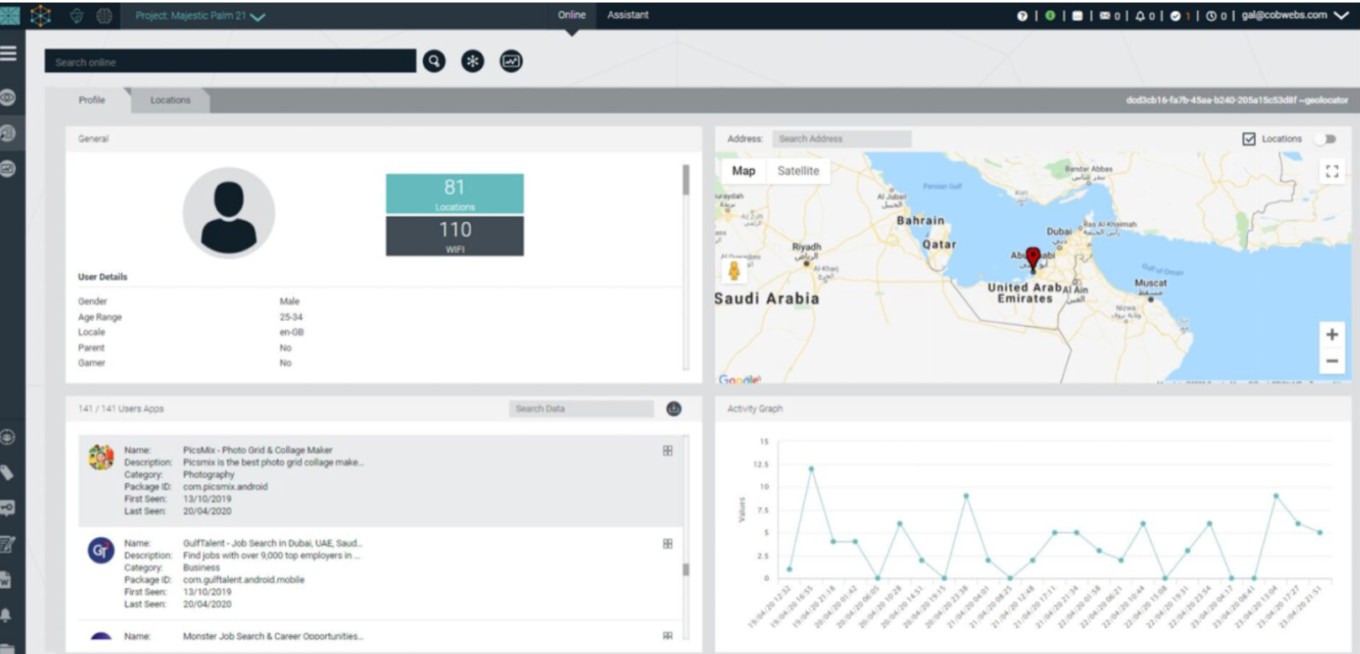
The report points out that Webloc is just one piece of a larger toolkit. First introduced in 2020, it is now sold as an add-on to Tangles — an “open-source intelligence” platform that scrapes and analyzes data from social media, the web, and parts of the dark web. Together, these tools form a powerful surveillance stack. But Webloc is arguably the most invasive part — because it doesn’t rely on what you post publicly. It relies on data quietly harvested from your apps.
Geographically, the system has been in use by governments around the world. Confirmed customers include:
- United States: federal agencies, local police, and military units
- Hungary: domestic intelligence agencies
- El Salvador: national police
Beyond that, there are signs of customers or potential customers in other regions too, including the Netherlands, Germany, Italy, France, Sweden, the United Kingdom, Singapore, Vietnam, Mexico, and the United Arab Emirates.
Even that is likely just the tip of the iceberg. Server infrastructure linked to these tools shows up in dozens more. Besides, in many cases law enforcement agencies simply refused to answer questions about whether they use it. So the real scale of the system’s deployment might be even bigger.
Under the Webloc’s hood: how it collects the data
As we’ve already mentioned, Webloc is built on top of the same data flows that power mobile advertising. And the two main channels that fuel this industry are data collected through advertising SDKs and real-time bidding (RTB) systems.
Researchers from Citizen Lab concluded that Webloc likely relies more on SDK-based data, than RTB advertising data, or a combination of both. Penlink, for its part, told the researchers that it “obtains its location data from providers who obtain user consent for location data sharing through SDKs and who filter out sensitive locations from their datasets, consistent with FTC mandates.” In other words, they claim the data comes from apps where users have agreed to share location through built-in SDKs, with certain protections applied to sensitive places. It’s worth noting that even if we take Penlink’s claims at face value, these kinds of safeguards are hard to verify in practice. Consent is often buried in long, opaque app privacy policies, or not clearly explained at all, and users usually have no real visibility into how many different apps are actually feeding data into these systems.
That said, the researchers point out that Webloc was likely drawing from SDK-based data sources, at least in materials they reviewed. One of the key reasons is technical: Webloc’s interface shows Wi-Fi access point data, including network names. While SDKs embedded in apps can access Wi-Fi-level information directly from devices, RTB advertising bidstream data cannot.
Types of data collected: more than just ‘location points’
Researchers reviewing El Salvador, Vietnam, and US Navy documents from 2021 describe Webloc as working with a wide mix of mobile and ad-tech data. At the core are mobile advertising IDs (MAIDs) and IP addresses, which act as persistent identifiers tied to devices. On top of that, the system collects GPS coordinates and Wi-Fi-based location signals, including Wi-Fi network names (SSIDs) and connection details. Every record is time-stamped, which means movement isn’t just captured as single points, but as something that can be followed over time.
This means that whoever uses the system can figure out things like your likely home and work locations, places you visit often, and repeated movement patterns. It also includes device details such as phone model, operating system, language settings, and device type. App-related signals appear too, like which apps are installed and when they show up on a device.
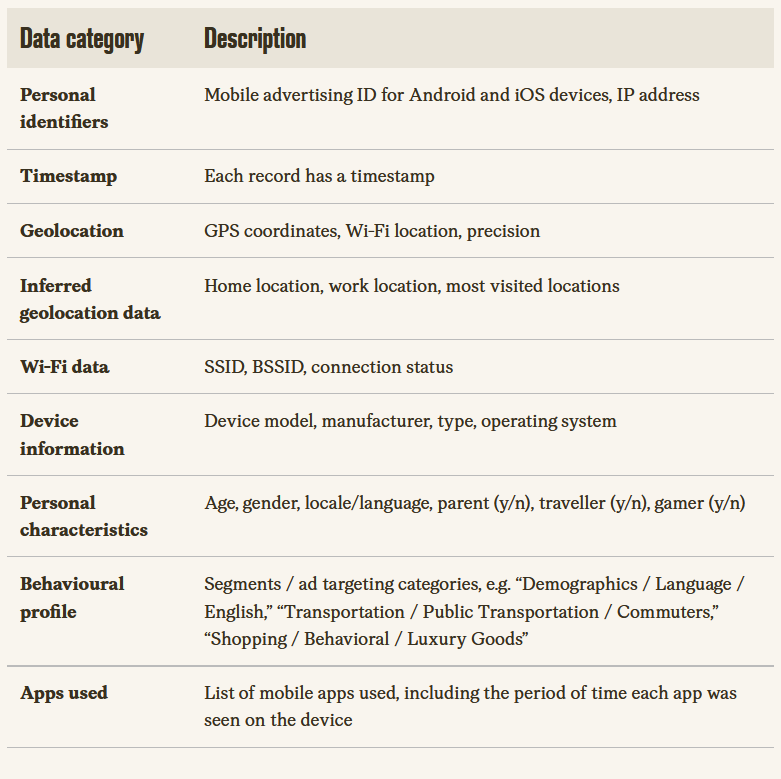
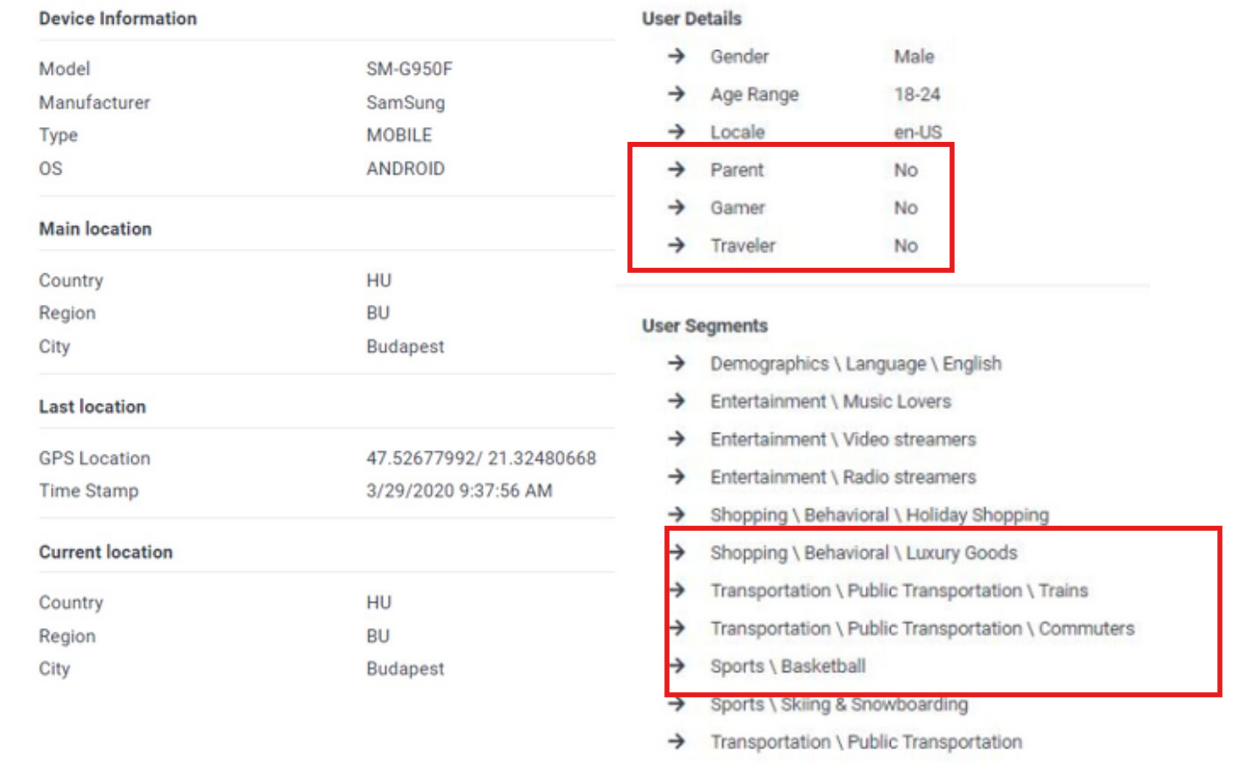
On top of this, ad-tech systems can sometimes add guessed attributes like age range, gender, and behavioral categories (for example that a person is into ‘luxury shopping’). These are not taken directly from the device, but inferred through advertising models and then linked back to device IDs.
Penlink disputes this broader interpretation. In its response to Citizen Lab, the company says Webloc only contains location data tied to device identifiers and claims it does not include things like age, gender, parental status, interest categories, or browsing history. But in the materials seen by the researchers, persons in the dataset are given labels such as “parent”, “gamer”, “traveler,” and their interests give a pretty clear picture of a person. Even if you only look at location data, calling it “just location” is misleading. Over time, location history alone can reveal where someone lives, where they work, their daily routines, travel habits, and general lifestyle patterns, especially when tied to a persistent device ID.
One Penlink-branded document cited in the report describes Webloc as producing “demographic insights” and enabling “detailed identity and lifestyle pattern resolution” which sounds more like the truth, as it suggests that the tool is built precisely to interpret behavior, not just log movement. The researchers also note that Penlink itself says in its privacy policy that it may receive data from “data brokers” and other commercially available sources, including name, email, phone number, and “historical information about the precise geolocation of your device,” and that it may disclose this information to its customers.
‘Mission creep’ or when temptation to surveil is too big
Some would argue that tools like Webloc exist for a good reason. In theory, they are meant to help law enforcement with combating serious crimes like trafficking, terrorism, and assisting in finding missing persons. In a perfect world, that might even sound reasonable: a tightly limited system used only when there is clear necessity and strong oversight.
But that’s not how these tools tend to be used in practice. Once a system like this exists, the temptation to use it beyond its original purpose is hard to resist. And this is where things start to go south.
The researchers refer to the phenomenon as a mission creep — a slow shift where powerful surveillance tools become investigative shortcuts for petty crimes. One example from the report illustrates this clearly: in Tucson, Texas, police described Tangles and Webloc as tools purchased for sex trafficking investigations. But in practice, it was used to look into minor crimes, even theft of relatively small items, like “thousands of dollars of cigarettes.” What’s important here is that these systems don’t just affect suspects. They also pull in people who were never part of the crime in the first place. Anyone whose device happened to be in the wrong place at the wrong time can end up in the dataset, cross-checked, linked, or mapped into an unrelated investigation. Even if this data is never actively used, it often remains stored somewhere, effectively lingering in the background. That alone increases the risk of misuse, unauthorized access, or data breaches.
Even more worrying is the report that Cobwebs Technologies provided its location-tracking capabilities and Tangles platform to a private intelligence initiative like Skull Games — a loosely organized network of volunteers who meet in “hackathon”-style events to identify suspected traffickers and sex workers using open-source intelligence. Although access to Cobwebs’ most powerful tools during a 2023 event appears to have been restricted to a company representative running queries on behalf of participants, the partnership still exposed people with no formal authority to highly sensitive surveillance capabilities, blurring the line between the use of such tools for legitimate investigation and vigilantism.
Bottom line, it’s almost inevitable that even if a system is introduced with a narrow justification, it will become a general-purpose surveillance tool, leading to the creation of a society where surveillance is easy, constant, and increasingly normalized.
Why privacy laws struggle to stop it and what you can actually do
What makes systems like Webloc hard to pin down is that they don’t technically operate outside the law. Instead, they operate inside it, or rather at the edges of it — in a gray zone. We’ve already seen how the data flows behind mobile ads and tracking SDKs are not really a secret, and we’ve covered the mechanics of it before in more detail here.
On paper, regulations like GDPR in Europe and in the US are supposed to protect users. GDPR requires clear, informed consent and says data should only be used for the purpose it was collected for. In the US, the FTC has already clarified that advertising identifiers are not truly anonymous and can be tied back to real people — names, phone numbers, addresses. That’s also part of what led to enforcement actions like the recent first-of-its-kind ban on a data broker for selling sensitive location data.
But in practice, the system is messy. Data is collected through apps, passed through SDKs, enriched, resold, and eventually ends up in places like surveillance platforms. Even when each step is “technically compliant,” the end result is still the same: large-scale behavioral data about people who never really understood they were part of this chain.
The uncomfortable but undeniable fact is that this surveillance system is built on the normal plumbing of the internet. The ad-delivery ecosystem on which most apps rely on to stay free becomes the same channel that feeds data into these larger surveillance systems.
That’s why ad blocking tools come into the equation from a different side than before. Not because ads are the problem in themselves, but because they are one of the main pipes through which your data leaks out. Tools like AdGuard can help reduce exposure by blocking tracking requests, and cutting down RTB-style data flows at the browser and network level. On mobile it’s more restricted due to operating system limits, but partial protection is still possible, especially with DNS filtering and system-wide blocking features.
That said, no tool fully solves it on its own. The broader strategy also comes down to a few other habits:
- Be mindful of what apps you install, especially obscure utility apps
- Check their reputation before installing if something feels off
- Give the minimum permissions needed (especially location, contacts, background activity)
- The fewer apps you use, the less data you leak
- The fewer permissions you grant, the less can be collected and shared
What all of this shows is that the infrastructure behind ad-based tracking is no longer just about ads. And blocking them isn’t only about getting rid of visual clutter — it’s also about reducing your digital footprint and lowering exposure to surveillance risks. That said, none of these measures eliminate the threat entirely. A real fix would require broader changes across the whole ecosystem, from how data is collected and shared in the ad industry, to how it’s regulated and enforced at national and international level.




















































