Apple’s ad business set to boom on the back of its own anti-tracking crackdown
Apple has always styled itself as a paragon of privacy whose profits are not ad-driven. “You are not our product. You are our customer. You are a jewel, and we care about the user experience,” Apple CEO Tim Cook famously said in 2018.
And unlike most of its high-profile competitors, Apple seemed to be walking the talk. While Apple’s ad revenue is expected to reach $5bn this year, it pales in comparison to the ad money Google and Facebook are making. Google earned a staggering $209bn from ads alone last year and Meta crossed the $100bn threshold for the first time, raking in $115bn.
Those figures could be even higher had Apple not launched a sweeping crackdown on tracking last year. Its new privacy feature, known as App Tracking Transparency (“ATT”), required apps to seek users’ permission to track them across other applications and websites, thus making it easier than ever for users to opt out of tracking and personalized advertising — which they overwhelmingly did. Only about 25% of iOS users worldwide now explicitly let apps to track them.
The disruptor
Apple’s push against third-party tracking wreaked havoc on the global ad market, prompting outcry from advertisers and, most notably, from Facebook. And Meta has all the reasons to see red. Apple dealt a blow to the ability of third-party platforms to pull personal data from apps. That data is crucial to targeted advertising which Facebook relies on as its prime source of revenue. Highly personalized ads pay off way more than ads based on a random or less precise set of data, so Facebook is losing money — Apple’s anti-tracking feature is projected to cost Meta $12.8 billion this year.
Facebook will take the greatest hit, but other big tech won’t be spared either: Google-owned YouTube is set to lose $2.2 billion, Snap — $546 million, and Twitter — $323. Small businesses have also become collateral damage in Apple’s anti-tracking quest, asthe cost of acquiring new customers has risen.
It’s time to ask: Cui prodest? Who benefits from Apple’s anti-tracking crusade? Apple will tell you that it’s you, the user, who is benefiting from less tracking and more privacy. It may not be a lie, (unless the anti-tracking restrictions can be sidestepped by the big tech, which increasingly looks like the case). However, it looks like it's Apple itself that will likely benefit the most.
New ad empire in the making?
A new report on the impact of Apple’s privacy policy found that mobile app advertisers are warming up to Apple. A survey by performance marketing firm Appsumer suggested that the anti-tracking feature boosted the adoption of Apple Search Ads, providing Cupertino a springboard for challenging Google and Facebook’s advertising duopoly.
The adoption of Apple Search Ads by advertisers grew 4% to 94.8% year-over-year, while that of Facebook’s decreased 3% to 82.8% and Google’s went down from 96.5% to 94.8%. Perhaps, unsurprisingly, advertisers have begun spending more money on Apple, with its share-of-wallet (SOW) increasing by 5% to 15%. In contrast, Facebook’s share dropped 4% to 28%, while Google’s stayed the same (from 35% to 34%).
Apple seems to be discovering a new source of revenue it used to proudly shun. And if anyone knows a thing or two about how ads work, it is Apple. For years, Apple has been running ads for hundreds of third-party apps across social media and other platforms so that users would download apps from its store and not from developers’ websites. This way Apple earned a hefty commission from in-app purchases.
Despite carving out quite a big chunk of the ad market for itself already, Apple still has a lot to do to catch up with the frontrunners. And it is not sitting idle.
Apple announced this summer that it will add two more advertising slots to the App Store. Developers will be able to buy ad space on the central “Today” page as well as on individual app pages. Currently, Apple presents ads in the “Suggested” panel on the App Store’s Search page and at the top of the search results relevant to a particular query. Say, if you search “sprint training” in the App Store, Apple will display you an ad for a running app. In September, Apple hinted that new ad placements might be unveiled just in time for the holidays, a traditionally busy and lucrative time for advertisers.
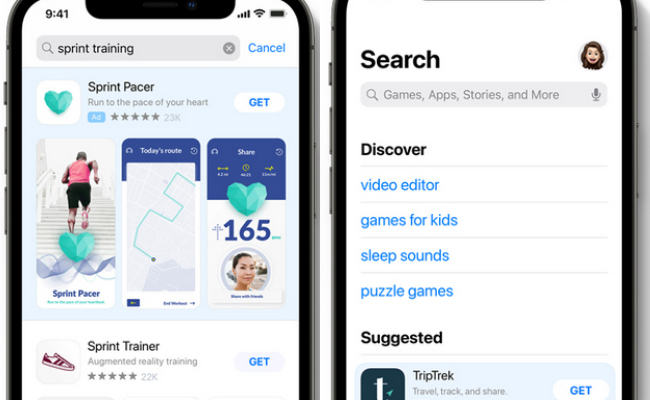
One thing that lets Apple claim moral high ground over competitors is that it only allows ads in the App Store from approved product pages, who are promoting their own apps and not a shaving cream or whatnot.
Rules for thee but not for me
Things get trickier when it comes to the ads Apple shows in its native News and Stocks apps. These ads include traditional display ads, ranging from jewelry to mortgage brokers.
In order to know which ads to show which users, Apple collects their account data, information about in-store purchases, search queries, news stories they read, as well as the information about their device and location. Apple used to harvest all this data by default, but starting with iOS 15 the company began displaying a pop-up message, asking users’ consent to turn personalized ads in Apple apps on.
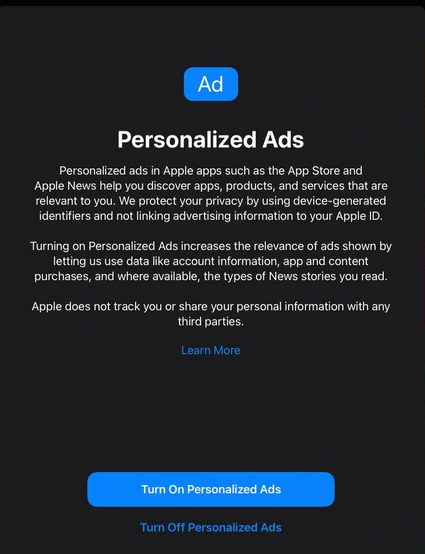
This bona fide move reportedly had very little effect on Apple’s advertising business. According to MacRumours, Apple has recently told advertisers that conversion rate for iOS 15 users with and without Personalized Ads enabled is about the same.
While Apple effectively tracks users on its own platform, the pre-installed apps are exempted from displaying a message asking permission to track users.
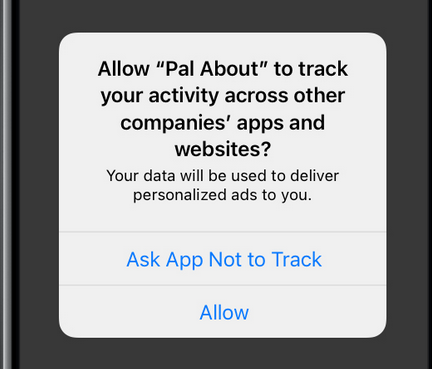
This is because Apple’s Anti-Tracking Transparency only applies to the apps that use third-party data to track users. Since Apple’s tracking stays within its own ecosystem, the company’s native apps are not subject to the policy. An exception Apple made for itself drew backlash, with some comparing the “nefarious"-sounding prompt third-party developers have to show to a far less ominous “personalized ads” pop-up Apple has to show itself.
Apple has hinted that more of its own apps can soon get ads. It was reported that the company eyes planting ads into Maps, Books and Podcasts apps..
Apple is also reportedly taking steps to build its own demand-side platform (DSP), which would enable buying and selling of ads in real time. If true, it would mean that Apple is jumping on the ad tech bandwagon, something that it has so far resisted doing. Google Marketing Platform and Facebook Ads Manager are examples of a DSP. Though, it’s far from clear if Apple’s DSP will be limited to serving ads within Apple’s own app store and apps, or goes beyond that. In any case, we hope Apple would not follow the example of some of its competitors and litter the feed with ads.
All in all, there is no doubt that Apple takes its advertising endeavor seriously as opposed to a mere side hustle of years ago. According to the Financial Times, Apple is poised to double the number of employees on its ads team by adding 216 people to the existing workforce of 250. The new hires would reportedly include managers, data engineers, product designers as well as sales specialists. And while Apple is in the midst of expanding its ad business, the prospects are looking nothing short of impressive: research group Evercore ISI projected that Apple’s ad business could be worth as much as $30 billion by 2026.
This meteoric rise is still to happen, but it would unlikely be feasible without Apple giving itself a leg up over its competitors at the pretext of the greater good — the protection of privacy. But has Apple’s ATT actually achieved that?
Meta and Google adjust to post-ATT reality
Apple’s anti-tracking bonanza may have disadvantaged smaller advertisers, but ad tech behemoths are likely to weather the storm after an initial shock.
Google, which boasts a far more diversified ad portfolio than Meta and thus is less dependent on mobile ads, appears to be adjusting to the post-ATT world quite well. Apple’s anti-tracking feature has no bearing on Google’s search ads which appear only to those who have been looking to buy a particular product or service. On the other hand, ads that rely on the ad network’s insights about user behavior and interests risk becoming less specific and, therefore, less effective.
Fortunately for Google, and unfortunately for privacy-conscious users Google has come up with new tracking technologies under the guise of privacy protection. A new Google technology called Topics is designed to replace third-party cookies and supposedly stop advertisers from identifying you. We’ve recently shown that it won’t be the case.
In addition to devising new tracking tools, Google wages an undeclared war against those who interfere with ads. Google’s Manifest V3 — Chrome’s new extension-building platform — severely limits the functionality of ad blockers. Though, ad blockers won't capitulate without a fight — that is as much as we can promise you. In a world’s first, AdGuard has recently published an ad-blocking extension built on Manifest V3 — you can read more about it here. Google has also been tightening screws on mobile apps with ad-blocking functionality. An updated version of Google Play Store policy forbids VPN apps to "manipulate ads that can impact apps monetization." The policy is set to come into effect on November 1st.
Photo: Rubaitul Azad/Unsplash
Yet another ingenious way Google has come up with to secure its ad prowess is making a Google account prerequisite for using its smart tech. From 2025 onwards Google account will be a must to use Fitbit, one of the world’s most popular fitness tracker.
As for Meta, Mark Zuckerberg’s company has been apparently busy working on workarounds to skirt the anti-tracking feature. Instagram and Facebook apps for iOS render external website links in their own in-app browsers instead of using Apple’s built-in Safari browser. Research has shown that Meta injects a code into each website you visit in its in-app browser, which allows it to potentially track you around the web. Meta insists that it is in compliance with Apple’s privacy policy, but is now getting sued by users accusing it of bypassing it.
Nevertheless, the data shared by Appsumer suggests that Meta is rebounding after the ATT-induced setback, with its share-of-wallet increasing in early 2022.
While none of this makes Apple a villain, it does cast a shadow on its image of a privacy-first company which puts the user's experience front and center. The advertising business is very lucrative, and some might say it was only a matter of time before Apple joined the advertising flock. But the fact that it appears to be trying to gain competitive advantage by claiming it protects user privacy seems disingenuous.




















































