Comprehensive guide to Meta's Threads app: privacy concerns uncovered

Threads, Meta’s new text, video, and image sharing app, has arrived on the social media scene with a bang, gaining 100 million subscribers within five days of its launch and breaking ChatGPT’s record for the fastest growing app. Labeled by some as “Twitter killer” — and many would argue that Musk-owned platform was already ailing — Threads saw a rapid surge in popularity just after its debut on July 6.

The buzz around Threads has died down somewhat after two weeks since its launch (that notably excluded the EU). The newly-minted app has been losing daily active users (DAUs) and engagement after the initial bout of enthusiasm, which is admittedly not a good sign, but is also hardly a death omen. Reactions to Threads so far have been polar opposite: while some call it boring and destined to fail, others are arguing it has the best chances to become the ultimate Twitter replacement.

Whether Threads will soar, or sink like Google+ did, we have yet to find out. Threads’ features are still rudimentary: for instance, you can’t send a DM on Threads, and Meta has yet to deliver on its promise to connect it to the fediverse, a network of independent servers that can share data among each other, where Mastodon, another Twitter rival, also lives.

Threads also doesn’t have ads yet, but we bet that will change soon. And when ads do come to Threads, they will be powered by data collected from users. That’s why it is important to know how Threads’ data collection works already now. Some other no less important and burning questions are why did Meta exclude the EU from the launch and what the implications of deleting your Threads account are. In this guide we will try to answer all of them.

What data does Threads collect?

While Threads will likely add features and become more user-friendly over time, the far bigger concern is its voracious appetite for sensitive user data, which is unlikely to go away.

A research by Top10VPN showed that Threads collects 45% more individual data points than, for instance, Twitter. However, strangely enough, Threads, unlike Twitter, claims to collect no data that can be used for tracking you across the Web. It must be noted that this is according to Apple’s App Store privacy labels that are self-reported by the app makers and are not verified by Apple.
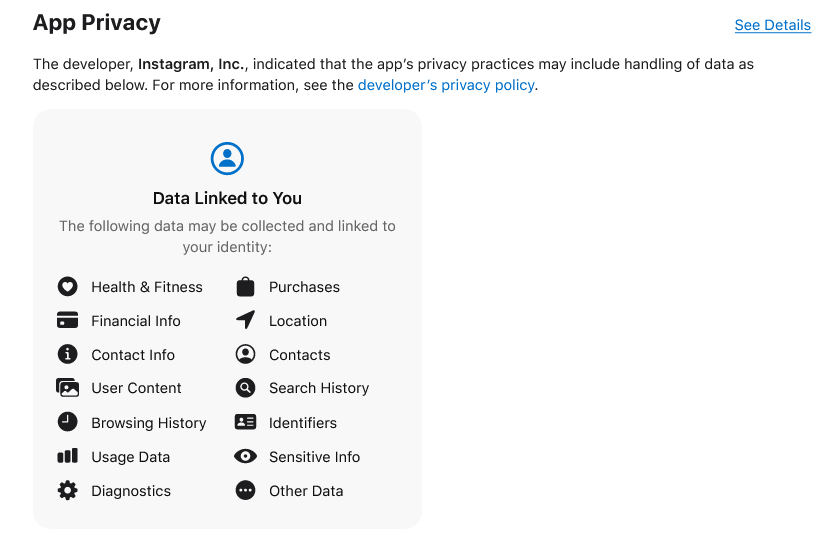
Threads’ privacy labels in App Store

The information Threads claims to collect. Source: Apple's App Store
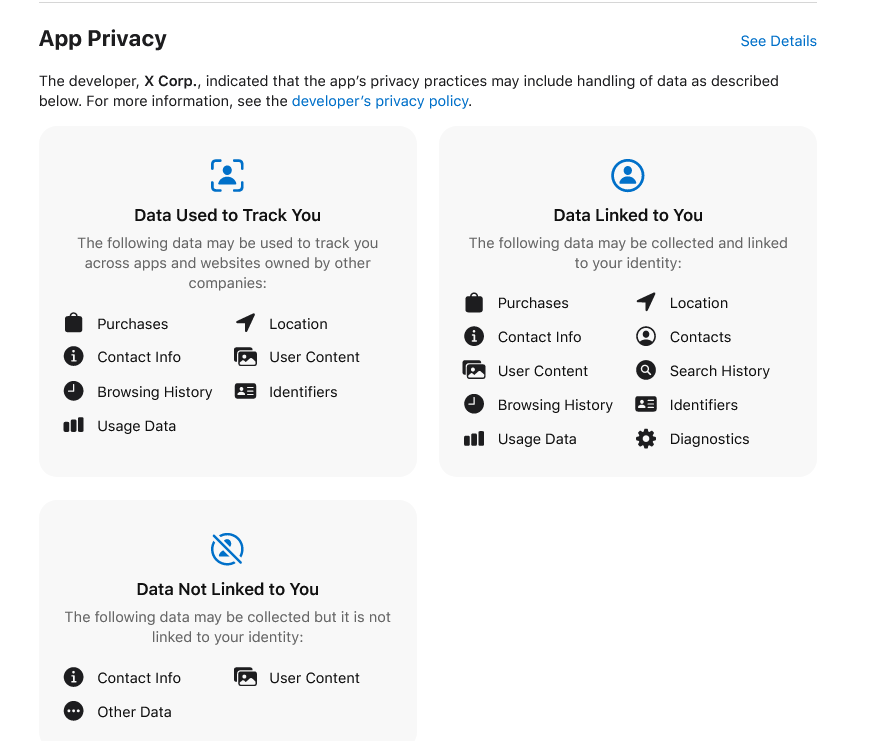
Twitter’s privacy labels in App Store

The information Twitter claims to collect. Source: Apple's App Store

As mentioned above, this does not mean that Threads collects less data, in fact — it collects more data. In the “Data Linked to You” category, which means this information is linked to your online ID, Threads states that it collects data about health and fitness, financial information, and sensitive information. The latter, according to the App Store developer guidelines, can mean anything from sexual orientation, pregnancy or birth information, religious and political beliefs, biometric data, genetic information, to racial and ethnic data and trade union membership.
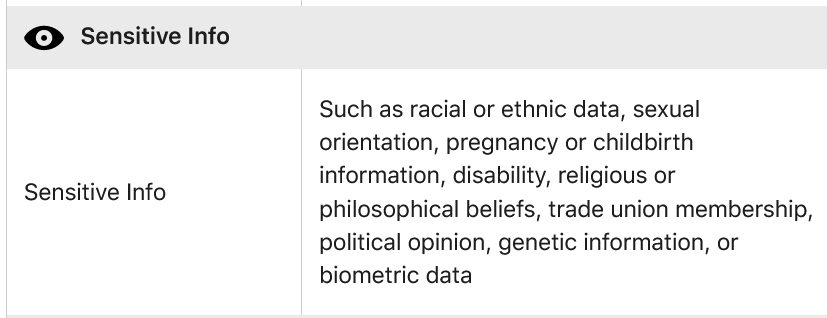
A description of ‘sensetive info’ in Apple’s developers guide
Source: Apple’s guide for developers

From a user’s perspective, the most important thing is how the data collected will be used, or, at least, how it is intended to be used. In that regard, one data use to pay attention to is for third-party advertising, since it means that the data collected for this purpose may be “shared” (essentially sold) with third parties so they can target you with ads. Threads can share the following data with marketers for that purpose: purchase history, financial info, location, including precise location, full contact info, including physical address, email address, name and a phone number, contacts, content you post, such as photos and videos, search history, browsing history, usage data, diagnostic data, and “other data”. Twitter, for instance, claims that it uses only email addresses out of all contact info for third-party advertising, and does not use financial information. Again, though, we have to take all these labels with a grain of salt, because they are essentially self-reported.

You might be wondering: what third-party advertising? Threads does not have ads. That’s true, for now, Threads does not show any ads on the platform, even though it claims to be an integral part of Instagram — “an Instagram app”, as Meta puts it. And Instagram is a huge source of ad revenue for Meta. In 2022, Instagram ads made up about 44% of Meta’s revenue, and it is expected to surpass Facebook as Meta’s main revenue generator by 2025.
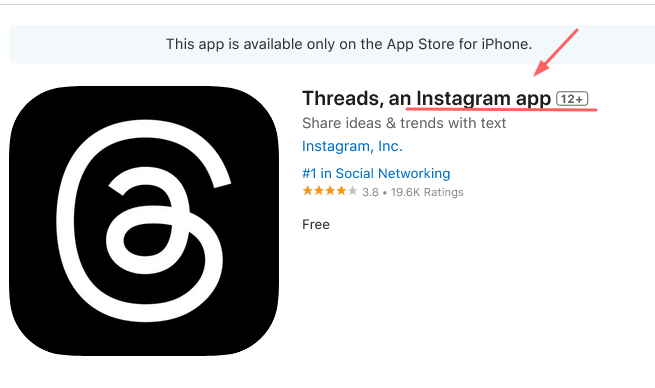
Threads in App Store

Anticipating ads in Meta’s Threads app

Threads may not have ads yet, but Meta CEO Mark Zuckerberg has hinted that once the app grows big enough and reaches “a clear path to 1 billion people”, he will start thinking about how to cash in on it. If Instagram’s modus operandi is any indicator, it may mean that ads are likely to be coming to Threads in droves sooner or later.
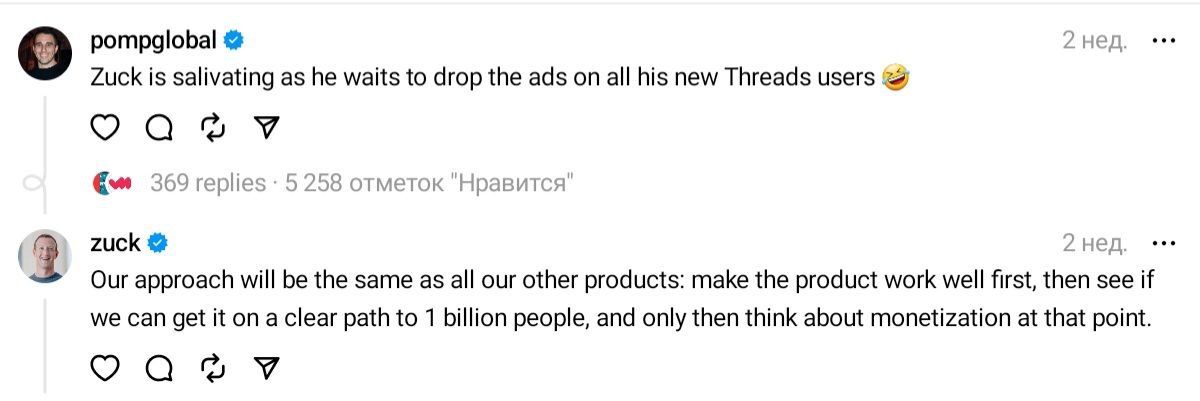
Screenshot of Zuckerberg's message on Threads

Advertisers are said to be already lined up, giddy about the prospect of having broad access to user data that they can harness to target ads. There’s been talk that Meta could start introducing ads in Threads as early as this year, with one ad exec telling Slate that Threads could start showing ads before the Christmas holidays.

There’s a big elephant in the room, though, and that’s not having the app available in the EU. Meta made $6.3 billion in European markets in the first quarter of this year, and risks missing billions of dollars in potential ad sales by failing to make the app available in the EU. So why exactly is it not launching there?

Why is Threads not available in the EU?

Threads has been launched in over 100 countries, but the EU member-states are not among them. Moreover, Meta also confirmed that it is blocking EU-based users from accessing Threads through a VPN. The reason for this unusual ostracism is stringent European data protection and privacy laws that Meta is apparently afraid of running afoul of as violations are punishable by hefty fines.

Meta has been going through a rough patch in the European courts lately. Earlier this month, the European Court of Justice found that “legitimate interest” — one of six legal bases a company can claim to process user data under GDPR — was not appropriate for running Meta’s behavioral advertising operation. The court said that Meta must obtain users’ consent before targeting them with ads in a major blow to Meta’s ad-based business model. In January, Meta already had to change legal basis for processing data from “contractual necessity” to “legal interest” after being fined $414 million for forcing users to accept personalized ads as a prerequisite for using Facebook. It looks like Meta is out of options now.

The looming enforcement of the EU’s new law, Digital Markets Act (DMA), that is aimed to curb the powers of ‘gatekeepers’ such as Meta, makes the company’s job of sustaining its ad business in the EU even harder.

Citing sources at Meta, the Guardian reported that the DMA is the main reason for “postponing” the launch of Threads in the EU. According to Article 5(a) of the DMA, gatekeepers may not combine personal data originating from one of their core platform services with personal data from any other of their core services or with personal data from third party services. This means that Meta could violate the DMA if it uses data from Instagram and Threads, which can be considered two separate services, to build a more detailed profile of its users and target them with personalized ads. And this is where we get to perhaps the most tricky part. Is Threads really a separate app?

Threads and Instagram: an inseperable duo?

Threads is part of the expanding Meta family, and unlike its more independent members like WhatsApp, it’s technically a scion of Meta’s other service, Instagram. Instagram and Threads are superglued together in a way that many would find awkward: while Threads has its own app in the Google Play Store and Apple App Store, you can’t delete your Threads account without also deleting your Instagram.

This conjointness is underscored by the fact that when you click on privacy settings in Threads, you have a very limited choice of what you can change, and for more fine-tuning you have to tap “other privacy settings,” which will redirect you to your Instagram account.
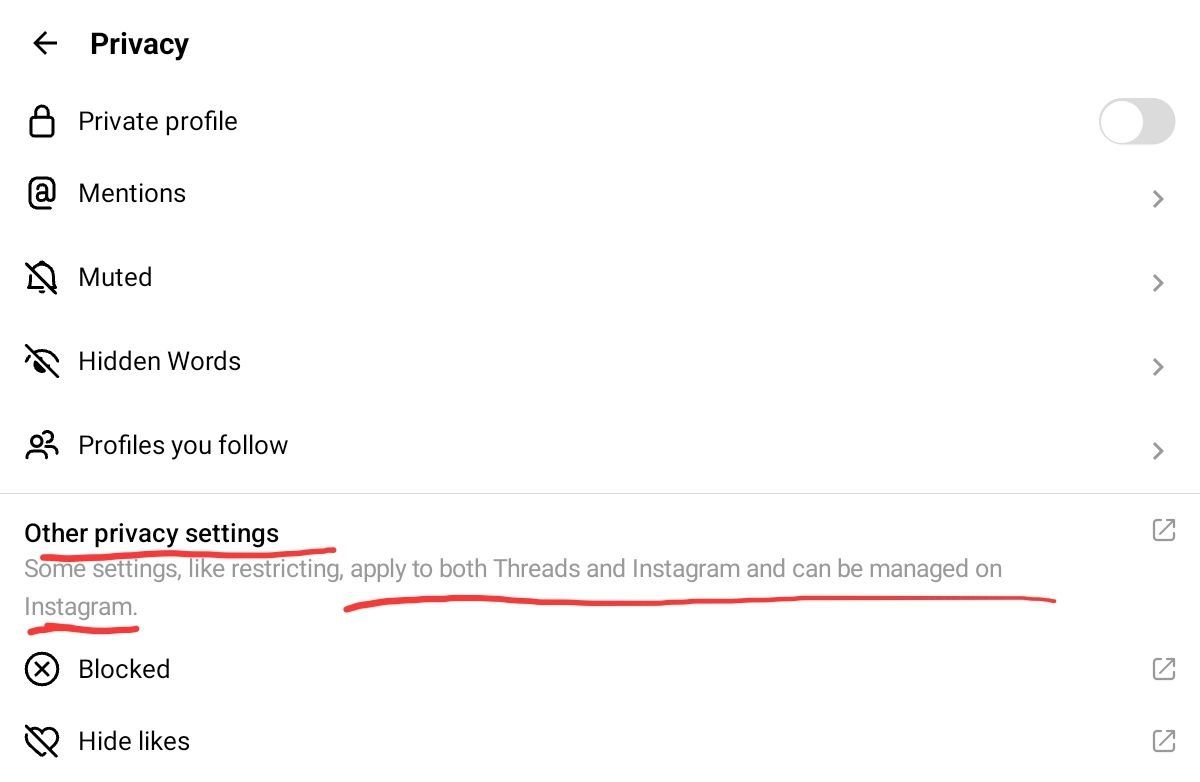
Threads’ privacy settings
A screenshot of Threads profile settings

The fact that you can only delete Threads together with Instagram seems unfair, as it restricts user options and control over data. You can only deactivate Threads, which leaves Meta a loophole to still store and use your Threads data. This is a major red flag for all those who care about privacy and app transparency. As for Threads’s privacy policy in that regard, it is seemingly purposefully vague: “We offer you a variety of tools to view, manage, download, and delete your Threads information by visiting your Instagram Settings,”it says.

Conclusion: Understanding Threads’ data privacy implications

Threads’ fast-paced growth has triggered significant interest, but also sparked serious privacy concerns over its data collection practices, its dependence on Instagram, and its absence in the EU due to stricter privacy and data protection laws. Whether you use it or not, be careful about what you share — it might be gobbled up by Meta and if you choose to delete it, be aware that you may have to nuke your Instagram account as well.


Piditkö tästä julkaisusta?
AdGuard VPN AdGuard DNS AdGuard Mail AdGuard Wallet
AdGuard for Windows -sovelluksen päänäyttö
AdGuard for Windows -sovelluksen Suojaus-näyttö, joka näyttää suojausominaisuudet ja asetukset
AdGuard for Windows -sovelluksen Tilastot-näyttö, joka näyttää tilastot estetyistä mainoksista ja seurannasta
AdGuard for Windows -sovelluksen Sovellusten hallinta -näyttö, joka näyttää laitteelle asennettujen sovellusten suojauksen hallintavaihtoehdot
20 390 20390 arvostelua
Erinomainen!

AdGuard: mainosten estäjä Windowsille

AdGuard Windowsille on enemmän kuin mainosten estäjä. Se on monikäyttöinen työkalu, joka estää mainoksia, hallitsee pääsyä vaarallisille sivustoille, nopeuttaa sivujen latautumista ja suojaa lapsia sopimattomalta sisällöltä

Lataamalla sovelluksen hyväksyt lisenssisopimuksen ehdot
Microsoft Store
Lataamalla sovelluksen hyväksyt lisenssisopimuksen ehdot
AdGuard Windowsille v8.0, 14 päivän kokeilujakso
AdGuard for Mac -sovelluksen päänäyttö
AdGuard for Macin Häivetilan näyttö
20 390 20390 arvostelua
Erinomainen!

AdGuard: mainosten estäjä Macille

AdGuard for Mac on ainutlaatuinen mainostenesto-ohjelma, joka on suunniteltu macOS:lle. Sen lisäksi, että se suojaa sinua häiritseviltä mainoksilta selaimissa ja sovelluksissa, se suojaa sinua seurannalta, tietojenkalastelulta ja petoksilta
Lataamalla sovelluksen hyväksyt lisenssisopimuksen ehdot
Lue lisää
AdGuard Macille v2.19, 14 päivän kokeilujakso
AdGuard for Android -sovelluksen päänäyttö
AdGuard for Android -sovelluksen Seurantasuojaus-näyttö
AdGuard for Android -sovelluksen Sovellusten hallinta -näyttö, joka näyttää laitteelle asennettujen sovellusten suojauksen hallintavaihtoehdot
AdGuard for Android -sovelluksen Tilastot-näyttö, joka näyttää tilastot estetyistä mainoksista ja seurannasta
AdGuardin yksityisen selaimen päänäyttö Androidille
QR-koodi AdGuard for Android -sovelluksen lataamiseen
20 390 20390 arvostelua
Erinomainen!

AdGuard: mainosten estäjä Androidille

Estää mainokset ja seurannan kaikissa selaimissa, peleissä ja muissa sovelluksissa. Suojaa yksityisyyttäsi ja antaa sinun hallita, miten sovelluksesi käyttävät Internetiä. Asennetaan APK-tiedostona
Lataamalla sovelluksen hyväksyt lisenssisopimuksen ehdot
Lue lisää
Lataa lukemalla koodi
Käytä mitä tahansa laitteellasi olevaa QR-koodilukijaa
AdGuard Androidille v4.14, 14 päivän kokeilujakso
AdGuard for iOS -sovelluksen päänäyttö
AdGuard for iOS -sovelluksen Suojaus-näyttö, joka näyttää suojausominaisuudet ja asetukset
AdGuard for iOS -sovelluksen Tilastot-näyttö, joka näyttää tilastot estetyistä mainoksista ja seurannasta
QR-koodi AdGuard for iOS -sovelluksen lataamiseen
20 390 20390 arvostelua
Erinomainen!

AdGuard: mainosten estäjä iOS:lle

Paras iOS-mainostenesto iPhonelle ja iPadille. AdGuard poistaa kaikenlaiset mainokset ja seurantatyökalut Safarissa ja suojaa yksityisyyttäsi kaikissa sovelluksissa DNS-tasolla
Lataamalla sovelluksen hyväksyt lisenssisopimuksen ehdot
Lue lisää
Lataa lukemalla koodi
Käytä mitä tahansa laitteellasi olevaa QR-koodilukijaa
AdGuard iOS:lle v4.5
AdGuard Content Blocker -sovelluksen päänäyttö
AdGuard Content Blocker -sovelluksen Suodattimet-näyttö
AdGuard Content Blocker -sovelluksen Asetukset-näyttö
20 390 20390 arvostelua
Erinomainen!

AdGuard Sisällönesto

AdGuard Content Blocker eliminoi kaikenlaiset mainokset mobiiliselaimissa, jotka tukevat sisällönesto-tekniikkaa — eli Samsung Internet- ja Yandex Browser -selaimissa. Sen ominaisuudet ovat rajatummat verrattuna AdGuard Androidille -sovellukseen, mutta se on ilmainen, helppo asentaa ja tehokas
Lataamalla sovelluksen hyväksyt lisenssisopimuksen ehdot
Lue lisää
AdGuard Sisällönesto v2.8
AdGuard Browser Extension -laajennuksen päänäyttö
AdGuard Browser Extension -laajennuksen Seurantasuojaus-näyttö
20 390 20390 arvostelua
Erinomainen!

AdGuard Selainlaajennus

AdGuard on nopein ja kevein mainosestolaajennus, joka estää tehokkaasti kaikentyyppiset mainokset kaikilla verkkosivuiilla! Valitse AdGuard käyttämällesi selaimelle ja nauti mainosvapaasta, nopeasta ja turvallisesta surffailusta.
Asenna
Lataamalla sovelluksen hyväksyt lisenssisopimuksen ehdot
Asenna
Lataamalla sovelluksen hyväksyt lisenssisopimuksen ehdot
Asenna
Lataamalla sovelluksen hyväksyt lisenssisopimuksen ehdot
Asenna
Lataamalla sovelluksen hyväksyt lisenssisopimuksen ehdot
Asenna
Lataamalla sovelluksen hyväksyt lisenssisopimuksen ehdot
Lue lisää
Asenna
Lataamalla sovelluksen hyväksyt lisenssisopimuksen ehdot
Lue lisää
AdGuard Selainlaajennus v5.5
AdGuard Assistant -sovelluksen päänäyttö
20 390 20390 arvostelua
Erinomainen!

AdGuard Avustaja

Selaimen lisälaajennus AdGuard-työpöytäsovelluksille. Sen avulla voit estää omia kohteita verkkosivustoilla, lisätä verkkosivustoja sallittujen listalle ja lähettää raportteja suoraan selaimesta
AdGuard Avustaja v1.4
20 390 20390 arvostelua
Erinomainen!

AdGuard Home

AdGuard Home on verkkopohjainen ratkaisu mainosten ja seurantalaitteiden estämiseen. Asenna se kerran reitittimeesi kattaaksesi kaikki kotiverkon laitteet – erillistä asiakasohjelmistoa ei tarvita. Tämä on erityisen tärkeää erilaisille IoT-laitteille, jotka usein uhkaavat yksityisyyttäsi
AdGuard Home v0.107
AdGuard Pro for iOS -sovelluksen päänäyttö
AdGuard Pro for iOS -sovelluksen Suojaus-näyttö, joka näyttää suojauksen ominaisuudet ja asetukset
AdGuard Pro for iOS -sovelluksen Tilastot-näyttö, joka näyttää estettyjen mainosten ja seurannan tilastot
20 390 20390 arvostelua
Erinomainen!

AdGuard Pro iOS:lle

AdGuard Pro for iOS sisältää kaikki kehittyneet mainosten eston suojausominaisuudet käytössä. Se tarjoaa samat työkalut kuin maksullinen AdGuard for iOS -versio. Se on erinomainen mainosten estämisessä Safarissa ja antaa sinun mukauttaa DNS-asetuksia räätälöidäksesi suojauksesi. Se estää mainokset selaimissa ja sovelluksissa, suojaa lapsiasi sopimattomalta sisällöltä ja pitää henkilötietosi turvallisina.
Lataamalla sovelluksen hyväksyt lisenssisopimuksen ehdot
Lue lisää
AdGuard Pro iOS:lle v4.5
AdGuard Mini for Mac -sovelluksen päänäyttö
AdGuard Mini for Mac -sovelluksen Safari-suojausnäyttö
AdGuard Mini for Mac -sovelluksen Luo sääntö -näyttö
20 390 20390 arvostelua
Erinomainen!

AdGuard Mini Macille — Safari-mainosesto

AdGuard Mini for Mac on tehokas Safari-mainosten estäjä. Tämä kevyt sovellus poistaa mainokset, estää seurannan ja nopeuttaa sivujen latautumista. Se auttaa sinua selaamaan verkkoa Safarissa keskeytyksettä ja pitämään tietosi yksityisinä
Asenna
Lataamalla sovelluksen hyväksyt lisenssisopimuksen ehdot
Lue lisää
AdGuard Mini Macille v2.3
AdGuard for Android TV -sovelluksen päänäyttö, jossa suojaus on käytössä
AdGuard for Android TV -sovelluksen mainosten esto -näyttö, joka näyttää sen ominaisuudet ja asetukset
AdGuard for Android TV -sovelluksen Asetukset-näyttö
AdGuard for Android TV -sovelluksen Sovellusten hallinta -näyttö, joka näyttää sovellukset, joissa mainokset ja seuranta on estetty
20 390 20390 arvostelua
Erinomainen!

AdGuard Android TV:lle

AdGuard Android TV:lle on ainoa sovellus, joka estää mainoksia, suojaa yksityisyyttäsi ja toimii älytelevisiosi palomuurina. Saat varoituksia verkkouhkista, voit käyttää suojattua DNS:ää ja hyötyä tietoliikenteen salauksesta. Rentoudu ja sukella suosikkisarjoihisi huippuluokan suojauksella ja mainoksetta!
AdGuard Android TV:lle v4.14, 14 päivän kokeilujakso
AdGuard-maskotti Agnar pitelee Linux-pingviiniä
20 390 20390 arvostelua
Erinomainen!

AdGuard Linuxille

AdGuard for Linux on maailman ensimmäinen järjestelmänlaajuinen Linux-mainosten esto-ohjelma. Estä mainokset ja seurantaohjelmat laitetasolla, valitse esiasennetuista suodattimista tai lisää omasi – kaikki tämä komentorivikäyttöliittymän kautta
AdGuard Linuxille v1.4
20 390 20390 arvostelua
Erinomainen!

AdGuard Temp Mail

Ilmainen tilapäisten sähköpostiosoitteiden generaattori, joka pitää sinut nimettömänä ja suojaa yksityisyyttäsi. Ei roskapostia pääpostilaatikossasi!
20 390 20390 arvostelua
Erinomainen!

AdGuard VPN

75 sijaintia ympäri maailman

Pääsy kaikkeen sisältöön

Vahva salaus

Ei lokitietoja

Nopein yhteys

24/7 tuki

Kokeile ilmaiseksi
Lataamalla sovelluksen hyväksyt lisenssisopimuksen ehdot
Lue lisää
20 390 20390 arvostelua
Erinomainen!

AdGuard DNS

AdGuard DNS on takuuvarma tapa Internet-mainosten estoon, eikä se vaadi edes sovellusten asennusta. Se on helppokäyttöinen, täysin ilmainen, helppo määrittää laitteisiin ja tarjoaa minimaalisen toiminnallisuuden mainosten, laskureiden, haitallisten sivustojen ja aikuisille tarkoitetun sisällönestoon.
20 390 20390 arvostelua
Erinomainen!

AdGuard Mail

Suojaa henkilöllisyytesi, vältä roskapostia ja pidä postilaatikkosi turvallisena aliaksillamme ja väliaikaisilla sähköpostiosoitteilla. Käytä ilmaista sähköpostin välityspalveluamme ja sovelluksiamme kaikille käyttöjärjestelmille
20 390 20390 arvostelua
Erinomainen!

AdGuard Wallet

Turvallinen ja yksityinen kryptolompakko, joka antaa sinulle täyden hallinnan varoistasi. Hallitse useita lompakoita ja löydä tuhansia kryptovaluuttoja tallennettavaksi, lähetettäväksi ja vaihdettavaksi
AdGuardin lataus Asenna AdGuard painamalla nuolen osoittamaa painiketta Valitse "Avaa", paina "OK" ja odota tiedoston latautumista. Avautuneessa ikkunassa, raahaa AdGuardin kuvake "Sovellukset" -kansioon. Kiitos AdGuardin valinnasta! Valitse "Avaa", paina "OK" ja odota tiedoston latautumista. Avautuneessa ikkunassa, paina "Asenna". Kiitos AdGuardin valinnasta!
Asenna AdGuard myös mobiililaitteille

















































