Incognito mode is a sham: it makes you feel safe while failing to protect your data

What does it mean to “go incognito”? According to the authoritative Collins dictionary, it means “using a false name or wearing a disguise, in order to avoid being recognized or identified.”

Given that, it’s quite tempting and natural to think that when you open an “incognito” window in the Google Chrome browser, you’re doing just that: hiding your identity and sailing anonymously across the Web (all while donning a stylish fedora hat and those circular Windsor glasses).

A survey by the University of Chicago found that many people vastly overestimate the benefits offered by private browsing modes, even after reading the fine print in the disclaimers. For example, the majority of the respondents believed that their search history was not recorded by Google, even if they were logged in their Google account. While some 27 percent wrongly thought that private mode protects them against viruses and malware.

To dispel these and other misunderstandings about private modes, we will zero in on the most popular of them — Chrome’s incognito mode.

How it works and what it is used for

Let’s start with what Incognito mode can really do for you. In a nutshell, it hides your browsing habits from other users of the same PC, or laptop, or phone — or any device for that matter. In more technical terms, when you’re in incognito mode, neither your search nor your browsing history is stored locally on your device. So it can be quite useful if you are looking for a surprise gift for your partner with whom you happen to share a laptop or a tablet. And if that was what people actually used the mode for, we would have no problem with it.
Chrome_Incognito_Mode

However, this is far from being the case. A February 2023 survey conducted in the UK showed that every second person who used private browsing or incognito mode primarily did it to protect their personal information from scammers and criminals. Around 40% would toggle it on in order to stop advertisers from tracking them across the Web.

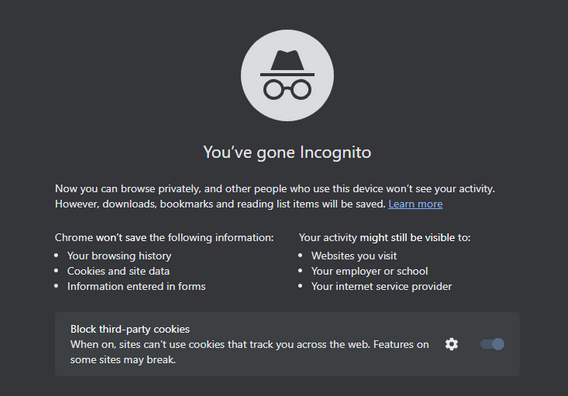
While Chrome’s incognito mode blocks third-party cookies (tracking codes planted by the websites other than the one you’re visiting in your browser) by default, it still collects cookies and site data during the session. They are stored in a temporary folder and are not deleted at least until you close all incognito windows.

Moreover, a lawsuit filed against Google by the users of incognito mode in 2020 claims that Google “stores users’ regular and private browsing data in the same logs.” It then “uses those mixed logs to send users personalized ads,” and even if individual data points are “anonymized,” Google is able to “uniquely identify a user with a high probability of success” when these data points are pooled.

What Google admits about Incognito mode

Chrome’s incognito mode disclaimer states that your activity will still be visible to three parties: the websites you visit, your employer or school, and your internet service provider.

It means that the analytic tools of the websites you visit can still capture some data about your on-site activity. This data will be anonymized but only to a degree.
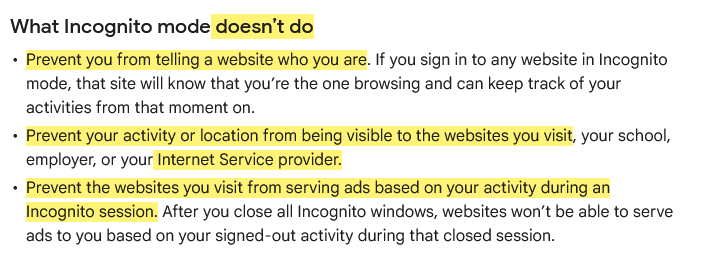
This is what Google says about Incognito mode

Source: Google

To give you the taste of browsing in an ‘incognito mode,’ we visited the CBC.ca website while using the AdGuard browser extension and took a screenshot of what it detected…
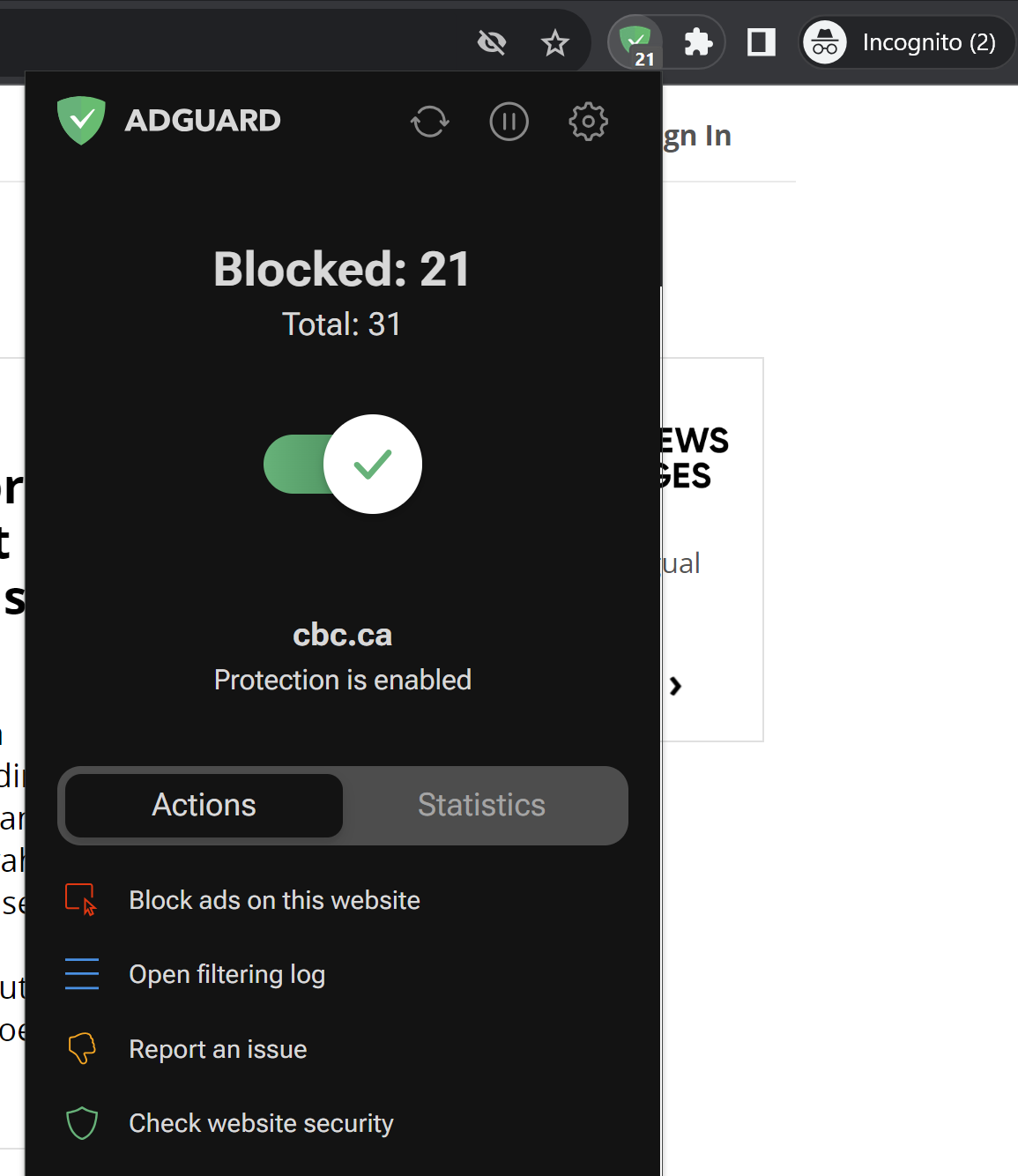
AdGuard Browser Extension has detected trackers in incognito mode

Note that we did not include third-party cookies in this test, because they are already blocked by default in Chrome’s incognito mode. But even without them, you can see how much tracking is going on behind the scenes. Almost every line you can see in the screenshot below is a failed attempt by a tracking tool to send some information about your online identity to a third party.
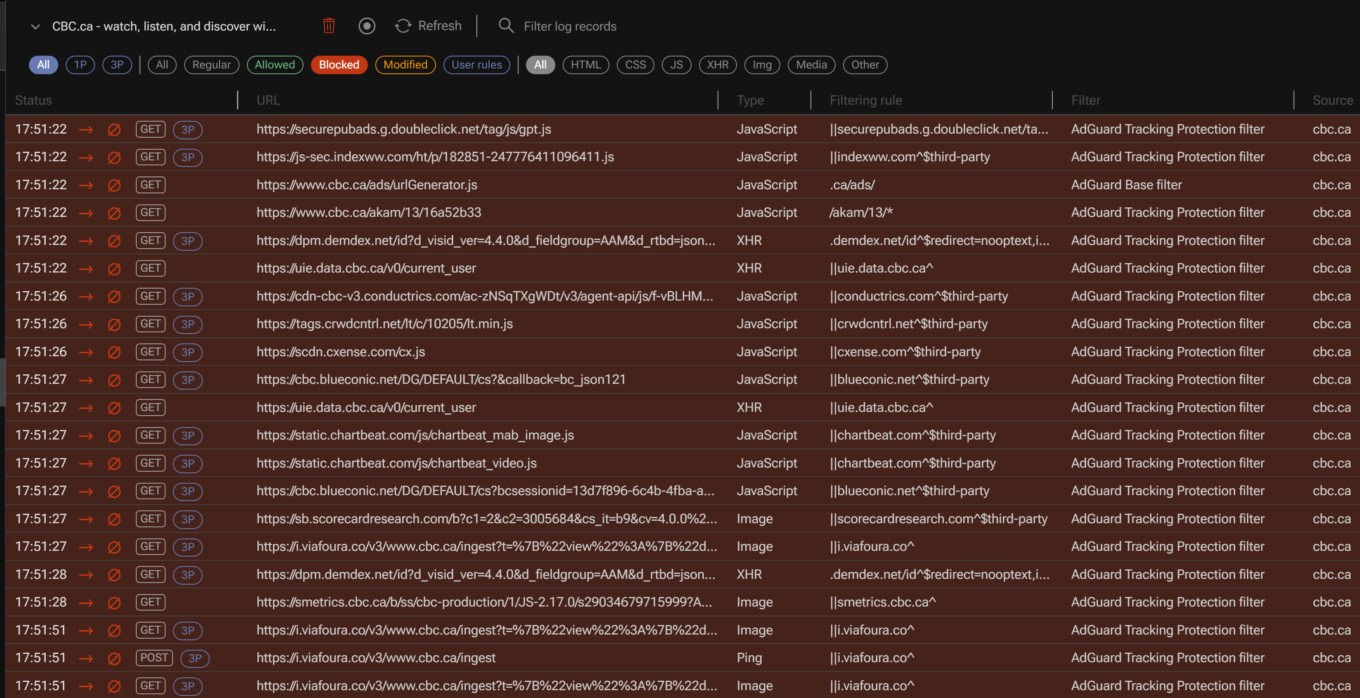
AdGuard filtering log

For example, one of such attempted requests was to Chartbeat, a provider of real-time website analytics. Chartbeat helps websites monitor their traffic, user engagement, and other important metrics. The request URL contains a tracking pixel (a tiny image embedded in web pages that is used to track user activity) and various parameters that send data to Chartbeat, such as host name, page URL, user ID, device type, screen resolution, and more.
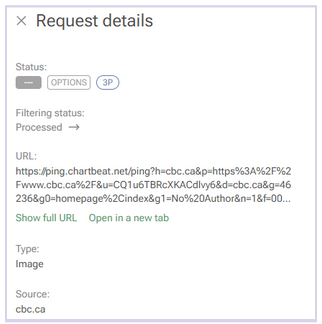
A request to a tracking company detected by AdGuard

Websites will be able to use this data to serve you ads during the session.

Incognito mode also does not hide your browsing activity from your IT department or your school network administrators, if you are using a work or a school network. In short, if you’re not the administrator of the network — for example, if you’re browsing the web using the Wi-Fi in a coffee shop — then you should consider your online activity to be out in the open, incognito mode or not.

In the same vein, regardless of whether you’re using incognito mode, your Internet Service Provider (ISP) will still be able to trace your IP address and see your activity.

And if you sign in to the site with your password and login, the little protection that incognito mode gives you from trackers will naturally be gone. “The site will know that you’re the one browsing and can keep track of your activities from that moment on,”Google says. So, if you sign in on YouTube, for example, while in incognito mode, it will record your activity and serve you recommendations based on it.

It’s probably even worse than that

There are things Google tells users about incognito mode — like the fact that it only helps keep your browsing history private from your partner or child — but there are some things it does not tell. The 2020 class-action lawsuit, that we’ve already mentioned, purports to reveal some of these things.

Remember that disclaimer that appears when you open an incognito mode window? Well, it does mention that third-party websites, your employer, and your school could see what you’re doing online. However, there is one important party that is not mentioned in the disclaimer: Google itself.

An excerpt from the lawsuit challenging incognito mode

Source: Lawsuit

According to the lawsuit, Google tracks and collects data from users even when they are in incognito mode. The plaintiffs claim that Google uses various methods to intercept and monitor users’ browsing data without their consent. The lawsuit explains how this works: “Whenever a user visits a website that is running Google Analytics, Ad Manager, or some similar Google service, Google’s software directs the user’s browser to send a separate communication to Google. This happens even when users are in private browsing mode, unbeknownst to website developers or the users themselves.”

The grand illusion of incognito mode

Incognito mode is like the emperor’s new clothes: it creates a false sense of security where there is none. In fact, its application is so narrow that you might be better off without it. If you want to clear your browsing history, cookies, and site data for a certain time period, there are other tools you can use. In Chrome, you can do this by selecting More Tools → Clear Browsing Data on the desktop version, or Settings → Privacy and security → Clear browsing data on the mobile version.
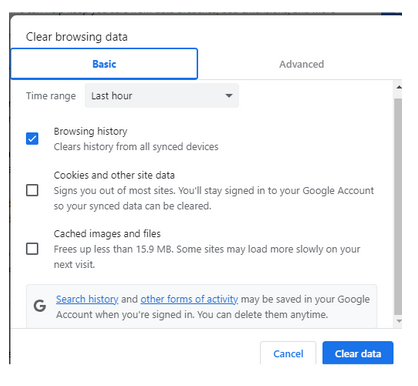
Google privacy controls allow to clear browsing history

However, if you want to truly protect your privacy and anonymity online, there are other, far better ways to do so.

One of them is using a VPN (Virtual Private Network), which is a service that encrypts your internet traffic and routes it through a remote server. This way, you can hide your IP address and location from your ISP, websites and third parties. There are many VPN providers available, but you should choose one that has a good reputation, a no-logs policy, and strong encryption. Generally, a VPN should not slow down your connection a lot, but it might be something you have to come to terms with in exchange for improved privacy.

Another way to go private online is using the Tor browser, which is a free software that allows you to browse the web anonymously. Tor works by bouncing your traffic through a network of volunteer nodes, called relays, that make it hard to trace your identity and location. Tor, however, has some drawbacks as well, such as (sometimes extremely) slow speed and serious compatibility issues.

Using a reliable ad blocker for Chrome will also go a long way in ensuring your browsing stays private. Almost every single one of them blocks trackers and not just ads; not to mention that the vast majority of ads serve as tracking tools, too.

When there are so many tools available to you to protect your privacy and keep your data private, there’s just no reason to resort to incognito mode… unless, of course, you’re looking for that gift for your SO.


Piditkö tästä julkaisusta?
AdGuard VPN AdGuard DNS AdGuard Mail AdGuard Wallet
AdGuard for Windows -sovelluksen päänäyttö
AdGuard for Windows -sovelluksen Suojaus-näyttö, joka näyttää suojausominaisuudet ja asetukset
AdGuard for Windows -sovelluksen Tilastot-näyttö, joka näyttää tilastot estetyistä mainoksista ja seurannasta
AdGuard for Windows -sovelluksen Sovellusten hallinta -näyttö, joka näyttää laitteelle asennettujen sovellusten suojauksen hallintavaihtoehdot
20 390 20390 arvostelua
Erinomainen!

AdGuard: mainosten estäjä Windowsille

AdGuard Windowsille on enemmän kuin mainosten estäjä. Se on monikäyttöinen työkalu, joka estää mainoksia, hallitsee pääsyä vaarallisille sivustoille, nopeuttaa sivujen latautumista ja suojaa lapsia sopimattomalta sisällöltä

Lataamalla sovelluksen hyväksyt lisenssisopimuksen ehdot
Microsoft Store
Lataamalla sovelluksen hyväksyt lisenssisopimuksen ehdot
AdGuard Windowsille v8.0, 14 päivän kokeilujakso
AdGuard for Mac -sovelluksen päänäyttö
AdGuard for Macin Häivetilan näyttö
20 390 20390 arvostelua
Erinomainen!

AdGuard: mainosten estäjä Macille

AdGuard for Mac on ainutlaatuinen mainostenesto-ohjelma, joka on suunniteltu macOS:lle. Sen lisäksi, että se suojaa sinua häiritseviltä mainoksilta selaimissa ja sovelluksissa, se suojaa sinua seurannalta, tietojenkalastelulta ja petoksilta
Lataamalla sovelluksen hyväksyt lisenssisopimuksen ehdot
Lue lisää
AdGuard Macille v2.19, 14 päivän kokeilujakso
AdGuard for Android -sovelluksen päänäyttö
AdGuard for Android -sovelluksen Seurantasuojaus-näyttö
AdGuard for Android -sovelluksen Sovellusten hallinta -näyttö, joka näyttää laitteelle asennettujen sovellusten suojauksen hallintavaihtoehdot
AdGuard for Android -sovelluksen Tilastot-näyttö, joka näyttää tilastot estetyistä mainoksista ja seurannasta
AdGuardin yksityisen selaimen päänäyttö Androidille
QR-koodi AdGuard for Android -sovelluksen lataamiseen
20 390 20390 arvostelua
Erinomainen!

AdGuard: mainosten estäjä Androidille

Estää mainokset ja seurannan kaikissa selaimissa, peleissä ja muissa sovelluksissa. Suojaa yksityisyyttäsi ja antaa sinun hallita, miten sovelluksesi käyttävät Internetiä. Asennetaan APK-tiedostona
Lataamalla sovelluksen hyväksyt lisenssisopimuksen ehdot
Lue lisää
Lataa lukemalla koodi
Käytä mitä tahansa laitteellasi olevaa QR-koodilukijaa
AdGuard Androidille v4.14, 14 päivän kokeilujakso
AdGuard for iOS -sovelluksen päänäyttö
AdGuard for iOS -sovelluksen Suojaus-näyttö, joka näyttää suojausominaisuudet ja asetukset
AdGuard for iOS -sovelluksen Tilastot-näyttö, joka näyttää tilastot estetyistä mainoksista ja seurannasta
QR-koodi AdGuard for iOS -sovelluksen lataamiseen
20 390 20390 arvostelua
Erinomainen!

AdGuard: mainosten estäjä iOS:lle

Paras iOS-mainostenesto iPhonelle ja iPadille. AdGuard poistaa kaikenlaiset mainokset ja seurantatyökalut Safarissa ja suojaa yksityisyyttäsi kaikissa sovelluksissa DNS-tasolla
Lataamalla sovelluksen hyväksyt lisenssisopimuksen ehdot
Lue lisää
Lataa lukemalla koodi
Käytä mitä tahansa laitteellasi olevaa QR-koodilukijaa
AdGuard iOS:lle v4.5
AdGuard Content Blocker -sovelluksen päänäyttö
AdGuard Content Blocker -sovelluksen Suodattimet-näyttö
AdGuard Content Blocker -sovelluksen Asetukset-näyttö
20 390 20390 arvostelua
Erinomainen!

AdGuard Sisällönesto

AdGuard Content Blocker eliminoi kaikenlaiset mainokset mobiiliselaimissa, jotka tukevat sisällönesto-tekniikkaa — eli Samsung Internet- ja Yandex Browser -selaimissa. Sen ominaisuudet ovat rajatummat verrattuna AdGuard Androidille -sovellukseen, mutta se on ilmainen, helppo asentaa ja tehokas
Lataamalla sovelluksen hyväksyt lisenssisopimuksen ehdot
Lue lisää
AdGuard Sisällönesto v2.8
AdGuard Browser Extension -laajennuksen päänäyttö
AdGuard Browser Extension -laajennuksen Seurantasuojaus-näyttö
20 390 20390 arvostelua
Erinomainen!

AdGuard Selainlaajennus

AdGuard on nopein ja kevein mainosestolaajennus, joka estää tehokkaasti kaikentyyppiset mainokset kaikilla verkkosivuiilla! Valitse AdGuard käyttämällesi selaimelle ja nauti mainosvapaasta, nopeasta ja turvallisesta surffailusta.
Asenna
Lataamalla sovelluksen hyväksyt lisenssisopimuksen ehdot
Asenna
Lataamalla sovelluksen hyväksyt lisenssisopimuksen ehdot
Asenna
Lataamalla sovelluksen hyväksyt lisenssisopimuksen ehdot
Asenna
Lataamalla sovelluksen hyväksyt lisenssisopimuksen ehdot
Asenna
Lataamalla sovelluksen hyväksyt lisenssisopimuksen ehdot
Lue lisää
Asenna
Lataamalla sovelluksen hyväksyt lisenssisopimuksen ehdot
Lue lisää
AdGuard Selainlaajennus v5.5
AdGuard Assistant -sovelluksen päänäyttö
20 390 20390 arvostelua
Erinomainen!

AdGuard Avustaja

Selaimen lisälaajennus AdGuard-työpöytäsovelluksille. Sen avulla voit estää omia kohteita verkkosivustoilla, lisätä verkkosivustoja sallittujen listalle ja lähettää raportteja suoraan selaimesta
AdGuard Avustaja v1.4
20 390 20390 arvostelua
Erinomainen!

AdGuard Home

AdGuard Home on verkkopohjainen ratkaisu mainosten ja seurantalaitteiden estämiseen. Asenna se kerran reitittimeesi kattaaksesi kaikki kotiverkon laitteet – erillistä asiakasohjelmistoa ei tarvita. Tämä on erityisen tärkeää erilaisille IoT-laitteille, jotka usein uhkaavat yksityisyyttäsi
AdGuard Home v0.107
AdGuard Pro for iOS -sovelluksen päänäyttö
AdGuard Pro for iOS -sovelluksen Suojaus-näyttö, joka näyttää suojauksen ominaisuudet ja asetukset
AdGuard Pro for iOS -sovelluksen Tilastot-näyttö, joka näyttää estettyjen mainosten ja seurannan tilastot
20 390 20390 arvostelua
Erinomainen!

AdGuard Pro iOS:lle

AdGuard Pro for iOS sisältää kaikki kehittyneet mainosten eston suojausominaisuudet käytössä. Se tarjoaa samat työkalut kuin maksullinen AdGuard for iOS -versio. Se on erinomainen mainosten estämisessä Safarissa ja antaa sinun mukauttaa DNS-asetuksia räätälöidäksesi suojauksesi. Se estää mainokset selaimissa ja sovelluksissa, suojaa lapsiasi sopimattomalta sisällöltä ja pitää henkilötietosi turvallisina.
Lataamalla sovelluksen hyväksyt lisenssisopimuksen ehdot
Lue lisää
AdGuard Pro iOS:lle v4.5
AdGuard Mini for Mac -sovelluksen päänäyttö
AdGuard Mini for Mac -sovelluksen Safari-suojausnäyttö
AdGuard Mini for Mac -sovelluksen Luo sääntö -näyttö
20 390 20390 arvostelua
Erinomainen!

AdGuard Mini Macille — Safari-mainosesto

AdGuard Mini for Mac on tehokas Safari-mainosten estäjä. Tämä kevyt sovellus poistaa mainokset, estää seurannan ja nopeuttaa sivujen latautumista. Se auttaa sinua selaamaan verkkoa Safarissa keskeytyksettä ja pitämään tietosi yksityisinä
Asenna
Lataamalla sovelluksen hyväksyt lisenssisopimuksen ehdot
Lue lisää
AdGuard Mini Macille v2.3
AdGuard for Android TV -sovelluksen päänäyttö, jossa suojaus on käytössä
AdGuard for Android TV -sovelluksen mainosten esto -näyttö, joka näyttää sen ominaisuudet ja asetukset
AdGuard for Android TV -sovelluksen Asetukset-näyttö
AdGuard for Android TV -sovelluksen Sovellusten hallinta -näyttö, joka näyttää sovellukset, joissa mainokset ja seuranta on estetty
20 390 20390 arvostelua
Erinomainen!

AdGuard Android TV:lle

AdGuard Android TV:lle on ainoa sovellus, joka estää mainoksia, suojaa yksityisyyttäsi ja toimii älytelevisiosi palomuurina. Saat varoituksia verkkouhkista, voit käyttää suojattua DNS:ää ja hyötyä tietoliikenteen salauksesta. Rentoudu ja sukella suosikkisarjoihisi huippuluokan suojauksella ja mainoksetta!
AdGuard Android TV:lle v4.14, 14 päivän kokeilujakso
AdGuard-maskotti Agnar pitelee Linux-pingviiniä
20 390 20390 arvostelua
Erinomainen!

AdGuard Linuxille

AdGuard for Linux on maailman ensimmäinen järjestelmänlaajuinen Linux-mainosten esto-ohjelma. Estä mainokset ja seurantaohjelmat laitetasolla, valitse esiasennetuista suodattimista tai lisää omasi – kaikki tämä komentorivikäyttöliittymän kautta
AdGuard Linuxille v1.4
20 390 20390 arvostelua
Erinomainen!

AdGuard Temp Mail

Ilmainen tilapäisten sähköpostiosoitteiden generaattori, joka pitää sinut nimettömänä ja suojaa yksityisyyttäsi. Ei roskapostia pääpostilaatikossasi!
20 390 20390 arvostelua
Erinomainen!

AdGuard VPN

75 sijaintia ympäri maailman

Pääsy kaikkeen sisältöön

Vahva salaus

Ei lokitietoja

Nopein yhteys

24/7 tuki

Kokeile ilmaiseksi
Lataamalla sovelluksen hyväksyt lisenssisopimuksen ehdot
Lue lisää
20 390 20390 arvostelua
Erinomainen!

AdGuard DNS

AdGuard DNS on takuuvarma tapa Internet-mainosten estoon, eikä se vaadi edes sovellusten asennusta. Se on helppokäyttöinen, täysin ilmainen, helppo määrittää laitteisiin ja tarjoaa minimaalisen toiminnallisuuden mainosten, laskureiden, haitallisten sivustojen ja aikuisille tarkoitetun sisällönestoon.
20 390 20390 arvostelua
Erinomainen!

AdGuard Mail

Suojaa henkilöllisyytesi, vältä roskapostia ja pidä postilaatikkosi turvallisena aliaksillamme ja väliaikaisilla sähköpostiosoitteilla. Käytä ilmaista sähköpostin välityspalveluamme ja sovelluksiamme kaikille käyttöjärjestelmille
20 390 20390 arvostelua
Erinomainen!

AdGuard Wallet

Turvallinen ja yksityinen kryptolompakko, joka antaa sinulle täyden hallinnan varoistasi. Hallitse useita lompakoita ja löydä tuhansia kryptovaluuttoja tallennettavaksi, lähetettäväksi ja vaihdettavaksi
AdGuardin lataus Asenna AdGuard painamalla nuolen osoittamaa painiketta Valitse "Avaa", paina "OK" ja odota tiedoston latautumista. Avautuneessa ikkunassa, raahaa AdGuardin kuvake "Sovellukset" -kansioon. Kiitos AdGuardin valinnasta! Valitse "Avaa", paina "OK" ja odota tiedoston latautumista. Avautuneessa ikkunassa, paina "Asenna". Kiitos AdGuardin valinnasta!
Asenna AdGuard myös mobiililaitteille

















































