Introducing AdGuard Home

As many of you probably know, AdGuard provides a lot of ways to block ads in form of various apps and browser extensions. Some even heard about AdGuard DNS, a way to block ads without installing anything on your device. And today we are announcing the official release of a completely new product — AdGuard Home, which carries a lot of cool new stuff with it.

The short version: AdGuard Home is a network-wide ad-and-tracker blocking DNS server. Its purpose is to let you control your entire network and all your devices, and it does not require using a client-side program. At the same, AdGuard Home features a web interface to easily manage the filtering process.


Where it started

The first step towards AdGuard Home was made two years ago, with the announcement of the AdGuard DNS beta. For the first time, we offered a way to block ads without having to install anything on your device, like a browser extension or an app. And while AdGuard Home is a standalone project, it took a lot from its spiritual predecessor.

In fact, we should probably "thank" Apple for speeding up the development of AdGuard Home. When Apple decided that you couldn't control the traffic on your own devices anymore, we sought ways to put users back in charge of their own gadgets. Naturally, the DNS approach looked the most promising. It's too bad Apple won't allow apps that manage DNS requests anywhere near the AppStore — well, what if you didn't need any apps? And this is the main strength of AdGuard Home: you can set it up anywhere, but I'm getting ahead of myself.

Honestly, I would be lying if I said that we implemented 100% of everything that we wanted. That is why we are calling this version of AdGuard Home "v0.9".

One of the main reasons is that the installation of AdGuard Home is currently not the easiest task for an unprepared user, simplifying it is one of the highest priority tasks as we move forward.

Don't get me wrong, it works perfectly fine in its current state, there's just even more we want to add — and we will, in the official v1.0 release that will be announced before you know it.

But we simply couldn't wait any longer, so meet AdGuard Home 0.9!

Why use it?

It is probably not news to you that ads and trackers follow you on the web wherever you go, not only on your computer, but also on your smartphone (in fact, probably even more on your smartphone!), and even in things like smart fridges, smart vacuums and — God help us all! — smart light bulbs!

Even if you have nothing against companies gathering data about you, tracking can be plain dangerous. Ads are no better — they have long become a gateway to all kinds of malware, viruses, crypto lockers, phishing and more trackers.

Given how densely we are surrounded by gadgets in our life, it can get really tiresome to find, install, configure and maintain an ad blocker app for each of them, and, as I've mentioned already, in case of "smart furniture" this is not possible at all. This is where AdGuard Home comes into play — and shines. It provides a unified solution for blocking ads and trackers on all devices within your network, most commonly your home Wi-Fi network, but nothing prevents you from setting it up in your workspace or anywhere else.

Features and advantages of AG Home

The first thing you will notice is the web interface. We think it looks neat and tidy:
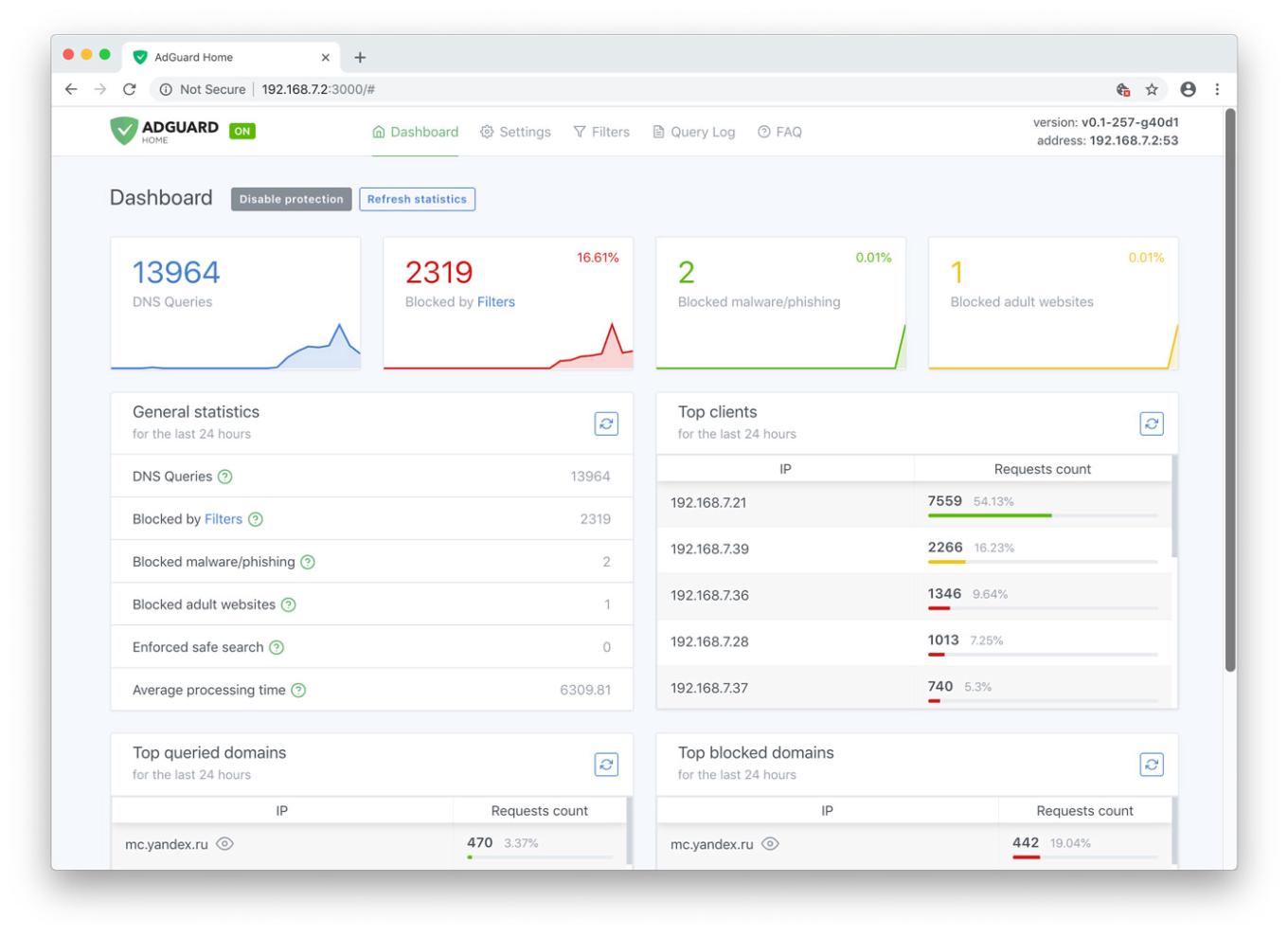
AdGuard Home Dashboard

Let's have a look at the main tab. Here you will find all kinds of statistics, including a vivid graphical representation. As you probably noticed, it looks just like a normal app, but you only need it alone to manage filtering on all your devices within the network.

Unlike application-based solutions for Android and iOS, AdGuard Home is not dependent on media giants like Google and Apple and their countless artificial limitations. Your personal preference is the only deciding factor

Now let's go to the "Settings" tab and look more closely at each of the options offered.
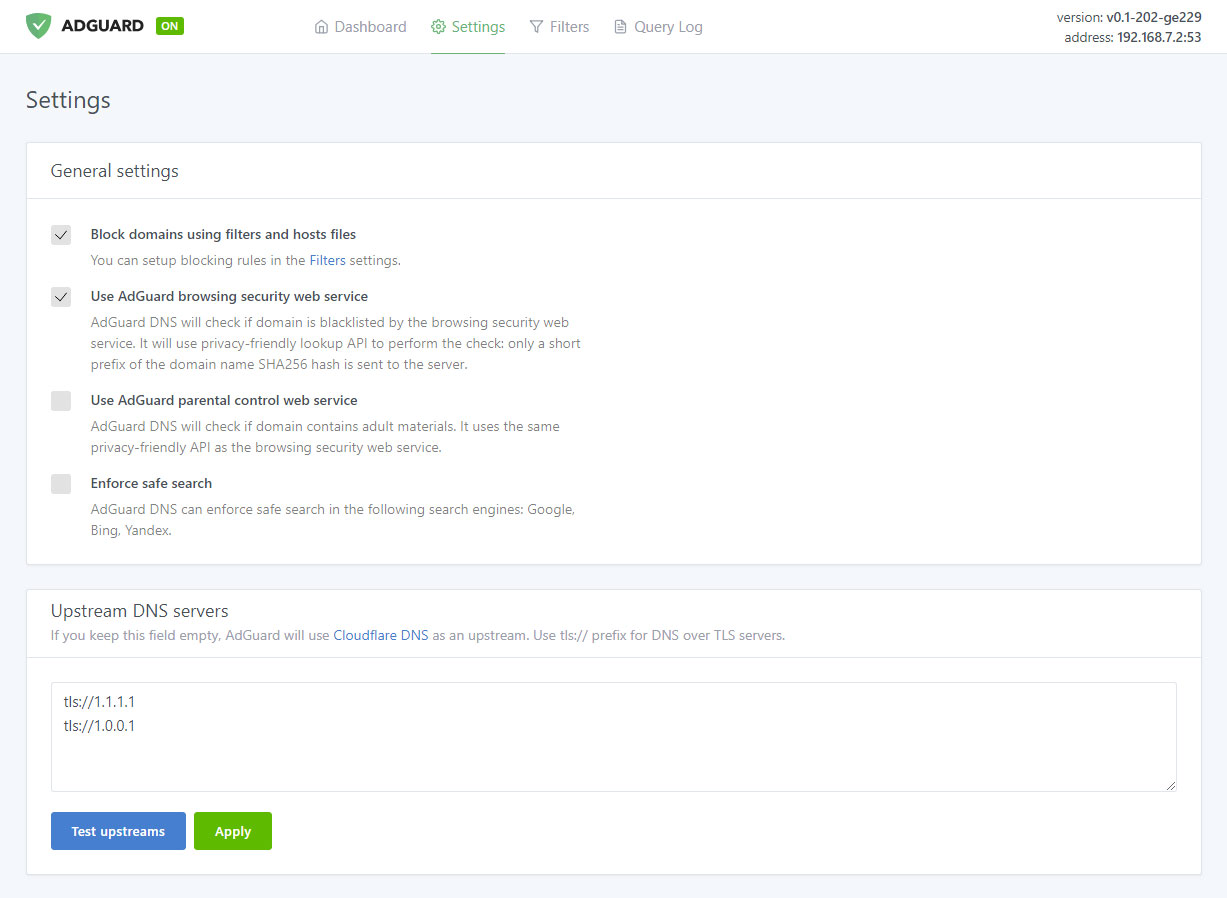
Manage filtering process

Ad blocking

The name speaks for itself. This is the main module, keep it enabled if you want AdGuard Home to block ads and tracking in your network — and it will block a lot. Just look at this comparison:
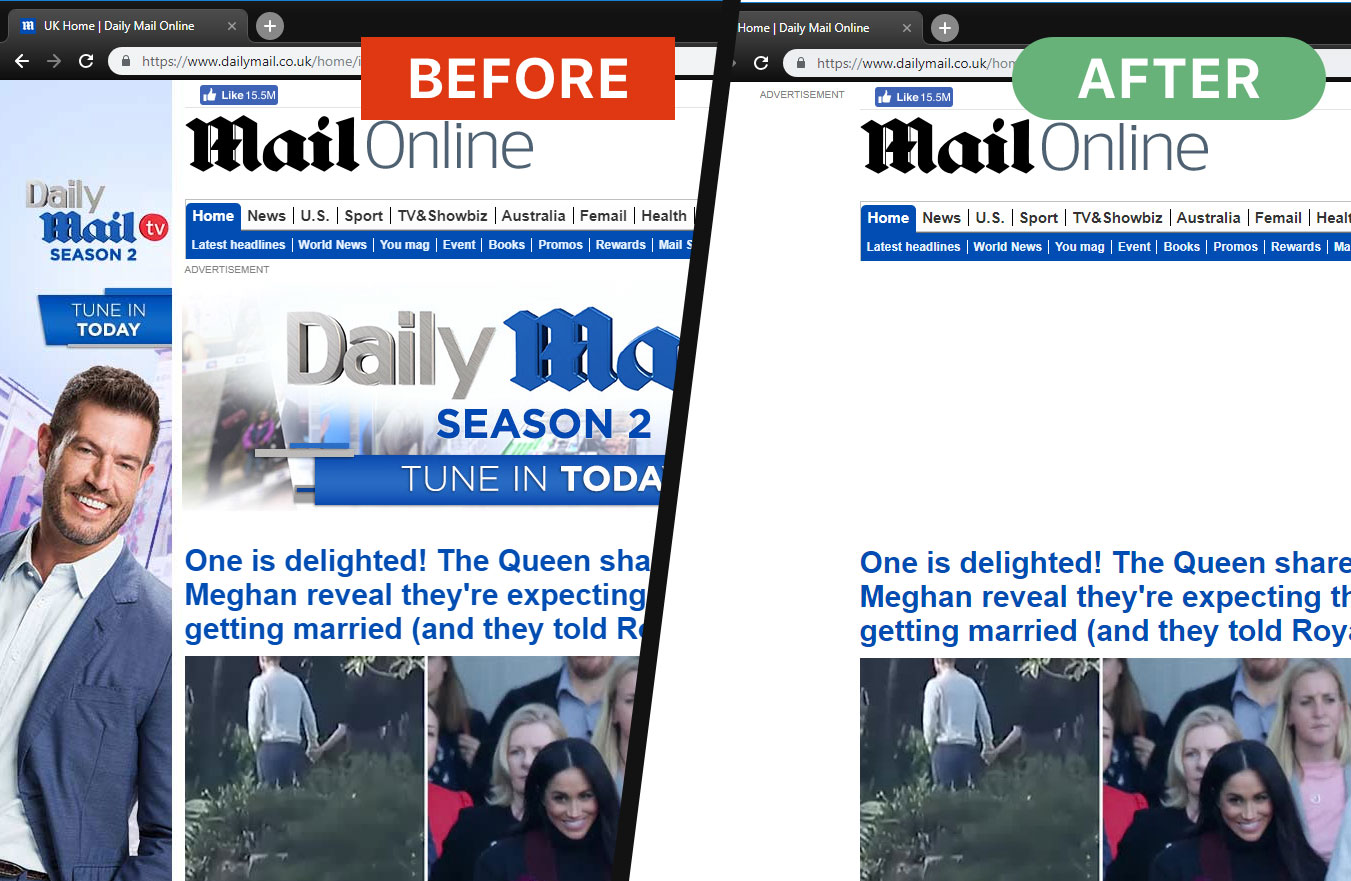
Ads are gone now

And this is not just aesthetics, look at the amount of saved traffic and load speed:
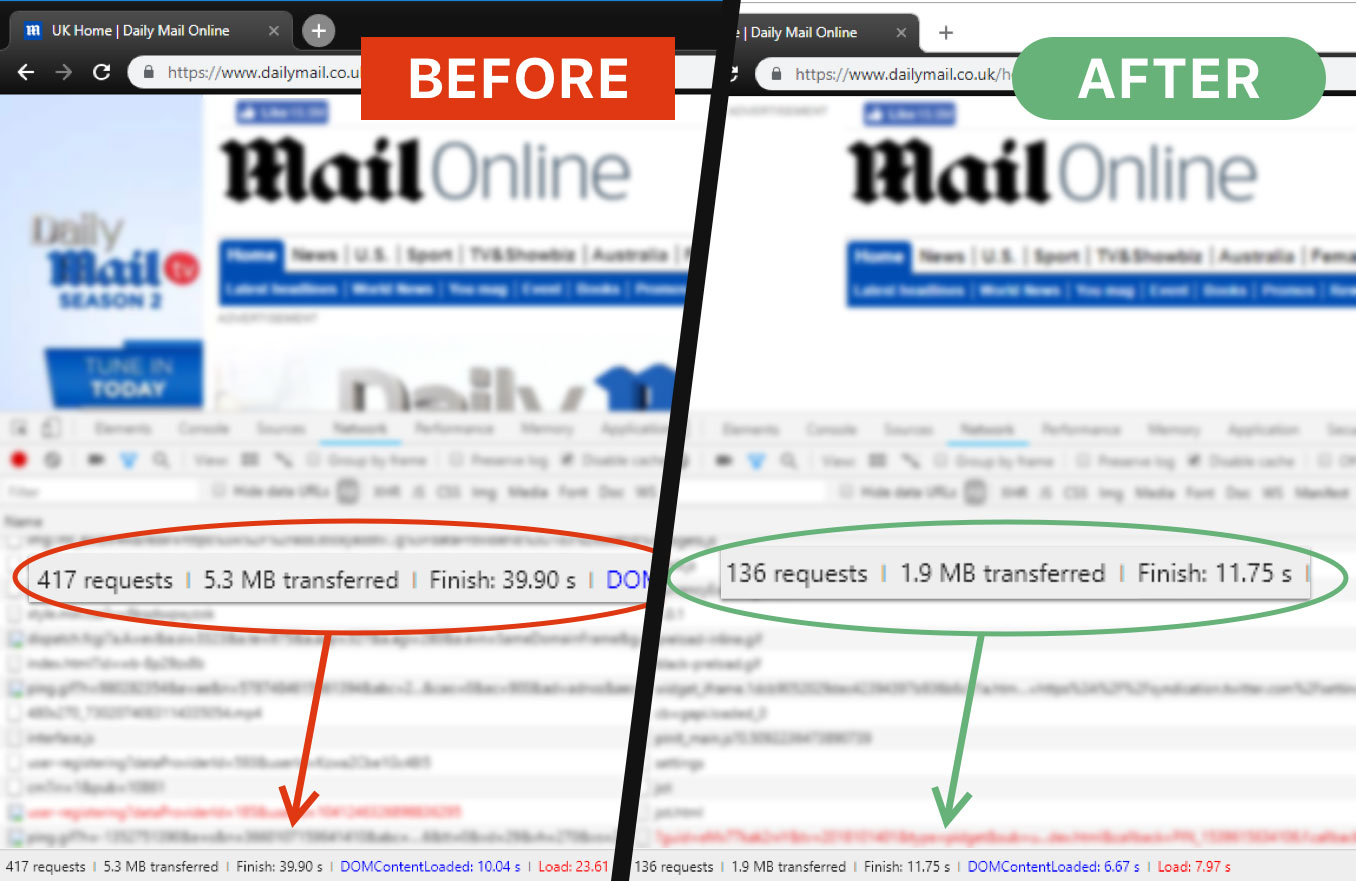
AG Home saves time and traffic

That is more than 3Mb of traffic and 15 seconds of load speed, and that's only one page.

Browsing Security
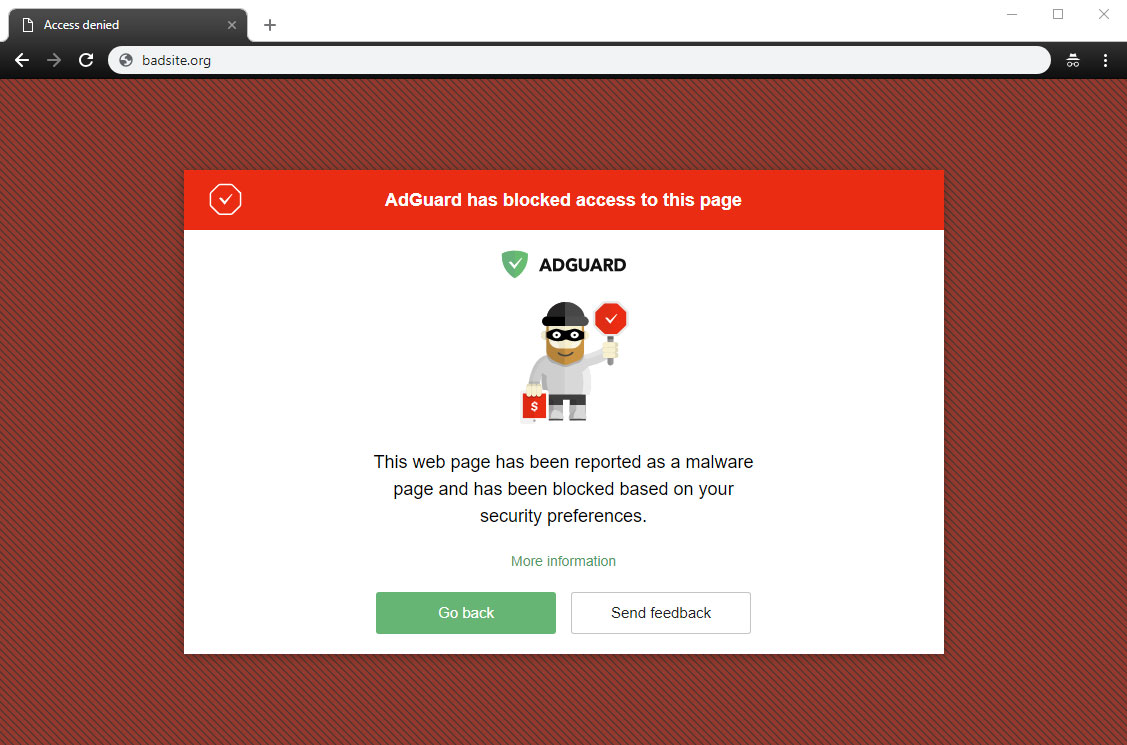
AG Home blocked a dangerous website

This stands for anti-malware and anti-phishing protection. AG Home will block all potentially dangerous requests to malicious and fraudulent websites, protecting you from online threats.

Parental control
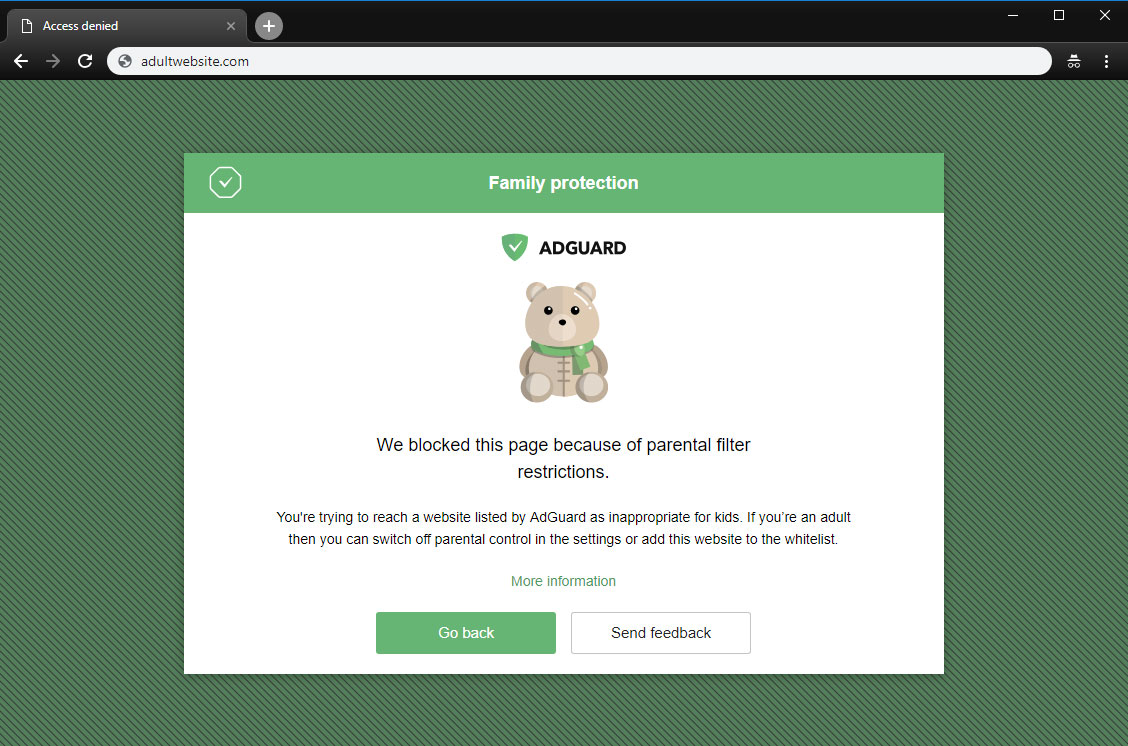
A page is blocked by Parental control

This is useful if you have kids and you don't want them to access websites with inappropriate content.

Safe search
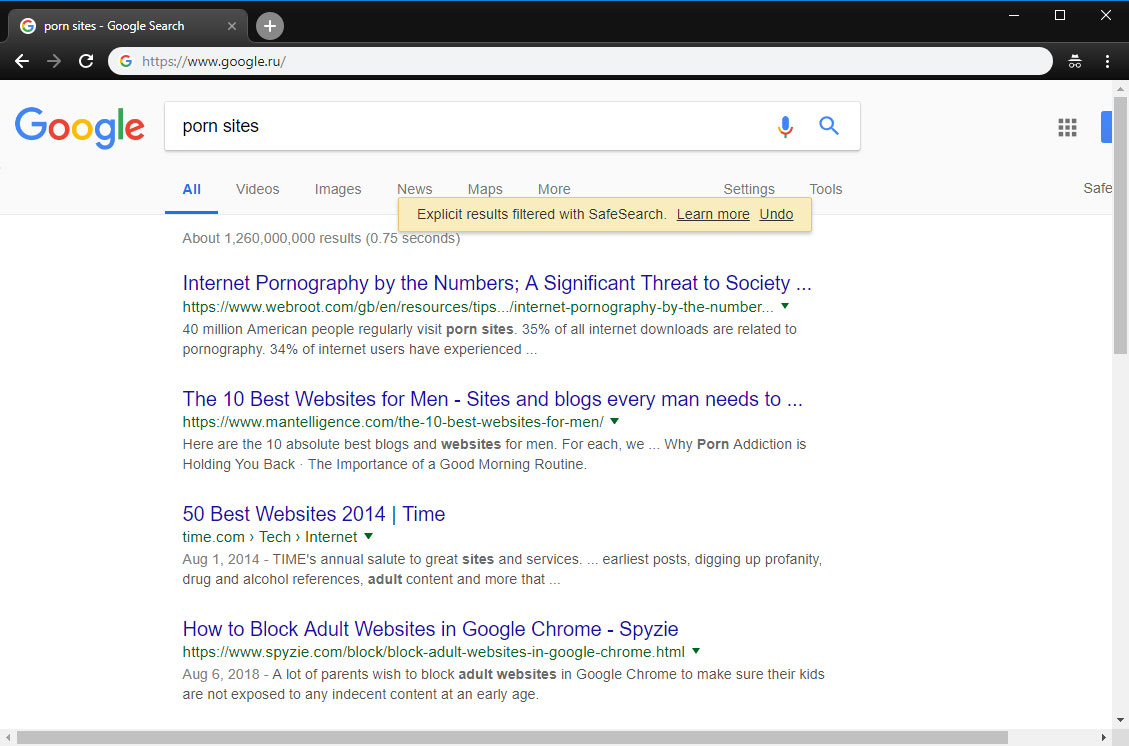
AG Home enforced "Safe search"

In the same vein, this option enforces "Safe search" mode in the most popular search engines (when enabled, it omits adult websites and pictures from being displayed in the search results)

Custom upstream servers

At the bottom of the "Settings" tab is a window to select a preferable upstream DNS server. Don't bother yourself with it unless you know what it means — this option is not essential to the quality filtering at all, but rather is a nice bonus.

AdGuard Home was developed based on the production-ready AdGuard DNS software, which has been used successfully by millions of users from around the globe for the last two years

Filter lists
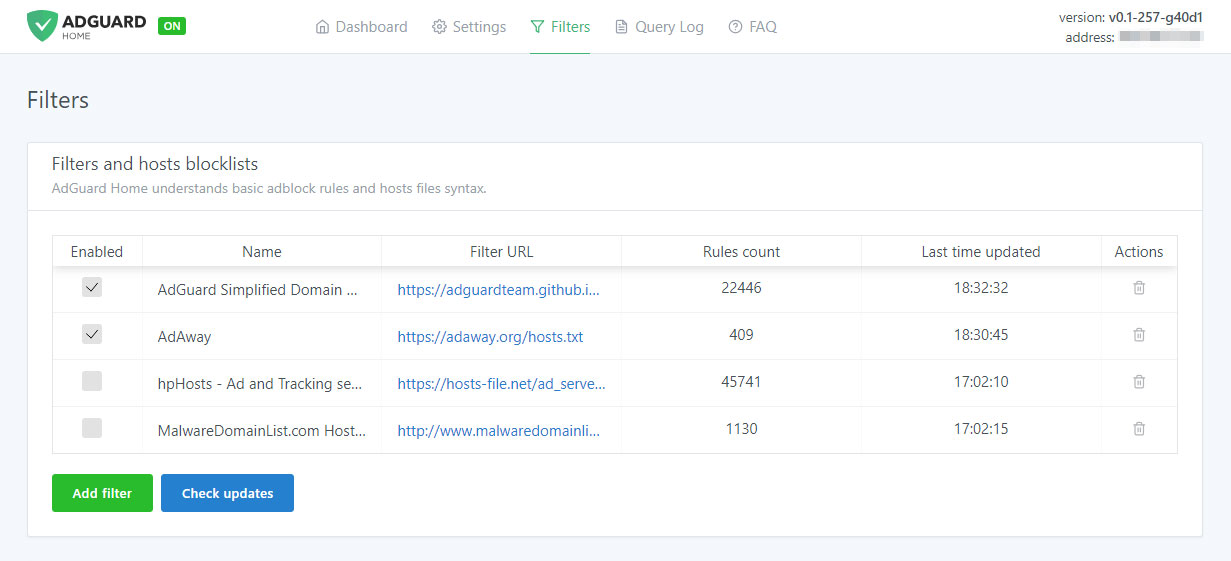
Add third-party filters

The third tab is devoted to filter settings. By default, ad blocking will be managed by the AdGuard SDN filter, but you have an option to add other filters and hosts-based blocking lists (basically, those are lists of rules that tell AG Home what exactly to block), or even create your own custom filtering rules. Multiple filters and hosts lists are available on the Internet.

AdGuard Home is developed by AdGuard — known experts in ad blocking and privacy protection. Over 25,000,000 users entrusted us with their online safety and never looked back

Query log
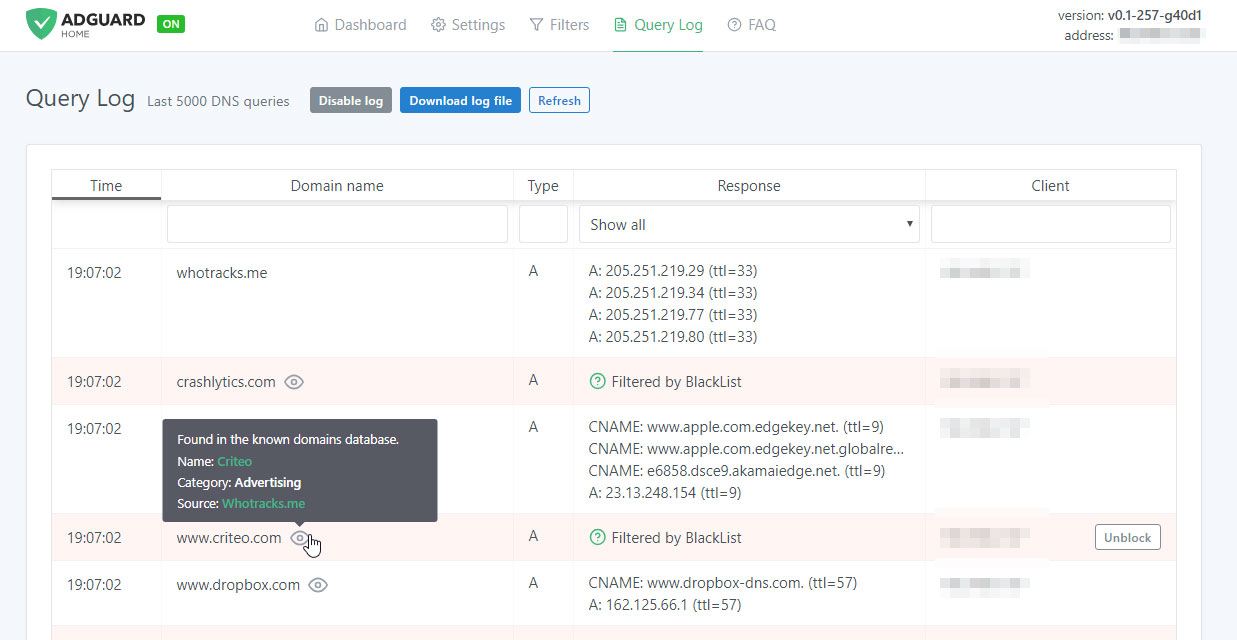
Monitor network activity

In the next tab there is a query log that offers everything you would expect from it — complete information on each and every request, all kinds of sorting. For each blocked request, there is a small tooltip telling you what rule it was filtered by, additional information about its origin and an "Unblock" button right next to it. Similarly, for unblocked requests there is a "Block" button. The log keeps track of the last 5000 queries and, of course, you can download the log file.

Open source

AdGuard Home is an open source project. We would be delighted to see any feedback, suggestions or other contribution from you. Whatever it is you have for us, the place to go to let us know about it is always the GitHub repository.

In summary, AdGuard Home gives you complete control over what is happening within your network.

How to set it up

Currently, you can install AdGuard Home on MacOS, Linux (x32 or x64), and Raspberry Pi. There is no need to go into technical details — we have the installation process described in the dedicated GitHub repository. Also, detailed guides on installing AG DNS to VPS and Raspberry Pi are available in our Wiki.

Further plans

We are not going to stop here: on the contrary, we have big plans regarding the future development of AdGuard Home. Here is a short list of what we are planning to do next:

  • One-click setup of your private VPN integrated with AdGuard Home
  • Improve the UI, make it better both functionally and aesthetically (send us your suggestions!)
  • Enhance the encryption options — DNSCrypt and DoH support, a possibility to run in the encrypted DNS server mode
  • Make it easier to use AdGuard Home with mobile devices (e.g. Mobileconfig for iOS)
  • Integrate AG Home with AdGuard applications

Being optimistic and looking a bit further, we would like AG Home to eventually become the privacy protection center for you and your devices, simple to use and easy to configure, where you can set up a personal proxy, VPN or encrypted DNS just in a couple of clicks.

Can I uninstall my ad blocker now?

The main advantage of AG Home lies in its ability to protect the whole network. When it comes to the sheer "filtering power", DNS-based ad blocking is inherently less potent and flexible than the approach taken by browser extensions and especially less so than dedicated tools. As an example, this article compares AG for Android and hosts-based ad blockers, and it gives a good impression of their relative capabilities. Whether you need this level of protection or not is a matter only you can decide.

And that's about it, hope you'll like AdGuard Home and will find a good use for it!

Do you have any questions or suggestions? We're answering everything on Product Hunt today!

Piditkö tästä julkaisusta?
AdGuard VPN AdGuard DNS AdGuard Mail AdGuard Wallet
AdGuard for Windows -sovelluksen päänäyttö
AdGuard for Windows -sovelluksen Suojaus-näyttö, joka näyttää suojausominaisuudet ja asetukset
AdGuard for Windows -sovelluksen Tilastot-näyttö, joka näyttää tilastot estetyistä mainoksista ja seurannasta
AdGuard for Windows -sovelluksen Sovellusten hallinta -näyttö, joka näyttää laitteelle asennettujen sovellusten suojauksen hallintavaihtoehdot
20 390 20390 arvostelua
Erinomainen!

AdGuard: mainosten estäjä Windowsille

AdGuard Windowsille on enemmän kuin mainosten estäjä. Se on monikäyttöinen työkalu, joka estää mainoksia, hallitsee pääsyä vaarallisille sivustoille, nopeuttaa sivujen latautumista ja suojaa lapsia sopimattomalta sisällöltä
Lataamalla sovelluksen hyväksyt lisenssisopimuksen ehdot
Microsoft Store
Lataamalla sovelluksen hyväksyt lisenssisopimuksen ehdot
AdGuard Windowsille v8.0, 14 päivän kokeilujakso
AdGuard for Mac -sovelluksen päänäyttö
AdGuard for Macin Häivetilan näyttö
20 390 20390 arvostelua
Erinomainen!

AdGuard: mainosten estäjä Macille

AdGuard for Mac on ainutlaatuinen mainostenesto-ohjelma, joka on suunniteltu macOS:lle. Sen lisäksi, että se suojaa sinua häiritseviltä mainoksilta selaimissa ja sovelluksissa, se suojaa sinua seurannalta, tietojenkalastelulta ja petoksilta
Lataamalla sovelluksen hyväksyt lisenssisopimuksen ehdot
Lue lisää
AdGuard Macille v2.19, 14 päivän kokeilujakso
AdGuard for Android -sovelluksen päänäyttö
AdGuard for Android -sovelluksen Seurantasuojaus-näyttö
AdGuard for Android -sovelluksen Sovellusten hallinta -näyttö, joka näyttää laitteelle asennettujen sovellusten suojauksen hallintavaihtoehdot
AdGuard for Android -sovelluksen Tilastot-näyttö, joka näyttää tilastot estetyistä mainoksista ja seurannasta
AdGuardin yksityisen selaimen päänäyttö Androidille
QR-koodi AdGuard for Android -sovelluksen lataamiseen
20 390 20390 arvostelua
Erinomainen!

AdGuard: mainosten estäjä Androidille

Estää mainokset ja seurannan kaikissa selaimissa, peleissä ja muissa sovelluksissa. Suojaa yksityisyyttäsi ja antaa sinun hallita, miten sovelluksesi käyttävät Internetiä. Asennetaan APK-tiedostona
Lataamalla sovelluksen hyväksyt lisenssisopimuksen ehdot
Lue lisää
Lataa lukemalla koodi
Käytä mitä tahansa laitteellasi olevaa QR-koodilukijaa
AdGuard Androidille v4.14, 14 päivän kokeilujakso
AdGuard for iOS -sovelluksen päänäyttö
AdGuard for iOS -sovelluksen Suojaus-näyttö, joka näyttää suojausominaisuudet ja asetukset
AdGuard for iOS -sovelluksen Tilastot-näyttö, joka näyttää tilastot estetyistä mainoksista ja seurannasta
QR-koodi AdGuard for iOS -sovelluksen lataamiseen
20 390 20390 arvostelua
Erinomainen!

AdGuard: mainosten estäjä iOS:lle

Paras iOS-mainostenesto iPhonelle ja iPadille. AdGuard poistaa kaikenlaiset mainokset ja seurantatyökalut Safarissa ja suojaa yksityisyyttäsi kaikissa sovelluksissa DNS-tasolla
Lataamalla sovelluksen hyväksyt lisenssisopimuksen ehdot
Lue lisää
Lataa lukemalla koodi
Käytä mitä tahansa laitteellasi olevaa QR-koodilukijaa
AdGuard iOS:lle v4.5
AdGuard Content Blocker -sovelluksen päänäyttö
AdGuard Content Blocker -sovelluksen Suodattimet-näyttö
AdGuard Content Blocker -sovelluksen Asetukset-näyttö
20 390 20390 arvostelua
Erinomainen!

AdGuard Sisällönesto

AdGuard Content Blocker eliminoi kaikenlaiset mainokset mobiiliselaimissa, jotka tukevat sisällönesto-tekniikkaa — eli Samsung Internet- ja Yandex Browser -selaimissa. Sen ominaisuudet ovat rajatummat verrattuna AdGuard Androidille -sovellukseen, mutta se on ilmainen, helppo asentaa ja tehokas
Lataamalla sovelluksen hyväksyt lisenssisopimuksen ehdot
Lue lisää
AdGuard Sisällönesto v2.8
AdGuard Browser Extension -laajennuksen päänäyttö
AdGuard Browser Extension -laajennuksen Seurantasuojaus-näyttö
20 390 20390 arvostelua
Erinomainen!

AdGuard Selainlaajennus

AdGuard on nopein ja kevein mainosestolaajennus, joka estää tehokkaasti kaikentyyppiset mainokset kaikilla verkkosivuiilla! Valitse AdGuard käyttämällesi selaimelle ja nauti mainosvapaasta, nopeasta ja turvallisesta surffailusta.
Asenna
Lataamalla sovelluksen hyväksyt lisenssisopimuksen ehdot
Asenna
Lataamalla sovelluksen hyväksyt lisenssisopimuksen ehdot
Asenna
Lataamalla sovelluksen hyväksyt lisenssisopimuksen ehdot
Asenna
Lataamalla sovelluksen hyväksyt lisenssisopimuksen ehdot
Asenna
Lataamalla sovelluksen hyväksyt lisenssisopimuksen ehdot
Lue lisää
Asenna
Lataamalla sovelluksen hyväksyt lisenssisopimuksen ehdot
Lue lisää
AdGuard Selainlaajennus v5.5
AdGuard Assistant -sovelluksen päänäyttö
20 390 20390 arvostelua
Erinomainen!

AdGuard Avustaja

Selaimen lisälaajennus AdGuard-työpöytäsovelluksille. Sen avulla voit estää omia kohteita verkkosivustoilla, lisätä verkkosivustoja sallittujen listalle ja lähettää raportteja suoraan selaimesta
AdGuard Avustaja v1.4
20 390 20390 arvostelua
Erinomainen!

AdGuard Home

AdGuard Home on verkkopohjainen ratkaisu mainosten ja seurantalaitteiden estämiseen. Asenna se kerran reitittimeesi kattaaksesi kaikki kotiverkon laitteet – erillistä asiakasohjelmistoa ei tarvita. Tämä on erityisen tärkeää erilaisille IoT-laitteille, jotka usein uhkaavat yksityisyyttäsi
AdGuard Home v0.107
AdGuard Pro for iOS -sovelluksen päänäyttö
AdGuard Pro for iOS -sovelluksen Suojaus-näyttö, joka näyttää suojauksen ominaisuudet ja asetukset
AdGuard Pro for iOS -sovelluksen Tilastot-näyttö, joka näyttää estettyjen mainosten ja seurannan tilastot
20 390 20390 arvostelua
Erinomainen!

AdGuard Pro iOS:lle

AdGuard Pro for iOS sisältää kaikki kehittyneet mainosten eston suojausominaisuudet käytössä. Se tarjoaa samat työkalut kuin maksullinen AdGuard for iOS -versio. Se on erinomainen mainosten estämisessä Safarissa ja antaa sinun mukauttaa DNS-asetuksia räätälöidäksesi suojauksesi. Se estää mainokset selaimissa ja sovelluksissa, suojaa lapsiasi sopimattomalta sisällöltä ja pitää henkilötietosi turvallisina.
Lataamalla sovelluksen hyväksyt lisenssisopimuksen ehdot
Lue lisää
AdGuard Pro iOS:lle v4.5
AdGuard Mini for Mac -sovelluksen päänäyttö
AdGuard Mini for Mac -sovelluksen Safari-suojausnäyttö
AdGuard Mini for Mac -sovelluksen Luo sääntö -näyttö
20 390 20390 arvostelua
Erinomainen!

AdGuard Mini Macille — Safari-mainosesto

AdGuard Mini for Mac on tehokas Safari-mainosten estäjä. Tämä kevyt sovellus poistaa mainokset, estää seurannan ja nopeuttaa sivujen latautumista. Se auttaa sinua selaamaan verkkoa Safarissa keskeytyksettä ja pitämään tietosi yksityisinä
Asenna
Lataamalla sovelluksen hyväksyt lisenssisopimuksen ehdot
Lue lisää
AdGuard Mini Macille v2.3
AdGuard for Android TV -sovelluksen päänäyttö, jossa suojaus on käytössä
AdGuard for Android TV -sovelluksen mainosten esto -näyttö, joka näyttää sen ominaisuudet ja asetukset
AdGuard for Android TV -sovelluksen Asetukset-näyttö
AdGuard for Android TV -sovelluksen Sovellusten hallinta -näyttö, joka näyttää sovellukset, joissa mainokset ja seuranta on estetty
20 390 20390 arvostelua
Erinomainen!

AdGuard Android TV:lle

AdGuard Android TV:lle on ainoa sovellus, joka estää mainoksia, suojaa yksityisyyttäsi ja toimii älytelevisiosi palomuurina. Saat varoituksia verkkouhkista, voit käyttää suojattua DNS:ää ja hyötyä tietoliikenteen salauksesta. Rentoudu ja sukella suosikkisarjoihisi huippuluokan suojauksella ja mainoksetta!
AdGuard Android TV:lle v4.14, 14 päivän kokeilujakso
AdGuard-maskotti Agnar pitelee Linux-pingviiniä
20 390 20390 arvostelua
Erinomainen!

AdGuard Linuxille

AdGuard for Linux on maailman ensimmäinen järjestelmänlaajuinen Linux-mainosten esto-ohjelma. Estä mainokset ja seurantaohjelmat laitetasolla, valitse esiasennetuista suodattimista tai lisää omasi – kaikki tämä komentorivikäyttöliittymän kautta
AdGuard Linuxille v1.4
20 390 20390 arvostelua
Erinomainen!

AdGuard Temp Mail

Ilmainen tilapäisten sähköpostiosoitteiden generaattori, joka pitää sinut nimettömänä ja suojaa yksityisyyttäsi. Ei roskapostia pääpostilaatikossasi!
20 390 20390 arvostelua
Erinomainen!

AdGuard VPN

75 sijaintia ympäri maailman

Pääsy kaikkeen sisältöön

Vahva salaus

Ei lokitietoja

Nopein yhteys

24/7 tuki

Kokeile ilmaiseksi
Lataamalla sovelluksen hyväksyt lisenssisopimuksen ehdot
Lue lisää
20 390 20390 arvostelua
Erinomainen!

AdGuard DNS

AdGuard DNS on takuuvarma tapa Internet-mainosten estoon, eikä se vaadi edes sovellusten asennusta. Se on helppokäyttöinen, täysin ilmainen, helppo määrittää laitteisiin ja tarjoaa minimaalisen toiminnallisuuden mainosten, laskureiden, haitallisten sivustojen ja aikuisille tarkoitetun sisällönestoon.
20 390 20390 arvostelua
Erinomainen!

AdGuard Mail

Suojaa henkilöllisyytesi, vältä roskapostia ja pidä postilaatikkosi turvallisena aliaksillamme ja väliaikaisilla sähköpostiosoitteilla. Käytä ilmaista sähköpostin välityspalveluamme ja sovelluksiamme kaikille käyttöjärjestelmille
20 390 20390 arvostelua
Erinomainen!

AdGuard Wallet

Turvallinen ja yksityinen kryptolompakko, joka antaa sinulle täyden hallinnan varoistasi. Hallitse useita lompakoita ja löydä tuhansia kryptovaluuttoja tallennettavaksi, lähetettäväksi ja vaihdettavaksi
AdGuardin lataus Asenna AdGuard painamalla nuolen osoittamaa painiketta Valitse "Avaa", paina "OK" ja odota tiedoston latautumista. Avautuneessa ikkunassa, raahaa AdGuardin kuvake "Sovellukset" -kansioon. Kiitos AdGuardin valinnasta! Valitse "Avaa", paina "OK" ja odota tiedoston latautumista. Avautuneessa ikkunassa, paina "Asenna". Kiitos AdGuardin valinnasta!
Asenna AdGuard myös mobiililaitteille


















































