If you think your data is safer with big corps, you’re wrong: The story of Lapsus$ hacker group

Today we have somewhat of an unusual digest, we're going to talk about a notorious hacker group called Lapsus$ that's responsible for a number of high-profile cases. And if this topic may seem like it has nothing to do with you — it's only at first glance.

Mr. President

In early January this year, Portuguese mediagroup IMPRESA was targeted by hackers. Mediagroup's child companies — TV channel SIC and newspaper Expresso — were hacked. SIC's streaming got cut off, Expresso's Twitter account was hijacked. Appealing to Expresso's 540,000 followers, the hacker group impertinently declared itself the "new president of Portugal".
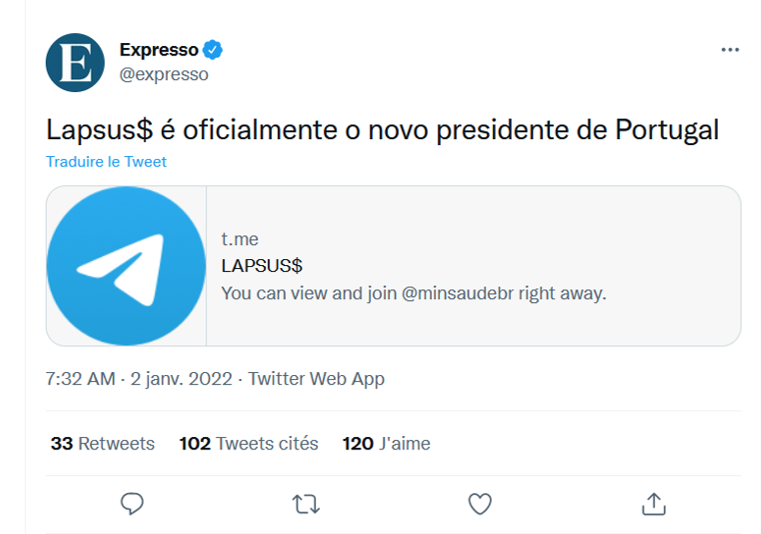
Lapsus$ tweet under the Expresso account
Source: Cyber etc. Twitter account

Next in line was Localiza, the biggest car rental service in Latin America. Anyone who visited their website got redirected to a porn website.

The hackers could have easily redirected users to a fake website, visually identical to the original, where the unsuspecting visitors would have voluntarily left all their personal data such as bank accounts' details. Like, for example, it happened to the hacked Instagram page of the NFT project Bored Ape Yacht Club. The hackers used the account to display phishing information and managed to steal over $1 million.

But Lapsus$, apparently, were more interested in attacking the big corp rather than in stealing the personal data of ordinary users.

Going big...

But this was only the beginning. The news about the NVIDIA hack shocked everyone. Among the stolen data were:

  • source codes for graphics cards' drivers, including the hashrate limiting technology that makes GPUs less desirable for miners;
  • highly confidential information about microchip design, including unreleased ones;
  • credentials of 71,000 NVIDIA employees;
  • source code for the DLSS rendering system;
  • and official code-signing certificates.

The list is long enough but one would think that at least the attack would only affect NVIDIA itself, its competitors, and, perhaps, miners. But this couldn't be further from reality. The signing certificates that were leaked to the web allow to sign any software as NVIDIA's. Any malefactor could use it to sign their virus, for example, and any computer would recognize this virus as perfectly normal NVIDIA software. This has opened a window for all kinds of perpetrators to circumvent Windows' built-in security systems.

And it didn't take long for the stolen certificates to start popping up in the news.
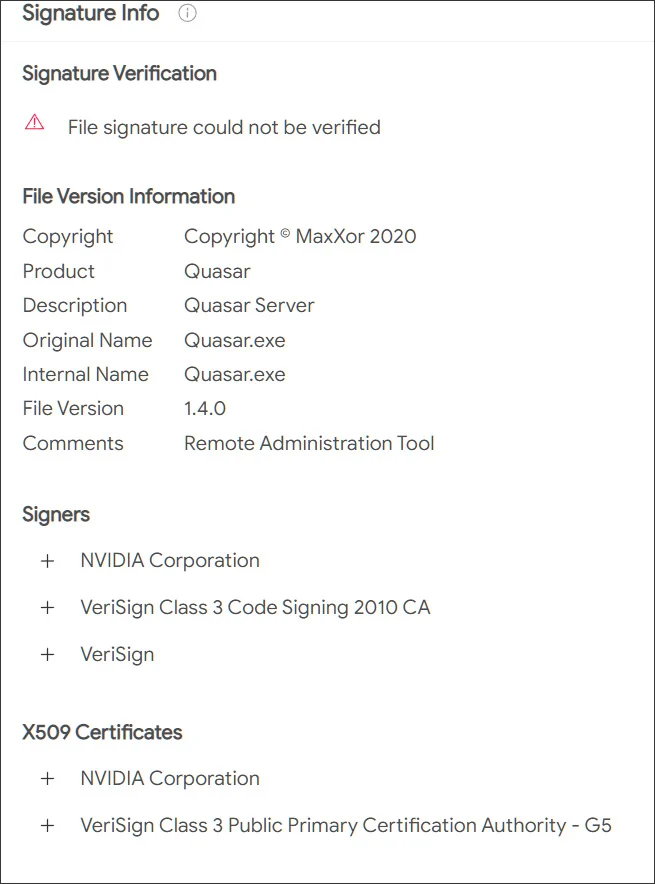
Stolen NVIDIA certificate
Source: Bleeping computer

...and going even bigger

The group expectantly didn't stop there, its appetites only growing. Samsung was destined to become the next victim. Lapsus$ stole source texts for the loader used in all latest devices, as well as the code responsible for biometrics, authentication, and encryption. In addition, confidential data of Qualcomm, one of Samsung's counterparties, was stolen.

The consequences, especially in the context of Samsung devices' security systems, can be quite disastrous. With high certainty, this data is currently being thoroughly scanned for vulnerabilities, and we can expect to hear about a series of Samsung devices being breached, and sooner rather than later. Evidently, even a single company getting hacked can often lead to more subsequent breaches and more data leakages. We all are forced into picking our poison and "trusting" one company or another with our personal data, but do they deserve this trust?

Meanwhile, Lapsus$ was only starting to gain momentum. Vodafone breach resulted in 200GB of data getting stolen. The company states that user data wasn't affected, and it may well be true, as it hasn't emerged anywhere on the darknet yet and wasn't among the files published by the hackers. It seems that the members of Lapsus$ are more interested in intellectual property than personal data. It doesn't mean that the next big hacker group will have the same preferences, we know plenty of examples when cybercriminals extorted money from regular Internet users. Yes, the sums may be smaller, but the number of potential victims compensates for that.

Gamedev was not spared either. Ubisoft became one of the next targets, and again, the company's data was stolen. We don't know yet what data exactly had been acquired by hackers, but Ubisoft initiated a full password reset for all its employees after the fact. It's unclear what was the hackers' goal this time, it may have simply been a stepping stone for performing larger scale attacks in the future. We can only wait and see if any of the clients' information was stolen too.

There was still room for Lapsus$ to go bigger: Microsoft fell prey next, a lot of source code was stolen, including that of Bing search engine and Cortana voice assistant. Hackers may be keeping the juiciest bites for themselves (e.g. credentials to access infrastructure), but even the share that they have decided to make public is enough to find more vulnerabilities in Microsoft products and exploit them in future breaches.

There are examples when hackers were able to cause some serious damage by gaining access to customer support accounts. Imagine what can be achieved when you have access to security engineers' accounts, know private message history and other details.

What's there to come

But the best illustration to the point we're making today is the breach of the single sign-on provider Okta. To carry out the attack, hackers compromised one of the company's contractors and proceeded to use it to get access to Okta systems. According to the company's statements, hackers stole the laptop of an engineer employed by one of Okta's contractors — talk about secure passwords.

It needs to be mentioned that Okta offers its services to over 15,000 companies around the world. Taking into account the fact that among them there are such giants as Peloton, Sonos, T-Mobile, and even The Federal Communications Commission of the US government, it's a safe bet that we're yet to witness how huge the aftermath of this breach can be.

After Okta, there was Globant breach — a key player in the market of software development consulting․ Around 70GB of data were stolen, and you can see from the screenshot below that among the affected companies are such big names as DHL, Facebook, Apple, C-span, Fortune, Arcserve.
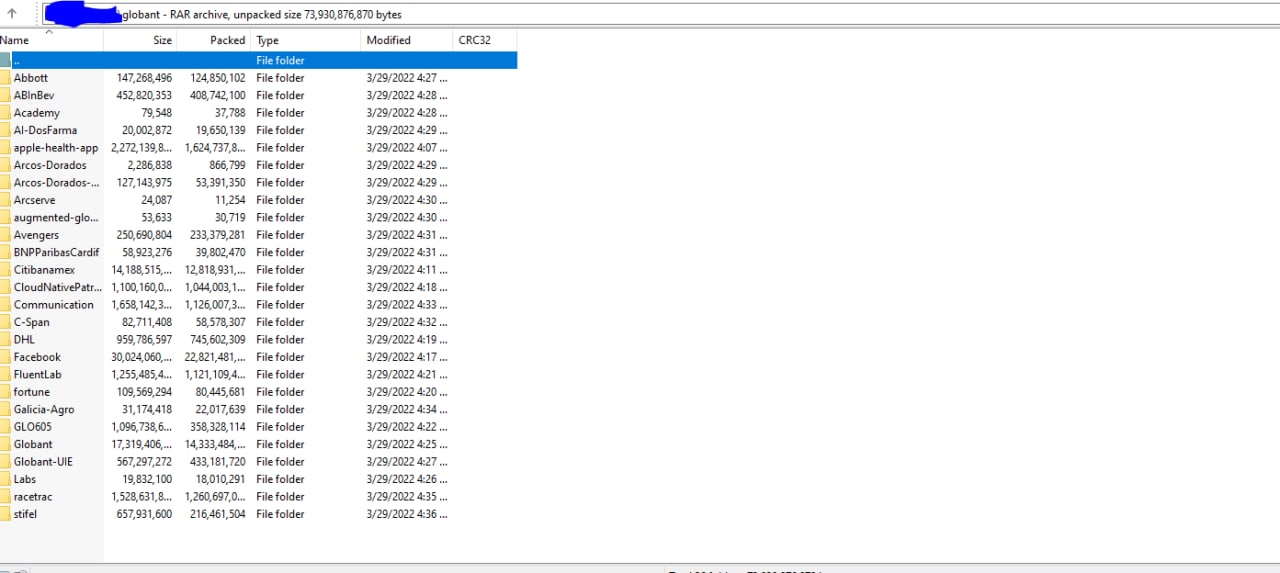
Globant data leak
Source: Lapsus$ Telegram channel

Another counterparty targeted, another case, which scale we'll be able to grasp only in the future. It'll greatly depend on which data exactly had been stolen and what the hackers will decide to do with it.

The prodigy

What makes all of this especially intriguing is the fact that the leader (or how cybersec experts often call him, the mastermind and ideologist) behind the Lapsus$ group allegedly is a 16-year-old teenager. And he's not the only one — according to investigators, some of the other supposed members of the group are teenagers as well, and they often turn their attacks into nothing less than a spectacle. How else would you call hacking and joining Zoom meetings and trolling company representatives? All of this adds spice to the story, but also raises a lot of questions to the hacked corporations and their security systems.

If you thought that we're done and there's nothing else to top the above mentioned breaches, here's another one: Apple and Meta voluntarily transferred user data to hackers who impersonated police representatives. The malefactors managed to hijack a police email account, which opened the door to sending urgent inquiries to obtain all kinds of confidential information, and Meta and Apple duly obliged. Despite the fact that the incident only recently got publicity, and that a different group called Recursion Team was responsible, Lapsus$ leader has employed similar techniques. Part of the Recursion Team's roster even (presumably) joined Lapsus$ later under different nicknames when the original group was disbanded.
And the argument that user data wasn't truly compromised doesn't fly with this breach's case. Ask yourself: do you really want to let the government and megacorps know everything about you?

Conclusion

Quite an impressive record for a group that was founded towards the very end of 2021, isn't it? And we haven't even listed all of their achievements. As you could see, smallish companies and tech giants from the top-10s in their respective fields, all fell victim to a bunch of teenagers with laptops. It's hard to convince yourself that they all were cutting costs at the expense of security. Nonetheless, they were all proven to be absolutely susceptible to hacker attacks.

The entire Lapsus$ story is a perfect example to dispel the myth that the bigger the company, the safer your data is with it. As it turns out, those giant corporations often present the juiciest bite. Companies' employees have access to your data, and with a little help from hackers, it may end up in the wrong hands so very easily. So when you're about to say "I've got nothing to hide anyway" the next time, think twice.


Piditkö tästä julkaisusta?
AdGuard VPN AdGuard DNS AdGuard Mail AdGuard Wallet
AdGuard for Windows -sovelluksen päänäyttö
AdGuard for Windows -sovelluksen Suojaus-näyttö, joka näyttää suojausominaisuudet ja asetukset
AdGuard for Windows -sovelluksen Tilastot-näyttö, joka näyttää tilastot estetyistä mainoksista ja seurannasta
AdGuard for Windows -sovelluksen Sovellusten hallinta -näyttö, joka näyttää laitteelle asennettujen sovellusten suojauksen hallintavaihtoehdot
20 391 20391 arvostelua
Erinomainen!

AdGuard: mainosten estäjä Windowsille

AdGuard Windowsille on enemmän kuin mainosten estäjä. Se on monikäyttöinen työkalu, joka estää mainoksia, hallitsee pääsyä vaarallisille sivustoille, nopeuttaa sivujen latautumista ja suojaa lapsia sopimattomalta sisällöltä
Lataamalla sovelluksen hyväksyt lisenssisopimuksen ehdot
Microsoft Store
Lataamalla sovelluksen hyväksyt lisenssisopimuksen ehdot
AdGuard Windowsille v8.0, 14 päivän kokeilujakso
AdGuard for Mac -sovelluksen päänäyttö
AdGuard for Macin Häivetilan näyttö
20 391 20391 arvostelua
Erinomainen!

AdGuard: mainosten estäjä Macille

AdGuard for Mac on ainutlaatuinen mainostenesto-ohjelma, joka on suunniteltu macOS:lle. Sen lisäksi, että se suojaa sinua häiritseviltä mainoksilta selaimissa ja sovelluksissa, se suojaa sinua seurannalta, tietojenkalastelulta ja petoksilta

Lataamalla sovelluksen hyväksyt lisenssisopimuksen ehdot
Lue lisää
AdGuard Macille v2.19, 14 päivän kokeilujakso
AdGuard for Android -sovelluksen päänäyttö
AdGuard for Android -sovelluksen Seurantasuojaus-näyttö
AdGuard for Android -sovelluksen Sovellusten hallinta -näyttö, joka näyttää laitteelle asennettujen sovellusten suojauksen hallintavaihtoehdot
AdGuard for Android -sovelluksen Tilastot-näyttö, joka näyttää tilastot estetyistä mainoksista ja seurannasta
AdGuardin yksityisen selaimen päänäyttö Androidille
QR-koodi AdGuard for Android -sovelluksen lataamiseen
20 391 20391 arvostelua
Erinomainen!

AdGuard: mainosten estäjä Androidille

Estää mainokset ja seurannan kaikissa selaimissa, peleissä ja muissa sovelluksissa. Suojaa yksityisyyttäsi ja antaa sinun hallita, miten sovelluksesi käyttävät Internetiä. Asennetaan APK-tiedostona

Lataamalla sovelluksen hyväksyt lisenssisopimuksen ehdot
Lue lisää
Lataa lukemalla koodi
Käytä mitä tahansa laitteellasi olevaa QR-koodilukijaa
AdGuard Androidille v4.14, 14 päivän kokeilujakso
AdGuard for iOS -sovelluksen päänäyttö
AdGuard for iOS -sovelluksen Suojaus-näyttö, joka näyttää suojausominaisuudet ja asetukset
AdGuard for iOS -sovelluksen Tilastot-näyttö, joka näyttää tilastot estetyistä mainoksista ja seurannasta
QR-koodi AdGuard for iOS -sovelluksen lataamiseen
20 391 20391 arvostelua
Erinomainen!

AdGuard: mainosten estäjä iOS:lle

Paras iOS-mainostenesto iPhonelle ja iPadille. AdGuard poistaa kaikenlaiset mainokset ja seurantatyökalut Safarissa ja suojaa yksityisyyttäsi kaikissa sovelluksissa DNS-tasolla
Lataamalla sovelluksen hyväksyt lisenssisopimuksen ehdot
Lue lisää
Lataa lukemalla koodi
Käytä mitä tahansa laitteellasi olevaa QR-koodilukijaa
AdGuard iOS:lle v4.5
AdGuard Content Blocker -sovelluksen päänäyttö
AdGuard Content Blocker -sovelluksen Suodattimet-näyttö
AdGuard Content Blocker -sovelluksen Asetukset-näyttö
20 391 20391 arvostelua
Erinomainen!

AdGuard Sisällönesto

AdGuard Content Blocker eliminoi kaikenlaiset mainokset mobiiliselaimissa, jotka tukevat sisällönesto-tekniikkaa — eli Samsung Internet- ja Yandex Browser -selaimissa. Sen ominaisuudet ovat rajatummat verrattuna AdGuard Androidille -sovellukseen, mutta se on ilmainen, helppo asentaa ja tehokas
Lataamalla sovelluksen hyväksyt lisenssisopimuksen ehdot
Lue lisää
AdGuard Sisällönesto v2.8
AdGuard Browser Extension -laajennuksen päänäyttö
AdGuard Browser Extension -laajennuksen Seurantasuojaus-näyttö
20 391 20391 arvostelua
Erinomainen!

AdGuard Selainlaajennus

AdGuard on nopein ja kevein mainosestolaajennus, joka estää tehokkaasti kaikentyyppiset mainokset kaikilla verkkosivuiilla! Valitse AdGuard käyttämällesi selaimelle ja nauti mainosvapaasta, nopeasta ja turvallisesta surffailusta.
Asenna
Lataamalla sovelluksen hyväksyt lisenssisopimuksen ehdot
Asenna
Lataamalla sovelluksen hyväksyt lisenssisopimuksen ehdot
Asenna
Lataamalla sovelluksen hyväksyt lisenssisopimuksen ehdot
Asenna
Lataamalla sovelluksen hyväksyt lisenssisopimuksen ehdot
Asenna
Lataamalla sovelluksen hyväksyt lisenssisopimuksen ehdot
Lue lisää
Asenna
Lataamalla sovelluksen hyväksyt lisenssisopimuksen ehdot
Lue lisää
AdGuard Selainlaajennus v5.5
AdGuard Assistant -sovelluksen päänäyttö
20 391 20391 arvostelua
Erinomainen!

AdGuard Avustaja

Selaimen lisälaajennus AdGuard-työpöytäsovelluksille. Sen avulla voit estää omia kohteita verkkosivustoilla, lisätä verkkosivustoja sallittujen listalle ja lähettää raportteja suoraan selaimesta
AdGuard Avustaja v1.4
20 391 20391 arvostelua
Erinomainen!

AdGuard Home

AdGuard Home on verkkopohjainen ratkaisu mainosten ja seurantalaitteiden estämiseen. Asenna se kerran reitittimeesi kattaaksesi kaikki kotiverkon laitteet – erillistä asiakasohjelmistoa ei tarvita. Tämä on erityisen tärkeää erilaisille IoT-laitteille, jotka usein uhkaavat yksityisyyttäsi
AdGuard Home v0.107
AdGuard Pro for iOS -sovelluksen päänäyttö
AdGuard Pro for iOS -sovelluksen Suojaus-näyttö, joka näyttää suojauksen ominaisuudet ja asetukset
AdGuard Pro for iOS -sovelluksen Tilastot-näyttö, joka näyttää estettyjen mainosten ja seurannan tilastot
20 391 20391 arvostelua
Erinomainen!

AdGuard Pro iOS:lle

AdGuard Pro for iOS sisältää kaikki kehittyneet mainosten eston suojausominaisuudet käytössä. Se tarjoaa samat työkalut kuin maksullinen AdGuard for iOS -versio. Se on erinomainen mainosten estämisessä Safarissa ja antaa sinun mukauttaa DNS-asetuksia räätälöidäksesi suojauksesi. Se estää mainokset selaimissa ja sovelluksissa, suojaa lapsiasi sopimattomalta sisällöltä ja pitää henkilötietosi turvallisina.
Lataamalla sovelluksen hyväksyt lisenssisopimuksen ehdot
Lue lisää
AdGuard Pro iOS:lle v4.5
AdGuard Mini for Mac -sovelluksen päänäyttö
AdGuard Mini for Mac -sovelluksen Safari-suojausnäyttö
AdGuard Mini for Mac -sovelluksen Luo sääntö -näyttö
20 391 20391 arvostelua
Erinomainen!

AdGuard Mini Macille — Safari-mainosesto

AdGuard Mini for Mac on tehokas Safari-mainosten estäjä. Tämä kevyt sovellus poistaa mainokset, estää seurannan ja nopeuttaa sivujen latautumista. Se auttaa sinua selaamaan verkkoa Safarissa keskeytyksettä ja pitämään tietosi yksityisinä
Asenna
Lataamalla sovelluksen hyväksyt lisenssisopimuksen ehdot
Lue lisää
AdGuard Mini Macille v2.3
AdGuard for Android TV -sovelluksen päänäyttö, jossa suojaus on käytössä
AdGuard for Android TV -sovelluksen mainosten esto -näyttö, joka näyttää sen ominaisuudet ja asetukset
AdGuard for Android TV -sovelluksen Asetukset-näyttö
AdGuard for Android TV -sovelluksen Sovellusten hallinta -näyttö, joka näyttää sovellukset, joissa mainokset ja seuranta on estetty
20 391 20391 arvostelua
Erinomainen!

AdGuard Android TV:lle

AdGuard Android TV:lle on ainoa sovellus, joka estää mainoksia, suojaa yksityisyyttäsi ja toimii älytelevisiosi palomuurina. Saat varoituksia verkkouhkista, voit käyttää suojattua DNS:ää ja hyötyä tietoliikenteen salauksesta. Rentoudu ja sukella suosikkisarjoihisi huippuluokan suojauksella ja mainoksetta!
AdGuard Android TV:lle v4.14, 14 päivän kokeilujakso
AdGuard-maskotti Agnar pitelee Linux-pingviiniä
20 391 20391 arvostelua
Erinomainen!

AdGuard Linuxille

AdGuard for Linux on maailman ensimmäinen järjestelmänlaajuinen Linux-mainosten esto-ohjelma. Estä mainokset ja seurantaohjelmat laitetasolla, valitse esiasennetuista suodattimista tai lisää omasi – kaikki tämä komentorivikäyttöliittymän kautta
AdGuard Linuxille v1.4
20 391 20391 arvostelua
Erinomainen!

AdGuard Temp Mail

Ilmainen tilapäisten sähköpostiosoitteiden generaattori, joka pitää sinut nimettömänä ja suojaa yksityisyyttäsi. Ei roskapostia pääpostilaatikossasi!
20 391 20391 arvostelua
Erinomainen!

AdGuard VPN

75 sijaintia ympäri maailman

Pääsy kaikkeen sisältöön

Vahva salaus

Ei lokitietoja

Nopein yhteys

24/7 tuki

Kokeile ilmaiseksi
Lataamalla sovelluksen hyväksyt lisenssisopimuksen ehdot
Lue lisää
20 391 20391 arvostelua
Erinomainen!

AdGuard DNS

AdGuard DNS on takuuvarma tapa Internet-mainosten estoon, eikä se vaadi edes sovellusten asennusta. Se on helppokäyttöinen, täysin ilmainen, helppo määrittää laitteisiin ja tarjoaa minimaalisen toiminnallisuuden mainosten, laskureiden, haitallisten sivustojen ja aikuisille tarkoitetun sisällönestoon.
20 391 20391 arvostelua
Erinomainen!

AdGuard Mail

Suojaa henkilöllisyytesi, vältä roskapostia ja pidä postilaatikkosi turvallisena aliaksillamme ja väliaikaisilla sähköpostiosoitteilla. Käytä ilmaista sähköpostin välityspalveluamme ja sovelluksiamme kaikille käyttöjärjestelmille
20 391 20391 arvostelua
Erinomainen!

AdGuard Wallet

Turvallinen ja yksityinen kryptolompakko, joka antaa sinulle täyden hallinnan varoistasi. Hallitse useita lompakoita ja löydä tuhansia kryptovaluuttoja tallennettavaksi, lähetettäväksi ja vaihdettavaksi
AdGuardin lataus Asenna AdGuard painamalla nuolen osoittamaa painiketta Valitse "Avaa", paina "OK" ja odota tiedoston latautumista. Avautuneessa ikkunassa, raahaa AdGuardin kuvake "Sovellukset" -kansioon. Kiitos AdGuardin valinnasta! Valitse "Avaa", paina "OK" ja odota tiedoston latautumista. Avautuneessa ikkunassa, paina "Asenna". Kiitos AdGuardin valinnasta!
Asenna AdGuard myös mobiililaitteille
















































