Light-side UX: How we design and write for privacy at AdGuard

💡
This post is based on the talk presented by Sofia Orlova, UX writer at AdGuard, at the Ad-Filtering Dev Summit in October, 2025. Other content about AFDS

At AdGuard, we develop a whole range of privacy tools: an ad blocker, a VPN, a DNS service, an email service, and soon — a crypto wallet. These products do a lot of complex things under the hood — but they need to stay simple and friendly on the outside.

Our users come from all over the world. Many of them don’t speak English natively, many aren’t tech-savvy. And yet we want all of them to feel supported while using our tools.

In this post, I want to show you how we at AdGuard approach UX design and copy:

  • What our writing and design are built on
  • How we handle different levels of user experience
  • How feedback and real-world constraints shape the final result
  • And how you can help us make it better

Let’s begin with the foundation.

What we build on: Our principles

At AdGuard, we like to say that we’re on the light side of the Internet. This idea runs through everything we do.

  • We care about transparency and openness
  • We actively show it — help users, explain things, or just get out of their way when needed
  • We give the control to the user. We believe the product should adapt to the user — not the other way around

Here’s what it looks like in practice.

Transparency → Clean UI, clear copy

We try to keep interfaces as clean as possible, with just enough visual and textual information to help you complete the task.
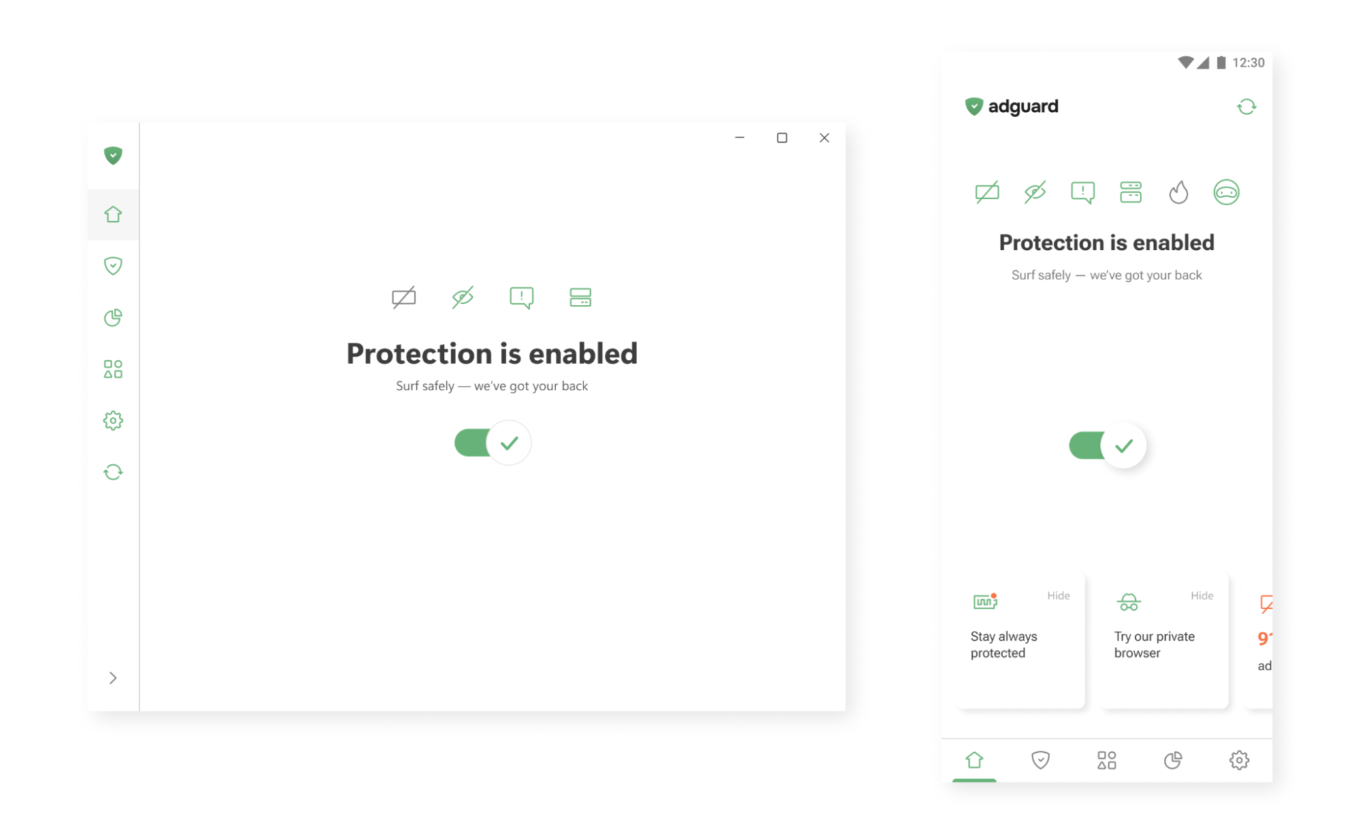
One button to enable protection

Active care → Help that’s always there

In our apps, you’ll often find small hints, tooltips, and summaries. Where needed, we add short explanations or links to longer articles — so you can dive deeper when you want to.
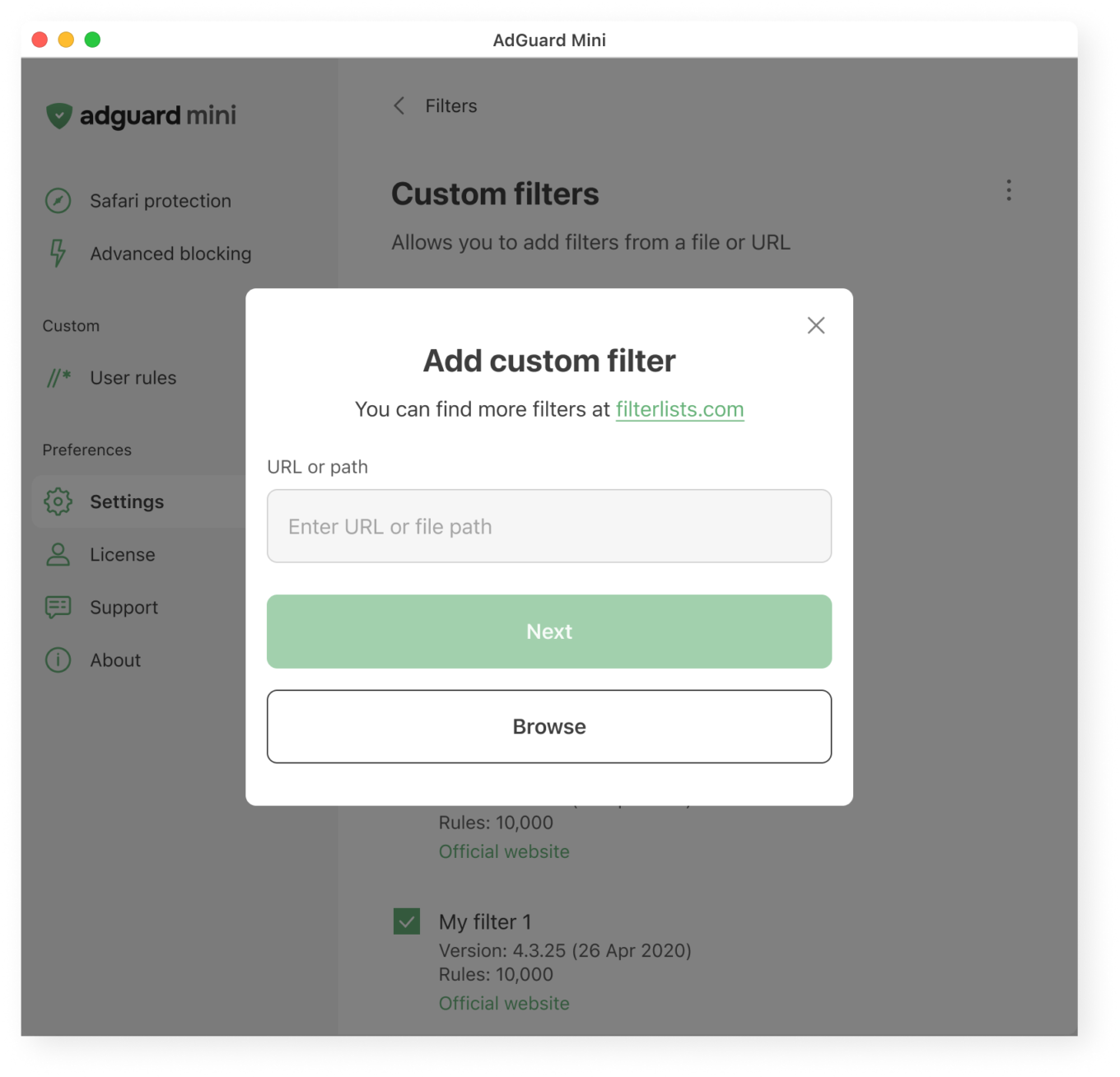
What users see when adding a custom filter

User control → Deep functionality, optional complexity

Most of our apps are layered. If you want to just turn on protection and move on, that’s great. If you want to dig deeper, you’ll find detailed settings, expert modes, and customizations. Your control is not necessary, but if you seek it, we’ll do our best to provide it to you.
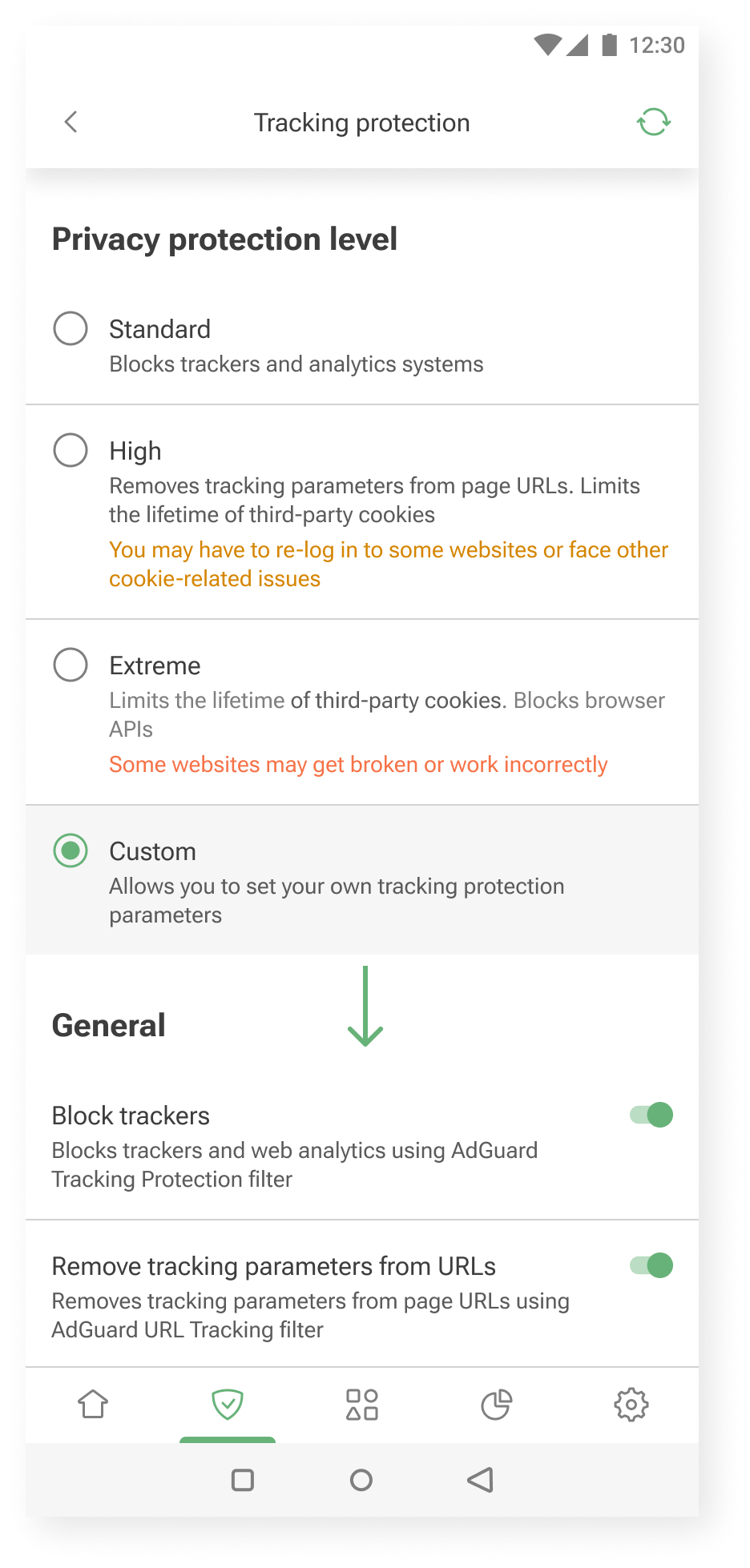
Additional settings are shown when you choose to customize further *mobile
Additional settings are shown when you choose to customize further

Our audience: How we approach different needs

Not everyone uses AdGuard the same way.

Some want to set it and forget it. Others enjoy tweaking settings and learning more about how privacy works. We try to support both.

Here’s how we approach it.

Layered experience

You can think of our apps as layered systems:

  • Simple on the surface — for those who want quick protection
  • Customizable in the middle — for those who are curious to learn and tweak things a bit
  • Deeply configurable — for power users who want full control without hand-holding

This approach helps us keep the UI clean, while still offering depth for those who need it.

One example is our User rules feature — a tool that allows users to create custom filtering rules.

Our previous approach was designed for advanced users only. There was a blank input field and a link to the documentation.
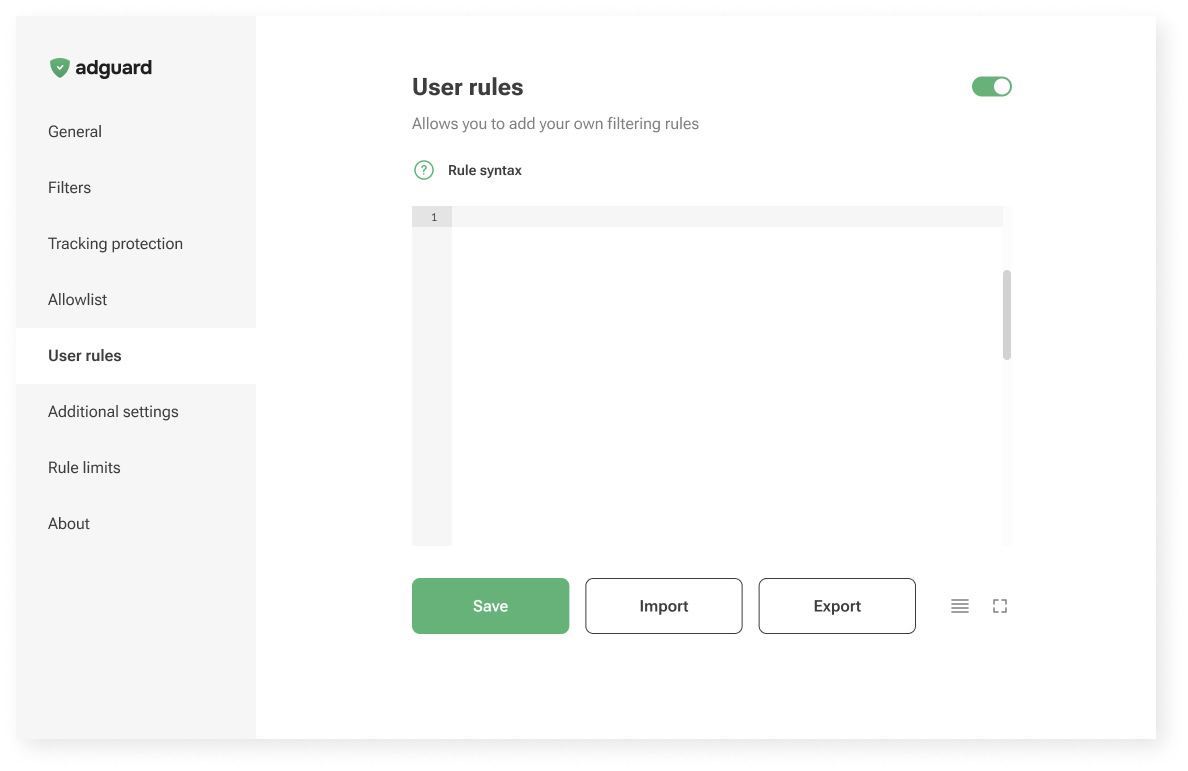
Old User rules unterface

Now, in AdGuard Mini for Mac, we’re trying something new: a guided interface that walks you through the process.
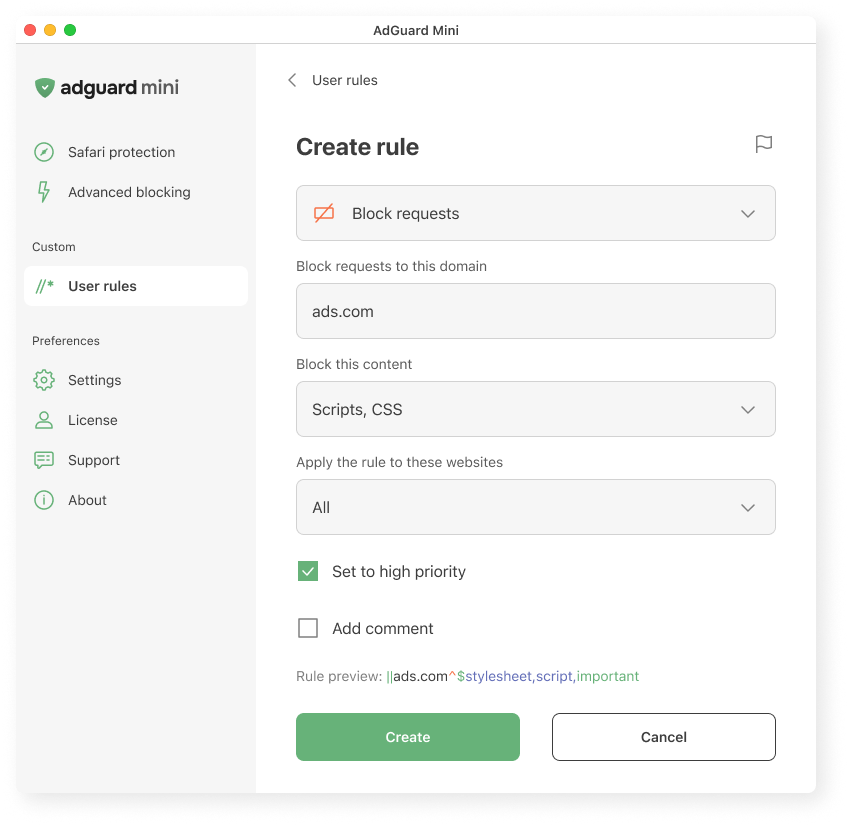
Creating a user rule in AdGuard Mini for Mac
Creating a user rule in AdGuard Mini for Mac

We explain what the rule does, where it applies, and how it works. We hope this makes it easier to get started, even if you’ve never written a rule before.

Let us know what you think: is it clear? Easy to follow? Missing something? Your feedback helps us decide whether to bring this approach to other platforms too.

Vocabulary

To meet users where they are, we adjust the vocabulary based on how familiar they might be with the topic and what they’re trying to achieve.

  • AdGuard protects you from ads and trackers — for those who just want peace of mind online. This works well when the user’s goal is simple: “I want the ads gone,” or “I want to feel safer.”
  • AdGuard blocks known analytics and phishing domains — for users who already understand the basics of online threats and want more transparency: “I know different types of tracking and risks exist, and I want to manage them more consciously.”
  • AdGuard lets you apply advanced cosmetic rules and scriptlets from custom lists — for experienced users who want full control, less explanations and more just tools: “I know what I’m doing; just let me configure it.”

Feedback: Where we learn what works

We’re constantly learning from you — and trying to reflect that in the product.

Sometimes the insights come from anonymous usage data. For example, we noticed that some users were ignoring the “card” about HTTPS filtering on the main screen. Without HTTPS filtering, however, most ads cannot be blocked. So we changed the wording on that “card” — and the result was immediate: the number of users who enabled the feature increased by about one and a half times.
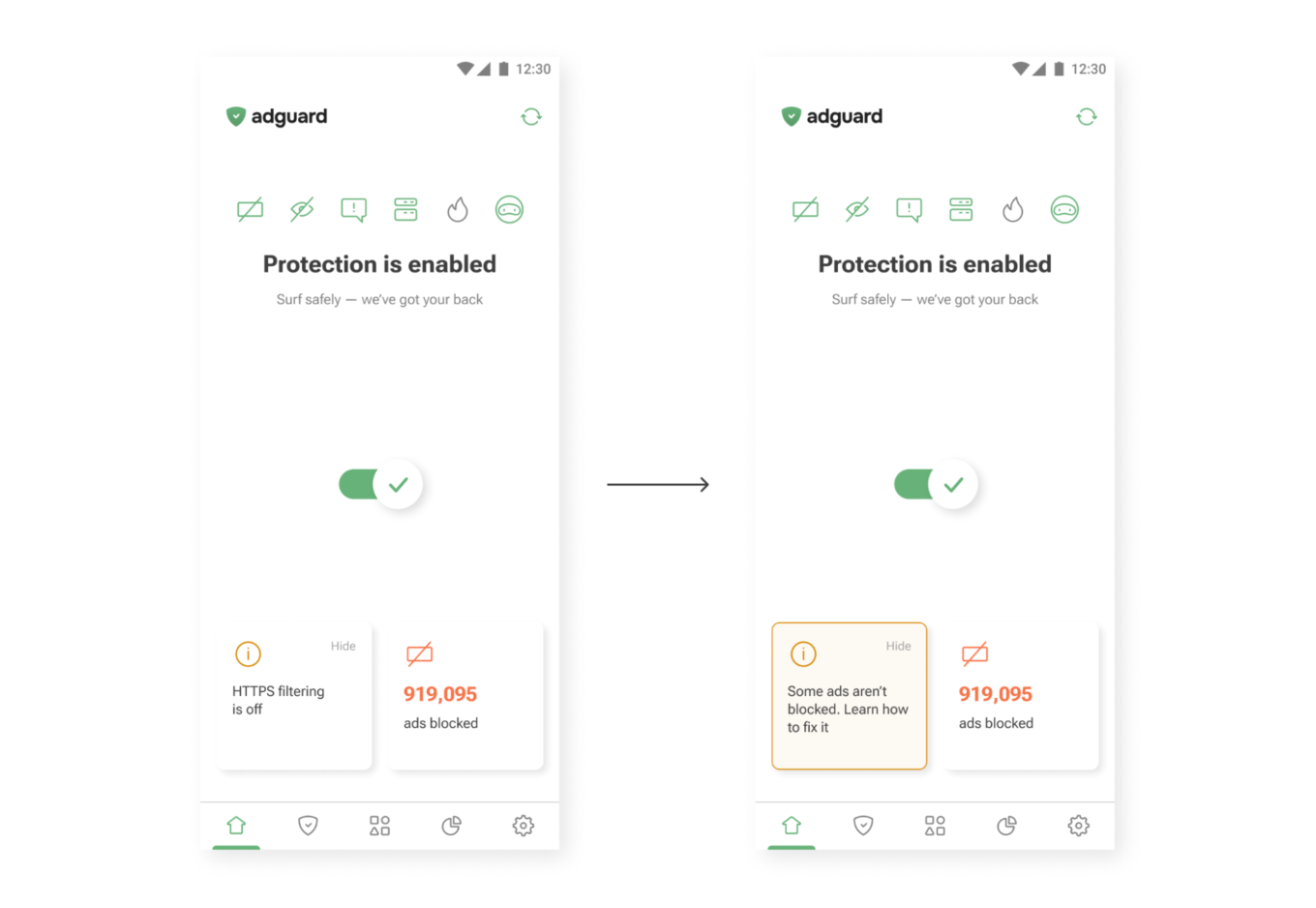
New wording on the main screen
New wording (right) drives more taps than the old one (left)

Sometimes feedback comes from support requests. One user once asked where they could find their VPN license key. The thing is, AdGuard VPN doesn’t use license keys — the subscription is simply tied to the email address used for purchase. So we added a short explanation to the confirmation email that users receive after buying a license. After that, questions about VPN license keys practically disappeared.
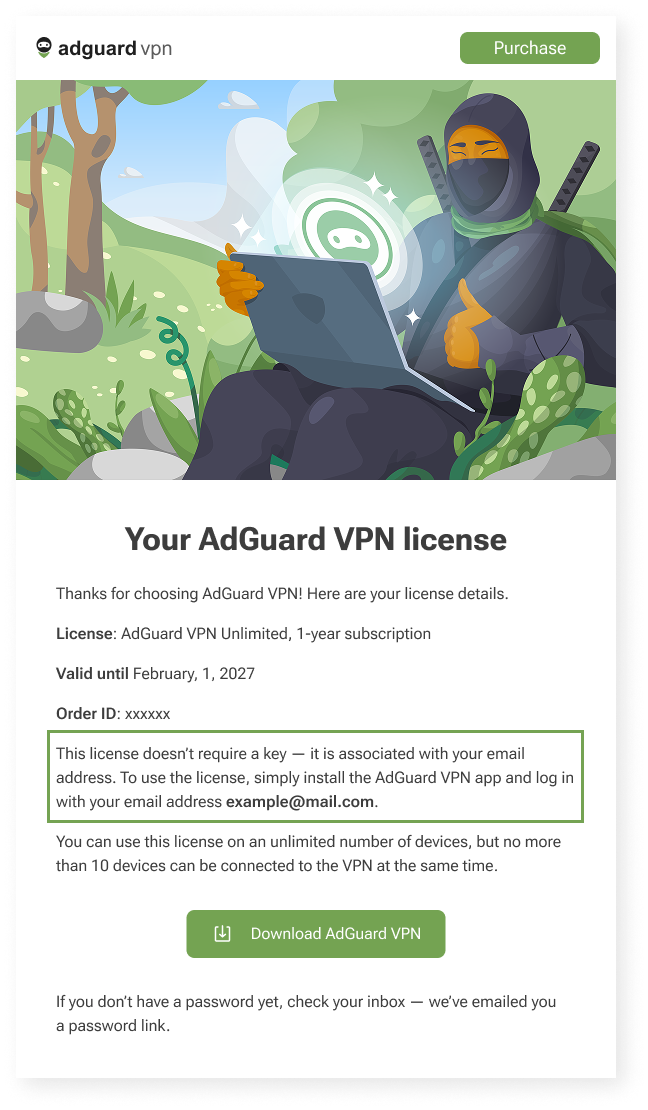
Post-purchase email for AdGuard VPN users *mobile
Post-purchase email for AdGuard VPN users

Constraints

We can’t implement every idea we come up with — and that’s not a bad thing. Constraints shape our work and help us better understand how and what to communicate to users. Here are a few examples of these constraints — and how we deal with them.

We’d love for all our texts to be friendly and concise, but in some cases we need to be legally precise to avoid any ambiguity. That’s why you may come across legal wording in our products — but whenever possible, we also provide a shorter, clearer summary to help you understand it quickly.
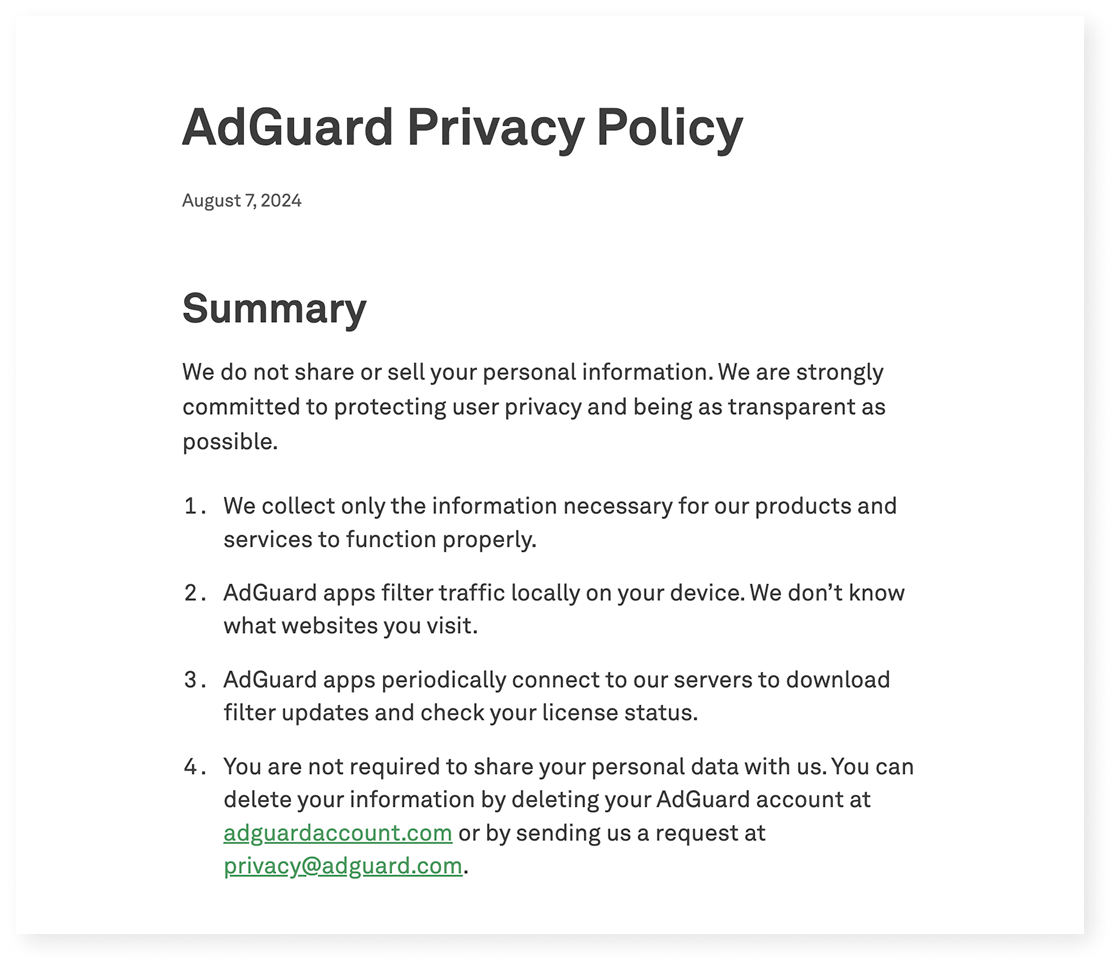
Excerpt from AdGuard’s Privacy policy

Localization

We build products for a global audience, and they are translated into 20+ languages. Even though we try to cover as many languages as possible, there will always be users who interact with our apps in a language that isn’t their native one. That means when we write in English, we have to keep in mind that not only native speakers will read it:

  • Vocabulary and syntax shouldn’t be too complex
  • We avoid local jokes, idioms, and wordplay that only native speakers would understand

Another constraint is how translation works in practice. We have several in-house translators and a group of dedicated volunteers who help us a lot (you can join too — read how). But in some cases, we have to rely on machine translation — and it’s much harder to provide context there.

This leads to a few additional rules:

  • Limit the amount of information in one message — English words are often shorter than their equivalents in other languages
  • Whenever possible, write in full sentences and avoid ending strings with prepositions — this can make translation more difficult

Let’s take another look at the User rules section.

When we were designing it, our initial idea was to make it feel like natural English: “Block request to ads.com.”

But in many languages, that structure wouldn’t work:

  • Slavic languages use grammatical cases
  • Turkic languages use postpositions, not prepositions
  • Asian languages often require more context

So we rewrote it as “Block requests to this domain.” It’s longer, but clearer for most of the users — and translators.
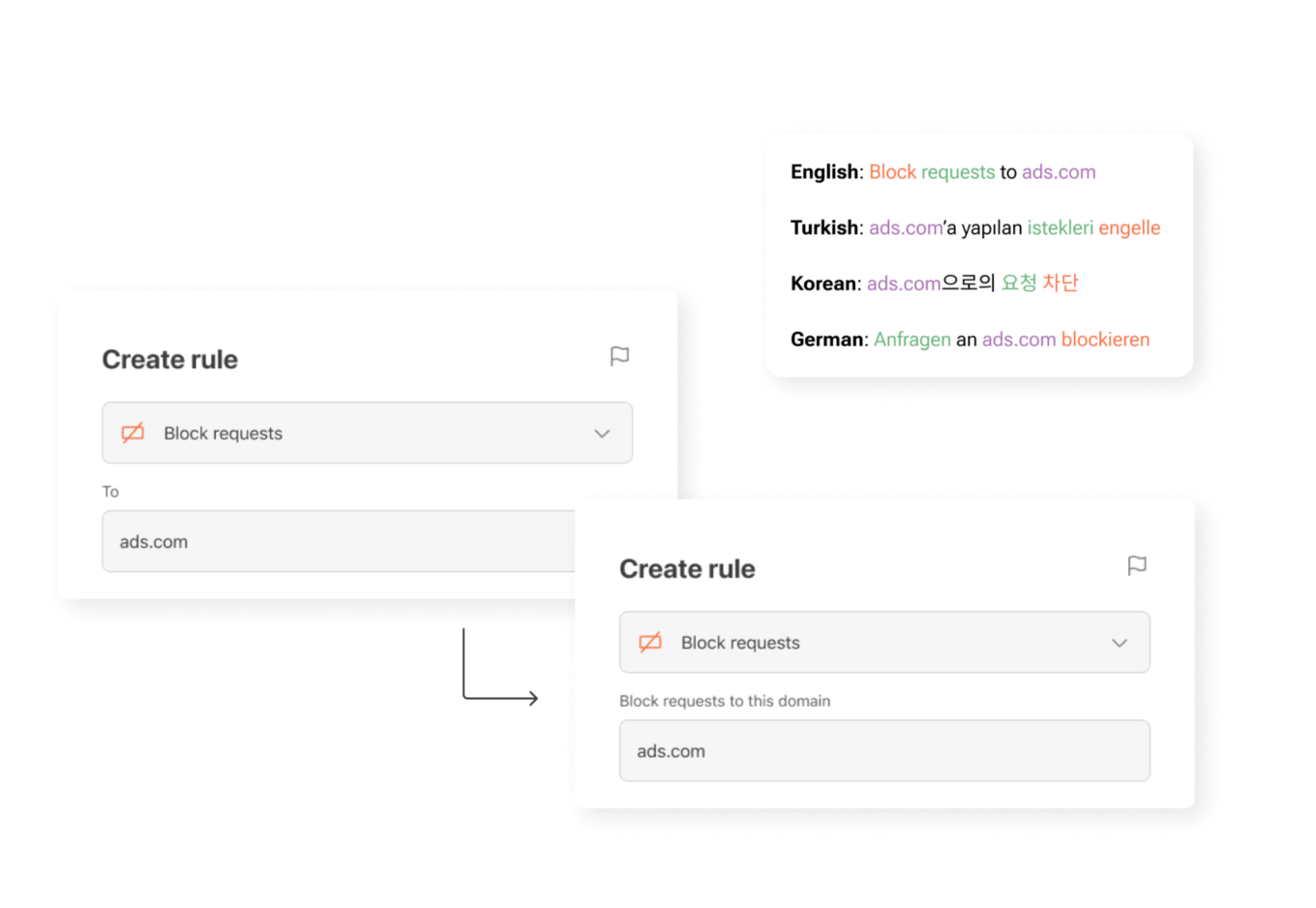
UI element for creating new rules in different languages

What’s next — and how you can help

Here’s a funny paradox: we’re a privacy company, so we collect as little data as possible. But that makes it harder to know which parts of our apps are most useful and which are confusing. We’re working on privacy-friendly ways to learn more about how you use AdGuard — so we can make things simpler, clearer, and more useful.

One small thing you can do to help: turn on the setting called Send anonymized app usage data. You’ll find it in AdGuard Ad Blocker, AdGuard VPN, and AdGuard Mail.

This option doesn’t send anything personal. We don’t collect identifiers, track you, or share your data with anyone. But it does help us see which screens people interact with — and which features need improvement.

Our next step is to rely more on insights like these when making product decisions. They help us see what really matters to users — and guide us in making AdGuard apps even clearer, more intuitive, and more helpful for you.

If you see something confusing — or something that worked well for you on our apps and websites — please let us know by clicking the button below.

We use every opportunity to make our apps clearer, more helpful, and closer to what you actually need!


Piditkö tästä julkaisusta?
AdGuard VPN AdGuard DNS AdGuard Mail AdGuard Wallet
AdGuard for Windows -sovelluksen päänäyttö
AdGuard for Windows -sovelluksen Suojaus-näyttö, joka näyttää suojausominaisuudet ja asetukset
AdGuard for Windows -sovelluksen Tilastot-näyttö, joka näyttää tilastot estetyistä mainoksista ja seurannasta
AdGuard for Windows -sovelluksen Sovellusten hallinta -näyttö, joka näyttää laitteelle asennettujen sovellusten suojauksen hallintavaihtoehdot
20 390 20390 arvostelua
Erinomainen!

AdGuard: mainosten estäjä Windowsille

AdGuard Windowsille on enemmän kuin mainosten estäjä. Se on monikäyttöinen työkalu, joka estää mainoksia, hallitsee pääsyä vaarallisille sivustoille, nopeuttaa sivujen latautumista ja suojaa lapsia sopimattomalta sisällöltä
Lataamalla sovelluksen hyväksyt lisenssisopimuksen ehdot
Microsoft Store
Lataamalla sovelluksen hyväksyt lisenssisopimuksen ehdot
AdGuard Windowsille v8.0, 14 päivän kokeilujakso
AdGuard for Mac -sovelluksen päänäyttö
AdGuard for Macin Häivetilan näyttö
20 390 20390 arvostelua
Erinomainen!

AdGuard: mainosten estäjä Macille

AdGuard for Mac on ainutlaatuinen mainostenesto-ohjelma, joka on suunniteltu macOS:lle. Sen lisäksi, että se suojaa sinua häiritseviltä mainoksilta selaimissa ja sovelluksissa, se suojaa sinua seurannalta, tietojenkalastelulta ja petoksilta
Lataamalla sovelluksen hyväksyt lisenssisopimuksen ehdot
Lue lisää
AdGuard Macille v2.19, 14 päivän kokeilujakso
AdGuard for Android -sovelluksen päänäyttö
AdGuard for Android -sovelluksen Seurantasuojaus-näyttö
AdGuard for Android -sovelluksen Sovellusten hallinta -näyttö, joka näyttää laitteelle asennettujen sovellusten suojauksen hallintavaihtoehdot
AdGuard for Android -sovelluksen Tilastot-näyttö, joka näyttää tilastot estetyistä mainoksista ja seurannasta
AdGuardin yksityisen selaimen päänäyttö Androidille
QR-koodi AdGuard for Android -sovelluksen lataamiseen
20 390 20390 arvostelua
Erinomainen!

AdGuard: mainosten estäjä Androidille

Estää mainokset ja seurannan kaikissa selaimissa, peleissä ja muissa sovelluksissa. Suojaa yksityisyyttäsi ja antaa sinun hallita, miten sovelluksesi käyttävät Internetiä. Asennetaan APK-tiedostona
Lataamalla sovelluksen hyväksyt lisenssisopimuksen ehdot
Lue lisää
Lataa lukemalla koodi
Käytä mitä tahansa laitteellasi olevaa QR-koodilukijaa
AdGuard Androidille v4.14, 14 päivän kokeilujakso
AdGuard for iOS -sovelluksen päänäyttö
AdGuard for iOS -sovelluksen Suojaus-näyttö, joka näyttää suojausominaisuudet ja asetukset
AdGuard for iOS -sovelluksen Tilastot-näyttö, joka näyttää tilastot estetyistä mainoksista ja seurannasta
QR-koodi AdGuard for iOS -sovelluksen lataamiseen
20 390 20390 arvostelua
Erinomainen!

AdGuard: mainosten estäjä iOS:lle

Paras iOS-mainostenesto iPhonelle ja iPadille. AdGuard poistaa kaikenlaiset mainokset ja seurantatyökalut Safarissa ja suojaa yksityisyyttäsi kaikissa sovelluksissa DNS-tasolla
Lataamalla sovelluksen hyväksyt lisenssisopimuksen ehdot
Lue lisää
Lataa lukemalla koodi
Käytä mitä tahansa laitteellasi olevaa QR-koodilukijaa
AdGuard iOS:lle v4.5
AdGuard Content Blocker -sovelluksen päänäyttö
AdGuard Content Blocker -sovelluksen Suodattimet-näyttö
AdGuard Content Blocker -sovelluksen Asetukset-näyttö
20 390 20390 arvostelua
Erinomainen!

AdGuard Sisällönesto

AdGuard Content Blocker eliminoi kaikenlaiset mainokset mobiiliselaimissa, jotka tukevat sisällönesto-tekniikkaa — eli Samsung Internet- ja Yandex Browser -selaimissa. Sen ominaisuudet ovat rajatummat verrattuna AdGuard Androidille -sovellukseen, mutta se on ilmainen, helppo asentaa ja tehokas
Lataamalla sovelluksen hyväksyt lisenssisopimuksen ehdot
Lue lisää
AdGuard Sisällönesto v2.8
AdGuard Browser Extension -laajennuksen päänäyttö
AdGuard Browser Extension -laajennuksen Seurantasuojaus-näyttö
20 390 20390 arvostelua
Erinomainen!

AdGuard Selainlaajennus

AdGuard on nopein ja kevein mainosestolaajennus, joka estää tehokkaasti kaikentyyppiset mainokset kaikilla verkkosivuiilla! Valitse AdGuard käyttämällesi selaimelle ja nauti mainosvapaasta, nopeasta ja turvallisesta surffailusta.
Asenna
Lataamalla sovelluksen hyväksyt lisenssisopimuksen ehdot
Asenna
Lataamalla sovelluksen hyväksyt lisenssisopimuksen ehdot
Asenna
Lataamalla sovelluksen hyväksyt lisenssisopimuksen ehdot
Asenna
Lataamalla sovelluksen hyväksyt lisenssisopimuksen ehdot
Asenna
Lataamalla sovelluksen hyväksyt lisenssisopimuksen ehdot
Lue lisää
Asenna
Lataamalla sovelluksen hyväksyt lisenssisopimuksen ehdot
Lue lisää
AdGuard Selainlaajennus v5.5
AdGuard Assistant -sovelluksen päänäyttö
20 390 20390 arvostelua
Erinomainen!

AdGuard Avustaja

Selaimen lisälaajennus AdGuard-työpöytäsovelluksille. Sen avulla voit estää omia kohteita verkkosivustoilla, lisätä verkkosivustoja sallittujen listalle ja lähettää raportteja suoraan selaimesta
AdGuard Avustaja v1.4
20 390 20390 arvostelua
Erinomainen!

AdGuard Home

AdGuard Home on verkkopohjainen ratkaisu mainosten ja seurantalaitteiden estämiseen. Asenna se kerran reitittimeesi kattaaksesi kaikki kotiverkon laitteet – erillistä asiakasohjelmistoa ei tarvita. Tämä on erityisen tärkeää erilaisille IoT-laitteille, jotka usein uhkaavat yksityisyyttäsi
AdGuard Home v0.107
AdGuard Pro for iOS -sovelluksen päänäyttö
AdGuard Pro for iOS -sovelluksen Suojaus-näyttö, joka näyttää suojauksen ominaisuudet ja asetukset
AdGuard Pro for iOS -sovelluksen Tilastot-näyttö, joka näyttää estettyjen mainosten ja seurannan tilastot
20 390 20390 arvostelua
Erinomainen!

AdGuard Pro iOS:lle

AdGuard Pro for iOS sisältää kaikki kehittyneet mainosten eston suojausominaisuudet käytössä. Se tarjoaa samat työkalut kuin maksullinen AdGuard for iOS -versio. Se on erinomainen mainosten estämisessä Safarissa ja antaa sinun mukauttaa DNS-asetuksia räätälöidäksesi suojauksesi. Se estää mainokset selaimissa ja sovelluksissa, suojaa lapsiasi sopimattomalta sisällöltä ja pitää henkilötietosi turvallisina.
Lataamalla sovelluksen hyväksyt lisenssisopimuksen ehdot
Lue lisää
AdGuard Pro iOS:lle v4.5
AdGuard Mini for Mac -sovelluksen päänäyttö
AdGuard Mini for Mac -sovelluksen Safari-suojausnäyttö
AdGuard Mini for Mac -sovelluksen Luo sääntö -näyttö
20 390 20390 arvostelua
Erinomainen!

AdGuard Mini Macille — Safari-mainosesto

AdGuard Mini for Mac on tehokas Safari-mainosten estäjä. Tämä kevyt sovellus poistaa mainokset, estää seurannan ja nopeuttaa sivujen latautumista. Se auttaa sinua selaamaan verkkoa Safarissa keskeytyksettä ja pitämään tietosi yksityisinä
Asenna
Lataamalla sovelluksen hyväksyt lisenssisopimuksen ehdot
Lue lisää
AdGuard Mini Macille v2.3
AdGuard for Android TV -sovelluksen päänäyttö, jossa suojaus on käytössä
AdGuard for Android TV -sovelluksen mainosten esto -näyttö, joka näyttää sen ominaisuudet ja asetukset
AdGuard for Android TV -sovelluksen Asetukset-näyttö
AdGuard for Android TV -sovelluksen Sovellusten hallinta -näyttö, joka näyttää sovellukset, joissa mainokset ja seuranta on estetty
20 390 20390 arvostelua
Erinomainen!

AdGuard Android TV:lle

AdGuard Android TV:lle on ainoa sovellus, joka estää mainoksia, suojaa yksityisyyttäsi ja toimii älytelevisiosi palomuurina. Saat varoituksia verkkouhkista, voit käyttää suojattua DNS:ää ja hyötyä tietoliikenteen salauksesta. Rentoudu ja sukella suosikkisarjoihisi huippuluokan suojauksella ja mainoksetta!
AdGuard Android TV:lle v4.14, 14 päivän kokeilujakso
AdGuard-maskotti Agnar pitelee Linux-pingviiniä
20 390 20390 arvostelua
Erinomainen!

AdGuard Linuxille

AdGuard for Linux on maailman ensimmäinen järjestelmänlaajuinen Linux-mainosten esto-ohjelma. Estä mainokset ja seurantaohjelmat laitetasolla, valitse esiasennetuista suodattimista tai lisää omasi – kaikki tämä komentorivikäyttöliittymän kautta
AdGuard Linuxille v1.4
20 390 20390 arvostelua
Erinomainen!

AdGuard Temp Mail

Ilmainen tilapäisten sähköpostiosoitteiden generaattori, joka pitää sinut nimettömänä ja suojaa yksityisyyttäsi. Ei roskapostia pääpostilaatikossasi!
20 390 20390 arvostelua
Erinomainen!

AdGuard VPN

75 sijaintia ympäri maailman

Pääsy kaikkeen sisältöön

Vahva salaus

Ei lokitietoja

Nopein yhteys

24/7 tuki

Kokeile ilmaiseksi
Lataamalla sovelluksen hyväksyt lisenssisopimuksen ehdot
Lue lisää
20 390 20390 arvostelua
Erinomainen!

AdGuard DNS

AdGuard DNS on takuuvarma tapa Internet-mainosten estoon, eikä se vaadi edes sovellusten asennusta. Se on helppokäyttöinen, täysin ilmainen, helppo määrittää laitteisiin ja tarjoaa minimaalisen toiminnallisuuden mainosten, laskureiden, haitallisten sivustojen ja aikuisille tarkoitetun sisällönestoon.
20 390 20390 arvostelua
Erinomainen!

AdGuard Mail

Suojaa henkilöllisyytesi, vältä roskapostia ja pidä postilaatikkosi turvallisena aliaksillamme ja väliaikaisilla sähköpostiosoitteilla. Käytä ilmaista sähköpostin välityspalveluamme ja sovelluksiamme kaikille käyttöjärjestelmille
20 390 20390 arvostelua
Erinomainen!

AdGuard Wallet

Turvallinen ja yksityinen kryptolompakko, joka antaa sinulle täyden hallinnan varoistasi. Hallitse useita lompakoita ja löydä tuhansia kryptovaluuttoja tallennettavaksi, lähetettäväksi ja vaihdettavaksi
AdGuardin lataus Asenna AdGuard painamalla nuolen osoittamaa painiketta Valitse "Avaa", paina "OK" ja odota tiedoston latautumista. Avautuneessa ikkunassa, raahaa AdGuardin kuvake "Sovellukset" -kansioon. Kiitos AdGuardin valinnasta! Valitse "Avaa", paina "OK" ja odota tiedoston latautumista. Avautuneessa ikkunassa, paina "Asenna". Kiitos AdGuardin valinnasta!
Asenna AdGuard myös mobiililaitteille

















































