TikTok, Meta, X, and others exploit push notifications on iOS to collect data about users

Apple has long said that fingerprinting — tracking a user through the hardware and software features of their device — is not allowed. But apparently some popular apps have found a backdoor that they are exploiting in plain sight.

Privacy researcher Tommy Mysk has discovered that a number of popular iOS apps are using a push notification feature, first introduced in 2016, to send detailed data about the user’s device to their companies’ servers.

Mysk explained that he noticed this disturbing and seemingly persistent pattern when he examined several social media apps, including TikTok, Facebook, FB Messenger, Instagram, Threads, and X. All of these apps took advantage of the feature that allowed them to customize their push notifications even when not running.

This feature is not intrinsically malicious and serves an important purpose. For example, it can be useful for apps that need to decode the notification payload or download additional content to best present the notification to the user. When an app receives a push notification, iOS signals the app to wake up and run for a short time. During this time, the app can do whatever the developer wants, including tweaking the push notification’s appearance in some way. The latter would be the original purpose of the feature, but the problem is that the app may also be collecting data or sending information about the user during that time.

Mysk has observed that the apps he has studied have learned to take full advantage of this limited run time to collect data from the device and send that data to remote servers. The researcher calls the ability to run code in the background “a gold mine for data-hungry apps.”

So how does it all work, according to Mysk?

  • The app developer comes up with a code they want the app to run in the background
  • The developer sends a push notification to the user of the app. The push can be about anything, from a news update, a live sports score to a new friend request
  • The user’s device receives the push notification, but does not show it on the screen yet. iOS recognizes that the push notification is from the social app and wakes it up in the background. The app is now running, but the user can’t see it or interact with it
  • The app runs the code that the developer has prepared in the background. And while it may be innocuous, for example, be used to add more information, such as images, to the notification, it can also be used to harvest data from the user’s device and send that data to the developer’s servers

This scheme can provide developers with a unique combination of the software and hardware characteristics of the user’s device.

Many apps are using this feature as an opportunity to send detailed device information while running quietly in the background. This includes: system uptime, locale, keyboard language, available memory, battery status, device model, display brightness, to mention a few.

This data can subsequently be used to track the user across applications, Mysk points out.

What data is being collected?

In the video describing the examples of such trickery, Mysk shows the types of data that can be collected by social media companies through the push notification loophole. The collection is done either through the company’s own services or with the help of third-party tools, such as Google’s analytics tools — Google Analytics and Firebase.
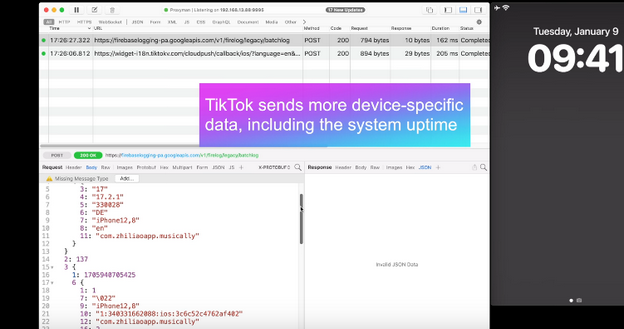
TikTok

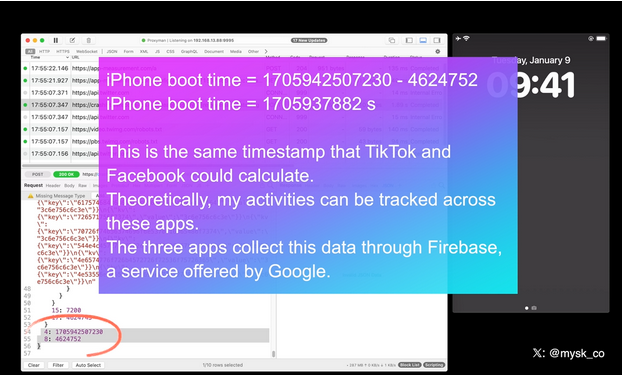
With TikTok, for example, the app sends the iPhone’s boot time to the remote servers every time it receives a push notification.
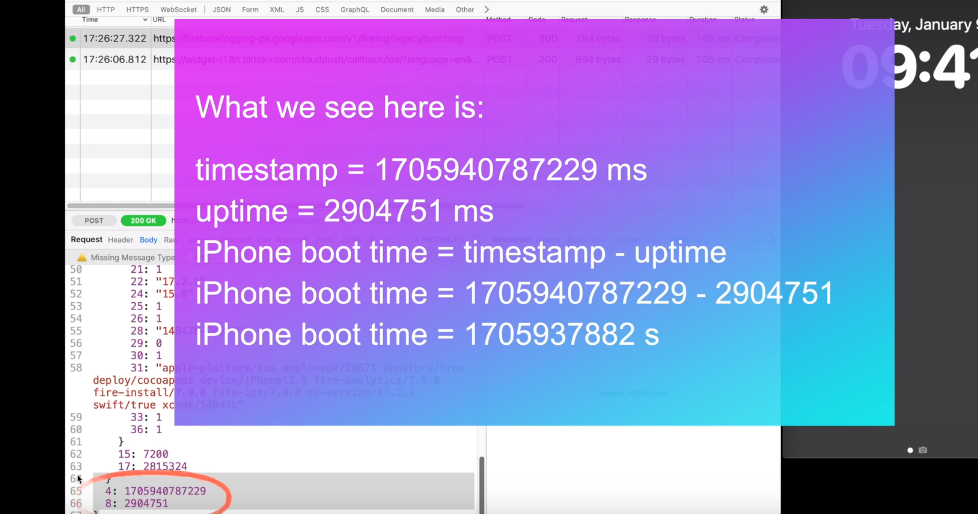
TikTok sends a lot of data to external servers

That means that TikTok knows exactly when the user last restarted their iPhone. If collected over a period of time, the boot time can tell how often the user reboots their iPhone, which can indicate how much they use it or how stable it is. It can be also used to identify the user’s device or track their activity.

When the Facebook app sends a push notification to the same device, Facebook receives the same data about the user’s iPhone last boot time.
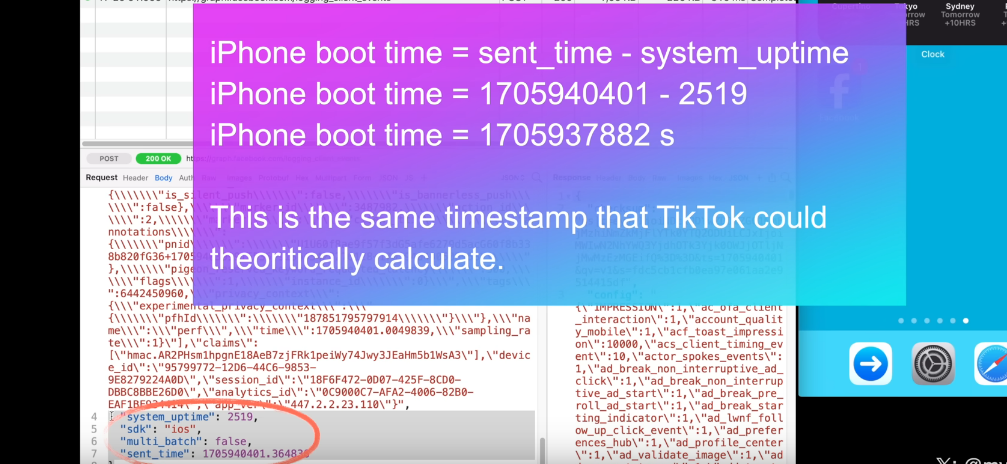
Facebook

As the researcher notes, this may facilitate tracking the user across different apps. That is because the boot time can be used as a unique identifier for the user’s device. If the same device has multiple apps that collect and send the boot time to the same or different servers, these servers can compare the boot time data and link it to the same device. This way, they can track the user’s behavior and preferences across different apps, even if the user does not use the same account or login information for each app. All of this makes the exploitation of the push notification feature by social media companies a legitimate privacy threat.

Moreover, Mysk notes that some apps, for example Facebook and TikTok, also send data when clearing their notifications in Notification Center, which is an iOS feature that provides an overview of alerts from applications.

For example, when a user clears a Facebook notification, the app sends a request with detailed information, including the information about available memory, the last app event, such as liking a post, the time since last app event, the actor ID, that identifies the user’s account on Facebook, the preferred content size, the timestamp (i.e. the exact date and time) when the notification was cleared, the connection type, and so forth.
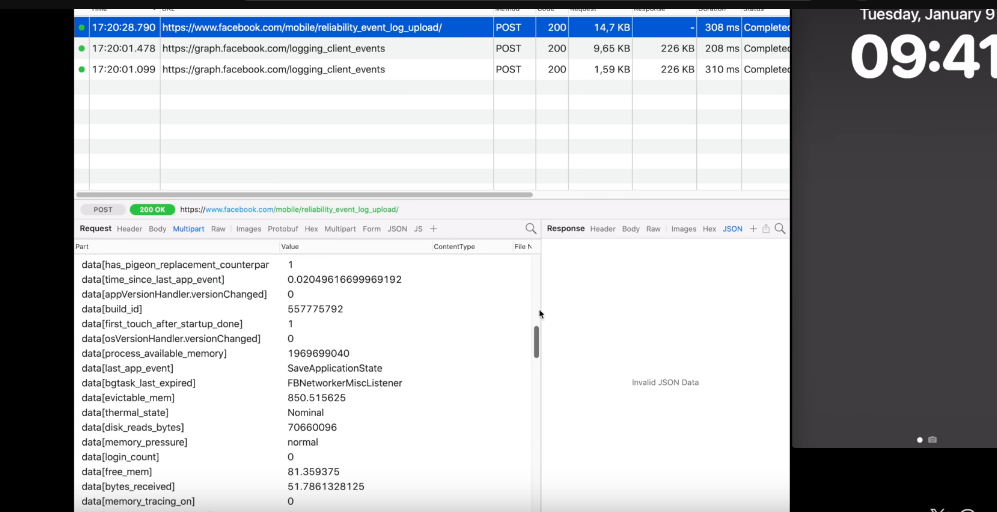
When a user clear a Facebook notification, the app sends detailed information about the user to the external servers

Twitter (X) handles the collection of the user’s information more or less the same way as Facebook and TikTok do.
X/Twitter

All three companies are using Firebase, a service offered by Google, Mysk notes, adding that “the frequency at which many apps send device information after being triggered by a notification is mind-blowing.”

New Apple rule for devs: what will they change?

Mysk pins a lot of hopes on the new rules for developers that Apple has put in place and that will come into effect this spring. As it unveiled the rules, Apple announced that developers would need to explain why their apps have to use certain APIs (Application Programming Interfaces), which are methods for different apps to communicate and share data.

The developers will have to explain why they need to access device information not only for their own code, but also for third-party SDKs (software development kits) that they add to their apps. Both apps and third-party SDKs will need to write one or more “approved reasons” for why they need to access device information through specific APIs in separate documents called “privacy manifest files.” These reasons should be “consistent with the app’s functionality.” We wrote a detailed review of Apple’s new requirement for developers in August — check it out here.

But the question is, will it stop companies from harvesting data from apps through the push notification backdoor? In theory, it should, but only if Apple seriously enforces these rules and monitors developers’ compliance. Which is by no means guaranteed.

We believe that the new rules will improve the situation, but by how much? It is a difficult question with many variables. Developers will have to take the new rules into account, so there’s a chance they’ll try to follow them in good faith. However, those who are hell-bent on continuing to collect this data will likely choose to take risks. And then it’ll be up to Apple and its reviewers to catch these apps in the act.

In any case, we hope Apple takes a proactive and transparent approach to privacy enforcement, or users’ data will continue to be at risk.


Piditkö tästä julkaisusta?
AdGuard VPN AdGuard DNS AdGuard Mail AdGuard Wallet
AdGuard for Windows -sovelluksen päänäyttö
AdGuard for Windows -sovelluksen Suojaus-näyttö, joka näyttää suojausominaisuudet ja asetukset
AdGuard for Windows -sovelluksen Tilastot-näyttö, joka näyttää tilastot estetyistä mainoksista ja seurannasta
AdGuard for Windows -sovelluksen Sovellusten hallinta -näyttö, joka näyttää laitteelle asennettujen sovellusten suojauksen hallintavaihtoehdot
20 390 20390 arvostelua
Erinomainen!

AdGuard: mainosten estäjä Windowsille

AdGuard Windowsille on enemmän kuin mainosten estäjä. Se on monikäyttöinen työkalu, joka estää mainoksia, hallitsee pääsyä vaarallisille sivustoille, nopeuttaa sivujen latautumista ja suojaa lapsia sopimattomalta sisällöltä

Lataamalla sovelluksen hyväksyt lisenssisopimuksen ehdot
Microsoft Store
Lataamalla sovelluksen hyväksyt lisenssisopimuksen ehdot
AdGuard Windowsille v8.0, 14 päivän kokeilujakso
AdGuard for Mac -sovelluksen päänäyttö
AdGuard for Macin Häivetilan näyttö
20 390 20390 arvostelua
Erinomainen!

AdGuard: mainosten estäjä Macille

AdGuard for Mac on ainutlaatuinen mainostenesto-ohjelma, joka on suunniteltu macOS:lle. Sen lisäksi, että se suojaa sinua häiritseviltä mainoksilta selaimissa ja sovelluksissa, se suojaa sinua seurannalta, tietojenkalastelulta ja petoksilta
Lataamalla sovelluksen hyväksyt lisenssisopimuksen ehdot
Lue lisää
AdGuard Macille v2.19, 14 päivän kokeilujakso
AdGuard for Android -sovelluksen päänäyttö
AdGuard for Android -sovelluksen Seurantasuojaus-näyttö
AdGuard for Android -sovelluksen Sovellusten hallinta -näyttö, joka näyttää laitteelle asennettujen sovellusten suojauksen hallintavaihtoehdot
AdGuard for Android -sovelluksen Tilastot-näyttö, joka näyttää tilastot estetyistä mainoksista ja seurannasta
AdGuardin yksityisen selaimen päänäyttö Androidille
QR-koodi AdGuard for Android -sovelluksen lataamiseen
20 390 20390 arvostelua
Erinomainen!

AdGuard: mainosten estäjä Androidille

Estää mainokset ja seurannan kaikissa selaimissa, peleissä ja muissa sovelluksissa. Suojaa yksityisyyttäsi ja antaa sinun hallita, miten sovelluksesi käyttävät Internetiä. Asennetaan APK-tiedostona
Lataamalla sovelluksen hyväksyt lisenssisopimuksen ehdot
Lue lisää
Lataa lukemalla koodi
Käytä mitä tahansa laitteellasi olevaa QR-koodilukijaa
AdGuard Androidille v4.14, 14 päivän kokeilujakso
AdGuard for iOS -sovelluksen päänäyttö
AdGuard for iOS -sovelluksen Suojaus-näyttö, joka näyttää suojausominaisuudet ja asetukset
AdGuard for iOS -sovelluksen Tilastot-näyttö, joka näyttää tilastot estetyistä mainoksista ja seurannasta
QR-koodi AdGuard for iOS -sovelluksen lataamiseen
20 390 20390 arvostelua
Erinomainen!

AdGuard: mainosten estäjä iOS:lle

Paras iOS-mainostenesto iPhonelle ja iPadille. AdGuard poistaa kaikenlaiset mainokset ja seurantatyökalut Safarissa ja suojaa yksityisyyttäsi kaikissa sovelluksissa DNS-tasolla
Lataamalla sovelluksen hyväksyt lisenssisopimuksen ehdot
Lue lisää
Lataa lukemalla koodi
Käytä mitä tahansa laitteellasi olevaa QR-koodilukijaa
AdGuard iOS:lle v4.5
AdGuard Content Blocker -sovelluksen päänäyttö
AdGuard Content Blocker -sovelluksen Suodattimet-näyttö
AdGuard Content Blocker -sovelluksen Asetukset-näyttö
20 390 20390 arvostelua
Erinomainen!

AdGuard Sisällönesto

AdGuard Content Blocker eliminoi kaikenlaiset mainokset mobiiliselaimissa, jotka tukevat sisällönesto-tekniikkaa — eli Samsung Internet- ja Yandex Browser -selaimissa. Sen ominaisuudet ovat rajatummat verrattuna AdGuard Androidille -sovellukseen, mutta se on ilmainen, helppo asentaa ja tehokas
Lataamalla sovelluksen hyväksyt lisenssisopimuksen ehdot
Lue lisää
AdGuard Sisällönesto v2.8
AdGuard Browser Extension -laajennuksen päänäyttö
AdGuard Browser Extension -laajennuksen Seurantasuojaus-näyttö
20 390 20390 arvostelua
Erinomainen!

AdGuard Selainlaajennus

AdGuard on nopein ja kevein mainosestolaajennus, joka estää tehokkaasti kaikentyyppiset mainokset kaikilla verkkosivuiilla! Valitse AdGuard käyttämällesi selaimelle ja nauti mainosvapaasta, nopeasta ja turvallisesta surffailusta.
Asenna
Lataamalla sovelluksen hyväksyt lisenssisopimuksen ehdot
Asenna
Lataamalla sovelluksen hyväksyt lisenssisopimuksen ehdot
Asenna
Lataamalla sovelluksen hyväksyt lisenssisopimuksen ehdot
Asenna
Lataamalla sovelluksen hyväksyt lisenssisopimuksen ehdot
Asenna
Lataamalla sovelluksen hyväksyt lisenssisopimuksen ehdot
Lue lisää
Asenna
Lataamalla sovelluksen hyväksyt lisenssisopimuksen ehdot
Lue lisää
AdGuard Selainlaajennus v5.5
AdGuard Assistant -sovelluksen päänäyttö
20 390 20390 arvostelua
Erinomainen!

AdGuard Avustaja

Selaimen lisälaajennus AdGuard-työpöytäsovelluksille. Sen avulla voit estää omia kohteita verkkosivustoilla, lisätä verkkosivustoja sallittujen listalle ja lähettää raportteja suoraan selaimesta
AdGuard Avustaja v1.4
20 390 20390 arvostelua
Erinomainen!

AdGuard Home

AdGuard Home on verkkopohjainen ratkaisu mainosten ja seurantalaitteiden estämiseen. Asenna se kerran reitittimeesi kattaaksesi kaikki kotiverkon laitteet – erillistä asiakasohjelmistoa ei tarvita. Tämä on erityisen tärkeää erilaisille IoT-laitteille, jotka usein uhkaavat yksityisyyttäsi
AdGuard Home v0.107
AdGuard Pro for iOS -sovelluksen päänäyttö
AdGuard Pro for iOS -sovelluksen Suojaus-näyttö, joka näyttää suojauksen ominaisuudet ja asetukset
AdGuard Pro for iOS -sovelluksen Tilastot-näyttö, joka näyttää estettyjen mainosten ja seurannan tilastot
20 390 20390 arvostelua
Erinomainen!

AdGuard Pro iOS:lle

AdGuard Pro for iOS sisältää kaikki kehittyneet mainosten eston suojausominaisuudet käytössä. Se tarjoaa samat työkalut kuin maksullinen AdGuard for iOS -versio. Se on erinomainen mainosten estämisessä Safarissa ja antaa sinun mukauttaa DNS-asetuksia räätälöidäksesi suojauksesi. Se estää mainokset selaimissa ja sovelluksissa, suojaa lapsiasi sopimattomalta sisällöltä ja pitää henkilötietosi turvallisina.
Lataamalla sovelluksen hyväksyt lisenssisopimuksen ehdot
Lue lisää
AdGuard Pro iOS:lle v4.5
AdGuard Mini for Mac -sovelluksen päänäyttö
AdGuard Mini for Mac -sovelluksen Safari-suojausnäyttö
AdGuard Mini for Mac -sovelluksen Luo sääntö -näyttö
20 390 20390 arvostelua
Erinomainen!

AdGuard Mini Macille — Safari-mainosesto

AdGuard Mini for Mac on tehokas Safari-mainosten estäjä. Tämä kevyt sovellus poistaa mainokset, estää seurannan ja nopeuttaa sivujen latautumista. Se auttaa sinua selaamaan verkkoa Safarissa keskeytyksettä ja pitämään tietosi yksityisinä
Asenna
Lataamalla sovelluksen hyväksyt lisenssisopimuksen ehdot
Lue lisää
AdGuard Mini Macille v2.3
AdGuard for Android TV -sovelluksen päänäyttö, jossa suojaus on käytössä
AdGuard for Android TV -sovelluksen mainosten esto -näyttö, joka näyttää sen ominaisuudet ja asetukset
AdGuard for Android TV -sovelluksen Asetukset-näyttö
AdGuard for Android TV -sovelluksen Sovellusten hallinta -näyttö, joka näyttää sovellukset, joissa mainokset ja seuranta on estetty
20 390 20390 arvostelua
Erinomainen!

AdGuard Android TV:lle

AdGuard Android TV:lle on ainoa sovellus, joka estää mainoksia, suojaa yksityisyyttäsi ja toimii älytelevisiosi palomuurina. Saat varoituksia verkkouhkista, voit käyttää suojattua DNS:ää ja hyötyä tietoliikenteen salauksesta. Rentoudu ja sukella suosikkisarjoihisi huippuluokan suojauksella ja mainoksetta!
AdGuard Android TV:lle v4.14, 14 päivän kokeilujakso
AdGuard-maskotti Agnar pitelee Linux-pingviiniä
20 390 20390 arvostelua
Erinomainen!

AdGuard Linuxille

AdGuard for Linux on maailman ensimmäinen järjestelmänlaajuinen Linux-mainosten esto-ohjelma. Estä mainokset ja seurantaohjelmat laitetasolla, valitse esiasennetuista suodattimista tai lisää omasi – kaikki tämä komentorivikäyttöliittymän kautta
AdGuard Linuxille v1.4
20 390 20390 arvostelua
Erinomainen!

AdGuard Temp Mail

Ilmainen tilapäisten sähköpostiosoitteiden generaattori, joka pitää sinut nimettömänä ja suojaa yksityisyyttäsi. Ei roskapostia pääpostilaatikossasi!
20 390 20390 arvostelua
Erinomainen!

AdGuard VPN

75 sijaintia ympäri maailman

Pääsy kaikkeen sisältöön

Vahva salaus

Ei lokitietoja

Nopein yhteys

24/7 tuki

Kokeile ilmaiseksi
Lataamalla sovelluksen hyväksyt lisenssisopimuksen ehdot
Lue lisää
20 390 20390 arvostelua
Erinomainen!

AdGuard DNS

AdGuard DNS on takuuvarma tapa Internet-mainosten estoon, eikä se vaadi edes sovellusten asennusta. Se on helppokäyttöinen, täysin ilmainen, helppo määrittää laitteisiin ja tarjoaa minimaalisen toiminnallisuuden mainosten, laskureiden, haitallisten sivustojen ja aikuisille tarkoitetun sisällönestoon.
20 390 20390 arvostelua
Erinomainen!

AdGuard Mail

Suojaa henkilöllisyytesi, vältä roskapostia ja pidä postilaatikkosi turvallisena aliaksillamme ja väliaikaisilla sähköpostiosoitteilla. Käytä ilmaista sähköpostin välityspalveluamme ja sovelluksiamme kaikille käyttöjärjestelmille
20 390 20390 arvostelua
Erinomainen!

AdGuard Wallet

Turvallinen ja yksityinen kryptolompakko, joka antaa sinulle täyden hallinnan varoistasi. Hallitse useita lompakoita ja löydä tuhansia kryptovaluuttoja tallennettavaksi, lähetettäväksi ja vaihdettavaksi
AdGuardin lataus Asenna AdGuard painamalla nuolen osoittamaa painiketta Valitse "Avaa", paina "OK" ja odota tiedoston latautumista. Avautuneessa ikkunassa, raahaa AdGuardin kuvake "Sovellukset" -kansioon. Kiitos AdGuardin valinnasta! Valitse "Avaa", paina "OK" ja odota tiedoston latautumista. Avautuneessa ikkunassa, paina "Asenna". Kiitos AdGuardin valinnasta!
Asenna AdGuard myös mobiililaitteille

















































