First public BETA of AdGuard 3.0 for iOS: you'll not recognize it

It's very exciting to be writing about an AdGuard for iOS update. I'm sure, for many users it will be no less exciting to read about it. Even though this is only a beta update, it will give you an impression of what to expect when the release version hits the AppStore (which will happen sooner than you might think). There's a lot to discuss, so let's not waste any more time and kick things off right away.

NOTE: fixing the last bugs took us a bit longer than we expected, and by the time we post this article the new beta has been just submitted for the TestFlight review. It will take some more time for it to pass this review, and then the beta will be available to all beta testers. Towards the end of the article I'll explain how to become a beta tester for AdGuard for iOS.

Pro or no Pro?

Most of our users know that there are two AdGuard for iOS apps — free one and Pro, the paid one. Those who've been around for a while are, perhaps, also familiar with the not-so-pleasant situation around Apple policy and AdGuard Pro. It'll soon be a whole year after Apple put a ban on AdGuard Pro updates (and many other apps that did content blocking outside Safari). We've been looking for various solutions, waiting for Apple to reconsider their policy, but in the end there just wasn't any solution that would have been completely satisfactory for users. So this is what we decided to go by:

  • AdGuard Pro for iOS will stay as it is

    Unless something truly magical happens, Apple is not going to loosen its grip on us. We still can't update AdGuard Pro without removing everything that makes it what it is. Thankfully, for the majority of users the app still functions alright, and we can only hope that it will stay that way for as long as possible.

  • Free AdGuard for iOS app will undergo a big update

    This is what this article is about in the first place. The baseline of the free app is that it is still a great tool for content blocking in Safari — even better than before, in fact. The app will remain free.

  • There will be new features in the free app available via in-app purchases

    Now, keep those pitchforks down for now, I'll explain everything in a moment. It's not as bad as it sounds, I promise :)

With all that said, let's move away from AdGuard Pro and start talking new beta. I'll skip discussing the new design on purpose, as you'll get a feel of it from the screenshots. And also, it's rather intuitive and there's no way it will cause you any troubles, so no need to devote too much time to it.

Powering through the rule count limitation

One of the biggest hurdles for any Safari content blocker is the notorious 50k active rule count limitation. For some reason, Apple thinks that 50,000 should be enough for you. For comparison, AdGuard Base filter alone has more than 100,000 rules! We're doing next to impossible things to optimize and compress our filters so that they can be used in Safari but the limitation still shows in the filtering quality.

Well, there is a trick that some content blockers have been using to circumvent this restriction, and AdGuard is going to arm itself with this trick too. The new beta combines five content blockers under one app, each of them has its own cap of 50k rules. That makes it 250k rules total (well, a little less in reality, but not by much). The only minor downside is that you need to enable all five content blockers in Safari settings on your phone/tablet, but that's not too big of an inconvenience comapred to the benefits.
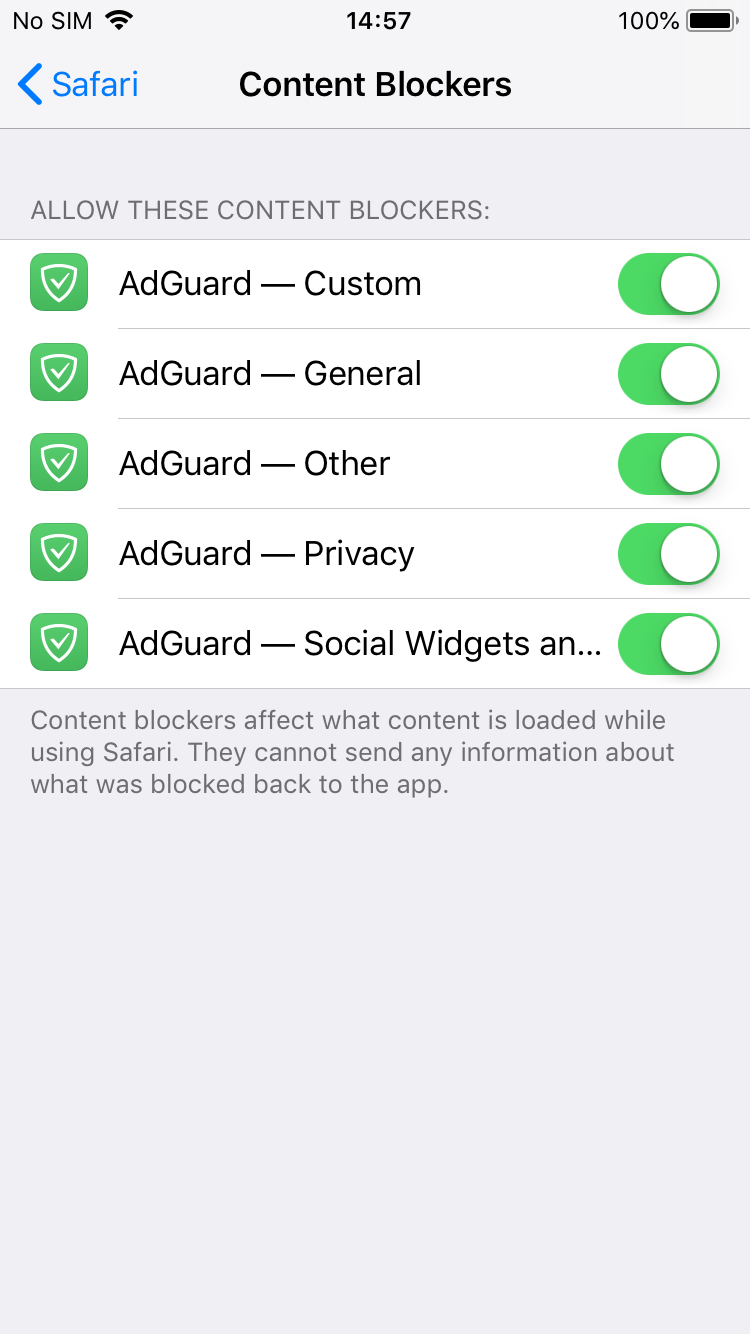
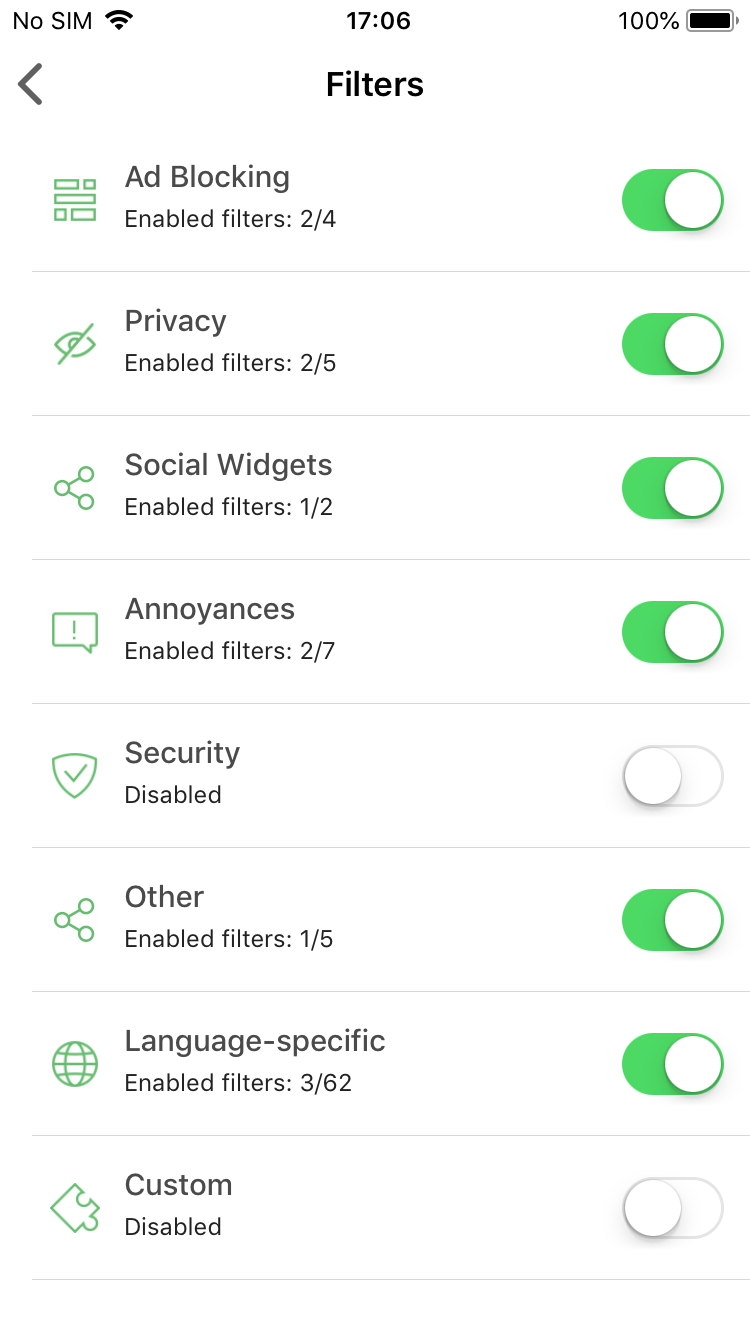
Turn on all five content blockers and enable any filters you want!

Premium features

I know this may seem like having Premium features in an updated free version of AdGuard for iOS contradicts with saying that we can't update the Pro version. Unfortunately, not everything could be transferred from there.

DNS Privacy

This is by far the biggest addition. If you're a user of AdGuard Pro, you'll recognize this immediately — it's good old custom DNS settings. Actually, it's more than that: now AdGuard supports DNS-over-TLS and DNS-over-HTTPS, two of the most secured DNS protocols.
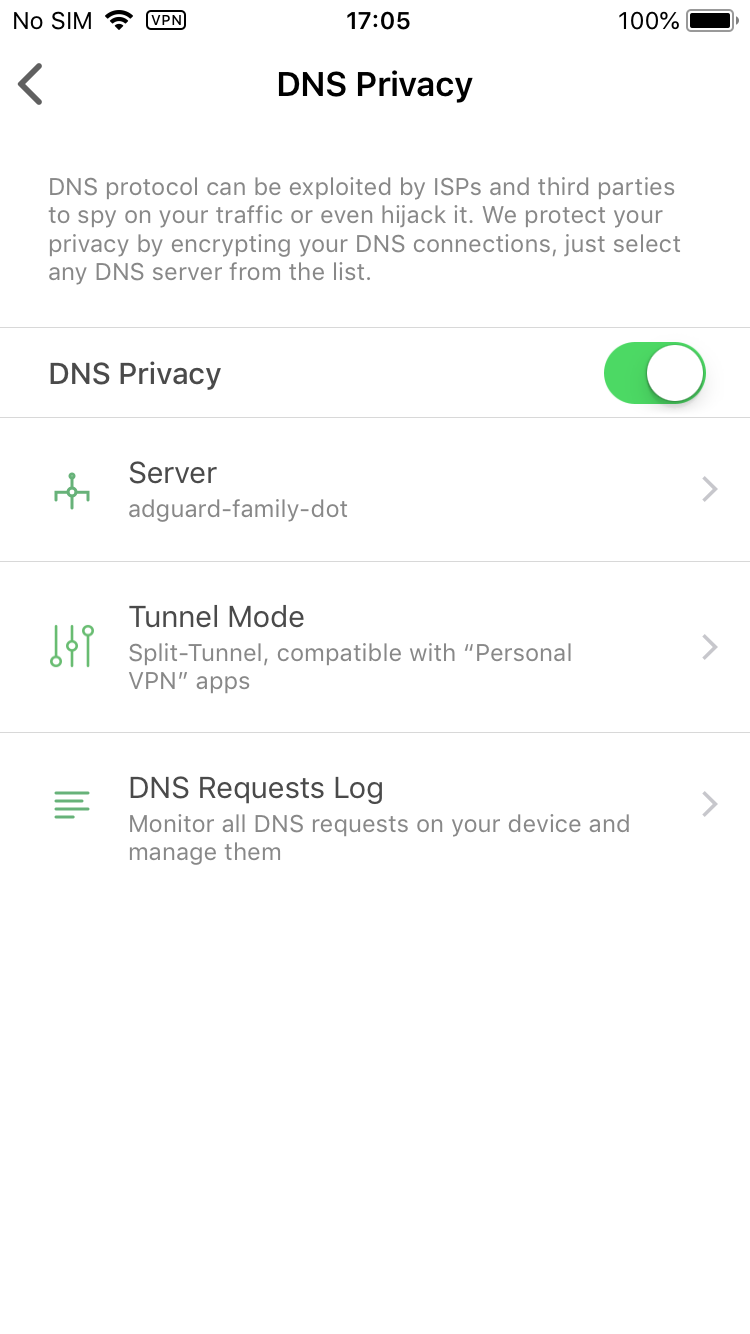
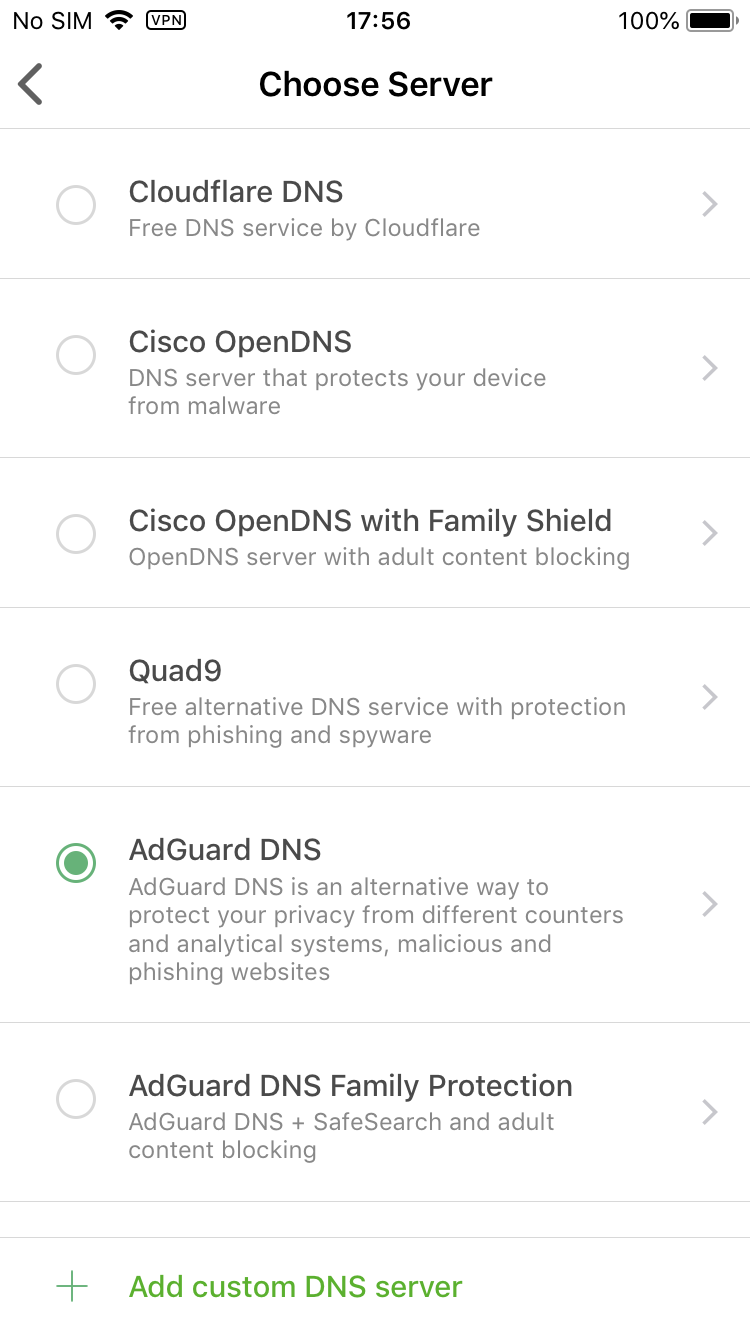
Manage your DNS settings

You select one of the DNS servers included by default or add any custom server you'd like. There's also a DNS requests log to monitor everything that's happening with your device's traffic. What you won't find there is any sort of DNS whitelist/blacklist or other customization. Sadly, this is as far as we can step under the circumstances.

Dark mode

Wait, wasn't dark mode the default (and only) choice before? Yes, but now we turned back to the classic white/green color scheme, as you could have seen on the screenshots above. Dark mode will be available to Premium users only, but isn't it worth it? :)
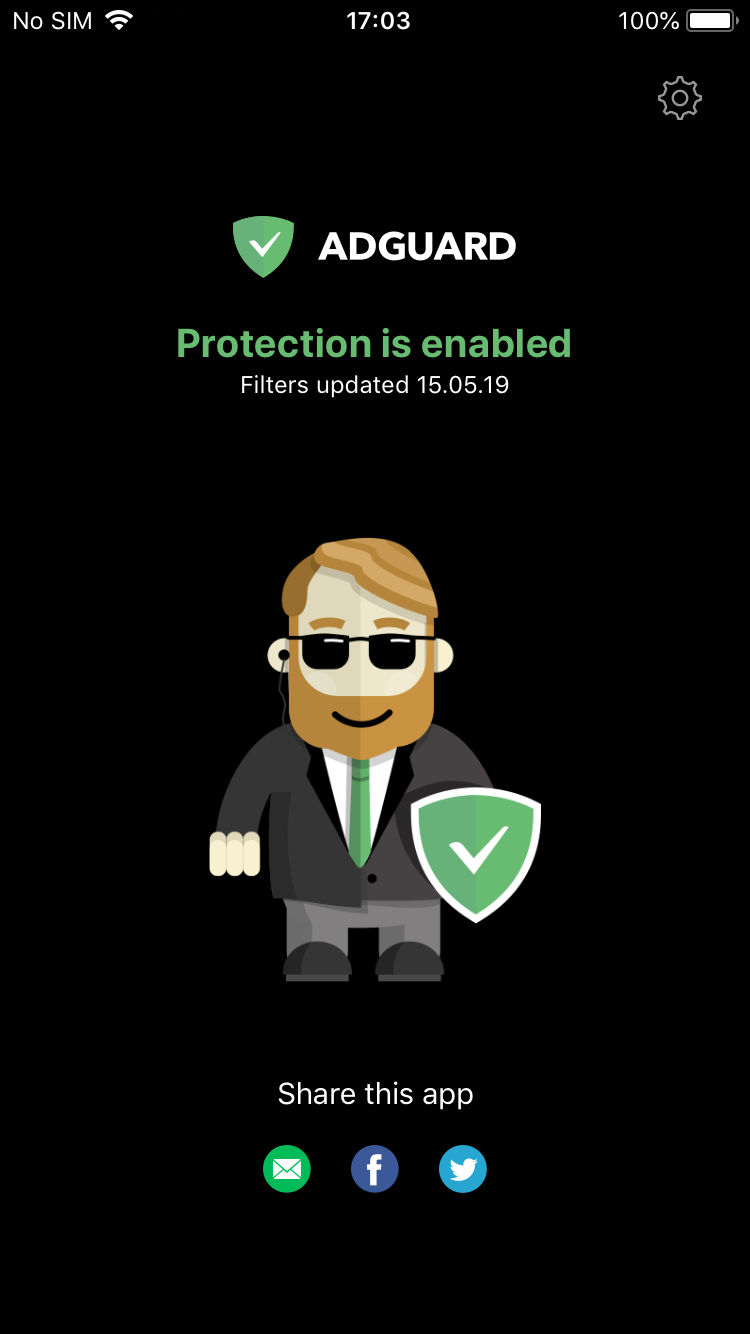
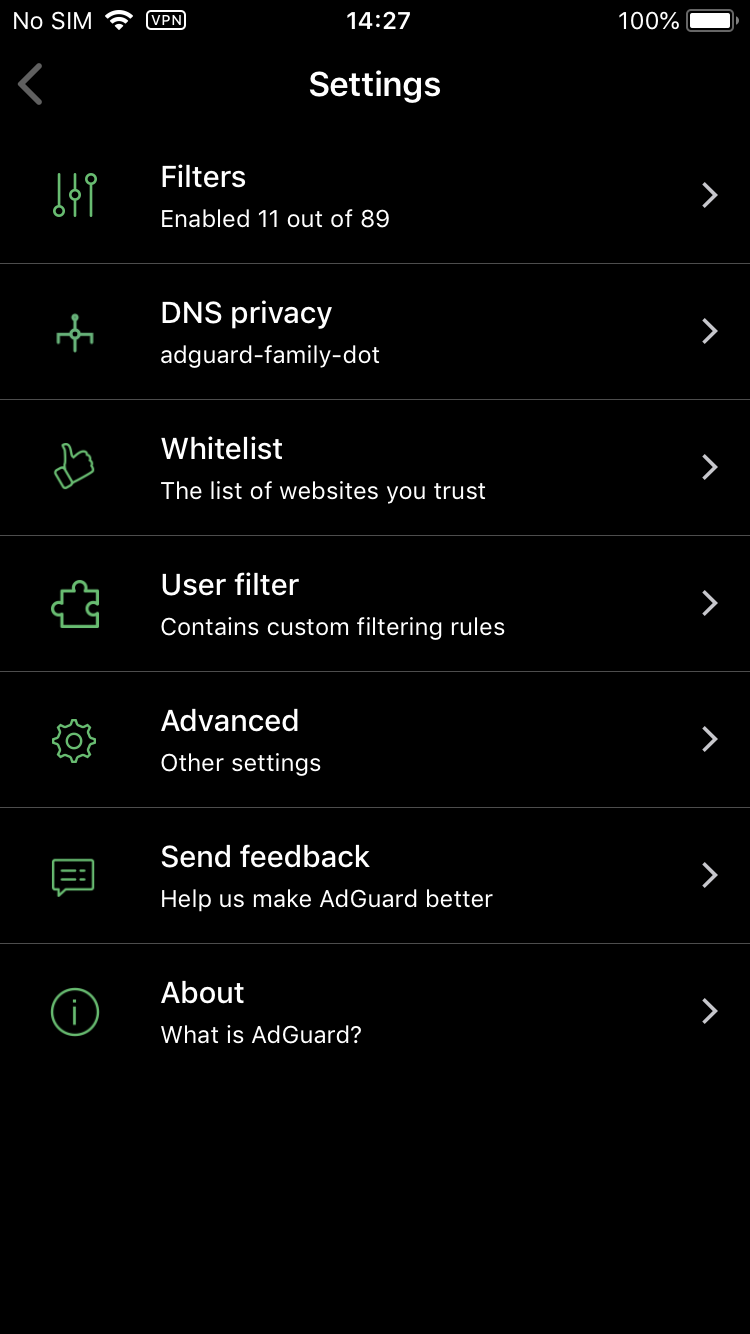
Bruce Wayne approves of this mode

Don't know about you, but I'm a big fan.

Premium filter categories

There are two filter categories that are available exclusively to Premium users:

Custom filters — not to be confused with the User filter that lets you add your own filtering rules and is present in the free version, as always. "Custom filters" is an entirely new filter group, you go there and add any number of filters by URL. Very useful if your favorite filter is not added by default, or if you have a filter of your own. Worth noting that filters added by URL will be automatically updated with the rest.
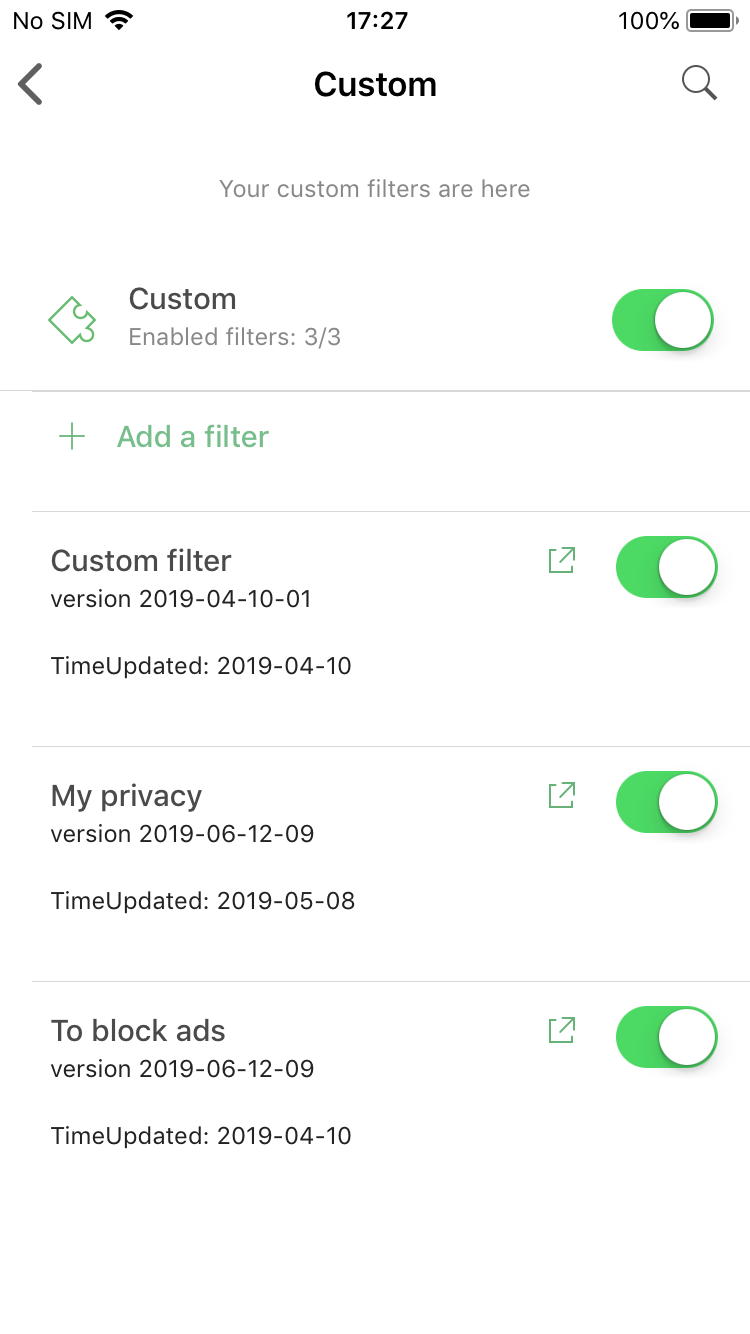
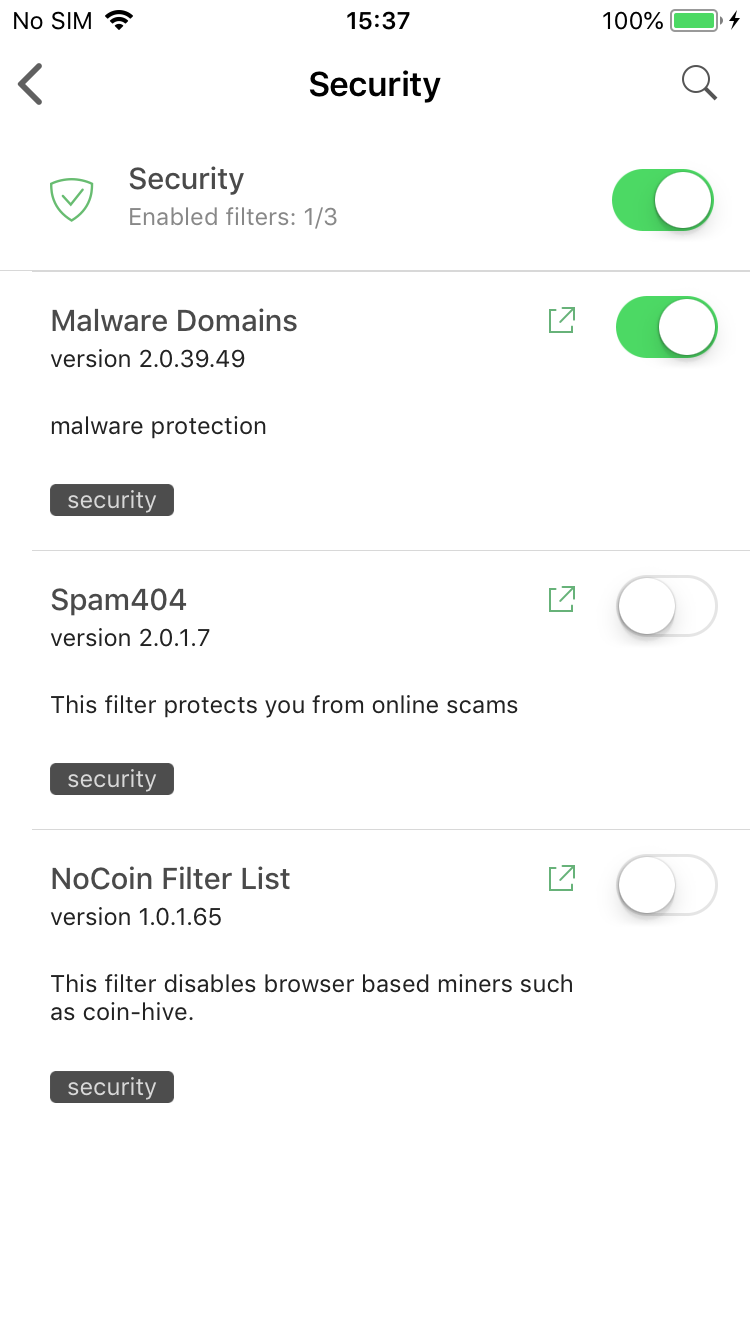
Premium filter categories: Custom and Security

Security filters — again, don't confuse it with the Privacy filter group. Protecting online privacy is essential and we wouldn't dare making it a Premium-only feature. Ensuring security is more about being attentive and careful when browsing the web, but if you look for a little extra insurance — this is for you.

How to get Premium?

There are three main options:

  • Purchase the subscription

    This is the most simple way. Just tap on the "Get Premium" plaque anywhere in the app and you'll be prompted to activate a monthly subscription. All you need to do is enter your Apple ID password and confirm the purchase.

  • Log into your AdGuard Personal account

    Go to the Settings > About > License screen and tap on the Login button there. You'll be asked to enter your AdGuard Personal account credentials. After you do, if you have a valid Premium or Mobile license in your account, it will be used to activate Premium in your AdGuard for iOS app. Friendly reminder that you can purchase any license on our official website.

  • Become a beta tester

    Very fitting! All approved beta testers receive a 1-year beta license key that works just as a regular key for our purposes. Head over to this page and send a request if you'd like to become a beta tester. You'll receive a reply with further instructions if your request was approved.

If you are already an AdGuard for iOS beta tester, you need to contact us anyway to get a beta license key. Having a TestFlight invite is not enough with the new beta.


And this is all for today. Get ready for the update, or jump right into it by becoming a beta tester. In the meantime, we'll be hitting you with more updates to various AdGuard products. So stay tuned, you'll be hearing from us again very soon!


Svidio vam se ovaj post?
AdGuard VPN AdGuard DNS AdGuard Mail AdGuard Wallet
Glavni zaslon AdGuard za Windows
Zaslon zaštite AdGuard za Windows koji prikazuje značajke zaštite i postavke
Zaslon statistika AdGuard za Windows koji prikazuje statistiku blokiranih oglasa i pratitelja
Zaslon upravljanja aplikacijama u AdGuard za Windows, koji prikazuje opcije upravljanja zaštitom za aplikacije instalirane na uređaju
20.397 20397 recenzija
Odlično!

AdGuard: blokator oglasa za Windows

AdGuard za Windows je više od blokatora oglasa. To je višenamjenski alat koji blokira oglase, kontrolira pristup opasnim web-mjestima, ubrzava učitavanje stranica i štiti djecu od neprikladnog sadržaja
Preuzimanjem programa prihvaćate odredbe licencnog ugovora
Microsoft Store
Preuzimanjem programa prihvaćate odredbe licencnog ugovora
AdGuard za Windows v8.0, 14-dnevni probni period
Glavni zaslon AdGuard za Mac
Zaslon prikrivenog načina u AdGuardu za Mac
20.397 20397 recenzija
Odlično!

AdGuard: blokator oglasa za Mac

AdGuard za Mac je jedinstveni blokator oglasa dizajniran s macOS-om na umu. Osim što vas štiti od dosadnih oglasa u preglednicima i aplikacijama, štiti vas i od praćenja, phishinga i prijevara
Preuzimanjem programa prihvaćate odredbe licencnog ugovora
Pročitajte više
AdGuard za Mac v2.19, 14-dnevni probni period
Glavni zaslon AdGuard za Android
Zaslon zaštite od praćenja u AdGuard za Android
Zaslon upravljanja aplikacijama u AdGuard za Android, koji prikazuje opcije upravljanja zaštitom za aplikacije instalirane na uređaju
Zaslon statistika AdGuard za Android koji prikazuje statistiku blokiranih oglasa i pratitelja
Glavni zaslon privatnog preglednika AdGuard za Android
QR kod za preuzimanje AdGuard za Android
20.397 20397 recenzija
Odlično!

AdGuard: blokator oglasa za Android

Blokira oglase i pratitelje u svim preglednicima, igrama i drugim aplikacijama. Štiti vašu privatnost i omogućuje vam kontrolu nad time kako vaše aplikacije koriste internet. Instalira se putem APK-a
Preuzimanjem programa prihvaćate odredbe licencnog ugovora
Pročitajte više
Skeniraj za preuzimanje
Koristite bilo koji čitač QR koda dostupan na vašem uređaju
AdGuard za Android v4.14, 14-dnevni probni period
Glavni zaslon AdGuard za iOS
Zaslon zaštite AdGuard za iOS koji prikazuje značajke zaštite i postavke
Zaslon statistika AdGuard za iOS koji prikazuje statistiku blokiranih oglasa i pratitelja
QR kod za preuzimanje AdGuard za iOS
20.397 20397 recenzija
Odlično!

AdGuard: blokator oglasa za iOS

Najbolji iOS blokator oglasa za iPhone i iPad. AdGuard uklanja sve vrste oglasa i alata za praćenje u Safariju i štiti vašu privatnost u svim aplikacijama na DNS razini
Preuzimanjem programa prihvaćate odredbe licencnog ugovora
Pročitajte više
Skeniraj za preuzimanje
Koristite bilo koji čitač QR koda dostupan na vašem uređaju
AdGuard za iOS v4.5
Glavni zaslon AdGuard Content Blocker
Zaslon filtara u AdGuard Content Blocker
Zaslon postavki u AdGuard Content Blocker
20.397 20397 recenzija
Odlično!

AdGuard Bloker sadržaja

AdGuard Content Blocker eliminira sve vrste oglasa u mobilnim preglednicima koji podržavaju tehnologiju blokiranja sadržaja — naime, Samsung Internet i Yandex Browser. Njegove su značajke ograničene u usporedbi s AdGuardom za Android, ali je besplatan, jednostavan za instalaciju i učinkovit
Preuzimanjem programa prihvaćate odredbe licencnog ugovora
Pročitajte više
AdGuard Bloker sadržaja v2.8
Glavni zaslon AdGuard Browser Extension
Zaslon zaštite od praćenja u AdGuard Browser Extension
20.397 20397 recenzija
Odlično!

AdGuard Proširenje preglednika

AdGuard je najbrže i najlakše proširenje za blokiranje oglasa koje učinkovito blokira sve vrste oglasa na svim web stranicama! Odaberite AdGuard za preglednik koji koristite i imajte brzo i sigurno pretraživanje Interneta bez oglasa.
Instalacija
Preuzimanjem programa prihvaćate odredbe licencnog ugovora
Instalacija
Preuzimanjem programa prihvaćate odredbe licencnog ugovora
Instalacija
Preuzimanjem programa prihvaćate odredbe licencnog ugovora
Instalacija
Preuzimanjem programa prihvaćate odredbe licencnog ugovora
Instalacija
Preuzimanjem programa prihvaćate odredbe licencnog ugovora
Pročitajte više
Instalacija
Preuzimanjem programa prihvaćate odredbe licencnog ugovora
Pročitajte više
AdGuard Proširenje preglednika v5.5
Glavni zaslon AdGuard Assistant
20.397 20397 recenzija
Odlično!

AdGuard Pomoćnik

Prateća ekstenzija za preglednik za AdGuard desktop aplikacije. Omogućuje blokiranje prilagođenih stavki na web stranicama, dodavanje web stranica na popis dopuštenih i slanje izvještaja izravno iz preglednika
AdGuard Pomoćnik v1.4
20.397 20397 recenzija
Odlično!

AdGuard Home

AdGuard Home je mrežno rješenje za blokiranje oglasa i trackera. Instalirajte ga jednom na usmjerivač kako biste pokrili sve uređaje na kućnoj mreži – nije potreban dodatni klijentski softver. To je posebno važno za razne IoT uređaje koji često predstavljaju prijetnju vašoj privatnosti
AdGuard Home v0.107
Glavni zaslon AdGuard Pro za iOS
Zaslon zaštite u AdGuard Pro za iOS, koji prikazuje značajke zaštite i postavke
Zaslon statistike u AdGuard Pro za iOS, koji prikazuje statistiku za blokirane oglase i pratitelje
20.397 20397 recenzija
Odlično!

AdGuard Pro za iOS

AdGuard Pro za iOS dolazi sa svim naprednim značajkama zaštite od blokiranja oglasa. Nudi iste alate kao i plaćena verzija AdGuarda za iOS. Ističe se u blokiranju oglasa u Safariju i omogućuje vam prilagođavanje DNS postavki kako biste prilagodili zaštitu svojim potrebama. Blokira oglase u preglednicima i aplikacijama, štiti vašu djecu od neprikladnog sadržaja i čuva vaše osobne podatke sigurnima.
Preuzimanjem programa prihvaćate odredbe licencnog ugovora
Pročitajte više
AdGuard Pro za iOS v4.5
Glavni zaslon AdGuard Mini za Mac
Zaslon zaštite za Safari u AdGuard Mini za Mac
Zaslon za stvaranje pravila u AdGuard Mini za Mac
20.397 20397 recenzija
Odlično!

AdGuard Mini za Mac — blokator oglasa u Safariju

AdGuard Mini za Mac je moćan Safari blokator oglasa. Ova lagana aplikacija uklanja oglase, blokira pratitelje i ubrzava učitavanje stranica. Pomaže vam pregledavati web u Safariju bez ometanja i čuvati vaše podatke privatnima
Instalacija
Preuzimanjem programa prihvaćate odredbe licencnog ugovora
Pročitajte više
AdGuard Mini za Mac v2.3
Glavni zaslon AdGuard za Android TV s omogućenom zaštitom
Zaslon blokiranja oglasa AdGuard za Android TV koji prikazuje njegove značajke i postavke
Zaslon postavki AdGuard za Android TV
Zaslon upravljanja aplikacijama AdGuard za Android TV koji prikazuje aplikacije u kojima su oglasi i pratitelji blokirani
20.397 20397 recenzija
Odlično!

AdGuard za Android TV

AdGuard za Android TV jedina je aplikacija koja blokira oglase, čuva vašu privatnost i djeluje kao vatrozid za vaš Smart TV. Primajte upozorenja o web prijetnjama, koristite siguran DNS i iskoristite prednosti šifriranog prometa. Opustite se i uronite u svoje omiljene emisije uz vrhunsku sigurnost i bez oglasa!
AdGuard za Android TV v4.14, 14-dnevni probni period
Maskota AdGuard, Agnar, drži Linux pingvina
20.397 20397 recenzija
Odlično!

AdGuard za Linux

AdGuard za Linux je prvi sustavni bloker oglasa za Linux na svijetu. Blokirajte oglase i pratitelje na razini uređaja, odaberite iz unaprijed instaliranih filtara ili dodajte vlastite — sve kroz sučelje naredbenog retka
AdGuard za Linux v1.4
20.397 20397 recenzija
Odlično!

AdGuard Temp Mail

Besplatni generator privremene adrese e-pošte koji vas čuva anonimnim i štiti vašu privatnost. Nema spama u vašem glavnom sandučiću!
20.397 20397 recenzija
Odlično!

AdGuard VPN

75 lokacija u cijelom svijetu

Sigurno strujanje

Snažno šifriranje

Ne sakupljamo zapise

Najbrža veza

24/7 podrška

Isprobajte besplatno
Preuzimanjem programa prihvaćate odredbe licencnog ugovora
Pročitajte više
20.397 20397 recenzija
Odlično!

AdGuard DNS

AdGuard DNS je siguran način blokiranja internetskih oglasa za koji nije potrebna instalacija aplikacije. Jednostavan je za upotrebu, potpuno besplatan, lako se postavlja na bilo koji uređaj i pruža vam minimum potrebnih funkcija za blokiranje oglasa, brojača, zlonamjernih web stranica i sadržaja za odrasle.
20.397 20397 recenzija
Odlično!

AdGuard Mail

Zaštitite svoj identitet, izbjegnite neželjenu poštu i čuvajte sigurnost svoje pristigle pošte uz naše pseudonime i privremene adrese e-pošte. Iskoristite našu besplatnu uslugu prosljeđivanja e-pošte i aplikacije za sve operacijske sustave.
20.397 20397 recenzija
Odlično!

AdGuard Wallet

Siguran i privatan kripto novčanik koji vam daje potpunu kontrolu nad vašom imovinom. Upravljajte višestrukim novčanicima i otkrijte tisuće kriptovaluta za pohranu, slanje i zamjenu
Započelo je preuzimanje AdGuard-a Da biste instalirali AdGuard, kliknite datoteku označenu strelicom Odaberite "Otvori" i pritisnite "U redu", te zatim pričekajte da se datoteka preuzme. U otvorenom prozoru povucite ikonu AdGuarda u mapu "Aplikacije". Hvala što ste odabrali AdGuard! Odaberite "Otvori" i pritisnite "U redu", potom pričekajte da se datoteka preuzme. U otvorenom prozoru pritisnite "Instaliraj". Hvala vam što ste izabrali AdGuard!
Također instalirajte AdGuard za mobilne uređaje

















































