Coming soon: AdGuard VPN — fast and reliable

Imagine this: you got everything sorted out. Your ad blocker protects you from all kinds of ads (except for that one website you really want to support). You have configured AdGuard DNS on your router and it stops all trackers in their tracks on every device in your home. You know what, you even got yourself an antivirus! Just to be 100% safe. It seems that you got all bases covered when it comes to your online privacy and security. You can finally find some peace and watch that new TV series that everyone can't keep their mouth shut about. But wait, what's that? "This video is not available in your country". After all this work?! Turns out, you missed one thing to truly complete your responsible web surfer suit: a VPN.

And we're going to give it to you! AdGuard VPN is about to officially hit the digital shelves of Chrome Web Store (you can already try the beta), and you can become one of the first to try it.

What is VPN?

First of all, let's get it out of the way: what's a VPN? What do you need it for? I'm sure many of you know the answer to these questions but it won't hurt to have a quick recap. The acronym stands for Virtual Private Network, but it alone doesn't clarify much. The point of a VPN is to create a secure connection to another network over the Internet.

Imagine there's an underground tunnel that leads from your house to your neighbour's. When you go through it and then outside, to everyone on the street it looks like you live there. It's roughly the same with VPNs. You establish a secure connection with another network and to everyone outside of this network it looks like your traffic comes from there. In fact, nobody even knows that it's your traffic. In our example VPN would be your neighbour's house, and the tunnel is an encrypted connection.
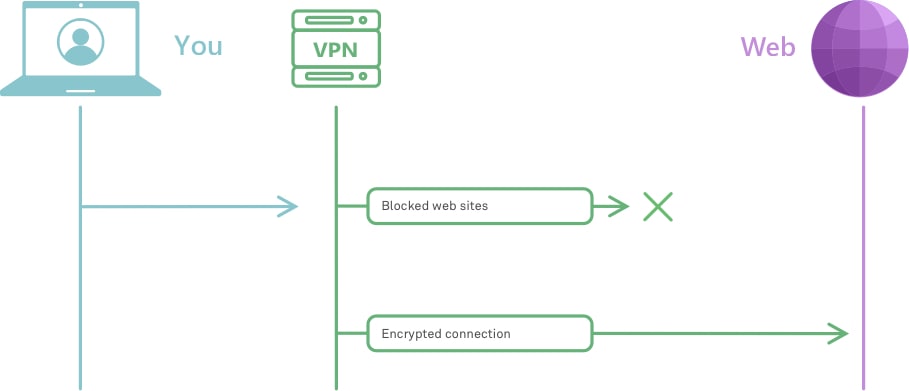
How VPN works *mobile
Very roughly, this is how VPN works

To understand better how it works, check out this article. And to really, really understand how it works, head to this one instead.

But why would you need it? We've already established that VPN masks your traffic so that no one knows that it's actually yours. And this has several real life applications:

  • provides online security, hides your location and other information about you and your computer;
  • protects your privacy by encrypting your data and masking IP address;
  • allows to see geo-restricted content;
  • helps avoiding geo-targeted ads.

These are only some of the ways VPN can be helpful when you browse online. So, now that you have an idea about how VPN works and why it is useful, it's high time to introduce our own brand new VPN!

Meet AdGuard VPN

So many people asked us in the past if we were going to develop a VPN, and every time we answered that it's not really our area of expertise. But one day we thought: "Hey, why not? We've got a lot of experience in privacy protection and other adjacent areas, we could do it!" And so we did. To test the waters, we kicked things off by developing a Chrome browser extension.
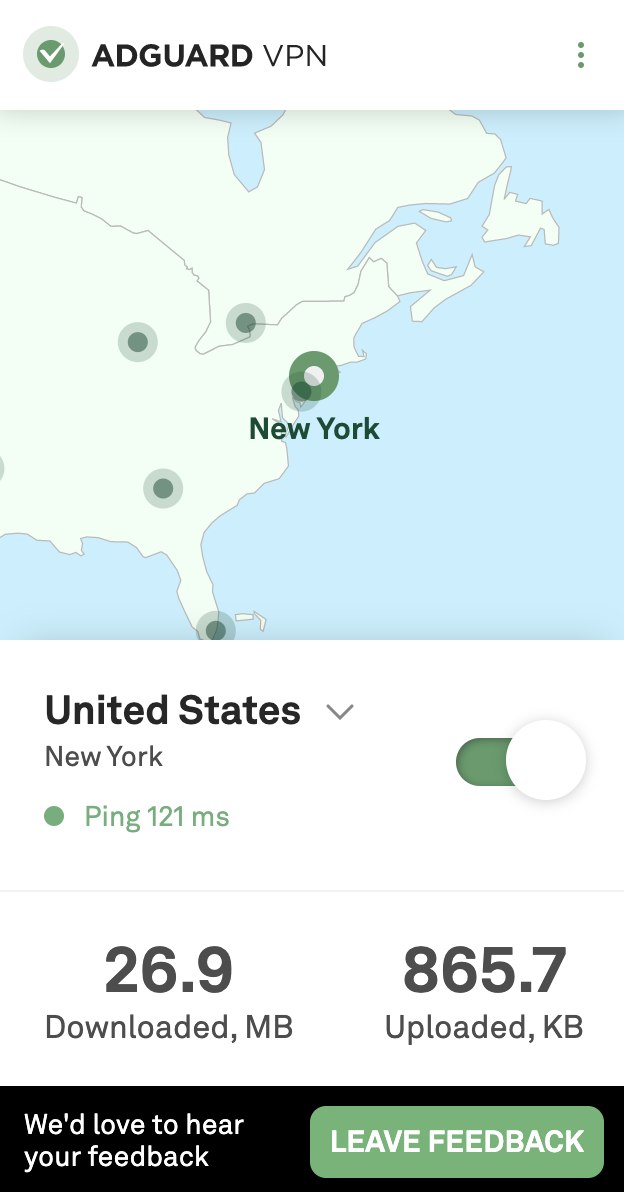
VPN extension main *mobile
Simple yet stylish, this is how we like it

To make things clear from the get-go: it's still work in progress. By this moment, only a beta version is available. Mostly to try out how well our server infrastructure will handle the traffic load and other technical things like that. There's still a lot to do, but it's functioning, and you can even join the beta test right now. Despite being in its infancy, the extension has all the basic stuff that you want from your VPN. A wide selection of server locations from all around the globe, a whitelist, a selective mode, traffic statistics. Fast speed and high reliability too, of course. In fact, more about this in just a moment.

Why AdGuard?

That's a valid question. There are hundreds of VPNs around, many of them proved to be good at their job and earned trust of millions of users. You could choose any of them, what can we offer to counter that? We've got a couple of unique advantages.

All in one

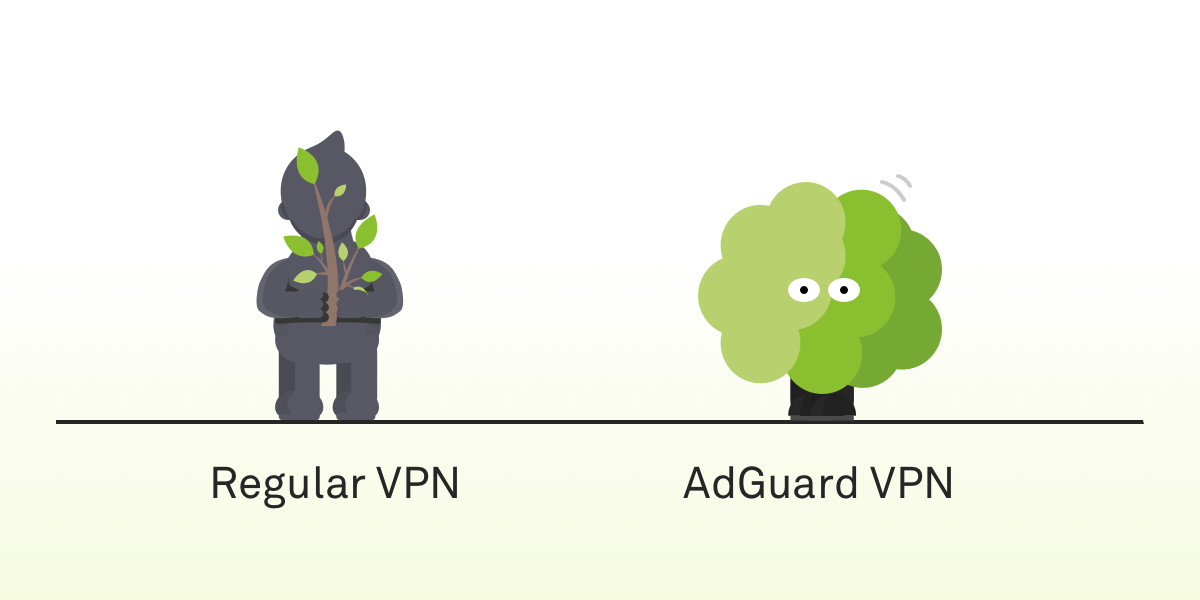
First, let's track back to our analogy. One of the biggest drawbacks of current VPNs is that they can be detected. Imagine you emerge from that little tunnel of yours and exit the neighbour's house all covered in dirt. It'll be pretty obvious that you don't live there. Same with VPN. Your ISP, or anyone else who has access to your traffic, will be able to tell you’re using a VPN.

There are solutions. You could be crawling through your tunnel more carefully to remain clean, but it would take much more time. There are some VPN protocols that conceal the fact that any VPN is being used, as a trade-off their speed is generally significantly lower. It seems that there are really no VPN protocols that have the best of both worlds.
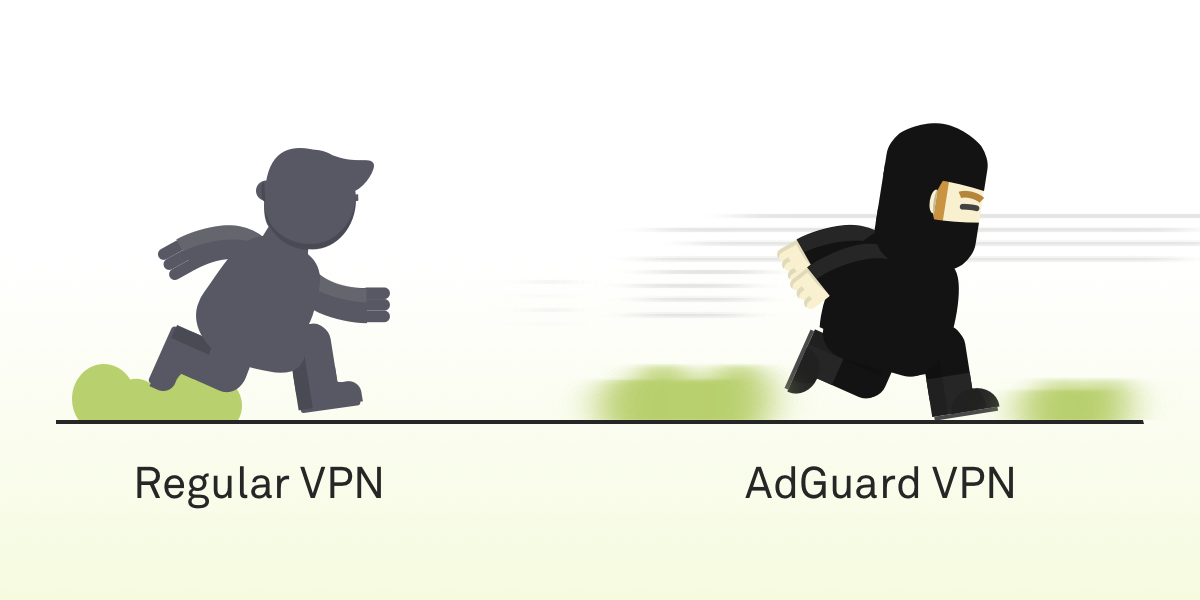
Fast *mobile
Safe *mobile
AdGuard VPN is both fast and hard to detect

And this is the ace up our sleeve. The protocol AdGuard VPN will employ is, in fact, both fast and hard to detect. It is brand new, we are developing it from scratch, and no other product is using it. It's still getting polished, so it will probably get added only by the time of the official release.

We often repeat ourselves about the importance of open source, and we stand by our words. Multiple AdGuard products, AdGuard DNS, AdGuard Home — we have a long list of open source projects and once the work is done, when the new protocol is up and running, tested and approved, then we'll make it open source too.

Compatibility with AdGuard ad blockers

Another advantage that we can offer to our users is that AdGuard VPN, unsurprisingly, will be able to work alongside the AdGuard mobile ad blocking apps. The struggle is familiar to any Android or iOS AdGuard user. To properly block ads on those platforms a local VPN is required; on Android you can't use two VPNs at the same time at all, on iOS not any two VPNs will work together. With AdGuard VPN, this will shortly become an ex-problem.

Future plans

Our plans reach far. It's clear our current priority is finishing the Chrome browser extension. Implementing the new protocol, stuffing it with more features. Adding more servers and new server locations. Eventually, we're going to release extensions for other browsers (e.g. Firefox), mobile apps for iOS and Android. Desktop apps are somewhere in a more distant future, but not out of the question either.

Don't want to miss all of it? Join the waitlist now and get an email notification the very day when AdGuard VPN becomes officially available to the public.

We should also mention that AdGuard VPN will be a freemium product. Part of the features will require a subscription, and we, of course, will give more details on that in a separate blog article when we near the big day. By the way, speaking of that...

Take part in the giveaway

If you sign up for early access now, you'll automatically join the giveaway of 10 free yearly AdGuard VPN subscriptions. To do that, follow this link and enter your email in the form. The winners will be announced in our social media: Twitter, Facebook, Telegram. Feel free to subscribe!


There's a lot to unpack here, so take your time. Ask us any questions about the present and the future of AdGuard VPN, we'll make sure to answer each and every one of them. And if you're brave enough to try the beta, give us your feedback! We're in that stage where you can influence how the app will look like in the end.

And most importantly — stay safe online!

Svidio vam se ovaj post?
AdGuard VPN AdGuard DNS AdGuard Mail AdGuard Wallet
Glavni zaslon AdGuard za Windows
Zaslon zaštite AdGuard za Windows koji prikazuje značajke zaštite i postavke
Zaslon statistika AdGuard za Windows koji prikazuje statistiku blokiranih oglasa i pratitelja
Zaslon upravljanja aplikacijama u AdGuard za Windows, koji prikazuje opcije upravljanja zaštitom za aplikacije instalirane na uređaju
20.397 20397 recenzija
Odlično!

AdGuard: blokator oglasa za Windows

AdGuard za Windows je više od blokatora oglasa. To je višenamjenski alat koji blokira oglase, kontrolira pristup opasnim web-mjestima, ubrzava učitavanje stranica i štiti djecu od neprikladnog sadržaja
Preuzimanjem programa prihvaćate odredbe licencnog ugovora
Microsoft Store
Preuzimanjem programa prihvaćate odredbe licencnog ugovora
AdGuard za Windows v8.0, 14-dnevni probni period
Glavni zaslon AdGuard za Mac
Zaslon prikrivenog načina u AdGuardu za Mac
20.397 20397 recenzija
Odlično!

AdGuard: blokator oglasa za Mac

AdGuard za Mac je jedinstveni blokator oglasa dizajniran s macOS-om na umu. Osim što vas štiti od dosadnih oglasa u preglednicima i aplikacijama, štiti vas i od praćenja, phishinga i prijevara
Preuzimanjem programa prihvaćate odredbe licencnog ugovora
Pročitajte više
AdGuard za Mac v2.19, 14-dnevni probni period
Glavni zaslon AdGuard za Android
Zaslon zaštite od praćenja u AdGuard za Android
Zaslon upravljanja aplikacijama u AdGuard za Android, koji prikazuje opcije upravljanja zaštitom za aplikacije instalirane na uređaju
Zaslon statistika AdGuard za Android koji prikazuje statistiku blokiranih oglasa i pratitelja
Glavni zaslon privatnog preglednika AdGuard za Android
QR kod za preuzimanje AdGuard za Android
20.397 20397 recenzija
Odlično!

AdGuard: blokator oglasa za Android

Blokira oglase i pratitelje u svim preglednicima, igrama i drugim aplikacijama. Štiti vašu privatnost i omogućuje vam kontrolu nad time kako vaše aplikacije koriste internet. Instalira se putem APK-a
Preuzimanjem programa prihvaćate odredbe licencnog ugovora
Pročitajte više
Skeniraj za preuzimanje
Koristite bilo koji čitač QR koda dostupan na vašem uređaju
AdGuard za Android v4.14, 14-dnevni probni period
Glavni zaslon AdGuard za iOS
Zaslon zaštite AdGuard za iOS koji prikazuje značajke zaštite i postavke
Zaslon statistika AdGuard za iOS koji prikazuje statistiku blokiranih oglasa i pratitelja
QR kod za preuzimanje AdGuard za iOS
20.397 20397 recenzija
Odlično!

AdGuard: blokator oglasa za iOS

Najbolji iOS blokator oglasa za iPhone i iPad. AdGuard uklanja sve vrste oglasa i alata za praćenje u Safariju i štiti vašu privatnost u svim aplikacijama na DNS razini
Preuzimanjem programa prihvaćate odredbe licencnog ugovora
Pročitajte više
Skeniraj za preuzimanje
Koristite bilo koji čitač QR koda dostupan na vašem uređaju
AdGuard za iOS v4.5
Glavni zaslon AdGuard Content Blocker
Zaslon filtara u AdGuard Content Blocker
Zaslon postavki u AdGuard Content Blocker
20.397 20397 recenzija
Odlično!

AdGuard Bloker sadržaja

AdGuard Content Blocker eliminira sve vrste oglasa u mobilnim preglednicima koji podržavaju tehnologiju blokiranja sadržaja — naime, Samsung Internet i Yandex Browser. Njegove su značajke ograničene u usporedbi s AdGuardom za Android, ali je besplatan, jednostavan za instalaciju i učinkovit
Preuzimanjem programa prihvaćate odredbe licencnog ugovora
Pročitajte više
AdGuard Bloker sadržaja v2.8
Glavni zaslon AdGuard Browser Extension
Zaslon zaštite od praćenja u AdGuard Browser Extension
20.397 20397 recenzija
Odlično!

AdGuard Proširenje preglednika

AdGuard je najbrže i najlakše proširenje za blokiranje oglasa koje učinkovito blokira sve vrste oglasa na svim web stranicama! Odaberite AdGuard za preglednik koji koristite i imajte brzo i sigurno pretraživanje Interneta bez oglasa.
Instalacija
Preuzimanjem programa prihvaćate odredbe licencnog ugovora
Instalacija
Preuzimanjem programa prihvaćate odredbe licencnog ugovora
Instalacija
Preuzimanjem programa prihvaćate odredbe licencnog ugovora
Instalacija
Preuzimanjem programa prihvaćate odredbe licencnog ugovora
Instalacija
Preuzimanjem programa prihvaćate odredbe licencnog ugovora
Pročitajte više
Instalacija
Preuzimanjem programa prihvaćate odredbe licencnog ugovora
Pročitajte više
AdGuard Proširenje preglednika v5.5
Glavni zaslon AdGuard Assistant
20.397 20397 recenzija
Odlično!

AdGuard Pomoćnik

Prateća ekstenzija za preglednik za AdGuard desktop aplikacije. Omogućuje blokiranje prilagođenih stavki na web stranicama, dodavanje web stranica na popis dopuštenih i slanje izvještaja izravno iz preglednika
AdGuard Pomoćnik v1.4
20.397 20397 recenzija
Odlično!

AdGuard Home

AdGuard Home je mrežno rješenje za blokiranje oglasa i trackera. Instalirajte ga jednom na usmjerivač kako biste pokrili sve uređaje na kućnoj mreži – nije potreban dodatni klijentski softver. To je posebno važno za razne IoT uređaje koji često predstavljaju prijetnju vašoj privatnosti
AdGuard Home v0.107
Glavni zaslon AdGuard Pro za iOS
Zaslon zaštite u AdGuard Pro za iOS, koji prikazuje značajke zaštite i postavke
Zaslon statistike u AdGuard Pro za iOS, koji prikazuje statistiku za blokirane oglase i pratitelje
20.397 20397 recenzija
Odlično!

AdGuard Pro za iOS

AdGuard Pro za iOS dolazi sa svim naprednim značajkama zaštite od blokiranja oglasa. Nudi iste alate kao i plaćena verzija AdGuarda za iOS. Ističe se u blokiranju oglasa u Safariju i omogućuje vam prilagođavanje DNS postavki kako biste prilagodili zaštitu svojim potrebama. Blokira oglase u preglednicima i aplikacijama, štiti vašu djecu od neprikladnog sadržaja i čuva vaše osobne podatke sigurnima.
Preuzimanjem programa prihvaćate odredbe licencnog ugovora
Pročitajte više
AdGuard Pro za iOS v4.5
Glavni zaslon AdGuard Mini za Mac
Zaslon zaštite za Safari u AdGuard Mini za Mac
Zaslon za stvaranje pravila u AdGuard Mini za Mac
20.397 20397 recenzija
Odlično!

AdGuard Mini za Mac — blokator oglasa u Safariju

AdGuard Mini za Mac je moćan Safari blokator oglasa. Ova lagana aplikacija uklanja oglase, blokira pratitelje i ubrzava učitavanje stranica. Pomaže vam pregledavati web u Safariju bez ometanja i čuvati vaše podatke privatnima
Instalacija
Preuzimanjem programa prihvaćate odredbe licencnog ugovora
Pročitajte više
AdGuard Mini za Mac v2.3
Glavni zaslon AdGuard za Android TV s omogućenom zaštitom
Zaslon blokiranja oglasa AdGuard za Android TV koji prikazuje njegove značajke i postavke
Zaslon postavki AdGuard za Android TV
Zaslon upravljanja aplikacijama AdGuard za Android TV koji prikazuje aplikacije u kojima su oglasi i pratitelji blokirani
20.397 20397 recenzija
Odlično!

AdGuard za Android TV

AdGuard za Android TV jedina je aplikacija koja blokira oglase, čuva vašu privatnost i djeluje kao vatrozid za vaš Smart TV. Primajte upozorenja o web prijetnjama, koristite siguran DNS i iskoristite prednosti šifriranog prometa. Opustite se i uronite u svoje omiljene emisije uz vrhunsku sigurnost i bez oglasa!
AdGuard za Android TV v4.14, 14-dnevni probni period
Maskota AdGuard, Agnar, drži Linux pingvina
20.397 20397 recenzija
Odlično!

AdGuard za Linux

AdGuard za Linux je prvi sustavni bloker oglasa za Linux na svijetu. Blokirajte oglase i pratitelje na razini uređaja, odaberite iz unaprijed instaliranih filtara ili dodajte vlastite — sve kroz sučelje naredbenog retka
AdGuard za Linux v1.4
20.397 20397 recenzija
Odlično!

AdGuard Temp Mail

Besplatni generator privremene adrese e-pošte koji vas čuva anonimnim i štiti vašu privatnost. Nema spama u vašem glavnom sandučiću!
20.397 20397 recenzija
Odlično!

AdGuard VPN

75 lokacija u cijelom svijetu

Sigurno strujanje

Snažno šifriranje

Ne sakupljamo zapise

Najbrža veza

24/7 podrška

Isprobajte besplatno
Preuzimanjem programa prihvaćate odredbe licencnog ugovora
Pročitajte više
20.397 20397 recenzija
Odlično!

AdGuard DNS

AdGuard DNS je siguran način blokiranja internetskih oglasa za koji nije potrebna instalacija aplikacije. Jednostavan je za upotrebu, potpuno besplatan, lako se postavlja na bilo koji uređaj i pruža vam minimum potrebnih funkcija za blokiranje oglasa, brojača, zlonamjernih web stranica i sadržaja za odrasle.
20.397 20397 recenzija
Odlično!

AdGuard Mail

Zaštitite svoj identitet, izbjegnite neželjenu poštu i čuvajte sigurnost svoje pristigle pošte uz naše pseudonime i privremene adrese e-pošte. Iskoristite našu besplatnu uslugu prosljeđivanja e-pošte i aplikacije za sve operacijske sustave.
20.397 20397 recenzija
Odlično!

AdGuard Wallet

Siguran i privatan kripto novčanik koji vam daje potpunu kontrolu nad vašom imovinom. Upravljajte višestrukim novčanicima i otkrijte tisuće kriptovaluta za pohranu, slanje i zamjenu
Započelo je preuzimanje AdGuard-a Da biste instalirali AdGuard, kliknite datoteku označenu strelicom Odaberite "Otvori" i pritisnite "U redu", te zatim pričekajte da se datoteka preuzme. U otvorenom prozoru povucite ikonu AdGuarda u mapu "Aplikacije". Hvala što ste odabrali AdGuard! Odaberite "Otvori" i pritisnite "U redu", potom pričekajte da se datoteka preuzme. U otvorenom prozoru pritisnite "Instaliraj". Hvala vam što ste izabrali AdGuard!
Također instalirajte AdGuard za mobilne uređaje


















































