Apple’s new EU terms: accept and lose money, or reject and stay within the walled garden

Apple’s ecosystem has always been known as a walled garden because of the restrictions it imposed on app developers and users. Developers had no choice but to list their apps on Apple’s App Store if they wanted an iOS user to install them. And if they wanted the user to buy something from them, they had to process payments through Apple’s own payment mechanism.

Such a closed system made life difficult not only for developers, who had to pay Apple’s 30% standard fee on in-app purchases (or 15% for small businesses), but also for users. The latter had less of a choice when it came to apps and download options than the users of the Android-based phones, since Google has always allowed sideloading.

This situation is about to change. The culprit is the EU’s upcoming antitrust law, known as the Digital Markets Act (DMA). In September 2023, App Store, iOS operating system, and Safari browser, all owned by Apple, received gatekeeper status under the DMA. This means that by March 6, 2024, Cupertino will have to open them up to competitors or face hefty fines of up to 10% of the company’s total global turnover.

As the deadline draws closer, Apple has come up with a plan for how it’s going to comply with the DMA. And after taking a look at this plan, it’s clear as day to us that Apple intends to comply with the legislation in letter, but definitely not in spirit. Essentially, Apple offers developers a false choice: either they agree to stay within the iOS ecosystem’s confines, or they can explore alternative payment methods and app stores — and risk going under in the process.

What’s wrong with Apple’s new business terms in Europe?

The dilemma that developers face right now is the following: they can either stay on the official App Store under the current terms, or accept the new terms and be subject to the new Core Technology Fee (CTF) that may cost them a fortune. Before we zoom in on the CTF and what it means for developers, especially those of free and freemium apps, we will briefly list the other parts of Apple’s DMA compliance plan.
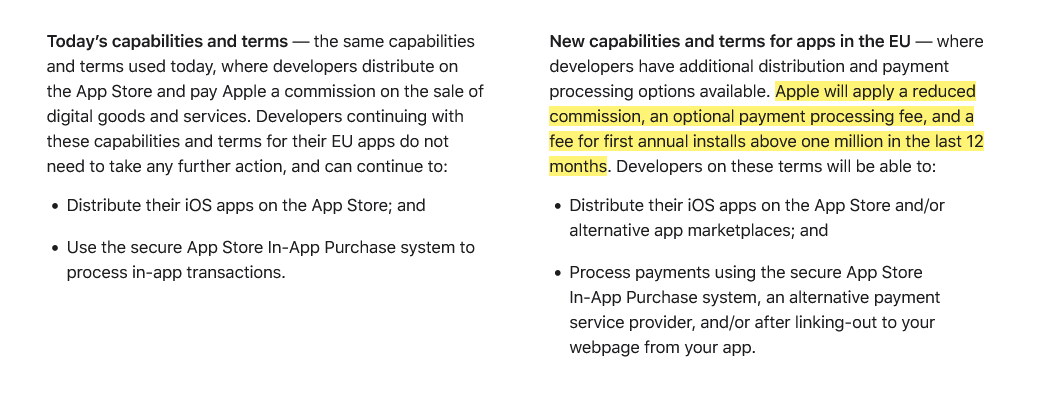
Apple introduces new terms for developers in the EU

Screenshot: Apple gives developers in the EU two options: stay on the current terms or accept the new news. Source: Apple

Under the plan, Apple says it will apply a “reduced commission” to in-app purchases. Developers in Apple’s small business program will pay a 10% fee instead of 15%, regardless of the payment method they choose. Others will pay a 17% fee instead of the standard 30% commission. If developers choose to continue using Apple as their payment processor, they’ll pay an additional 3% payment processing fee. But if they decide to ditch Apple and switch to an alternative payment system or redirect users to their own site for payment, they won’t have to pay Apple any additional fees.

So far so good, right?

It’s when we move to the third part of this masterplan, the Core Technology Fee, that things stop being pretty. In fact, they are starting to look pretty ugly.
The Core Technology Fee (CTF) is the fee that will apply only to the iOS apps whose developers accepted the new business terms. Importantly, it will apply both to iOS apps distributed on the App Store, as well as to the apps that are distributed through alternative app stores, or “marketplaces” as Apple calls them.

The definition of the 'first annual install' is not that straightforward

Subject to the fee are the developers whose apps will clock in over 1 million first annual installs in the past 12 months. They will have to pay a €0.50 fee to Apple for each user over 1 million who installed their app for the first time in a year. After these 12 months, developers will have to pay the fee again, and it does not have to be an install per se. The developer terms state that “app updates,” for instance, are also counted as new installs, “as long as they start a new 12-month period.”
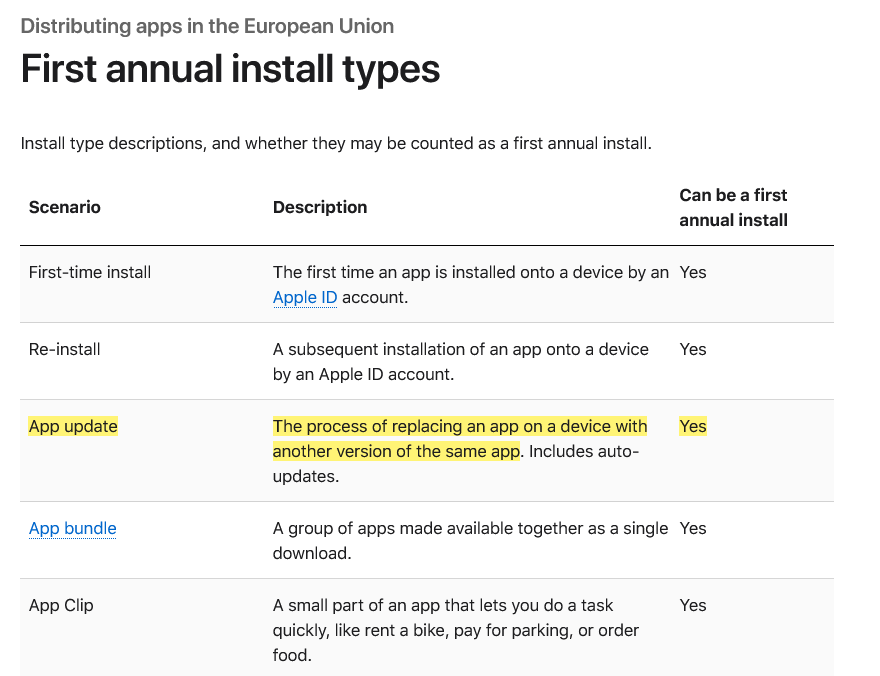
Types of first annual install under Apple's new terms

Marketplace apps or alternative app stores will have it even worse under Apple’s new and supposedly more competition-friendly rules. The developers who will create and distribute their own app stores for iOS apps in the EU are due a €0.50 CTF to Apple for each user who installs their app store for the first time in a year even if it happens before the developer racks up one million installs in total.

Go DMA and go broke: what CTF means in practice

If any of the “big guns,” meaning apps that get more than 1 million downloads in a year, could afford such a fee, it would be the paid apps. However, when it comes to free apps that make money by showing ads, or to freemium apps that offer part of their functionality for free, the fee is insurmountable.

Needless to say, Apple’s masterplan did not strike a chord with developers. Spotify did not hold back, calling the CTF “extortion, plain and simple.”

A key issue raised by Spotify in its scathing response to Apple’s plan is the vulnerable position it puts free app developers in: “How will a developer pay Apple back if its free app goes viral — multiple millions of accounts install that free app, and then that developer owes Apple millions?” Indeed, if a developer of a free or freemium app makes the unfortunate decision to accept Apple’s new terms in the EU, and then has a breakthrough and sees the app gain popularity, the last thing on their mind would be celebrating their achievement, because the first thing they should be thinking about is how to pay Apple back the fees they would owe. And, as Spotify points out, there is nothing preventing Apple from raising the fees at any time they deem fit.

To be fair, Apple has made no big secret of how punitive the new terms could be for some developers. Anyone can estimate how much they’ll pay Apple under its DMA compliance plan using its fee calculator. So let’s take a game that hit the sweet spot and went moderately viral, reaching 2 million installs in the EU in 12 months. Under the new terms, it would have to pay Apple $45,290 per month, whereas under the old terms, it would have to pay nothing. The choice seems a no-brainer to us.
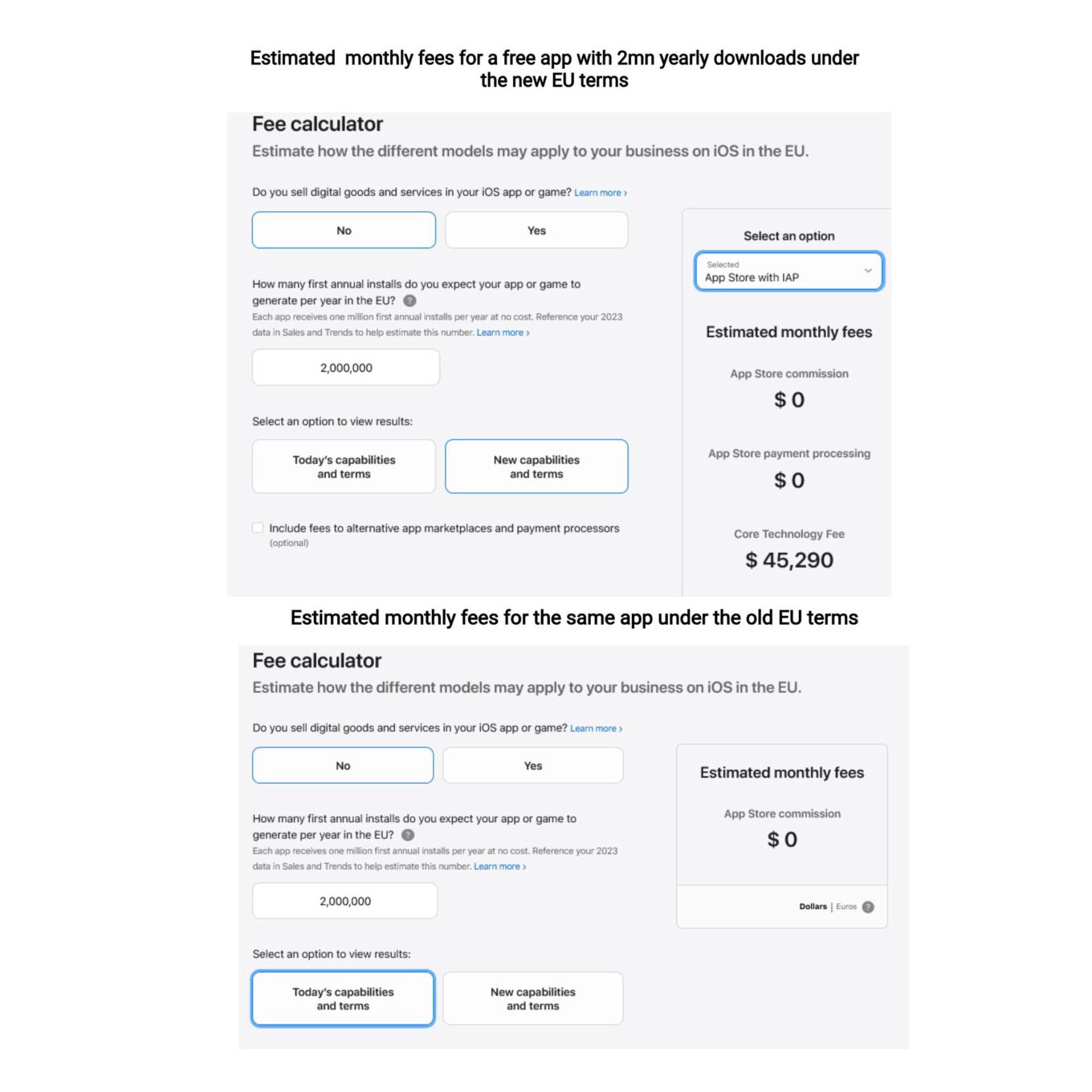
You can use a calculator to estimate your potential CTF

What Apple is effectively doing is trying to discourage developers from switching to the new terms, where they would have had more freedom to choose distribution and payment options. They are betting, and rightly so, that not so many would be willing to risk going into the red if their app takes off or experiences a sudden surge in popularity.

So, while Apple allows alternative stores de jure, de facto there is a prohibitive Core Technology Fee that blocks the way for free and freemium apps to enter alternative stores. In AdGuard’s case, we cannot take advantage of this offer either, simply because we do not have enough resources to pay the Core Technology Fee, and we are not alone in this. The only option left on the table is to make the app fully paid — which we have no intention of doing.

Will the EU regulators buy it?

It remains to be seen whether the DMA-focused changes that Apple plans to introduce will raise an issue with the EU regulators. As TechCrunch points out, the Article 6(12) of the DMA states that “the gatekeeper shall apply fair, reasonable, and non-discriminatory general conditions of access for business users to its software application stores, online search engines and online social networking services.” Is the Core Technology Fee fair? We don’t think so.

Apple’s plan to comply with the DMA is a clever attempt to spin the regulation to its own advantage, and to pressure developers into sticking with the old terms. By imposing the Core Technology Fee on apps that exceed a certain threshold of downloads, Apple is effectively penalizing developers who want to explore alternative distribution and payment options. This is a false choice and a mockery of real freedom and real competition in the digital sector. We hope that the EU regulators will not be fooled by Apple’s cosmetic changes and will insist that the DMA is enforced in a way that truly benefits consumers and developers.


Svidio vam se ovaj post?
AdGuard VPN AdGuard DNS AdGuard Mail AdGuard Wallet
Glavni zaslon AdGuard za Windows
Zaslon zaštite AdGuard za Windows koji prikazuje značajke zaštite i postavke
Zaslon statistika AdGuard za Windows koji prikazuje statistiku blokiranih oglasa i pratitelja
Zaslon upravljanja aplikacijama u AdGuard za Windows, koji prikazuje opcije upravljanja zaštitom za aplikacije instalirane na uređaju
20.397 20397 recenzija
Odlično!

AdGuard: blokator oglasa za Windows

AdGuard za Windows je više od blokatora oglasa. To je višenamjenski alat koji blokira oglase, kontrolira pristup opasnim web-mjestima, ubrzava učitavanje stranica i štiti djecu od neprikladnog sadržaja

Preuzimanjem programa prihvaćate odredbe licencnog ugovora
Microsoft Store
Preuzimanjem programa prihvaćate odredbe licencnog ugovora
AdGuard za Windows v8.0, 14-dnevni probni period
Glavni zaslon AdGuard za Mac
Zaslon prikrivenog načina u AdGuardu za Mac
20.397 20397 recenzija
Odlično!

AdGuard: blokator oglasa za Mac

AdGuard za Mac je jedinstveni blokator oglasa dizajniran s macOS-om na umu. Osim što vas štiti od dosadnih oglasa u preglednicima i aplikacijama, štiti vas i od praćenja, phishinga i prijevara
Preuzimanjem programa prihvaćate odredbe licencnog ugovora
Pročitajte više
AdGuard za Mac v2.19, 14-dnevni probni period
Glavni zaslon AdGuard za Android
Zaslon zaštite od praćenja u AdGuard za Android
Zaslon upravljanja aplikacijama u AdGuard za Android, koji prikazuje opcije upravljanja zaštitom za aplikacije instalirane na uređaju
Zaslon statistika AdGuard za Android koji prikazuje statistiku blokiranih oglasa i pratitelja
Glavni zaslon privatnog preglednika AdGuard za Android
QR kod za preuzimanje AdGuard za Android
20.397 20397 recenzija
Odlično!

AdGuard: blokator oglasa za Android

Blokira oglase i pratitelje u svim preglednicima, igrama i drugim aplikacijama. Štiti vašu privatnost i omogućuje vam kontrolu nad time kako vaše aplikacije koriste internet. Instalira se putem APK-a
Preuzimanjem programa prihvaćate odredbe licencnog ugovora
Pročitajte više
Skeniraj za preuzimanje
Koristite bilo koji čitač QR koda dostupan na vašem uređaju
AdGuard za Android v4.14, 14-dnevni probni period
Glavni zaslon AdGuard za iOS
Zaslon zaštite AdGuard za iOS koji prikazuje značajke zaštite i postavke
Zaslon statistika AdGuard za iOS koji prikazuje statistiku blokiranih oglasa i pratitelja
QR kod za preuzimanje AdGuard za iOS
20.397 20397 recenzija
Odlično!

AdGuard: blokator oglasa za iOS

Najbolji iOS blokator oglasa za iPhone i iPad. AdGuard uklanja sve vrste oglasa i alata za praćenje u Safariju i štiti vašu privatnost u svim aplikacijama na DNS razini
Preuzimanjem programa prihvaćate odredbe licencnog ugovora
Pročitajte više
Skeniraj za preuzimanje
Koristite bilo koji čitač QR koda dostupan na vašem uređaju
AdGuard za iOS v4.5
Glavni zaslon AdGuard Content Blocker
Zaslon filtara u AdGuard Content Blocker
Zaslon postavki u AdGuard Content Blocker
20.397 20397 recenzija
Odlično!

AdGuard Bloker sadržaja

AdGuard Content Blocker eliminira sve vrste oglasa u mobilnim preglednicima koji podržavaju tehnologiju blokiranja sadržaja — naime, Samsung Internet i Yandex Browser. Njegove su značajke ograničene u usporedbi s AdGuardom za Android, ali je besplatan, jednostavan za instalaciju i učinkovit
Preuzimanjem programa prihvaćate odredbe licencnog ugovora
Pročitajte više
AdGuard Bloker sadržaja v2.8
Glavni zaslon AdGuard Browser Extension
Zaslon zaštite od praćenja u AdGuard Browser Extension
20.397 20397 recenzija
Odlično!

AdGuard Proširenje preglednika

AdGuard je najbrže i najlakše proširenje za blokiranje oglasa koje učinkovito blokira sve vrste oglasa na svim web stranicama! Odaberite AdGuard za preglednik koji koristite i imajte brzo i sigurno pretraživanje Interneta bez oglasa.
Instalacija
Preuzimanjem programa prihvaćate odredbe licencnog ugovora
Instalacija
Preuzimanjem programa prihvaćate odredbe licencnog ugovora
Instalacija
Preuzimanjem programa prihvaćate odredbe licencnog ugovora
Instalacija
Preuzimanjem programa prihvaćate odredbe licencnog ugovora
Instalacija
Preuzimanjem programa prihvaćate odredbe licencnog ugovora
Pročitajte više
Instalacija
Preuzimanjem programa prihvaćate odredbe licencnog ugovora
Pročitajte više
AdGuard Proširenje preglednika v5.5
Glavni zaslon AdGuard Assistant
20.397 20397 recenzija
Odlično!

AdGuard Pomoćnik

Prateća ekstenzija za preglednik za AdGuard desktop aplikacije. Omogućuje blokiranje prilagođenih stavki na web stranicama, dodavanje web stranica na popis dopuštenih i slanje izvještaja izravno iz preglednika
AdGuard Pomoćnik v1.4
20.397 20397 recenzija
Odlično!

AdGuard Home

AdGuard Home je mrežno rješenje za blokiranje oglasa i trackera. Instalirajte ga jednom na usmjerivač kako biste pokrili sve uređaje na kućnoj mreži – nije potreban dodatni klijentski softver. To je posebno važno za razne IoT uređaje koji često predstavljaju prijetnju vašoj privatnosti
AdGuard Home v0.107
Glavni zaslon AdGuard Pro za iOS
Zaslon zaštite u AdGuard Pro za iOS, koji prikazuje značajke zaštite i postavke
Zaslon statistike u AdGuard Pro za iOS, koji prikazuje statistiku za blokirane oglase i pratitelje
20.397 20397 recenzija
Odlično!

AdGuard Pro za iOS

AdGuard Pro za iOS dolazi sa svim naprednim značajkama zaštite od blokiranja oglasa. Nudi iste alate kao i plaćena verzija AdGuarda za iOS. Ističe se u blokiranju oglasa u Safariju i omogućuje vam prilagođavanje DNS postavki kako biste prilagodili zaštitu svojim potrebama. Blokira oglase u preglednicima i aplikacijama, štiti vašu djecu od neprikladnog sadržaja i čuva vaše osobne podatke sigurnima.
Preuzimanjem programa prihvaćate odredbe licencnog ugovora
Pročitajte više
AdGuard Pro za iOS v4.5
Glavni zaslon AdGuard Mini za Mac
Zaslon zaštite za Safari u AdGuard Mini za Mac
Zaslon za stvaranje pravila u AdGuard Mini za Mac
20.397 20397 recenzija
Odlično!

AdGuard Mini za Mac — blokator oglasa u Safariju

AdGuard Mini za Mac je moćan Safari blokator oglasa. Ova lagana aplikacija uklanja oglase, blokira pratitelje i ubrzava učitavanje stranica. Pomaže vam pregledavati web u Safariju bez ometanja i čuvati vaše podatke privatnima
Instalacija
Preuzimanjem programa prihvaćate odredbe licencnog ugovora
Pročitajte više
AdGuard Mini za Mac v2.3
Glavni zaslon AdGuard za Android TV s omogućenom zaštitom
Zaslon blokiranja oglasa AdGuard za Android TV koji prikazuje njegove značajke i postavke
Zaslon postavki AdGuard za Android TV
Zaslon upravljanja aplikacijama AdGuard za Android TV koji prikazuje aplikacije u kojima su oglasi i pratitelji blokirani
20.397 20397 recenzija
Odlično!

AdGuard za Android TV

AdGuard za Android TV jedina je aplikacija koja blokira oglase, čuva vašu privatnost i djeluje kao vatrozid za vaš Smart TV. Primajte upozorenja o web prijetnjama, koristite siguran DNS i iskoristite prednosti šifriranog prometa. Opustite se i uronite u svoje omiljene emisije uz vrhunsku sigurnost i bez oglasa!
AdGuard za Android TV v4.14, 14-dnevni probni period
Maskota AdGuard, Agnar, drži Linux pingvina
20.397 20397 recenzija
Odlično!

AdGuard za Linux

AdGuard za Linux je prvi sustavni bloker oglasa za Linux na svijetu. Blokirajte oglase i pratitelje na razini uređaja, odaberite iz unaprijed instaliranih filtara ili dodajte vlastite — sve kroz sučelje naredbenog retka
AdGuard za Linux v1.4
20.397 20397 recenzija
Odlično!

AdGuard Temp Mail

Besplatni generator privremene adrese e-pošte koji vas čuva anonimnim i štiti vašu privatnost. Nema spama u vašem glavnom sandučiću!
20.397 20397 recenzija
Odlično!

AdGuard VPN

75 lokacija u cijelom svijetu

Sigurno strujanje

Snažno šifriranje

Ne sakupljamo zapise

Najbrža veza

24/7 podrška

Isprobajte besplatno
Preuzimanjem programa prihvaćate odredbe licencnog ugovora
Pročitajte više
20.397 20397 recenzija
Odlično!

AdGuard DNS

AdGuard DNS je siguran način blokiranja internetskih oglasa za koji nije potrebna instalacija aplikacije. Jednostavan je za upotrebu, potpuno besplatan, lako se postavlja na bilo koji uređaj i pruža vam minimum potrebnih funkcija za blokiranje oglasa, brojača, zlonamjernih web stranica i sadržaja za odrasle.
20.397 20397 recenzija
Odlično!

AdGuard Mail

Zaštitite svoj identitet, izbjegnite neželjenu poštu i čuvajte sigurnost svoje pristigle pošte uz naše pseudonime i privremene adrese e-pošte. Iskoristite našu besplatnu uslugu prosljeđivanja e-pošte i aplikacije za sve operacijske sustave.
20.397 20397 recenzija
Odlično!

AdGuard Wallet

Siguran i privatan kripto novčanik koji vam daje potpunu kontrolu nad vašom imovinom. Upravljajte višestrukim novčanicima i otkrijte tisuće kriptovaluta za pohranu, slanje i zamjenu
Započelo je preuzimanje AdGuard-a Da biste instalirali AdGuard, kliknite datoteku označenu strelicom Odaberite "Otvori" i pritisnite "U redu", te zatim pričekajte da se datoteka preuzme. U otvorenom prozoru povucite ikonu AdGuarda u mapu "Aplikacije". Hvala što ste odabrali AdGuard! Odaberite "Otvori" i pritisnite "U redu", potom pričekajte da se datoteka preuzme. U otvorenom prozoru pritisnite "Instaliraj". Hvala vam što ste izabrali AdGuard!
Također instalirajte AdGuard za mobilne uređaje

















































