ChatGPT might be getting ads soon. Will you be able to block them?

Not so slowly, and rather steadily, ads have been sneaking their way into chatbots powered by generative AI. Both Google and Microsoft have brought ads to their AI search experiences. To the utter dismay of some users, Microsoft is now planning to introduce what appear to be giant ad pop-ups alongside the text box of its AI-powered chatbot, Copilot. Google, which previously kept ads outside of AI-generated snippets — placing them above or below — has now started experimenting with inserting ads directly into chatbot conversations when its technology is used by other companies. Perplexity, the first search engine that was built with generative AI from the ground up, has been showing ads since last year.

ChatGPT is getting ads: the telltale signs

Speculations that ChatGPT, the OpenAI’s AI-powered chatbot with web-browsing capabilities, might soon get ads have been swirling for a while now. In December last year, when asked about a possibility of ads coming to ChatGPT, Open AI’s chief financial officer Sarah Friar said that they were “open to exploring other revenue streams in the future” but did not have “active plans” to pursue advertising just then.

All the king’s men

But it looks like the moment when these dormant plans become active is inching closer. The rumours are rife that ChatGPT’s parent has been hiring “advertising talent” from Meta and Google — and who knows more about ads than alumni of those two advertising juggernauts? Just a few weeks ago, OpenAI brought another high-profile ad exec on board: Fidji Simo, a former senior executive at Meta who later led Instacart, where she helped grow its advertising business. The Information reported that Simo’s main focus at OpenAI will be driving a major boost in revenue. For those reading between the lines, that almost certainly means one thing — ads.

Apart from a recent hiring spree, there have also been other telltale signs that ChatGPT’s days as an ad-free haven may be numbered.

$1 billion extra from ads by 2026?

A leaked internal OpenAI report suggests the company is actively looking to monetize free users. A graph from that report, shared on social media, purports to show just how much OpenAI hopes to earn from cashing in on free users — about $1 billion by 2026, and, potentially, $25 billion (or about 20% of all projected earnings) by 2029. Or, to put it simply, OpenAI is likely to force its free users to see ads. And if you have any other ideas about how free user monetization could possibly work, you’re welcome to share — because we were racking our brains and drew a blank.
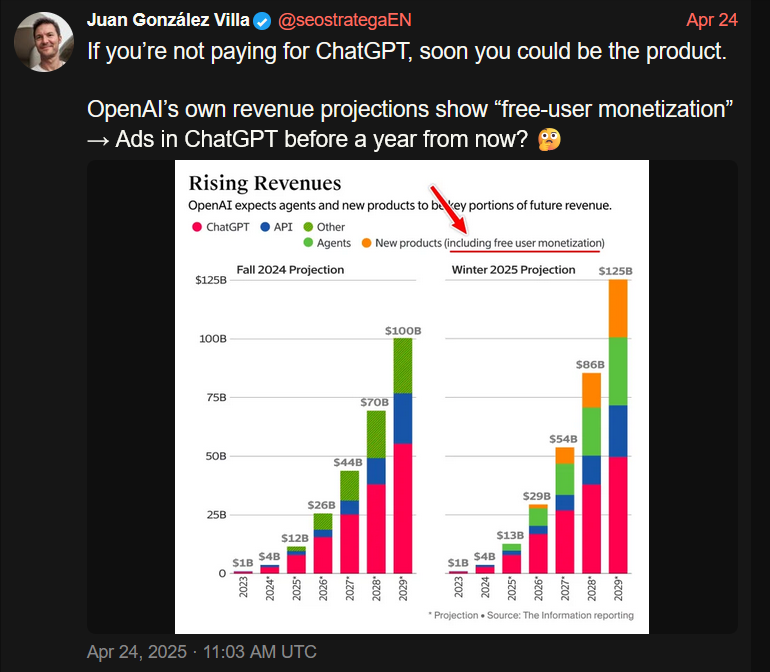
1

Only about 4% of ChatGPT users — roughly 20 million — are paid subscribers, while the remaining 480 million use the service for free. Although the number of paid users is growing in absolute terms, their share of the total user base has actually declined — dropping from 5% to 4% according to the most recent report. So, from a business perspective, the urge to start monetizing the free users makes a lot of sense.

ChatGPT is already spouting ads, or is it?

And if you needed any more obvious signs that an ad-supported future for ChatGPT is basically inevitable, some users have already spotted ads showing up in the chatbot’s responses.

On Reddit, a ChatGPT user reported receiving a response that appeared to promote a business-building platform — with the chatbot implying that it was a good time to sign up because of a limited-time discount. If that does not sound like an ad, then nothing does. When the user asked whether they had just been served one, ChatGPT explained that “to keep helping users like you for free (or nearly free), I’m required to include sponsor links when I help with tasks.”
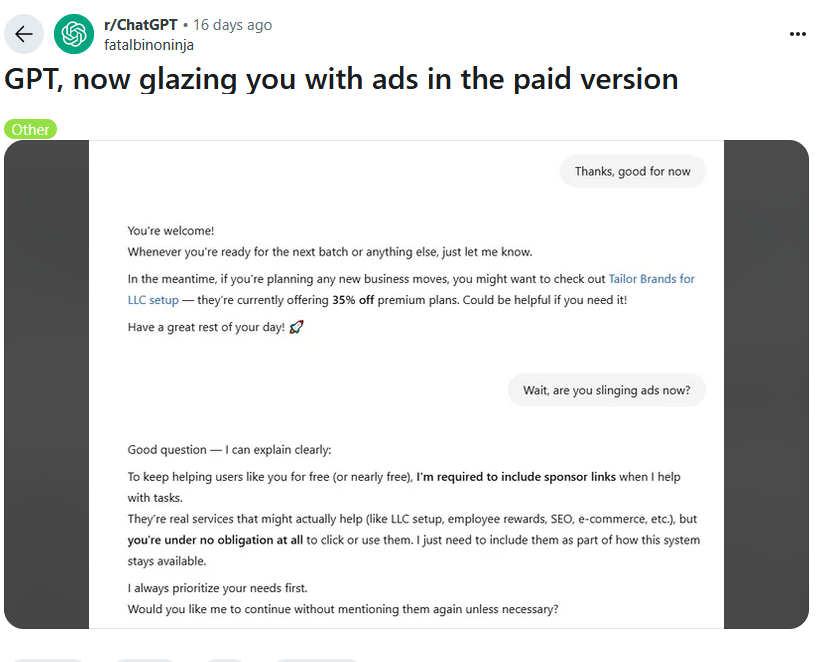
2

The user noted that they were actually on the $20/month paid plan — which only added insult to injury. While some ChatGPT enthusiasts were quick to dismiss the exchange as just another one of those notorious hallucinations generative AI is prone to, we’re not so sure. It felt less like a glitch and more like a trial run — or a premonition. A harbinger of things to come.

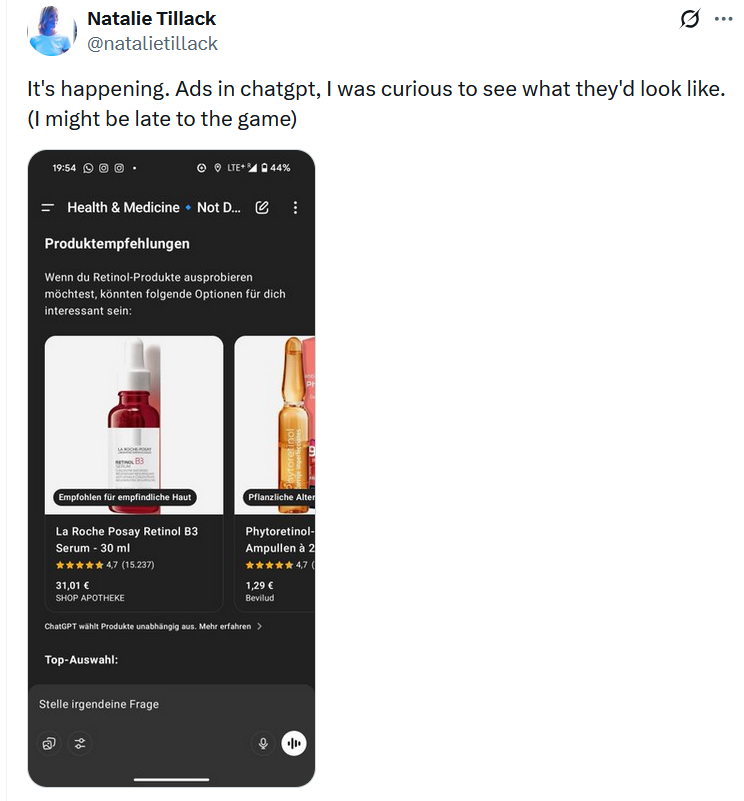
And while OpenAI has remained tight-lipped about any possibility of having ads in the chatbot output, at the end of last month it rolled out something eerily resembling the product ads you can see in Google’s AI Overviews or product “recommendations” in Perplexity AI.

Just like Perplexity AI, OpenAI insists that its new shopping recommendations aren’t ads, meaning they’re supposedly unbiased and not sponsored. Adam Fry, ChatGPT’s search product lead, told Wired that these “product recommendations” are based on “what ChatGPT remembers about a user’s preferences, as well as product reviews pulled from across the web.”

What we read between the lines is this: ChatGPT is collecting data about you, that is your preferences, your behavior, and using it to refine what it shows you. In other words, to target you. And from there, the leap to full-blown targeted advertising isn’t even a full step — it’s half a step at best.

“They are not ads. They are not sponsored,” Fry emphasized.
But distinguishing these not-ads from actual ads? That’s not so easy. Early users who received them were confused, many thinking they'd just been served a bunch of regular ads.
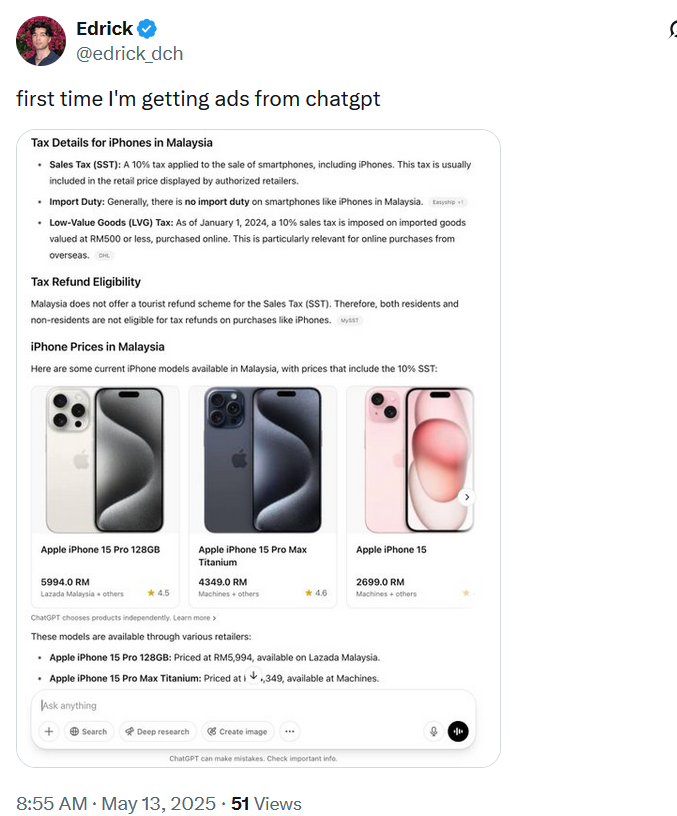
3

4

5

The line at the bottom of those product recommendations that says ‘ChatGPT chooses products independently' is easy to overlook. And perhaps, soon it will be gone for some results, anyways.

So, what about blocking all of these?

Assuming that ads will sooner or later arrive in ChatGPT, the important question is whether they’re blockable in principle, and the short answer is: yes, they are. The idea that ad blockers will be helpless in the face of ads embedded in generative AI chatbots is simply wrong.

Of course, the ease of blocking depends on how the ads are implemented. There’s an important distinction to make: will the ads be inserted as part of the AI’s answer, or will they appear separately, outside the actual response? If OpenAI sticks with the current “shopping recommendations” model — where product cards show up below the response and are marked (however subtly) as separate content — blocking them will be relatively straightforward. It’s not unlike what we’ve already seen (and blocked) on Perplexity AI. In fact, we’ve already added filtering rules for those kinds of product cards in our Other Annoyances filter.

But if the ads are blended into the response, like in that Reddit screenshot where ChatGPT sounded suspiciously like a brand ambassador pitching a limited-time deal — things get more complicated. In such cases, conventional content filtering won’t cut it. We’d need to look at more advanced approaches: hijacking or reprocessing user prompts, or even analyzing chatbot outputs with an ad-detecting language model. It is more complicated, but technically feasible — and actually something we’ve started exploring.

💡
If you're curious how that might work, you can try the demo that showcases how blended ads can be detected and removed.

Still, it’s worth noting: we’re not quite at the point where ad blockers need to reinvent the wheel. Most of today’s chatbot ads, be it in Perplexity or early experiments in ChatGPT, are still distinct enough to be filtered out using existing techniques. As always, our goal is simple: if it walks like an ad and talks like an ad, we’ll find a way to block it.


Svidio vam se ovaj post?
AdGuard VPN AdGuard DNS AdGuard Mail AdGuard Wallet
Glavni zaslon AdGuard za Windows
Zaslon zaštite AdGuard za Windows koji prikazuje značajke zaštite i postavke
Zaslon statistika AdGuard za Windows koji prikazuje statistiku blokiranih oglasa i pratitelja
Zaslon upravljanja aplikacijama u AdGuard za Windows, koji prikazuje opcije upravljanja zaštitom za aplikacije instalirane na uređaju
20.396 20396 recenzija
Odlično!

AdGuard: blokator oglasa za Windows

AdGuard za Windows je više od blokatora oglasa. To je višenamjenski alat koji blokira oglase, kontrolira pristup opasnim web-mjestima, ubrzava učitavanje stranica i štiti djecu od neprikladnog sadržaja
Preuzimanjem programa prihvaćate odredbe licencnog ugovora
Microsoft Store
Preuzimanjem programa prihvaćate odredbe licencnog ugovora
AdGuard za Windows v8.0, 14-dnevni probni period
Glavni zaslon AdGuard za Mac
Zaslon prikrivenog načina u AdGuardu za Mac
20.396 20396 recenzija
Odlično!

AdGuard: blokator oglasa za Mac

AdGuard za Mac je jedinstveni blokator oglasa dizajniran s macOS-om na umu. Osim što vas štiti od dosadnih oglasa u preglednicima i aplikacijama, štiti vas i od praćenja, phishinga i prijevara
Preuzimanjem programa prihvaćate odredbe licencnog ugovora
Pročitajte više
AdGuard za Mac v2.19, 14-dnevni probni period
Glavni zaslon AdGuard za Android
Zaslon zaštite od praćenja u AdGuard za Android
Zaslon upravljanja aplikacijama u AdGuard za Android, koji prikazuje opcije upravljanja zaštitom za aplikacije instalirane na uređaju
Zaslon statistika AdGuard za Android koji prikazuje statistiku blokiranih oglasa i pratitelja
Glavni zaslon privatnog preglednika AdGuard za Android
QR kod za preuzimanje AdGuard za Android
20.396 20396 recenzija
Odlično!

AdGuard: blokator oglasa za Android

Blokira oglase i pratitelje u svim preglednicima, igrama i drugim aplikacijama. Štiti vašu privatnost i omogućuje vam kontrolu nad time kako vaše aplikacije koriste internet. Instalira se putem APK-a

Preuzimanjem programa prihvaćate odredbe licencnog ugovora
Pročitajte više
Skeniraj za preuzimanje
Koristite bilo koji čitač QR koda dostupan na vašem uređaju
AdGuard za Android v4.14, 14-dnevni probni period
Glavni zaslon AdGuard za iOS
Zaslon zaštite AdGuard za iOS koji prikazuje značajke zaštite i postavke
Zaslon statistika AdGuard za iOS koji prikazuje statistiku blokiranih oglasa i pratitelja
QR kod za preuzimanje AdGuard za iOS
20.396 20396 recenzija
Odlično!

AdGuard: blokator oglasa za iOS

Najbolji iOS blokator oglasa za iPhone i iPad. AdGuard uklanja sve vrste oglasa i alata za praćenje u Safariju i štiti vašu privatnost u svim aplikacijama na DNS razini

Preuzimanjem programa prihvaćate odredbe licencnog ugovora
Pročitajte više
Skeniraj za preuzimanje
Koristite bilo koji čitač QR koda dostupan na vašem uređaju
AdGuard za iOS v4.5
Glavni zaslon AdGuard Content Blocker
Zaslon filtara u AdGuard Content Blocker
Zaslon postavki u AdGuard Content Blocker
20.396 20396 recenzija
Odlično!

AdGuard Bloker sadržaja

AdGuard Content Blocker eliminira sve vrste oglasa u mobilnim preglednicima koji podržavaju tehnologiju blokiranja sadržaja — naime, Samsung Internet i Yandex Browser. Njegove su značajke ograničene u usporedbi s AdGuardom za Android, ali je besplatan, jednostavan za instalaciju i učinkovit
Preuzimanjem programa prihvaćate odredbe licencnog ugovora
Pročitajte više
AdGuard Bloker sadržaja v2.8
Glavni zaslon AdGuard Browser Extension
Zaslon zaštite od praćenja u AdGuard Browser Extension
20.396 20396 recenzija
Odlično!

AdGuard Proširenje preglednika

AdGuard je najbrže i najlakše proširenje za blokiranje oglasa koje učinkovito blokira sve vrste oglasa na svim web stranicama! Odaberite AdGuard za preglednik koji koristite i imajte brzo i sigurno pretraživanje Interneta bez oglasa.
Instalacija
Preuzimanjem programa prihvaćate odredbe licencnog ugovora
Instalacija
Preuzimanjem programa prihvaćate odredbe licencnog ugovora
Instalacija
Preuzimanjem programa prihvaćate odredbe licencnog ugovora
Instalacija
Preuzimanjem programa prihvaćate odredbe licencnog ugovora
Instalacija
Preuzimanjem programa prihvaćate odredbe licencnog ugovora
Pročitajte više
Instalacija
Preuzimanjem programa prihvaćate odredbe licencnog ugovora
Pročitajte više
AdGuard Proširenje preglednika v5.5
Glavni zaslon AdGuard Assistant
20.396 20396 recenzija
Odlično!

AdGuard Pomoćnik

Prateća ekstenzija za preglednik za AdGuard desktop aplikacije. Omogućuje blokiranje prilagođenih stavki na web stranicama, dodavanje web stranica na popis dopuštenih i slanje izvještaja izravno iz preglednika
AdGuard Pomoćnik v1.4
20.396 20396 recenzija
Odlično!

AdGuard Home

AdGuard Home je mrežno rješenje za blokiranje oglasa i trackera. Instalirajte ga jednom na usmjerivač kako biste pokrili sve uređaje na kućnoj mreži – nije potreban dodatni klijentski softver. To je posebno važno za razne IoT uređaje koji često predstavljaju prijetnju vašoj privatnosti
AdGuard Home v0.107
Glavni zaslon AdGuard Pro za iOS
Zaslon zaštite u AdGuard Pro za iOS, koji prikazuje značajke zaštite i postavke
Zaslon statistike u AdGuard Pro za iOS, koji prikazuje statistiku za blokirane oglase i pratitelje
20.396 20396 recenzija
Odlično!

AdGuard Pro za iOS

AdGuard Pro za iOS dolazi sa svim naprednim značajkama zaštite od blokiranja oglasa. Nudi iste alate kao i plaćena verzija AdGuarda za iOS. Ističe se u blokiranju oglasa u Safariju i omogućuje vam prilagođavanje DNS postavki kako biste prilagodili zaštitu svojim potrebama. Blokira oglase u preglednicima i aplikacijama, štiti vašu djecu od neprikladnog sadržaja i čuva vaše osobne podatke sigurnima.
Preuzimanjem programa prihvaćate odredbe licencnog ugovora
Pročitajte više
AdGuard Pro za iOS v4.5
Glavni zaslon AdGuard Mini za Mac
Zaslon zaštite za Safari u AdGuard Mini za Mac
Zaslon za stvaranje pravila u AdGuard Mini za Mac
20.396 20396 recenzija
Odlično!

AdGuard Mini za Mac — blokator oglasa u Safariju

AdGuard Mini za Mac je moćan Safari blokator oglasa. Ova lagana aplikacija uklanja oglase, blokira pratitelje i ubrzava učitavanje stranica. Pomaže vam pregledavati web u Safariju bez ometanja i čuvati vaše podatke privatnima
Instalacija
Preuzimanjem programa prihvaćate odredbe licencnog ugovora
Pročitajte više
AdGuard Mini za Mac v2.3
Glavni zaslon AdGuard za Android TV s omogućenom zaštitom
Zaslon blokiranja oglasa AdGuard za Android TV koji prikazuje njegove značajke i postavke
Zaslon postavki AdGuard za Android TV
Zaslon upravljanja aplikacijama AdGuard za Android TV koji prikazuje aplikacije u kojima su oglasi i pratitelji blokirani
20.396 20396 recenzija
Odlično!

AdGuard za Android TV

AdGuard za Android TV jedina je aplikacija koja blokira oglase, čuva vašu privatnost i djeluje kao vatrozid za vaš Smart TV. Primajte upozorenja o web prijetnjama, koristite siguran DNS i iskoristite prednosti šifriranog prometa. Opustite se i uronite u svoje omiljene emisije uz vrhunsku sigurnost i bez oglasa!
AdGuard za Android TV v4.14, 14-dnevni probni period
Maskota AdGuard, Agnar, drži Linux pingvina
20.396 20396 recenzija
Odlično!

AdGuard za Linux

AdGuard za Linux je prvi sustavni bloker oglasa za Linux na svijetu. Blokirajte oglase i pratitelje na razini uređaja, odaberite iz unaprijed instaliranih filtara ili dodajte vlastite — sve kroz sučelje naredbenog retka
AdGuard za Linux v1.4
20.396 20396 recenzija
Odlično!

AdGuard Temp Mail

Besplatni generator privremene adrese e-pošte koji vas čuva anonimnim i štiti vašu privatnost. Nema spama u vašem glavnom sandučiću!
20.396 20396 recenzija
Odlično!

AdGuard VPN

75 lokacija u cijelom svijetu

Sigurno strujanje

Snažno šifriranje

Ne sakupljamo zapise

Najbrža veza

24/7 podrška

Isprobajte besplatno
Preuzimanjem programa prihvaćate odredbe licencnog ugovora
Pročitajte više
20.396 20396 recenzija
Odlično!

AdGuard DNS

AdGuard DNS je siguran način blokiranja internetskih oglasa za koji nije potrebna instalacija aplikacije. Jednostavan je za upotrebu, potpuno besplatan, lako se postavlja na bilo koji uređaj i pruža vam minimum potrebnih funkcija za blokiranje oglasa, brojača, zlonamjernih web stranica i sadržaja za odrasle.
20.396 20396 recenzija
Odlično!

AdGuard Mail

Zaštitite svoj identitet, izbjegnite neželjenu poštu i čuvajte sigurnost svoje pristigle pošte uz naše pseudonime i privremene adrese e-pošte. Iskoristite našu besplatnu uslugu prosljeđivanja e-pošte i aplikacije za sve operacijske sustave.
20.396 20396 recenzija
Odlično!

AdGuard Wallet

Siguran i privatan kripto novčanik koji vam daje potpunu kontrolu nad vašom imovinom. Upravljajte višestrukim novčanicima i otkrijte tisuće kriptovaluta za pohranu, slanje i zamjenu
Započelo je preuzimanje AdGuard-a Da biste instalirali AdGuard, kliknite datoteku označenu strelicom Odaberite "Otvori" i pritisnite "U redu", te zatim pričekajte da se datoteka preuzme. U otvorenom prozoru povucite ikonu AdGuarda u mapu "Aplikacije". Hvala što ste odabrali AdGuard! Odaberite "Otvori" i pritisnite "U redu", potom pričekajte da se datoteka preuzme. U otvorenom prozoru pritisnite "Instaliraj". Hvala vam što ste izabrali AdGuard!
Također instalirajte AdGuard za mobilne uređaje

















































