Everything about HTTPS filtering in AdGuard

This post is intended for more technically advanced users and meant to provide a detailed description on the HTTPS filtering and why it is essential in Adguard. The thing is, HTTPS is a very serious and sensitive subject, and we want to be as open here as possible.

What is HTTPS?

HTTPS (HyperText Transfer Protocol Secure) is an extension of the HTTP protocol that supports encryption to increase security. This protocol is used to securely transmit valuable information like personal data, credit card details, etc.

Using HTTPS is strictly advantageous, since encrypted traffic is protected from ‘eavesdropping’ by third parties, and we can only welcome this. HTTPS spread has been on the rise in the recent years, mostly because it is being encouraged by Google, and also due to the emergence of a free certification center Let’s Encrypt.

The diagram below describes the difference between plain HTTP protocol and secure HTTPS protocol.
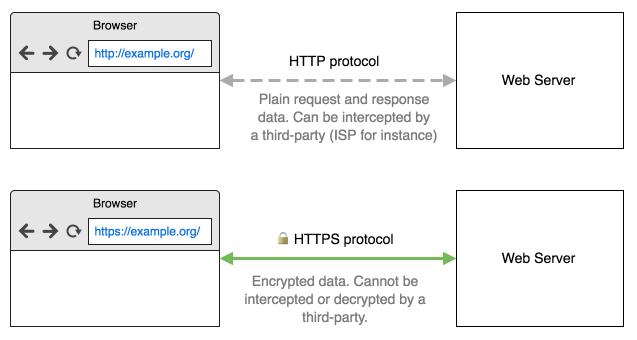
What is HTTPS

What is a security certificate?

Simply put, HTTPS means data encryption. But there’s still a problem: how can you be sure you’ve established an encrypted connection with exactly the website you intended to? That’s where security certificates come into play. The certificate is proof that the website is actually what it tells you it is. If a website doesn’t have such certificate, or the certificate contains incorrect information, the browser won’t let you establish a secure connection. It is important that the certificate a website uses was issued by a certification authority (CA) trusted by your browser. Such CA guarantees that the SSL certificate is, indeed, issued to the website’s owner.

Why does Adguard need to be able to filter HTTPS?

The thing is, more and more websites, blogs, social media, etc. switch to HTTPS every day. And besides blogs and websites, more ad networks switch to HTTPS too, because it becomes necessary to display ads on the HTTPS-based website. Here are few examples of popular websites, where you can’t remove ads without filtering the HTTPS: youtube.com, facebook.com, twitter.com.

Adguard versions for Windows and Mac have HTTPS filtering enabled by default. In case of Android you'll need to enable it manually.

How does HTTPS filtering work?

If it were easy, HTTPS wouldn’t be that secure. Upon browser’s attempt to connect to a server, Adguard establishes two secure connections: one with the browser (or another app), and the other with the server. It is crucial that browser trusts Adguard and the connections created by it. For this purpose, Adguard generates a special (and unique) root certificate and installs it into the system and, when it is required, into some browsers too (e.g. Firefox). Thus, Adguard can see what is happening inside of the secure connection and do its job - block ads and tracking.

For better understanding we depicted this process:
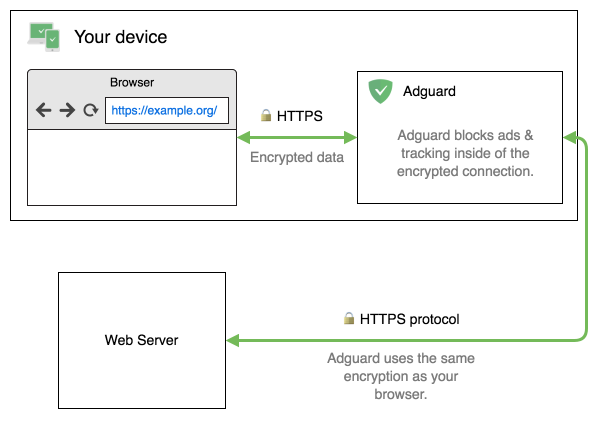
How does HTTPS filtering work

Does my traffic remain encrypted and secure?

Of course! Your connection with a remote server remains encrypted and secure. Adguard, just as your browser, checks the server’s certificate before deciding whether to filter it or not.

Nevertheless, HTTPS filtering has its drawbacks. The most important of them is the fact that it hides from the browser the real certificate that the website uses. Instead, the browser sees the certificate issued by Adguard.

Because of this, we undertake several additional measures to improve the connection’s security.

Financial websites and websites with sensitive personal data

By default, Adguard doesn’t filter any information for the bank websites, websites of the payment systems and websites with valuable personal data. We maintain a list of more than 1300 such exclusions.

If you believe some website should be added to this list, please let us know.

Extended Validation (EV) certificates

Adguard provides an ability to exclude from filtering all websites that use extended validation certificates.

EV certificate means a higher security level and provides more guarantees than a regular certificate, proving that the website is not fraudulent or fake. When you visit a website protected by such certificate, the address bar becomes green, and the organization’s name appears in the browser’s interface.
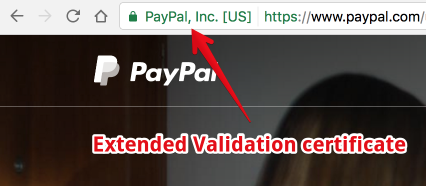
EV certificate

Problems related to HTTPS filtering

The recent research shows that 5 to 10% of HTTPS connections are established by HTTPS filtering applications. It is usually done by various kinds of antivirus software. The bad news is that 24 of 26 tested antiviruses were in one way or another reducing the connection security level and two-thirds were creating vulnerable to hacking connections.

The researchers’ conclusion was simple - Internet security community has to pay close attention to applications that filter secure connections. And the developers of such programs have to attend to the quality of filtering implementation most seriously.

I want to note that Adguard has not been tested by the researchers. According to our estimates, and judging by the set of tests, at the time of testing we would get the maximum score - A*. Nevertheless, that score is not perfect. There are some problems that have been identified by researchers but were not taken into account in the final evaluation.

Here in Adguard, we completely agree with those conclusions. Moreover, we would like to be as open with users as possible and talk about the problems we are having at the moment, and what steps we are taking to improve the quality and security of filtering mechanism. The list of these problems is sorted by their priority.

The majority of the problems discovered in the research above are connected with certificate validation mechanisms. This is what we want to focus on firstly. We are working on a separate certificate validation library. Moreover, we want to make it open source. A separate article lists all known issues of HTTPS filtering in Adguard and estimates when we will fix them.

How to manually check HTTPS quality?

There are several websites created specifically for the purpose of checking HTTPS connections quality. These websites check if your browser (or, in our case, browser + Adguard) is susceptible to common vulnerabilities. If you plan to use any program that filters HTTPS (not necessarily Adguard, it may be an antivirus, etc.), we advise checking the connection quality on these websites.


Svidio vam se ovaj post?
AdGuard VPN AdGuard DNS AdGuard Mail AdGuard Wallet
Glavni zaslon AdGuard za Windows
Zaslon zaštite AdGuard za Windows koji prikazuje značajke zaštite i postavke
Zaslon statistika AdGuard za Windows koji prikazuje statistiku blokiranih oglasa i pratitelja
Zaslon upravljanja aplikacijama u AdGuard za Windows, koji prikazuje opcije upravljanja zaštitom za aplikacije instalirane na uređaju
20.396 20396 recenzija
Odlično!

AdGuard: blokator oglasa za Windows

AdGuard za Windows je više od blokatora oglasa. To je višenamjenski alat koji blokira oglase, kontrolira pristup opasnim web-mjestima, ubrzava učitavanje stranica i štiti djecu od neprikladnog sadržaja

Preuzimanjem programa prihvaćate odredbe licencnog ugovora
Microsoft Store
Preuzimanjem programa prihvaćate odredbe licencnog ugovora
AdGuard za Windows v8.0, 14-dnevni probni period
Glavni zaslon AdGuard za Mac
Zaslon prikrivenog načina u AdGuardu za Mac
20.396 20396 recenzija
Odlično!

AdGuard: blokator oglasa za Mac

AdGuard za Mac je jedinstveni blokator oglasa dizajniran s macOS-om na umu. Osim što vas štiti od dosadnih oglasa u preglednicima i aplikacijama, štiti vas i od praćenja, phishinga i prijevara
Preuzimanjem programa prihvaćate odredbe licencnog ugovora
Pročitajte više
AdGuard za Mac v2.19, 14-dnevni probni period
Glavni zaslon AdGuard za Android
Zaslon zaštite od praćenja u AdGuard za Android
Zaslon upravljanja aplikacijama u AdGuard za Android, koji prikazuje opcije upravljanja zaštitom za aplikacije instalirane na uređaju
Zaslon statistika AdGuard za Android koji prikazuje statistiku blokiranih oglasa i pratitelja
Glavni zaslon privatnog preglednika AdGuard za Android
QR kod za preuzimanje AdGuard za Android
20.396 20396 recenzija
Odlično!

AdGuard: blokator oglasa za Android

Blokira oglase i pratitelje u svim preglednicima, igrama i drugim aplikacijama. Štiti vašu privatnost i omogućuje vam kontrolu nad time kako vaše aplikacije koriste internet. Instalira se putem APK-a
Preuzimanjem programa prihvaćate odredbe licencnog ugovora
Pročitajte više
Skeniraj za preuzimanje
Koristite bilo koji čitač QR koda dostupan na vašem uređaju
AdGuard za Android v4.14, 14-dnevni probni period
Glavni zaslon AdGuard za iOS
Zaslon zaštite AdGuard za iOS koji prikazuje značajke zaštite i postavke
Zaslon statistika AdGuard za iOS koji prikazuje statistiku blokiranih oglasa i pratitelja
QR kod za preuzimanje AdGuard za iOS
20.396 20396 recenzija
Odlično!

AdGuard: blokator oglasa za iOS

Najbolji iOS blokator oglasa za iPhone i iPad. AdGuard uklanja sve vrste oglasa i alata za praćenje u Safariju i štiti vašu privatnost u svim aplikacijama na DNS razini
Preuzimanjem programa prihvaćate odredbe licencnog ugovora
Pročitajte više
Skeniraj za preuzimanje
Koristite bilo koji čitač QR koda dostupan na vašem uređaju
AdGuard za iOS v4.5
Glavni zaslon AdGuard Content Blocker
Zaslon filtara u AdGuard Content Blocker
Zaslon postavki u AdGuard Content Blocker
20.396 20396 recenzija
Odlično!

AdGuard Bloker sadržaja

AdGuard Content Blocker eliminira sve vrste oglasa u mobilnim preglednicima koji podržavaju tehnologiju blokiranja sadržaja — naime, Samsung Internet i Yandex Browser. Njegove su značajke ograničene u usporedbi s AdGuardom za Android, ali je besplatan, jednostavan za instalaciju i učinkovit
Preuzimanjem programa prihvaćate odredbe licencnog ugovora
Pročitajte više
AdGuard Bloker sadržaja v2.8
Glavni zaslon AdGuard Browser Extension
Zaslon zaštite od praćenja u AdGuard Browser Extension
20.396 20396 recenzija
Odlično!

AdGuard Proširenje preglednika

AdGuard je najbrže i najlakše proširenje za blokiranje oglasa koje učinkovito blokira sve vrste oglasa na svim web stranicama! Odaberite AdGuard za preglednik koji koristite i imajte brzo i sigurno pretraživanje Interneta bez oglasa.
Instalacija
Preuzimanjem programa prihvaćate odredbe licencnog ugovora
Instalacija
Preuzimanjem programa prihvaćate odredbe licencnog ugovora
Instalacija
Preuzimanjem programa prihvaćate odredbe licencnog ugovora
Instalacija
Preuzimanjem programa prihvaćate odredbe licencnog ugovora
Instalacija
Preuzimanjem programa prihvaćate odredbe licencnog ugovora
Pročitajte više
Instalacija
Preuzimanjem programa prihvaćate odredbe licencnog ugovora
Pročitajte više
AdGuard Proširenje preglednika v5.5
Glavni zaslon AdGuard Assistant
20.396 20396 recenzija
Odlično!

AdGuard Pomoćnik

Prateća ekstenzija za preglednik za AdGuard desktop aplikacije. Omogućuje blokiranje prilagođenih stavki na web stranicama, dodavanje web stranica na popis dopuštenih i slanje izvještaja izravno iz preglednika
AdGuard Pomoćnik v1.4
20.396 20396 recenzija
Odlično!

AdGuard Home

AdGuard Home je mrežno rješenje za blokiranje oglasa i trackera. Instalirajte ga jednom na usmjerivač kako biste pokrili sve uređaje na kućnoj mreži – nije potreban dodatni klijentski softver. To je posebno važno za razne IoT uređaje koji često predstavljaju prijetnju vašoj privatnosti
AdGuard Home v0.107
Glavni zaslon AdGuard Pro za iOS
Zaslon zaštite u AdGuard Pro za iOS, koji prikazuje značajke zaštite i postavke
Zaslon statistike u AdGuard Pro za iOS, koji prikazuje statistiku za blokirane oglase i pratitelje
20.396 20396 recenzija
Odlično!

AdGuard Pro za iOS

AdGuard Pro za iOS dolazi sa svim naprednim značajkama zaštite od blokiranja oglasa. Nudi iste alate kao i plaćena verzija AdGuarda za iOS. Ističe se u blokiranju oglasa u Safariju i omogućuje vam prilagođavanje DNS postavki kako biste prilagodili zaštitu svojim potrebama. Blokira oglase u preglednicima i aplikacijama, štiti vašu djecu od neprikladnog sadržaja i čuva vaše osobne podatke sigurnima.
Preuzimanjem programa prihvaćate odredbe licencnog ugovora
Pročitajte više
AdGuard Pro za iOS v4.5
Glavni zaslon AdGuard Mini za Mac
Zaslon zaštite za Safari u AdGuard Mini za Mac
Zaslon za stvaranje pravila u AdGuard Mini za Mac
20.396 20396 recenzija
Odlično!

AdGuard Mini za Mac — blokator oglasa u Safariju

AdGuard Mini za Mac je moćan Safari blokator oglasa. Ova lagana aplikacija uklanja oglase, blokira pratitelje i ubrzava učitavanje stranica. Pomaže vam pregledavati web u Safariju bez ometanja i čuvati vaše podatke privatnima
Instalacija
Preuzimanjem programa prihvaćate odredbe licencnog ugovora
Pročitajte više
AdGuard Mini za Mac v2.3
Glavni zaslon AdGuard za Android TV s omogućenom zaštitom
Zaslon blokiranja oglasa AdGuard za Android TV koji prikazuje njegove značajke i postavke
Zaslon postavki AdGuard za Android TV
Zaslon upravljanja aplikacijama AdGuard za Android TV koji prikazuje aplikacije u kojima su oglasi i pratitelji blokirani
20.396 20396 recenzija
Odlično!

AdGuard za Android TV

AdGuard za Android TV jedina je aplikacija koja blokira oglase, čuva vašu privatnost i djeluje kao vatrozid za vaš Smart TV. Primajte upozorenja o web prijetnjama, koristite siguran DNS i iskoristite prednosti šifriranog prometa. Opustite se i uronite u svoje omiljene emisije uz vrhunsku sigurnost i bez oglasa!
AdGuard za Android TV v4.14, 14-dnevni probni period
Maskota AdGuard, Agnar, drži Linux pingvina
20.396 20396 recenzija
Odlično!

AdGuard za Linux

AdGuard za Linux je prvi sustavni bloker oglasa za Linux na svijetu. Blokirajte oglase i pratitelje na razini uređaja, odaberite iz unaprijed instaliranih filtara ili dodajte vlastite — sve kroz sučelje naredbenog retka
AdGuard za Linux v1.4
20.396 20396 recenzija
Odlično!

AdGuard Temp Mail

Besplatni generator privremene adrese e-pošte koji vas čuva anonimnim i štiti vašu privatnost. Nema spama u vašem glavnom sandučiću!
20.396 20396 recenzija
Odlično!

AdGuard VPN

75 lokacija u cijelom svijetu

Sigurno strujanje

Snažno šifriranje

Ne sakupljamo zapise

Najbrža veza

24/7 podrška

Isprobajte besplatno
Preuzimanjem programa prihvaćate odredbe licencnog ugovora
Pročitajte više
20.396 20396 recenzija
Odlično!

AdGuard DNS

AdGuard DNS je siguran način blokiranja internetskih oglasa za koji nije potrebna instalacija aplikacije. Jednostavan je za upotrebu, potpuno besplatan, lako se postavlja na bilo koji uređaj i pruža vam minimum potrebnih funkcija za blokiranje oglasa, brojača, zlonamjernih web stranica i sadržaja za odrasle.
20.396 20396 recenzija
Odlično!

AdGuard Mail

Zaštitite svoj identitet, izbjegnite neželjenu poštu i čuvajte sigurnost svoje pristigle pošte uz naše pseudonime i privremene adrese e-pošte. Iskoristite našu besplatnu uslugu prosljeđivanja e-pošte i aplikacije za sve operacijske sustave.
20.396 20396 recenzija
Odlično!

AdGuard Wallet

Siguran i privatan kripto novčanik koji vam daje potpunu kontrolu nad vašom imovinom. Upravljajte višestrukim novčanicima i otkrijte tisuće kriptovaluta za pohranu, slanje i zamjenu
Započelo je preuzimanje AdGuard-a Da biste instalirali AdGuard, kliknite datoteku označenu strelicom Odaberite "Otvori" i pritisnite "U redu", te zatim pričekajte da se datoteka preuzme. U otvorenom prozoru povucite ikonu AdGuarda u mapu "Aplikacije". Hvala što ste odabrali AdGuard! Odaberite "Otvori" i pritisnite "U redu", potom pričekajte da se datoteka preuzme. U otvorenom prozoru pritisnite "Instaliraj". Hvala vam što ste izabrali AdGuard!
Također instalirajte AdGuard za mobilne uređaje

















































