In-Depth Features Overview: AdGuard for Android

November 2018 update: another, updated version of AdGuard for Android features review has been published in our Blog, we recommend checking it out!

As you all know, AdGuard has a rich feature set in the sphere of ad blocking and privacy protection. Up until now, we used to write a separate post about every feature we have, but there was no place you could find our features collected all together in a full-fledged overview. By reading this article, you´ll learn a lot of new things about AdGuard for Android.
Ad Blocking

The main function of AdGuard for Android is ad blocking, which includes blocking of annoying banners, pop-ups and push messages. All your traffic goes through a VPN-server installed on your device, that makes filtering faster and more secure. Because of the local VPN, your data is not transmitted to any third-party servers.

The process of blocking ads on web pages is described here.
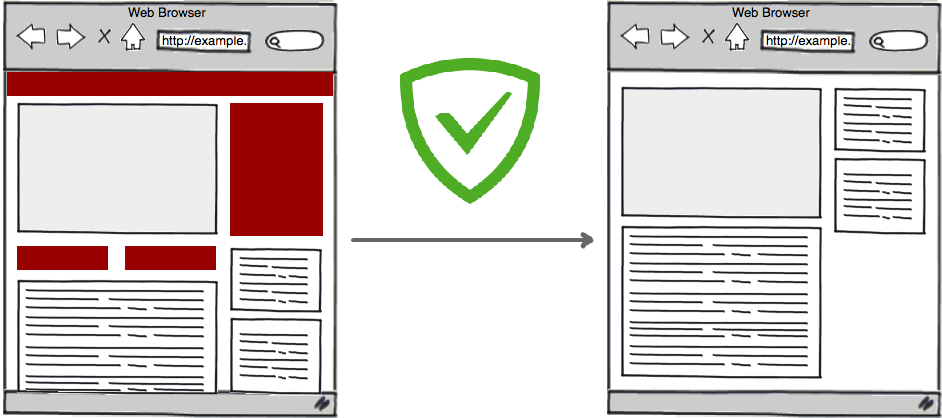
Ad blocking feature seems to be as plain as daylight, but it's not that simple. Nowadays you can find a lot of programs which are considered to protect you from annoying publicity on the Internet, but AdGuard makes it way better than other ad blockers.

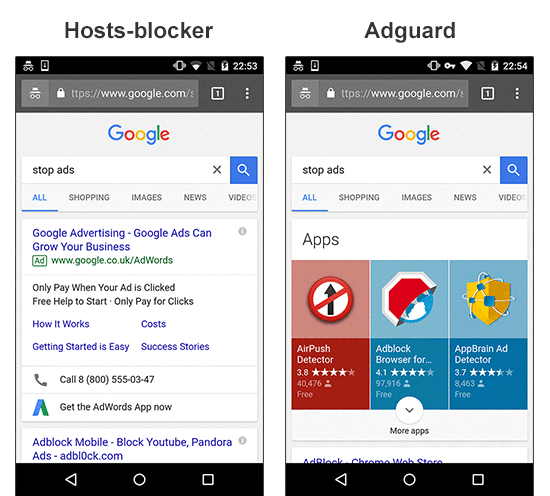
Unlike many other other ad blockers, AdGuard is not just a "hosts" blocker, but a full-fledged "filter" that passes through itself traffic of all apps, and then decides what to do with it. These decisions are based on the set of special rules. For example, in the picture below you can see that AdGuard (right side) is capable of eliminating the ad which is impossible to block without applying cosmetic rules.
Thanks to the HTTPS filtering, AdGuard has outstanding ad blocking capabilities. However, you'll need to enable this feature manually.

To find out how else AdGuard is different from other ad blockers you can have a look at this detailed comparative analysis.

Privacy Protection

Don't you know that even if you don't use specific apps like Facebook it doesn't stop them from collecting information about you? We did our own research you can read here.
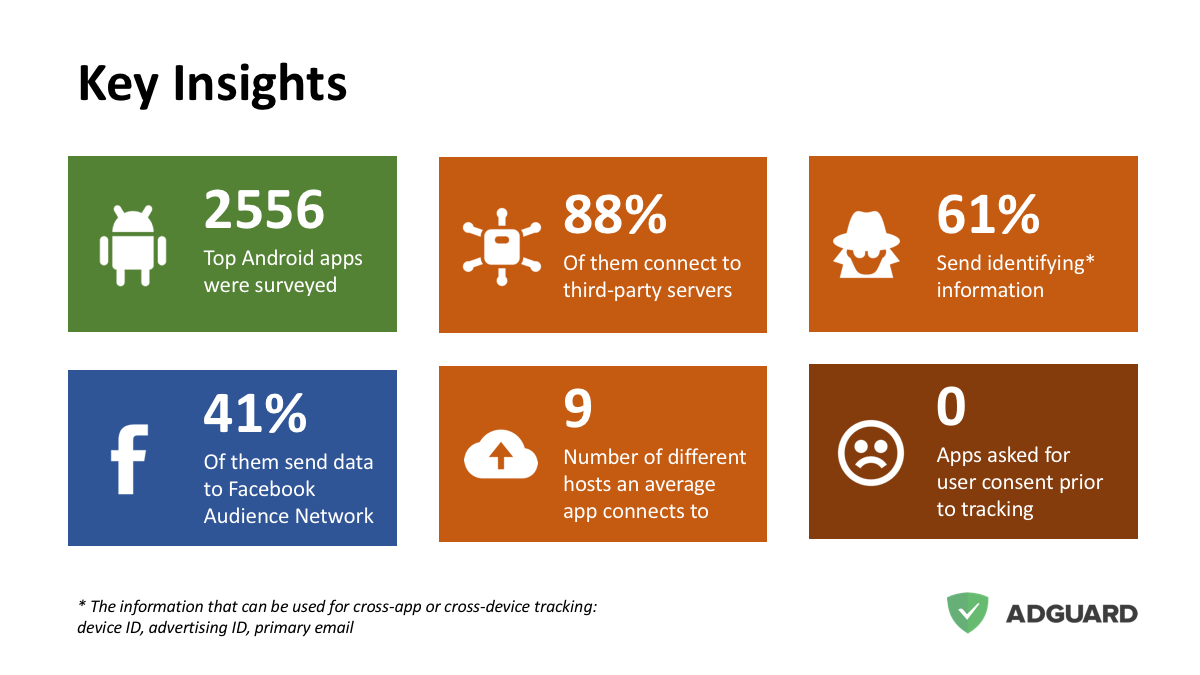
Most importantly, we have a tool to protect you from being tracked on the Internet. AdGuard for Android includes a pair of potent filters, specifically created for privacy protection: "AdGuard Spyware filter" and "EasyPrivacy".

Many websites gather information about their visitors, such as their IP addresses, information about browser and operating system, screen resolution, and even what page the user was redirected from. The Spyware filter protects your personal data from automatic data gathering systems. Turn on this filter, and no one will be able to track your web activity anymore.

Phishing and malware protection

The Internet is a pretty dangerous place where your device can be attacked by viruses whereas your personal or financial information can be stolen. Fortunately, AdGuard's Browsing Seciruty module protects you from visiting phishing and malicious websites. It also prevents malware from being downloaded onto your device. At the same time, your personal data is not transferred anywhere, and AdGuard does not know which websites you are visiting, because security check is not performed against open web address (URL) but through hash prefixes (hash is a certain data structure that renders unambiguous each address added to the base).

You can learn more about AdGuard's phishing and malware protection here.

Get Back Control Over Your Apps

Don't forget that with AdGuard for Android you always you have full control over the device. You can see all information about requests coming through the Internet connection on your device. No apps will try to go online without you knowing.

Apps Management (+Firewall)

In the Apps Management special module, you can choose which apps should have WiFi or mobile data access. You can also change the rules of background Internet connection for your apps when the screen is locked. These settings can be applied to all installed apps or just to selected ones.

Filtering Log

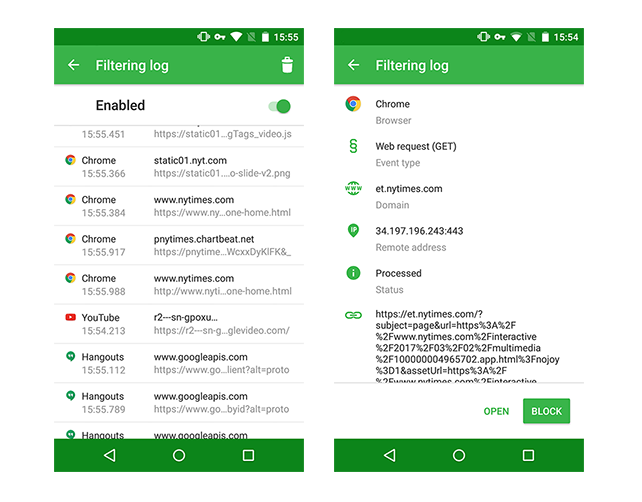
This feature appeared in AdGuard for Android 2.9 and made your life easier. There you can have a complete control of what is going on on your device. In the Filtering log you can manage the access for requests, e.g. block them. You can also check the requests and see whether they are safe.
DNS filtering

DNS filtering is one of the most effective ways to protect you from malicious websites, which consists in redirecting a request to the special server. If you have DNS filtering enabled on your device, all DNS requests will pass through AdGuard before reaching the DNS server.

DNS-level blocking

So AdGuard can block ads by requests. How exactly? It has a special 'Simplified domain names filter' containing a large amount of ad and tracker domains, which it uses in conjunction with User filter to recognize 'bad' requests. Every request is checked against this filter, and if there's a hit, instead of forwarding it to the DNS server, it is being rerouted to a 'blackhole'.
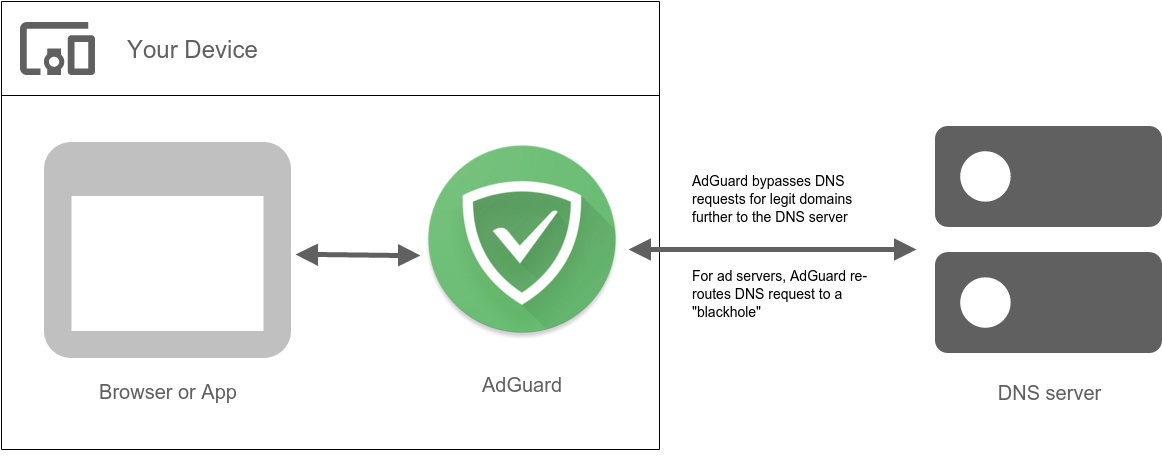
The main advantage of this approach is extremely economical and saving. Once a domain is blocked, it won't be requested again within an hour. The disadvantage being the roughness of this method: specific URLs can't be blocked, only whole domains. It can sometimes lead to 'breaking' of a websites functionality.

Don't let others snoop on your browsing history

If you use regular plain DNS protocol, you are at risk of your DNS requests being intercepted and, subsequently, eavesdropped and/or altered. The experiments show that the DNS tracking can even be used to construct a 'profile of interests' for any user. AdGuard is able to use DNSCrypt - a special protocol that encrypts communication with the DNS server, thus preventing tampering and tracking by any third party including your ISP.
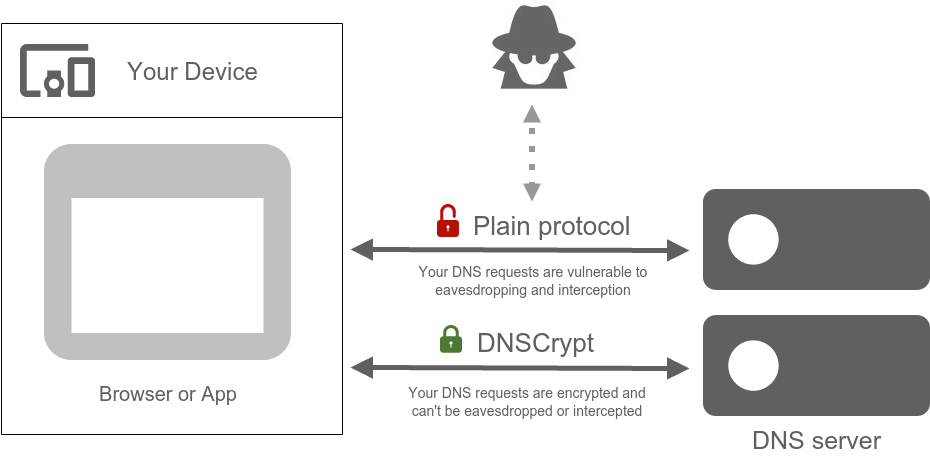
If you care about your online privacy, we strongly recommend using DNSCrypt.

Custom DNS servers

AdGuard for Android not only gives you an option of DNS filtering, but also allows to use any DNS server over the default one provided by your ISP or mobile network carrier. There are dozens and dozens of various DNS servers to choose from, encrypted and not, each one of them with its own advantages. As we already know, DNS servers can be used as an ad blocking and malware protection tool, but not only that — they can help you speed up your internet connection or set up a parental control. You can even configure AdGuard to use your own DNS server if you don't rely on any of the listed ones.

Proxy and Tor

And one more thing about privacy. Using a proxy server is not just about bypassing access restriction to geolocked resources. It's about security! If you are using a proxy server, intruders won't know what websites you visit. And by the way, AdGuard allows configuring a proxy right in the app. You can also use AdGuard along with the anonymity network Tor (we have already integrated AdGuard with Tor for your convenience!).
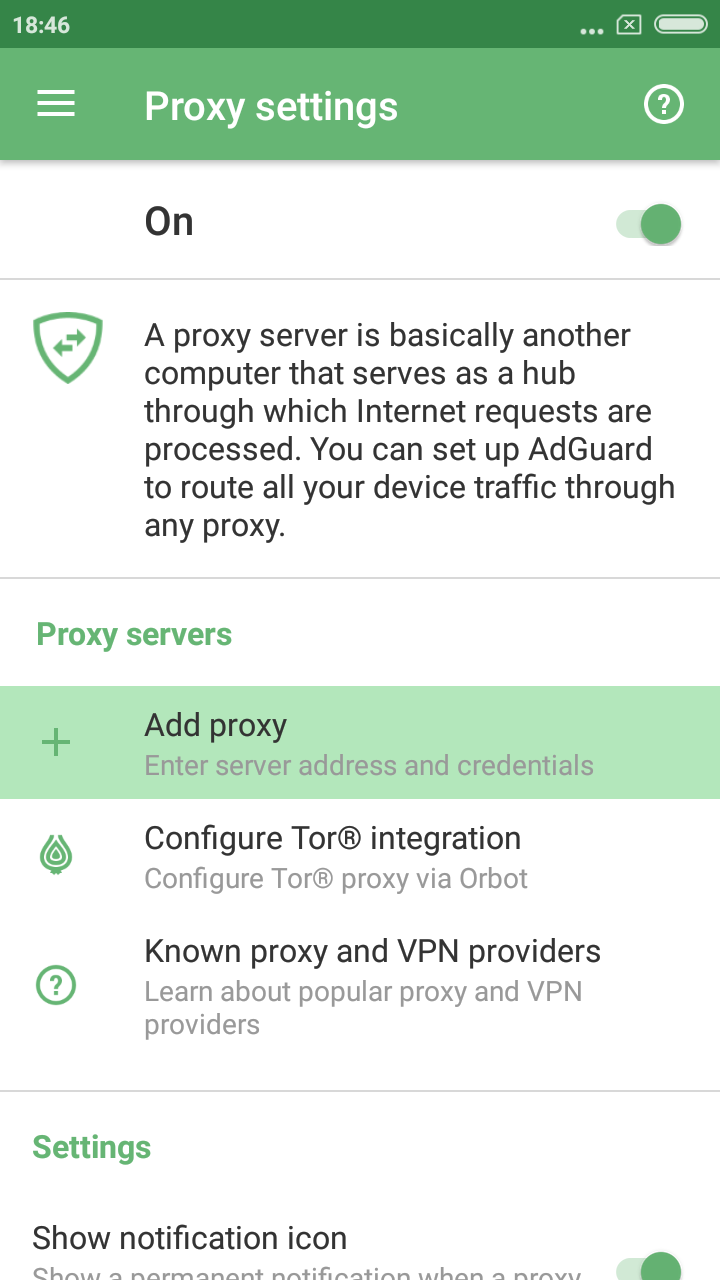
If you need an instruction on how to set up proxy, look it up here.

Also, you can configure your own proxy.

Want new features?

Well, there are some options you can try!

  • You can become our beta-tester and discover release updates. Here is the instruction on how to become one.
  • You also can enjoy our Nightly builds (builds that contain all the changes that developers worked on during that day). If you want to get them, see the information here
  • You can file bug reports or feature requests to our open bug tracker on Github.
  • Check out our public Telegram group where you can discuss AdGuard with developers in real time.
Svidio vam se ovaj post?
AdGuard VPN AdGuard DNS AdGuard Mail AdGuard Wallet
Glavni zaslon AdGuard za Windows
Zaslon zaštite AdGuard za Windows koji prikazuje značajke zaštite i postavke
Zaslon statistika AdGuard za Windows koji prikazuje statistiku blokiranih oglasa i pratitelja
Zaslon upravljanja aplikacijama u AdGuard za Windows, koji prikazuje opcije upravljanja zaštitom za aplikacije instalirane na uređaju
20.397 20397 recenzija
Odlično!

AdGuard: blokator oglasa za Windows

AdGuard za Windows je više od blokatora oglasa. To je višenamjenski alat koji blokira oglase, kontrolira pristup opasnim web-mjestima, ubrzava učitavanje stranica i štiti djecu od neprikladnog sadržaja
Preuzimanjem programa prihvaćate odredbe licencnog ugovora
Microsoft Store
Preuzimanjem programa prihvaćate odredbe licencnog ugovora
AdGuard za Windows v8.0, 14-dnevni probni period
Glavni zaslon AdGuard za Mac
Zaslon prikrivenog načina u AdGuardu za Mac
20.397 20397 recenzija
Odlično!

AdGuard: blokator oglasa za Mac

AdGuard za Mac je jedinstveni blokator oglasa dizajniran s macOS-om na umu. Osim što vas štiti od dosadnih oglasa u preglednicima i aplikacijama, štiti vas i od praćenja, phishinga i prijevara
Preuzimanjem programa prihvaćate odredbe licencnog ugovora
Pročitajte više
AdGuard za Mac v2.19, 14-dnevni probni period
Glavni zaslon AdGuard za Android
Zaslon zaštite od praćenja u AdGuard za Android
Zaslon upravljanja aplikacijama u AdGuard za Android, koji prikazuje opcije upravljanja zaštitom za aplikacije instalirane na uređaju
Zaslon statistika AdGuard za Android koji prikazuje statistiku blokiranih oglasa i pratitelja
Glavni zaslon privatnog preglednika AdGuard za Android
QR kod za preuzimanje AdGuard za Android
20.397 20397 recenzija
Odlično!

AdGuard: blokator oglasa za Android

Blokira oglase i pratitelje u svim preglednicima, igrama i drugim aplikacijama. Štiti vašu privatnost i omogućuje vam kontrolu nad time kako vaše aplikacije koriste internet. Instalira se putem APK-a
Preuzimanjem programa prihvaćate odredbe licencnog ugovora
Pročitajte više
Skeniraj za preuzimanje
Koristite bilo koji čitač QR koda dostupan na vašem uređaju
AdGuard za Android v4.14, 14-dnevni probni period
Glavni zaslon AdGuard za iOS
Zaslon zaštite AdGuard za iOS koji prikazuje značajke zaštite i postavke
Zaslon statistika AdGuard za iOS koji prikazuje statistiku blokiranih oglasa i pratitelja
QR kod za preuzimanje AdGuard za iOS
20.397 20397 recenzija
Odlično!

AdGuard: blokator oglasa za iOS

Najbolji iOS blokator oglasa za iPhone i iPad. AdGuard uklanja sve vrste oglasa i alata za praćenje u Safariju i štiti vašu privatnost u svim aplikacijama na DNS razini
Preuzimanjem programa prihvaćate odredbe licencnog ugovora
Pročitajte više
Skeniraj za preuzimanje
Koristite bilo koji čitač QR koda dostupan na vašem uređaju
AdGuard za iOS v4.5
Glavni zaslon AdGuard Content Blocker
Zaslon filtara u AdGuard Content Blocker
Zaslon postavki u AdGuard Content Blocker
20.397 20397 recenzija
Odlično!

AdGuard Bloker sadržaja

AdGuard Content Blocker eliminira sve vrste oglasa u mobilnim preglednicima koji podržavaju tehnologiju blokiranja sadržaja — naime, Samsung Internet i Yandex Browser. Njegove su značajke ograničene u usporedbi s AdGuardom za Android, ali je besplatan, jednostavan za instalaciju i učinkovit
Preuzimanjem programa prihvaćate odredbe licencnog ugovora
Pročitajte više
AdGuard Bloker sadržaja v2.8
Glavni zaslon AdGuard Browser Extension
Zaslon zaštite od praćenja u AdGuard Browser Extension
20.397 20397 recenzija
Odlično!

AdGuard Proširenje preglednika

AdGuard je najbrže i najlakše proširenje za blokiranje oglasa koje učinkovito blokira sve vrste oglasa na svim web stranicama! Odaberite AdGuard za preglednik koji koristite i imajte brzo i sigurno pretraživanje Interneta bez oglasa.
Instalacija
Preuzimanjem programa prihvaćate odredbe licencnog ugovora
Instalacija
Preuzimanjem programa prihvaćate odredbe licencnog ugovora
Instalacija
Preuzimanjem programa prihvaćate odredbe licencnog ugovora
Instalacija
Preuzimanjem programa prihvaćate odredbe licencnog ugovora
Instalacija
Preuzimanjem programa prihvaćate odredbe licencnog ugovora
Pročitajte više
Instalacija
Preuzimanjem programa prihvaćate odredbe licencnog ugovora
Pročitajte više
AdGuard Proširenje preglednika v5.5
Glavni zaslon AdGuard Assistant
20.397 20397 recenzija
Odlično!

AdGuard Pomoćnik

Prateća ekstenzija za preglednik za AdGuard desktop aplikacije. Omogućuje blokiranje prilagođenih stavki na web stranicama, dodavanje web stranica na popis dopuštenih i slanje izvještaja izravno iz preglednika
AdGuard Pomoćnik v1.4
20.397 20397 recenzija
Odlično!

AdGuard Home

AdGuard Home je mrežno rješenje za blokiranje oglasa i trackera. Instalirajte ga jednom na usmjerivač kako biste pokrili sve uređaje na kućnoj mreži – nije potreban dodatni klijentski softver. To je posebno važno za razne IoT uređaje koji često predstavljaju prijetnju vašoj privatnosti
AdGuard Home v0.107
Glavni zaslon AdGuard Pro za iOS
Zaslon zaštite u AdGuard Pro za iOS, koji prikazuje značajke zaštite i postavke
Zaslon statistike u AdGuard Pro za iOS, koji prikazuje statistiku za blokirane oglase i pratitelje
20.397 20397 recenzija
Odlično!

AdGuard Pro za iOS

AdGuard Pro za iOS dolazi sa svim naprednim značajkama zaštite od blokiranja oglasa. Nudi iste alate kao i plaćena verzija AdGuarda za iOS. Ističe se u blokiranju oglasa u Safariju i omogućuje vam prilagođavanje DNS postavki kako biste prilagodili zaštitu svojim potrebama. Blokira oglase u preglednicima i aplikacijama, štiti vašu djecu od neprikladnog sadržaja i čuva vaše osobne podatke sigurnima.
Preuzimanjem programa prihvaćate odredbe licencnog ugovora
Pročitajte više
AdGuard Pro za iOS v4.5
Glavni zaslon AdGuard Mini za Mac
Zaslon zaštite za Safari u AdGuard Mini za Mac
Zaslon za stvaranje pravila u AdGuard Mini za Mac
20.397 20397 recenzija
Odlično!

AdGuard Mini za Mac — blokator oglasa u Safariju

AdGuard Mini za Mac je moćan Safari blokator oglasa. Ova lagana aplikacija uklanja oglase, blokira pratitelje i ubrzava učitavanje stranica. Pomaže vam pregledavati web u Safariju bez ometanja i čuvati vaše podatke privatnima
Instalacija
Preuzimanjem programa prihvaćate odredbe licencnog ugovora
Pročitajte više
AdGuard Mini za Mac v2.3
Glavni zaslon AdGuard za Android TV s omogućenom zaštitom
Zaslon blokiranja oglasa AdGuard za Android TV koji prikazuje njegove značajke i postavke
Zaslon postavki AdGuard za Android TV
Zaslon upravljanja aplikacijama AdGuard za Android TV koji prikazuje aplikacije u kojima su oglasi i pratitelji blokirani
20.397 20397 recenzija
Odlično!

AdGuard za Android TV

AdGuard za Android TV jedina je aplikacija koja blokira oglase, čuva vašu privatnost i djeluje kao vatrozid za vaš Smart TV. Primajte upozorenja o web prijetnjama, koristite siguran DNS i iskoristite prednosti šifriranog prometa. Opustite se i uronite u svoje omiljene emisije uz vrhunsku sigurnost i bez oglasa!
AdGuard za Android TV v4.14, 14-dnevni probni period
Maskota AdGuard, Agnar, drži Linux pingvina
20.397 20397 recenzija
Odlično!

AdGuard za Linux

AdGuard za Linux je prvi sustavni bloker oglasa za Linux na svijetu. Blokirajte oglase i pratitelje na razini uređaja, odaberite iz unaprijed instaliranih filtara ili dodajte vlastite — sve kroz sučelje naredbenog retka
AdGuard za Linux v1.4
20.397 20397 recenzija
Odlično!

AdGuard Temp Mail

Besplatni generator privremene adrese e-pošte koji vas čuva anonimnim i štiti vašu privatnost. Nema spama u vašem glavnom sandučiću!
20.397 20397 recenzija
Odlično!

AdGuard VPN

75 lokacija u cijelom svijetu

Sigurno strujanje

Snažno šifriranje

Ne sakupljamo zapise

Najbrža veza

24/7 podrška

Isprobajte besplatno
Preuzimanjem programa prihvaćate odredbe licencnog ugovora
Pročitajte više
20.397 20397 recenzija
Odlično!

AdGuard DNS

AdGuard DNS je siguran način blokiranja internetskih oglasa za koji nije potrebna instalacija aplikacije. Jednostavan je za upotrebu, potpuno besplatan, lako se postavlja na bilo koji uređaj i pruža vam minimum potrebnih funkcija za blokiranje oglasa, brojača, zlonamjernih web stranica i sadržaja za odrasle.
20.397 20397 recenzija
Odlično!

AdGuard Mail

Zaštitite svoj identitet, izbjegnite neželjenu poštu i čuvajte sigurnost svoje pristigle pošte uz naše pseudonime i privremene adrese e-pošte. Iskoristite našu besplatnu uslugu prosljeđivanja e-pošte i aplikacije za sve operacijske sustave.
20.397 20397 recenzija
Odlično!

AdGuard Wallet

Siguran i privatan kripto novčanik koji vam daje potpunu kontrolu nad vašom imovinom. Upravljajte višestrukim novčanicima i otkrijte tisuće kriptovaluta za pohranu, slanje i zamjenu
Započelo je preuzimanje AdGuard-a Da biste instalirali AdGuard, kliknite datoteku označenu strelicom Odaberite "Otvori" i pritisnite "U redu", te zatim pričekajte da se datoteka preuzme. U otvorenom prozoru povucite ikonu AdGuarda u mapu "Aplikacije". Hvala što ste odabrali AdGuard! Odaberite "Otvori" i pritisnite "U redu", potom pričekajte da se datoteka preuzme. U otvorenom prozoru pritisnite "Instaliraj". Hvala vam što ste izabrali AdGuard!



Također instalirajte AdGuard za mobilne uređaje
















































