Mozilla deletes promise to 'never sell' your data. Has it really backed out on its word?

Mozilla, the company behind the open-source Firefox browser, has long prided itself on standing apart from tech giants like Google. Unlike Google, which has a rich history of collecting user data even if you try to say ‘no’, Mozilla has consistently insisted — and generally followed through — that user controls in Firefox aren’t a smokescreen and that it puts privacy front and center. Mozilla’s Privacy FAQ still greets you with a subheading in bold: “We Stand for People over Profit.”

The promise that’s no longer there

In late February, Mozilla updated its Privacy FAQ, Firefox’s own Privacy FAQ and introduced Firefox TOU. All three documents raised a lot of eyebrows, sending the community into frenzy.

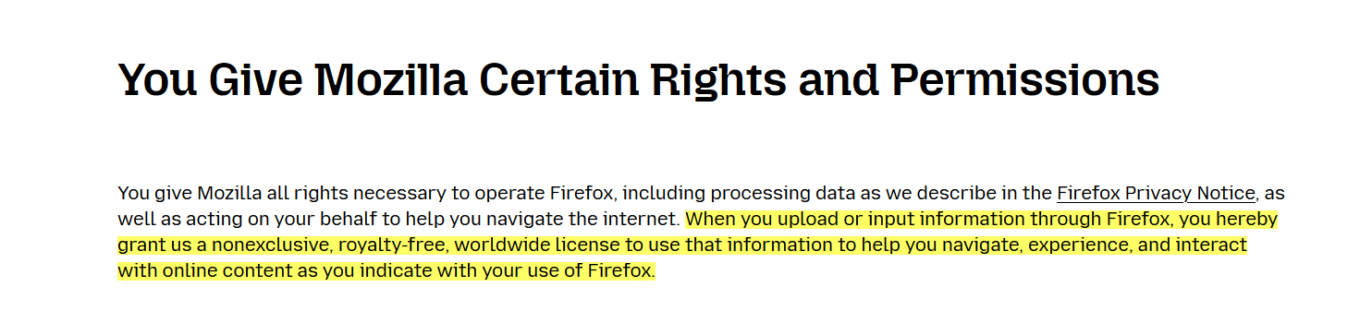
Let’s start with the TOU. The Firefox Terms of Use, released in late February, intially included the language that had many users scratching their heads. Specifically, it stated that “when you upload or input information through Firefox, you hereby grant us a nonexclusive, royalty-free, worldwide license to use that information to help you navigate, experience, and interact with online content as you indicate with your use of Firefox.”
The promise

What appeared to be a new policy triggered a flood of comments on Reddit, with users taking exception to the wording. Some criticized the language for being too vague, while not inherently and necessarily nefarious. Others were ringing alarm bells, and rather loudly: “For frick's sake I don't want you to use information typed in to Firefox, Mozilla. Whatever I type into the browser window is between me and whatever service I'm sending the information to, not you, Mozilla,” one Redditor ranted.

Others were still more willing to give Mozilla the benefit of the doubt: “I believe the Mozilla Foundation is trying to do the right thing, but this kind of language in the terms is ripe for abuse. I hope they clarify it.”

In response to the backlash, Mozilla released a blog post to try and clear things up, saying:

We’ve seen a little confusion about the language regarding licenses, so we want to clear that up. We need a license to allow us to make some of the basic functionality of Firefox possible. Without it, we couldn’t use information typed into Firefox, for example. It does NOT give us ownership of your data or a right to use it for anything other than what is described in the Privacy Notice.

However, this attempt at clarification only seemed to stir the pot further. Mozilla claimed they needed the license to make basic Firefox features work, but didn’t explain why they needed access to what you type in.

A few days later, Mozilla made another attempt at setting the record straight (or at damage control, whichever you prefer).

In a seperate blog post on February 28, it announced that it had changed the TOU once again.

Now the paragraph, that has caused so much controversy, reads like this:

You give Mozilla the rights necessary to operate Firefox. This includes processing your data as we describe in the Firefox Privacy Notice. It also includes a nonexclusive, royalty-free, worldwide license for the purpose of doing as you request with the content you input in Firefox. This does not give Mozilla any ownership in that content.

The apparent goal of this change was to ease users' fears that Mozilla now claims ownership of their typed-in content. However, if anything, the wording is even more vague than before, as it simply directs users to check the Firefox Privacy Notice for details as to how exactly their data will be used.

The TOU was only a small part of the controversy. Mozilla's updated Privacy FAQ and Firefox Privacy FAQ were responsible for the other part.

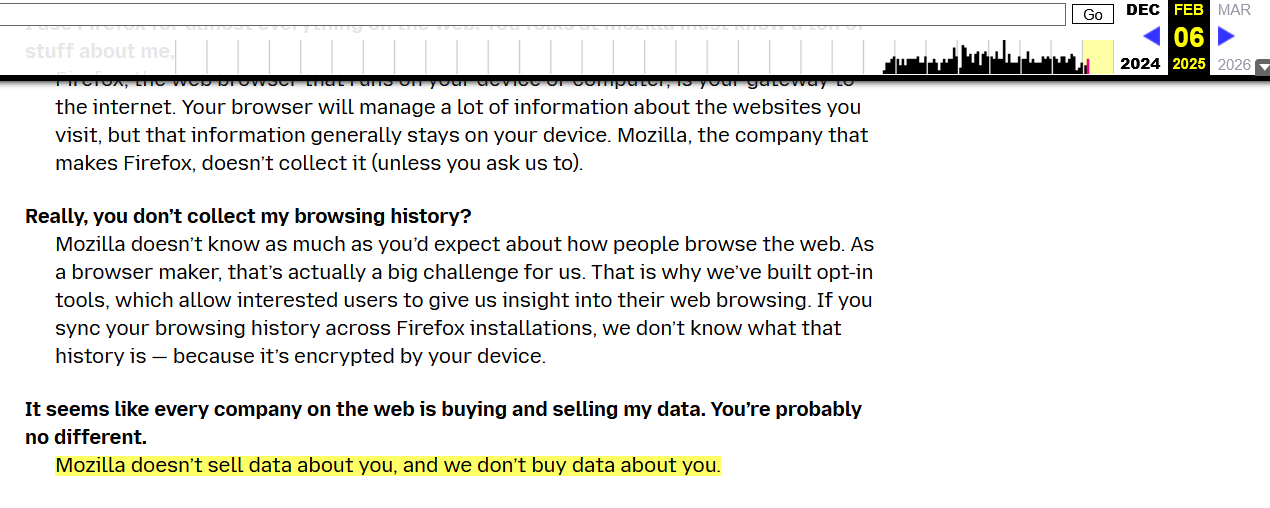
Previously, Mozilla's Privacy FAQ proudly stated that they “don’t sell data about you,” nor do they buy data about you. Below is a screenshot of the FAQ from February 6:
The promise2

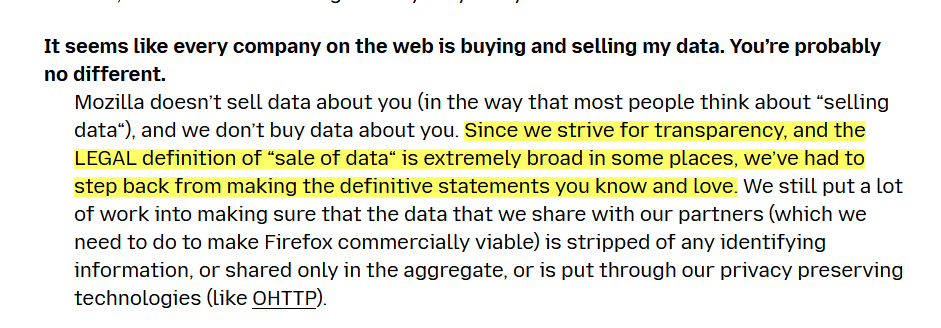
The updated version now reads that Mozilla “does not sell data about you” but “in the way that most people think about “selling data”. This makes you wonder, whether you’re the ‘most people’ and what’s all this really supposed to mean.
The promise
Current version of Mozilla’s Privacy FAQ

In its blog post from February 28, Mozilla justified the new, somewhat vague wording by stating that the current legal definition of what constitutes a sale of data is too "broad and evolving."

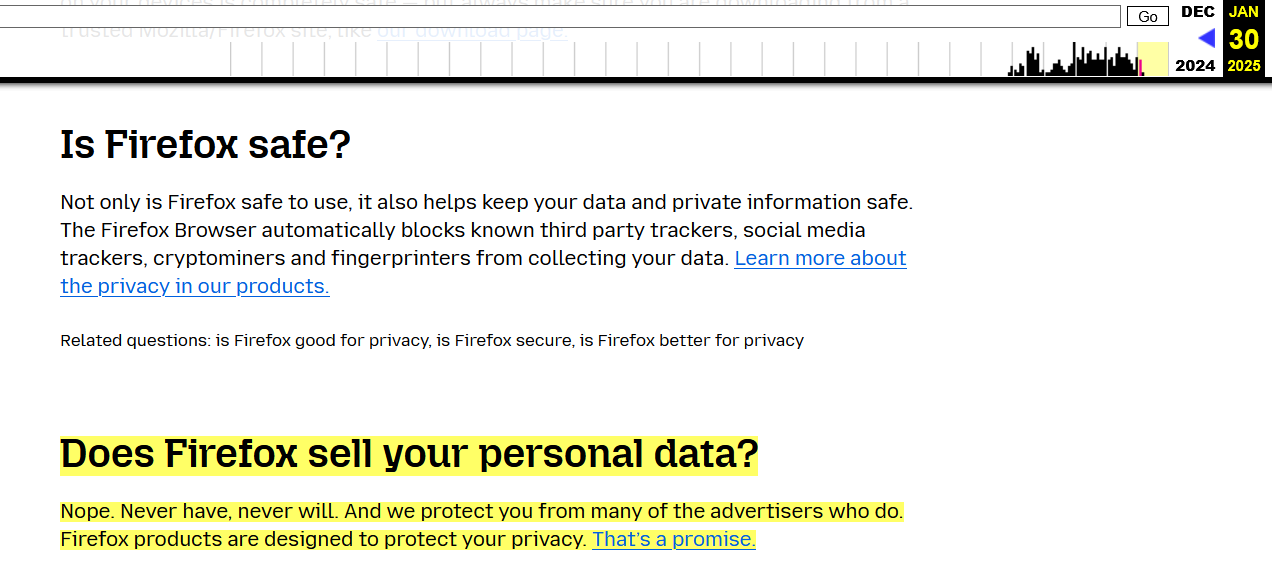
However, even more confusing — and arguably more disheartening for users — was the removal of Mozilla’s bold promise to “never sell your data” from its Firefox Privacy FAQ. Previously, the FAQ had answered the question “Does Firefox sell your personal data?” with a resounding “Nope. Never have, never will. And we protect you from many of the advertisers who do.”
Mozilla's FAQ screenshot

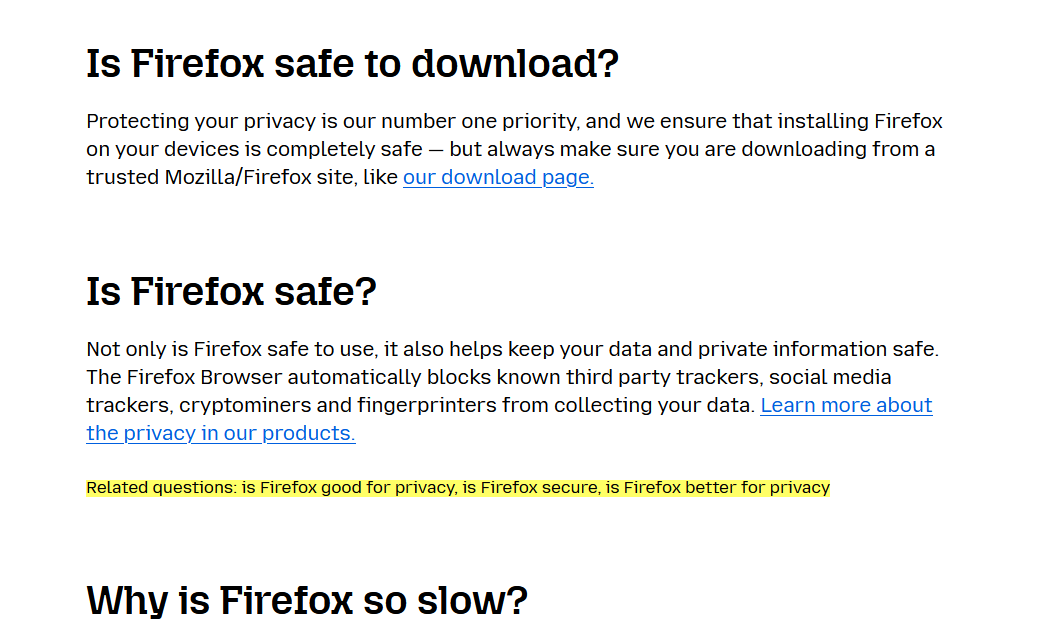
Now (as of the time of writing), the section is missing completely from Firefox’s Privacy FAQ:
The promise

To be fair, the section appears to be under construction, and it’s likely we’ll soon see a replacement to the promise that had been dear to many of Firefox’s users.

And while some might have been taken off guard by an apparent change of heart on behalf of Mozilla, this new language isn't coming as a surprise to those who’ve been paying close attention to Mozilla lately. Here’s why.

Mozilla’s slow descent into ad tech

One of Mozilla’s core principles has always been its commitment to user privacy, with a foundational promise not to sell data. However, over the past few years, and more noticeably, months, that promise has started to fade, and the pillars supporting it have shown signs of crumbling.

Back in October, Mozilla made official what many had been predicting: its move into the ad-tech space. In a blog post, Mozilla president Mark Surman raised a question: “How do we ensure that privacy is not a privilege of the few, but a fundamental right available to everyone?” He went on to suggest that one part of the solution lies in “online advertising,” arguing that the system is “fundamentally broken.” Mozilla, according to Surman, is experimenting with advertising as a way to fix it.

For what it’s worth, Mozilla is following a well-worn path that many tech companies took before it. Much like Google and Microsoft, which have rolled out features like Google’s Protected Audience API and Microsoft’s Ad Selection API, Mozilla is now attempting to blend privacy with advertising. However, advertising has never been a major part of Mozilla’s DNA — until quite recently.

The shift has taken time to shape up, but it’s becoming much clearer now. Just last summer, Mozilla made waves by acquiring Anonym, an ad metrics company. The goal? They claim it will improve ad targeting while safeguarding user data. Not long after, Mozilla rolled out Privacy-Preserving Attribution (PPA), a feature designed to let advertisers track the effectiveness of their ads without crossing the line into intrusive tracking. PPA was enabled by default in Firefox.

Time to ditch Firefox?

The latest changes to Mozilla’s Terms of Service and Privacy FAQs seem to reflect its growing focus on advertising.

As the company becomes more deeply entangled in the ad-tech industry, its long-standing promises about privacy are starting to feel less clear-cut. What once seemed like an unwavering dedication to protecting user data is now being tested by the growing push to make privacy compatible with advertising. For many users, this raises the question: how much is Mozilla really willing to compromise? While the answer is not yet clear, bidding farewell to that bold, albeit idealistic, promise feels sad. It might mark the end of an era — and, even sadder, that end may be inevitable.


Svidio vam se ovaj post?
AdGuard VPN AdGuard DNS AdGuard Mail AdGuard Wallet
Glavni zaslon AdGuard za Windows
Zaslon zaštite AdGuard za Windows koji prikazuje značajke zaštite i postavke
Zaslon statistika AdGuard za Windows koji prikazuje statistiku blokiranih oglasa i pratitelja
Zaslon upravljanja aplikacijama u AdGuard za Windows, koji prikazuje opcije upravljanja zaštitom za aplikacije instalirane na uređaju
20.396 20396 recenzija
Odlično!

AdGuard: blokator oglasa za Windows

AdGuard za Windows je više od blokatora oglasa. To je višenamjenski alat koji blokira oglase, kontrolira pristup opasnim web-mjestima, ubrzava učitavanje stranica i štiti djecu od neprikladnog sadržaja
Preuzimanjem programa prihvaćate odredbe licencnog ugovora
Microsoft Store
Preuzimanjem programa prihvaćate odredbe licencnog ugovora
AdGuard za Windows v8.0, 14-dnevni probni period
Glavni zaslon AdGuard za Mac
Zaslon prikrivenog načina u AdGuardu za Mac
20.396 20396 recenzija
Odlično!

AdGuard: blokator oglasa za Mac

AdGuard za Mac je jedinstveni blokator oglasa dizajniran s macOS-om na umu. Osim što vas štiti od dosadnih oglasa u preglednicima i aplikacijama, štiti vas i od praćenja, phishinga i prijevara
Preuzimanjem programa prihvaćate odredbe licencnog ugovora
Pročitajte više
AdGuard za Mac v2.19, 14-dnevni probni period
Glavni zaslon AdGuard za Android
Zaslon zaštite od praćenja u AdGuard za Android
Zaslon upravljanja aplikacijama u AdGuard za Android, koji prikazuje opcije upravljanja zaštitom za aplikacije instalirane na uređaju
Zaslon statistika AdGuard za Android koji prikazuje statistiku blokiranih oglasa i pratitelja
Glavni zaslon privatnog preglednika AdGuard za Android
QR kod za preuzimanje AdGuard za Android
20.396 20396 recenzija
Odlično!

AdGuard: blokator oglasa za Android

Blokira oglase i pratitelje u svim preglednicima, igrama i drugim aplikacijama. Štiti vašu privatnost i omogućuje vam kontrolu nad time kako vaše aplikacije koriste internet. Instalira se putem APK-a
Preuzimanjem programa prihvaćate odredbe licencnog ugovora
Pročitajte više
Skeniraj za preuzimanje
Koristite bilo koji čitač QR koda dostupan na vašem uređaju
AdGuard za Android v4.14, 14-dnevni probni period
Glavni zaslon AdGuard za iOS
Zaslon zaštite AdGuard za iOS koji prikazuje značajke zaštite i postavke
Zaslon statistika AdGuard za iOS koji prikazuje statistiku blokiranih oglasa i pratitelja
QR kod za preuzimanje AdGuard za iOS
20.396 20396 recenzija
Odlično!

AdGuard: blokator oglasa za iOS

Najbolji iOS blokator oglasa za iPhone i iPad. AdGuard uklanja sve vrste oglasa i alata za praćenje u Safariju i štiti vašu privatnost u svim aplikacijama na DNS razini
Preuzimanjem programa prihvaćate odredbe licencnog ugovora
Pročitajte više
Skeniraj za preuzimanje
Koristite bilo koji čitač QR koda dostupan na vašem uređaju
AdGuard za iOS v4.5
Glavni zaslon AdGuard Content Blocker
Zaslon filtara u AdGuard Content Blocker
Zaslon postavki u AdGuard Content Blocker
20.396 20396 recenzija
Odlično!

AdGuard Bloker sadržaja

AdGuard Content Blocker eliminira sve vrste oglasa u mobilnim preglednicima koji podržavaju tehnologiju blokiranja sadržaja — naime, Samsung Internet i Yandex Browser. Njegove su značajke ograničene u usporedbi s AdGuardom za Android, ali je besplatan, jednostavan za instalaciju i učinkovit
Preuzimanjem programa prihvaćate odredbe licencnog ugovora
Pročitajte više
AdGuard Bloker sadržaja v2.8
Glavni zaslon AdGuard Browser Extension
Zaslon zaštite od praćenja u AdGuard Browser Extension
20.396 20396 recenzija
Odlično!

AdGuard Proširenje preglednika

AdGuard je najbrže i najlakše proširenje za blokiranje oglasa koje učinkovito blokira sve vrste oglasa na svim web stranicama! Odaberite AdGuard za preglednik koji koristite i imajte brzo i sigurno pretraživanje Interneta bez oglasa.
Instalacija
Preuzimanjem programa prihvaćate odredbe licencnog ugovora
Instalacija
Preuzimanjem programa prihvaćate odredbe licencnog ugovora
Instalacija
Preuzimanjem programa prihvaćate odredbe licencnog ugovora
Instalacija
Preuzimanjem programa prihvaćate odredbe licencnog ugovora
Instalacija
Preuzimanjem programa prihvaćate odredbe licencnog ugovora
Pročitajte više
Instalacija
Preuzimanjem programa prihvaćate odredbe licencnog ugovora
Pročitajte više
AdGuard Proširenje preglednika v5.5
Glavni zaslon AdGuard Assistant
20.396 20396 recenzija
Odlično!

AdGuard Pomoćnik

Prateća ekstenzija za preglednik za AdGuard desktop aplikacije. Omogućuje blokiranje prilagođenih stavki na web stranicama, dodavanje web stranica na popis dopuštenih i slanje izvještaja izravno iz preglednika
AdGuard Pomoćnik v1.4
20.396 20396 recenzija
Odlično!

AdGuard Home

AdGuard Home je mrežno rješenje za blokiranje oglasa i trackera. Instalirajte ga jednom na usmjerivač kako biste pokrili sve uređaje na kućnoj mreži – nije potreban dodatni klijentski softver. To je posebno važno za razne IoT uređaje koji često predstavljaju prijetnju vašoj privatnosti
AdGuard Home v0.107
Glavni zaslon AdGuard Pro za iOS
Zaslon zaštite u AdGuard Pro za iOS, koji prikazuje značajke zaštite i postavke
Zaslon statistike u AdGuard Pro za iOS, koji prikazuje statistiku za blokirane oglase i pratitelje
20.396 20396 recenzija
Odlično!

AdGuard Pro za iOS

AdGuard Pro za iOS dolazi sa svim naprednim značajkama zaštite od blokiranja oglasa. Nudi iste alate kao i plaćena verzija AdGuarda za iOS. Ističe se u blokiranju oglasa u Safariju i omogućuje vam prilagođavanje DNS postavki kako biste prilagodili zaštitu svojim potrebama. Blokira oglase u preglednicima i aplikacijama, štiti vašu djecu od neprikladnog sadržaja i čuva vaše osobne podatke sigurnima.
Preuzimanjem programa prihvaćate odredbe licencnog ugovora
Pročitajte više
AdGuard Pro za iOS v4.5
Glavni zaslon AdGuard Mini za Mac
Zaslon zaštite za Safari u AdGuard Mini za Mac
Zaslon za stvaranje pravila u AdGuard Mini za Mac
20.396 20396 recenzija
Odlično!

AdGuard Mini za Mac — blokator oglasa u Safariju

AdGuard Mini za Mac je moćan Safari blokator oglasa. Ova lagana aplikacija uklanja oglase, blokira pratitelje i ubrzava učitavanje stranica. Pomaže vam pregledavati web u Safariju bez ometanja i čuvati vaše podatke privatnima
Instalacija
Preuzimanjem programa prihvaćate odredbe licencnog ugovora
Pročitajte više
AdGuard Mini za Mac v2.3
Glavni zaslon AdGuard za Android TV s omogućenom zaštitom
Zaslon blokiranja oglasa AdGuard za Android TV koji prikazuje njegove značajke i postavke
Zaslon postavki AdGuard za Android TV
Zaslon upravljanja aplikacijama AdGuard za Android TV koji prikazuje aplikacije u kojima su oglasi i pratitelji blokirani
20.396 20396 recenzija
Odlično!

AdGuard za Android TV

AdGuard za Android TV jedina je aplikacija koja blokira oglase, čuva vašu privatnost i djeluje kao vatrozid za vaš Smart TV. Primajte upozorenja o web prijetnjama, koristite siguran DNS i iskoristite prednosti šifriranog prometa. Opustite se i uronite u svoje omiljene emisije uz vrhunsku sigurnost i bez oglasa!
AdGuard za Android TV v4.14, 14-dnevni probni period
Maskota AdGuard, Agnar, drži Linux pingvina
20.396 20396 recenzija
Odlično!

AdGuard za Linux

AdGuard za Linux je prvi sustavni bloker oglasa za Linux na svijetu. Blokirajte oglase i pratitelje na razini uređaja, odaberite iz unaprijed instaliranih filtara ili dodajte vlastite — sve kroz sučelje naredbenog retka
AdGuard za Linux v1.4
20.396 20396 recenzija
Odlično!

AdGuard Temp Mail

Besplatni generator privremene adrese e-pošte koji vas čuva anonimnim i štiti vašu privatnost. Nema spama u vašem glavnom sandučiću!
20.396 20396 recenzija
Odlično!

AdGuard VPN

75 lokacija u cijelom svijetu

Sigurno strujanje

Snažno šifriranje

Ne sakupljamo zapise

Najbrža veza

24/7 podrška

Isprobajte besplatno
Preuzimanjem programa prihvaćate odredbe licencnog ugovora
Pročitajte više
20.396 20396 recenzija
Odlično!

AdGuard DNS

AdGuard DNS je siguran način blokiranja internetskih oglasa za koji nije potrebna instalacija aplikacije. Jednostavan je za upotrebu, potpuno besplatan, lako se postavlja na bilo koji uređaj i pruža vam minimum potrebnih funkcija za blokiranje oglasa, brojača, zlonamjernih web stranica i sadržaja za odrasle.

20.396 20396 recenzija
Odlično!

AdGuard Mail

Zaštitite svoj identitet, izbjegnite neželjenu poštu i čuvajte sigurnost svoje pristigle pošte uz naše pseudonime i privremene adrese e-pošte. Iskoristite našu besplatnu uslugu prosljeđivanja e-pošte i aplikacije za sve operacijske sustave.


20.396 20396 recenzija
Odlično!

AdGuard Wallet

Siguran i privatan kripto novčanik koji vam daje potpunu kontrolu nad vašom imovinom. Upravljajte višestrukim novčanicima i otkrijte tisuće kriptovaluta za pohranu, slanje i zamjenu
Započelo je preuzimanje AdGuard-a Da biste instalirali AdGuard, kliknite datoteku označenu strelicom Odaberite "Otvori" i pritisnite "U redu", te zatim pričekajte da se datoteka preuzme. U otvorenom prozoru povucite ikonu AdGuarda u mapu "Aplikacije". Hvala što ste odabrali AdGuard! Odaberite "Otvori" i pritisnite "U redu", potom pričekajte da se datoteka preuzme. U otvorenom prozoru pritisnite "Instaliraj". Hvala vam što ste izabrali AdGuard!
Također instalirajte AdGuard za mobilne uređaje















































