‘My AI’ is not your friend: How Snap’s AI chatbot spies on you and fuels ad targeting

Snapchat users are accustomed to the idea that most messages, be they texts or snaps, sent in individual chats are deleted by default from Snap’s servers once they’ve been viewed or expired. At least, that’s what Snap’s privacy policy promises. It’s somewhat tempting to transfer this logic to My AI, the company’s own ChatGPT-powered chatbot. First introduced in February this year as a purple-skinned, AI-powered character that can “recommend birthday gift ideas for your BFF, plan a hiking trip for a long weekend, suggest a recipe for dinner” and more, My AI was pitched as a friend that you can shoot a message anytime, anywhere, such as when you’re feeling lonely or bored.
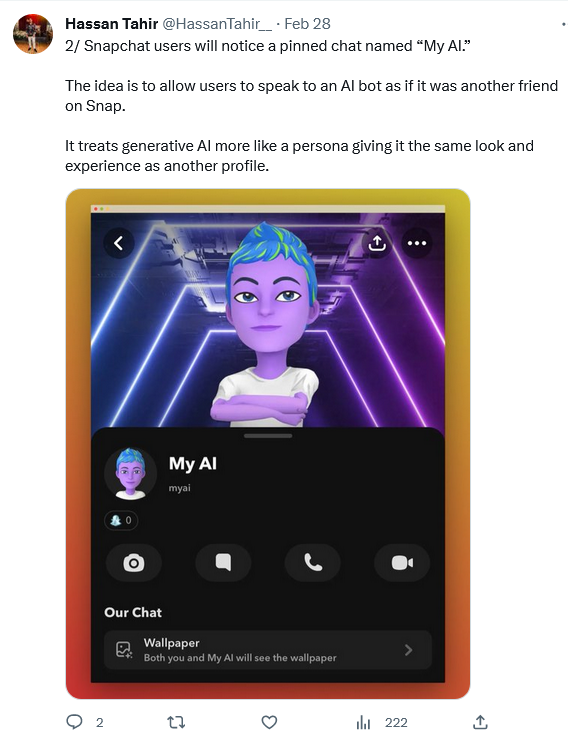
An avatar of 'My AI' chatbot looks friendly enough

But despite its endearing appearance and readiness to “even write a haiku about cheese for your cheddar-obsessed pal,” do not be fooled into believing My AI is your friend: it is nothing but a tattletale. Not only does My AI occasionally hallucinate and make promises it can not keep (such as accessing your location after you specifically tell it not to), but it also logs and hands over everything you told it to Snap so that it can target ads to you.

My AI: A friend who tells on you and cannot be removed

When Snap first unveiled My AI, it rolled it out only to its Snapchat Plus subscribers who pay $3.99 a month. Two months later, Snap, apparently realizing My AI’s potential in boosting its ad revenue, made it accessible to all the users within the app. And, while some users were legitimately excited about playing with yet another AI-powered toy, others were concerned about that way Snap forced My AI on them: the chatbot is pinned to the app chat tab above conversations with friends, and cannot be unpinned or removed. Well, it can, only that it is a paid service(!).
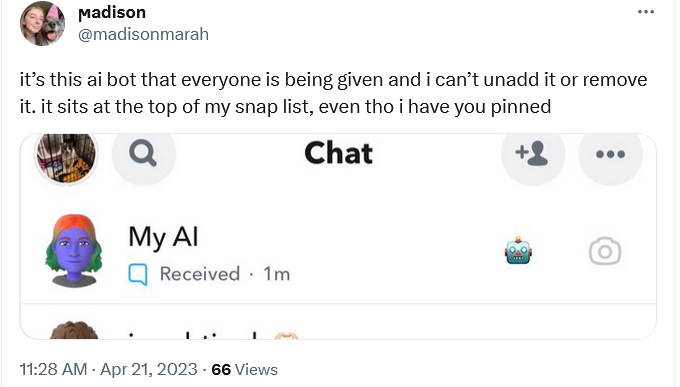
Some users want My AI to be unpinned from their chat tab

Before you start chatting My AI up — and it’s really hard to resist the urge to do so, since Snap made it a permanent eyesore — it will display you a ‘Say Hi to My AI’ privacy notice. In it it will say that all of your messages with your weird-looking AI companion “will be retained unless you delete them and may be used to improve Snap’s products and to personalize your experience, including ads.” With that, it will encourage you to “not share any sensitive or confidential information.”
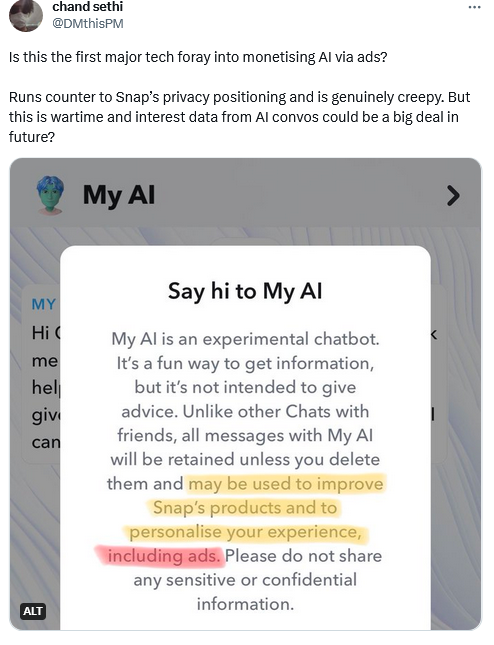
Snap shows a privacy notification before you start communicating with the chatbot

But what about tips on birthday gifts for you ‘BFF,’ personal information on your pals (re:haiku), and advice on trekking routes? Isn’t this information personal enough? In other words, It looks like Snapchat is trying to convince you that ‘My AI’ is no different from your friend — even though it has that bluish tint to its skin — while in the same breath warning you not to trust it with anything sensitive. So, what is it, Snap?

This ambiguity has given rise to confusion, with users surprised to find out that My AI was aware of previous conversations with them.
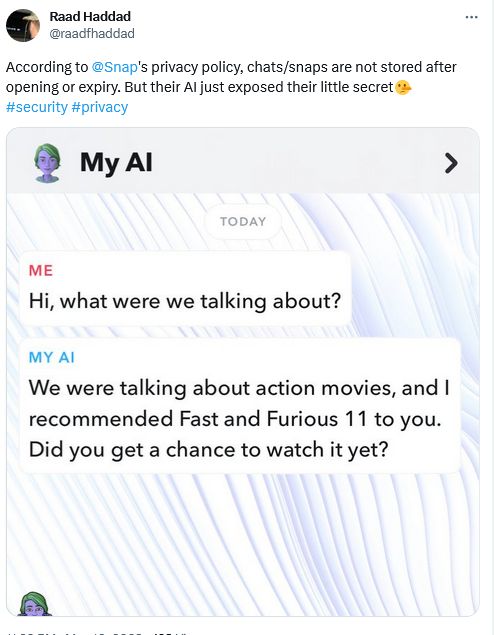
Some users seemed to be confused over why My AI remembers their previous conversations

Snapchat has faced a backlash from users who want the bot be removed — some of them claiming that My AI’s forced addition to their chat list was a “serious invasion of privacy.”

To understand their frustration, imagine having no option to delete a random stranger who was inserted on top of your WhatsApp/Telegram/Signal chats — that would be very annoying. Snap has, however, refused to budge on the issue.

This aggressive promotion combined with inherent user curiosity have made My AI extremely popular among Snapchatters. The latter have shared tons of personal information with it, Snap revealed.

Cars, baby showers, education & pets: things people told My AI

Snap revealed that 150 million people sent over 10 billion messages to My AI, which propelled it to the top tier of consumer chatbots.

In a recent blog post, Snap shared a detailed breakdown of what users asked My AI about — you can check it here. The most popular topics included art and design, birthday, wedding and baby shower planning, tourist tips, education, restaurant recommendations, beauty products, clothing, pets, cars, gadgets, sports, and entertainment. In other words, users asked My AI about everything and anything. It’s likely that while getting tips from My AI, users have shared troves of their personal information with the AI-powered assistant, such as ages of their kids, location of their home, names of their pets, their allergies, shoe sizes — the list goes on. And since my AI is marketed as your friend and its retention policies may have not been crystal clear (more about that later), people may have been more inclined to share personal details of their lives with it than they would with a faceless non-animated service. This data can now be used to personalize ads to them.

Here’s what Snap has to say about this:

We are able to use conversations with My AI to enhance a key optimization that we offer advertisers, called Snapchat Lifestyle Categories (SLCs). These categories are historically based on factors like which content a Snapchatter watches. New signals from conversations with My AI will now help us enhance the quality and depth of SLCs, ultimately boosting the relevance of the ads Snapchatters see on the app.

Snapchat LifeStyle Categories are groups of users with similar interests and behaviors on the app. They allow advertisers to pick the group that suits their ad goals and target it with ads. Thanks to the data it can now extract from users’ chats with My AI, Snap can craft more precise and tailored groups, boosting the effectiveness of ad campaigns and its own ad revenue (especially with ads also coming to My AI chatbot), but also raising privacy concerns for users.

Besides the fact that some Snapchatters may not even realize that their conversations with My AI are not as private as other one-on-one chats, others may have to fear that this data could be shared or sold to third parties, or hacked or leaked. This is a real possibility, especially if users’ chats with My AI are kept by default, as it is now.

Snapchat’s tricky policies: how to stop My AI from snooping on you

There’s a way to reduce Snap’s ability to build a detailed ad profile on you, that could lead to intrusive ads right in the chatbot and elsewhere. According to Snapchat, all the content you share with My AI is “retained until you delete it.”

If the chat with My AI is less than 24-hours old, you can delete it just by long-pressing the message. However, if the message is older than that, you have to jump through some hoops. The deletion pathway for iOS and Android is slightly different, but in both cases you have to go to Settings first and perform at least two more actions. Then you might have to wait up to 30 days (!) for the messages to be deleted from Snapchat servers, based on the timeframe Snap has given itself.

When it comes to users’ location information, there’s a catch. Snap claims that My AI “does not collect any new location information” from users, but it can access location information that the user has already agreed to share with Snap. And if the user opts out of sharing location information with Snapchat, it may take a while for this news to reach My AI. Snapchat admits that “If Snapchatters stop sharing their location with Snapchat, it may take a little time for this to take effect in My AI.” Which is a troubling perspective, especially considering that Snapchat says that privacy is its “foundational value.”
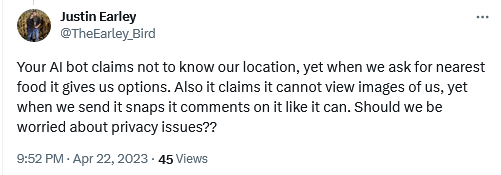
Users seemed to be confused about whether the chatbot has access to location

To sum it up, there may not be a foolproof way to prevent My AI from harvesting data from you, so you may want to think twice when grilling the blue AI-powered avatar about your personal stuff and getting advice on sensitive issues. There’s always a trade-off between risk and reward, or in this case, risk and curiosity, to consider. And everyone has their own meter.

Conclusion: is chatting with My AI worth the privacy risks?

Snapchat’s My AI chatbot may seem like a fun and friendly way to get tips and entertainment from an AI-powered avatar, and a blue one at that. But behind the scenes, Snap is analyzing your chats to serve you personalized ads that may be invasive or inappropriate. This may make you feel violated, especially since My AI is touted as your friend, not a marketing tool.

Moreover, Snap does not make it easy for you to delete the data collected by My AI, which shows that it has little regard to your privacy and cares predominantly about its ad revenue, which is expected to soar with its adoption of AI. There are some ways to mitigate the privacy risks, such as deleting your chats or opting out of location sharing, but they are not foolproof and may not take effect right away. So, before you chat with My AI, you need to ask yourself: is it really worth it? The answer may be different for everyone, but one thing is clear: you should be careful what you tell your chatbot helper, or it can tell on you.


Svidio vam se ovaj post?
AdGuard VPN AdGuard DNS AdGuard Mail AdGuard Wallet
Glavni zaslon AdGuard za Windows
Zaslon zaštite AdGuard za Windows koji prikazuje značajke zaštite i postavke
Zaslon statistika AdGuard za Windows koji prikazuje statistiku blokiranih oglasa i pratitelja
Zaslon upravljanja aplikacijama u AdGuard za Windows, koji prikazuje opcije upravljanja zaštitom za aplikacije instalirane na uređaju
20.397 20397 recenzija
Odlično!

AdGuard: blokator oglasa za Windows

AdGuard za Windows je više od blokatora oglasa. To je višenamjenski alat koji blokira oglase, kontrolira pristup opasnim web-mjestima, ubrzava učitavanje stranica i štiti djecu od neprikladnog sadržaja
Preuzimanjem programa prihvaćate odredbe licencnog ugovora
Microsoft Store
Preuzimanjem programa prihvaćate odredbe licencnog ugovora
AdGuard za Windows v8.0, 14-dnevni probni period
Glavni zaslon AdGuard za Mac
Zaslon prikrivenog načina u AdGuardu za Mac
20.397 20397 recenzija
Odlično!

AdGuard: blokator oglasa za Mac

AdGuard za Mac je jedinstveni blokator oglasa dizajniran s macOS-om na umu. Osim što vas štiti od dosadnih oglasa u preglednicima i aplikacijama, štiti vas i od praćenja, phishinga i prijevara

Preuzimanjem programa prihvaćate odredbe licencnog ugovora
Pročitajte više
AdGuard za Mac v2.19, 14-dnevni probni period
Glavni zaslon AdGuard za Android
Zaslon zaštite od praćenja u AdGuard za Android
Zaslon upravljanja aplikacijama u AdGuard za Android, koji prikazuje opcije upravljanja zaštitom za aplikacije instalirane na uređaju
Zaslon statistika AdGuard za Android koji prikazuje statistiku blokiranih oglasa i pratitelja
Glavni zaslon privatnog preglednika AdGuard za Android
QR kod za preuzimanje AdGuard za Android
20.397 20397 recenzija
Odlično!

AdGuard: blokator oglasa za Android

Blokira oglase i pratitelje u svim preglednicima, igrama i drugim aplikacijama. Štiti vašu privatnost i omogućuje vam kontrolu nad time kako vaše aplikacije koriste internet. Instalira se putem APK-a

Preuzimanjem programa prihvaćate odredbe licencnog ugovora
Pročitajte više
Skeniraj za preuzimanje
Koristite bilo koji čitač QR koda dostupan na vašem uređaju
AdGuard za Android v4.14, 14-dnevni probni period
Glavni zaslon AdGuard za iOS
Zaslon zaštite AdGuard za iOS koji prikazuje značajke zaštite i postavke
Zaslon statistika AdGuard za iOS koji prikazuje statistiku blokiranih oglasa i pratitelja
QR kod za preuzimanje AdGuard za iOS
20.397 20397 recenzija
Odlično!

AdGuard: blokator oglasa za iOS

Najbolji iOS blokator oglasa za iPhone i iPad. AdGuard uklanja sve vrste oglasa i alata za praćenje u Safariju i štiti vašu privatnost u svim aplikacijama na DNS razini
Preuzimanjem programa prihvaćate odredbe licencnog ugovora
Pročitajte više
Skeniraj za preuzimanje
Koristite bilo koji čitač QR koda dostupan na vašem uređaju
AdGuard za iOS v4.5
Glavni zaslon AdGuard Content Blocker
Zaslon filtara u AdGuard Content Blocker
Zaslon postavki u AdGuard Content Blocker
20.397 20397 recenzija
Odlično!

AdGuard Bloker sadržaja

AdGuard Content Blocker eliminira sve vrste oglasa u mobilnim preglednicima koji podržavaju tehnologiju blokiranja sadržaja — naime, Samsung Internet i Yandex Browser. Njegove su značajke ograničene u usporedbi s AdGuardom za Android, ali je besplatan, jednostavan za instalaciju i učinkovit
Preuzimanjem programa prihvaćate odredbe licencnog ugovora
Pročitajte više
AdGuard Bloker sadržaja v2.8
Glavni zaslon AdGuard Browser Extension
Zaslon zaštite od praćenja u AdGuard Browser Extension
20.397 20397 recenzija
Odlično!

AdGuard Proširenje preglednika

AdGuard je najbrže i najlakše proširenje za blokiranje oglasa koje učinkovito blokira sve vrste oglasa na svim web stranicama! Odaberite AdGuard za preglednik koji koristite i imajte brzo i sigurno pretraživanje Interneta bez oglasa.
Instalacija
Preuzimanjem programa prihvaćate odredbe licencnog ugovora
Instalacija
Preuzimanjem programa prihvaćate odredbe licencnog ugovora
Instalacija
Preuzimanjem programa prihvaćate odredbe licencnog ugovora
Instalacija
Preuzimanjem programa prihvaćate odredbe licencnog ugovora
Instalacija
Preuzimanjem programa prihvaćate odredbe licencnog ugovora
Pročitajte više
Instalacija
Preuzimanjem programa prihvaćate odredbe licencnog ugovora
Pročitajte više
AdGuard Proširenje preglednika v5.5
Glavni zaslon AdGuard Assistant
20.397 20397 recenzija
Odlično!

AdGuard Pomoćnik

Prateća ekstenzija za preglednik za AdGuard desktop aplikacije. Omogućuje blokiranje prilagođenih stavki na web stranicama, dodavanje web stranica na popis dopuštenih i slanje izvještaja izravno iz preglednika
AdGuard Pomoćnik v1.4
20.397 20397 recenzija
Odlično!

AdGuard Home

AdGuard Home je mrežno rješenje za blokiranje oglasa i trackera. Instalirajte ga jednom na usmjerivač kako biste pokrili sve uređaje na kućnoj mreži – nije potreban dodatni klijentski softver. To je posebno važno za razne IoT uređaje koji često predstavljaju prijetnju vašoj privatnosti
AdGuard Home v0.107
Glavni zaslon AdGuard Pro za iOS
Zaslon zaštite u AdGuard Pro za iOS, koji prikazuje značajke zaštite i postavke
Zaslon statistike u AdGuard Pro za iOS, koji prikazuje statistiku za blokirane oglase i pratitelje
20.397 20397 recenzija
Odlično!

AdGuard Pro za iOS

AdGuard Pro za iOS dolazi sa svim naprednim značajkama zaštite od blokiranja oglasa. Nudi iste alate kao i plaćena verzija AdGuarda za iOS. Ističe se u blokiranju oglasa u Safariju i omogućuje vam prilagođavanje DNS postavki kako biste prilagodili zaštitu svojim potrebama. Blokira oglase u preglednicima i aplikacijama, štiti vašu djecu od neprikladnog sadržaja i čuva vaše osobne podatke sigurnima.
Preuzimanjem programa prihvaćate odredbe licencnog ugovora
Pročitajte više
AdGuard Pro za iOS v4.5
Glavni zaslon AdGuard Mini za Mac
Zaslon zaštite za Safari u AdGuard Mini za Mac
Zaslon za stvaranje pravila u AdGuard Mini za Mac
20.397 20397 recenzija
Odlično!

AdGuard Mini za Mac — blokator oglasa u Safariju

AdGuard Mini za Mac je moćan Safari blokator oglasa. Ova lagana aplikacija uklanja oglase, blokira pratitelje i ubrzava učitavanje stranica. Pomaže vam pregledavati web u Safariju bez ometanja i čuvati vaše podatke privatnima
Instalacija
Preuzimanjem programa prihvaćate odredbe licencnog ugovora
Pročitajte više
AdGuard Mini za Mac v2.3
Glavni zaslon AdGuard za Android TV s omogućenom zaštitom
Zaslon blokiranja oglasa AdGuard za Android TV koji prikazuje njegove značajke i postavke
Zaslon postavki AdGuard za Android TV
Zaslon upravljanja aplikacijama AdGuard za Android TV koji prikazuje aplikacije u kojima su oglasi i pratitelji blokirani
20.397 20397 recenzija
Odlično!

AdGuard za Android TV

AdGuard za Android TV jedina je aplikacija koja blokira oglase, čuva vašu privatnost i djeluje kao vatrozid za vaš Smart TV. Primajte upozorenja o web prijetnjama, koristite siguran DNS i iskoristite prednosti šifriranog prometa. Opustite se i uronite u svoje omiljene emisije uz vrhunsku sigurnost i bez oglasa!
AdGuard za Android TV v4.14, 14-dnevni probni period
Maskota AdGuard, Agnar, drži Linux pingvina
20.397 20397 recenzija
Odlično!

AdGuard za Linux

AdGuard za Linux je prvi sustavni bloker oglasa za Linux na svijetu. Blokirajte oglase i pratitelje na razini uređaja, odaberite iz unaprijed instaliranih filtara ili dodajte vlastite — sve kroz sučelje naredbenog retka
AdGuard za Linux v1.4
20.397 20397 recenzija
Odlično!

AdGuard Temp Mail

Besplatni generator privremene adrese e-pošte koji vas čuva anonimnim i štiti vašu privatnost. Nema spama u vašem glavnom sandučiću!
20.397 20397 recenzija
Odlično!

AdGuard VPN

75 lokacija u cijelom svijetu

Sigurno strujanje

Snažno šifriranje

Ne sakupljamo zapise

Najbrža veza

24/7 podrška

Isprobajte besplatno
Preuzimanjem programa prihvaćate odredbe licencnog ugovora
Pročitajte više
20.397 20397 recenzija
Odlično!

AdGuard DNS

AdGuard DNS je siguran način blokiranja internetskih oglasa za koji nije potrebna instalacija aplikacije. Jednostavan je za upotrebu, potpuno besplatan, lako se postavlja na bilo koji uređaj i pruža vam minimum potrebnih funkcija za blokiranje oglasa, brojača, zlonamjernih web stranica i sadržaja za odrasle.
20.397 20397 recenzija
Odlično!

AdGuard Mail

Zaštitite svoj identitet, izbjegnite neželjenu poštu i čuvajte sigurnost svoje pristigle pošte uz naše pseudonime i privremene adrese e-pošte. Iskoristite našu besplatnu uslugu prosljeđivanja e-pošte i aplikacije za sve operacijske sustave.
20.397 20397 recenzija
Odlično!

AdGuard Wallet

Siguran i privatan kripto novčanik koji vam daje potpunu kontrolu nad vašom imovinom. Upravljajte višestrukim novčanicima i otkrijte tisuće kriptovaluta za pohranu, slanje i zamjenu
Započelo je preuzimanje AdGuard-a Da biste instalirali AdGuard, kliknite datoteku označenu strelicom Odaberite "Otvori" i pritisnite "U redu", te zatim pričekajte da se datoteka preuzme. U otvorenom prozoru povucite ikonu AdGuarda u mapu "Aplikacije". Hvala što ste odabrali AdGuard! Odaberite "Otvori" i pritisnite "U redu", potom pričekajte da se datoteka preuzme. U otvorenom prozoru pritisnite "Instaliraj". Hvala vam što ste izabrali AdGuard!
Također instalirajte AdGuard za mobilne uređaje
















































