Updating AdGuard Pro for iOS: What has changed

A month ago we presented AdGuard 4.0 for iOS. Today we do the same for AdGuard Pro. And it inevitably leads to a lot of questions, which is quite fair. What's the difference between these apps? Is AdGuard Pro still 'pro'? We have gathered all the frequently asked questions and answered them in this article — and, of course, reviewed all major changes.

Regular AdGuard for iOS and AdGuard Pro

Before we dive into the intricacies of the new update, we'd like to preemptively give answers to all those questions that you might have now, or that might appear later.

What are the differences?

Long time ago, AdGuard Pro was our only app that offered premium functionality, in contrast to the free AdGuard for iOS app that was only intended to block ads in Safari. But then App Store's policies had become much stricter, and we were forced to virtually freeze the development of AdGuard Pro in order to keep what features it had by that moment.

Instead, we switched focus to AdGuard for iOS and saturated it with as many features as we could under the new restrictions. Until one day, Apple decided to revert the policy back to where it was before. We were once again allowed to add more DNS-related features. But this time we had two different apps, each having its own userbase, and a need to update both. A mess, in other words.

For the entire story, check out this link to an older article that explains the whole situation in detail. What's important,

Now AdGuard Pro and AdGuard for iOS are the same in terms of functionality.

And this takes us to the next question.

I already have AdGuard for iOS/AdGuard Pro, do I need to install another app?

No, you absolutely don't. One app is enough! And it doesn't really matter which one you have, feel free to stick to it and be sure that you don't miss on anything.

Why another article then? Why not simply quote our own post from last month? True, you'll see almost the same changelog here as for AdGuard v4.0 for iOS, but the two apps arrived here differently. For users of AdGuard Pro some features will stand out and other seem familiar, and vice versa.

What has changed?

All major changes can be grouped into three categories: UI, Safari content blocking and DNS-related. Let's start with the most obvious one.

Completely new UI

  • General design

Traditionally, a major version increase heralds a lot of changes regarding the UI. This time is not an exception. And considering the app jumped from v2.1 staright to v4.0, the transformation is drastic. The style, menu logic, and icons are new – the app looks so different you might not even recognize it. One thing stays the same though: you can switch to dark mode.
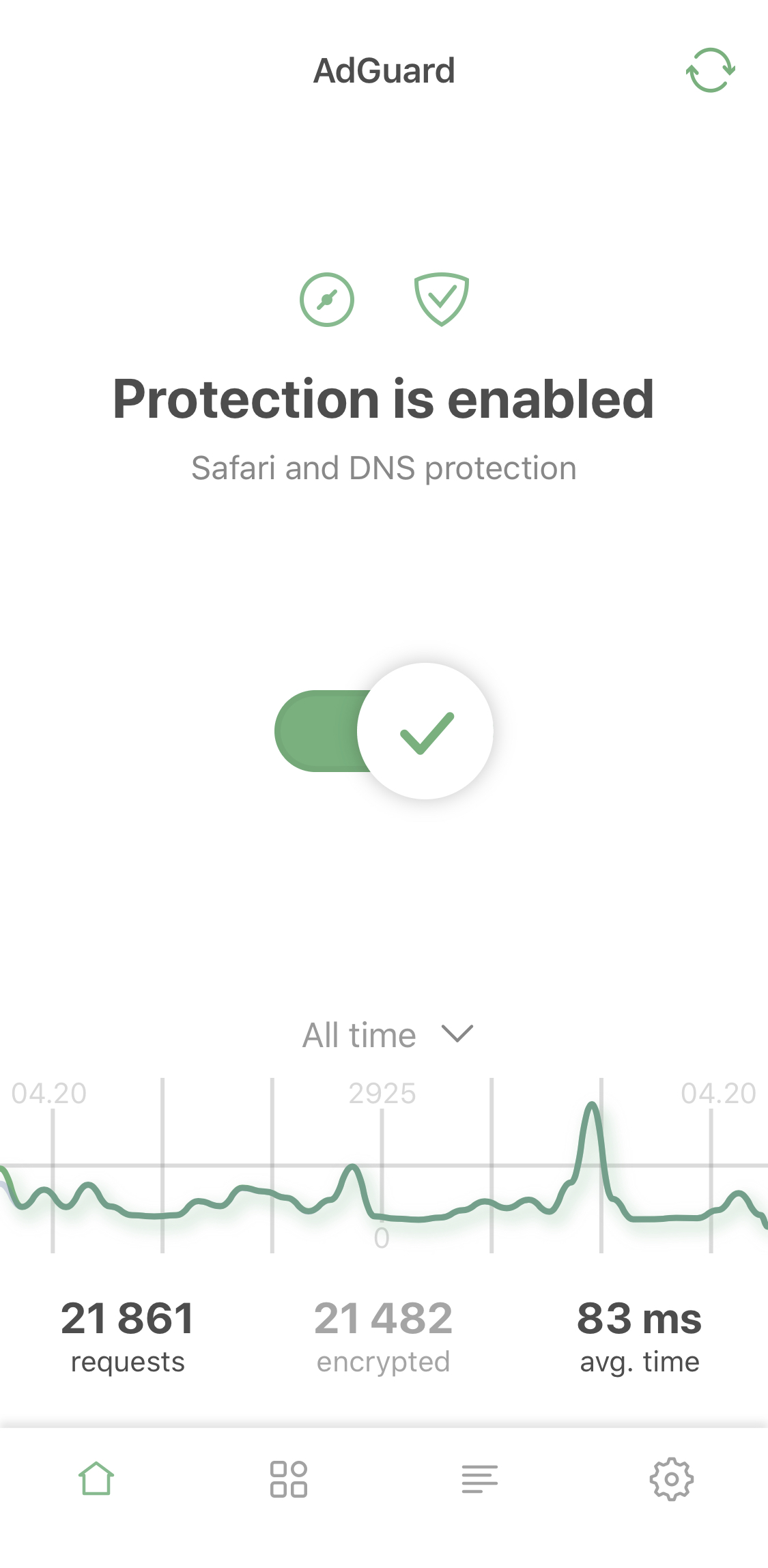
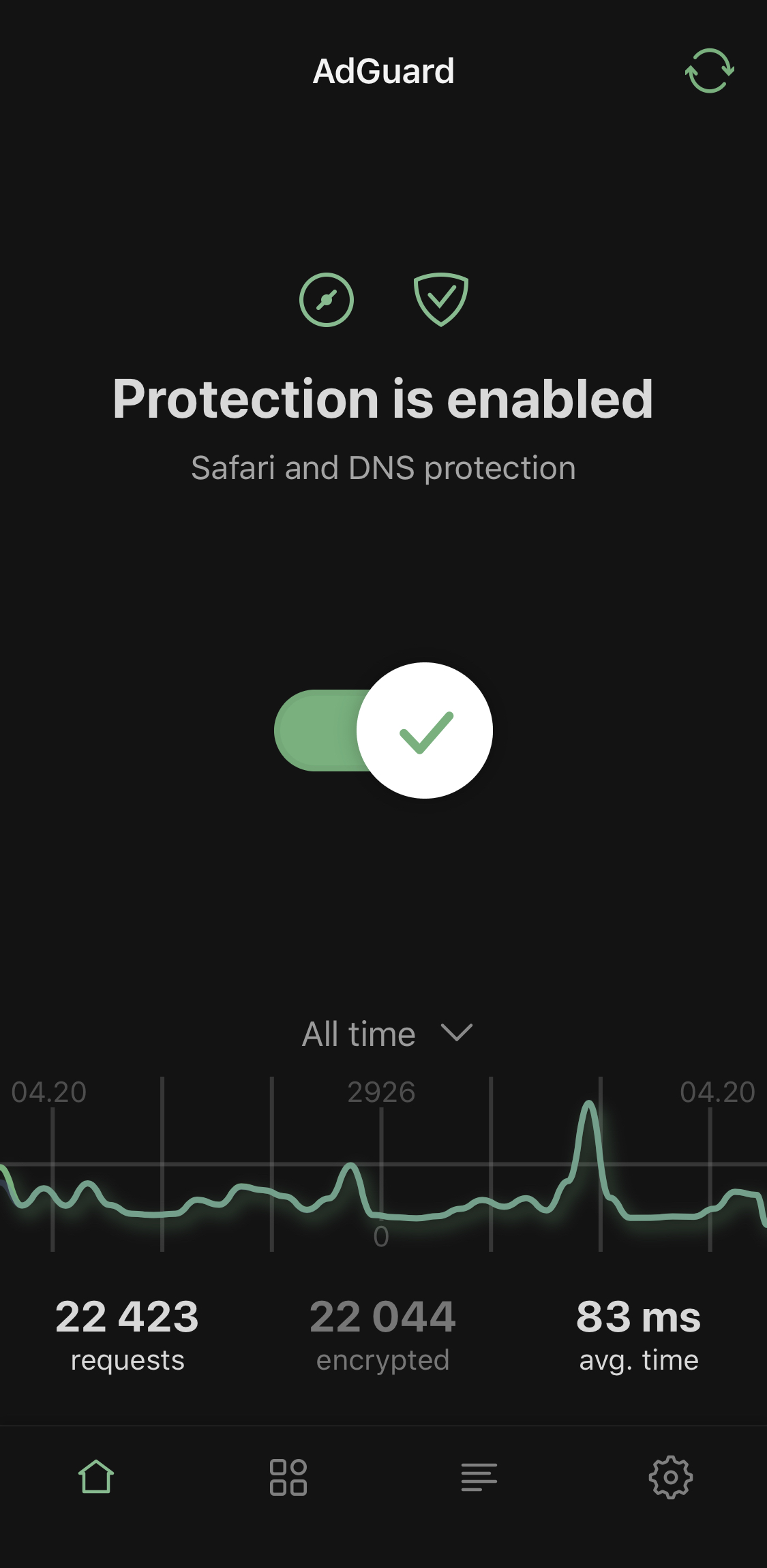
Light and dark themes

  • Advanced mode

We've added additional settings for advanced users. Use them at your own risk! However, the app isn't called 'AdGuard Pro' for nothing: if you've been using it for a while, these advanced settings probably won't scare you off.
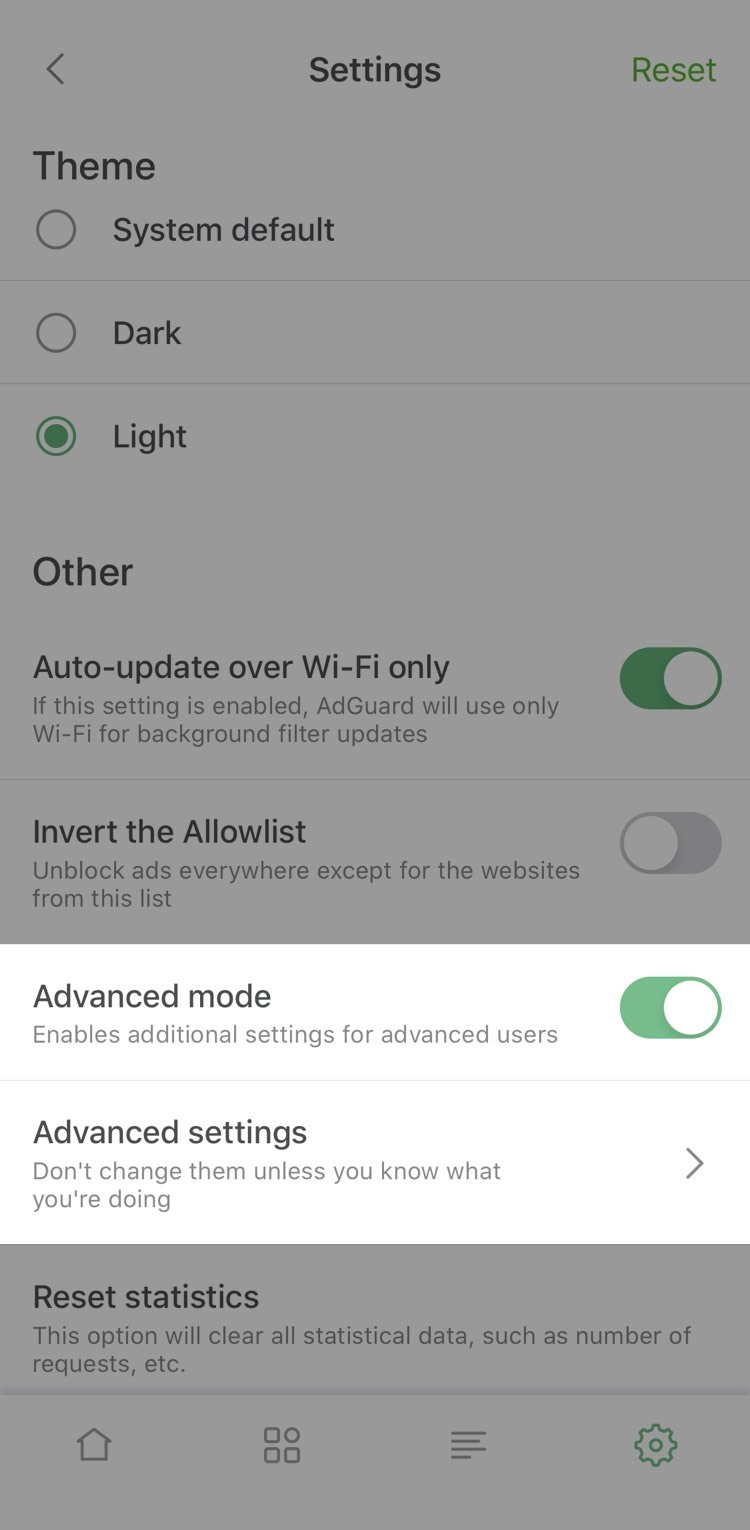
Advanced mode

By the way, now you have to enable Advanced mode to add your own DNS filter*. Let's illustrate this by an example of adding our AdGuard SDN filter.

*⠀Don't confuse it with adding a custom filter to Safari, the option we only added in this version.

Simplified domain names (SDN) filter is composed from several other filters (English filter, Social media filter, Spyware filter, Mobile ads filter, EasyList and EasyPrivacy) and simplified specifically to be better compatible with DNS-level ad blocking.

To enable it in AdGuard Pro, you need to take three steps:

  1. Open AdGuard Pro Settings —> General —> Enable Advanced mode
  2. Go to DNS protection —> DNS filtering —> DNS filters —> Add filter
  3. Paste this link to add AdGuard SDN filter (or use a link to any other filter you want to add).

That's it! You've successfully added a custom filter!

  • Activity feed

If we're being completely honest, it's a fancy name for the familiar DNS requests log, but better looking and more detailed. For example, it'll tell you the origin of most DNS requests.
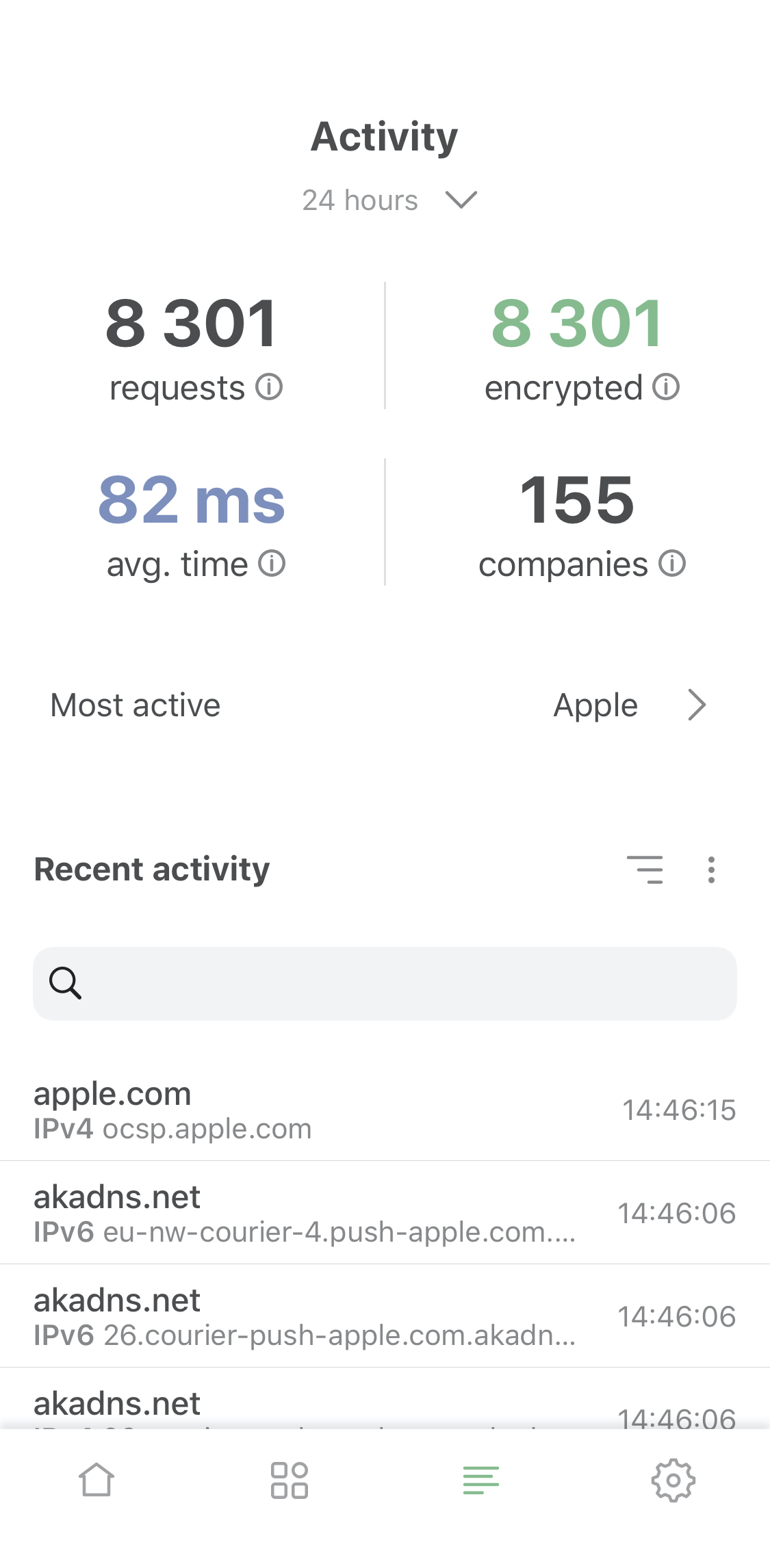
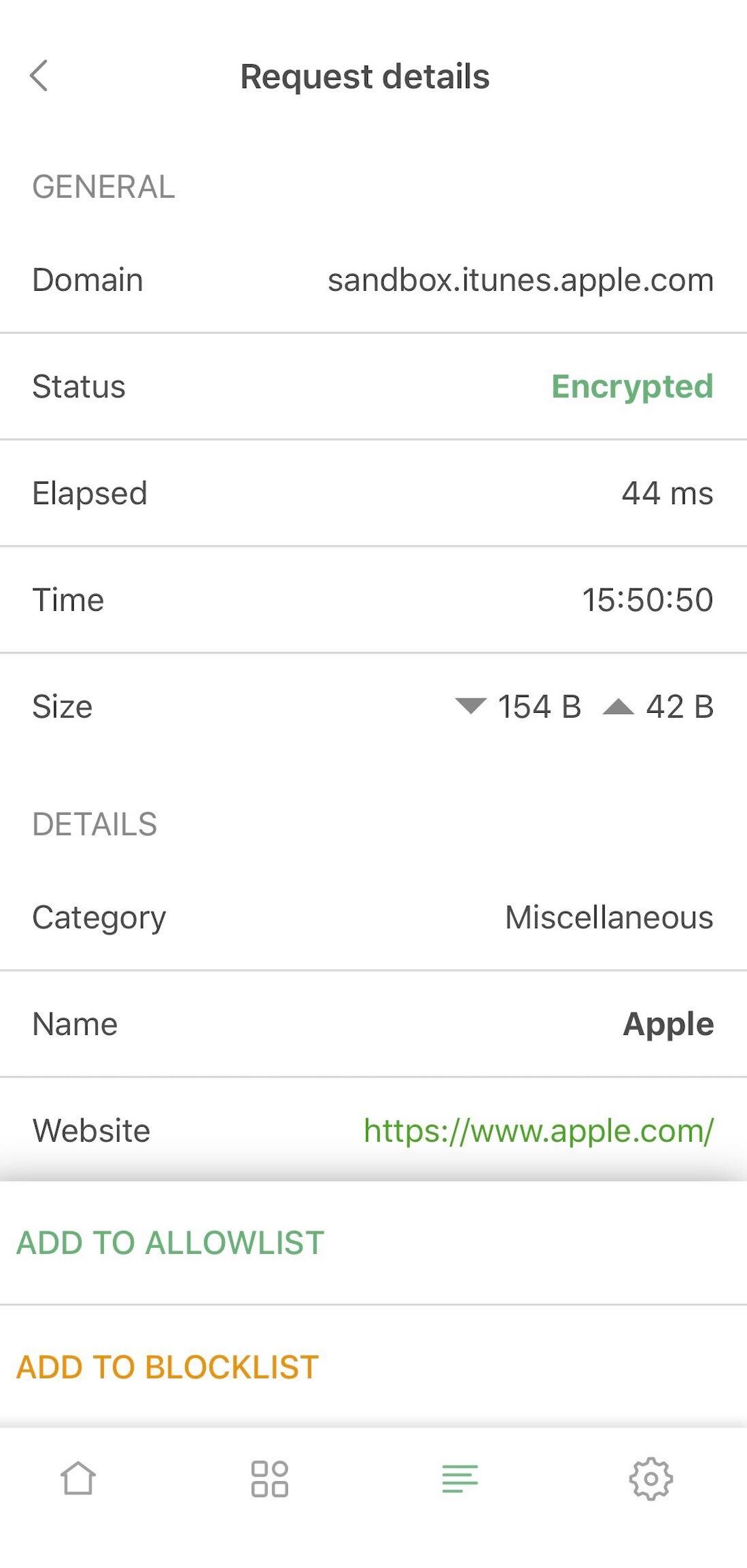
Activity screen and request details

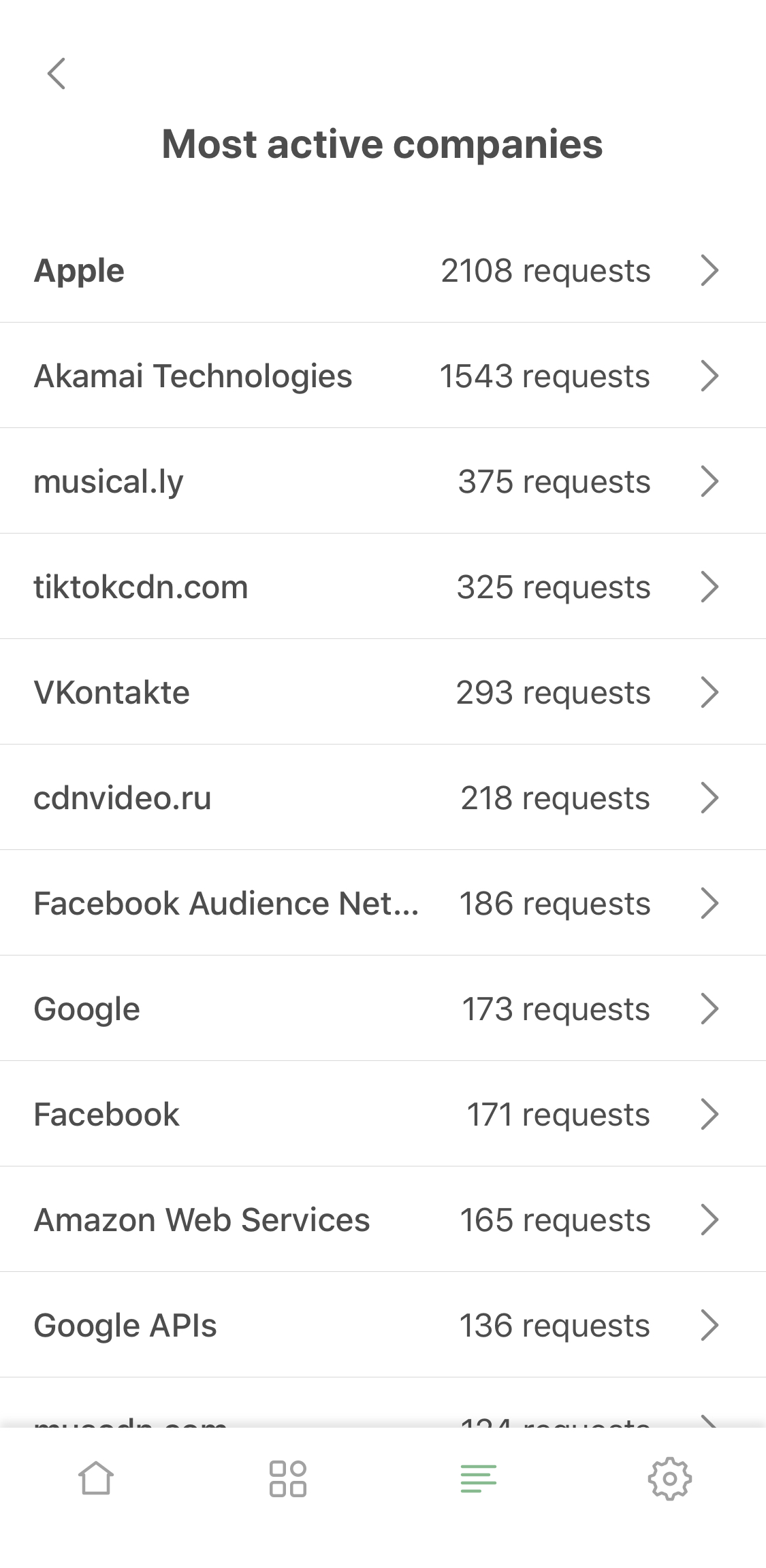
  • Most active companies

Now you can not only see which company this or that DNS request belongs to, you can view the "leaderboard" on the 'Most active companies' screen, accessible from the activity feed.
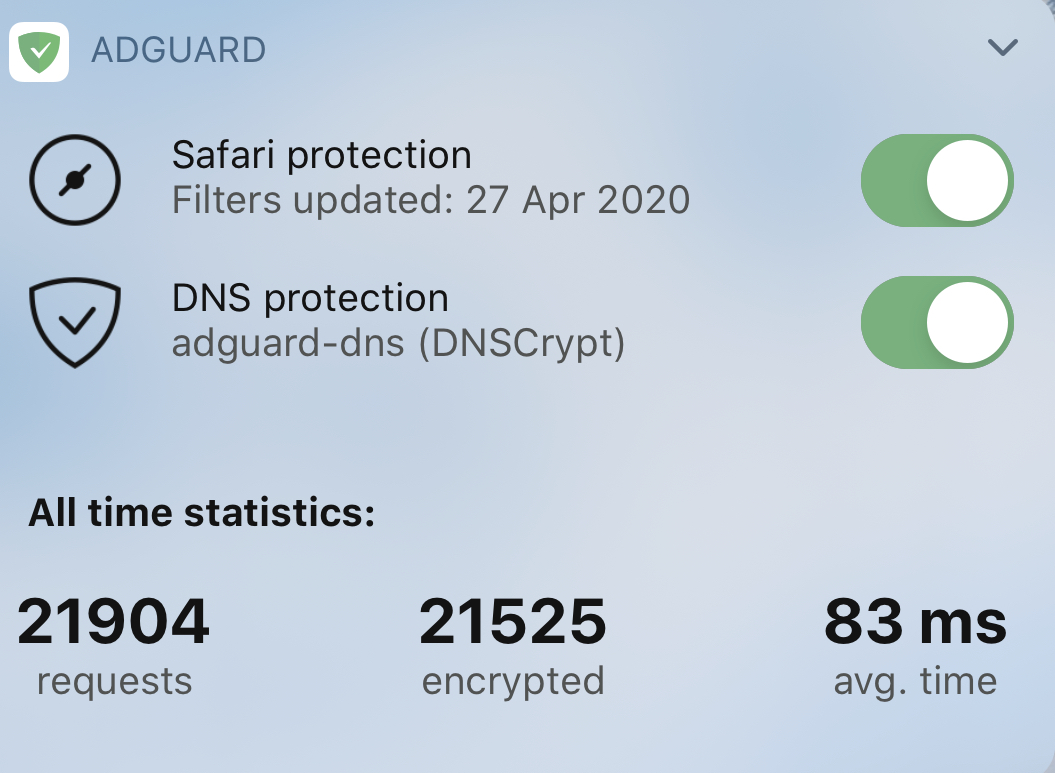
  • Requests statistic

Last but not least! Now you can switch between all-time, monthly, weekly or daily stats. You'll find it on the main screen and in widgets.
Content blocking

Speaking of changes that should really impress the old-timers. Safari content blocking went a long way since the last AdGuard Pro update. In v4.0 it has improved manyfold compared to v2.1, check it out:

  • Max rules count raised to 300k

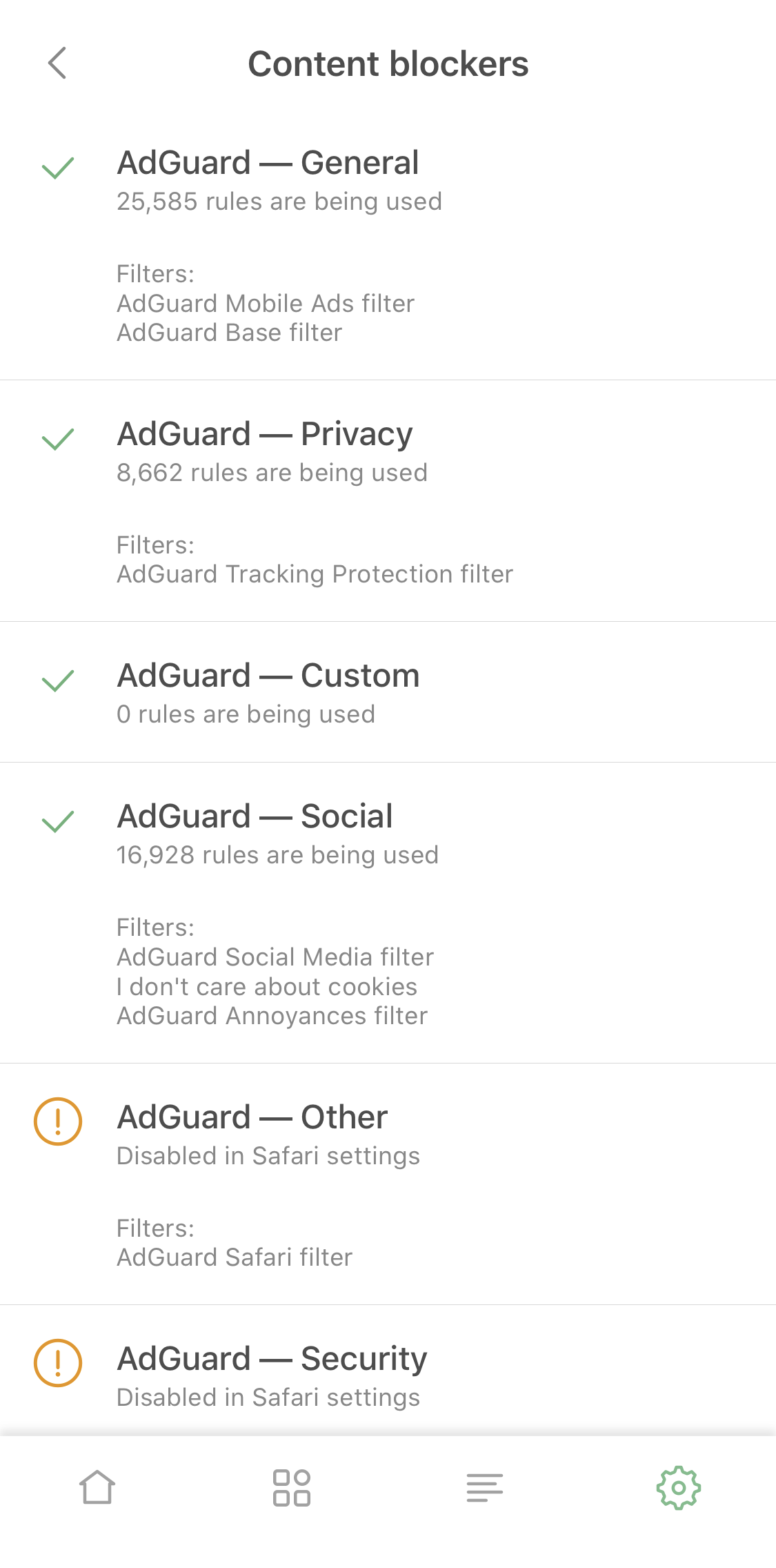
Safari is notoriously known for its harsh 50k max limit for filtering rules in content blockers. This number is laughably low, and for ages we were struggling with it. Now we've implemented a workaround: split AdGuard Pro into six content blockers. Each of them has the same 50k restriction but in total they add up to a much more reasonable 300k rules cap. You don't have to seek weird compromises anymore and can enable all your favorite filters at once!
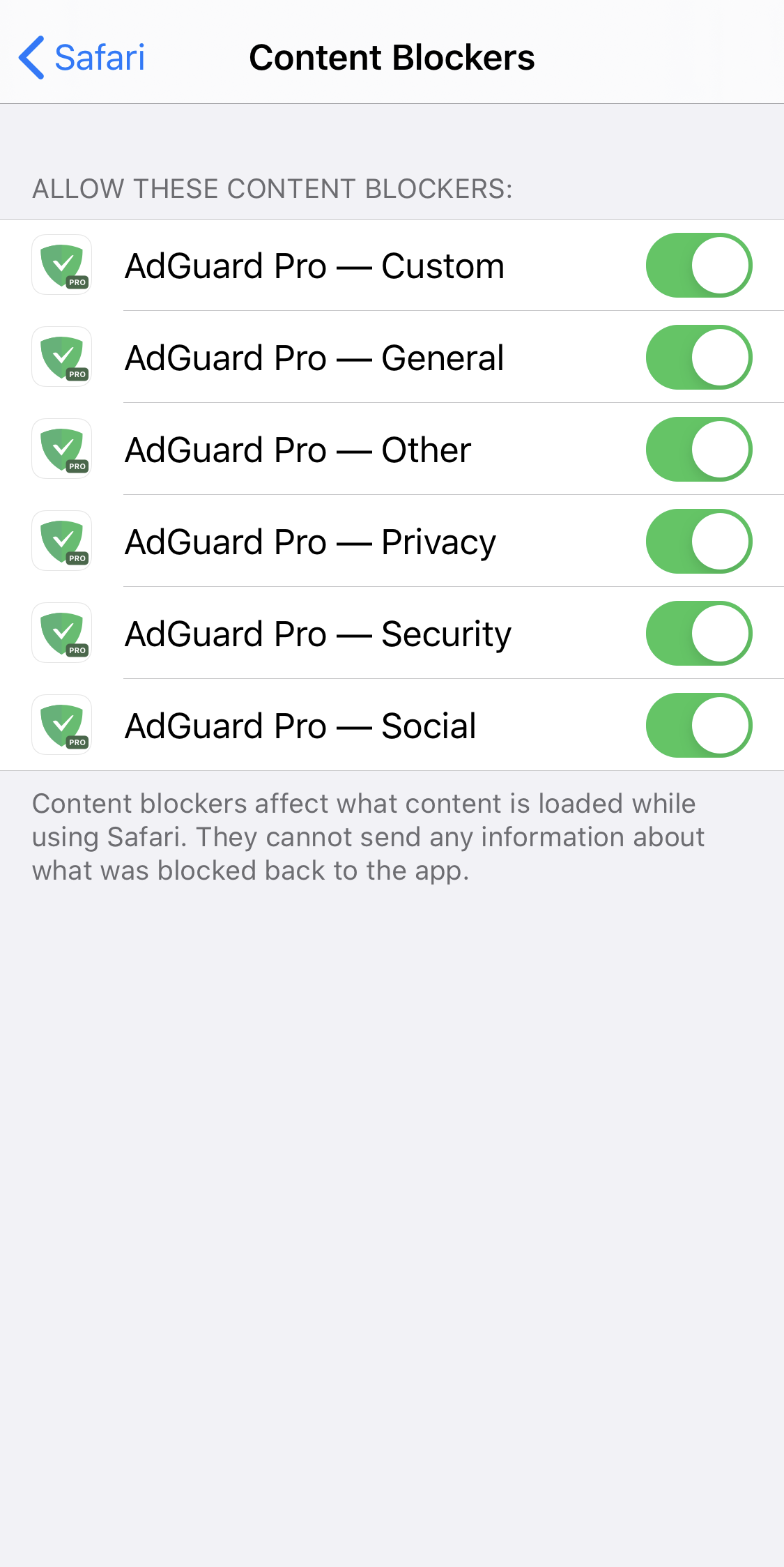
Content blockers — the avengers of Safari ad blocking

  • 'Content blockers' screen

Continuing on this topic, it would be rather annoying to go to Safari settings each time you want to check which content blockers and filters are enabled. We know this from personal experience. The logical solution was to add a new screen right to AdGuard Pro settings, which we did. Go to General settings > Content blockers to see the current state. You’ll even find there which content blockers exactly are enabled and how many rules each of them has used up.
  • Content blocker affinity

Some filtering rules depend on each other or work better together. There’s a problem in cases when such rules belong to different content blockers. Normally they wouldn't always work as intended, even if both content blockers were enabled. But we put in extra work to achieve cross-content blocker compatibility, so the quality of ad blocking went further up.

  • Adding custom filters

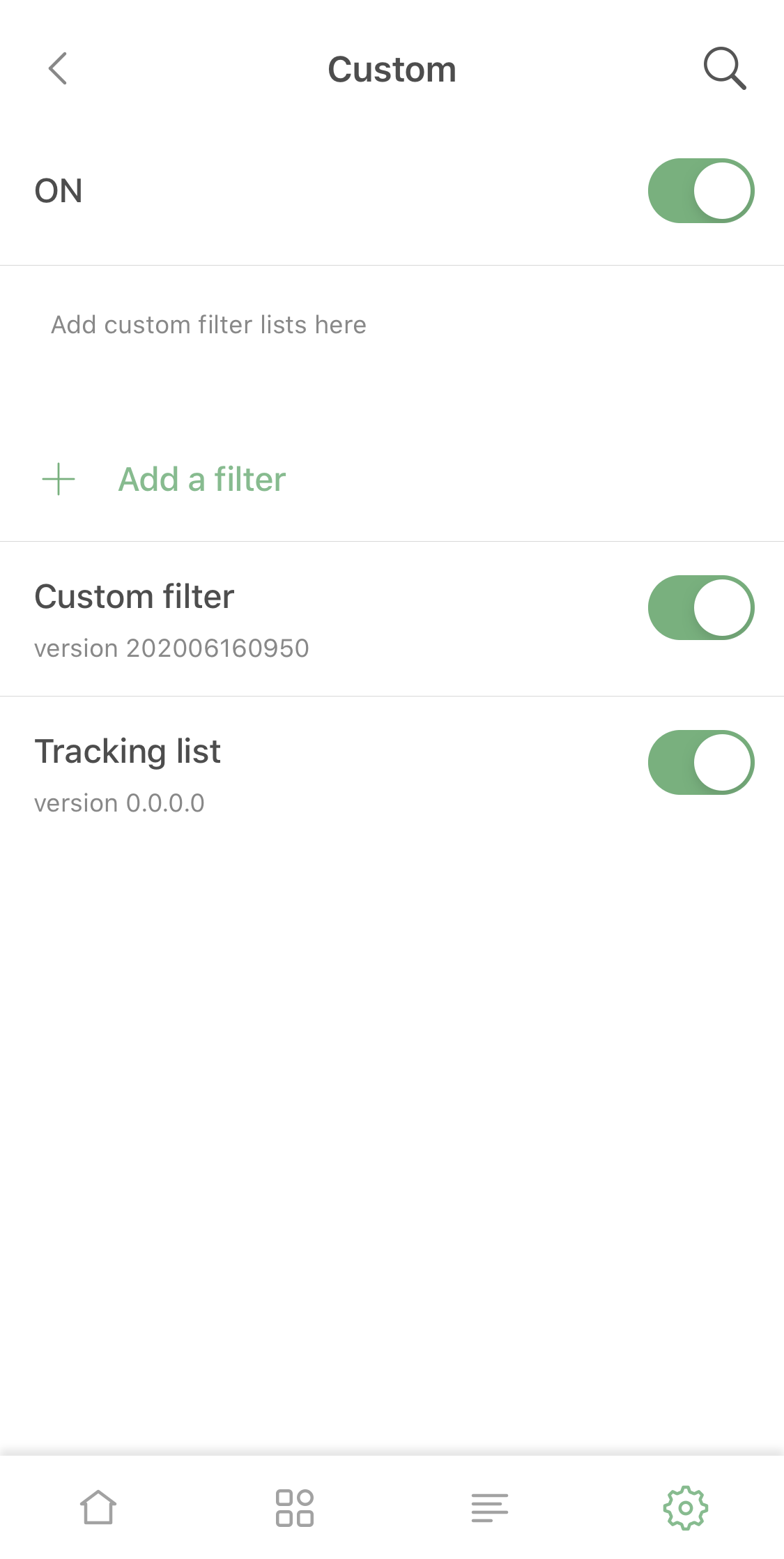
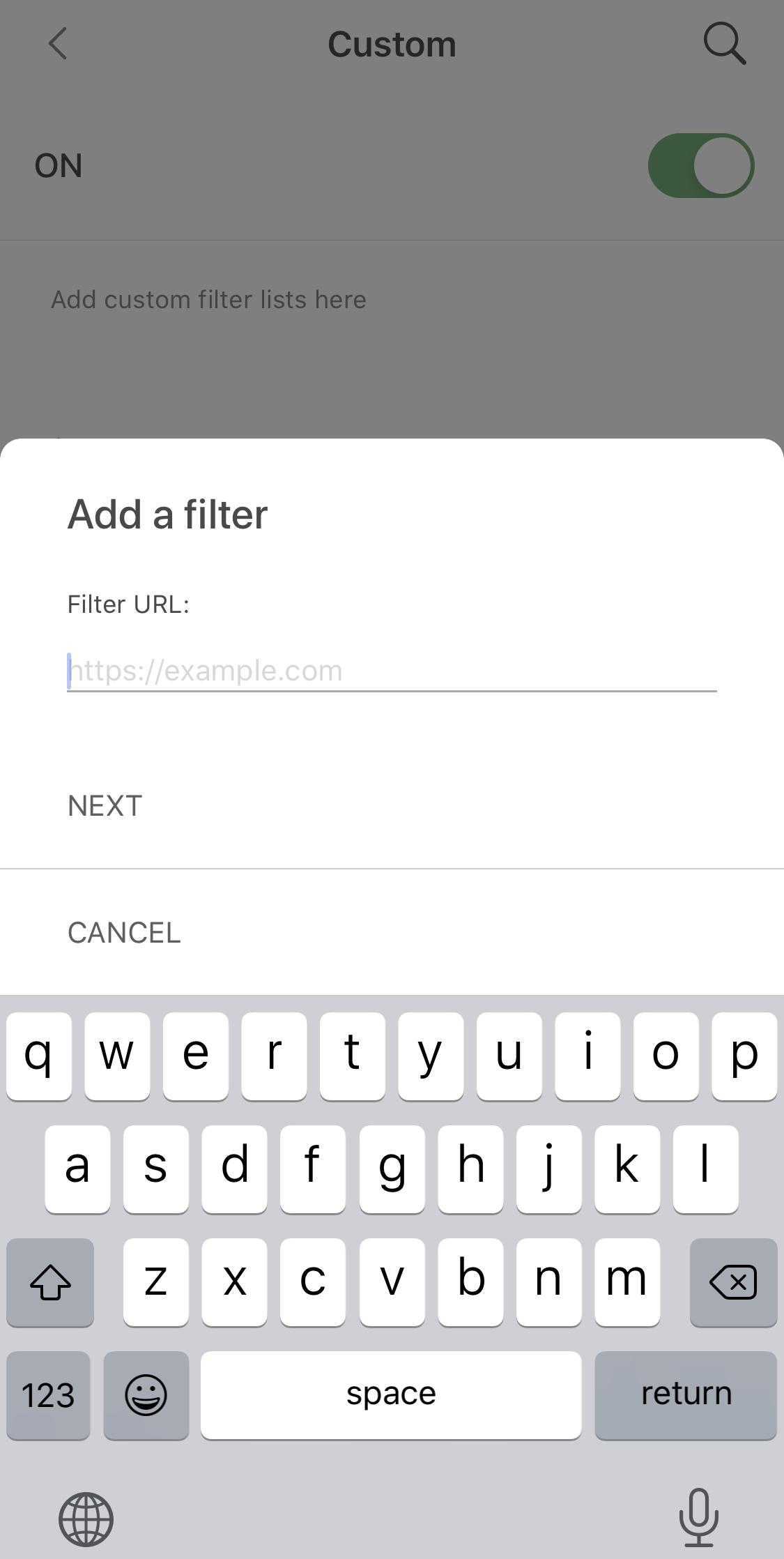
This option will be very useful for those who support their own filters, or just have a favorite filter that wasn't included by default. Add it by URL and it will be kept updated just as any other filter!
Adding a custom filter

DNS protection

Actually, despite it's been so long, DNS-related functionality in the old AdGuard Pro versions wasn't that much behind. However, we found some ways to improve it (aside from the obvious bugfixing).
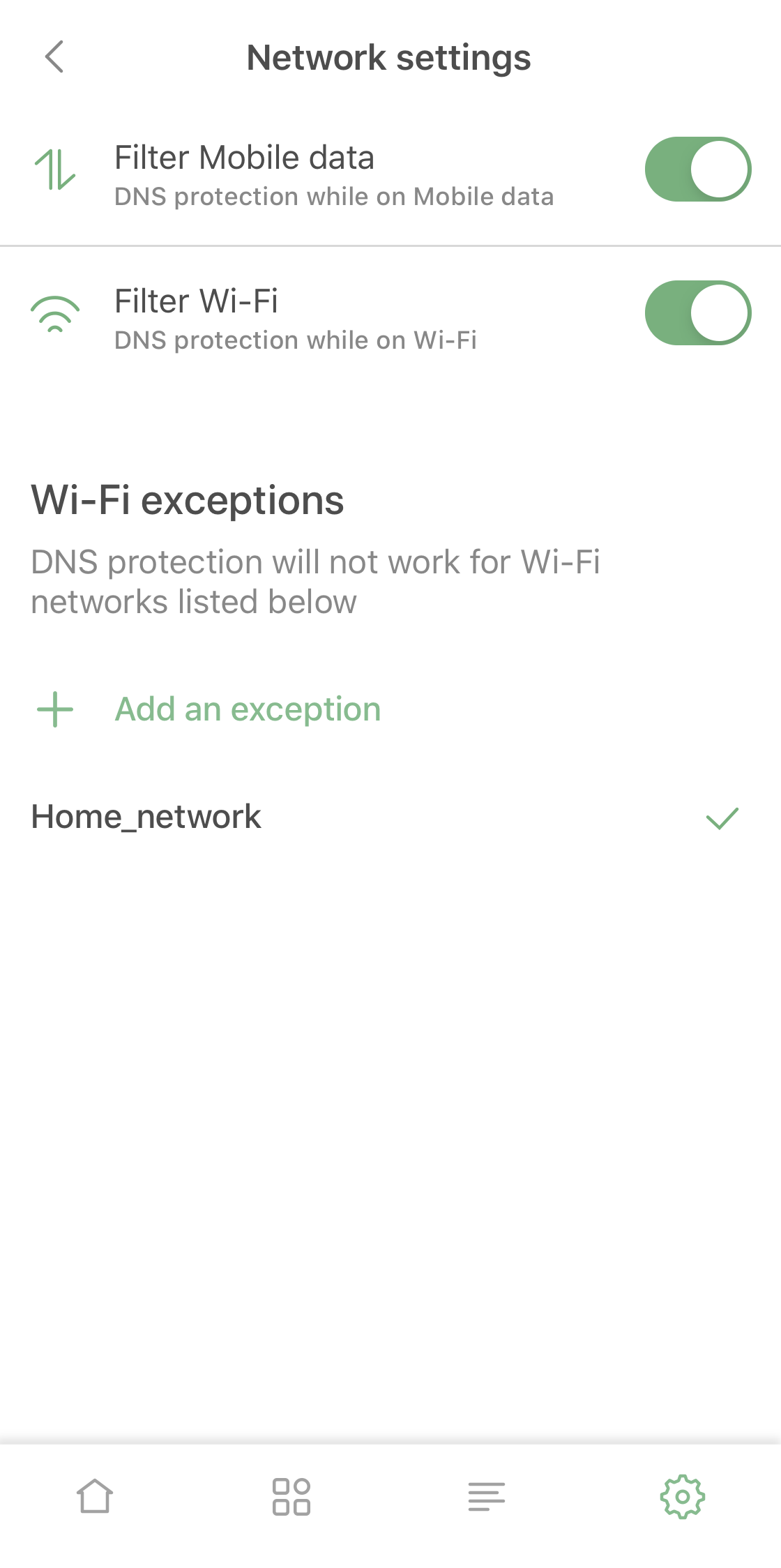
New Network Settings screen

Firstly, we made it so it's possible now to enable and disable DNS protection for Wi-Fi or mobile data separately, a feature that should be useful for many AdGuard Pro users.

Besides that, in addition to familiar DNS functionality you now can add mobile network or certain Wi-Fi networks to exclusions. For example, you can use it if you have AdGuard Home set up for your home Wi-Fi.

There are several lesser changes related to DNS functionality that are too technical or too minor to include here, but together they make the DNS protection suite quite a lot better compared to the previous version.

Pricing policy

Unlike AdGuard for iOS (that's subscription-based), AdGuard Pro has always been a one-time purchase app. Its price has stayed the same (and relatively low) for a long time for apparent reasons.

Now, when AdGuard Pro and AdGuard for iOS wield the same arsenal, it wouldn't be fair to have different prices. In the near future we're going to increase the price of AdGuard Pro to be in line with the lifetime subscription of AdGuard for iOS. You still have time to purchase it for the old price, though!

Summing it up

AdGuard Pro caught up with AdGuard for iOS and the two apps are now functionally equivalent and can completely replace one another. If you already have AdGuard Pro, you don't need the regular AdGuard version, and it works the other way around too.

If you have neither, hurry up and visit the App Store to take advantage of the low price, it won't stay that way for long!


We hope you'll enjoy using AdGuard Pro – it will be a completely new experience compared to v2.1. Traditionally, all the changes and bugfixes are available on GitHub. Share your feedback of using the app with us – right here in the comments, in the App Store or in social media!


Svidio vam se ovaj post?
AdGuard VPN AdGuard DNS AdGuard Mail AdGuard Wallet
Glavni zaslon AdGuard za Windows
Zaslon zaštite AdGuard za Windows koji prikazuje značajke zaštite i postavke
Zaslon statistika AdGuard za Windows koji prikazuje statistiku blokiranih oglasa i pratitelja
Zaslon upravljanja aplikacijama u AdGuard za Windows, koji prikazuje opcije upravljanja zaštitom za aplikacije instalirane na uređaju
20.397 20397 recenzija
Odlično!

AdGuard: blokator oglasa za Windows

AdGuard za Windows je više od blokatora oglasa. To je višenamjenski alat koji blokira oglase, kontrolira pristup opasnim web-mjestima, ubrzava učitavanje stranica i štiti djecu od neprikladnog sadržaja
Preuzimanjem programa prihvaćate odredbe licencnog ugovora
Microsoft Store
Preuzimanjem programa prihvaćate odredbe licencnog ugovora
AdGuard za Windows v8.0, 14-dnevni probni period
Glavni zaslon AdGuard za Mac
Zaslon prikrivenog načina u AdGuardu za Mac
20.397 20397 recenzija
Odlično!

AdGuard: blokator oglasa za Mac

AdGuard za Mac je jedinstveni blokator oglasa dizajniran s macOS-om na umu. Osim što vas štiti od dosadnih oglasa u preglednicima i aplikacijama, štiti vas i od praćenja, phishinga i prijevara
Preuzimanjem programa prihvaćate odredbe licencnog ugovora
Pročitajte više
AdGuard za Mac v2.19, 14-dnevni probni period
Glavni zaslon AdGuard za Android
Zaslon zaštite od praćenja u AdGuard za Android
Zaslon upravljanja aplikacijama u AdGuard za Android, koji prikazuje opcije upravljanja zaštitom za aplikacije instalirane na uređaju
Zaslon statistika AdGuard za Android koji prikazuje statistiku blokiranih oglasa i pratitelja
Glavni zaslon privatnog preglednika AdGuard za Android
QR kod za preuzimanje AdGuard za Android
20.397 20397 recenzija
Odlično!

AdGuard: blokator oglasa za Android

Blokira oglase i pratitelje u svim preglednicima, igrama i drugim aplikacijama. Štiti vašu privatnost i omogućuje vam kontrolu nad time kako vaše aplikacije koriste internet. Instalira se putem APK-a
Preuzimanjem programa prihvaćate odredbe licencnog ugovora
Pročitajte više
Skeniraj za preuzimanje
Koristite bilo koji čitač QR koda dostupan na vašem uređaju
AdGuard za Android v4.14, 14-dnevni probni period
Glavni zaslon AdGuard za iOS
Zaslon zaštite AdGuard za iOS koji prikazuje značajke zaštite i postavke
Zaslon statistika AdGuard za iOS koji prikazuje statistiku blokiranih oglasa i pratitelja
QR kod za preuzimanje AdGuard za iOS
20.397 20397 recenzija
Odlično!

AdGuard: blokator oglasa za iOS

Najbolji iOS blokator oglasa za iPhone i iPad. AdGuard uklanja sve vrste oglasa i alata za praćenje u Safariju i štiti vašu privatnost u svim aplikacijama na DNS razini
Preuzimanjem programa prihvaćate odredbe licencnog ugovora
Pročitajte više
Skeniraj za preuzimanje
Koristite bilo koji čitač QR koda dostupan na vašem uređaju
AdGuard za iOS v4.5
Glavni zaslon AdGuard Content Blocker
Zaslon filtara u AdGuard Content Blocker
Zaslon postavki u AdGuard Content Blocker
20.397 20397 recenzija
Odlično!

AdGuard Bloker sadržaja

AdGuard Content Blocker eliminira sve vrste oglasa u mobilnim preglednicima koji podržavaju tehnologiju blokiranja sadržaja — naime, Samsung Internet i Yandex Browser. Njegove su značajke ograničene u usporedbi s AdGuardom za Android, ali je besplatan, jednostavan za instalaciju i učinkovit
Preuzimanjem programa prihvaćate odredbe licencnog ugovora
Pročitajte više
AdGuard Bloker sadržaja v2.8
Glavni zaslon AdGuard Browser Extension
Zaslon zaštite od praćenja u AdGuard Browser Extension
20.397 20397 recenzija
Odlično!

AdGuard Proširenje preglednika

AdGuard je najbrže i najlakše proširenje za blokiranje oglasa koje učinkovito blokira sve vrste oglasa na svim web stranicama! Odaberite AdGuard za preglednik koji koristite i imajte brzo i sigurno pretraživanje Interneta bez oglasa.

Instalacija
Preuzimanjem programa prihvaćate odredbe licencnog ugovora
Instalacija
Preuzimanjem programa prihvaćate odredbe licencnog ugovora
Instalacija
Preuzimanjem programa prihvaćate odredbe licencnog ugovora
Instalacija
Preuzimanjem programa prihvaćate odredbe licencnog ugovora
Instalacija
Preuzimanjem programa prihvaćate odredbe licencnog ugovora
Pročitajte više
Instalacija
Preuzimanjem programa prihvaćate odredbe licencnog ugovora
Pročitajte više
AdGuard Proširenje preglednika v5.5
Glavni zaslon AdGuard Assistant
20.397 20397 recenzija
Odlično!

AdGuard Pomoćnik

Prateća ekstenzija za preglednik za AdGuard desktop aplikacije. Omogućuje blokiranje prilagođenih stavki na web stranicama, dodavanje web stranica na popis dopuštenih i slanje izvještaja izravno iz preglednika
AdGuard Pomoćnik v1.4
20.397 20397 recenzija
Odlično!

AdGuard Home

AdGuard Home je mrežno rješenje za blokiranje oglasa i trackera. Instalirajte ga jednom na usmjerivač kako biste pokrili sve uređaje na kućnoj mreži – nije potreban dodatni klijentski softver. To je posebno važno za razne IoT uređaje koji često predstavljaju prijetnju vašoj privatnosti
AdGuard Home v0.107
Glavni zaslon AdGuard Pro za iOS
Zaslon zaštite u AdGuard Pro za iOS, koji prikazuje značajke zaštite i postavke
Zaslon statistike u AdGuard Pro za iOS, koji prikazuje statistiku za blokirane oglase i pratitelje
20.397 20397 recenzija
Odlično!

AdGuard Pro za iOS

AdGuard Pro za iOS dolazi sa svim naprednim značajkama zaštite od blokiranja oglasa. Nudi iste alate kao i plaćena verzija AdGuarda za iOS. Ističe se u blokiranju oglasa u Safariju i omogućuje vam prilagođavanje DNS postavki kako biste prilagodili zaštitu svojim potrebama. Blokira oglase u preglednicima i aplikacijama, štiti vašu djecu od neprikladnog sadržaja i čuva vaše osobne podatke sigurnima.
Preuzimanjem programa prihvaćate odredbe licencnog ugovora
Pročitajte više
AdGuard Pro za iOS v4.5
Glavni zaslon AdGuard Mini za Mac
Zaslon zaštite za Safari u AdGuard Mini za Mac
Zaslon za stvaranje pravila u AdGuard Mini za Mac
20.397 20397 recenzija
Odlično!

AdGuard Mini za Mac — blokator oglasa u Safariju

AdGuard Mini za Mac je moćan Safari blokator oglasa. Ova lagana aplikacija uklanja oglase, blokira pratitelje i ubrzava učitavanje stranica. Pomaže vam pregledavati web u Safariju bez ometanja i čuvati vaše podatke privatnima
Instalacija
Preuzimanjem programa prihvaćate odredbe licencnog ugovora
Pročitajte više
AdGuard Mini za Mac v2.3
Glavni zaslon AdGuard za Android TV s omogućenom zaštitom
Zaslon blokiranja oglasa AdGuard za Android TV koji prikazuje njegove značajke i postavke
Zaslon postavki AdGuard za Android TV
Zaslon upravljanja aplikacijama AdGuard za Android TV koji prikazuje aplikacije u kojima su oglasi i pratitelji blokirani
20.397 20397 recenzija
Odlično!

AdGuard za Android TV

AdGuard za Android TV jedina je aplikacija koja blokira oglase, čuva vašu privatnost i djeluje kao vatrozid za vaš Smart TV. Primajte upozorenja o web prijetnjama, koristite siguran DNS i iskoristite prednosti šifriranog prometa. Opustite se i uronite u svoje omiljene emisije uz vrhunsku sigurnost i bez oglasa!
AdGuard za Android TV v4.14, 14-dnevni probni period
Maskota AdGuard, Agnar, drži Linux pingvina
20.397 20397 recenzija
Odlično!

AdGuard za Linux

AdGuard za Linux je prvi sustavni bloker oglasa za Linux na svijetu. Blokirajte oglase i pratitelje na razini uređaja, odaberite iz unaprijed instaliranih filtara ili dodajte vlastite — sve kroz sučelje naredbenog retka
AdGuard za Linux v1.4
20.397 20397 recenzija
Odlično!

AdGuard Temp Mail

Besplatni generator privremene adrese e-pošte koji vas čuva anonimnim i štiti vašu privatnost. Nema spama u vašem glavnom sandučiću!
20.397 20397 recenzija
Odlično!

AdGuard VPN

75 lokacija u cijelom svijetu

Sigurno strujanje

Snažno šifriranje

Ne sakupljamo zapise

Najbrža veza

24/7 podrška

Isprobajte besplatno
Preuzimanjem programa prihvaćate odredbe licencnog ugovora
Pročitajte više
20.397 20397 recenzija
Odlično!

AdGuard DNS

AdGuard DNS je siguran način blokiranja internetskih oglasa za koji nije potrebna instalacija aplikacije. Jednostavan je za upotrebu, potpuno besplatan, lako se postavlja na bilo koji uređaj i pruža vam minimum potrebnih funkcija za blokiranje oglasa, brojača, zlonamjernih web stranica i sadržaja za odrasle.
20.397 20397 recenzija
Odlično!

AdGuard Mail

Zaštitite svoj identitet, izbjegnite neželjenu poštu i čuvajte sigurnost svoje pristigle pošte uz naše pseudonime i privremene adrese e-pošte. Iskoristite našu besplatnu uslugu prosljeđivanja e-pošte i aplikacije za sve operacijske sustave.
20.397 20397 recenzija
Odlično!

AdGuard Wallet

Siguran i privatan kripto novčanik koji vam daje potpunu kontrolu nad vašom imovinom. Upravljajte višestrukim novčanicima i otkrijte tisuće kriptovaluta za pohranu, slanje i zamjenu
Započelo je preuzimanje AdGuard-a Da biste instalirali AdGuard, kliknite datoteku označenu strelicom Odaberite "Otvori" i pritisnite "U redu", te zatim pričekajte da se datoteka preuzme. U otvorenom prozoru povucite ikonu AdGuarda u mapu "Aplikacije". Hvala što ste odabrali AdGuard! Odaberite "Otvori" i pritisnite "U redu", potom pričekajte da se datoteka preuzme. U otvorenom prozoru pritisnite "Instaliraj". Hvala vam što ste izabrali AdGuard!
Također instalirajte AdGuard za mobilne uređaje
















































