Is ad-free streaming doomed?

Those of us who have been around for a while may remember the blissful old days when streaming was strongly associated with an ad-free experience. Sick and tired of the commercial breaks on cable TV (and let’s not even get started on linear TV), we would embrace streaming as a healthy alternative to the choiceless and ad-laden regular TV viewing.

Little did we know that this would not last forever… a paradise lost, likely never to be rediscovered. Slowly but surely, the old subscription-based streaming services introduced ad-supported tiers, while the new ones, like Discovery+ or Peacock, received ad-supported tiers right out of the gate.

Last year, it was time for streaming veteran Netflix to bow to the trend: Netflix introduced an ad-supported tier for $6.99 a month and, to rub salt in the wound, in July this year dropped its $9.99 ad-free basic plan in the US, the UK, and Canada, with its cheapest ad-free plan now costing $15.49 a month. We have already lamented the demise of the completely ad-free Netflix, which once promised to never introduce ads. You can read our detailed epitaph here. This time, the bell has tolled for Amazon Prime.

Prime Video is past its prime

This month, Amazon announced that its Prime Video streaming service will begin featuring ads in shows and movies in early 2024. The rollout will begin in the US, UK, Germany, and Canada, and later expand to France, Italy, Spain, Mexico, and Australia. In a press release, Amazon justified the introduction of a new ad-supported tier by citing the need to support the creation of “compelling content,” such as its hit series The Marvelous Mrs. Maisel.

Whatever the justification, the fact that Prime Video is turning to an ad-supported model is frustrating. And it’s not just a matter of seeing ads in places where there were none before. The other problem with any ad-supported service is that it collects a lot of viewers’ data in order to show them the most relevant ads. We do not know what kind of information Amazon will use to target ads in Prime Video, but we can assume that it will have a lot of data to work with, given the role that Amazon services play in the daily lives of the average American. For example, Amazon has 148 million Prime members in the US who use its various services such as streaming, retail, prescription drugs, grocery delivery, photo storage, and gaming. This means that Amazon can track and analyze their online behavior, preferences, purchases, and more. The sheer amount of data potentially available to advertisers means that they will be willing to pay a lot of money to reach these customers with personalized ads.

For Amazon Prime users who want to keep watching videos without ads, they will have to shell out an extra $2.99/month. That may sound like just a cup of coffee, but it’s actually a huge price hike. It means paying ~20% more for the monthly Prime subscription in the US (currently $14.99) or ~26% more for the annual one (currently $139).

This, along with the sneaky way that Amazon is rolling out the ad-supported option, suggests that the company’s real goal is to lure users into staying on the ad-infested tier, rather than a genuine offer to let them choose between ads and no ads.

But what is so sneaky about Amazon’s new hard-to-resist offer?

‘No action required’

The sneaky part is that while there’s a fundamental difference between ads and no ads, and it may be a deal-breaker for many, Amazon isn’t technically introducing a new ad-supported tier that you are free to join; rather, it’s automatically enrolling all of its Prime users into the ad-supported plan.

In a statement announcing the arrival of ads to Prime Video, Amazon says: “No action is required for Prime members.” In the same statement it describes ads as a necessary evil that should not detract much from the Prime viewing experience, at least in comparison with its competitors: “We aim to have meaningfully fewer ads than linear TV and other streaming TV providers.”

However, the wording leaves much to interpretation, and we cannot possibly know what Amazon means by “meaningfully fewer ads” and who are “streaming TV providers” it compares itself with. For instance, subscribers of Netflix ad-supported plan should see on average 4 minutes of ads per hour, while Discovery +’s and Hulu’s ad load is higher — 5 minutes of ads per hour and 7.3(!) minutes of ads per hour respectively. According to Media Radar, the largest advertising-based video on-demand platforms average 6.1 minutes of ads per hour.

The way Amazon Prime is quietly pushing its subscribers toward the ad-supported plan reeks of unfair practices and dark patterns. And it’s not like Amazon is new to this. Just three months ago the US Federal Trade Commission (FTC) accused the company of having “knowingly duped millions into unknowingly enrolling in Amazon Prime,” that is without their consent or knowledge. The FTC claimed that Amazon had employed “manipulative, coercive or deceptive user-interface designs known as 'dark patterns' to trick consumers into enrolling in automatically renewing Prime subscriptions.” History repeating itself?

It’s bigger than Amazon

We have zeroed in on Amazon in this article not because it is an outlier, but because it is a perfect illustration of the domineering trend. Many streaming services nowadays are either adding ad-supported tiers or raising prices of the already existing ones. The ultimate goal seems to be to get users to accept the idea that what was once considered incompatible, even absurd — paying for subscriptions and still watching ads — is now the new normal.

In arguably the same vein, YouTube recently removed its cheapest ad-free plan, ‘Premium Lite,’ from several wealthy European countries where it was previously available. However, YouTube has not ruled out the plan’s return in some other form, and has launched ‘YouTube Lite’ in Thailand.

In any case, the idea that ads are something we have to come to terms with is being hammered vigorously into our minds. For instance, Telsey Advisory Group analyst Joseph Feldman, complementing Amazon for boosting its ad business via the new tier, notes that “for members who are heavy consumers of video, the ad-supported and ad-free options are standards in the industry, including Netflix, Inc NFLX and Hulu, and should not be a surprise.”

However, some users still beg to differ. In response to Amazon’s announcement, some have argued that the presence of ads, and not just the generic ads you can see on cable TV, but highly-targeted high-paying ads, is enough of a trade-off between the user and the service provider.
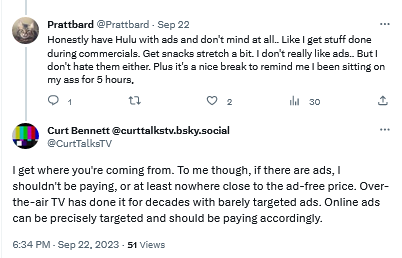
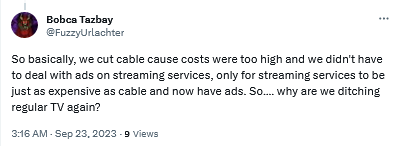
Users are not yet comfortable with streaming services introducing ad tiers

By introducing ads streaming services become just like regular TV

Bracing for the worst, hoping for the best

Unfortunately, everything points to a future where users are forced to be comfortable with ads as an inherent part of subscription-based services. We can come up with various reasons why this is so, but the most likely one is that ads are simply too lucrative to pass up, and no subscription revenue can (probably) make up for what they bring in.

Streaming platforms train us to see ads not as what they are — inherently intrusive and privacy-breaking nuisances — but as an inalienable part of every service, of every interface. We believe that users deserve a better streaming experience, and if platforms are not willing to provide it to them, it’s only natural that they turn to ad blockers.

However, there are limits to what ad blockers can do when you want to block ads on streaming services. If you want to get the most out of your ad blocker, we recommend that you use your streaming service in the browser. This way, an ad blocker (a browser extension or standalone app) is able to apply more complicated filtering techniques and block most ads. But it comes with no surprise that streaming platforms do not like their ads to be blocked, and they try to prevent ad blockers from working at full tilt. They do this by constantly changing their code and ad loading mechanism. This, in turn, requires ad blockers and filter developers to constantly update their filters to keep up with these changes. That takes time, as it’s not easy to monitor numerous streaming services all at once — and then there are thousands of other websites to block ads on, too. That’s why we at AdGuard appreciate it so much when you send us reports about missed ads. If you’re using AdGuard and notice an ad — please, take a minute of your time to report it. It really helps us a lot to stay on top of things.

Note that while DNS services (such as AdGuard DNS) can occasionally block some ads on some streaming services, it’s more the exception than the rule. So we would not recommend relying on DNS-level blocking alone to stop ads on your streaming platform of choice. The reason for this is that streaming services often use the same domain name for both the video content and the ads, making it impossible for the DNS server to distinguish between them. DNS blocking has its applications, but this isn’t the job for it.


Tetszett ez a bejegyzés?
AdGuard VPN AdGuard DNS AdGuard Mail AdGuard Wallet
Az AdGuard for Windows főképernyője
Az AdGuard for Windows Védelem képernyője, amely a védelem funkcióit és beállításait mutatja
Az AdGuard for Windows Statisztikák képernyője, amely a letiltott hirdetések és nyomkövetők statisztikáit mutatja
Az AdGuard for Windows Alkalmazáskezelés képernyője, amely az eszközre telepített alkalmazások védelemkezelési beállításait mutatja
20 409 20409 értékelések
Kiváló!

AdGuard: hirdetésblokkoló Windowshoz

Az AdGuard Windowsra több mint egy reklámblokkoló. Ez egy többcélú eszköz, amely blokkolja a hirdetéseket, szabályozza a hozzáférést a veszélyes webhelyekhez, felgyorsítja az oldalak betöltését, és megvédi a gyermekeket a nem megfelelő tartalmaktól
A program letöltésével elfogadja a licencszerződés feltételeit
Microsoft Store
A program letöltésével elfogadja a licencszerződés feltételeit
AdGuard Windowsra v8.0, 14-napos próbaidőszak
Az AdGuard for Mac főképernyője
Az AdGuard Mac-hez Lopakodó mód képernyője
20 409 20409 értékelések
Kiváló!

AdGuard: hirdetésblokkoló Mac-hez

Az AdGuard for Mac egy egyedi reklámblokkoló, amelyet kifejezetten a macOS-hez terveztek. Amellett, hogy megvéd a zavaró hirdetésektől a böngészőkben és az alkalmazásokban, védelmet nyújt a követés, az adathalászat és a csalás ellen
A program letöltésével elfogadja a licencszerződés feltételeit
Olvasson tovább
AdGuard Macre v2.19, 14-napos próbaidőszak
Az AdGuard for Android főképernyője
Az AdGuard for Android Követés elleni védelem képernyője
Az AdGuard for Android Alkalmazáskezelés képernyője, amely az eszközre telepített alkalmazások védelemkezelési beállításait mutatja
Az AdGuard for Android Statisztikák képernyője, amely a letiltott hirdetések és nyomkövetők statisztikáit mutatja
Az AdGuard privát böngészőjének főképernyője Androidon
QR-kód az AdGuard for Android letöltéséhez
20 409 20409 értékelések
Kiváló!

AdGuard: hirdetésblokkoló Androidra

Blokkolja a hirdetéseket és a nyomkövetőket minden böngészőben, játékban és egyéb alkalmazásban. Védi a magánszféráját, és lehetővé teszi, hogy szabályozza, hogyan használják az alkalmazásai az Internetet. APK-n keresztül telepítve
A program letöltésével elfogadja a licencszerződés feltételeit
Olvasson tovább
Letöltésre szolgáló szkennelés
Használjon a készüléken elérhető QR-kódolvasót
AdGuard Androidra v4.14, 14-napos próbaidőszak
Az AdGuard for iOS főképernyője
Az AdGuard for iOS Védelem képernyője, amely a védelem funkcióit és beállításait mutatja
Az AdGuard for iOS Statisztikák képernyője, amely a letiltott hirdetések és nyomkövetők statisztikáit mutatja
QR-kód az AdGuard for iOS letöltéséhez
20 409 20409 értékelések
Kiváló!

AdGuard: hirdetésblokkoló az iOS-hez

A legjobb iOS-es reklámblokkoló iPhone-hoz és iPadhez. Az AdGuard mindenféle hirdetést és követőt eltávolít a Safariban, és DNS-szinten védi az adatvédelmedet az összes alkalmazásban
A program letöltésével elfogadja a licencszerződés feltételeit
Olvasson tovább
Letöltésre szolgáló szkennelés
Használjon a készüléken elérhető QR-kódolvasót
AdGuard iOS-re v4.5
Az AdGuard Content Blocker főképernyője
Az AdGuard Content Blocker Szűrők képernyője
Az AdGuard Content Blocker Beállítások képernyője
20 409 20409 értékelések
Kiváló!

AdGuard Tartalomblokkoló

Az AdGuard Content Blocker kiküszöböli a mobilböngészők minden olyan hirdetését, amely támogatja a tartalomblokkoló technológiát — nevezetesen a Samsung Internet és a Yandex böngésző. Funkciói korlátozottak az AdGuard for Androidhoz képest, de ingyenes, könnyen telepíthető és hatékony
A program letöltésével elfogadja a licencszerződés feltételeit
Olvasson tovább
AdGuard Tartalomblokkoló v2.8
Az AdGuard Browser Extension főképernyője
Az AdGuard Browser Extension Követés elleni védelem képernyője
20 409 20409 értékelések
Kiváló!

AdGuard Böngészőkiegészítő

Az AdGuard a leggyorsabb és a legkönnyedebb hirdetésblokkoló bővítmény, amely hatékonyan blokkolja az összes hirdetéstípust az bármelyik weboldalon! Válassza az AdGuard lehetőséget az Ön által használt böngészőhöz, hogy hirdetésektől mentesen, gyorsan és biztonságosan böngészhessen.
Telepítés
A program letöltésével elfogadja a licencszerződés feltételeit
Telepítés
A program letöltésével elfogadja a licencszerződés feltételeit
Telepítés
A program letöltésével elfogadja a licencszerződés feltételeit
Telepítés
A program letöltésével elfogadja a licencszerződés feltételeit
Telepítés
A program letöltésével elfogadja a licencszerződés feltételeit
Olvasson tovább
AdGuard Böngészőkiegészítő v5.5
Az AdGuard Assistant főképernyője
20 409 20409 értékelések
Kiváló!

AdGuard Asszisztens

A [AdGuard asztali alkalmazások] böngészőbővítménye(https://adguard.com/products.html?_plc=hu). Lehetővé teszi a webhelyek egyéni elemeinek blokkolását, webhelyek hozzáadását az engedélyezési listához, és jelentések küldését közvetlenül a böngészőből
AdGuard Asszisztens v1.4
20 409 20409 értékelések
Kiváló!

AdGuard Home

Az AdGuard Home egy hálózati alapú megoldás a hirdetések és nyomkövetők blokkolására. Telepítse egyszer az útválasztóra, hogy lefedje az otthoni hálózat összes eszközét – nincs szükség további kliensszoftverre. Ez különösen fontos a különféle IoT-eszközök esetében, amelyek gyakran veszélyt jelentenek az Ön magánéletére
AdGuard Home v0.107
Az AdGuard Pro for iOS főképernyője
Az AdGuard Pro for iOS Védelem képernyője, amely a védelem funkcióit és beállításait mutatja
Az AdGuard Pro for iOS Statisztikák képernyője, amely a letiltott hirdetések és nyomkövetők statisztikáit mutatja
20 409 20409 értékelések
Kiváló!

AdGuard Pro iOS-re

Az AdGuard Pro iOS-hez verziója minden fejlett hirdetésblokkoló védelmi funkcióval rendelkezik. Ugyanazokat az eszközöket kínálja, mint az AdGuard iOS fizetős verziója. Kiválóan blokkolja a hirdetéseket a Safariban, és lehetővé teszi a DNS-beállítások testreszabását a védelem személyre szabásához. Blokkolja a hirdetéseket a böngészőkben és alkalmazásokban, megvédi gyermekeit a nem megfelelő tartalmaktól, és biztonságban tartja személyes adatait.

A program letöltésével elfogadja a licencszerződés feltételeit
Olvasson tovább
AdGuard Pro iOS-re v4.5
Az AdGuard Mini for Mac főképernyője
Az AdGuard Mini for Mac Safari védelem képernyője
Az AdGuard Mini for Mac Szabály létrehozása képernyője
20 409 20409 értékelések
Kiváló!

AdGuard Mini Mac-hez — Safari hirdetésblokkoló

Az AdGuard Mini Mac-re egy hatékony Safari hirdetésblokkoló. Ez a könnyű alkalmazás eltávolítja a hirdetéseket, blokkolja a nyomkövetőket, és felgyorsítja az oldalak betöltését. Segít zavaró tényezők nélkül böngészni a webet Safariban, és megőrzi az adataid privát jellegét

AdGuard Mini Mac-hez v2.3
Az AdGuard for Android TV főképernyője engedélyezett védelemmel
Az AdGuard for Android TV hirdetésblokkolás képernyője, amely a funkciókat és beállításokat mutatja
Az AdGuard for Android TV Beállítások képernyője
Az AdGuard for Android TV Alkalmazáskezelés képernyője, amely azokat az alkalmazásokat mutatja, ahol a hirdetések és nyomkövetők le vannak tiltva
20 409 20409 értékelések
Kiváló!

AdGuard Android TV-hez

Az Android TV-hez készült AdGuard az egyetlen alkalmazás, amely blokkolja a hirdetéseket, védi az Ön adatait, és tűzfalként működik a Smart TV-ben. Figyelmeztetéseket kaphat a webes fenyegetésekről, használjon biztonságos DNS-t, és élvezze a titkosított forgalom előnyeit. Pihenjen, és merüljön el kedvenc műsoraiban a csúcsminőségű biztonság és  zero  hirdetés!

AdGuard Android TV-hez v4.14, 14-napos próbaidőszak
Az AdGuard kabalája, Agnar, aki a Linux pingvint tartja
20 409 20409 értékelések
Kiváló!

AdGuard Linuxhoz

Az AdGuard for Linux a világ első rendszerszintű Linux-hirdetésblokkolója. Blokkolja a hirdetéseket és a nyomkövetőket eszközszinten, válasszon az előre telepített szűrők közül, vagy adja hozzá sajátját – mindezt a parancssori felületen keresztül
AdGuard Linuxhoz v1.4
20 409 20409 értékelések
Kiváló!

AdGuard Temp Mail

Ingyenes ideiglenes email címgenerátor, amely névtelenül tartja és védi magánéletét. Nincs spam a fő postaládájában!
20 409 20409 értékelések
Kiváló!

AdGuard VPN

75 végpont világszerte

Hozzáférés bármilyen tartalomhoz

Erős titkosítás

Nincs naplózás

Gyorsabb kapcsolódás

0-24 támogatás

20 409 20409 értékelések
Kiváló!

AdGuard DNS

Az AdGuard DNS egy bolondbiztos módszer az internetes hirdetések blokkolására, amely nem igényel alkalmazásokat. Könnyen használható, teljesen ingyenes, könnyen beállítható bármilyen eszközön, és csak minimálisan szükséges funkciókat biztosít a hirdetések, számlálók, rosszindulatú webhelyek és felnőtteknek szóló tartalmak blokkolásához.
20 409 20409 értékelések
Kiváló!

AdGuard Mail

Védje személyazonosságát, kerülje a kéretlen leveleket, és tartsa biztonságban postafiókját álneveinkkel és ideiglenes email címeinkkel. Élvezze ingyenes email továbbító szolgáltatásunk és alkalmazásaink előnyeit minden operációs rendszerre.
20 409 20409 értékelések
Kiváló!

AdGuard Wallet

Biztonságos és privát kriptopénztárca, amely teljes ellenőrzést biztosít eszközei felett. Kezeljen több pénztárcát, és fedezzen fel több ezer kriptovalutát tárolásra, küldésre és cserére
Az AdGuard letöltése megkezdődött Kattintson a nyíllal jelzett gombra a telepítés elindításához. Válassza a "Megnyitás" lehetőséget, és kattintson az "OK" gombra, majd várja meg a fájl letöltését. A megnyílt ablakban húzza az AdGuard ikont az "Alkalmazások" mappába. Köszönjük, hogy az AdGuardot választotta! Válassza a "Megnyitás" lehetőséget, és kattintson az "OK" gombra, majd várja meg a fájl letöltését. A megnyílt ablakban kattintson az "Telepítés" gombra. Köszönjük, hogy az AdGuardot választotta!
Telepítse az AdGuardot mobileszközökre is:















































