Apple’s new EU terms: accept and lose money, or reject and stay within the walled garden

Apple’s ecosystem has always been known as a walled garden because of the restrictions it imposed on app developers and users. Developers had no choice but to list their apps on Apple’s App Store if they wanted an iOS user to install them. And if they wanted the user to buy something from them, they had to process payments through Apple’s own payment mechanism.

Such a closed system made life difficult not only for developers, who had to pay Apple’s 30% standard fee on in-app purchases (or 15% for small businesses), but also for users. The latter had less of a choice when it came to apps and download options than the users of the Android-based phones, since Google has always allowed sideloading.

This situation is about to change. The culprit is the EU’s upcoming antitrust law, known as the Digital Markets Act (DMA). In September 2023, App Store, iOS operating system, and Safari browser, all owned by Apple, received gatekeeper status under the DMA. This means that by March 6, 2024, Cupertino will have to open them up to competitors or face hefty fines of up to 10% of the company’s total global turnover.

As the deadline draws closer, Apple has come up with a plan for how it’s going to comply with the DMA. And after taking a look at this plan, it’s clear as day to us that Apple intends to comply with the legislation in letter, but definitely not in spirit. Essentially, Apple offers developers a false choice: either they agree to stay within the iOS ecosystem’s confines, or they can explore alternative payment methods and app stores — and risk going under in the process.

What’s wrong with Apple’s new business terms in Europe?

The dilemma that developers face right now is the following: they can either stay on the official App Store under the current terms, or accept the new terms and be subject to the new Core Technology Fee (CTF) that may cost them a fortune. Before we zoom in on the CTF and what it means for developers, especially those of free and freemium apps, we will briefly list the other parts of Apple’s DMA compliance plan.
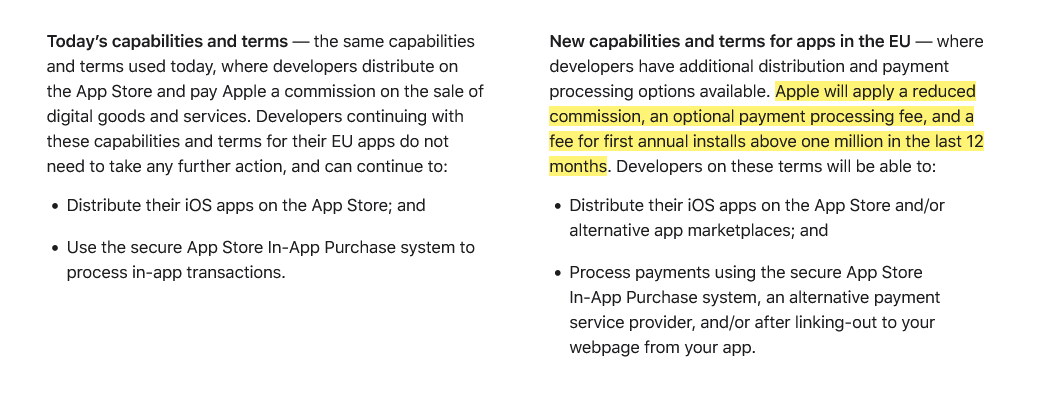
Apple introduces new terms for developers in the EU

Screenshot: Apple gives developers in the EU two options: stay on the current terms or accept the new news. Source: Apple

Under the plan, Apple says it will apply a “reduced commission” to in-app purchases. Developers in Apple’s small business program will pay a 10% fee instead of 15%, regardless of the payment method they choose. Others will pay a 17% fee instead of the standard 30% commission. If developers choose to continue using Apple as their payment processor, they’ll pay an additional 3% payment processing fee. But if they decide to ditch Apple and switch to an alternative payment system or redirect users to their own site for payment, they won’t have to pay Apple any additional fees.

So far so good, right?

It’s when we move to the third part of this masterplan, the Core Technology Fee, that things stop being pretty. In fact, they are starting to look pretty ugly.
The Core Technology Fee (CTF) is the fee that will apply only to the iOS apps whose developers accepted the new business terms. Importantly, it will apply both to iOS apps distributed on the App Store, as well as to the apps that are distributed through alternative app stores, or “marketplaces” as Apple calls them.

The definition of the 'first annual install' is not that straightforward

Subject to the fee are the developers whose apps will clock in over 1 million first annual installs in the past 12 months. They will have to pay a €0.50 fee to Apple for each user over 1 million who installed their app for the first time in a year. After these 12 months, developers will have to pay the fee again, and it does not have to be an install per se. The developer terms state that “app updates,” for instance, are also counted as new installs, “as long as they start a new 12-month period.”
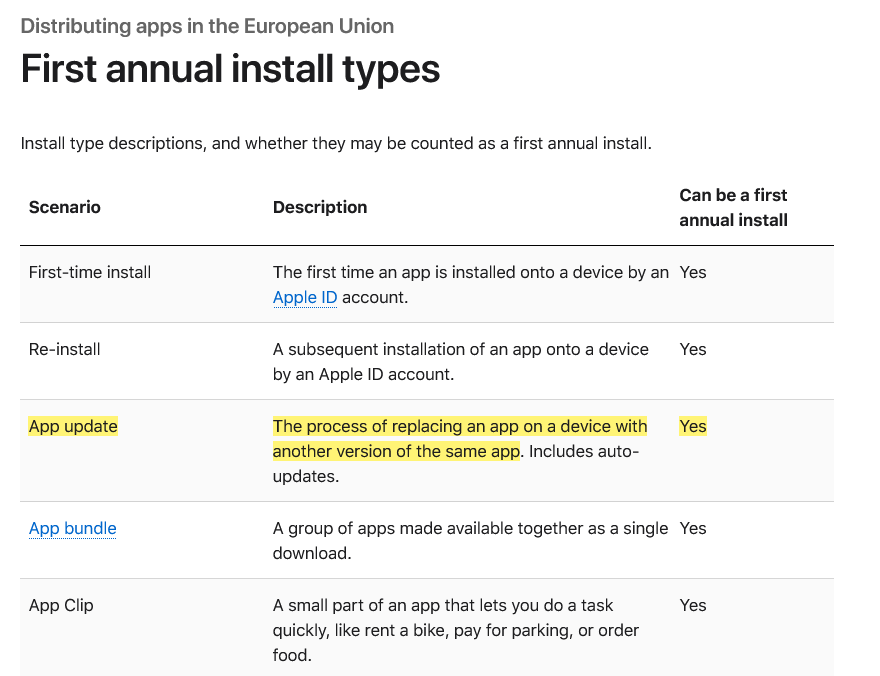
Types of first annual install under Apple's new terms

Marketplace apps or alternative app stores will have it even worse under Apple’s new and supposedly more competition-friendly rules. The developers who will create and distribute their own app stores for iOS apps in the EU are due a €0.50 CTF to Apple for each user who installs their app store for the first time in a year even if it happens before the developer racks up one million installs in total.

Go DMA and go broke: what CTF means in practice

If any of the “big guns,” meaning apps that get more than 1 million downloads in a year, could afford such a fee, it would be the paid apps. However, when it comes to free apps that make money by showing ads, or to freemium apps that offer part of their functionality for free, the fee is insurmountable.

Needless to say, Apple’s masterplan did not strike a chord with developers. Spotify did not hold back, calling the CTF “extortion, plain and simple.”

A key issue raised by Spotify in its scathing response to Apple’s plan is the vulnerable position it puts free app developers in: “How will a developer pay Apple back if its free app goes viral — multiple millions of accounts install that free app, and then that developer owes Apple millions?” Indeed, if a developer of a free or freemium app makes the unfortunate decision to accept Apple’s new terms in the EU, and then has a breakthrough and sees the app gain popularity, the last thing on their mind would be celebrating their achievement, because the first thing they should be thinking about is how to pay Apple back the fees they would owe. And, as Spotify points out, there is nothing preventing Apple from raising the fees at any time they deem fit.

To be fair, Apple has made no big secret of how punitive the new terms could be for some developers. Anyone can estimate how much they’ll pay Apple under its DMA compliance plan using its fee calculator. So let’s take a game that hit the sweet spot and went moderately viral, reaching 2 million installs in the EU in 12 months. Under the new terms, it would have to pay Apple $45,290 per month, whereas under the old terms, it would have to pay nothing. The choice seems a no-brainer to us.
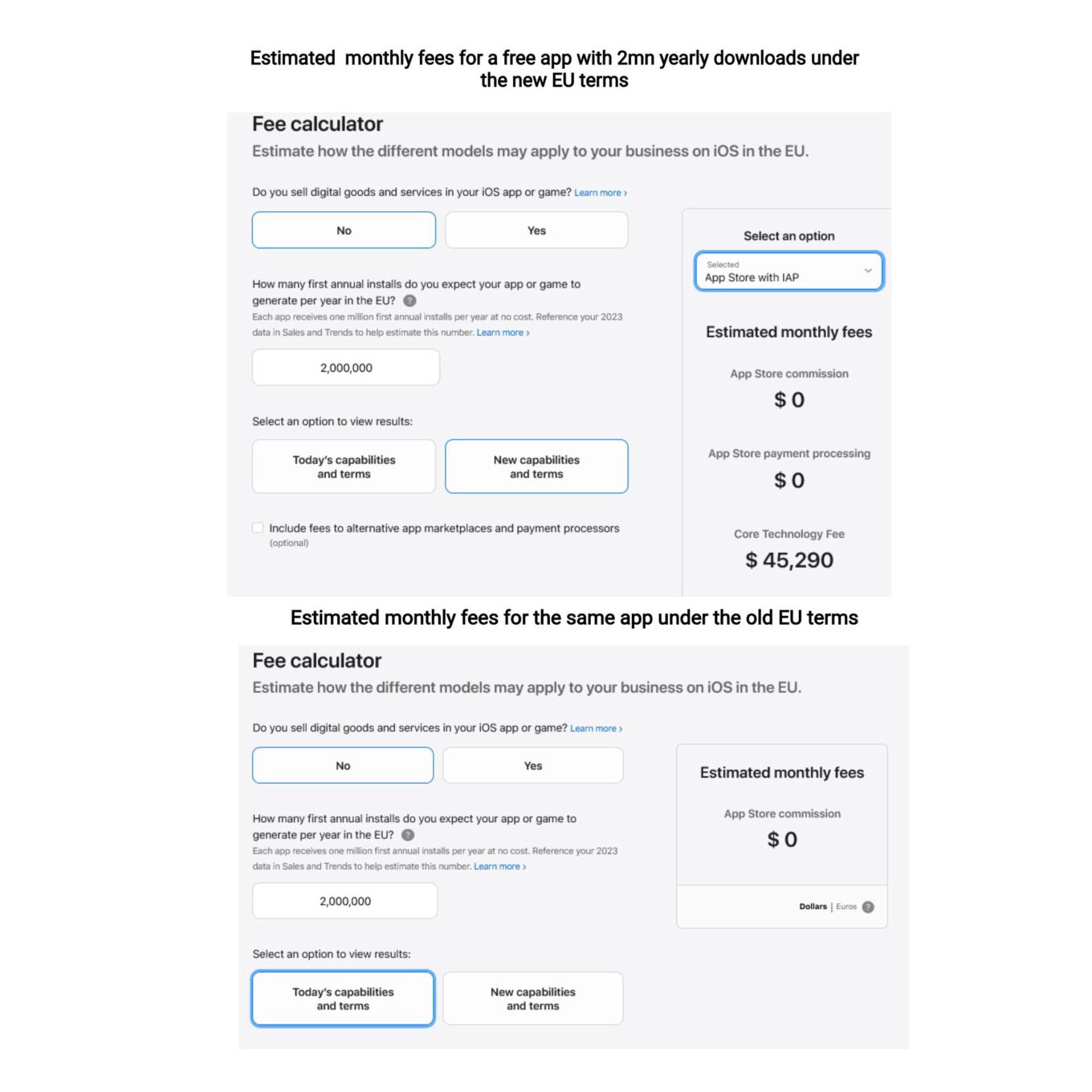
You can use a calculator to estimate your potential CTF

What Apple is effectively doing is trying to discourage developers from switching to the new terms, where they would have had more freedom to choose distribution and payment options. They are betting, and rightly so, that not so many would be willing to risk going into the red if their app takes off or experiences a sudden surge in popularity.

So, while Apple allows alternative stores de jure, de facto there is a prohibitive Core Technology Fee that blocks the way for free and freemium apps to enter alternative stores. In AdGuard’s case, we cannot take advantage of this offer either, simply because we do not have enough resources to pay the Core Technology Fee, and we are not alone in this. The only option left on the table is to make the app fully paid — which we have no intention of doing.

Will the EU regulators buy it?

It remains to be seen whether the DMA-focused changes that Apple plans to introduce will raise an issue with the EU regulators. As TechCrunch points out, the Article 6(12) of the DMA states that “the gatekeeper shall apply fair, reasonable, and non-discriminatory general conditions of access for business users to its software application stores, online search engines and online social networking services.” Is the Core Technology Fee fair? We don’t think so.

Apple’s plan to comply with the DMA is a clever attempt to spin the regulation to its own advantage, and to pressure developers into sticking with the old terms. By imposing the Core Technology Fee on apps that exceed a certain threshold of downloads, Apple is effectively penalizing developers who want to explore alternative distribution and payment options. This is a false choice and a mockery of real freedom and real competition in the digital sector. We hope that the EU regulators will not be fooled by Apple’s cosmetic changes and will insist that the DMA is enforced in a way that truly benefits consumers and developers.


Tetszett ez a bejegyzés?
AdGuard VPN AdGuard DNS AdGuard Mail AdGuard Wallet
Az AdGuard for Windows főképernyője
Az AdGuard for Windows Védelem képernyője, amely a védelem funkcióit és beállításait mutatja
Az AdGuard for Windows Statisztikák képernyője, amely a letiltott hirdetések és nyomkövetők statisztikáit mutatja
Az AdGuard for Windows Alkalmazáskezelés képernyője, amely az eszközre telepített alkalmazások védelemkezelési beállításait mutatja
20 409 20409 értékelések
Kiváló!

AdGuard: hirdetésblokkoló Windowshoz

Az AdGuard Windowsra több mint egy reklámblokkoló. Ez egy többcélú eszköz, amely blokkolja a hirdetéseket, szabályozza a hozzáférést a veszélyes webhelyekhez, felgyorsítja az oldalak betöltését, és megvédi a gyermekeket a nem megfelelő tartalmaktól

A program letöltésével elfogadja a licencszerződés feltételeit
Microsoft Store
A program letöltésével elfogadja a licencszerződés feltételeit
AdGuard Windowsra v8.0, 14-napos próbaidőszak
Az AdGuard for Mac főképernyője
Az AdGuard Mac-hez Lopakodó mód képernyője
20 409 20409 értékelések
Kiváló!

AdGuard: hirdetésblokkoló Mac-hez

Az AdGuard for Mac egy egyedi reklámblokkoló, amelyet kifejezetten a macOS-hez terveztek. Amellett, hogy megvéd a zavaró hirdetésektől a böngészőkben és az alkalmazásokban, védelmet nyújt a követés, az adathalászat és a csalás ellen
A program letöltésével elfogadja a licencszerződés feltételeit
Olvasson tovább
AdGuard Macre v2.19, 14-napos próbaidőszak
Az AdGuard for Android főképernyője
Az AdGuard for Android Követés elleni védelem képernyője
Az AdGuard for Android Alkalmazáskezelés képernyője, amely az eszközre telepített alkalmazások védelemkezelési beállításait mutatja
Az AdGuard for Android Statisztikák képernyője, amely a letiltott hirdetések és nyomkövetők statisztikáit mutatja
Az AdGuard privát böngészőjének főképernyője Androidon
QR-kód az AdGuard for Android letöltéséhez
20 409 20409 értékelések
Kiváló!

AdGuard: hirdetésblokkoló Androidra

Blokkolja a hirdetéseket és a nyomkövetőket minden böngészőben, játékban és egyéb alkalmazásban. Védi a magánszféráját, és lehetővé teszi, hogy szabályozza, hogyan használják az alkalmazásai az Internetet. APK-n keresztül telepítve
A program letöltésével elfogadja a licencszerződés feltételeit
Olvasson tovább
Letöltésre szolgáló szkennelés
Használjon a készüléken elérhető QR-kódolvasót
AdGuard Androidra v4.14, 14-napos próbaidőszak
Az AdGuard for iOS főképernyője
Az AdGuard for iOS Védelem képernyője, amely a védelem funkcióit és beállításait mutatja
Az AdGuard for iOS Statisztikák képernyője, amely a letiltott hirdetések és nyomkövetők statisztikáit mutatja
QR-kód az AdGuard for iOS letöltéséhez
20 409 20409 értékelések
Kiváló!

AdGuard: hirdetésblokkoló az iOS-hez

A legjobb iOS-es reklámblokkoló iPhone-hoz és iPadhez. Az AdGuard mindenféle hirdetést és követőt eltávolít a Safariban, és DNS-szinten védi az adatvédelmedet az összes alkalmazásban
A program letöltésével elfogadja a licencszerződés feltételeit
Olvasson tovább
Letöltésre szolgáló szkennelés
Használjon a készüléken elérhető QR-kódolvasót
AdGuard iOS-re v4.5
Az AdGuard Content Blocker főképernyője
Az AdGuard Content Blocker Szűrők képernyője
Az AdGuard Content Blocker Beállítások képernyője
20 409 20409 értékelések
Kiváló!

AdGuard Tartalomblokkoló

Az AdGuard Content Blocker kiküszöböli a mobilböngészők minden olyan hirdetését, amely támogatja a tartalomblokkoló technológiát — nevezetesen a Samsung Internet és a Yandex böngésző. Funkciói korlátozottak az AdGuard for Androidhoz képest, de ingyenes, könnyen telepíthető és hatékony
A program letöltésével elfogadja a licencszerződés feltételeit
Olvasson tovább
AdGuard Tartalomblokkoló v2.8
Az AdGuard Browser Extension főképernyője
Az AdGuard Browser Extension Követés elleni védelem képernyője
20 409 20409 értékelések
Kiváló!

AdGuard Böngészőkiegészítő

Az AdGuard a leggyorsabb és a legkönnyedebb hirdetésblokkoló bővítmény, amely hatékonyan blokkolja az összes hirdetéstípust az bármelyik weboldalon! Válassza az AdGuard lehetőséget az Ön által használt böngészőhöz, hogy hirdetésektől mentesen, gyorsan és biztonságosan böngészhessen.
Telepítés
A program letöltésével elfogadja a licencszerződés feltételeit
Telepítés
A program letöltésével elfogadja a licencszerződés feltételeit
Telepítés
A program letöltésével elfogadja a licencszerződés feltételeit
Telepítés
A program letöltésével elfogadja a licencszerződés feltételeit
Telepítés
A program letöltésével elfogadja a licencszerződés feltételeit
Olvasson tovább
AdGuard Böngészőkiegészítő v5.5
Az AdGuard Assistant főképernyője
20 409 20409 értékelések
Kiváló!

AdGuard Asszisztens

A [AdGuard asztali alkalmazások] böngészőbővítménye(https://adguard.com/products.html?_plc=hu). Lehetővé teszi a webhelyek egyéni elemeinek blokkolását, webhelyek hozzáadását az engedélyezési listához, és jelentések küldését közvetlenül a böngészőből
AdGuard Asszisztens v1.4
20 409 20409 értékelések
Kiváló!

AdGuard Home

Az AdGuard Home egy hálózati alapú megoldás a hirdetések és nyomkövetők blokkolására. Telepítse egyszer az útválasztóra, hogy lefedje az otthoni hálózat összes eszközét – nincs szükség további kliensszoftverre. Ez különösen fontos a különféle IoT-eszközök esetében, amelyek gyakran veszélyt jelentenek az Ön magánéletére
AdGuard Home v0.107
Az AdGuard Pro for iOS főképernyője
Az AdGuard Pro for iOS Védelem képernyője, amely a védelem funkcióit és beállításait mutatja
Az AdGuard Pro for iOS Statisztikák képernyője, amely a letiltott hirdetések és nyomkövetők statisztikáit mutatja
20 409 20409 értékelések
Kiváló!

AdGuard Pro iOS-re

Az AdGuard Pro iOS-hez verziója minden fejlett hirdetésblokkoló védelmi funkcióval rendelkezik. Ugyanazokat az eszközöket kínálja, mint az AdGuard iOS fizetős verziója. Kiválóan blokkolja a hirdetéseket a Safariban, és lehetővé teszi a DNS-beállítások testreszabását a védelem személyre szabásához. Blokkolja a hirdetéseket a böngészőkben és alkalmazásokban, megvédi gyermekeit a nem megfelelő tartalmaktól, és biztonságban tartja személyes adatait.
A program letöltésével elfogadja a licencszerződés feltételeit
Olvasson tovább
AdGuard Pro iOS-re v4.5
Az AdGuard Mini for Mac főképernyője
Az AdGuard Mini for Mac Safari védelem képernyője
Az AdGuard Mini for Mac Szabály létrehozása képernyője
20 409 20409 értékelések
Kiváló!

AdGuard Mini Mac-hez — Safari hirdetésblokkoló

Az AdGuard Mini Mac-re egy hatékony Safari hirdetésblokkoló. Ez a könnyű alkalmazás eltávolítja a hirdetéseket, blokkolja a nyomkövetőket, és felgyorsítja az oldalak betöltését. Segít zavaró tényezők nélkül böngészni a webet Safariban, és megőrzi az adataid privát jellegét
AdGuard Mini Mac-hez v2.3
Az AdGuard for Android TV főképernyője engedélyezett védelemmel
Az AdGuard for Android TV hirdetésblokkolás képernyője, amely a funkciókat és beállításokat mutatja
Az AdGuard for Android TV Beállítások képernyője
Az AdGuard for Android TV Alkalmazáskezelés képernyője, amely azokat az alkalmazásokat mutatja, ahol a hirdetések és nyomkövetők le vannak tiltva
20 409 20409 értékelések
Kiváló!

AdGuard Android TV-hez

Az Android TV-hez készült AdGuard az egyetlen alkalmazás, amely blokkolja a hirdetéseket, védi az Ön adatait, és tűzfalként működik a Smart TV-ben. Figyelmeztetéseket kaphat a webes fenyegetésekről, használjon biztonságos DNS-t, és élvezze a titkosított forgalom előnyeit. Pihenjen, és merüljön el kedvenc műsoraiban a csúcsminőségű biztonság és  zero  hirdetés!
AdGuard Android TV-hez v4.14, 14-napos próbaidőszak
Az AdGuard kabalája, Agnar, aki a Linux pingvint tartja
20 409 20409 értékelések
Kiváló!

AdGuard Linuxhoz

Az AdGuard for Linux a világ első rendszerszintű Linux-hirdetésblokkolója. Blokkolja a hirdetéseket és a nyomkövetőket eszközszinten, válasszon az előre telepített szűrők közül, vagy adja hozzá sajátját – mindezt a parancssori felületen keresztül
AdGuard Linuxhoz v1.4
20 409 20409 értékelések
Kiváló!

AdGuard Temp Mail

Ingyenes ideiglenes email címgenerátor, amely névtelenül tartja és védi magánéletét. Nincs spam a fő postaládájában!
20 409 20409 értékelések
Kiváló!

AdGuard VPN

75 végpont világszerte

Hozzáférés bármilyen tartalomhoz

Erős titkosítás

Nincs naplózás

Gyorsabb kapcsolódás

0-24 támogatás

20 409 20409 értékelések
Kiváló!

AdGuard DNS

Az AdGuard DNS egy bolondbiztos módszer az internetes hirdetések blokkolására, amely nem igényel alkalmazásokat. Könnyen használható, teljesen ingyenes, könnyen beállítható bármilyen eszközön, és csak minimálisan szükséges funkciókat biztosít a hirdetések, számlálók, rosszindulatú webhelyek és felnőtteknek szóló tartalmak blokkolásához.
20 409 20409 értékelések
Kiváló!

AdGuard Mail

Védje személyazonosságát, kerülje a kéretlen leveleket, és tartsa biztonságban postafiókját álneveinkkel és ideiglenes email címeinkkel. Élvezze ingyenes email továbbító szolgáltatásunk és alkalmazásaink előnyeit minden operációs rendszerre.
20 409 20409 értékelések
Kiváló!

AdGuard Wallet

Biztonságos és privát kriptopénztárca, amely teljes ellenőrzést biztosít eszközei felett. Kezeljen több pénztárcát, és fedezzen fel több ezer kriptovalutát tárolásra, küldésre és cserére
Az AdGuard letöltése megkezdődött Kattintson a nyíllal jelzett gombra a telepítés elindításához. Válassza a "Megnyitás" lehetőséget, és kattintson az "OK" gombra, majd várja meg a fájl letöltését. A megnyílt ablakban húzza az AdGuard ikont az "Alkalmazások" mappába. Köszönjük, hogy az AdGuardot választotta! Válassza a "Megnyitás" lehetőséget, és kattintson az "OK" gombra, majd várja meg a fájl letöltését. A megnyílt ablakban kattintson az "Telepítés" gombra. Köszönjük, hogy az AdGuardot választotta!
Telepítse az AdGuardot mobileszközökre is:

















































