Does the rise of ChatGPT mean the end for Google?
Since AI research startup OpenAI released experimental chatbot ChatGPT in late November, it has taken the world by storm. ChatGPT can write human-sounding essays, good enough for some schools to ban the chatbot within their walls, compose poetry, give advice on how to get rich, write code, including malware, explain stocks to a 5th grader — all of this for free and without ads.
There are also things that ChatGPT cannot do (yet): it still fails at brain teasers (but is getting better), does not know what time your train arrives, can spout historical and geographical untruths with the confidence of that annoying person that seems to know everything. And, like that pesky know-it-all, it sometimes will give you unwarranted advice instead of answering the question directly.
In all fairness, on its prompt page, ChatGPT warns that it may “occasionally produce incorrect information” and “occasionally produce harmful instructions or biased content.”
Still, despite ChatGPT’s limitations, its popularity has led experts to wonder whether it is a match that will set the search engine industry ablaze and even spark a downfall of Google Search — the world’s most popular search engine with an 84% market share. By comparison, Google’s closest competitor, Microsoft’s search engine Bing, has only a modest 9% market share.
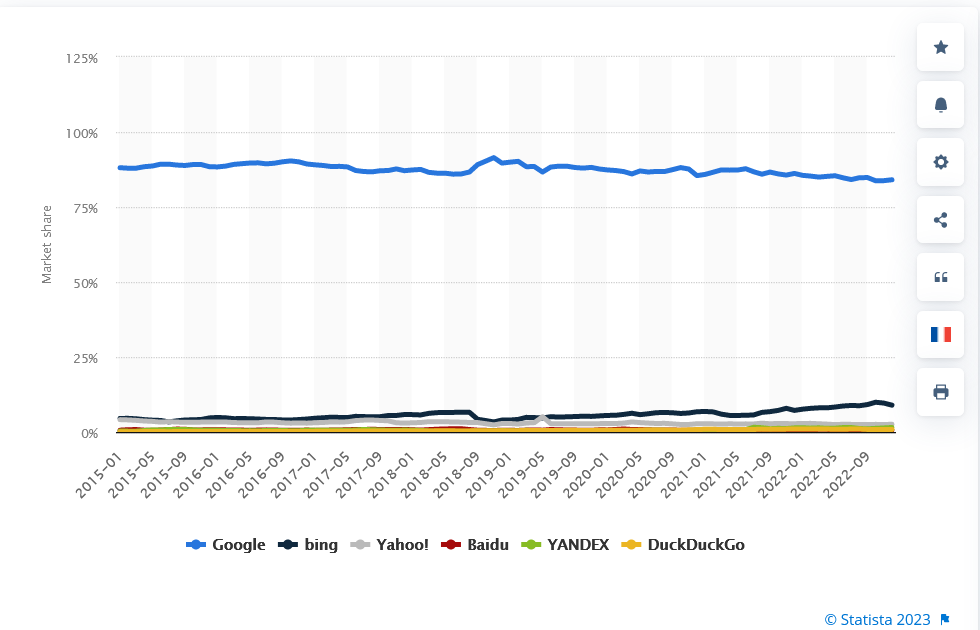
Source: Statista
To say that Google’s search empire is on the verge of imminent collapse would be an overstatement. The competition, though, has just become much more heated.
“The new Bing”
Part of the reason for this is that Microsoft has just launched a new version of Bing, integrated with a “new, next-generation OpenAI large language model.” Microsoft did not name the model, but revealed that it is specifically tailored for search and is an improvement over GPT-3.5, a large language model on top of which ChatGPT was built. Unlike ChatGPT, the new Bing will be able to answer questions with current information. Moreover, it will cite all the sources where it gets that information from. This does not mean, however, that Microsoft is pulling the plug on its traditional search engine: users will be able to switch back and forth between the familiar interface with a search bar and one with a chat box. The chatbot version of Bing is currently available through a waitlist.
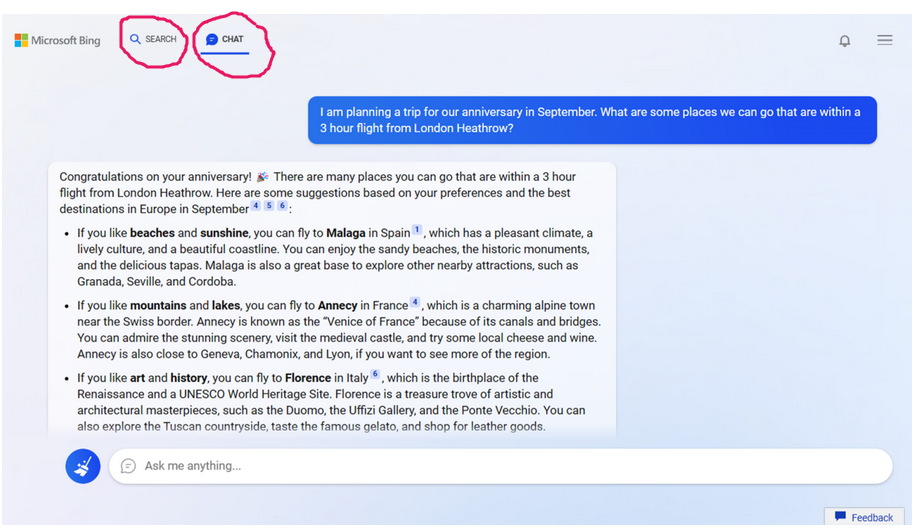
The fact that Bing has become the first AI-powered search engine should not surprise anyone: Microsoft has a very tight-knit relationship with OpenAI. Microsoft poured $1 billion into the startup in 2019, and committed to invest another $10 billion.
Has Google built its own kryptonite?
Still, it’s hard to predict how long it will take for Google Search’s dominance to show cracks, if any. ‘Hey Google’ is so ingrained in our psyche that it will be difficult to kick the habit.
We asked ChatGPT if it believes that its rise will spell doom to Google. Turns out, it doesn’t.
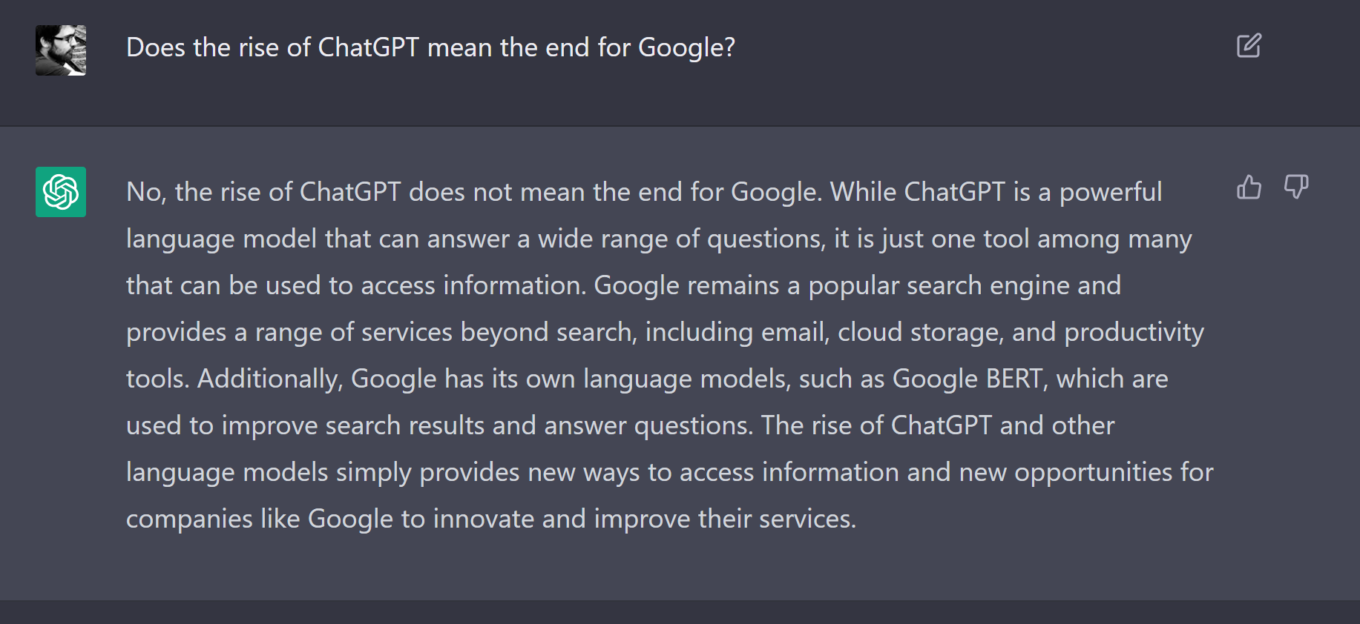
But the threat to Google is real, and the tech giant knows it better than anybody. The release of ChatGPT prompted the company to declare “code red”, the New York Times reported. Google’s rapid response team to the threat of GPT is led by Google’s CEO Sundar Pinchai himself. Pichai even sought help from Google founders, Larry Page and Sergey Brin, who “pitched ideas to put more chatbot features into Google’s search engine.”
Judging by Google’s hectic reaction to ChatGPT, it might seem that the tech behemoth slept on AI, and has just woken up to the new and scary reality. But this is not true. In fact, Google has championed the development of AI itself, and even has designed its own chatbot — a potential ChatGPT’s rival. Google’s chatbot is powered by LaMDA, short for Language Model for Dialogue Applications. This model was first unveiled by Google in 2021.
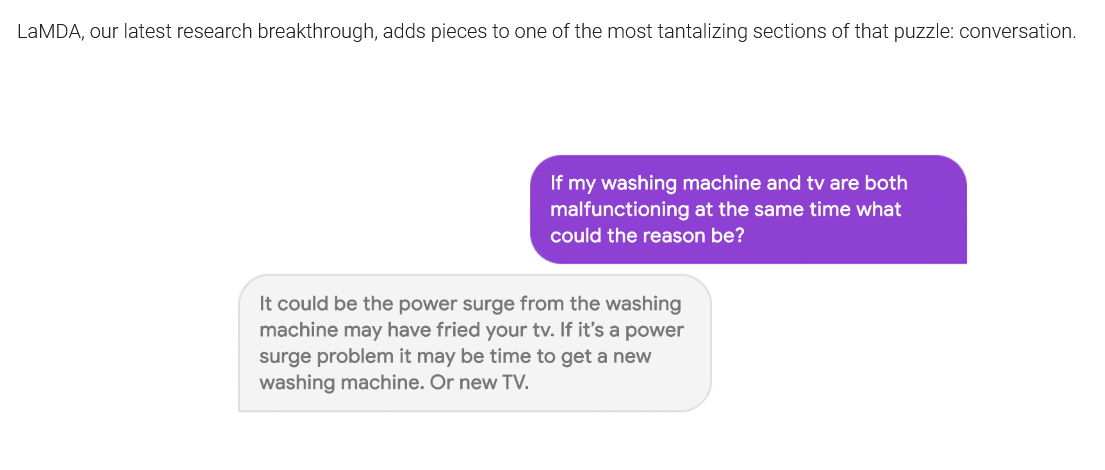
A sample LaMDA dialog. Source: Google
Introducing LaMDA two years ago, Google said that like many other recent large language models, including GPT-3, it was built on Transformer, a neural network architecture that “Google Research invented and open-sourced in 2017.”
Bye Google, hey Bard?
Now, Google also wants to ride the AI train. And even though it may be a little late to the party, it is not going to miss the chance to jump on the bandwagon. Early February, Google announced that it has been “working on an experimental conversational AI service, powered by LaMDA.” Google made the service, named Bard, available to a select group of testers, and plans to roll it out to more people “in the coming weeks.”
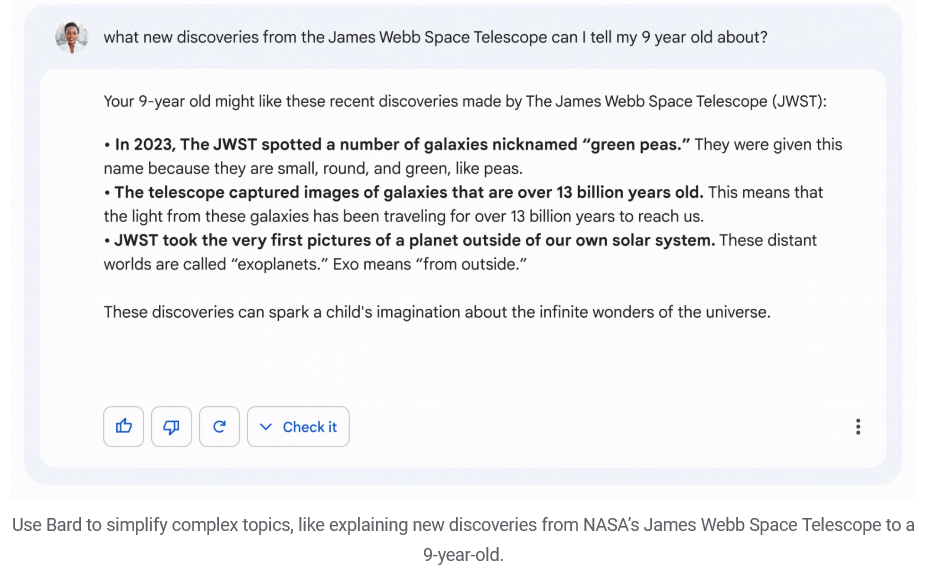
A sample Bard response. Source: Google
Bard could also be coming to search. “Soon, you’ll see AI-powered features in Search that distill complex information and multiple perspectives into easy-to-digest formats,” Pinchai wrote.
What begs the question is why Google has been dragging its feet on the implementation of AI technology, so that it is now being forced to act in a rush. Was it the sheer belief that competitors were too far behind? Or has Google deliberately delayed the decision to integrate its services with AI-powered tools because it is afraid of something? But what?
Possible issue: Accuracy
Accuracy has always been the weak spot of AI-powered chatbots, and, despite all the fine-tuning and recent breakthroughs, it remains a concern.
Enter the disaster that was an ill-fated Microsoft’s Tay chatbot. Launched in March 2016, the chatbot was programmed to learn from its conversations with Twitter’s users. After just 24 hours, Microsoft took Tay down as the bot’s responses became increasingly racist and xenophobic. Meta’s Blender Bot 3, released last August, claimed that Donald Trump was the sitting US President and seemed to harbor anti-Semitic views. Another Meta’s chatbot, Galactica, released in November, did not do much better. Trained on “106 billion tokens of open-access scientific text and data,” the bot was supposed to generate Wiki articles and summarize scientific literature. Instead, it penned fake papers and wrote a quite convincingly-sounding article about bears in space.
Unveiling the new Bing, Microsoft noted that while its chatbot “tries to keep answers fun and factual… it can still show unexpected or inaccurate results based on the web content summarized.” ChatGPT’s creator, Open AI, also admitted in the past that its chatbot sometimes would write “plausible-sounding but incorrect or nonsensical answers.”
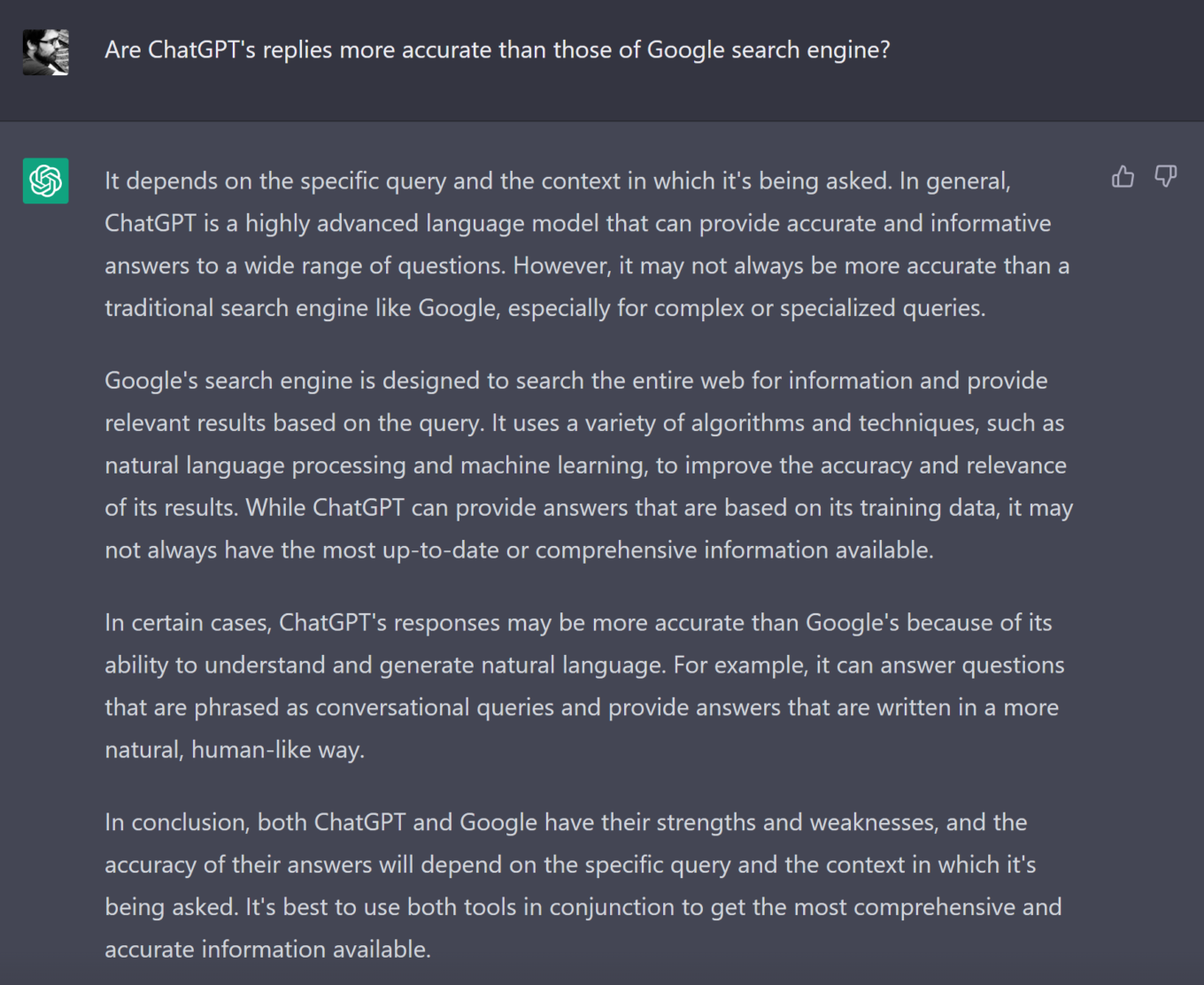
We asked ChatGPT what it thinks of its own accuracy compared to that of Google Search. The response was characteristically diplomatic. ChatGPT said that “it may not always be more accurate” than Google when it comes to “complex or specialized queries,” but noted that both Google and itself have “their strengths and weaknesses.”
Possible issue: (the lack of) ads
And while accuracy is likely to improve over time, there’s another issue that may be why Google has been wary of the technology.
“Google may be reluctant to deploy this new tech as a replacement for online search, however, because it is not suited to delivering digital ads, which accounted for more than 80 percent of the company’s revenue last year,” the New York Times writes. Indeed, ads, and search ads in particular, are Google’s bread and butter. In the third quarter of 2022, Google’s revenue amounted to $69.1 billion, of which $39.5 billion (or 57.2%) was from search ads.
We need to note that Google is already using AI to deliver “featured snippets” or short and usually concise answers to your query on top of organic search results and below ads. Until now, though, it did not go beyond that.

Example of a featured snippet
And here’s probably why:
Let’s imagine that Google provides you with an elaborate answer to any question you ask in a couple of clear sentences instead of a panoply of links. This way, your potential exposure to ads will diminish dramatically. Unless you specifically look for, say, websites to buy plane tickets or stores nearby, you won’t have the incentive to click on any ads, which means lower ad revenue for Google.
It cannot be ruled out that Google could somehow tinker with the technology to make it show ads, but it may not sit down well with users, especially if there will be an ad-free alternative capable of much the same, such as ChatGPT. But what is ChatGPT exactly?
What is ChatGPT?
ChatGPT, GPT-3, GPT-3.5 — you may have heard some or all of these names, in this article alone if nowhere else. So let’s set the record straight as to who is who. ChatGPT (GPT is short for Generative Pre-trained Transformer) is a chatbot based on OpenAI’s GPT-3.5 series of models, which is an improved version of the GPT-3 deep learning neural network. GPT-3 has 175 billion machine learning parameters, or values, that the neural network tries to optimize as it trains, making it much smarter than all its predecessors. GPT-3 was trained on 570GB of filtered CommonCrawl data, two internet-based books corpora, high-quality web pages scraped from Reddit links, and English-language Wikipedia.
GPT-3.5 series is an improvement over GPT-3 because it includes text-davinci-003 model that allows it to write better and process more complex instructions. GPT-4 is rumored to be even more powerful, and reportedly will be significantly larger.
ChatGPT uses an AI-based moderation API to block malicious or illegal content and reject inappropriate requests. However, this is a double-edged sword. OpenAI admits that the model is prone to both false negatives and false positives, meaning that perfectly legitimate requests can be flagged and illegal still come through.
Will ChatGPT replace traditional search engines?
ChatGPT has stirred up the hornet’s nest that is the search engine industry. As it has the potential to revolutionize the way we think about coding, marketing, and learning, it has the potential to disrupt the search market, which has long been under the yoke of Google.
Concerns remain about AI-powered tools providing false information under the guise of authority. And we have yet to see how the much-anticipated integration of Bing with a GPT model will work.
Google’s reaction to the rise of ChatGPT shows that it sees AI-powered chatbots as a challenge, and potentially, a threat to its search empire. To avoid falling behind its rivals, Google now has little choice but to streamline the development and integration of AI technologies into its own search engine. As a result, Google may lose some of its advertising revenue. However, it would be naive to think that the tech giant won’t look for ways to marry ads with new tech.
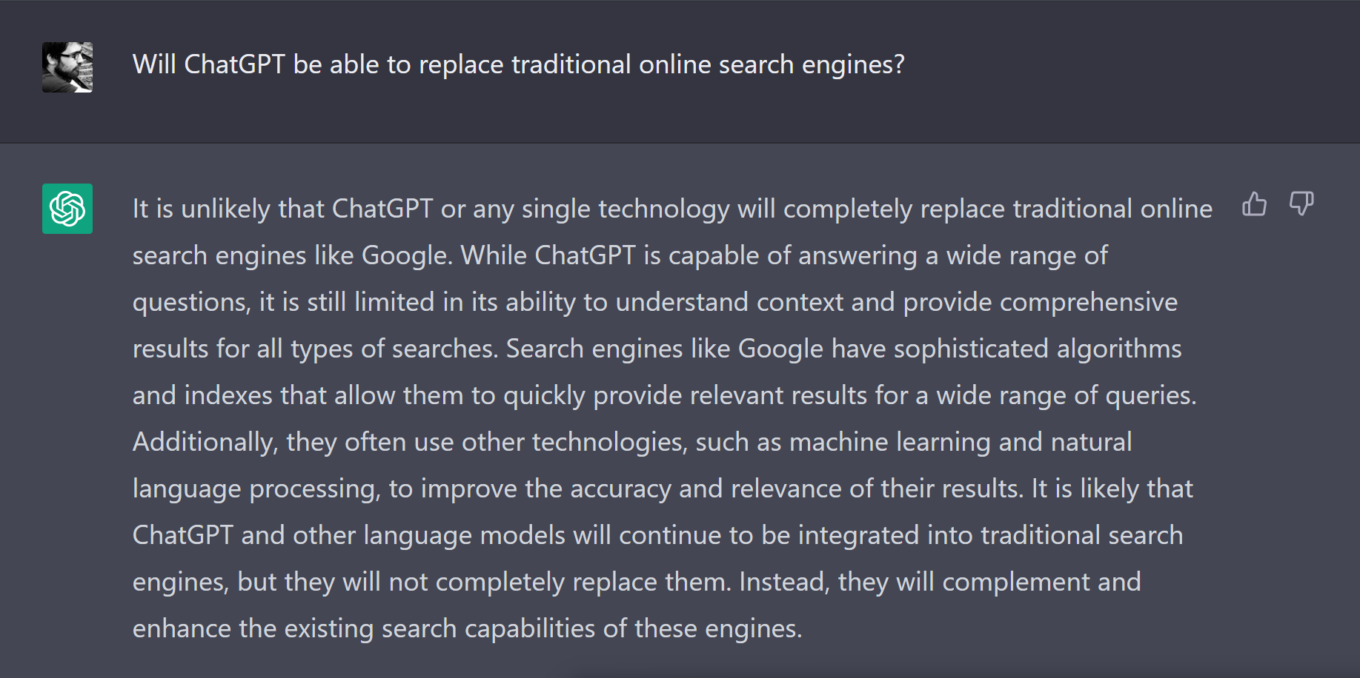
As for whether ChatGPT, or any similar technology, will be able to replace traditional search engines, we have referred that question to ChatGPT. Its verdict: unlikely. Which is not the same as “no, never.”
If one thing is clear, though, is that the search race has just got a lot hotter.




















































