Cloudflare says Encrypted Client Hello might ‘solve privacy for good’. The reality is not that simple

A cutting-edge technology that is “filling the privacy gap in our existing online security infrastructure” and that, if widely adopted, “might even solve privacy for good.” Sounds promising, right? That’s how Mozilla and Cloudflare describe Encrypted Client Hello (ECH), a protocol that encrypts the entire “hello” message or the first communication between your browser and a website’s server.

We believe ECH is indeed a major element of Internet privacy, and the importance of its support by such major players as Mozilla, Chrome, and Cloudflare cannot be understated. At AdGuard, we have added ECH support in our Windows, Mac, and Android apps, because we believe in the technology’s potential to make browsing more private. AdGuard’s ECH support works across all apps and browsers that AdGuard filters. But is ECH the missing piece of the puzzle that will solve privacy and defeat censorship once and for all? As much as we would like it to, it is unlikely.

And before we pour some cold water on the excitement over ECH and its supposed invincibility to censors, copyright authorities, peeping toms, and other prying eyes, we need to take a step back and cover some basics.

What is ECH and why do we need it?

Imagine you are sending a letter to your friend. You seal the envelope and write their name and address on it. No one can open the envelope and read your letter without breaking the seal. But anyone can see who you are sending the letter to by looking at the address.

That’s kind of how HTTPS, a default protocol that is used by over 84% of websites, works. The first piece of information your browser communicates when establishing an encrypted connection to the website is known as “Client Hello.” Some information in Client Hello, such as SNI (Server Name Indication, which is a way for your browser to tell the server which website it wants to connect to), is not encrypted. This, in turn, means that network operators, including your ISP, can see it. Having received the Client Hello message, the server replies with some information known as “Server Hello” to complete the ‘handshake’ with the device.
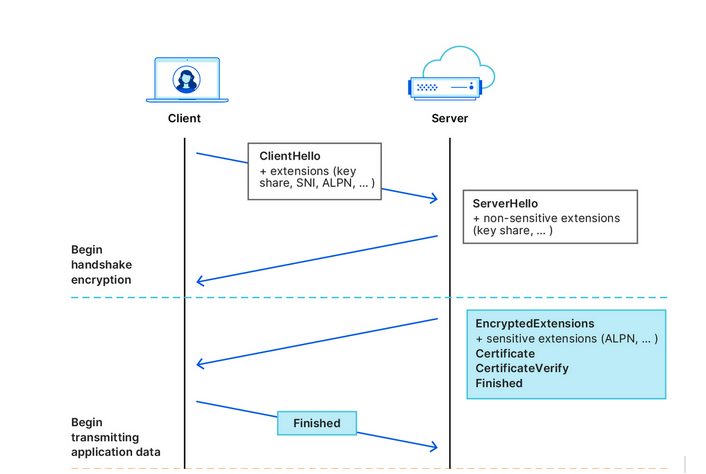
Cloudflare illustrates how the handshake works
Source: Cloudflare

After that first greeting, the data your browser exchanges with the server is encrypted, so that only you and the website can see what’s inside it. But by that point, your internet provider already knows the name of the website you are visiting. For example, if you went to www.google.com, your internet provider couldn’t see what you were searching for, but they could see that you were using Google.

What we’ve described above is how a TLS handshake works. TLS stands for Transport Layer Security, which is a cryptographic protocol that provides end-to-end security for data sent over the Internet. To be more technical, the first “Client Hello” message that your browser sends in clear text to the website’s servers contains not only the SNI, but also the TLS version and an encryption algorithm. But the main point is it’s not encrypted, so anyone who can see the network traffic can also see the website name your browser is requesting.

The question is, how can we shield that first piece of data that is not encrypted and that exposes our browsing habits?

This is where the Encrypted Client Hello protocol comes in. In simple terms, ECH encrypts the Client Hello message containing SNI, which, as we’ve already mentioned, indicates the name of the website you are visiting. Instead of showing the website’s real domain name, like www.google.com, to any external observers, your browser only shows the name of a so-called client-facing server, behind which multiple backend servers with their own domain names are hidden. The client-facing server has a general domain name: for example, Cloudflare uses cloudflare-ech.com as its client-facing server name. But how does your browser know which information to send to it to connect to a specific website?

The client-facing server acts as a middleman that has a special decryption key with which it opens your inner letter and sees your website name. Then it forwards the request to the real domain and sends back the response. This is possible because ECH splits Client Hello into two parts: the outer part contains non-sensitive information like the name of the client-facing server, and the inner part contains the inner SNI indicating the domain name of the backend server, which is the website you want to visit. To continue with our letter analogy: it’s like having the same address written on letters to different recipients, and having to use a magic wand to break the seal to see the inner letter with an actual address.
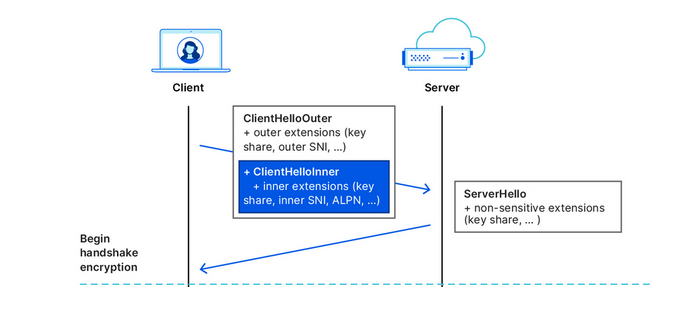
Cloudflare illustrates how the ECH works
Source: Cloudflare

What is the situation like with ECH adoption?

In recent months, more and more industry players have begun to warm up to ECH. Google started shipping the feature in Chrome 117, while Chrome 118 became the first stable release of Google’s browser with ECH support. In Firefox, ECH is on by default as of Firefox 118, but only works if you have DNS-over-HTTPS enabled. Edge is also testing ECH, but has yet to roll it out in a stable version.

However, support for ECH from the browser side means little without being reciprocated from the server side. It only means that a browser can send encrypted ECH messages to the servers that support this protocol. So, the move by Cloudflare, the most popular CDN provider on the market, to also support the protocol has made a big difference in the ECH adoption. Cloudflare, which handles around 20% of all the traffic on the Internet, announced that it began supporting ECH for all customers on free plans at the end of September, and encouraged paid customers to apply for the feature.

The protocol, however, still has a long way to go before it is widely accepted. As of right now, many of Cloudflare’s free domains are missing information about ECH in their DNS records, so Chrome can’t use ECH for those websites. But, since the ECH rollout is still in its early stages, this issue will likely be resolved over time.

So, is privacy solved?

As much as we would like to see it happen, declaring privacy solved is wishful thinking.

On the one hand, the universal adoption of the ECH, if it happens, will render useless some of the tried-and-tested blocking techniques employed by Internet authorities around the world to tackle online piracy, incur geo-fencing, and impose censorship. For one, law enforcement authorities will find it more difficult to target specific websites based on their names, because they will be hidden by the ECH.

However, this does not mean that censors won’t be able to clear this hurdle. It may require some adjustments on their part, but blocking will still be possible.

ECH’s weak spots or potential blocking methods

Now, we’re going to play devil’s advocate and give you some concrete ways that censors can try to block websites despite the implementation of the ECH.

  • One way is to “cut” the ECH from DNS records. To establish an ECH connection with a server, your browser needs a special DNS record from that server. This record tells your browser which domain name and decryption key to use in the outer and inner part of the ECH. However, if your DNS traffic is not encrypted, which is the case for most users, then anyone who can see your DNS queries, such as your ISP or a censor, can also see the ECH record. They can use this record to identify and block your ECH connection. Of course, if users have encrypted their DNS traffic, then this method won’t work.

  • A cruder, but a fairly effective way is to block all known client-facing servers, such as clouflare-ech.com. Realistically, there shouldn’t be many of these servers, so it should not be hard for censors to identify and block them all. But this method is very risky because it could break the Internet for many users. If the censors block all the servers that support ECH, then the browsers will not be able to establish a connection with the websites that have ECH enabled. This may, in turn, prompt Cloudflare to disable ECH for countries with strict internet censorship. It remains to be seen how Cloudflare will react if their client-facing server gets blocked by censors in countries like China or Russia. They will face a difficult choice, for sure. Another pitfall that awaits those banking on ECH as the ultimate solution to all privacy-related problems is a risk that website owners will simply refuse to adopt it or will opt out of the protocol because of the very same reason. If censors target ECH and make websites that enable it unaccessible, then website owners might want to disable the ECH support rather than lose their visitors.

There’s no denying that ECH is an exciting and a very promising technology that aims to make the Internet more private. However, it is not foolproof, and should not be regarded as a panacea against surveillance. Moreover, its widespread adoption favors the use of certain CDN services, such as the one offered by Cloudflare. While these services may not be problematic in and of themselves, their promotion as a side-effect of the ECH adoption risks making the Internet even more centralized than before. Only time will tell if this is for better or worse.


Tetszett ez a bejegyzés?
AdGuard VPN AdGuard DNS AdGuard Mail AdGuard Wallet
Az AdGuard for Windows főképernyője
Az AdGuard for Windows Védelem képernyője, amely a védelem funkcióit és beállításait mutatja
Az AdGuard for Windows Statisztikák képernyője, amely a letiltott hirdetések és nyomkövetők statisztikáit mutatja
Az AdGuard for Windows Alkalmazáskezelés képernyője, amely az eszközre telepített alkalmazások védelemkezelési beállításait mutatja
20 409 20409 értékelések
Kiváló!

AdGuard: hirdetésblokkoló Windowshoz

Az AdGuard Windowsra több mint egy reklámblokkoló. Ez egy többcélú eszköz, amely blokkolja a hirdetéseket, szabályozza a hozzáférést a veszélyes webhelyekhez, felgyorsítja az oldalak betöltését, és megvédi a gyermekeket a nem megfelelő tartalmaktól
A program letöltésével elfogadja a licencszerződés feltételeit
Microsoft Store
A program letöltésével elfogadja a licencszerződés feltételeit
AdGuard Windowsra v8.0, 14-napos próbaidőszak
Az AdGuard for Mac főképernyője
Az AdGuard Mac-hez Lopakodó mód képernyője
20 409 20409 értékelések
Kiváló!

AdGuard: hirdetésblokkoló Mac-hez

Az AdGuard for Mac egy egyedi reklámblokkoló, amelyet kifejezetten a macOS-hez terveztek. Amellett, hogy megvéd a zavaró hirdetésektől a böngészőkben és az alkalmazásokban, védelmet nyújt a követés, az adathalászat és a csalás ellen
A program letöltésével elfogadja a licencszerződés feltételeit
Olvasson tovább
AdGuard Macre v2.19, 14-napos próbaidőszak
Az AdGuard for Android főképernyője
Az AdGuard for Android Követés elleni védelem képernyője
Az AdGuard for Android Alkalmazáskezelés képernyője, amely az eszközre telepített alkalmazások védelemkezelési beállításait mutatja
Az AdGuard for Android Statisztikák képernyője, amely a letiltott hirdetések és nyomkövetők statisztikáit mutatja
Az AdGuard privát böngészőjének főképernyője Androidon
QR-kód az AdGuard for Android letöltéséhez
20 409 20409 értékelések
Kiváló!

AdGuard: hirdetésblokkoló Androidra

Blokkolja a hirdetéseket és a nyomkövetőket minden böngészőben, játékban és egyéb alkalmazásban. Védi a magánszféráját, és lehetővé teszi, hogy szabályozza, hogyan használják az alkalmazásai az Internetet. APK-n keresztül telepítve
A program letöltésével elfogadja a licencszerződés feltételeit
Olvasson tovább
Letöltésre szolgáló szkennelés
Használjon a készüléken elérhető QR-kódolvasót
AdGuard Androidra v4.14, 14-napos próbaidőszak
Az AdGuard for iOS főképernyője
Az AdGuard for iOS Védelem képernyője, amely a védelem funkcióit és beállításait mutatja
Az AdGuard for iOS Statisztikák képernyője, amely a letiltott hirdetések és nyomkövetők statisztikáit mutatja
QR-kód az AdGuard for iOS letöltéséhez
20 409 20409 értékelések
Kiváló!

AdGuard: hirdetésblokkoló az iOS-hez

A legjobb iOS-es reklámblokkoló iPhone-hoz és iPadhez. Az AdGuard mindenféle hirdetést és követőt eltávolít a Safariban, és DNS-szinten védi az adatvédelmedet az összes alkalmazásban
A program letöltésével elfogadja a licencszerződés feltételeit
Olvasson tovább
Letöltésre szolgáló szkennelés
Használjon a készüléken elérhető QR-kódolvasót
AdGuard iOS-re v4.5
Az AdGuard Content Blocker főképernyője
Az AdGuard Content Blocker Szűrők képernyője
Az AdGuard Content Blocker Beállítások képernyője
20 409 20409 értékelések
Kiváló!

AdGuard Tartalomblokkoló

Az AdGuard Content Blocker kiküszöböli a mobilböngészők minden olyan hirdetését, amely támogatja a tartalomblokkoló technológiát — nevezetesen a Samsung Internet és a Yandex böngésző. Funkciói korlátozottak az AdGuard for Androidhoz képest, de ingyenes, könnyen telepíthető és hatékony
A program letöltésével elfogadja a licencszerződés feltételeit
Olvasson tovább
AdGuard Tartalomblokkoló v2.8
Az AdGuard Browser Extension főképernyője
Az AdGuard Browser Extension Követés elleni védelem képernyője
20 409 20409 értékelések
Kiváló!

AdGuard Böngészőkiegészítő

Az AdGuard a leggyorsabb és a legkönnyedebb hirdetésblokkoló bővítmény, amely hatékonyan blokkolja az összes hirdetéstípust az bármelyik weboldalon! Válassza az AdGuard lehetőséget az Ön által használt böngészőhöz, hogy hirdetésektől mentesen, gyorsan és biztonságosan böngészhessen.
Telepítés
A program letöltésével elfogadja a licencszerződés feltételeit
Telepítés
A program letöltésével elfogadja a licencszerződés feltételeit
Telepítés
A program letöltésével elfogadja a licencszerződés feltételeit
Telepítés
A program letöltésével elfogadja a licencszerződés feltételeit
Telepítés
A program letöltésével elfogadja a licencszerződés feltételeit
Olvasson tovább
AdGuard Böngészőkiegészítő v5.5
Az AdGuard Assistant főképernyője
20 409 20409 értékelések
Kiváló!

AdGuard Asszisztens

A [AdGuard asztali alkalmazások] böngészőbővítménye(https://adguard.com/products.html?_plc=hu). Lehetővé teszi a webhelyek egyéni elemeinek blokkolását, webhelyek hozzáadását az engedélyezési listához, és jelentések küldését közvetlenül a böngészőből
AdGuard Asszisztens v1.4
20 409 20409 értékelések
Kiváló!

AdGuard Home

Az AdGuard Home egy hálózati alapú megoldás a hirdetések és nyomkövetők blokkolására. Telepítse egyszer az útválasztóra, hogy lefedje az otthoni hálózat összes eszközét – nincs szükség további kliensszoftverre. Ez különösen fontos a különféle IoT-eszközök esetében, amelyek gyakran veszélyt jelentenek az Ön magánéletére

AdGuard Home v0.107
Az AdGuard Pro for iOS főképernyője
Az AdGuard Pro for iOS Védelem képernyője, amely a védelem funkcióit és beállításait mutatja
Az AdGuard Pro for iOS Statisztikák képernyője, amely a letiltott hirdetések és nyomkövetők statisztikáit mutatja
20 409 20409 értékelések
Kiváló!

AdGuard Pro iOS-re

Az AdGuard Pro iOS-hez verziója minden fejlett hirdetésblokkoló védelmi funkcióval rendelkezik. Ugyanazokat az eszközöket kínálja, mint az AdGuard iOS fizetős verziója. Kiválóan blokkolja a hirdetéseket a Safariban, és lehetővé teszi a DNS-beállítások testreszabását a védelem személyre szabásához. Blokkolja a hirdetéseket a böngészőkben és alkalmazásokban, megvédi gyermekeit a nem megfelelő tartalmaktól, és biztonságban tartja személyes adatait.

A program letöltésével elfogadja a licencszerződés feltételeit
Olvasson tovább
AdGuard Pro iOS-re v4.5
Az AdGuard Mini for Mac főképernyője
Az AdGuard Mini for Mac Safari védelem képernyője
Az AdGuard Mini for Mac Szabály létrehozása képernyője
20 409 20409 értékelések
Kiváló!

AdGuard Mini Mac-hez — Safari hirdetésblokkoló

Az AdGuard Mini Mac-re egy hatékony Safari hirdetésblokkoló. Ez a könnyű alkalmazás eltávolítja a hirdetéseket, blokkolja a nyomkövetőket, és felgyorsítja az oldalak betöltését. Segít zavaró tényezők nélkül böngészni a webet Safariban, és megőrzi az adataid privát jellegét
AdGuard Mini Mac-hez v2.3
Az AdGuard for Android TV főképernyője engedélyezett védelemmel
Az AdGuard for Android TV hirdetésblokkolás képernyője, amely a funkciókat és beállításokat mutatja
Az AdGuard for Android TV Beállítások képernyője
Az AdGuard for Android TV Alkalmazáskezelés képernyője, amely azokat az alkalmazásokat mutatja, ahol a hirdetések és nyomkövetők le vannak tiltva
20 409 20409 értékelések
Kiváló!

AdGuard Android TV-hez

Az Android TV-hez készült AdGuard az egyetlen alkalmazás, amely blokkolja a hirdetéseket, védi az Ön adatait, és tűzfalként működik a Smart TV-ben. Figyelmeztetéseket kaphat a webes fenyegetésekről, használjon biztonságos DNS-t, és élvezze a titkosított forgalom előnyeit. Pihenjen, és merüljön el kedvenc műsoraiban a csúcsminőségű biztonság és  zero  hirdetés!
AdGuard Android TV-hez v4.14, 14-napos próbaidőszak
Az AdGuard kabalája, Agnar, aki a Linux pingvint tartja
20 409 20409 értékelések
Kiváló!

AdGuard Linuxhoz

Az AdGuard for Linux a világ első rendszerszintű Linux-hirdetésblokkolója. Blokkolja a hirdetéseket és a nyomkövetőket eszközszinten, válasszon az előre telepített szűrők közül, vagy adja hozzá sajátját – mindezt a parancssori felületen keresztül
AdGuard Linuxhoz v1.4
20 409 20409 értékelések
Kiváló!

AdGuard Temp Mail

Ingyenes ideiglenes email címgenerátor, amely névtelenül tartja és védi magánéletét. Nincs spam a fő postaládájában!
20 409 20409 értékelések
Kiváló!

AdGuard VPN

75 végpont világszerte

Hozzáférés bármilyen tartalomhoz

Erős titkosítás

Nincs naplózás

Gyorsabb kapcsolódás

0-24 támogatás

20 409 20409 értékelések
Kiváló!

AdGuard DNS

Az AdGuard DNS egy bolondbiztos módszer az internetes hirdetések blokkolására, amely nem igényel alkalmazásokat. Könnyen használható, teljesen ingyenes, könnyen beállítható bármilyen eszközön, és csak minimálisan szükséges funkciókat biztosít a hirdetések, számlálók, rosszindulatú webhelyek és felnőtteknek szóló tartalmak blokkolásához.
20 409 20409 értékelések
Kiváló!

AdGuard Mail

Védje személyazonosságát, kerülje a kéretlen leveleket, és tartsa biztonságban postafiókját álneveinkkel és ideiglenes email címeinkkel. Élvezze ingyenes email továbbító szolgáltatásunk és alkalmazásaink előnyeit minden operációs rendszerre.
20 409 20409 értékelések
Kiváló!

AdGuard Wallet

Biztonságos és privát kriptopénztárca, amely teljes ellenőrzést biztosít eszközei felett. Kezeljen több pénztárcát, és fedezzen fel több ezer kriptovalutát tárolásra, küldésre és cserére
Az AdGuard letöltése megkezdődött Kattintson a nyíllal jelzett gombra a telepítés elindításához. Válassza a "Megnyitás" lehetőséget, és kattintson az "OK" gombra, majd várja meg a fájl letöltését. A megnyílt ablakban húzza az AdGuard ikont az "Alkalmazások" mappába. Köszönjük, hogy az AdGuardot választotta! Válassza a "Megnyitás" lehetőséget, és kattintson az "OK" gombra, majd várja meg a fájl letöltését. A megnyílt ablakban kattintson az "Telepítés" gombra. Köszönjük, hogy az AdGuardot választotta!
Telepítse az AdGuardot mobileszközökre is:
















































