Musk versus Apple, Meta employees hijack accounts, as Twitter and WhatsApp (allegedly) leak data. AdGuard’s Digest

In this edition of AdGuard’s digest: Elon Musk criticizes App Store, a tracking tool sends sensitive financial info to Meta, Apple’s tracking accusations escalate, stolen data of millions of Twitter users surfaces up for free, as WhatsApp may or may not have leaked user data.

Elon Musk takes on Apple’s 30% tax and ‘censorship’

Twitter CEO Elon Musk has reignited a feud with Apple, blasting the company for stopping nearly all advertisements on Twitter and criticizing a 30% cut it takes from in-app purchases. On November 28, Musk tweeted that Apple had “threatened” to remove Twitter from the App Store. In another tweet, Musk accused Apple of failing to support free speech on the platform by winding down its ad spend.

Elon Musk has rekindled the row with Apple over its App Store commission

Photo: Brett Jordan/Unsplash

Musk has sparred with Apple over its App Store fee before. In May, Musk argued the 30% cut “literally 10 times higher than it should be”. Musk’s growing frustration with Apple was reportedly part of the reason while he pushed back the launch of the revamped Twitter Blue subsription. However, if there was some beef between Apple and Twitter, Musk called a truce after meeting with Apple’s Tim Cook later that week. “Among other things, we resolved the misunderstanding about Twitter potentially being removed from the App Store,” he said. Apple has since resumed advertising on Twitter. It’s unclear if Apple’s 30% tax was on the agenda of the Musk-Cook meeting.

And while Musk and Cook may have buried the hatchet (at least temporary), the steep fee that iOS developers must pay Apple has long been an issue. As we explained in our recent article, the dominance of the Apple and Google app stores hurts developers and users alike.

Meta employees used internal tool called ‘Oops’ to hijack user accounts

Multiple Meta employees have been found out to have accepted bribes for getting into Instagram and Facebook accounts with a secret internal tool. The tool called “Oops” (short for Online Operations) was designed so that Meta employees and contractors could restore accounts for their friends and family without them needing to reach out to Meta’s support. However, some employees and contractors apparently decided to monetize their privileged access to the shortcut. According to a report in the Wall Street Journal, they offered their recovery services both to legitimate users who’d got locked out of their accounts as well as to hackers.

The Journal reported that some workers and contractors allegedly received “thousands of dollars in bribes” for resetting Facebook accounts. Interestingly, some of those workers were supposed to provide security for Meta. Over two dozen people were either “disciplined or fired” after Meta conducted an internal probe.

Given the scale on which Meta has mishandled user data before, it has long been apparent that the company cares more about collecting user data, than ensuring it is secure, or investing into proper customer service. That and an unclear moderation policy apparently allow Meta employees to play demigods. Thus, earlier this year, an OnlyFans star claimed that she slept with several Meta employees to reverse her Instagram ban.

Meta’s tracking tool sends user financial info to… Meta

Roses are red, violets are blue, Meta is always tracking you. Meta Pixel, a notorious tracking tool that has previously been found sending sensitive health data from hospital websites to Meta, made headlines again. This time, the code was sending financial information from several US tax filing websites to the tech giant. The information sent included email addresses, names, income, refund amounts, and, sometimes, even the names of the dependents, The Markup investigation found.

Meta has been receiving sensitive user financial data from tax filing websites

Photo: Christin Hume/Unsplash

Meta has denied any wrongdoing, blaming the website owners for failing to properly configure the tool. “Advertisers should not send sensitive information about people through our Business Tools,” a Meta spokesperson said. The tech giant has also said that it has special filters in place to prevent it from actually being able to detect the sensitive data. Since the report went live, several tax filing websites have removed the pixel, some saying that they were unaware that it had been sending the data to Facebook.

While Meta argues that it was sent the data by mistake, it’s worth noting that Meta’s lifeline is user data, which it repurposes for targeted advertising — its main source of revenue. So, one has to take with a pinch of salt the company’s assurances that it might have been fed the data against its will.

Apple collects personally identifiable info despite promises not to

The information that Apple’s native apps send to Apple include a permanent ID number that is tied to a user’s name, email, and phone number, independent researchers from the software company Mysk have found. This apparently runs contrary to Apple’s privacy policy, which states that “none of the collected information identifies you personally.”
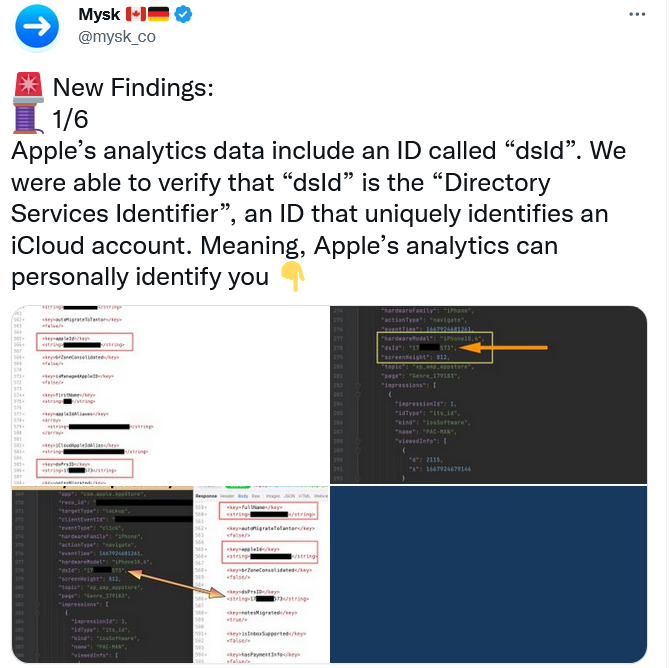
Apple collects data directly linked to your identity, but insists it is not tracking you

The researchers noted that the user has no way to opt out from Apple’s tracking. “All these detailed analytics are going to be linked directly to you. And that’s a problem, because there’s no way to switch it off,”researcher Tommy Mysk told Gizmodo. Earlier, the same researchers found that Apple keeps on collecting detailed real-time usage data even if the user has disabled all personalization options, including “Share iPhone Analytics.” Apple is now facing a class-action lawsuit over allegedly deceiving users with its privacy settings.

Apple has long claimed to prioritize privacy. However, its reputation as a privacy stalwart has been showing more and more cracks as of late. Experts question whether Apple is holding itself to the same standards regarding tracking that it imposes on third parties such as Meta. And as Apple builds its own advertising empire, these privacy concerns only intensify.

Someone is selling 500 million WhatsApp users’ phone numbers… maybe

A hacker has claimed to be selling an up-to-date database containing 487 million WhatsApp user mobile numbers. According to a report by Cybernews that investigated a sample of US and UK telephone numbers from the database, the claim is “likely” true. The bad actor alleged that the dataset contains phone numbers of the residents of 84 countries. Cybernews speculated that the data was most likely obtained by scraping, rather than in the course of an actual hack.

WhatsApp has denied that there has been a data leak. A spokesman for the company said that the report was based “on unsubstantiated screenshots,” even though Cybernews said that they had contacted the seller.

Whether this particular report is true or not, WhatsApp is known to regularly suffer from security vulnerabilities. Not long ago, WhatsApp’s rival Telegram CEO Pavel Durov called WhatsApp a “surveillance tool” commenting on a report about a recent security issue that struck WhatsApp. The issue could have allowed hackers gain “full access” to everything on WhatsApp users’ phones. It’s also not a secret that WhatsApp itself collects vast amounts of unencrypted metadata, including users’ phone numbers, which it can share with Meta and police.

Over 5.4 million Twitter user records offered for free on dark web

While some bad actors want to cash in on the user data, others give it out for free. A large dataset containing 5.4 million of Twitter user records has been posted on a hacker forum, the Bleeping Computer reported. The trove includes user phone numbers and email addresses in addition to Twitter logins, names, locations and IDs. Previously, the same dump was advertised for sale for $30,000.

The data was scraped in December 2021 through a Twitter security vulnerability that has since been patched. The issue, however, is now believed to be way more serious than previously thought. A much larger Twitter dump reportedly consisting of over 17 million records has been uncovered by security researcher Chad Loder. The data in the dump appears to be different from the 5.4 million dataset. The Irish privacy watchdog has started looking into the alleged breach.

While we can assume that Twitter is still suffering from the effects of a vulnerability that has long been fixed, it does not help that some of the platform’s top security and privacy executives resigned following Elon Musk’s Twitter takeover. Unless Musk takes serious steps to protect Twitter’s security and privacy, this probably won’t be the last such incident. The inherent risk is that Twitter collects a lot of personal information and has been known to misuse it.


Tetszett ez a bejegyzés?
AdGuard VPN AdGuard DNS AdGuard Mail AdGuard Wallet
Az AdGuard for Windows főképernyője
Az AdGuard for Windows Védelem képernyője, amely a védelem funkcióit és beállításait mutatja
Az AdGuard for Windows Statisztikák képernyője, amely a letiltott hirdetések és nyomkövetők statisztikáit mutatja
Az AdGuard for Windows Alkalmazáskezelés képernyője, amely az eszközre telepített alkalmazások védelemkezelési beállításait mutatja
20 412 20412 értékelések
Kiváló!

AdGuard: hirdetésblokkoló Windowshoz

Az AdGuard Windowsra több mint egy reklámblokkoló. Ez egy többcélú eszköz, amely blokkolja a hirdetéseket, szabályozza a hozzáférést a veszélyes webhelyekhez, felgyorsítja az oldalak betöltését, és megvédi a gyermekeket a nem megfelelő tartalmaktól
A program letöltésével elfogadja a licencszerződés feltételeit
Microsoft Store
A program letöltésével elfogadja a licencszerződés feltételeit
AdGuard Windowsra v8.0, 14-napos próbaidőszak
Az AdGuard for Mac főképernyője
Az AdGuard Mac-hez Lopakodó mód képernyője
20 412 20412 értékelések
Kiváló!

AdGuard: hirdetésblokkoló Mac-hez

Az AdGuard for Mac egy egyedi reklámblokkoló, amelyet kifejezetten a macOS-hez terveztek. Amellett, hogy megvéd a zavaró hirdetésektől a böngészőkben és az alkalmazásokban, védelmet nyújt a követés, az adathalászat és a csalás ellen
A program letöltésével elfogadja a licencszerződés feltételeit
Olvasson tovább
AdGuard Macre v2.19, 14-napos próbaidőszak
Az AdGuard for Android főképernyője
Az AdGuard for Android Követés elleni védelem képernyője
Az AdGuard for Android Alkalmazáskezelés képernyője, amely az eszközre telepített alkalmazások védelemkezelési beállításait mutatja
Az AdGuard for Android Statisztikák képernyője, amely a letiltott hirdetések és nyomkövetők statisztikáit mutatja
Az AdGuard privát böngészőjének főképernyője Androidon
QR-kód az AdGuard for Android letöltéséhez
20 412 20412 értékelések
Kiváló!

AdGuard: hirdetésblokkoló Androidra

Blokkolja a hirdetéseket és a nyomkövetőket minden böngészőben, játékban és egyéb alkalmazásban. Védi a magánszféráját, és lehetővé teszi, hogy szabályozza, hogyan használják az alkalmazásai az Internetet. APK-n keresztül telepítve
A program letöltésével elfogadja a licencszerződés feltételeit
Olvasson tovább
Letöltésre szolgáló szkennelés
Használjon a készüléken elérhető QR-kódolvasót
AdGuard Androidra v4.14, 14-napos próbaidőszak
Az AdGuard for iOS főképernyője
Az AdGuard for iOS Védelem képernyője, amely a védelem funkcióit és beállításait mutatja
Az AdGuard for iOS Statisztikák képernyője, amely a letiltott hirdetések és nyomkövetők statisztikáit mutatja
QR-kód az AdGuard for iOS letöltéséhez
20 412 20412 értékelések
Kiváló!

AdGuard: hirdetésblokkoló az iOS-hez

A legjobb iOS-es reklámblokkoló iPhone-hoz és iPadhez. Az AdGuard mindenféle hirdetést és követőt eltávolít a Safariban, és DNS-szinten védi az adatvédelmedet az összes alkalmazásban
A program letöltésével elfogadja a licencszerződés feltételeit
Olvasson tovább
Letöltésre szolgáló szkennelés
Használjon a készüléken elérhető QR-kódolvasót
AdGuard iOS-re v4.5
Az AdGuard Content Blocker főképernyője
Az AdGuard Content Blocker Szűrők képernyője
Az AdGuard Content Blocker Beállítások képernyője
20 412 20412 értékelések
Kiváló!

AdGuard Tartalomblokkoló

Az AdGuard Content Blocker kiküszöböli a mobilböngészők minden olyan hirdetését, amely támogatja a tartalomblokkoló technológiát — nevezetesen a Samsung Internet és a Yandex böngésző. Funkciói korlátozottak az AdGuard for Androidhoz képest, de ingyenes, könnyen telepíthető és hatékony
A program letöltésével elfogadja a licencszerződés feltételeit
Olvasson tovább
AdGuard Tartalomblokkoló v2.8
Az AdGuard Browser Extension főképernyője
Az AdGuard Browser Extension Követés elleni védelem képernyője
20 412 20412 értékelések
Kiváló!

AdGuard Böngészőkiegészítő

Az AdGuard a leggyorsabb és a legkönnyedebb hirdetésblokkoló bővítmény, amely hatékonyan blokkolja az összes hirdetéstípust az bármelyik weboldalon! Válassza az AdGuard lehetőséget az Ön által használt böngészőhöz, hogy hirdetésektől mentesen, gyorsan és biztonságosan böngészhessen.
Telepítés
A program letöltésével elfogadja a licencszerződés feltételeit
Telepítés
A program letöltésével elfogadja a licencszerződés feltételeit
Telepítés
A program letöltésével elfogadja a licencszerződés feltételeit
Telepítés
A program letöltésével elfogadja a licencszerződés feltételeit
Telepítés
A program letöltésével elfogadja a licencszerződés feltételeit
Olvasson tovább
AdGuard Böngészőkiegészítő v5.5
Az AdGuard Assistant főképernyője
20 412 20412 értékelések
Kiváló!

AdGuard Asszisztens

A [AdGuard asztali alkalmazások] böngészőbővítménye(https://adguard.com/products.html?_plc=hu). Lehetővé teszi a webhelyek egyéni elemeinek blokkolását, webhelyek hozzáadását az engedélyezési listához, és jelentések küldését közvetlenül a böngészőből
AdGuard Asszisztens v1.4
20 412 20412 értékelések
Kiváló!

AdGuard Home

Az AdGuard Home egy hálózati alapú megoldás a hirdetések és nyomkövetők blokkolására. Telepítse egyszer az útválasztóra, hogy lefedje az otthoni hálózat összes eszközét – nincs szükség további kliensszoftverre. Ez különösen fontos a különféle IoT-eszközök esetében, amelyek gyakran veszélyt jelentenek az Ön magánéletére
AdGuard Home v0.107
Az AdGuard Pro for iOS főképernyője
Az AdGuard Pro for iOS Védelem képernyője, amely a védelem funkcióit és beállításait mutatja
Az AdGuard Pro for iOS Statisztikák képernyője, amely a letiltott hirdetések és nyomkövetők statisztikáit mutatja
20 412 20412 értékelések
Kiváló!

AdGuard Pro iOS-re

Az AdGuard Pro iOS-hez verziója minden fejlett hirdetésblokkoló védelmi funkcióval rendelkezik. Ugyanazokat az eszközöket kínálja, mint az AdGuard iOS fizetős verziója. Kiválóan blokkolja a hirdetéseket a Safariban, és lehetővé teszi a DNS-beállítások testreszabását a védelem személyre szabásához. Blokkolja a hirdetéseket a böngészőkben és alkalmazásokban, megvédi gyermekeit a nem megfelelő tartalmaktól, és biztonságban tartja személyes adatait.

A program letöltésével elfogadja a licencszerződés feltételeit
Olvasson tovább
AdGuard Pro iOS-re v4.5
Az AdGuard Mini for Mac főképernyője
Az AdGuard Mini for Mac Safari védelem képernyője
Az AdGuard Mini for Mac Szabály létrehozása képernyője
20 412 20412 értékelések
Kiváló!

AdGuard Mini Mac-hez — Safari hirdetésblokkoló

Az AdGuard Mini Mac-re egy hatékony Safari hirdetésblokkoló. Ez a könnyű alkalmazás eltávolítja a hirdetéseket, blokkolja a nyomkövetőket, és felgyorsítja az oldalak betöltését. Segít zavaró tényezők nélkül böngészni a webet Safariban, és megőrzi az adataid privát jellegét

AdGuard Mini Mac-hez v2.3
Az AdGuard for Android TV főképernyője engedélyezett védelemmel
Az AdGuard for Android TV hirdetésblokkolás képernyője, amely a funkciókat és beállításokat mutatja
Az AdGuard for Android TV Beállítások képernyője
Az AdGuard for Android TV Alkalmazáskezelés képernyője, amely azokat az alkalmazásokat mutatja, ahol a hirdetések és nyomkövetők le vannak tiltva
20 412 20412 értékelések
Kiváló!

AdGuard Android TV-hez

Az Android TV-hez készült AdGuard az egyetlen alkalmazás, amely blokkolja a hirdetéseket, védi az Ön adatait, és tűzfalként működik a Smart TV-ben. Figyelmeztetéseket kaphat a webes fenyegetésekről, használjon biztonságos DNS-t, és élvezze a titkosított forgalom előnyeit. Pihenjen, és merüljön el kedvenc műsoraiban a csúcsminőségű biztonság és  zero  hirdetés!

AdGuard Android TV-hez v4.14, 14-napos próbaidőszak
Az AdGuard kabalája, Agnar, aki a Linux pingvint tartja
20 412 20412 értékelések
Kiváló!

AdGuard Linuxhoz

Az AdGuard for Linux a világ első rendszerszintű Linux-hirdetésblokkolója. Blokkolja a hirdetéseket és a nyomkövetőket eszközszinten, válasszon az előre telepített szűrők közül, vagy adja hozzá sajátját – mindezt a parancssori felületen keresztül
AdGuard Linuxhoz v1.4
20 412 20412 értékelések
Kiváló!

AdGuard Temp Mail

Ingyenes ideiglenes email címgenerátor, amely névtelenül tartja és védi magánéletét. Nincs spam a fő postaládájában!
20 412 20412 értékelések
Kiváló!

AdGuard VPN

75 végpont világszerte

Hozzáférés bármilyen tartalomhoz

Erős titkosítás

Nincs naplózás

Gyorsabb kapcsolódás

0-24 támogatás

20 412 20412 értékelések
Kiváló!

AdGuard DNS

Az AdGuard DNS egy bolondbiztos módszer az internetes hirdetések blokkolására, amely nem igényel alkalmazásokat. Könnyen használható, teljesen ingyenes, könnyen beállítható bármilyen eszközön, és csak minimálisan szükséges funkciókat biztosít a hirdetések, számlálók, rosszindulatú webhelyek és felnőtteknek szóló tartalmak blokkolásához.
20 412 20412 értékelések
Kiváló!

AdGuard Mail

Védje személyazonosságát, kerülje a kéretlen leveleket, és tartsa biztonságban postafiókját álneveinkkel és ideiglenes email címeinkkel. Élvezze ingyenes email továbbító szolgáltatásunk és alkalmazásaink előnyeit minden operációs rendszerre.
20 412 20412 értékelések
Kiváló!

AdGuard Wallet

Biztonságos és privát kriptopénztárca, amely teljes ellenőrzést biztosít eszközei felett. Kezeljen több pénztárcát, és fedezzen fel több ezer kriptovalutát tárolásra, küldésre és cserére
Az AdGuard letöltése megkezdődött Kattintson a nyíllal jelzett gombra a telepítés elindításához. Válassza a "Megnyitás" lehetőséget, és kattintson az "OK" gombra, majd várja meg a fájl letöltését. A megnyílt ablakban húzza az AdGuard ikont az "Alkalmazások" mappába. Köszönjük, hogy az AdGuardot választotta! Válassza a "Megnyitás" lehetőséget, és kattintson az "OK" gombra, majd várja meg a fájl letöltését. A megnyílt ablakban kattintson az "Telepítés" gombra. Köszönjük, hogy az AdGuardot választotta!
Telepítse az AdGuardot mobileszközökre is:















































