The return of The Ad: Netflix’s launch of ad-supported tier marks the end of the golden era
Until the mid-2000s, if you wanted a break from regular TV, your options were limited: you could pay for subscription TV via cable or satellite with its incessant stream of ads, rent a movie, buy a disc, or you could pirate something off the internet. Each of these options was far from the most convenient, so the advent of on-demand streaming services felt like a breath of fresh air. Having started streaming in 2007, Netflix became the face of this new era.
Initially, streaming services pitched themselves as a cheap, ad-free alternative to cable. They freed us from TV schedule constraints and lured us into binge-watching. However, as soon as they got all of us hooked, they began morphing into the internet-age version of traditional TV by inviting pesky ads to their lores.
The prince charming didn’t turn back into a frog overnight. Over the past few years, players in the crowded streaming sector have grown to embrace the ad-supported model. HBO Max and Paramount+ introduced an ad-supported tier last June. Discovery+ by Warner Bros., which launched in 2020, came with both ad-free and ad-supported plans right from the get-go. NBC’s Peacock, launched the same year, went even further, offering viewers not one, but two ad-supported tiers: one is completely free and the other is “premium”(sic!). There is also Hulu, which has been ad-supported from day one — it added an ad-free subscription tier only in 2015.
While all of these streaming platforms and companies behind them are competing for our hearts and wallets, they have yet to catch up with Netflix. With 223 million subscribers worldwide, Netflix remains the largest independent streaming network in the world and vies for the first place overall with Disney’s motley crew of streaming services.
Whether we like it or not, Netflix has become synonymous with streaming in general (after all, not every company makes it into internet slang territory). Its cultural significance is undisputed. That’s why Netflix’s move to introduce an ad-supported subscription tier feels like a tectonic shift or the end of an era. Upcoming launch of an ad-supported version of Disney+ in December makes the transition even more obvious and final.
Netflix adopting an ad-supported model may not affect you personally, but it’s bad for your viewing experience and privacy long-term. Let’s take a look at what exactly is the new Netflix option, why it is finally here and what to expect next.
The broken promise
Netflix’s move is a big one not least because the company had repeatedly promised to never toy with ads before jumping onto the ad-supported bandwagon. Just a little over two years ago, Netflix CEO Reed Hastings said that selling ads on the platform would tarnish the company’s image.
In January 2020 Hastings explained that building a viable advertising business takes following into the footsteps of ad giants such as Google and Facebook that collect massive amounts of data to track users — something that he said Netflix did not want to do. “They're integrating so much data from so many sources ... you've got to spend very heavily on that and track locations and all kinds of other things that we're not interested in doing.” Another thing that Netflix was not interested in doing is to put itself on a collision course with regulators in the EU and California enforcing privacy laws, he said.
In Netflix CEO’s own words: “We want to be the safe respite where you can explore; you can get stimulated, have fun, enjoy, relax and have none of the controversy around exploiting users with advertising.”
Well… that did not age well.
What’s now
In June 2022 Netflix announced that it would be adding an ad-supported tier and was already in talks with advertisers. The company portrayed the move as not a fundamental change of its business model, but as a release of a new fascinating feature. “We are adding an ad tier; we're not adding ads to Netflix as you know it today,”Netflix co-CEO Ted Sarandos said.
The new “Basic with Ads” tier, unveiled this November, costs $6.99 a month, $3 less than Netflix’s second-cheapest ad-free “Basic” plan. For these $3 a month viewers will have to endure 4 to 5 minutes of ads per hour. Netflix reportedly told advertisers that viewers would be shown the same ad no more than once per hour and no more than three times per day — which is, however, a small consolation, considering it is still a paid subscription. Another obvious downside of the ad-supported tier is that some shows may be missing from it. That is because several major studios are reportedly (understandably) not on board with the idea of planting ads into their original content. Previously, Netflix said that it expects the content representing 85% to 90% of viewing to be included in the ad-supported tier. However, it is unclear how much it is in terms of its viewing library.
The ads will be 15 or 30 seconds long, and displayed at the start of the shows as well as inserted throughout them. Video quality on the ad-supported tier is limited to 720p and, unlike other Netflix plans, “Basic with Ads” subscribers won’t be able to download shows to their device to watch them offline (which makes sense, since otherwise ads won’t reach them).
In essense, it means that if you spend, say, 3 hours per week watching Netflix with ads, you’ll see an hour of ads in a month. On average, however, users spend much more time streaming. In 2019, Netflix reported that the average US Netflix subscriber watches around 2 hours of content a day, and in 2020, viewing time increased to 3.2 hours. The pandemic effect aside, the potential time of the user’s monthly exposure to advertising on Netflix is enormous and so is the potential ad revenue.
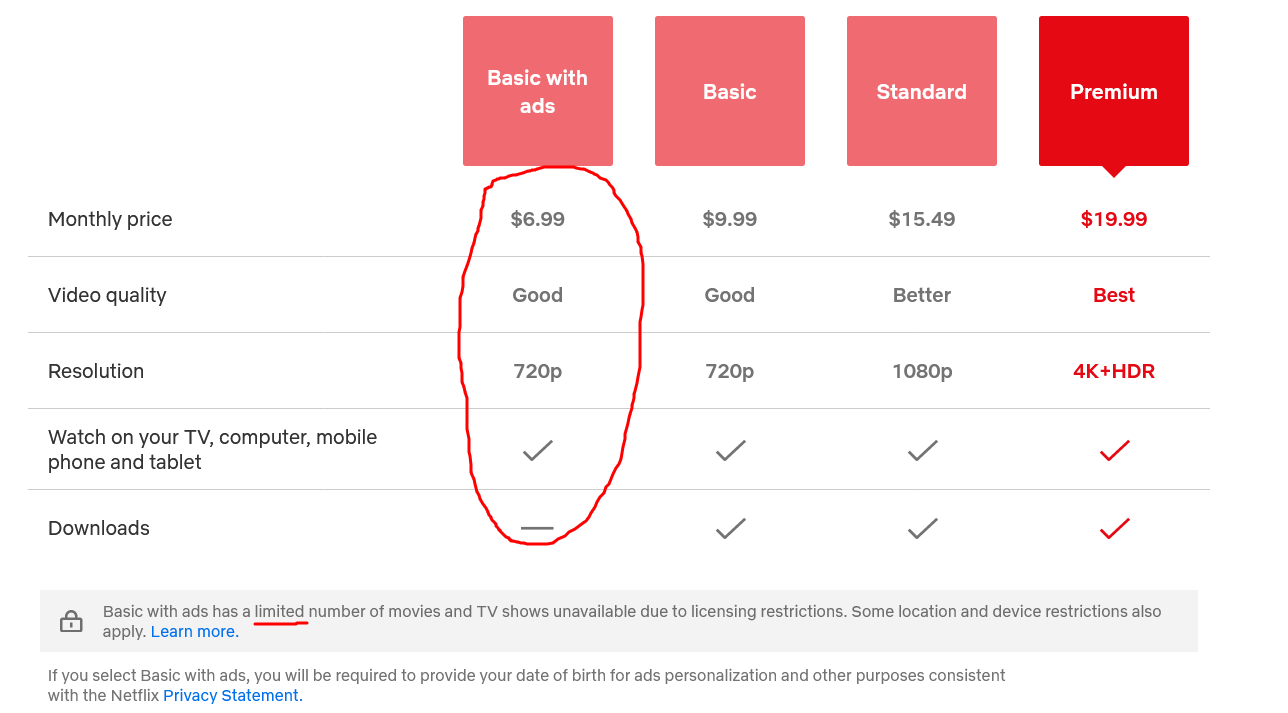
Screenshot from Netflix’s website
However, advertisers, though taking keen interest in Netflix’s venture, are reportedly not lining up to pay a high fee to be allowed in. According to the Wall Street Journal, instead of charging $65 for an ad to reach 1,000 viewers as initially intended, Netflix had to settle for the $45 to $55 range. At the first sight, it may seem puzzling: a massively popular platform that makes people spend hours glued to their screens certainly should not have any problems with charging whatever it wants.
But there is a problem: It’s Netflix’s lack of ad-tracking infrastructure. “Some brands have been reluctant to pay a steep premium for an unproven platform that isn't offering sophisticated ad targeting,” the WSJ writes. Indeed, for the time being Netflix plans to target ads only based on a genre (e.g. action, romance) and country.
It may even not sound so bad: Netflix will keep the ad-free tiers, while those who could not supposedly afford Netflix before will be able to afford it. It’s no big deal if a streaming service knows where I’m from and that I prefer sci-fi to romcoms. But the thing is, what we’re seeing now is a honeymoon period, and it will not be long before Netflix goes hardcore on ad targeting and starts collecting different types of personal data, the more granular the better. It has to — if it wants to make real money.
Targeting and tracking: starting slow, moving fast?
Netflix does not make a big secret of the fact that its advertising business is only in its early stages, and that its ad-targeting won’t be that rudimentary forever. During an earnings call in October, Netflix COO and chief product officer Greg Peters outlined the company’s approach to conquering the ad market and it’s not veni-vidi-vici: rather, it’s “crawl-walk-run.”
First, Netflix wants to start personalising ads based on users’ birthdays and genders. It has already begun collecting this information at the sign-up, requiring those who want to join the ad-supported tier to state their date of birth and gender.

Photo: Melanie Deziel/Unsplash
Once you start down a slippery slope of collecting personal information for advertising purposes… it is harder to climb off. And in the case of Netflix, the streaming service plans to slide down further. Peters said, that in the long run, Netflix wants to make its audience “fully targetable.” Namely, the company wants to have “100% signed-in audience, fully addressable, fully targetable” and “start to layer in additional targeting measures over time.” This is just another way to say: “Netflix will want to know as much as possible about you to bombard you with highly-specific ads.”
What will this entail in practice we have yet to find out. According to Digiday, Netflix’s head of ads Jeremi Gorman said that Netflix would also be able to serve “behavioural ads” but did not provide any details. In marketing, behavioural targeting means profiling users so that advertisers can display highly-personalised ads to them.
At this point, we can only speculate what will come out of Netflix’s foray into the ad business. Gorman claims that the streaming giant will not allow Netflix’s ad-supported tier user data to be repurposed for ad targeting outside of the streaming platform. However, she did not say whether Netflix itself would use third-party data for ads. In this regard, Netflix already has a head start. Netflix has registered users’ email addresses, which it can supplement with information about off-platform purchase history, income status and other data collected by advertisers or third-party data brokers.
Cheaper for you, more money for me
Announcing the launch of the ad-supported tier, Netflix said that it would help it win over new clientale, that is, bring the joy of streaming to a less well-off audience. “We've left a big customer segment off the table, which is people who say: "Hey, Netflix is too expensive for me and I don't mind advertising",” Saranos said in June. We can argue about what difference, if any, $3 makes, but even leaving that aside, there’s no doubt that the real driver of Netflix’s turnaround is money, and not necessarily from new customers. In fact, a recent S&P Global survey has shown that there is only “a faint correlation” between consumer’s choice of ad-supported streaming services and their income.
Netflix said it expects “positive-to-neutral” revenue from ads in the short term and it to grow significantly in the longer run. Wall Street analyst Michael Nathanson forecast that ads would bring in Netflix $1 billion revenue next year and $2.7 billion by 2025. By 2027, Netflix ad revenue is set to increase to $3.5 billion, making up 9% of the company’s total profits.
The new plan is more likely to be embraced by existing subscribers, rather than to attract new users. Nathanson forecast that the number of those joining the ad-supported tier will reach 21.5 million in 2023, while Netflix as a whole will gain only 4.1 miilion new users. On the face of it, existing users giving up their more expensive subscriptions in favour of cheaper ones shouldn’t benefit Netflix. But this is where it gets tricky.

Photo: JESHOOTS.COM/Unsplash
Last year, Discovery+ CFO Gunnar Wiedenfels revealed that the ad-supported version of Discovery+ was bringing in more revenue per user compared to the ads-free one. Wiedenfels noted that he believes the service’s competitors were “experiencing similar metrics of performance.”
The catch in all of that is that Netflix’s ad-supported tier can earn the company more money per subscriber than its more expensive version without ads. It’s perhaps no coincidence that Hulu, one of the earliest adopters of the ad-supported model, charges $14.99/month on its ad-free plan, and only half the price ($7.99/month) on its ad-supported plan. The company, however, makes up for that difference with extended commercial breaks. Users complain about having to watch up to 5 minutes of commercials before shows and having to sit through multiple 90 second ad breaks during a short episode. The Hulu community forums are flooded with complaints that ads are getting “worse” by the year. What’s more, some users report still seeing ads after switching to the ad-free option. If that’s what the future holds for Netflix, it looks rather bleak.
What to expect next?
With Netflix and Disney+ joining the ad-supported model, the streaming industry has come full circle. It’s likely that over time, the ad-free Netflix tier will go up in price, and the gap between the ad-supported and ad-free options will widen. If it happens, Netflix can push users who prefer streaming sans ads and on the cheap towards piracy, which incidentally is making its comeback.
In addition to that, Netflix’s new endeavour raises privacy concerns. For now, Netflix says that it will only collect certain personal data about the ad-supported tier users in order to target them with ads in the future. However, it is unclear what will happen with this data once these users decide to switch to the ad-free tier. Can we be sure that the information that Netflix gathers won’t be used to target ads outside the platform? Where is the guarantee that Netflix won’t use the same data-gathering tools to keep tabs on the users of its ad-free plans at some point?
Perhaps this is just us being too pessimistic, but history has shown that when it comes to scaling up data collection and ad targeting, it never ends well for the user and their privacy. The main objective of any business is to earn a profit, and make it seem like the only thing it cares about is the user. Netflix is no exception. It remains to be seen to what lengths the company is ready to go or to what depths it is ready to stoop now that its self-imposed ban on ads has been lifted.
We can speculate as to what pushed Netflix over the ad-free service edge. Possibly, it’s the increased competition, and the fact that so many of its rivals have been embracing the model. However, Netflix has been doing not that bad financially. The company said it expects to post $5 to $6 billion annual operating profit this year, while noting that its competitors “are all losing money” trying to whip up subscriber growth. Netflix announced that it would no longer forecast subscriber numbers, and instead would focus on profit — this is quite consistent with the concept of earning more money on existing subscribers, including by showing them ads.
Now we are witnessing Netflix’s attempt to sit in two chairs: “exploiting users with advertising” (in Neflix CEO’s own words) while trying to keep its image of an ads-free haven intact. But that image is already in tatters. The golden era of ad-free streaming is officially over — The Ad has won. Still, it does not mean we should cower in despair. For one, we at AdGuard will continue to protect you against ads in apps and browsers, and will be working to adapt our products to new challenges.




















































