Privacy Sandbox on Android and how it will affect you

AdGuard always keeps a close eye on industry news that affects privacy issues. Google recently introduced the Privacy Sandbox which will largely determine the future of privacy of Android users. And we certainly need to comment on it. This article is a brief overview of the situation made by Andrey Meshkov, CTO and co-founder of AdGuard. Now we are continuing to explore the topic, and a large research article will be published soon. Follow our blog and social media so you don't miss its release.

Google has announced a new suite of technologies called Privacy Sandbox that should (at least theoretically) make Android devices better in terms of privacy. But at the same time, Google is making it clear that they'd like advertisers to keep as many options as possible — and this is a tough balance to strike. Have they managed to do it?

Privacy Sandbox includes several separate technologies. You can dive deep into the matter yourself, but I'll try to describe the key points about each of the new initiatives here.

SDK Runtime

This is an extremely useful technology that will definitely have a positive effect. This SDK — which stands for Software Development Kit — creates a dedicated environment for third-party SDKs to run in.

How it was before

It used to be kind of a lawless land. Developers would insert third-party libraries in their apps (think Facebook, Google), and those libraries would inherit all the permissions that the app itself was granted. For example, let's say that the app has access to the device's location — the library has it too now. Needless to say, libraries' vendors were abusing this scheme left and right, collecting all sorts of data. And this wasn't the only trouble — should some kind of a problem occur with the library, the app was at risk of suffering the consequences too ([1], [2]).
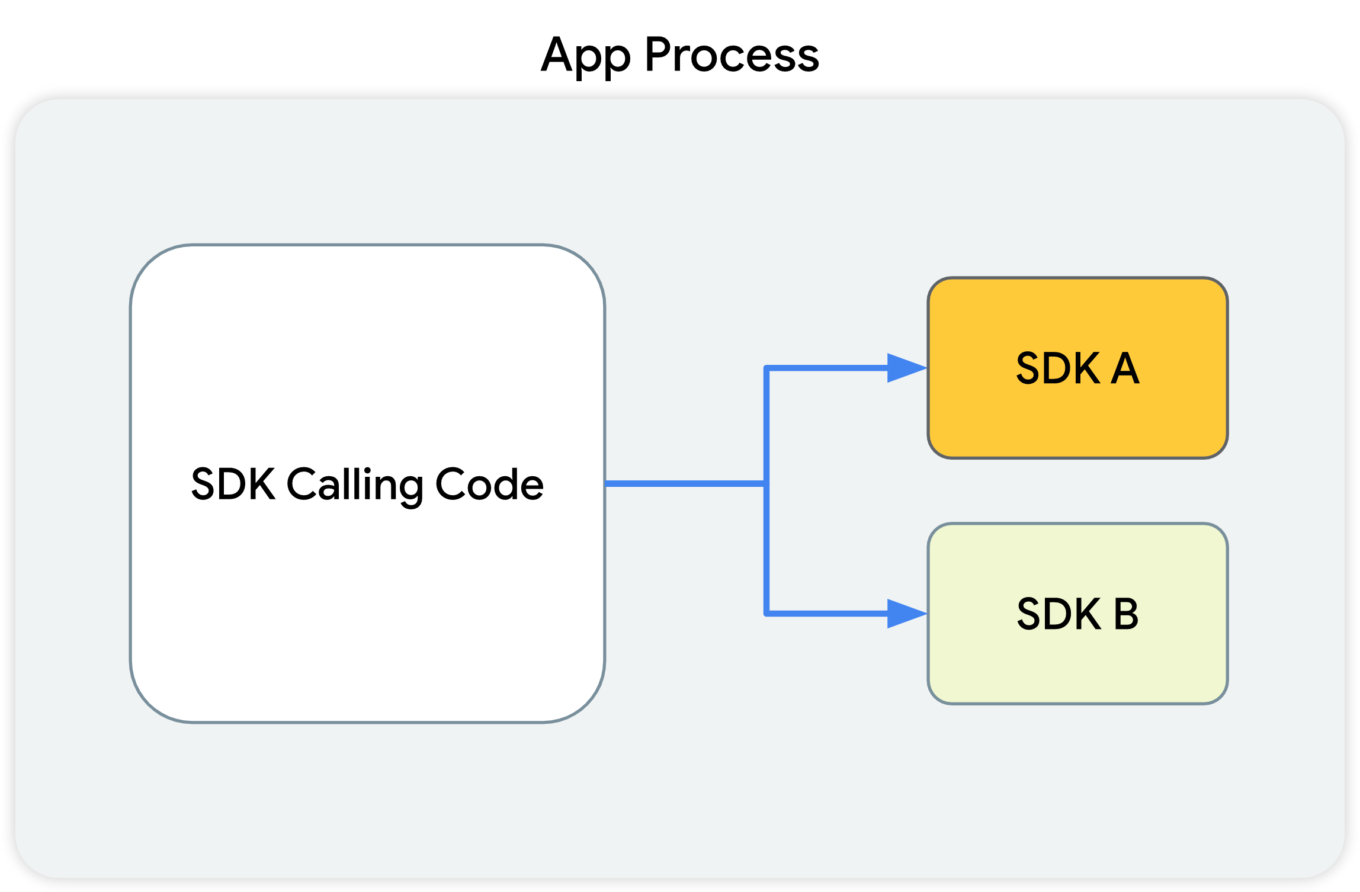
This diagram shows that the SDK-calling code, along with the SDKs that receive the calls from this code, all reside in the app's process.

What Google suggests

With the introduction of SDK Runtime, third-party libraries will operate in a separate, thoroughly monitored and regulated virtual "sandbox", hence the name. The developer will be able to manage the access rights for each of such libraries, including restricting them.
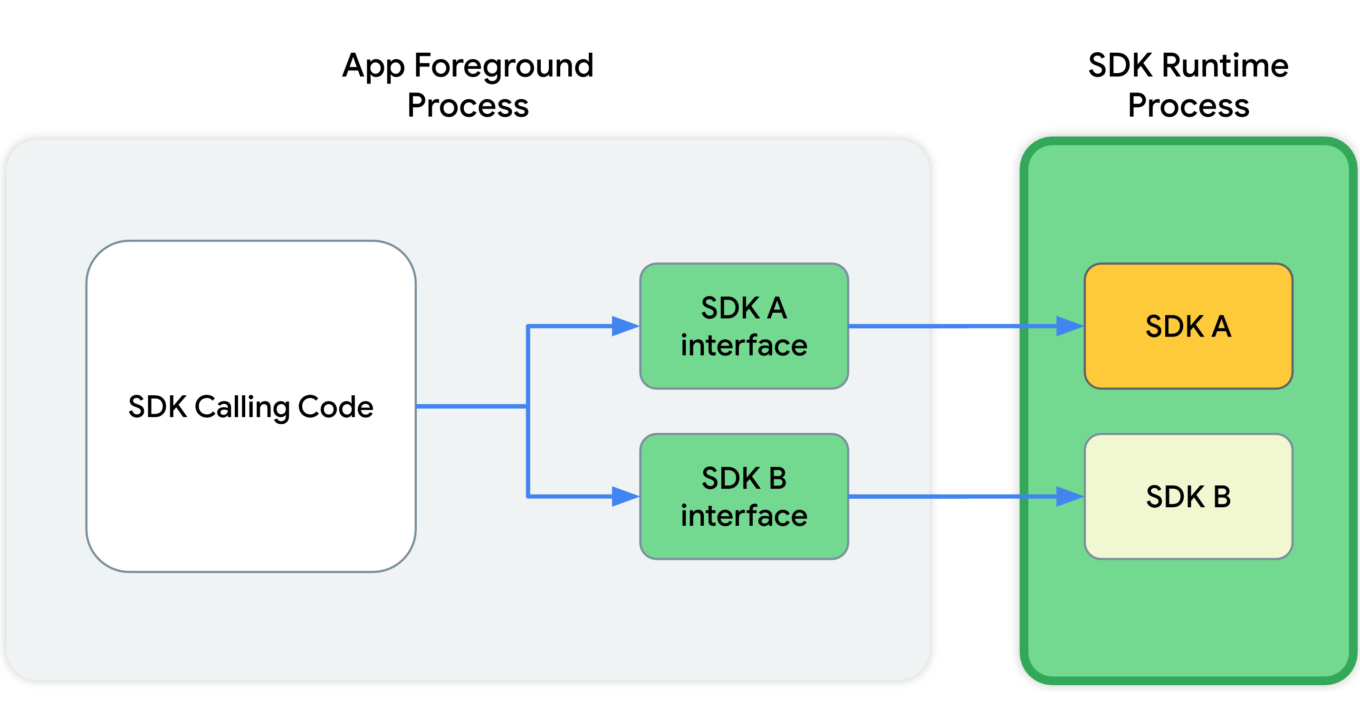
This diagram shows that, in the app's foreground process, the SDK calling code communicates with SDK interfaces. These interfaces then cross a process boundary into the SDK Runtime process to call into the SDKs themselves.

Since all those libraries will be running in a "sandbox" that's detached from the rest of the app's processes, the app won't crash in cases when something goes wrong with one of them.

And last but not least, these libraries will be distributed via a special store that (presumably) will have its own review guidelines.

Read more about SDK Runtime:
https://developer.android.com/design-for-safety/ads/sdk-runtime

Topics

This is the same technology that Google is going to introduce in Chrome. The main idea behind Topics is that the device itself will monitor which apps its owner is using. Based on this data, every week the device will calculate five topics that will have interested the user the most that week.

Apps will be able to get access to some of this data, and different apps will receive different data. This, according to Google, will minimize the risk of using Topics to fingerprint users.

But let's illustrate it with an example:

  1. You have several apps installed on your phone that you use regularly: Facebook, WhatsApp, Instagram, etc.
  2. Each of them receives some part of your topics for the week.
  3. The apps collect this information and use it to supplement your online profile.
  4. Week after week, your profile grows and accretes data.

It's not clear to me why Google has decided that it's OK to share my interests without my consent. Make no mistake, large publishers like Facebook/Meta will not just use this information once and then forget it. They will aggregate it, combine it with other data, and so on.

And that's not the end of it. Lots of apps use SDKs developed by a small pool of companies (you guessed it, Meta is one of them). These companies will receive information streams about you coming from dozens of different apps. From that point, it doesn't take much to construct an excruciatingly detailed profile that has all imaginable data about you.

Read more about Topics for Android:
https://developer.android.com/design-for-safety/ads/topics

FLEDGE on Android

FLEDGE is a mechanism that is meant to be used locally on your device. You will soon see that from a data safety standpoint it compares favorably to the existing alternatives.

How it was before

Currently, ad retargeting is mostly based on the lists of "audiences" that publishers upload. They are often made up of user IDs, or sometimes even straight up emails. This allows publishers to reach these users with ads that they consider relevant to the people from that list.

What Google suggests

When FLEDGE comes into full effect, apps will create such lists themselves with the help of a special API (Application Programming Interface). The key difference is that these lists will be stored locally on the device. The advertising networks will know the names of these lists, and they will upload ads that target specific lists. The process of selecting the ad to display to the user will happen entirely within the device, based on the lists (stored on the same device) and the advertisments uploaded by the ad networks.

Read more about FLEDGE:
https://developer.android.com/design-for-safety/ads/fledge

Attribution Reporting

This is a technology for counting clicks and measuring conversions. Advertisers want to know how their ads perform, and Google suggests doing all the measurements right on the device. Ad networks' SDKs will be able to request an aggregated report, which will, however, be presented with a certain delay. The delay is very important as it greatly complicates potential attempts to identify the user. And the entire mechanism is generously sprinkled with encryption and additional verifications.
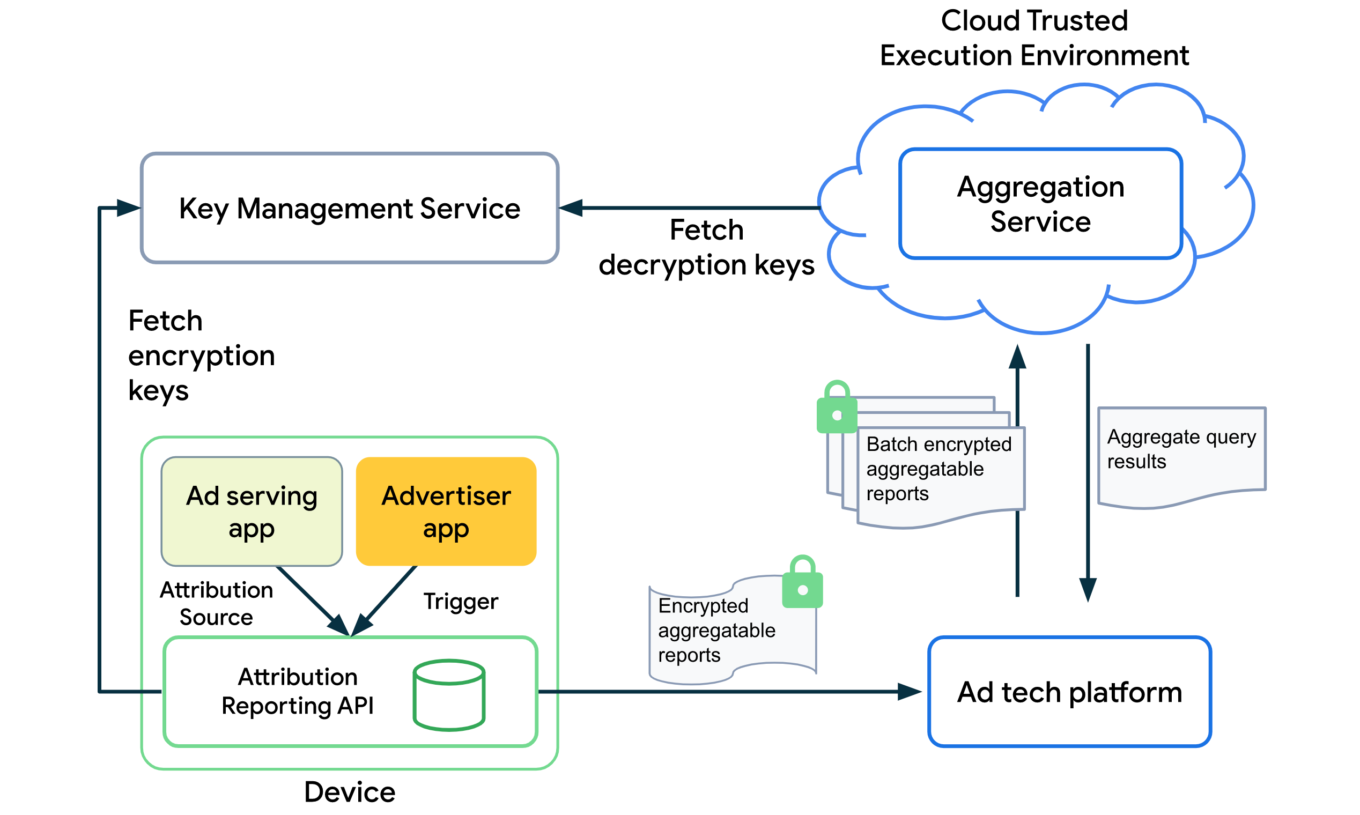
The overall design of how the Attribution Reporting API works looks quite complicated. To better understand the topic, open the link we've posted below.

Read more about Attribution Reporting:
https://developer.android.com/design-for-safety/ads/attribution

Conclusions

In general, all these initiatives (excluding Topics) can be described as improving users' privacy in the context of the ad market. But with one very important condition — ONLY those mechanisms should be used.

As for Topics, it reflects the (completely understandable) desire to keep the ability to utilize information about users' interests for targeting purposes. But this technology further expands the scope of that information instead of reducing it.

But even the good ones still leave a bitter aftertaste: de facto Google will become the single entity to control which ads users see on their Android devices. It was partially true before, but only within Google's own advertising network. Now they are looking to directly influence all other ad networks too, and we know that monopolies rarely end up being good for the consumer. We kind of know what is going to be happening on our smartphones now, and there's no guarantee it will stay that way.

This is the trend that we've been seeing for a while now — advertising networks slowly but steadily moving into our devices. Thinking about buying a new phone? Be ready to get your hands on a highly specialized tool for showing ads instead.


Tetszett ez a bejegyzés?
AdGuard VPN AdGuard DNS AdGuard Mail AdGuard Wallet
Az AdGuard for Windows főképernyője
Az AdGuard for Windows Védelem képernyője, amely a védelem funkcióit és beállításait mutatja
Az AdGuard for Windows Statisztikák képernyője, amely a letiltott hirdetések és nyomkövetők statisztikáit mutatja
Az AdGuard for Windows Alkalmazáskezelés képernyője, amely az eszközre telepített alkalmazások védelemkezelési beállításait mutatja
20 410 20410 értékelések
Kiváló!

AdGuard: hirdetésblokkoló Windowshoz

Az AdGuard Windowsra több mint egy reklámblokkoló. Ez egy többcélú eszköz, amely blokkolja a hirdetéseket, szabályozza a hozzáférést a veszélyes webhelyekhez, felgyorsítja az oldalak betöltését, és megvédi a gyermekeket a nem megfelelő tartalmaktól

A program letöltésével elfogadja a licencszerződés feltételeit
Microsoft Store
A program letöltésével elfogadja a licencszerződés feltételeit
AdGuard Windowsra v8.0, 14-napos próbaidőszak
Az AdGuard for Mac főképernyője
Az AdGuard Mac-hez Lopakodó mód képernyője
20 410 20410 értékelések
Kiváló!

AdGuard: hirdetésblokkoló Mac-hez

Az AdGuard for Mac egy egyedi reklámblokkoló, amelyet kifejezetten a macOS-hez terveztek. Amellett, hogy megvéd a zavaró hirdetésektől a böngészőkben és az alkalmazásokban, védelmet nyújt a követés, az adathalászat és a csalás ellen
A program letöltésével elfogadja a licencszerződés feltételeit
Olvasson tovább
AdGuard Macre v2.19, 14-napos próbaidőszak
Az AdGuard for Android főképernyője
Az AdGuard for Android Követés elleni védelem képernyője
Az AdGuard for Android Alkalmazáskezelés képernyője, amely az eszközre telepített alkalmazások védelemkezelési beállításait mutatja
Az AdGuard for Android Statisztikák képernyője, amely a letiltott hirdetések és nyomkövetők statisztikáit mutatja
Az AdGuard privát böngészőjének főképernyője Androidon
QR-kód az AdGuard for Android letöltéséhez
20 410 20410 értékelések
Kiváló!

AdGuard: hirdetésblokkoló Androidra

Blokkolja a hirdetéseket és a nyomkövetőket minden böngészőben, játékban és egyéb alkalmazásban. Védi a magánszféráját, és lehetővé teszi, hogy szabályozza, hogyan használják az alkalmazásai az Internetet. APK-n keresztül telepítve
A program letöltésével elfogadja a licencszerződés feltételeit
Olvasson tovább
Letöltésre szolgáló szkennelés
Használjon a készüléken elérhető QR-kódolvasót
AdGuard Androidra v4.14, 14-napos próbaidőszak
Az AdGuard for iOS főképernyője
Az AdGuard for iOS Védelem képernyője, amely a védelem funkcióit és beállításait mutatja
Az AdGuard for iOS Statisztikák képernyője, amely a letiltott hirdetések és nyomkövetők statisztikáit mutatja
QR-kód az AdGuard for iOS letöltéséhez
20 410 20410 értékelések
Kiváló!

AdGuard: hirdetésblokkoló az iOS-hez

A legjobb iOS-es reklámblokkoló iPhone-hoz és iPadhez. Az AdGuard mindenféle hirdetést és követőt eltávolít a Safariban, és DNS-szinten védi az adatvédelmedet az összes alkalmazásban
A program letöltésével elfogadja a licencszerződés feltételeit
Olvasson tovább
Letöltésre szolgáló szkennelés
Használjon a készüléken elérhető QR-kódolvasót
AdGuard iOS-re v4.5
Az AdGuard Content Blocker főképernyője
Az AdGuard Content Blocker Szűrők képernyője
Az AdGuard Content Blocker Beállítások képernyője
20 410 20410 értékelések
Kiváló!

AdGuard Tartalomblokkoló

Az AdGuard Content Blocker kiküszöböli a mobilböngészők minden olyan hirdetését, amely támogatja a tartalomblokkoló technológiát — nevezetesen a Samsung Internet és a Yandex böngésző. Funkciói korlátozottak az AdGuard for Androidhoz képest, de ingyenes, könnyen telepíthető és hatékony
A program letöltésével elfogadja a licencszerződés feltételeit
Olvasson tovább
AdGuard Tartalomblokkoló v2.8
Az AdGuard Browser Extension főképernyője
Az AdGuard Browser Extension Követés elleni védelem képernyője
20 410 20410 értékelések
Kiváló!

AdGuard Böngészőkiegészítő

Az AdGuard a leggyorsabb és a legkönnyedebb hirdetésblokkoló bővítmény, amely hatékonyan blokkolja az összes hirdetéstípust az bármelyik weboldalon! Válassza az AdGuard lehetőséget az Ön által használt böngészőhöz, hogy hirdetésektől mentesen, gyorsan és biztonságosan böngészhessen.
Telepítés
A program letöltésével elfogadja a licencszerződés feltételeit
Telepítés
A program letöltésével elfogadja a licencszerződés feltételeit
Telepítés
A program letöltésével elfogadja a licencszerződés feltételeit
Telepítés
A program letöltésével elfogadja a licencszerződés feltételeit
Telepítés
A program letöltésével elfogadja a licencszerződés feltételeit
Olvasson tovább
AdGuard Böngészőkiegészítő v5.5
Az AdGuard Assistant főképernyője
20 410 20410 értékelések
Kiváló!

AdGuard Asszisztens

A [AdGuard asztali alkalmazások] böngészőbővítménye(https://adguard.com/products.html?_plc=hu). Lehetővé teszi a webhelyek egyéni elemeinek blokkolását, webhelyek hozzáadását az engedélyezési listához, és jelentések küldését közvetlenül a böngészőből
AdGuard Asszisztens v1.4
20 410 20410 értékelések
Kiváló!

AdGuard Home

Az AdGuard Home egy hálózati alapú megoldás a hirdetések és nyomkövetők blokkolására. Telepítse egyszer az útválasztóra, hogy lefedje az otthoni hálózat összes eszközét – nincs szükség további kliensszoftverre. Ez különösen fontos a különféle IoT-eszközök esetében, amelyek gyakran veszélyt jelentenek az Ön magánéletére
AdGuard Home v0.107
Az AdGuard Pro for iOS főképernyője
Az AdGuard Pro for iOS Védelem képernyője, amely a védelem funkcióit és beállításait mutatja
Az AdGuard Pro for iOS Statisztikák képernyője, amely a letiltott hirdetések és nyomkövetők statisztikáit mutatja
20 410 20410 értékelések
Kiváló!

AdGuard Pro iOS-re

Az AdGuard Pro iOS-hez verziója minden fejlett hirdetésblokkoló védelmi funkcióval rendelkezik. Ugyanazokat az eszközöket kínálja, mint az AdGuard iOS fizetős verziója. Kiválóan blokkolja a hirdetéseket a Safariban, és lehetővé teszi a DNS-beállítások testreszabását a védelem személyre szabásához. Blokkolja a hirdetéseket a böngészőkben és alkalmazásokban, megvédi gyermekeit a nem megfelelő tartalmaktól, és biztonságban tartja személyes adatait.
A program letöltésével elfogadja a licencszerződés feltételeit
Olvasson tovább
AdGuard Pro iOS-re v4.5
Az AdGuard Mini for Mac főképernyője
Az AdGuard Mini for Mac Safari védelem képernyője
Az AdGuard Mini for Mac Szabály létrehozása képernyője
20 410 20410 értékelések
Kiváló!

AdGuard Mini Mac-hez — Safari hirdetésblokkoló

Az AdGuard Mini Mac-re egy hatékony Safari hirdetésblokkoló. Ez a könnyű alkalmazás eltávolítja a hirdetéseket, blokkolja a nyomkövetőket, és felgyorsítja az oldalak betöltését. Segít zavaró tényezők nélkül böngészni a webet Safariban, és megőrzi az adataid privát jellegét
AdGuard Mini Mac-hez v2.3
Az AdGuard for Android TV főképernyője engedélyezett védelemmel
Az AdGuard for Android TV hirdetésblokkolás képernyője, amely a funkciókat és beállításokat mutatja
Az AdGuard for Android TV Beállítások képernyője
Az AdGuard for Android TV Alkalmazáskezelés képernyője, amely azokat az alkalmazásokat mutatja, ahol a hirdetések és nyomkövetők le vannak tiltva
20 410 20410 értékelések
Kiváló!

AdGuard Android TV-hez

Az Android TV-hez készült AdGuard az egyetlen alkalmazás, amely blokkolja a hirdetéseket, védi az Ön adatait, és tűzfalként működik a Smart TV-ben. Figyelmeztetéseket kaphat a webes fenyegetésekről, használjon biztonságos DNS-t, és élvezze a titkosított forgalom előnyeit. Pihenjen, és merüljön el kedvenc műsoraiban a csúcsminőségű biztonság és  zero  hirdetés!
AdGuard Android TV-hez v4.14, 14-napos próbaidőszak
Az AdGuard kabalája, Agnar, aki a Linux pingvint tartja
20 410 20410 értékelések
Kiváló!

AdGuard Linuxhoz

Az AdGuard for Linux a világ első rendszerszintű Linux-hirdetésblokkolója. Blokkolja a hirdetéseket és a nyomkövetőket eszközszinten, válasszon az előre telepített szűrők közül, vagy adja hozzá sajátját – mindezt a parancssori felületen keresztül
AdGuard Linuxhoz v1.4
20 410 20410 értékelések
Kiváló!

AdGuard Temp Mail

Ingyenes ideiglenes email címgenerátor, amely névtelenül tartja és védi magánéletét. Nincs spam a fő postaládájában!
20 410 20410 értékelések
Kiváló!

AdGuard VPN

75 végpont világszerte

Hozzáférés bármilyen tartalomhoz

Erős titkosítás

Nincs naplózás

Gyorsabb kapcsolódás

0-24 támogatás

20 410 20410 értékelések
Kiváló!

AdGuard DNS

Az AdGuard DNS egy bolondbiztos módszer az internetes hirdetések blokkolására, amely nem igényel alkalmazásokat. Könnyen használható, teljesen ingyenes, könnyen beállítható bármilyen eszközön, és csak minimálisan szükséges funkciókat biztosít a hirdetések, számlálók, rosszindulatú webhelyek és felnőtteknek szóló tartalmak blokkolásához.
20 410 20410 értékelések
Kiváló!

AdGuard Mail

Védje személyazonosságát, kerülje a kéretlen leveleket, és tartsa biztonságban postafiókját álneveinkkel és ideiglenes email címeinkkel. Élvezze ingyenes email továbbító szolgáltatásunk és alkalmazásaink előnyeit minden operációs rendszerre.
20 410 20410 értékelések
Kiváló!

AdGuard Wallet

Biztonságos és privát kriptopénztárca, amely teljes ellenőrzést biztosít eszközei felett. Kezeljen több pénztárcát, és fedezzen fel több ezer kriptovalutát tárolásra, küldésre és cserére
Az AdGuard letöltése megkezdődött Kattintson a nyíllal jelzett gombra a telepítés elindításához. Válassza a "Megnyitás" lehetőséget, és kattintson az "OK" gombra, majd várja meg a fájl letöltését. A megnyílt ablakban húzza az AdGuard ikont az "Alkalmazások" mappába. Köszönjük, hogy az AdGuardot választotta! Válassza a "Megnyitás" lehetőséget, és kattintson az "OK" gombra, majd várja meg a fájl letöltését. A megnyílt ablakban kattintson az "Telepítés" gombra. Köszönjük, hogy az AdGuardot választotta!
Telepítse az AdGuardot mobileszközökre is:

















































