Musk taking over Twitter has created chaos. Will he make order out of it?

Some thought that this day would never come, but on October 27 billionaire entreprenuer Elon Musk officially closed the deal with Twitter, acquiring the social media company for $44 billion. Musk took the reins in rather dramatic fashion, showing the entire Twitter board of directors the door and making himself its sole director and CEO (presumably temporarily).

After becoming the Chief Twit, Musk unveiled his plan to change the platform’s monetization model via premium subscriptions. About 90% of Twitter’s revenue currently comes from advertising, and Twitter’s overreliance on ad money along with its spam bots have always been one of Musk’s biggest pet peeves.

Faced with the irreversable fact of Musk’s takeover, the Twittersphere descended into chaos. Users have envisaged doomsday scenarios in which Twitter would become a “cesspool of vitriol and hatred”, free of any regulation, and accused Musk of trying to turn it into “a money grabbing cash machine.”

With Musk taking his first steps at Twitter, only time will tell whether he breathes new life into the platform or indeed puts the final nail into its coffin. Musk himself declared that he added Twitter to his already extensive portfolio of assets not to make more money, but to “try to help humanity” and that he does not rule out that he fails in this quest. There is “a very real possibility” of that, according to the entrepreneur himself.

Still, Musk’s vision for Twitter’s future as a freemium service is spot-on. However, there are just too many variables that one has to take into account to bet on his success.

Moving away from ad-based monetization model

Musk had been talking about how he would change Twitter at length even before he bought the company. But the only proposal the auto tycon has given specific details about so far is how he plans to steer Twitter away from its ad-driven monetization model.
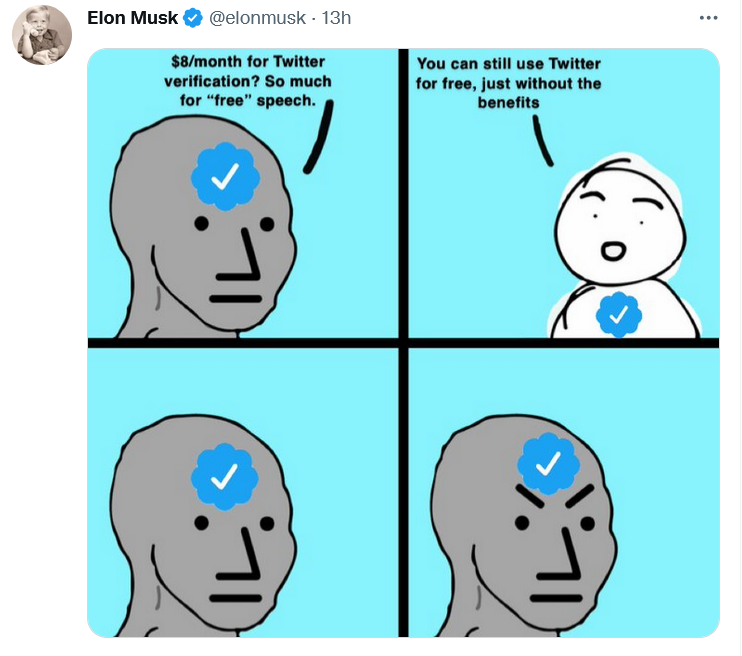
Musk explained Twitter’s freemium model in his favorite way — with a meme

In a series of tweets on November 1, Musk blasted the Twitter verification system as unfair. “Twitter’s current lords & peasants system for who has or doesn’t have a blue checkmark is bullshit,” the billionaire wrote.

To open up verification to all users, Musk suggested making the blue checkmark part of a paid Twitter Blue subscription. Launched last June, Twitter Blue is so far only available in the US, Canada, Australia, and New Zealand. Subscribers pay a monthly fee adjusted for the region. In the US, the fee amounts to $4.99/month.

As of now, Twitter requires an account to be “authentic,”“notable,” and “active” for a blue tick to be bestowed upon it. The allocation of verification badges and their removal is solely at Twitter’s discretion. The practice sparked controversy in the past: in 2016 Twitter “unverified” the account of right-wing personality Milo Yiannopoulos, fuelling the debate about censorship on the platform.

Good value for money finally or a rip-off?

Although Twitter Blue went live more than a year ago, the revenue stream from the company’s original attempt to diversify its monetization model has been more of a trickle. Sensor Tower estimated that Twitter Blue generated only $6.4 million in global spending to date, a drop in the ocean compared to Twitter’s annual revenue of $5.08 billion in 2021. Now Musk, apparently, wants to turn Twitter Blue into something worth paying for. Whether he succeeds in doing so or kills Twitter while trying, is a very big question.

Twitter Blue currently does offer a number of useful features, but they have failed to win over power users. Subscribers can already save tweets to bookmarks, undo a tweet within up to 60 seconds of sending it, read long threads as a single page of text, customize the navigation bar, and get instant access to the most-shared articles from people they follow. Most recently, Twitter Blue allowed subscribers in Australia, Canada, and New Zealand to edit tweets up to five times in 30 minutes after posting.

Musk proposed increasing the Twitter Blue fee from $4.5 to $8 a month in the US, but he also touted additional features that should turn things around for the paid service.

Apart from the blue tick, subscribers will get priority in replies, mentions and search. They will also be able to post longer videos and audios, as well as gain access to paywalled content from publishers willing to partner with Twitter.
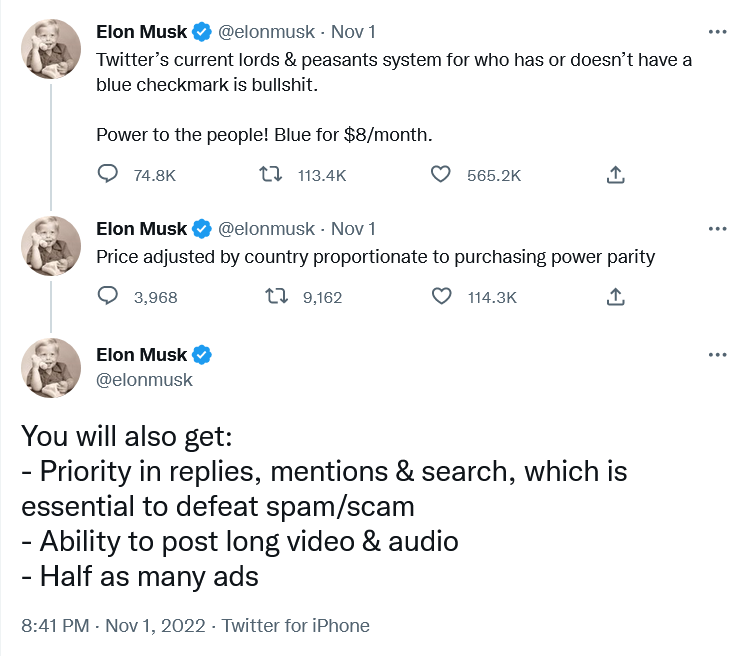
Musk unveiled his plan for Twitter monetization…on Twitter

According to different estimates, there are from 300,000 up to 400,000 verified accounts on Twitter. In the second quarter of 2022, Twitter reported 237 million monetizable daily users. It’s unclear how many of them will buy into the Musk vision, and will be ready to pay for it from their own pockets.

Under Musk’s plan, public figures should remain recognizable even if they do not pay for the subscription. Twitter would add “a secondary tag” below their names, “which is already the case for politicians,” according to Musk. Apparently, the Twitter CEO referred to the labels for government and state-affiliated media accounts Twitter introduced back in 2020.

Fewer ads for subscribers

Most interesting for regular users, perhaps, is that subscribers will see fewer distractions, namely, “half as many ads.”

Some may consider this as a letdown from a man who once said that he “hates advertising.”. In a since deleted Twitter thread from April, Musk proposed essentially the same model, but suggested that those who sign up for Twitter Blue should see no ads at all.

“The power of corporations to dictate policy is greatly enhanced if Twitter depends on advertising money to survive,” Musk tweeted at the time.
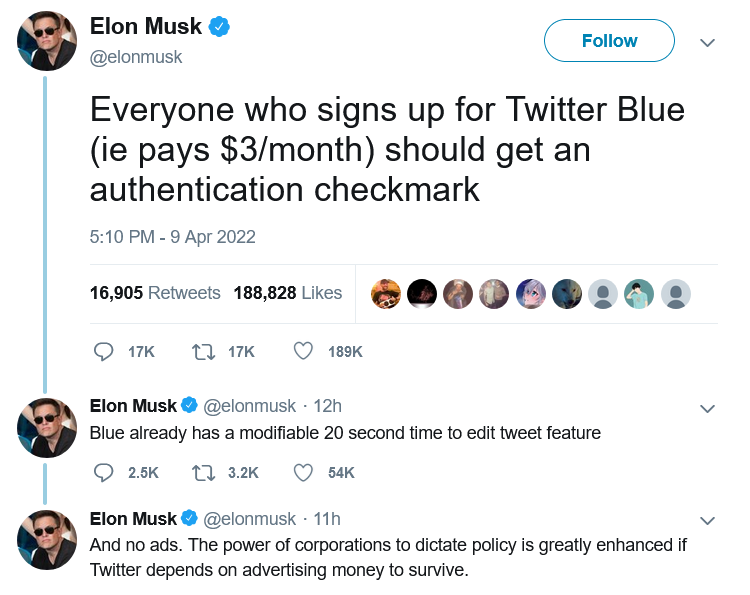
Half a year before becoming Twitter CEO, Musk suggested disabling ads for Twitter Blue subscribers

At the moment, though, Twitter Blue subscribers are being bombarded with the same amount of ads as non-subscribers. So, Musk’s decision can be seen as a step in the right direction.

According to Musk, the new system should enable Twitter to “defeat spam/scam on the platform”, as well as provide it with a “revenue stream to reward content creators.”

Ads will not go away, so won’t content moderation

After ascending to the Twitter throne, Musk has softened his stance towards advertisers. On the same day the Twitter deal was officially done and dusted, Musk addressed the advertising industry in a Twitter post titled “Dear Twitter Advertisers.”

“There has been much speculation about why I bought Twitter and what I think about advertising. Most of it has been wrong,”Musk wrote. The billionaire, who is known as a vocal advocate of the freedom of speech, added that while he wants the platform to be “warm and welcoming to all,” it won’t be completely free of regulation. “Twitter obviously cannot become a free-for-all hellspace, where anything can be said for no consequences!”

Musk then made it clear that advertisers will stay on the platform, but hinted that the rules for how they conduct their business can change. “It is essentially to show Twitter users advertising that is as relevant as possible to their needs. Low relevancy ads are spam, but highly relevant ads are actually content!” Musk went on to write.

The post was too sketchy on details as far as the future of ads on Twitter is concerned. Musk said that he wants to make Twitter “the most respected advertising platform in the world,” and judging by his previous rhetoric it is unlikely to mean harvesting more personal data without user consent. Hopefully, quite the opposite.

Meanwhile, individual companies, such as automaker GM (which, incidentally, is a Tesla competitor), have decided to suspend advertising on Twitter. It is unclear how many advertisers will decide to stick with the platform when the dust settles.

What to expect next?

It remains to be seen if Musk comes back to various proposals he’d made while still not at the helm of Twitter. One of them is to introduce end-to-end encryption for Twitter DMs like in the privacy-first Signal messanger. Another is to make Twitter algorithms open source. If Musk brings these ideas of his to life, Twitter would become more private and secure.

Given that Musk, however successful his other business ventures may be, is rather unpredictable, it’s difficult to gauge what will come out of his great Twitter gamble.

But a pivot from an ad-based revenue model to a model based on paid subscriptions is also pivot to more privacy. If Twitter’s revenue no longer fully depends on advertising, big corporations will have less sway over the company, and Twitter — fewer incentives to sell user data.
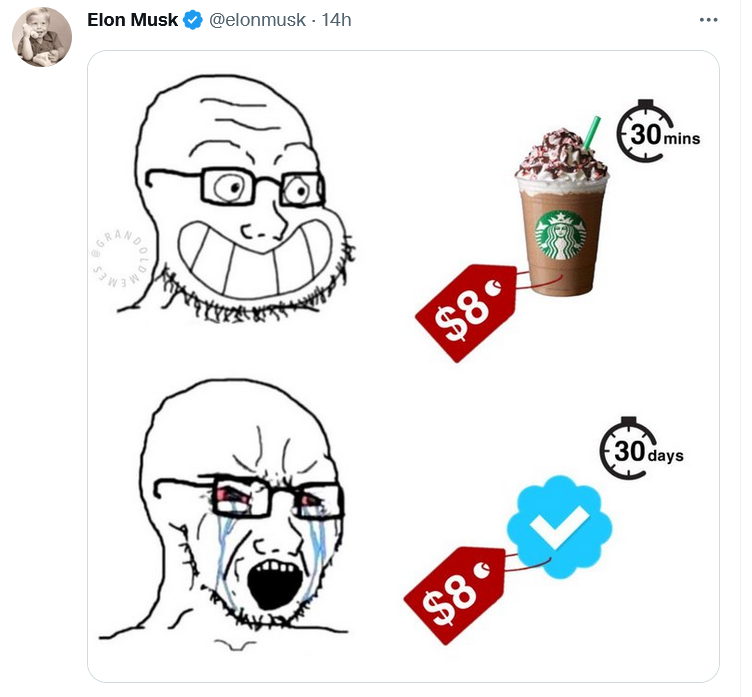
Musk compared the proposed Twitter subscription fee to a price of one cup of coffee

Whether the new model takes off, and what shape it will take in the end, one can only guess. Right now the odds are not in Musk’s favor, but no one becomes the richest man in the world for nothing. Much will depend on how Musk uses his personal marketing appeal to sell Twitter Blue to users, whether and how quickly he adds new features, and how well he listens to feedback. For now, everything is still up in the air. For example, it’s unclear how many ads are “half as many ads” exactly, and whether all the new proposed features would be enough to convince users to pay for a subscription.

As for the price tag, $8 is less than the cost of a few cups of coffee. It’s more about whether Musk will be able to sweeten the deal up enough.


Tetszett ez a bejegyzés?
AdGuard VPN AdGuard DNS AdGuard Mail AdGuard Wallet
Az AdGuard for Windows főképernyője
Az AdGuard for Windows Védelem képernyője, amely a védelem funkcióit és beállításait mutatja
Az AdGuard for Windows Statisztikák képernyője, amely a letiltott hirdetések és nyomkövetők statisztikáit mutatja
Az AdGuard for Windows Alkalmazáskezelés képernyője, amely az eszközre telepített alkalmazások védelemkezelési beállításait mutatja
20 410 20410 értékelések
Kiváló!

AdGuard: hirdetésblokkoló Windowshoz

Az AdGuard Windowsra több mint egy reklámblokkoló. Ez egy többcélú eszköz, amely blokkolja a hirdetéseket, szabályozza a hozzáférést a veszélyes webhelyekhez, felgyorsítja az oldalak betöltését, és megvédi a gyermekeket a nem megfelelő tartalmaktól

A program letöltésével elfogadja a licencszerződés feltételeit
Microsoft Store
A program letöltésével elfogadja a licencszerződés feltételeit
AdGuard Windowsra v8.0, 14-napos próbaidőszak
Az AdGuard for Mac főképernyője
Az AdGuard Mac-hez Lopakodó mód képernyője
20 410 20410 értékelések
Kiváló!

AdGuard: hirdetésblokkoló Mac-hez

Az AdGuard for Mac egy egyedi reklámblokkoló, amelyet kifejezetten a macOS-hez terveztek. Amellett, hogy megvéd a zavaró hirdetésektől a böngészőkben és az alkalmazásokban, védelmet nyújt a követés, az adathalászat és a csalás ellen
A program letöltésével elfogadja a licencszerződés feltételeit
Olvasson tovább
AdGuard Macre v2.19, 14-napos próbaidőszak
Az AdGuard for Android főképernyője
Az AdGuard for Android Követés elleni védelem képernyője
Az AdGuard for Android Alkalmazáskezelés képernyője, amely az eszközre telepített alkalmazások védelemkezelési beállításait mutatja
Az AdGuard for Android Statisztikák képernyője, amely a letiltott hirdetések és nyomkövetők statisztikáit mutatja
Az AdGuard privát böngészőjének főképernyője Androidon
QR-kód az AdGuard for Android letöltéséhez
20 410 20410 értékelések
Kiváló!

AdGuard: hirdetésblokkoló Androidra

Blokkolja a hirdetéseket és a nyomkövetőket minden böngészőben, játékban és egyéb alkalmazásban. Védi a magánszféráját, és lehetővé teszi, hogy szabályozza, hogyan használják az alkalmazásai az Internetet. APK-n keresztül telepítve
A program letöltésével elfogadja a licencszerződés feltételeit
Olvasson tovább
Letöltésre szolgáló szkennelés
Használjon a készüléken elérhető QR-kódolvasót
AdGuard Androidra v4.14, 14-napos próbaidőszak
Az AdGuard for iOS főképernyője
Az AdGuard for iOS Védelem képernyője, amely a védelem funkcióit és beállításait mutatja
Az AdGuard for iOS Statisztikák képernyője, amely a letiltott hirdetések és nyomkövetők statisztikáit mutatja
QR-kód az AdGuard for iOS letöltéséhez
20 410 20410 értékelések
Kiváló!

AdGuard: hirdetésblokkoló az iOS-hez

A legjobb iOS-es reklámblokkoló iPhone-hoz és iPadhez. Az AdGuard mindenféle hirdetést és követőt eltávolít a Safariban, és DNS-szinten védi az adatvédelmedet az összes alkalmazásban
A program letöltésével elfogadja a licencszerződés feltételeit
Olvasson tovább
Letöltésre szolgáló szkennelés
Használjon a készüléken elérhető QR-kódolvasót
AdGuard iOS-re v4.5
Az AdGuard Content Blocker főképernyője
Az AdGuard Content Blocker Szűrők képernyője
Az AdGuard Content Blocker Beállítások képernyője
20 410 20410 értékelések
Kiváló!

AdGuard Tartalomblokkoló

Az AdGuard Content Blocker kiküszöböli a mobilböngészők minden olyan hirdetését, amely támogatja a tartalomblokkoló technológiát — nevezetesen a Samsung Internet és a Yandex böngésző. Funkciói korlátozottak az AdGuard for Androidhoz képest, de ingyenes, könnyen telepíthető és hatékony
A program letöltésével elfogadja a licencszerződés feltételeit
Olvasson tovább
AdGuard Tartalomblokkoló v2.8
Az AdGuard Browser Extension főképernyője
Az AdGuard Browser Extension Követés elleni védelem képernyője
20 410 20410 értékelések
Kiváló!

AdGuard Böngészőkiegészítő

Az AdGuard a leggyorsabb és a legkönnyedebb hirdetésblokkoló bővítmény, amely hatékonyan blokkolja az összes hirdetéstípust az bármelyik weboldalon! Válassza az AdGuard lehetőséget az Ön által használt böngészőhöz, hogy hirdetésektől mentesen, gyorsan és biztonságosan böngészhessen.
Telepítés
A program letöltésével elfogadja a licencszerződés feltételeit
Telepítés
A program letöltésével elfogadja a licencszerződés feltételeit
Telepítés
A program letöltésével elfogadja a licencszerződés feltételeit
Telepítés
A program letöltésével elfogadja a licencszerződés feltételeit
Telepítés
A program letöltésével elfogadja a licencszerződés feltételeit
Olvasson tovább
AdGuard Böngészőkiegészítő v5.5
Az AdGuard Assistant főképernyője
20 410 20410 értékelések
Kiváló!

AdGuard Asszisztens

A [AdGuard asztali alkalmazások] böngészőbővítménye(https://adguard.com/products.html?_plc=hu). Lehetővé teszi a webhelyek egyéni elemeinek blokkolását, webhelyek hozzáadását az engedélyezési listához, és jelentések küldését közvetlenül a böngészőből
AdGuard Asszisztens v1.4
20 410 20410 értékelések
Kiváló!

AdGuard Home

Az AdGuard Home egy hálózati alapú megoldás a hirdetések és nyomkövetők blokkolására. Telepítse egyszer az útválasztóra, hogy lefedje az otthoni hálózat összes eszközét – nincs szükség további kliensszoftverre. Ez különösen fontos a különféle IoT-eszközök esetében, amelyek gyakran veszélyt jelentenek az Ön magánéletére
AdGuard Home v0.107
Az AdGuard Pro for iOS főképernyője
Az AdGuard Pro for iOS Védelem képernyője, amely a védelem funkcióit és beállításait mutatja
Az AdGuard Pro for iOS Statisztikák képernyője, amely a letiltott hirdetések és nyomkövetők statisztikáit mutatja
20 410 20410 értékelések
Kiváló!

AdGuard Pro iOS-re

Az AdGuard Pro iOS-hez verziója minden fejlett hirdetésblokkoló védelmi funkcióval rendelkezik. Ugyanazokat az eszközöket kínálja, mint az AdGuard iOS fizetős verziója. Kiválóan blokkolja a hirdetéseket a Safariban, és lehetővé teszi a DNS-beállítások testreszabását a védelem személyre szabásához. Blokkolja a hirdetéseket a böngészőkben és alkalmazásokban, megvédi gyermekeit a nem megfelelő tartalmaktól, és biztonságban tartja személyes adatait.
A program letöltésével elfogadja a licencszerződés feltételeit
Olvasson tovább
AdGuard Pro iOS-re v4.5
Az AdGuard Mini for Mac főképernyője
Az AdGuard Mini for Mac Safari védelem képernyője
Az AdGuard Mini for Mac Szabály létrehozása képernyője
20 410 20410 értékelések
Kiváló!

AdGuard Mini Mac-hez — Safari hirdetésblokkoló

Az AdGuard Mini Mac-re egy hatékony Safari hirdetésblokkoló. Ez a könnyű alkalmazás eltávolítja a hirdetéseket, blokkolja a nyomkövetőket, és felgyorsítja az oldalak betöltését. Segít zavaró tényezők nélkül böngészni a webet Safariban, és megőrzi az adataid privát jellegét
AdGuard Mini Mac-hez v2.3
Az AdGuard for Android TV főképernyője engedélyezett védelemmel
Az AdGuard for Android TV hirdetésblokkolás képernyője, amely a funkciókat és beállításokat mutatja
Az AdGuard for Android TV Beállítások képernyője
Az AdGuard for Android TV Alkalmazáskezelés képernyője, amely azokat az alkalmazásokat mutatja, ahol a hirdetések és nyomkövetők le vannak tiltva
20 410 20410 értékelések
Kiváló!

AdGuard Android TV-hez

Az Android TV-hez készült AdGuard az egyetlen alkalmazás, amely blokkolja a hirdetéseket, védi az Ön adatait, és tűzfalként működik a Smart TV-ben. Figyelmeztetéseket kaphat a webes fenyegetésekről, használjon biztonságos DNS-t, és élvezze a titkosított forgalom előnyeit. Pihenjen, és merüljön el kedvenc műsoraiban a csúcsminőségű biztonság és  zero  hirdetés!
AdGuard Android TV-hez v4.14, 14-napos próbaidőszak
Az AdGuard kabalája, Agnar, aki a Linux pingvint tartja
20 410 20410 értékelések
Kiváló!

AdGuard Linuxhoz

Az AdGuard for Linux a világ első rendszerszintű Linux-hirdetésblokkolója. Blokkolja a hirdetéseket és a nyomkövetőket eszközszinten, válasszon az előre telepített szűrők közül, vagy adja hozzá sajátját – mindezt a parancssori felületen keresztül
AdGuard Linuxhoz v1.4
20 410 20410 értékelések
Kiváló!

AdGuard Temp Mail

Ingyenes ideiglenes email címgenerátor, amely névtelenül tartja és védi magánéletét. Nincs spam a fő postaládájában!
20 410 20410 értékelések
Kiváló!

AdGuard VPN

75 végpont világszerte

Hozzáférés bármilyen tartalomhoz

Erős titkosítás

Nincs naplózás

Gyorsabb kapcsolódás

0-24 támogatás

20 410 20410 értékelések
Kiváló!

AdGuard DNS

Az AdGuard DNS egy bolondbiztos módszer az internetes hirdetések blokkolására, amely nem igényel alkalmazásokat. Könnyen használható, teljesen ingyenes, könnyen beállítható bármilyen eszközön, és csak minimálisan szükséges funkciókat biztosít a hirdetések, számlálók, rosszindulatú webhelyek és felnőtteknek szóló tartalmak blokkolásához.
20 410 20410 értékelések
Kiváló!

AdGuard Mail

Védje személyazonosságát, kerülje a kéretlen leveleket, és tartsa biztonságban postafiókját álneveinkkel és ideiglenes email címeinkkel. Élvezze ingyenes email továbbító szolgáltatásunk és alkalmazásaink előnyeit minden operációs rendszerre.
20 410 20410 értékelések
Kiváló!

AdGuard Wallet

Biztonságos és privát kriptopénztárca, amely teljes ellenőrzést biztosít eszközei felett. Kezeljen több pénztárcát, és fedezzen fel több ezer kriptovalutát tárolásra, küldésre és cserére
Az AdGuard letöltése megkezdődött Kattintson a nyíllal jelzett gombra a telepítés elindításához. Válassza a "Megnyitás" lehetőséget, és kattintson az "OK" gombra, majd várja meg a fájl letöltését. A megnyílt ablakban húzza az AdGuard ikont az "Alkalmazások" mappába. Köszönjük, hogy az AdGuardot választotta! Válassza a "Megnyitás" lehetőséget, és kattintson az "OK" gombra, majd várja meg a fájl letöltését. A megnyílt ablakban kattintson az "Telepítés" gombra. Köszönjük, hogy az AdGuardot választotta!
Telepítse az AdGuardot mobileszközökre is:

















































