New twist in YouTube’s war against ad blockers: pay or see ads after 3 videos

YouTube appears to be ramping up its crusade against ad blockers, as first spotted by users on Reddit. A member of the r/youtube subreddit posted a screenshot of a pop-up message that the Google-owned platform now displays, limiting the user to watching only three videos for free without ads. After that, the user must either pay for a premium YouTube subscription or enable ads.

The message says: “It looks like you may be using an ad blocker. Video playback will be blocked unless YouTube is allowlisted or the ad blocker is disabled.” YouTube tries to justify this by saying that ads help keep the service free for users and support creators.
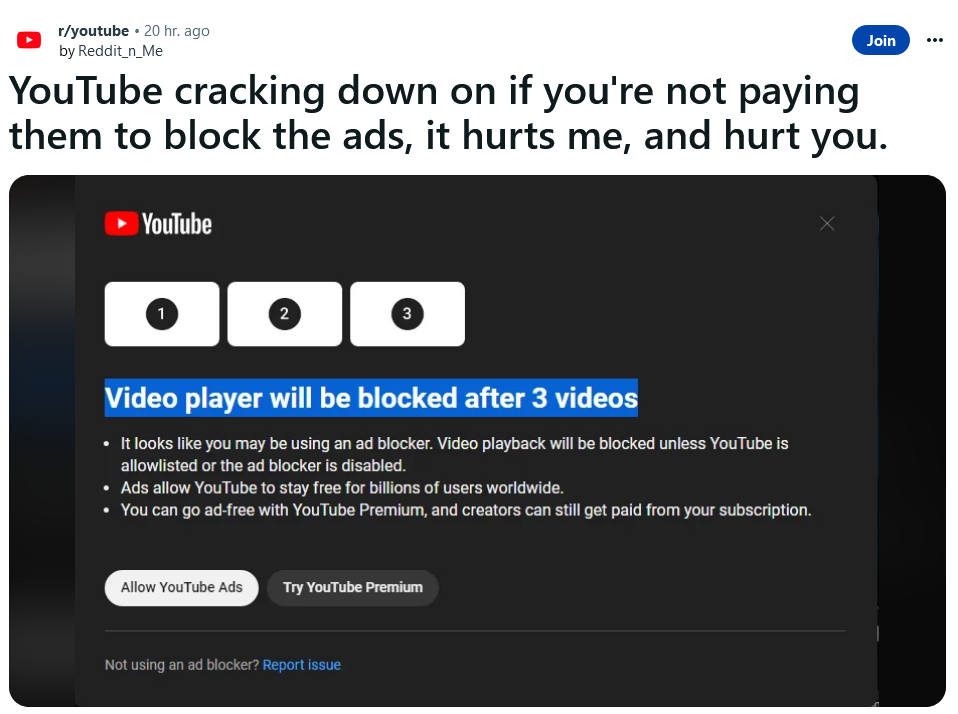
Reddit users spotted a pop-up from YouTube telling them to disable ad blockers

Source: Reddit

This comes a month after YouTube admitted to testing new methods to block ad blockers. In May, some users reported seeing a similar pop-up bluntly saying “ad blockers are not allowed” and preventing them from watching any content, period. Now, YouTube seems to have softened its stance a bit. Apparently, it has now decided that three videos is enough bait to lure non-paying users into its premium program. For that, they have to shell out $11.99 a month, or $119.99 a year in the US.

Like the last time, this test seems to be very limited and not many users are seeing the pop-up. But if anything, it shows that YouTube is not giving up on the idea of getting users to disable their ad blockers, one way or another.

As for how this will reflect on users, we have commented on this issue before, and we stand by our words today. Previously, we said that YouTube’s plan to purge ad blocking users from its platform will not go down well with either users or ad blockers, who will undoubtedly push back. As YouTube widens up its crackdown, ad blocker developers won’t sit idly by, but will try to come up with solutions that would allow them to evade YouTube’s detection — a process that might take some time.

This means that users who stick with ad blockers may have a mixed bag of experiences on YouTube. Sometimes they may see the annoying pop-ups, but at other times they may enjoy ad-free videos for free.

Will YouTube follow through with the ban on ad blockers?

Whether YouTube continues to tighten the screws on ad blocking users or backs off will largely depend on user reaction to the new feature. If the Reddit comments section is any indication, that reaction is overwhelmingly negative, with the top comment pointing out YouTube’s ad overload.

![Reddit users’s reaction to YouTube’s ban on ad blockers has been negative]

The seemingly ever-increasing amount of ads on YouTube has long been a source of frustration for users, and YouTube’s own actions in this regard have done little to appease them. Last September, YouTube began experimenting with up to 11 consecutive bumper ads — 6-second video ads that viewers can’t skip — before a video. The experiment caused a massive backlash and was soon stopped.

Another problem with ads on YouTube, aside from the fact that they can be annoying and invasive, is that some of them are also downright deceptive. Many users have encountered “scam ads” on YouTube that lure them into buying fake or dubious products, such as get-rich-quick schemes. Some of these ads even impersonate public figures or popular creators to trick their fans. This has driven some users to turn to ad blockers to make the platform not only cleaner, but safer for themselves.
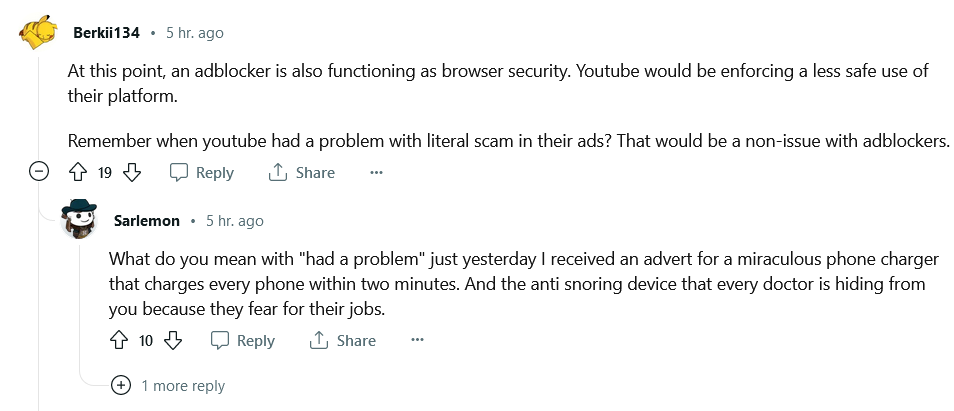
Users would resort to ad blockers to protect themselves from 'scam' YouTube ads

Why now?

On the one hand, YouTube is following a trend where video content platforms are moving toward subscriptions and incentivizing users to either watch more ads or pay twice. Netflix, for example, has just revealed it is phasing out its ad-free Basic plan, which costs $9.99 a month. New viewers who want to avoid ads will have to pay at least $15.49 a month for the Standard plan, which is quite a price hike.

On the other hand, YouTube’s ad revenue has declined for the third quarter in a row, which may have prompted its leadership to look for ways to boost it — and who to blame. Ad blockers just became the most convenient scapegoat. But what about creators? YouTube says that by disabling your ad blocker you’re supporting them. But are you? Well, only partially.

Not all creators benefit from turning off ad blocker

YouTube creators can earn a share of the platform’s ad revenue if they meet certain eligibility criteria, such as having at least 500 subscribers and 3,000 watch hours (for YouTube’s Partner Program) in the past year. However, joining the program does not guarantee a stable income from ads.

How much money you earn off YouTube ads depends on many factors, such as the topic of the video and the location of viewers, but the most crucial one is how many people actually click on the ads or watch them fully or for at least 30 seconds, whichever is shorter. Only those views count towards YouTube’s and creator’s ad revenue. According to Influencer Marketing Hub, the average earnings from views are about $0.018 per view or $18 per 1,000 views. However, this number can vary significantly, as The Business Insider reported that different influencers earned between $1.61 and $29.30 per 1,000 views. Moreover, videos can be demonetized on some more or less random pretext or by mistake, which can further reduce income from ads. All of this means that YouTube creators cannot rely on advertising alone to support their channels, and are likely to rely on brand deals and donations that provide a more stable stream of revenue and connection to their audiences.

It’s also worth noting that YouTube still monetizes videos from channels who have not (yet) qualified for its partner program. In plain words, this means YouTube keeps all the money from the ads it places in those videos, while the creators get nothing. Besides, some creators choose to disable YouTube ads altogether and make their money independently from YouTube, such as via donations, selling merchandise etc.

And let’s not forget that YouTube keeps a big chunk of the ad money for itself — about 45% — while the money you donate directly to your favorite YouTuber goes more or less right into their pockets. In short, YouTube ads are not a reliable source of income for most creators, as it hinges on many factors beyond their control. Therefore, turning off ad blockers may not have a significant impact on creators’ earnings, as most views do not generate any ad revenue anyway. A better way to support creators would be probably directly through donations, as it ensures the money goes to them, and not towards filling Big Tech’s bottomless pockets.


So far, we have not seen the new YouTube popup ourselves. As we mentioned, YouTube is still experimenting with the ban, which may explain why we haven’t witnessed the new YouTube popup yet. If you have, and are using the AdGuard ad blocker, send us a message. In the meantime, here’s a video on how to block ads on YouTube on any device with any OS using AdGuard.


Suka postingan ini?
AdGuard VPN DNS AdGuard AdGuard Mail AdGuard Wallet
Layar utama AdGuard untuk Windows
Layar Perlindungan AdGuard untuk Windows, menampilkan fitur dan pengaturan perlindungan
Layar Statistik AdGuard untuk Windows, menampilkan statistik untuk iklan dan pelacak yang terblokir
Layar Pengelolaan aplikasi AdGuard untuk Windows, menampilkan opsi pengelolaan perlindungan untuk aplikasi yang terinstal di perangkat
20.534 20534 ulasan pengguna
Sempurna!

AdGuard untuk Windows — pemblokir iklan untuk PC Anda

AdGuard untuk Windows lebih dari sekadar pemblokir iklan. Ini adalah alat serbaguna yang memblokir iklan, mengontrol akses ke situs berbahaya, mempercepat pemuatan halaman, dan melindungi anak-anak dari konten yang tidak pantas
Dengan mengunduhnya Anda menerima ketentuan Perjanjian lisensi
Microsoft Store
Dengan mengunduhnya Anda menerima ketentuan Perjanjian lisensi
AdGuard untuk Windows v8.0, masa percobaan 14 hari
Layar utama AdGuard untuk Mac
Layar Mode Siluman AdGuard untuk Mac
20.534 20534 ulasan pengguna
Sempurna!

AdGuard untuk Mac — pemblokir iklan seluruh sistem

AdGuard untuk Mac adalah pemblokir iklan unik yang dirancang khusus untuk macOS. Selain melindungi Anda dari iklan yang mengganggu di browser dan aplikasi, ini juga melindungi Anda dari pelacakan, phishing, dan penipuan
Dengan mengunduhnya Anda menerima ketentuan Perjanjian lisensi
Pelajari lainnya
AdGuard untuk Mac v2.19, masa percobaan 14 hari
Layar utama AdGuard untuk Android
Layar Perlindungan pelacakan AdGuard untuk Android
Layar Pengelolaan aplikasi AdGuard untuk Android, menampilkan opsi pengelolaan perlindungan untuk aplikasi yang terinstal di perangkat
Layar Statistik AdGuard untuk Android, menampilkan statistik untuk iklan dan pelacak yang terblokir
Layar utama peramban privat AdGuard untuk Android
Kode QR untuk unduh AdGuard untuk Android
20.534 20534 ulasan pengguna
Sempurna!

AdGuard untuk Android: pemblokir iklan semua aplikasi

Memblokir iklan dan pelacak di semua browser, game, dan aplikasi lainnya. Melindungi privasi Anda dan memungkinkan Anda mengontrol bagaimana aplikasi Anda menggunakan internet. Diinstal melalui APK
Dengan mengunduhnya Anda menerima ketentuan Perjanjian lisensi
Pelajari lainnya
Pindai untuk mengunduh
Gunakan pembaca kode QR yang tersedia di perangkat Anda
AdGuard untuk Android v4.14, masa percobaan 14 hari
Layar utama AdGuard untuk iOS
Layar Perlindungan AdGuard untuk iOS, menampilkan fitur dan pengaturan perlindungan
Layar Statistik AdGuard untuk iOS, menampilkan statistik untuk iklan dan pelacak yang terblokir
Kode QR untuk unduh AdGuard untuk iOS
20.534 20534 ulasan pengguna
Sempurna!

AdGuard untuk iOS — pemblokir iklan di luar Safari

Pemblokir iklan iOS terbaik untuk iPhone dan iPad. AdGuard menghilangkan semua jenis iklan dan pelacak di Safari serta melindungi privasi Anda di semua aplikasi pada tingkat DNS

Dengan mengunduhnya Anda menerima ketentuan Perjanjian lisensi
Pelajari lainnya
Pindai untuk mengunduh
Gunakan pembaca kode QR yang tersedia di perangkat Anda
AdGuard untuk iOS versi 4.5
Layar utama AdGuard Content Blocker
Layar filter AdGuard Content Blocker
Layar pengaturan AdGuard Content Blocker
20.534 20534 ulasan pengguna
Sempurna!

Pemblokir Konten AdGuard

AdGuard Content Blocker menghilangkan semua jenis iklan di browser seluler yang mendukung teknologi pemblokiran konten — yaitu, Samsung Internet dan Yandex Browser. Fitur-fiturnya terbatas dibandingkan dengan AdGuard untuk Android, tetapi gratis, mudah dipasang, dan efisien

Dengan mengunduhnya Anda menerima ketentuan Perjanjian lisensi
Pelajari lainnya
Pemblokir Konten AdGuard versi 2.8
Layar utama AdGuard Browser Extension
Layar Perlindungan pelacakan AdGuard Browser Extension
20.534 20534 ulasan pengguna
Sempurna!

Ekstensi peramban AdGuard

AdGuard adalah ekstensi pemblokiran iklan tercepat dan paling ringan yang secara efektif memblokir semua jenis iklan di semua halaman web! Pilih AdGuard untuk browser yang Anda gunakan dan dapatkan penjelajahan bebas iklan, cepat, dan aman.
Pasang
Dengan mengunduhnya Anda menerima ketentuan Perjanjian lisensi
Pasang
Dengan mengunduhnya Anda menerima ketentuan Perjanjian lisensi
Pasang
Dengan mengunduhnya Anda menerima ketentuan Perjanjian lisensi
Pasang
Dengan mengunduhnya Anda menerima ketentuan Perjanjian lisensi
Pasang
Dengan mengunduhnya Anda menerima ketentuan Perjanjian lisensi
Pelajari lainnya
Pasang
Dengan mengunduhnya Anda menerima ketentuan Perjanjian lisensi
Pelajari lainnya
Ekstensi peramban AdGuard versi 5.5
Layar utama Asisten Peramban
20.534 20534 ulasan pengguna
Sempurna!

Asisten AdGuard

Sebuah ekstensi peramban pendamping untuk aplikasi AdGuard desktop. Ini mengizinkan Anda memblokir item kustom di situs web, menambahkan situs web ke daftar izinkan, dan mengirim laporan langsung dari peramban Anda
Asisten AdGuard versi 1.4
20.534 20534 ulasan pengguna
Sempurna!

AdGuard Home

AdGuard Home adalah solusi berbasis jaringan untuk memblokir iklan dan pelacak. Instal sekali di router Anda untuk mencakup semua perangkat di jaringan rumah Anda — tidak diperlukan perangkat lunak klien tambahan. Ini sangat penting untuk berbagai perangkat IoT yang sering menimbulkan ancaman bagi privasi Anda
AdGuard Home versi 0.107
Layar utama AdGuard Pro untuk iOS
Layar Perlindungan AdGuard Pro untuk iOS, menampilkan fitur dan pengaturan perlindungan
Layar statistik AdGuard Pro untuk iOS, menampilkan statistik untuk iklan dan pelacak yang terblokir
20.534 20534 ulasan pengguna
Sempurna!

AdGuard Pro untuk iOS

AdGuard Pro untuk iOS dilengkapi dengan semua fitur perlindungan pemblokiran iklan canggih. Aplikasi ini menawarkan fitur yang sama dengan versi berbayar AdGuard untuk iOS. Aplikasi ini unggul dalam memblokir iklan di Safari dan memungkinkan Anda menyesuaikan pengaturan DNS untuk perlindungan yang lebih baik. Aplikasi ini memblokir iklan di browser dan aplikasi, melindungi anak-anak Anda dari konten yang tidak pantas, dan menjaga keamanan data pribadi Anda.
Dengan mengunduhnya Anda menerima ketentuan Perjanjian lisensi
Pelajari lainnya
AdGuard Pro untuk iOS versi 4.5
Layar utama AdGuard Mini untuk Mac
Layar perlindungan Safari AdGuard Mini untuk Mac
Layar Buat aturan AdGuard Mini untuk Mac
20.534 20534 ulasan pengguna
Sempurna!

AdGuard Mini untuk Mac — pemblokir iklan Safari

AdGuard Mini untuk Mac adalah pemblokir iklan Safari yang kuat. Aplikasi ringan ini menghapus iklan, memblokir pelacak, dan mempercepat pemuatan halaman. Ini membantu Anda menjelajah Web di Safari tanpa gangguan dan menjaga data Anda tetap pribadi
Pasang
Dengan mengunduhnya Anda menerima ketentuan Perjanjian lisensi
Pelajari lainnya
AdGuard Mini untuk Mac versi 2.3
Layar utama AdGuard untuk Android TV dengan perlindungan diaktifkan
Layar pemblokiran iklan AdGuard untuk Android TV, menampilkan fitur dan pengaturannya
Layar pengaturan AdGuard untuk Android TV
Layar Pengelolaan aplikasi AdGuard untuk Android TV, menampilkan aplikasi tempat iklan dan pelacak terblokir
20.534 20534 ulasan pengguna
Sempurna!

AdGuard untuk Android TV

AdGuard untuk Android TV adalah satu-satunya aplikasi yang memblokir iklan, menjaga privasi Anda, dan bertindak sebagai firewall untuk Smart TV Anda. Dapatkan peringatan tentang ancaman web, gunakan DNS yang aman, dan dapatkan manfaatkan lalu lintas yang terenkripsi. Bersantailah dan selami acara favorit Anda dengan keamanan terbaik dan tanpa iklan!
AdGuard untuk Android TV v4.14, masa percobaan 14 hari
Maskot AdGuard, Agnar, memegang penguin Linux
20.534 20534 ulasan pengguna
Sempurna!

AdGuard untuk Linux

AdGuard untuk Linux adalah pemblokir iklan sistem luas pertama di dunia untuk Linux. Blokir iklan dan pelacak di tingkat perangkat, pilih dari filter yang sudah terinstal sebelumnya, atau tambahkan milikmu sendiri — semuanya melalui antar muka baris perintah
AdGuard untuk Linux versi 1.4
20.534 20534 ulasan pengguna
Sempurna!

AdGuard Temp Mail

Generator alamat e-mail sementara gratis yang membuat Anda tetap anonim dan melindungi privasi Anda. Tidak ada spam di kotak masuk utama Anda!
20.534 20534 ulasan pengguna
Sempurna!

AdGuard VPN

75 Lokasi Di Seluruh Dunia

Akses ke konten apa pun

Enkripsi yang kuat

Tanpa kebijakan log

Koneksi paling cepat

dukungan 24/7

Coba gratis
Dengan mengunduhnya Anda menerima ketentuan Perjanjian lisensi
Pelajari lainnya
20.534 20534 ulasan pengguna
Sempurna!

DNS AdGuard

AdGuard DNS adalah cara yang sangat andal untuk memblokir iklan internet tanpa perlu menginstal aplikasi apapun. Mudah digunakan, sepenuhnya gratis, mudah dipasang di perangkat mana saja, dan menyediakan fungsi minimal yang diperlukan untuk memblokir iklan, penghitung, situs web berbahaya, dan konten dewasa.
20.534 20534 ulasan pengguna
Sempurna!

AdGuard Mail

Lindungi identitas Anda, hindari spam, dan jaga keamanan kotak masuk Anda dengan alias dan alamat e-mail sementara kami. Nikmati layanan penerusan e-mail gratis serta aplikasi untuk semua sistem operasi.
20.534 20534 ulasan pengguna
Sempurna!

AdGuard Wallet

Dompet kripto yang aman dan pribadi yang memberi Anda kendali penuh atas aset Anda. Kelola beberapa dompet dan temukan ribuan mata uang kripto untuk disimpan, dikirim, dan ditukar
Mengunduh AdGuard Klik tombol yang ditujukkan oleh panah untuk memulai instalasi. Pilih "Buka" dan klik "OK", lalu tunggu file diunduh. Di jendela yang terbuka, seret ikon AdGuard ke folder "Aplikasi". Terima kasih telah memilih AdGuard! Pilih "Buka" dan klik "OK", lalu tunggu file diunduh. Di jendela yang terbuka, klik "Install". Terima kasih telah memilih AdGuard!
Instal AdGuard untuk perangkat ponsel juga
















































