AdGuard v3.5 for Android: added AdGuard VPN compatibility

As the summer fades away, the mood often goes down. We'd like to brighten up your day with a major AdGuard for Android update!

Let me say it right away — the most important change here is added compatibility with AdGuard VPN. It's especially topical since a big update of AdGuard VPN for Android is coming VERY soon. I want to save it for dessert, but if you're not the patient type, feel free to jump straight to it. For the rest, let's look at some slightly less exciting (but still exciting!) changes first.

Better Android 11 compatibility

Perhaps, for some of those who have Android 11 installed on their devices this is the most important topic, and not some VPN-related news.

You receive a notification about a new episode of your favorite podcast, and rush to download it to listen to on your way back home. But the download doesn't start for some reason, and on top of that your Telegram messenger won't update. In the end, you have to stare out of the window for the next half an hour. Did you recognize yourself in this situation?

Hopefully not, but many Android 11 users encountered various download-related issues with all kinds of apps while AdGuard protection was enabled. We looked into the problem and managed to find a solution. In v3.5 this won't be an issue anymore. Download everything you want, all day, every day! AdGuard won't stand in your way.

'What's new?' screen

If you prefer to click buttons first and read letters later, chances are you've noticed it already.
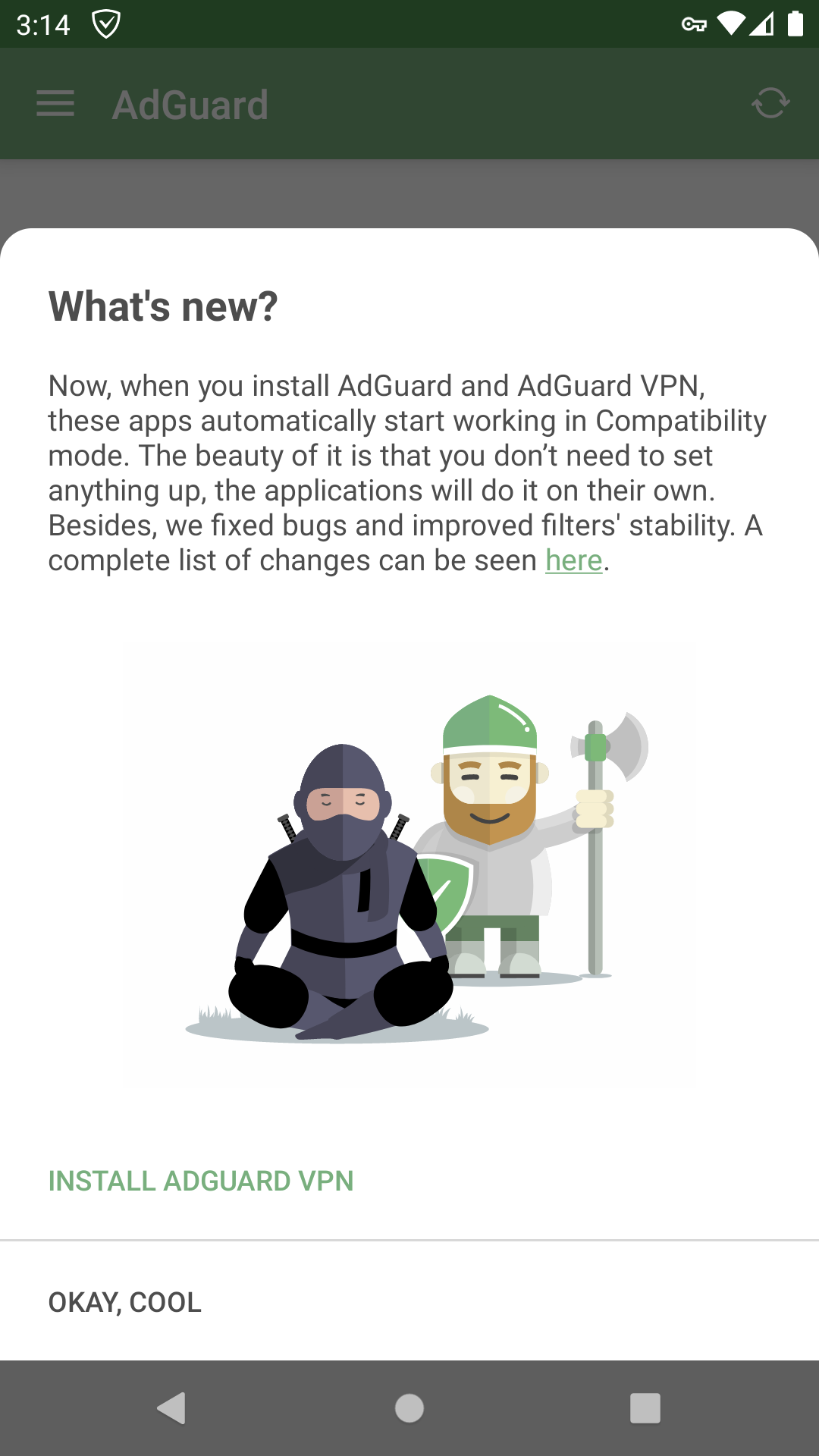
This time it's all about two AdGuards working together, of course

A picture tells more than words in this case: after an update you'll be met with a screen that briefly familiarizes you with the latest changes so you won't miss anything important. This time it's all about VPN compatibility. Speaking of...

Compatibility with AdGuard VPN for Android

And now — as promised — to the main course (I know I called it dessert earlier. You don't eat dessert for a main course?).

Since AdGuard VPN for Android was first introduced, there was already a way to make it work along with AdGuard ad blocker. But to make the two apps coexist in peace, you were required to jump through some hoops. Anyone who went ahead and did the thing, 100% has been waiting for a proper integration ever since — and we oblige.


The best kind of compatibility is when you install two apps and they just start working together. We did exactly that. Presuming you already have AdGuard ad blocker installed, just download AdGuard VPN from Play Store (you can get there right from the ad blocker app, there's a new item in General Settings menu).
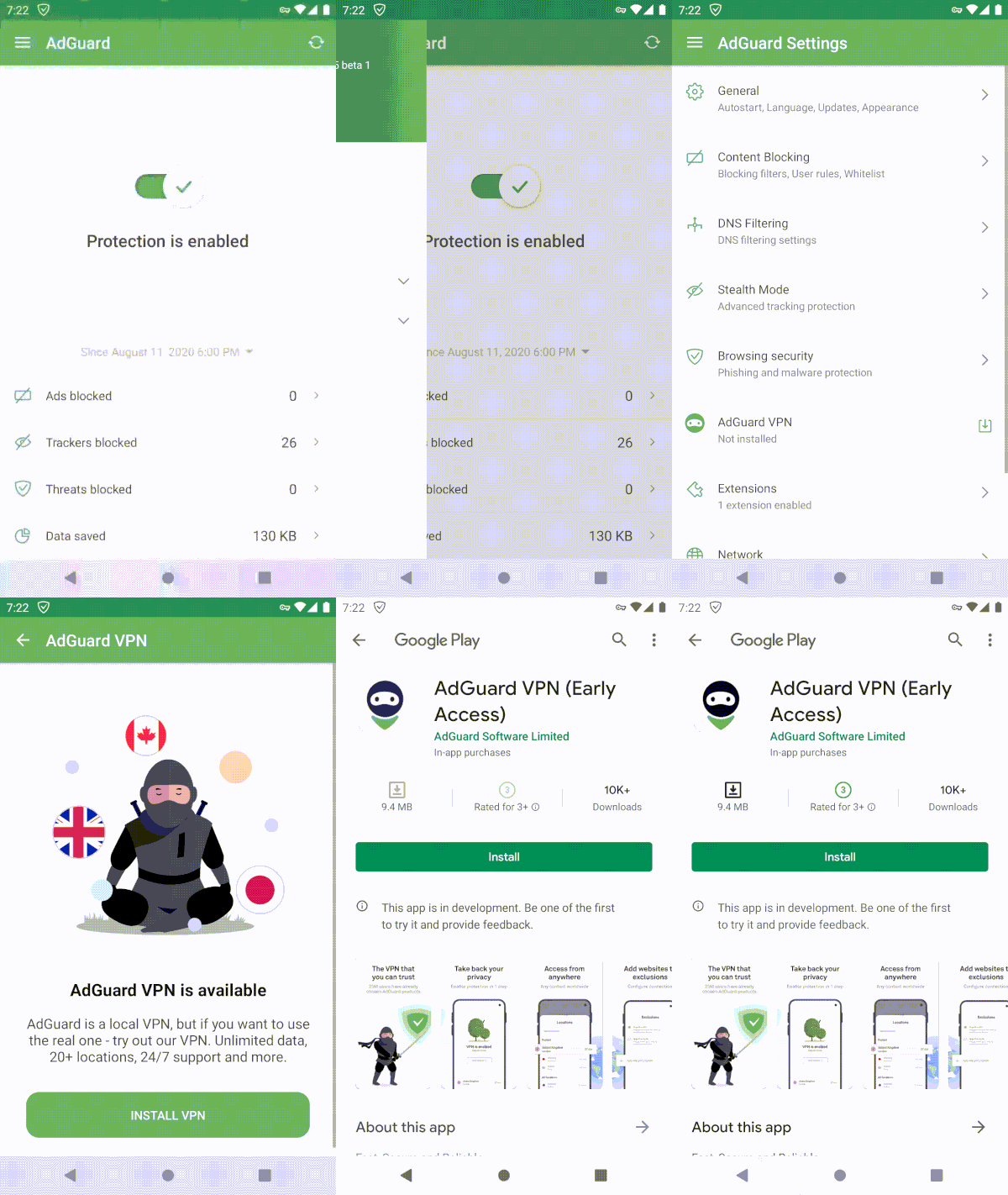
It's almost harder to NOT install AdGuard VPN

Both apps will detect each other and do everything that's needed for smooth joint work. All that will be left for you is to enjoy both ad-free Internet and all the benefits of a VPN. By the way, it works the other way around just as well: install AdGuard ad blocker on top of an already-running AdGuard VPN and you're good.
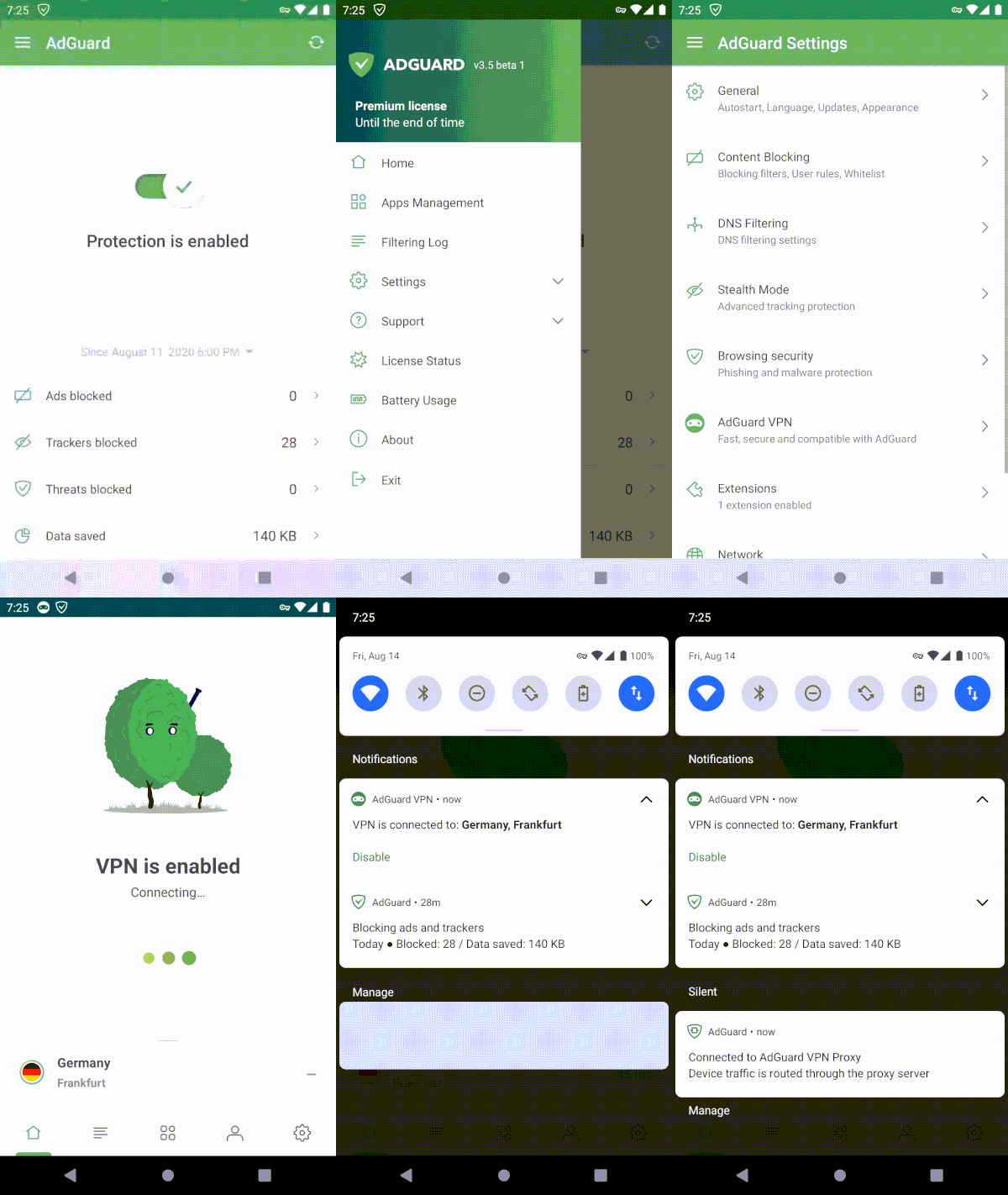
Literally takes 4 taps on the screen (5 to 6 if you're clumsy like me)

If you'd like to disable Compatibility Mode for any reason, it's very simple to do so from AdGuard ad blocker settings, just toggle the switch. Additionally, you can add AdGuard ad blocker and AdGuard VPN tiles to your device's notification bar and toggle them in one tap at your own will — thanks to Compatibility Mode the configuration will change immediately and silently.
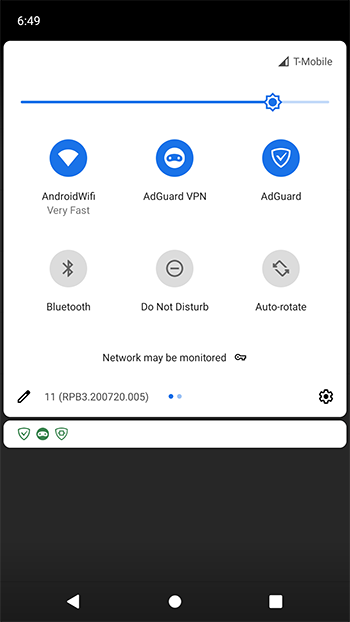
If you're a sucker for tiles, I got some good news for you

What is AdGuard VPN?
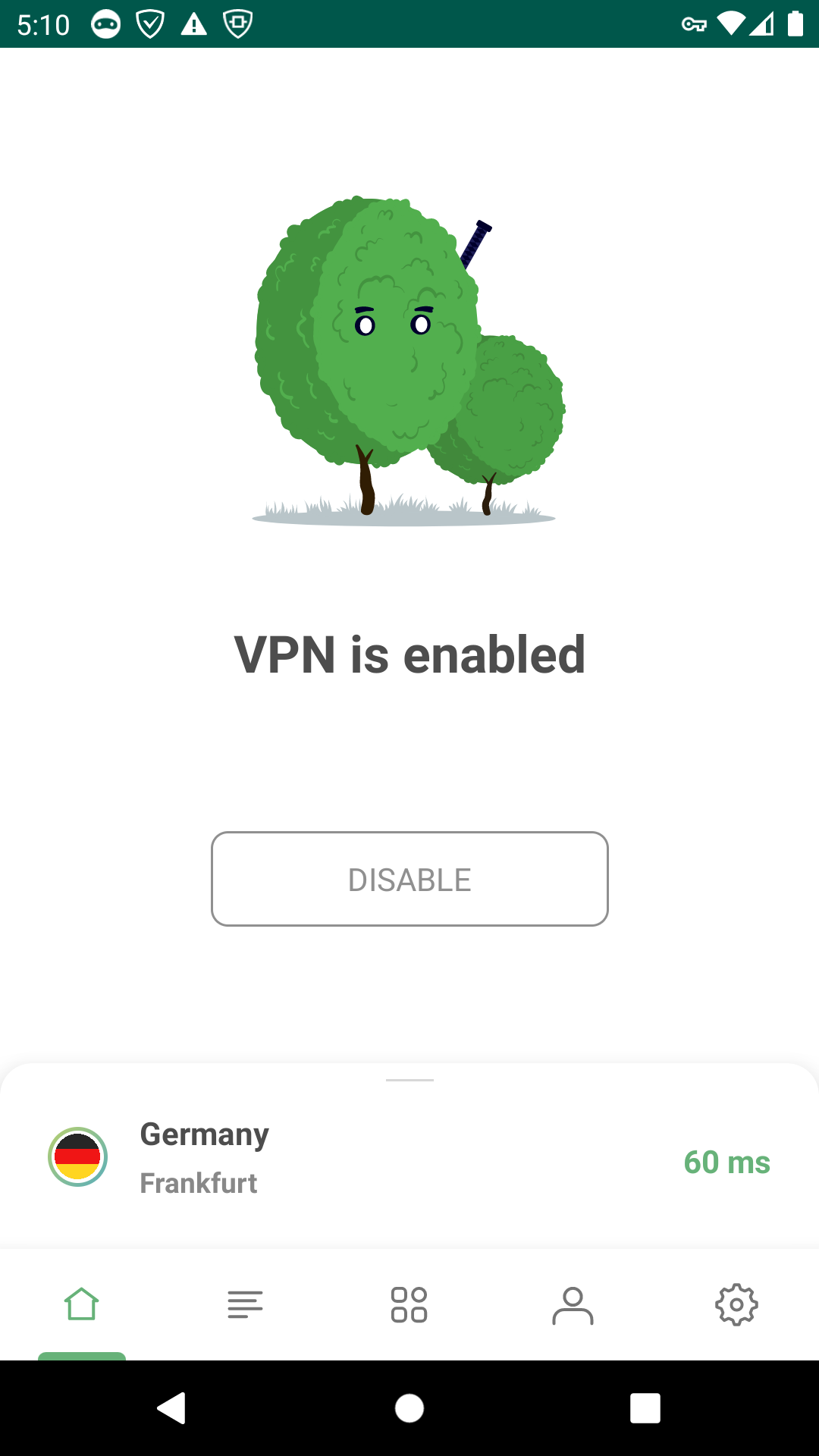
Soon you'll know, and here's how looks

Wait, no. What's a VPN?

Imagine VPN as a tunnel that connects your device to a server and allows you to browse the web using someone else's IP address. So if the chosen VPN server is located in a different country, it will appear like you have connected to the Internet from that country. At the same time, if the VPN is any good, this tunnel is secure, your traffic is encrypted and your data safe. Why would you want to use a VPN?

  • It can hide your real whereabouts and help stay anonymous
  • Your traffic will be protected from spoofing (network traffic interception) and tracking on the part of your Internet service provider and malefactors.

Now, there's dozens of VPNs available out there, and some of them are even good. What distincts AdGuard VPN from the rest?

Why AdGuard VPN?

You already know the first reason. Normally, two VPN-based apps can't work together on Android. So if you want to reap the benefits of AdGuard ad blocker protection, using a VPN may prove a challenging task — unless you use AdGuard VPN in compatibility mode, of course. But there's more reasons:

  • Unique VPN protocol

One of the main differences between AdGuard VPN and its competitors is that we use our own protocol that we developed ourselves. It disguises itself as normal traffic, so it is much more difficult to detect that you're using a VPN at all, and therefore track and block your connection.

  • Regular/Selective mode

Users can configure themselves where VPN works and where it doesn’t work.
For example, you want your VPN to work on all websites except example.com. Regular mode is enabled by default, so you don’t need to turn it on. Simply add this website to the list of exceptions. That’s it!

  • No logs policy

No logs policy means that we don’t collect, store your personal data or transfer it to third parties. The full text of AdGuard privacy policy can be found here.

  • Trusted developer

Not going to lie, it's a bit weird to brag like that, but we at AdGuard genuinely believe that over more than 10 years of developing AdGuard ad blocker we have proven that we value users' privacy and safety above everything else. With AdGuard VPN it's not going to be any different.

There's more, but despite how it looks, this article isn't just about AdGuard VPN. So I won't go into too many details, especially since there are places like Knowledge base that do it much better.

How to get it?

For the sake of argument let's say that you're convinced to at least give AdGuard VPN a try. How would you get around it?

If you have AdGuard ad blocker, simply update it to v3.5 and tap the respective button in the menu. Or download the VPN app directly from the Play Store. It's free, although some premium features are only available after you purchase a subscription. We also have AdGuard VPN browser extensions for Chrome and Firefox browsers, you can get them from our website.

I also know for a fact that many of you strive to be on the very edge when it comes to new features and updates. Anticipating your question — yes, we do have a beta testing program. You can sign up here for our future testing on Android, we even have an ongoing beta test for AdGuard VPN for iOS if you're playing both fields.

And what a pitch would it be if I don't end it with a link to a purchase page. If you like the idea of using a VPN and find AdGuard to be a good choice, hurry up! Right now you can purchase AdGuard VPN subscription with a discount, and it won't be that way forever.


Wow, in case you forgot, we were talking about AdGuard v3.5 for Android. As always, the complete list of changes is on GitHub, and as always, we welcome your feedback on the update. Leave a comment here or contact us in social media, anything will do! See you next time!


Suka postingan ini?
AdGuard VPN DNS AdGuard AdGuard Mail AdGuard Wallet
Layar utama AdGuard untuk Windows
Layar Perlindungan AdGuard untuk Windows, menampilkan fitur dan pengaturan perlindungan
Layar Statistik AdGuard untuk Windows, menampilkan statistik untuk iklan dan pelacak yang terblokir
Layar Pengelolaan aplikasi AdGuard untuk Windows, menampilkan opsi pengelolaan perlindungan untuk aplikasi yang terinstal di perangkat
20.534 20534 ulasan pengguna
Sempurna!

AdGuard untuk Windows — pemblokir iklan untuk PC Anda

AdGuard untuk Windows lebih dari sekadar pemblokir iklan. Ini adalah alat serbaguna yang memblokir iklan, mengontrol akses ke situs berbahaya, mempercepat pemuatan halaman, dan melindungi anak-anak dari konten yang tidak pantas
Dengan mengunduhnya Anda menerima ketentuan Perjanjian lisensi
Microsoft Store
Dengan mengunduhnya Anda menerima ketentuan Perjanjian lisensi
AdGuard untuk Windows v8.0, masa percobaan 14 hari
Layar utama AdGuard untuk Mac
Layar Mode Siluman AdGuard untuk Mac
20.534 20534 ulasan pengguna
Sempurna!

AdGuard untuk Mac — pemblokir iklan seluruh sistem

AdGuard untuk Mac adalah pemblokir iklan unik yang dirancang khusus untuk macOS. Selain melindungi Anda dari iklan yang mengganggu di browser dan aplikasi, ini juga melindungi Anda dari pelacakan, phishing, dan penipuan
Dengan mengunduhnya Anda menerima ketentuan Perjanjian lisensi
Pelajari lainnya
AdGuard untuk Mac v2.19, masa percobaan 14 hari
Layar utama AdGuard untuk Android
Layar Perlindungan pelacakan AdGuard untuk Android
Layar Pengelolaan aplikasi AdGuard untuk Android, menampilkan opsi pengelolaan perlindungan untuk aplikasi yang terinstal di perangkat
Layar Statistik AdGuard untuk Android, menampilkan statistik untuk iklan dan pelacak yang terblokir
Layar utama peramban privat AdGuard untuk Android
Kode QR untuk unduh AdGuard untuk Android
20.534 20534 ulasan pengguna
Sempurna!

AdGuard untuk Android: pemblokir iklan semua aplikasi

Memblokir iklan dan pelacak di semua browser, game, dan aplikasi lainnya. Melindungi privasi Anda dan memungkinkan Anda mengontrol bagaimana aplikasi Anda menggunakan internet. Diinstal melalui APK
Dengan mengunduhnya Anda menerima ketentuan Perjanjian lisensi
Pelajari lainnya
Pindai untuk mengunduh
Gunakan pembaca kode QR yang tersedia di perangkat Anda
AdGuard untuk Android v4.14, masa percobaan 14 hari
Layar utama AdGuard untuk iOS
Layar Perlindungan AdGuard untuk iOS, menampilkan fitur dan pengaturan perlindungan
Layar Statistik AdGuard untuk iOS, menampilkan statistik untuk iklan dan pelacak yang terblokir
Kode QR untuk unduh AdGuard untuk iOS
20.534 20534 ulasan pengguna
Sempurna!

AdGuard untuk iOS — pemblokir iklan di luar Safari

Pemblokir iklan iOS terbaik untuk iPhone dan iPad. AdGuard menghilangkan semua jenis iklan dan pelacak di Safari serta melindungi privasi Anda di semua aplikasi pada tingkat DNS
Dengan mengunduhnya Anda menerima ketentuan Perjanjian lisensi
Pelajari lainnya
Pindai untuk mengunduh
Gunakan pembaca kode QR yang tersedia di perangkat Anda
AdGuard untuk iOS versi 4.5
Layar utama AdGuard Content Blocker
Layar filter AdGuard Content Blocker
Layar pengaturan AdGuard Content Blocker
20.534 20534 ulasan pengguna
Sempurna!

Pemblokir Konten AdGuard

AdGuard Content Blocker menghilangkan semua jenis iklan di browser seluler yang mendukung teknologi pemblokiran konten — yaitu, Samsung Internet dan Yandex Browser. Fitur-fiturnya terbatas dibandingkan dengan AdGuard untuk Android, tetapi gratis, mudah dipasang, dan efisien
Dengan mengunduhnya Anda menerima ketentuan Perjanjian lisensi
Pelajari lainnya
Pemblokir Konten AdGuard versi 2.8
Layar utama AdGuard Browser Extension
Layar Perlindungan pelacakan AdGuard Browser Extension
20.534 20534 ulasan pengguna
Sempurna!

Ekstensi peramban AdGuard

AdGuard adalah ekstensi pemblokiran iklan tercepat dan paling ringan yang secara efektif memblokir semua jenis iklan di semua halaman web! Pilih AdGuard untuk browser yang Anda gunakan dan dapatkan penjelajahan bebas iklan, cepat, dan aman.
Pasang
Dengan mengunduhnya Anda menerima ketentuan Perjanjian lisensi
Pasang
Dengan mengunduhnya Anda menerima ketentuan Perjanjian lisensi
Pasang
Dengan mengunduhnya Anda menerima ketentuan Perjanjian lisensi
Pasang
Dengan mengunduhnya Anda menerima ketentuan Perjanjian lisensi
Pasang
Dengan mengunduhnya Anda menerima ketentuan Perjanjian lisensi
Pelajari lainnya
Pasang
Dengan mengunduhnya Anda menerima ketentuan Perjanjian lisensi
Pelajari lainnya
Ekstensi peramban AdGuard versi 5.5
Layar utama Asisten Peramban
20.534 20534 ulasan pengguna
Sempurna!

Asisten AdGuard

Sebuah ekstensi peramban pendamping untuk aplikasi AdGuard desktop. Ini mengizinkan Anda memblokir item kustom di situs web, menambahkan situs web ke daftar izinkan, dan mengirim laporan langsung dari peramban Anda
Asisten AdGuard versi 1.4
20.534 20534 ulasan pengguna
Sempurna!

AdGuard Home

AdGuard Home adalah solusi berbasis jaringan untuk memblokir iklan dan pelacak. Instal sekali di router Anda untuk mencakup semua perangkat di jaringan rumah Anda — tidak diperlukan perangkat lunak klien tambahan. Ini sangat penting untuk berbagai perangkat IoT yang sering menimbulkan ancaman bagi privasi Anda
AdGuard Home versi 0.107
Layar utama AdGuard Pro untuk iOS
Layar Perlindungan AdGuard Pro untuk iOS, menampilkan fitur dan pengaturan perlindungan
Layar statistik AdGuard Pro untuk iOS, menampilkan statistik untuk iklan dan pelacak yang terblokir
20.534 20534 ulasan pengguna
Sempurna!

AdGuard Pro untuk iOS

AdGuard Pro untuk iOS dilengkapi dengan semua fitur perlindungan pemblokiran iklan canggih. Aplikasi ini menawarkan fitur yang sama dengan versi berbayar AdGuard untuk iOS. Aplikasi ini unggul dalam memblokir iklan di Safari dan memungkinkan Anda menyesuaikan pengaturan DNS untuk perlindungan yang lebih baik. Aplikasi ini memblokir iklan di browser dan aplikasi, melindungi anak-anak Anda dari konten yang tidak pantas, dan menjaga keamanan data pribadi Anda.
Dengan mengunduhnya Anda menerima ketentuan Perjanjian lisensi
Pelajari lainnya
AdGuard Pro untuk iOS versi 4.5
Layar utama AdGuard Mini untuk Mac
Layar perlindungan Safari AdGuard Mini untuk Mac
Layar Buat aturan AdGuard Mini untuk Mac
20.534 20534 ulasan pengguna
Sempurna!

AdGuard Mini untuk Mac — pemblokir iklan Safari

AdGuard Mini untuk Mac adalah pemblokir iklan Safari yang kuat. Aplikasi ringan ini menghapus iklan, memblokir pelacak, dan mempercepat pemuatan halaman. Ini membantu Anda menjelajah Web di Safari tanpa gangguan dan menjaga data Anda tetap pribadi
Pasang
Dengan mengunduhnya Anda menerima ketentuan Perjanjian lisensi
Pelajari lainnya
AdGuard Mini untuk Mac versi 2.3
Layar utama AdGuard untuk Android TV dengan perlindungan diaktifkan
Layar pemblokiran iklan AdGuard untuk Android TV, menampilkan fitur dan pengaturannya
Layar pengaturan AdGuard untuk Android TV
Layar Pengelolaan aplikasi AdGuard untuk Android TV, menampilkan aplikasi tempat iklan dan pelacak terblokir
20.534 20534 ulasan pengguna
Sempurna!

AdGuard untuk Android TV

AdGuard untuk Android TV adalah satu-satunya aplikasi yang memblokir iklan, menjaga privasi Anda, dan bertindak sebagai firewall untuk Smart TV Anda. Dapatkan peringatan tentang ancaman web, gunakan DNS yang aman, dan dapatkan manfaatkan lalu lintas yang terenkripsi. Bersantailah dan selami acara favorit Anda dengan keamanan terbaik dan tanpa iklan!
AdGuard untuk Android TV v4.14, masa percobaan 14 hari
Maskot AdGuard, Agnar, memegang penguin Linux
20.534 20534 ulasan pengguna
Sempurna!

AdGuard untuk Linux

AdGuard untuk Linux adalah pemblokir iklan sistem luas pertama di dunia untuk Linux. Blokir iklan dan pelacak di tingkat perangkat, pilih dari filter yang sudah terinstal sebelumnya, atau tambahkan milikmu sendiri — semuanya melalui antar muka baris perintah
AdGuard untuk Linux versi 1.4
20.534 20534 ulasan pengguna
Sempurna!

AdGuard Temp Mail

Generator alamat e-mail sementara gratis yang membuat Anda tetap anonim dan melindungi privasi Anda. Tidak ada spam di kotak masuk utama Anda!
20.534 20534 ulasan pengguna
Sempurna!

AdGuard VPN

75 Lokasi Di Seluruh Dunia

Akses ke konten apa pun

Enkripsi yang kuat

Tanpa kebijakan log

Koneksi paling cepat

dukungan 24/7

Coba gratis
Dengan mengunduhnya Anda menerima ketentuan Perjanjian lisensi
Pelajari lainnya
20.534 20534 ulasan pengguna
Sempurna!

DNS AdGuard

AdGuard DNS adalah cara yang sangat andal untuk memblokir iklan internet tanpa perlu menginstal aplikasi apapun. Mudah digunakan, sepenuhnya gratis, mudah dipasang di perangkat mana saja, dan menyediakan fungsi minimal yang diperlukan untuk memblokir iklan, penghitung, situs web berbahaya, dan konten dewasa.
20.534 20534 ulasan pengguna
Sempurna!

AdGuard Mail

Lindungi identitas Anda, hindari spam, dan jaga keamanan kotak masuk Anda dengan alias dan alamat e-mail sementara kami. Nikmati layanan penerusan e-mail gratis serta aplikasi untuk semua sistem operasi.
20.534 20534 ulasan pengguna
Sempurna!

AdGuard Wallet

Dompet kripto yang aman dan pribadi yang memberi Anda kendali penuh atas aset Anda. Kelola beberapa dompet dan temukan ribuan mata uang kripto untuk disimpan, dikirim, dan ditukar
Mengunduh AdGuard Klik tombol yang ditujukkan oleh panah untuk memulai instalasi. Pilih "Buka" dan klik "OK", lalu tunggu file diunduh. Di jendela yang terbuka, seret ikon AdGuard ke folder "Aplikasi". Terima kasih telah memilih AdGuard! Pilih "Buka" dan klik "OK", lalu tunggu file diunduh. Di jendela yang terbuka, klik "Install". Terima kasih telah memilih AdGuard!
Instal AdGuard untuk perangkat ponsel juga

















































