AdGuard for Windows v6.2 release

Hello! You’d better get a hold on something because we are about to drop the biggest changelog you have ever seen! It may be overwhelming if you haven’t monitored the beta releases — we reworked Filtering log and Filter editor, gave Assistant a new look, integrated AdGuard with Windows 10 notifications center, majorly improved several extensions... The list goes on and on. Just hop in and see for yourself.

UI


Let’s start with UI changes. Both Filtering log and Filter editor have been seriously redesigned. We need to say a big ’thank you’ to everyone who has expressed his or her opinion because few changes depend as heavily on users’ feedback as these.

[Changed] Filtering log rework #96
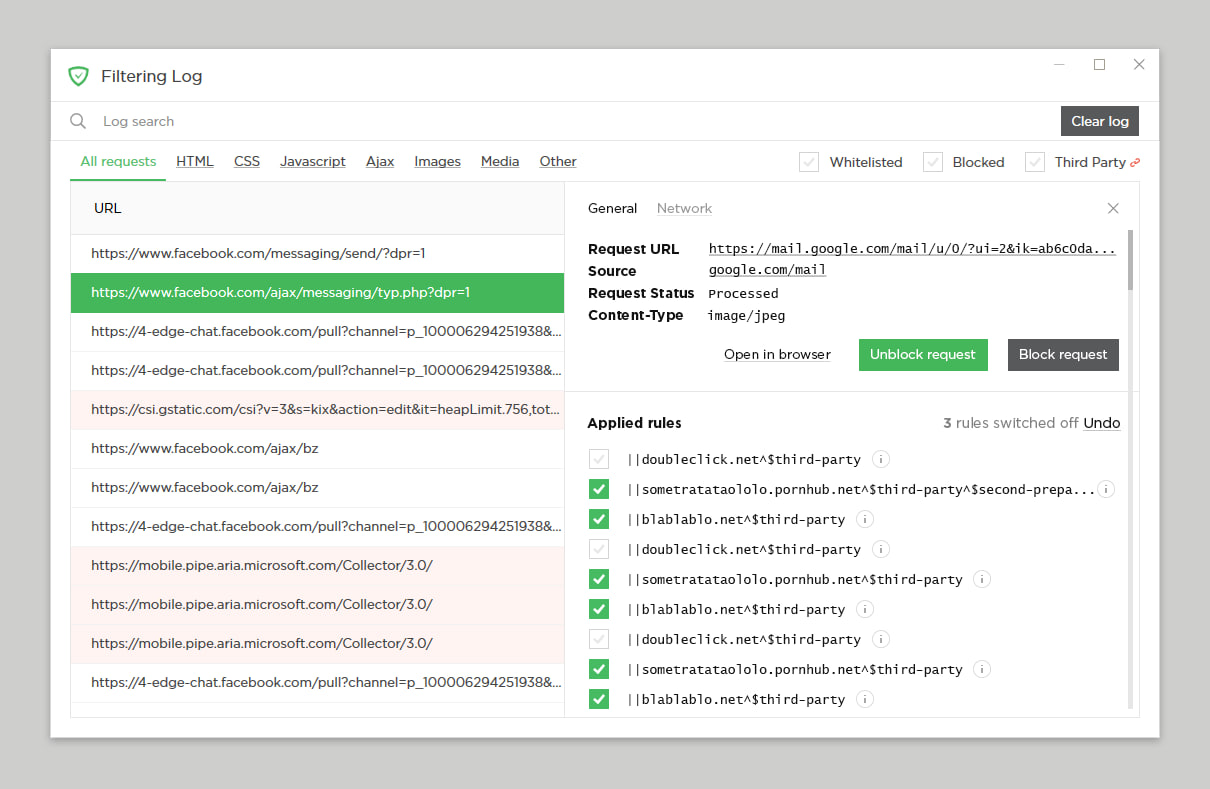
We know for certain that quite a few of our users are actively using Filtering log — both for creating new custom rules and generally knowing what’s going on. So why not help them a bit? It has undergone a major renovation. New Filtering log overlaps with Filter editor a great bit, for example, you can create new rules and unblock blocked requests right therefrom.

There are more details to see about each request, too. The request details dialog window is very reminiscent of the Developer tools in Chrome browser. All in all, the new Filtering log is much more than a simple list of which requests are blocked and which are not.
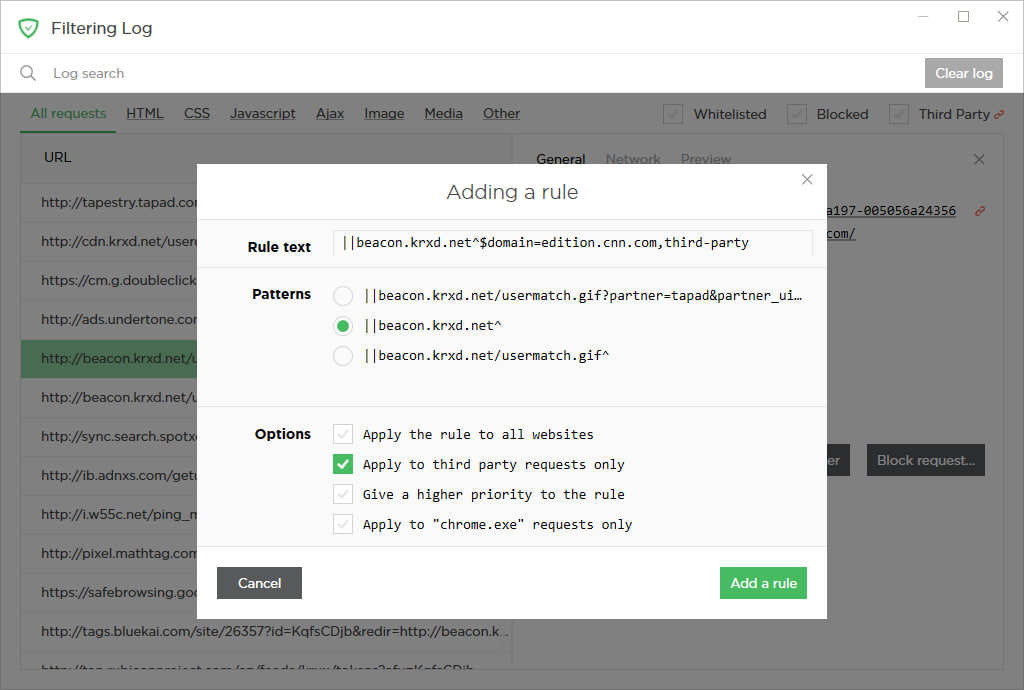
  • [Improved] Search criteria in the Filtering log have been extended #1513

[Changed] Filter editor rework #1293
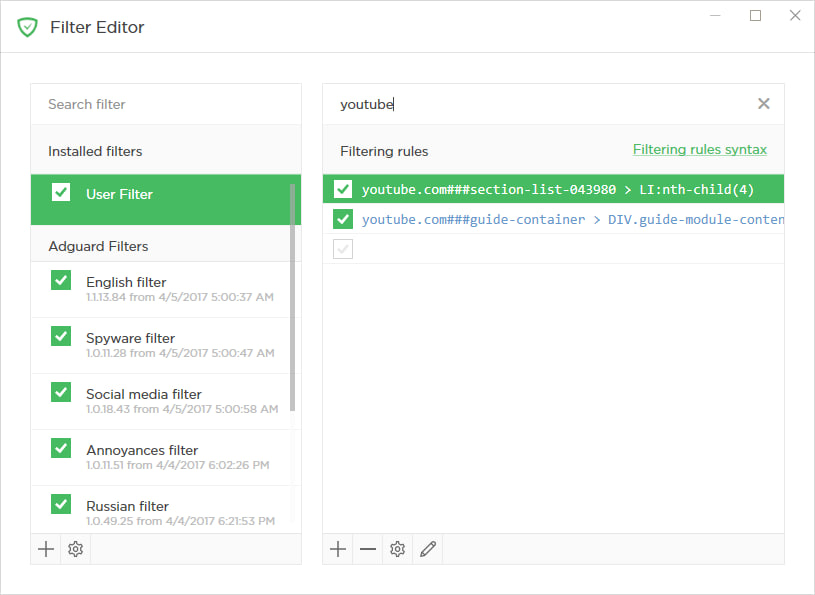
Filter editor has also changed for the best. The addition of an ’Edit mode’ allows replacing the data grid with a text area. This lets you copy/paste/delete many rules at once without having to bother with export/import.

Basic hotkeys are now available, which will speed up the process of working with the filter editor. There are many other quality of life changes, especially to the UI, which will draw your attention as soon as you launch the new version.

  • [Added] An option to disable pop-up text in the Filter editor #1082
  • [Added] A switch to change the filter list display mode #574
  • [Changed] The link to custom rules creation manual is added to the Filter editor #1410

[Added] Integration with Windows 10 notifications center #1554

Many Windows 10 users find the Notification center to be helpful when it comes to tracking the activity of their apps. We have finally decided to take advantage of it and integrated AdGuard with the center. AdGuard has a surprisingly decent amount of various notifications. Just to name a few: notifications related to the license/trial period, automatic filter activations, new rules in User filter, Safebrowsing triggers, update checks results, etc. If you use Windows 10, you’ll be able to find them all in one place now, thus making it much easier to keep up with what’s going on with AdGuard.

[Changed] Network settings moved to a separate settings tab #1404
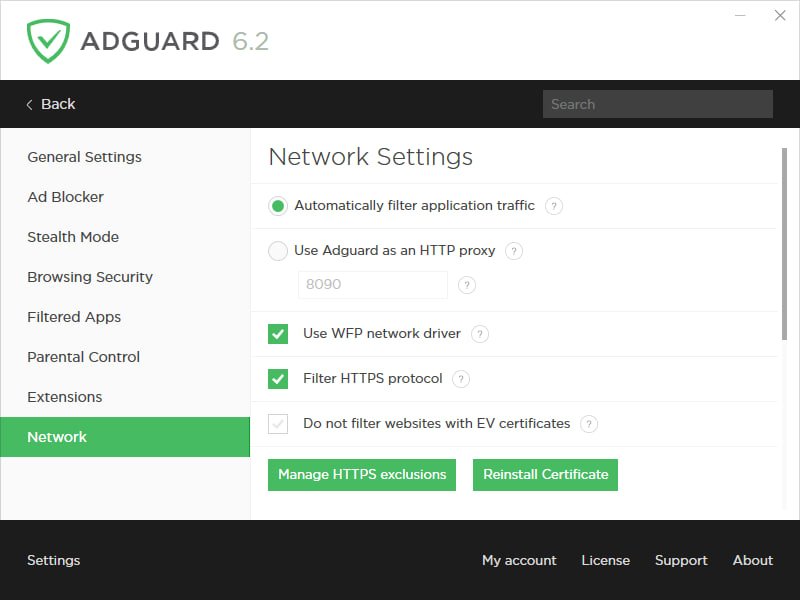
This one is rather straightforward. Previously, all network settings were crowding inside the ’General settings’ tab making it harder to scroll up and down, searching for the one setting you need. Adding a separate first-level tab makes it easier to navigate through the app.

Assistant and other extensions


While not being an integral part of AdGuard for Windows, some extensions (or userscripts) have grown over time to become strongly associated with it. And we showed them some love!

AdGuard Assistant


A lot has been done in terms of improving AdGuard Assistant, and a lot more is planned for the future, so we decided to allocate it a separate, own GitHub repository: https://github.com/AdguardTeam/AdguardAssistant/

By the way, you may notice that the ’Report website’ button now leads to a whole new page. Basically, what you see is a web reporting tool that allows you to easily send us a report on anything from a missed ad to a false positive. More about this later.

What else is done already? The biggest change is the ability to drag the Assistant icon across the page and place it wherever you see fit. Moreover, AdGuard will memorize the position of the Assistant icon for each website separately, so you can really customize it according to your taste and preferences.
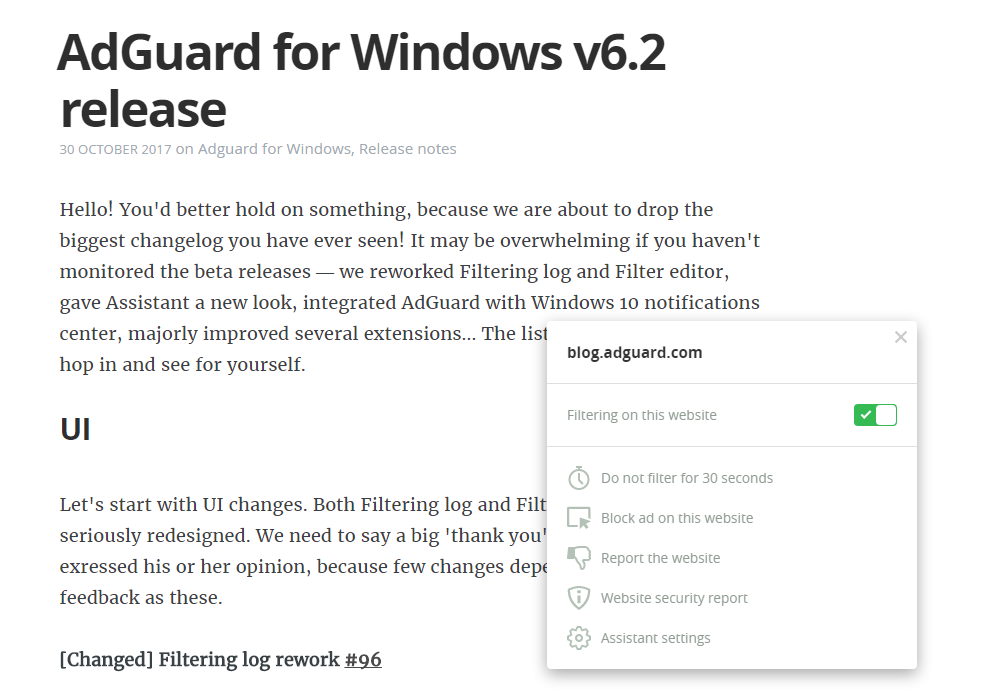
The Assistant interface overall has become smaller but retained full functionality compared to earlier versions. There is even one new feature: a switch for toggling the filtering on the website on and off. Previously, the Assistant wasn’t shown on websites with disabled filtering, and you had to go to User filter to enable it back.

Oh, and we could use your help with translating the new Assistant. Did you know that anyone can volunteer as a translator? If you feel confident, head right here and find your native language. Don’t forget to read through the translator’s memo.

AdGuard PopupBlocker


[Added] AdGuard PopupBlocker extension v2.1 #1883

For quite a while now, AdGuard works as a userscript manager — you can install any script via AdGuard to use it in any browser. PopupBlocker has always been one of the ’native’ userscripts that are installed by default, alongside AdGuard Assistant. Its purpose is clear — to block any unwanted pop-ups.

Previous version (v1.0) was functional but very little beyond that. We have completely redesigned the PopupBlocker. It now has advanced pop-up detection, compared to its predecessor and its alternatives, restores the initial click behavior and is invisible to other scripts. All in all, new PopupBlocker is a solid addition to your online protection suite.

By the way, it is available as a standalone script that can be used on its own with any other userscript manager. To find more information about PopupBlocker, visit its GitHub repository.

Reports web app


[Added] Integration with Reports Web App #1964
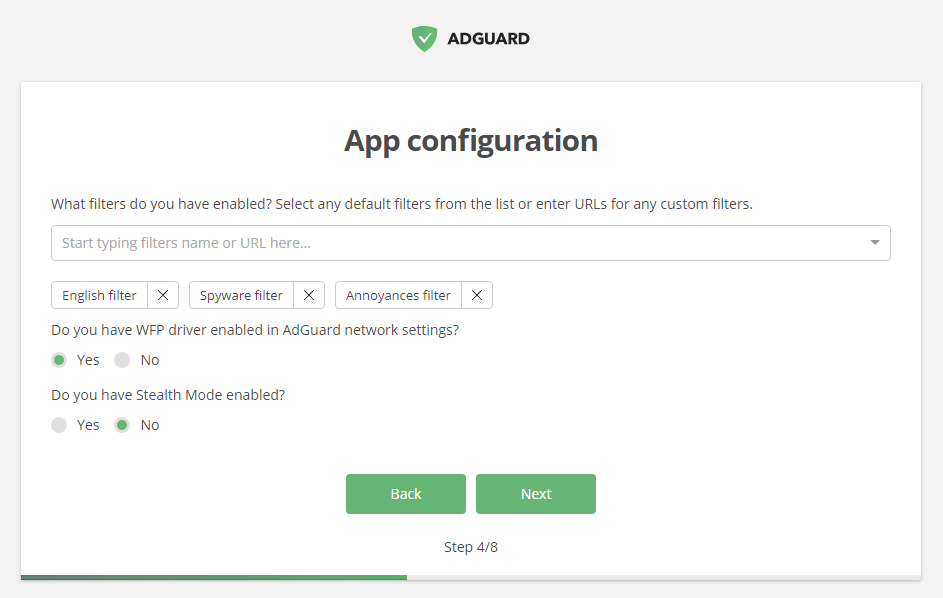
When it comes to keeping our filter lists updated, we owe our users a big one. Thanks to their timely reports of missed ads, false positives etc., AdGuard filters are always up-to-date. We want to make the process of reporting a website easy for users and informative for filter developers, that’s why we decided to integrate AdGuard for Windows with a special web reporting tool.

When you see any problem like missed ad or annoyance, click on the Assistant icon and choose «Report this website». You will be taken to a new page and asked to fill in some information about your AdGuard settings and the nature of the problem. Good thing is that AdGuard pre-fills most of the fields automatically, so most of the job is already done for you :)

We hope this change will strengthen the feedback from our users and allow AdGuard filters to stay at the cutting edge of ad blocking technology.

Userscripts handling


[Changed] The way AdGuard handles userscripts #1714

A lot of effort has been put into improving (better to say, rethinking) the way AdGuard works with userscripts. This actually has two different aspects:

First, from now on, the communication between AdGuard and Assistant is based on WebSocket, which results in better performance. This is also perfectly applicable to AdGuard Browser extension, when it is working in the integration mode with AdGuard for Windows.

Second, we have taken a whole complex of measures that allow for any external userscripts that you install via AdGuard to show higher speed and execution stability.

Other important changes


[Added] Settings export/import #1405
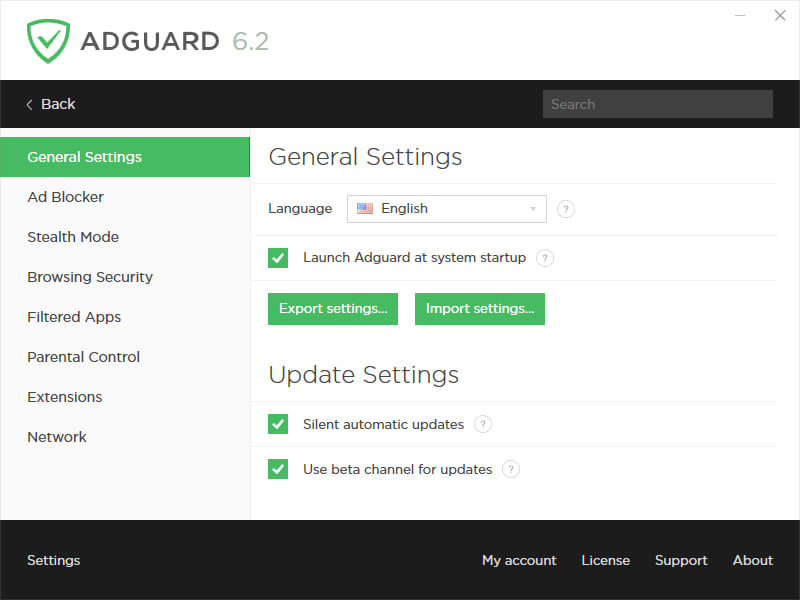
A lot of users were asking for this, and finally we deliver. Now you can save your settings configuration into a file and then use it to set up AdGuard on another machine exactly how you prefer. Another implication of this is to quickly switch between different settings profiles without having to feverishly click through a dozen of tabs and checkboxes.

[Improved] A complete «Exit AdGuard» functionality was added #1509

Now users have a choice between closing AdGuard as they usually do, and closing it completely. That means closing the Windows service as well as UI, and when UI is getting started again, the service will start as well (you may be asked for the admin privileges, though).

[Added] An option to create custom filters not backed with a file #1669

In addition to the usual option of adding any list by URL or loading it from a local file, you can now create independent new filters from scratch. It is possible to create several such filters, give each of them their own name and fill with any rules. As a result, you can create a set of specified filters which can be separately enabled, disabled and edited.

In conclusion


See, we didn’t lie, this changelog is monstrous! And that’s only major changes, imagine the full list! Jokes aside, we realize that it is not only hard for the users to digest all at once, but also not very healthy to unload new features in such big chunks. We will try to keep AdGuard for Windows updates come more steadily: with fewer changes but more often.

Share your thoughts and opinions in the comment section and see you next time!

Suka postingan ini?
AdGuard VPN DNS AdGuard AdGuard Mail AdGuard Wallet
Layar utama AdGuard untuk Windows
Layar Perlindungan AdGuard untuk Windows, menampilkan fitur dan pengaturan perlindungan
Layar Statistik AdGuard untuk Windows, menampilkan statistik untuk iklan dan pelacak yang terblokir
Layar Pengelolaan aplikasi AdGuard untuk Windows, menampilkan opsi pengelolaan perlindungan untuk aplikasi yang terinstal di perangkat
20.533 20533 ulasan pengguna
Sempurna!

AdGuard untuk Windows — pemblokir iklan untuk PC Anda

AdGuard untuk Windows lebih dari sekadar pemblokir iklan. Ini adalah alat serbaguna yang memblokir iklan, mengontrol akses ke situs berbahaya, mempercepat pemuatan halaman, dan melindungi anak-anak dari konten yang tidak pantas
Dengan mengunduhnya Anda menerima ketentuan Perjanjian lisensi
Microsoft Store
Dengan mengunduhnya Anda menerima ketentuan Perjanjian lisensi
AdGuard untuk Windows v8.0, masa percobaan 14 hari
Layar utama AdGuard untuk Mac
Layar Mode Siluman AdGuard untuk Mac
20.533 20533 ulasan pengguna
Sempurna!

AdGuard untuk Mac — pemblokir iklan seluruh sistem

AdGuard untuk Mac adalah pemblokir iklan unik yang dirancang khusus untuk macOS. Selain melindungi Anda dari iklan yang mengganggu di browser dan aplikasi, ini juga melindungi Anda dari pelacakan, phishing, dan penipuan
Dengan mengunduhnya Anda menerima ketentuan Perjanjian lisensi
Pelajari lainnya
AdGuard untuk Mac v2.19, masa percobaan 14 hari
Layar utama AdGuard untuk Android
Layar Perlindungan pelacakan AdGuard untuk Android
Layar Pengelolaan aplikasi AdGuard untuk Android, menampilkan opsi pengelolaan perlindungan untuk aplikasi yang terinstal di perangkat
Layar Statistik AdGuard untuk Android, menampilkan statistik untuk iklan dan pelacak yang terblokir
Layar utama peramban privat AdGuard untuk Android
Kode QR untuk unduh AdGuard untuk Android
20.533 20533 ulasan pengguna
Sempurna!

AdGuard untuk Android: pemblokir iklan semua aplikasi

Memblokir iklan dan pelacak di semua browser, game, dan aplikasi lainnya. Melindungi privasi Anda dan memungkinkan Anda mengontrol bagaimana aplikasi Anda menggunakan internet. Diinstal melalui APK
Dengan mengunduhnya Anda menerima ketentuan Perjanjian lisensi
Pelajari lainnya
Pindai untuk mengunduh
Gunakan pembaca kode QR yang tersedia di perangkat Anda
AdGuard untuk Android v4.14, masa percobaan 14 hari
Layar utama AdGuard untuk iOS
Layar Perlindungan AdGuard untuk iOS, menampilkan fitur dan pengaturan perlindungan
Layar Statistik AdGuard untuk iOS, menampilkan statistik untuk iklan dan pelacak yang terblokir
Kode QR untuk unduh AdGuard untuk iOS
20.533 20533 ulasan pengguna
Sempurna!

AdGuard untuk iOS — pemblokir iklan di luar Safari

Pemblokir iklan iOS terbaik untuk iPhone dan iPad. AdGuard menghilangkan semua jenis iklan dan pelacak di Safari serta melindungi privasi Anda di semua aplikasi pada tingkat DNS
Dengan mengunduhnya Anda menerima ketentuan Perjanjian lisensi
Pelajari lainnya
Pindai untuk mengunduh
Gunakan pembaca kode QR yang tersedia di perangkat Anda
AdGuard untuk iOS versi 4.5
Layar utama AdGuard Content Blocker
Layar filter AdGuard Content Blocker
Layar pengaturan AdGuard Content Blocker
20.533 20533 ulasan pengguna
Sempurna!

Pemblokir Konten AdGuard

AdGuard Content Blocker menghilangkan semua jenis iklan di browser seluler yang mendukung teknologi pemblokiran konten — yaitu, Samsung Internet dan Yandex Browser. Fitur-fiturnya terbatas dibandingkan dengan AdGuard untuk Android, tetapi gratis, mudah dipasang, dan efisien
Dengan mengunduhnya Anda menerima ketentuan Perjanjian lisensi
Pelajari lainnya
Pemblokir Konten AdGuard versi 2.8
Layar utama AdGuard Browser Extension
Layar Perlindungan pelacakan AdGuard Browser Extension
20.533 20533 ulasan pengguna
Sempurna!

Ekstensi peramban AdGuard

AdGuard adalah ekstensi pemblokiran iklan tercepat dan paling ringan yang secara efektif memblokir semua jenis iklan di semua halaman web! Pilih AdGuard untuk browser yang Anda gunakan dan dapatkan penjelajahan bebas iklan, cepat, dan aman.
Pasang
Dengan mengunduhnya Anda menerima ketentuan Perjanjian lisensi
Pasang
Dengan mengunduhnya Anda menerima ketentuan Perjanjian lisensi
Pasang
Dengan mengunduhnya Anda menerima ketentuan Perjanjian lisensi
Pasang
Dengan mengunduhnya Anda menerima ketentuan Perjanjian lisensi
Pasang
Dengan mengunduhnya Anda menerima ketentuan Perjanjian lisensi
Pelajari lainnya
Pasang
Dengan mengunduhnya Anda menerima ketentuan Perjanjian lisensi
Pelajari lainnya
Ekstensi peramban AdGuard versi 5.5
Layar utama Asisten Peramban
20.533 20533 ulasan pengguna
Sempurna!

Asisten AdGuard

Sebuah ekstensi peramban pendamping untuk aplikasi AdGuard desktop. Ini mengizinkan Anda memblokir item kustom di situs web, menambahkan situs web ke daftar izinkan, dan mengirim laporan langsung dari peramban Anda
Asisten AdGuard versi 1.4
20.533 20533 ulasan pengguna
Sempurna!

AdGuard Home

AdGuard Home adalah solusi berbasis jaringan untuk memblokir iklan dan pelacak. Instal sekali di router Anda untuk mencakup semua perangkat di jaringan rumah Anda — tidak diperlukan perangkat lunak klien tambahan. Ini sangat penting untuk berbagai perangkat IoT yang sering menimbulkan ancaman bagi privasi Anda
AdGuard Home versi 0.107
Layar utama AdGuard Pro untuk iOS
Layar Perlindungan AdGuard Pro untuk iOS, menampilkan fitur dan pengaturan perlindungan
Layar statistik AdGuard Pro untuk iOS, menampilkan statistik untuk iklan dan pelacak yang terblokir
20.533 20533 ulasan pengguna
Sempurna!

AdGuard Pro untuk iOS

AdGuard Pro untuk iOS dilengkapi dengan semua fitur perlindungan pemblokiran iklan canggih. Aplikasi ini menawarkan fitur yang sama dengan versi berbayar AdGuard untuk iOS. Aplikasi ini unggul dalam memblokir iklan di Safari dan memungkinkan Anda menyesuaikan pengaturan DNS untuk perlindungan yang lebih baik. Aplikasi ini memblokir iklan di browser dan aplikasi, melindungi anak-anak Anda dari konten yang tidak pantas, dan menjaga keamanan data pribadi Anda.
Dengan mengunduhnya Anda menerima ketentuan Perjanjian lisensi
Pelajari lainnya
AdGuard Pro untuk iOS versi 4.5
Layar utama AdGuard Mini untuk Mac
Layar perlindungan Safari AdGuard Mini untuk Mac
Layar Buat aturan AdGuard Mini untuk Mac
20.533 20533 ulasan pengguna
Sempurna!

AdGuard Mini untuk Mac — pemblokir iklan Safari

AdGuard Mini untuk Mac adalah pemblokir iklan Safari yang kuat. Aplikasi ringan ini menghapus iklan, memblokir pelacak, dan mempercepat pemuatan halaman. Ini membantu Anda menjelajah Web di Safari tanpa gangguan dan menjaga data Anda tetap pribadi
Pasang
Dengan mengunduhnya Anda menerima ketentuan Perjanjian lisensi
Pelajari lainnya
AdGuard Mini untuk Mac versi 2.3
Layar utama AdGuard untuk Android TV dengan perlindungan diaktifkan
Layar pemblokiran iklan AdGuard untuk Android TV, menampilkan fitur dan pengaturannya
Layar pengaturan AdGuard untuk Android TV
Layar Pengelolaan aplikasi AdGuard untuk Android TV, menampilkan aplikasi tempat iklan dan pelacak terblokir
20.533 20533 ulasan pengguna
Sempurna!

AdGuard untuk Android TV

AdGuard untuk Android TV adalah satu-satunya aplikasi yang memblokir iklan, menjaga privasi Anda, dan bertindak sebagai firewall untuk Smart TV Anda. Dapatkan peringatan tentang ancaman web, gunakan DNS yang aman, dan dapatkan manfaatkan lalu lintas yang terenkripsi. Bersantailah dan selami acara favorit Anda dengan keamanan terbaik dan tanpa iklan!
AdGuard untuk Android TV v4.14, masa percobaan 14 hari
Maskot AdGuard, Agnar, memegang penguin Linux
20.533 20533 ulasan pengguna
Sempurna!

AdGuard untuk Linux

AdGuard untuk Linux adalah pemblokir iklan sistem luas pertama di dunia untuk Linux. Blokir iklan dan pelacak di tingkat perangkat, pilih dari filter yang sudah terinstal sebelumnya, atau tambahkan milikmu sendiri — semuanya melalui antar muka baris perintah
AdGuard untuk Linux versi 1.4
20.533 20533 ulasan pengguna
Sempurna!

AdGuard Temp Mail

Generator alamat e-mail sementara gratis yang membuat Anda tetap anonim dan melindungi privasi Anda. Tidak ada spam di kotak masuk utama Anda!
20.533 20533 ulasan pengguna
Sempurna!

AdGuard VPN

75 Lokasi Di Seluruh Dunia

Akses ke konten apa pun

Enkripsi yang kuat

Tanpa kebijakan log

Koneksi paling cepat

dukungan 24/7

Coba gratis
Dengan mengunduhnya Anda menerima ketentuan Perjanjian lisensi
Pelajari lainnya
20.533 20533 ulasan pengguna
Sempurna!

DNS AdGuard

AdGuard DNS adalah cara yang sangat andal untuk memblokir iklan internet tanpa perlu menginstal aplikasi apapun. Mudah digunakan, sepenuhnya gratis, mudah dipasang di perangkat mana saja, dan menyediakan fungsi minimal yang diperlukan untuk memblokir iklan, penghitung, situs web berbahaya, dan konten dewasa.
20.533 20533 ulasan pengguna
Sempurna!

AdGuard Mail

Lindungi identitas Anda, hindari spam, dan jaga keamanan kotak masuk Anda dengan alias dan alamat e-mail sementara kami. Nikmati layanan penerusan e-mail gratis serta aplikasi untuk semua sistem operasi.
20.533 20533 ulasan pengguna
Sempurna!

AdGuard Wallet

Dompet kripto yang aman dan pribadi yang memberi Anda kendali penuh atas aset Anda. Kelola beberapa dompet dan temukan ribuan mata uang kripto untuk disimpan, dikirim, dan ditukar
Mengunduh AdGuard Klik tombol yang ditujukkan oleh panah untuk memulai instalasi. Pilih "Buka" dan klik "OK", lalu tunggu file diunduh. Di jendela yang terbuka, seret ikon AdGuard ke folder "Aplikasi". Terima kasih telah memilih AdGuard! Pilih "Buka" dan klik "OK", lalu tunggu file diunduh. Di jendela yang terbuka, klik "Install". Terima kasih telah memilih AdGuard!
Instal AdGuard untuk perangkat ponsel juga


















































