AdGuard vs AdAway (and other hosts-based ad blockers - DNS66, Netguard etc)

Why do we feel there's a need to write an article like this? On forums and in users' messages we often see a widespread belief that Adguard Ad Blocker for Android is just a tool to block ads on devices that don't have ROOT access. And this is a serious mistake. Adguard is the most advanced way to get rid of ads and tracking on Android, no matter if you have your device rooted or not.

I will even say more. Adguard - not just an ad blocker, but a full-featured firewall. With its help, you are able to take under your control all apps on your device, allow or forbid the network access - as a whole, to a specific server or even a specific file! But let's not rush things and start from the beginning.

The history of ad blocking on Android

First ad blockers for Android emerged around 2011. At first, they were Adblock Plus for Android and Adaway. Today, the former is almost abandoned, the latter is still being developed but rather sluggishly - it has very little room for development, and I will explain why.

In the next few years ad blocking on Android suffered several heavy punches:

In 2013 Android KitKat got released, and along with it the prohibition to change proxy settings without ROOT access. This de-facto killed Adblock Plus for Android. For a long time, the use of ad blockers was limited exclusively to rooted devices.

Around this time happened the mass exile of ad blockers from Google Play. Google had adopted a new policy for apps added to Play Store, which practically turned all ad blockers into 'outlaws'.

For the same reason, the very first version of Adguard for Android was kicked out of Play Store in the November 2014, only 5 days after its official release.

With time, more and more browsers with built-in ad blocking feature started to appear, but this is a whole different story, and I'll cover it in the next part of this article.

What's the difference between Adguard and AdAway?

AdAway - is, really, a great and very simple way to block ad networks' domains. What can be easier? You just tell the system that the ad domain is located in a place it can't reach so that all attempts to get to it end up in failure. AdAway does it with the help of a special file called 'hosts' - many of you, probably, know about it. This file contains a list that matches server names with addresses the system should use to reach a particular server.

This method, undoubtedly, possesses some advantages:

  • Simplicity. All you need to do - substitute the contents of one file. As simple as it can be.

  • Easy to implement. All that the app should do is to update the contents of hosts file from time to time. The system will do all the job itself.

There are drawbacks too, of course:

  • Lack of flexibility. You have no way to manage the blocking. If a domain is blocked - it's blocked, you can't change it. Why does it matter? Sometimes blocking of an ad network leads to breaking the functionality of this or that app or website, and you can do nothing about it.

  • Roughness. Imagine that ads are loaded not from the ad network server, but from a server that is also being used for other purposes. What to do in such case? And these cases are far from being unique. A good example is Facebook ad network (don't be tricked by its name - it is used by thousands of different apps). If you want to get rid of such ads with the hosts file, you'll need to forget about using Facebook apps.

  • Limitations of such approach. Not all ads can be blocked like this. For example, you can't eliminate Google ads without so-called cosmetic rules which 'hide' the banners.

Adguard, on the other hand, is a full-fledged 'filter' that passes through itself traffic of all apps, and then decides what to do with it. These decisions are based on the set of special rules. You can rely on Adguard's own filters or use popular external filters such as EasyList - it's up to you. You can even create your own filtering rules, the detailed syntax description is available in our Knowledge base.

Why did we choose this method?

The answer is simple - because we can't cope with the limitations caused by the rough approach of hosts-based ad blockers. We firmly believe that every user should have unlimited control over his data and his device, and this doesn't only mean ad blocking.

Below I will show on examples what exactly are the drawbacks and limitations we refuse to put up with.

Missed ads

It is well known that a picture is worth a thousand words. We collected some examples that vividly illustrate the difference between blocking ads with Adguard and with a hosts-based ad blocker.

Important: to get the same result it's crucial to enable HTTPS filtering in Adguard's settings.

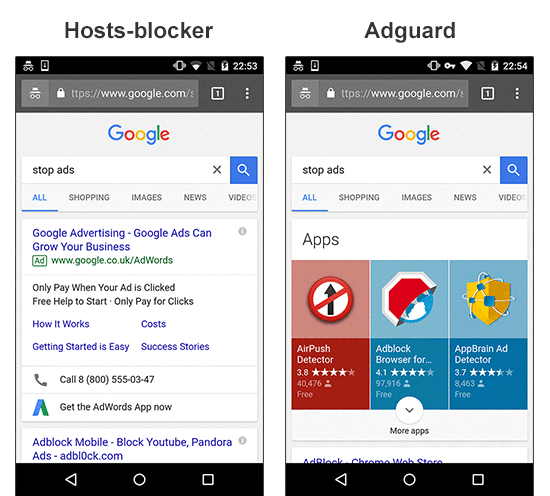
Example #1: ad which is impossible to block without applying cosmetic rules;
  • Left side: proof that Google contextual ads can be irrelevant sometimes.
  • Right side: evidence that Google search still has some room for improvement :).
Adguard vs AdAway

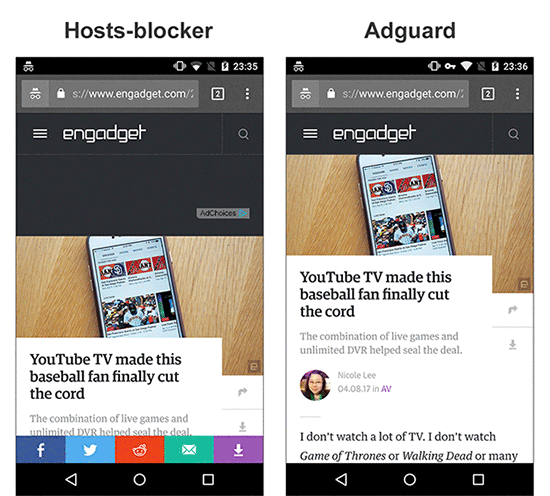
Example #2: ad which is loaded from the same website;
  • Left side: you might have blocked the AdChoices network, but you didn't get rid of the initial ad script loaded from the site's own domain. Hence, half of the page is used for a banner place. I'd also like to draw your attention to the social widget stealing 5-10% of the screen.
  • Right side: the same page processed by Adguard finally lets you focus on content.
Adguard vs AdAway

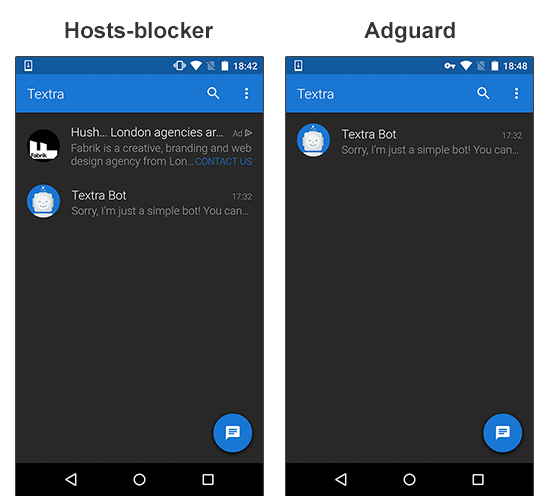
Example #3: Facebook ad network;
  • Left side: the ad is loaded from the Facebook domain. With a hosts-based blocker like Adaway, blocking it means blocking Facebook as well.
  • Right side: the ad is removed by Adguard and you can still use Facebook to tell your friends about it.
Adguard vs AdAway

Messed up websites' layout

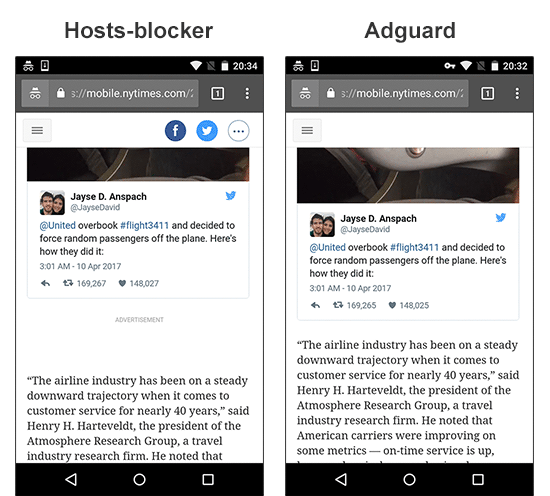
Situations, when hosts-blocker manages to block ads but ruins the websites readability, are not rare. Blank spaces, ad 'remains' - Adguard removes them from the page content or hides with cosmetic rules.

Example #1: the leftovers of a blocked ad;
Adguard vs AdAway

Example #2: empty space after the ad is blocked;
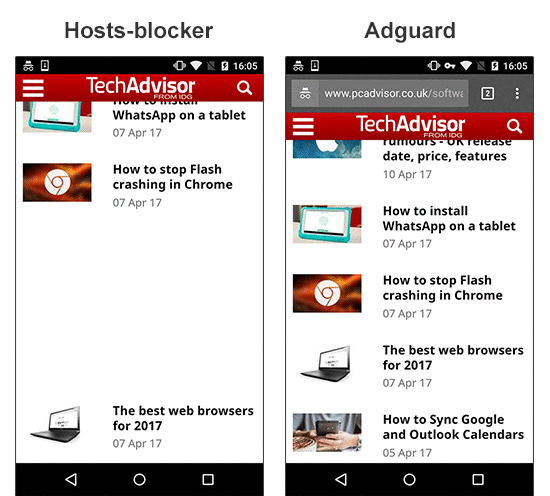
Adguard vs AdAway

Anti-adblockers

This year the fight against ad blockers takes a new turn. Users get to know about new terms they have never heard of before: Ad Reinsertion, Ad Recovery; some websites experiment with limiting functionality or the access to the website to users who have an ad blocker installed. The rough approach of a hosts-blockers doesn't allow to fight back.

Example #1: the website limits the access to its content;
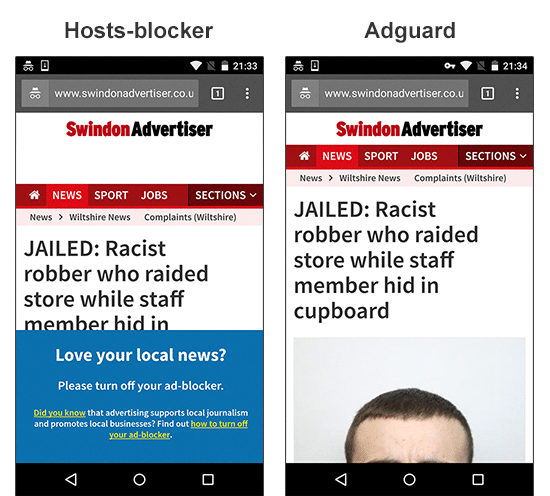
Adguard vs AdAway

Broken functionality

Another scourge of hosts-blockers is 'broken' elements. Video players are one of the most frequent victims.

Example #1: a video player on the website becomes broken;
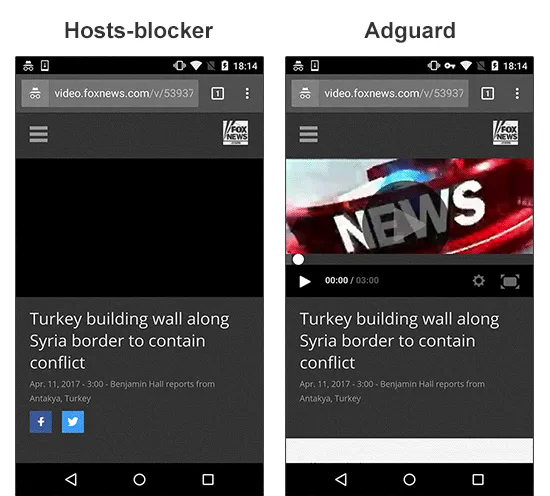
Adguard vs AdAway

Example #2: a video player doesn't work and the content isn't loaded;
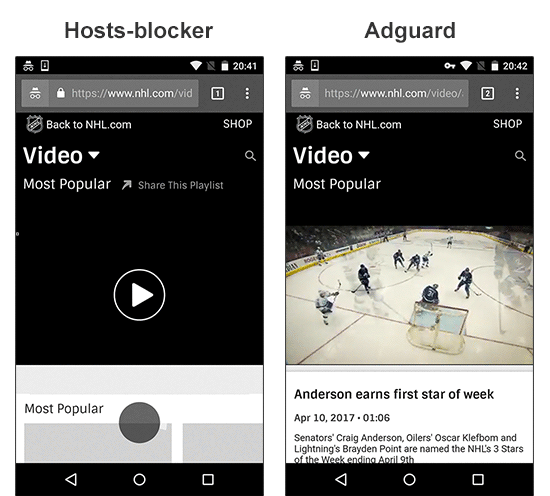
Adguard vs AdAway

Making conclusions

By the way, Adguard, besides everything else, is capable of working in many different modes, including the DNS-blocker mode - this is almost the same as what hosts-blockers do. But despite all the difficulties, we have chosen the full-fledged 'filter' mode as a default. This is our principled stance - only users have to decide for themselves what should be blocked and how. Hosts-based ad blockers, sadly, don't provide such possibilities.

I hope this article clarifies our motifs and demonstrates the differences between the approach of Adguard and other ad blockers on the market. Some of the questions that might have arisen will be touched on in the second part of this article. Or you can ask those questions in the comments, and I or someone else from Adguard team will certainly answer them.


Suka postingan ini?
AdGuard VPN DNS AdGuard AdGuard Mail AdGuard Wallet
Layar utama AdGuard untuk Windows
Layar Perlindungan AdGuard untuk Windows, menampilkan fitur dan pengaturan perlindungan
Layar Statistik AdGuard untuk Windows, menampilkan statistik untuk iklan dan pelacak yang terblokir
Layar Pengelolaan aplikasi AdGuard untuk Windows, menampilkan opsi pengelolaan perlindungan untuk aplikasi yang terinstal di perangkat
20.533 20533 ulasan pengguna
Sempurna!

AdGuard untuk Windows — pemblokir iklan untuk PC Anda

AdGuard untuk Windows lebih dari sekadar pemblokir iklan. Ini adalah alat serbaguna yang memblokir iklan, mengontrol akses ke situs berbahaya, mempercepat pemuatan halaman, dan melindungi anak-anak dari konten yang tidak pantas

Dengan mengunduhnya Anda menerima ketentuan Perjanjian lisensi
Microsoft Store
Dengan mengunduhnya Anda menerima ketentuan Perjanjian lisensi
AdGuard untuk Windows v8.0, masa percobaan 14 hari
Layar utama AdGuard untuk Mac
Layar Mode Siluman AdGuard untuk Mac
20.533 20533 ulasan pengguna
Sempurna!

AdGuard untuk Mac — pemblokir iklan seluruh sistem

AdGuard untuk Mac adalah pemblokir iklan unik yang dirancang khusus untuk macOS. Selain melindungi Anda dari iklan yang mengganggu di browser dan aplikasi, ini juga melindungi Anda dari pelacakan, phishing, dan penipuan
Dengan mengunduhnya Anda menerima ketentuan Perjanjian lisensi
Pelajari lainnya
AdGuard untuk Mac v2.19, masa percobaan 14 hari
Layar utama AdGuard untuk Android
Layar Perlindungan pelacakan AdGuard untuk Android
Layar Pengelolaan aplikasi AdGuard untuk Android, menampilkan opsi pengelolaan perlindungan untuk aplikasi yang terinstal di perangkat
Layar Statistik AdGuard untuk Android, menampilkan statistik untuk iklan dan pelacak yang terblokir
Layar utama peramban privat AdGuard untuk Android
Kode QR untuk unduh AdGuard untuk Android
20.533 20533 ulasan pengguna
Sempurna!

AdGuard untuk Android: pemblokir iklan semua aplikasi

Memblokir iklan dan pelacak di semua browser, game, dan aplikasi lainnya. Melindungi privasi Anda dan memungkinkan Anda mengontrol bagaimana aplikasi Anda menggunakan internet. Diinstal melalui APK
Dengan mengunduhnya Anda menerima ketentuan Perjanjian lisensi
Pelajari lainnya
Pindai untuk mengunduh
Gunakan pembaca kode QR yang tersedia di perangkat Anda
AdGuard untuk Android v4.14, masa percobaan 14 hari
Layar utama AdGuard untuk iOS
Layar Perlindungan AdGuard untuk iOS, menampilkan fitur dan pengaturan perlindungan
Layar Statistik AdGuard untuk iOS, menampilkan statistik untuk iklan dan pelacak yang terblokir
Kode QR untuk unduh AdGuard untuk iOS
20.533 20533 ulasan pengguna
Sempurna!

AdGuard untuk iOS — pemblokir iklan di luar Safari

Pemblokir iklan iOS terbaik untuk iPhone dan iPad. AdGuard menghilangkan semua jenis iklan dan pelacak di Safari serta melindungi privasi Anda di semua aplikasi pada tingkat DNS
Dengan mengunduhnya Anda menerima ketentuan Perjanjian lisensi
Pelajari lainnya
Pindai untuk mengunduh
Gunakan pembaca kode QR yang tersedia di perangkat Anda
AdGuard untuk iOS versi 4.5
Layar utama AdGuard Content Blocker
Layar filter AdGuard Content Blocker
Layar pengaturan AdGuard Content Blocker
20.533 20533 ulasan pengguna
Sempurna!

Pemblokir Konten AdGuard

AdGuard Content Blocker menghilangkan semua jenis iklan di browser seluler yang mendukung teknologi pemblokiran konten — yaitu, Samsung Internet dan Yandex Browser. Fitur-fiturnya terbatas dibandingkan dengan AdGuard untuk Android, tetapi gratis, mudah dipasang, dan efisien
Dengan mengunduhnya Anda menerima ketentuan Perjanjian lisensi
Pelajari lainnya
Pemblokir Konten AdGuard versi 2.8
Layar utama AdGuard Browser Extension
Layar Perlindungan pelacakan AdGuard Browser Extension
20.533 20533 ulasan pengguna
Sempurna!

Ekstensi peramban AdGuard

AdGuard adalah ekstensi pemblokiran iklan tercepat dan paling ringan yang secara efektif memblokir semua jenis iklan di semua halaman web! Pilih AdGuard untuk browser yang Anda gunakan dan dapatkan penjelajahan bebas iklan, cepat, dan aman.
Pasang
Dengan mengunduhnya Anda menerima ketentuan Perjanjian lisensi
Pasang
Dengan mengunduhnya Anda menerima ketentuan Perjanjian lisensi
Pasang
Dengan mengunduhnya Anda menerima ketentuan Perjanjian lisensi
Pasang
Dengan mengunduhnya Anda menerima ketentuan Perjanjian lisensi
Pasang
Dengan mengunduhnya Anda menerima ketentuan Perjanjian lisensi
Pelajari lainnya
Pasang
Dengan mengunduhnya Anda menerima ketentuan Perjanjian lisensi
Pelajari lainnya
Ekstensi peramban AdGuard versi 5.5
Layar utama Asisten Peramban
20.533 20533 ulasan pengguna
Sempurna!

Asisten AdGuard

Sebuah ekstensi peramban pendamping untuk aplikasi AdGuard desktop. Ini mengizinkan Anda memblokir item kustom di situs web, menambahkan situs web ke daftar izinkan, dan mengirim laporan langsung dari peramban Anda
Asisten AdGuard versi 1.4
20.533 20533 ulasan pengguna
Sempurna!

AdGuard Home

AdGuard Home adalah solusi berbasis jaringan untuk memblokir iklan dan pelacak. Instal sekali di router Anda untuk mencakup semua perangkat di jaringan rumah Anda — tidak diperlukan perangkat lunak klien tambahan. Ini sangat penting untuk berbagai perangkat IoT yang sering menimbulkan ancaman bagi privasi Anda
AdGuard Home versi 0.107
Layar utama AdGuard Pro untuk iOS
Layar Perlindungan AdGuard Pro untuk iOS, menampilkan fitur dan pengaturan perlindungan
Layar statistik AdGuard Pro untuk iOS, menampilkan statistik untuk iklan dan pelacak yang terblokir
20.533 20533 ulasan pengguna
Sempurna!

AdGuard Pro untuk iOS

AdGuard Pro untuk iOS dilengkapi dengan semua fitur perlindungan pemblokiran iklan canggih. Aplikasi ini menawarkan fitur yang sama dengan versi berbayar AdGuard untuk iOS. Aplikasi ini unggul dalam memblokir iklan di Safari dan memungkinkan Anda menyesuaikan pengaturan DNS untuk perlindungan yang lebih baik. Aplikasi ini memblokir iklan di browser dan aplikasi, melindungi anak-anak Anda dari konten yang tidak pantas, dan menjaga keamanan data pribadi Anda.
Dengan mengunduhnya Anda menerima ketentuan Perjanjian lisensi
Pelajari lainnya
AdGuard Pro untuk iOS versi 4.5
Layar utama AdGuard Mini untuk Mac
Layar perlindungan Safari AdGuard Mini untuk Mac
Layar Buat aturan AdGuard Mini untuk Mac
20.533 20533 ulasan pengguna
Sempurna!

AdGuard Mini untuk Mac — pemblokir iklan Safari

AdGuard Mini untuk Mac adalah pemblokir iklan Safari yang kuat. Aplikasi ringan ini menghapus iklan, memblokir pelacak, dan mempercepat pemuatan halaman. Ini membantu Anda menjelajah Web di Safari tanpa gangguan dan menjaga data Anda tetap pribadi
Pasang
Dengan mengunduhnya Anda menerima ketentuan Perjanjian lisensi
Pelajari lainnya
AdGuard Mini untuk Mac versi 2.3
Layar utama AdGuard untuk Android TV dengan perlindungan diaktifkan
Layar pemblokiran iklan AdGuard untuk Android TV, menampilkan fitur dan pengaturannya
Layar pengaturan AdGuard untuk Android TV
Layar Pengelolaan aplikasi AdGuard untuk Android TV, menampilkan aplikasi tempat iklan dan pelacak terblokir
20.533 20533 ulasan pengguna
Sempurna!

AdGuard untuk Android TV

AdGuard untuk Android TV adalah satu-satunya aplikasi yang memblokir iklan, menjaga privasi Anda, dan bertindak sebagai firewall untuk Smart TV Anda. Dapatkan peringatan tentang ancaman web, gunakan DNS yang aman, dan dapatkan manfaatkan lalu lintas yang terenkripsi. Bersantailah dan selami acara favorit Anda dengan keamanan terbaik dan tanpa iklan!
AdGuard untuk Android TV v4.14, masa percobaan 14 hari
Maskot AdGuard, Agnar, memegang penguin Linux
20.533 20533 ulasan pengguna
Sempurna!

AdGuard untuk Linux

AdGuard untuk Linux adalah pemblokir iklan sistem luas pertama di dunia untuk Linux. Blokir iklan dan pelacak di tingkat perangkat, pilih dari filter yang sudah terinstal sebelumnya, atau tambahkan milikmu sendiri — semuanya melalui antar muka baris perintah
AdGuard untuk Linux versi 1.4
20.533 20533 ulasan pengguna
Sempurna!

AdGuard Temp Mail

Generator alamat e-mail sementara gratis yang membuat Anda tetap anonim dan melindungi privasi Anda. Tidak ada spam di kotak masuk utama Anda!
20.533 20533 ulasan pengguna
Sempurna!

AdGuard VPN

75 Lokasi Di Seluruh Dunia

Akses ke konten apa pun

Enkripsi yang kuat

Tanpa kebijakan log

Koneksi paling cepat

dukungan 24/7

Coba gratis
Dengan mengunduhnya Anda menerima ketentuan Perjanjian lisensi
Pelajari lainnya
20.533 20533 ulasan pengguna
Sempurna!

DNS AdGuard

AdGuard DNS adalah cara yang sangat andal untuk memblokir iklan internet tanpa perlu menginstal aplikasi apapun. Mudah digunakan, sepenuhnya gratis, mudah dipasang di perangkat mana saja, dan menyediakan fungsi minimal yang diperlukan untuk memblokir iklan, penghitung, situs web berbahaya, dan konten dewasa.
20.533 20533 ulasan pengguna
Sempurna!

AdGuard Mail

Lindungi identitas Anda, hindari spam, dan jaga keamanan kotak masuk Anda dengan alias dan alamat e-mail sementara kami. Nikmati layanan penerusan e-mail gratis serta aplikasi untuk semua sistem operasi.
20.533 20533 ulasan pengguna
Sempurna!

AdGuard Wallet

Dompet kripto yang aman dan pribadi yang memberi Anda kendali penuh atas aset Anda. Kelola beberapa dompet dan temukan ribuan mata uang kripto untuk disimpan, dikirim, dan ditukar
Mengunduh AdGuard Klik tombol yang ditujukkan oleh panah untuk memulai instalasi. Pilih "Buka" dan klik "OK", lalu tunggu file diunduh. Di jendela yang terbuka, seret ikon AdGuard ke folder "Aplikasi". Terima kasih telah memilih AdGuard! Pilih "Buka" dan klik "OK", lalu tunggu file diunduh. Di jendela yang terbuka, klik "Install". Terima kasih telah memilih AdGuard!
Instal AdGuard untuk perangkat ponsel juga

















































