Is ad-free streaming doomed?

Those of us who have been around for a while may remember the blissful old days when streaming was strongly associated with an ad-free experience. Sick and tired of the commercial breaks on cable TV (and let’s not even get started on linear TV), we would embrace streaming as a healthy alternative to the choiceless and ad-laden regular TV viewing.

Little did we know that this would not last forever… a paradise lost, likely never to be rediscovered. Slowly but surely, the old subscription-based streaming services introduced ad-supported tiers, while the new ones, like Discovery+ or Peacock, received ad-supported tiers right out of the gate.

Last year, it was time for streaming veteran Netflix to bow to the trend: Netflix introduced an ad-supported tier for $6.99 a month and, to rub salt in the wound, in July this year dropped its $9.99 ad-free basic plan in the US, the UK, and Canada, with its cheapest ad-free plan now costing $15.49 a month. We have already lamented the demise of the completely ad-free Netflix, which once promised to never introduce ads. You can read our detailed epitaph here. This time, the bell has tolled for Amazon Prime.

Prime Video is past its prime

This month, Amazon announced that its Prime Video streaming service will begin featuring ads in shows and movies in early 2024. The rollout will begin in the US, UK, Germany, and Canada, and later expand to France, Italy, Spain, Mexico, and Australia. In a press release, Amazon justified the introduction of a new ad-supported tier by citing the need to support the creation of “compelling content,” such as its hit series The Marvelous Mrs. Maisel.

Whatever the justification, the fact that Prime Video is turning to an ad-supported model is frustrating. And it’s not just a matter of seeing ads in places where there were none before. The other problem with any ad-supported service is that it collects a lot of viewers’ data in order to show them the most relevant ads. We do not know what kind of information Amazon will use to target ads in Prime Video, but we can assume that it will have a lot of data to work with, given the role that Amazon services play in the daily lives of the average American. For example, Amazon has 148 million Prime members in the US who use its various services such as streaming, retail, prescription drugs, grocery delivery, photo storage, and gaming. This means that Amazon can track and analyze their online behavior, preferences, purchases, and more. The sheer amount of data potentially available to advertisers means that they will be willing to pay a lot of money to reach these customers with personalized ads.

For Amazon Prime users who want to keep watching videos without ads, they will have to shell out an extra $2.99/month. That may sound like just a cup of coffee, but it’s actually a huge price hike. It means paying ~20% more for the monthly Prime subscription in the US (currently $14.99) or ~26% more for the annual one (currently $139).

This, along with the sneaky way that Amazon is rolling out the ad-supported option, suggests that the company’s real goal is to lure users into staying on the ad-infested tier, rather than a genuine offer to let them choose between ads and no ads.

But what is so sneaky about Amazon’s new hard-to-resist offer?

‘No action required’

The sneaky part is that while there’s a fundamental difference between ads and no ads, and it may be a deal-breaker for many, Amazon isn’t technically introducing a new ad-supported tier that you are free to join; rather, it’s automatically enrolling all of its Prime users into the ad-supported plan.

In a statement announcing the arrival of ads to Prime Video, Amazon says: “No action is required for Prime members.” In the same statement it describes ads as a necessary evil that should not detract much from the Prime viewing experience, at least in comparison with its competitors: “We aim to have meaningfully fewer ads than linear TV and other streaming TV providers.”

However, the wording leaves much to interpretation, and we cannot possibly know what Amazon means by “meaningfully fewer ads” and who are “streaming TV providers” it compares itself with. For instance, subscribers of Netflix ad-supported plan should see on average 4 minutes of ads per hour, while Discovery +’s and Hulu’s ad load is higher — 5 minutes of ads per hour and 7.3(!) minutes of ads per hour respectively. According to Media Radar, the largest advertising-based video on-demand platforms average 6.1 minutes of ads per hour.

The way Amazon Prime is quietly pushing its subscribers toward the ad-supported plan reeks of unfair practices and dark patterns. And it’s not like Amazon is new to this. Just three months ago the US Federal Trade Commission (FTC) accused the company of having “knowingly duped millions into unknowingly enrolling in Amazon Prime,” that is without their consent or knowledge. The FTC claimed that Amazon had employed “manipulative, coercive or deceptive user-interface designs known as 'dark patterns' to trick consumers into enrolling in automatically renewing Prime subscriptions.” History repeating itself?

It’s bigger than Amazon

We have zeroed in on Amazon in this article not because it is an outlier, but because it is a perfect illustration of the domineering trend. Many streaming services nowadays are either adding ad-supported tiers or raising prices of the already existing ones. The ultimate goal seems to be to get users to accept the idea that what was once considered incompatible, even absurd — paying for subscriptions and still watching ads — is now the new normal.

In arguably the same vein, YouTube recently removed its cheapest ad-free plan, ‘Premium Lite,’ from several wealthy European countries where it was previously available. However, YouTube has not ruled out the plan’s return in some other form, and has launched ‘YouTube Lite’ in Thailand.

In any case, the idea that ads are something we have to come to terms with is being hammered vigorously into our minds. For instance, Telsey Advisory Group analyst Joseph Feldman, complementing Amazon for boosting its ad business via the new tier, notes that “for members who are heavy consumers of video, the ad-supported and ad-free options are standards in the industry, including Netflix, Inc NFLX and Hulu, and should not be a surprise.”

However, some users still beg to differ. In response to Amazon’s announcement, some have argued that the presence of ads, and not just the generic ads you can see on cable TV, but highly-targeted high-paying ads, is enough of a trade-off between the user and the service provider.
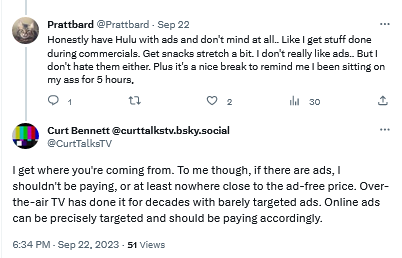
Users are not yet comfortable with streaming services introducing ad tiers

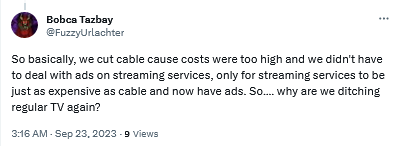
By introducing ads streaming services become just like regular TV

Bracing for the worst, hoping for the best

Unfortunately, everything points to a future where users are forced to be comfortable with ads as an inherent part of subscription-based services. We can come up with various reasons why this is so, but the most likely one is that ads are simply too lucrative to pass up, and no subscription revenue can (probably) make up for what they bring in.

Streaming platforms train us to see ads not as what they are — inherently intrusive and privacy-breaking nuisances — but as an inalienable part of every service, of every interface. We believe that users deserve a better streaming experience, and if platforms are not willing to provide it to them, it’s only natural that they turn to ad blockers.

However, there are limits to what ad blockers can do when you want to block ads on streaming services. If you want to get the most out of your ad blocker, we recommend that you use your streaming service in the browser. This way, an ad blocker (a browser extension or standalone app) is able to apply more complicated filtering techniques and block most ads. But it comes with no surprise that streaming platforms do not like their ads to be blocked, and they try to prevent ad blockers from working at full tilt. They do this by constantly changing their code and ad loading mechanism. This, in turn, requires ad blockers and filter developers to constantly update their filters to keep up with these changes. That takes time, as it’s not easy to monitor numerous streaming services all at once — and then there are thousands of other websites to block ads on, too. That’s why we at AdGuard appreciate it so much when you send us reports about missed ads. If you’re using AdGuard and notice an ad — please, take a minute of your time to report it. It really helps us a lot to stay on top of things.

Note that while DNS services (such as AdGuard DNS) can occasionally block some ads on some streaming services, it’s more the exception than the rule. So we would not recommend relying on DNS-level blocking alone to stop ads on your streaming platform of choice. The reason for this is that streaming services often use the same domain name for both the video content and the ads, making it impossible for the DNS server to distinguish between them. DNS blocking has its applications, but this isn’t the job for it.


Suka postingan ini?
AdGuard VPN DNS AdGuard AdGuard Mail AdGuard Wallet
Layar utama AdGuard untuk Windows
Layar Perlindungan AdGuard untuk Windows, menampilkan fitur dan pengaturan perlindungan
Layar Statistik AdGuard untuk Windows, menampilkan statistik untuk iklan dan pelacak yang terblokir
Layar Pengelolaan aplikasi AdGuard untuk Windows, menampilkan opsi pengelolaan perlindungan untuk aplikasi yang terinstal di perangkat
20.534 20534 ulasan pengguna
Sempurna!

AdGuard untuk Windows — pemblokir iklan untuk PC Anda

AdGuard untuk Windows lebih dari sekadar pemblokir iklan. Ini adalah alat serbaguna yang memblokir iklan, mengontrol akses ke situs berbahaya, mempercepat pemuatan halaman, dan melindungi anak-anak dari konten yang tidak pantas
Dengan mengunduhnya Anda menerima ketentuan Perjanjian lisensi
Microsoft Store
Dengan mengunduhnya Anda menerima ketentuan Perjanjian lisensi
AdGuard untuk Windows v8.0, masa percobaan 14 hari
Layar utama AdGuard untuk Mac
Layar Mode Siluman AdGuard untuk Mac
20.534 20534 ulasan pengguna
Sempurna!

AdGuard untuk Mac — pemblokir iklan seluruh sistem

AdGuard untuk Mac adalah pemblokir iklan unik yang dirancang khusus untuk macOS. Selain melindungi Anda dari iklan yang mengganggu di browser dan aplikasi, ini juga melindungi Anda dari pelacakan, phishing, dan penipuan
Dengan mengunduhnya Anda menerima ketentuan Perjanjian lisensi
Pelajari lainnya
AdGuard untuk Mac v2.19, masa percobaan 14 hari
Layar utama AdGuard untuk Android
Layar Perlindungan pelacakan AdGuard untuk Android
Layar Pengelolaan aplikasi AdGuard untuk Android, menampilkan opsi pengelolaan perlindungan untuk aplikasi yang terinstal di perangkat
Layar Statistik AdGuard untuk Android, menampilkan statistik untuk iklan dan pelacak yang terblokir
Layar utama peramban privat AdGuard untuk Android
Kode QR untuk unduh AdGuard untuk Android
20.534 20534 ulasan pengguna
Sempurna!

AdGuard untuk Android: pemblokir iklan semua aplikasi

Memblokir iklan dan pelacak di semua browser, game, dan aplikasi lainnya. Melindungi privasi Anda dan memungkinkan Anda mengontrol bagaimana aplikasi Anda menggunakan internet. Diinstal melalui APK

Dengan mengunduhnya Anda menerima ketentuan Perjanjian lisensi
Pelajari lainnya
Pindai untuk mengunduh
Gunakan pembaca kode QR yang tersedia di perangkat Anda
AdGuard untuk Android v4.14, masa percobaan 14 hari
Layar utama AdGuard untuk iOS
Layar Perlindungan AdGuard untuk iOS, menampilkan fitur dan pengaturan perlindungan
Layar Statistik AdGuard untuk iOS, menampilkan statistik untuk iklan dan pelacak yang terblokir
Kode QR untuk unduh AdGuard untuk iOS
20.534 20534 ulasan pengguna
Sempurna!

AdGuard untuk iOS — pemblokir iklan di luar Safari

Pemblokir iklan iOS terbaik untuk iPhone dan iPad. AdGuard menghilangkan semua jenis iklan dan pelacak di Safari serta melindungi privasi Anda di semua aplikasi pada tingkat DNS

Dengan mengunduhnya Anda menerima ketentuan Perjanjian lisensi
Pelajari lainnya
Pindai untuk mengunduh
Gunakan pembaca kode QR yang tersedia di perangkat Anda
AdGuard untuk iOS versi 4.5
Layar utama AdGuard Content Blocker
Layar filter AdGuard Content Blocker
Layar pengaturan AdGuard Content Blocker
20.534 20534 ulasan pengguna
Sempurna!

Pemblokir Konten AdGuard

AdGuard Content Blocker menghilangkan semua jenis iklan di browser seluler yang mendukung teknologi pemblokiran konten — yaitu, Samsung Internet dan Yandex Browser. Fitur-fiturnya terbatas dibandingkan dengan AdGuard untuk Android, tetapi gratis, mudah dipasang, dan efisien
Dengan mengunduhnya Anda menerima ketentuan Perjanjian lisensi
Pelajari lainnya
Pemblokir Konten AdGuard versi 2.8
Layar utama AdGuard Browser Extension
Layar Perlindungan pelacakan AdGuard Browser Extension
20.534 20534 ulasan pengguna
Sempurna!

Ekstensi peramban AdGuard

AdGuard adalah ekstensi pemblokiran iklan tercepat dan paling ringan yang secara efektif memblokir semua jenis iklan di semua halaman web! Pilih AdGuard untuk browser yang Anda gunakan dan dapatkan penjelajahan bebas iklan, cepat, dan aman.
Pasang
Dengan mengunduhnya Anda menerima ketentuan Perjanjian lisensi
Pasang
Dengan mengunduhnya Anda menerima ketentuan Perjanjian lisensi
Pasang
Dengan mengunduhnya Anda menerima ketentuan Perjanjian lisensi
Pasang
Dengan mengunduhnya Anda menerima ketentuan Perjanjian lisensi
Pasang
Dengan mengunduhnya Anda menerima ketentuan Perjanjian lisensi
Pelajari lainnya
Pasang
Dengan mengunduhnya Anda menerima ketentuan Perjanjian lisensi
Pelajari lainnya
Ekstensi peramban AdGuard versi 5.5
Layar utama Asisten Peramban
20.534 20534 ulasan pengguna
Sempurna!

Asisten AdGuard

Sebuah ekstensi peramban pendamping untuk aplikasi AdGuard desktop. Ini mengizinkan Anda memblokir item kustom di situs web, menambahkan situs web ke daftar izinkan, dan mengirim laporan langsung dari peramban Anda
Asisten AdGuard versi 1.4
20.534 20534 ulasan pengguna
Sempurna!

AdGuard Home

AdGuard Home adalah solusi berbasis jaringan untuk memblokir iklan dan pelacak. Instal sekali di router Anda untuk mencakup semua perangkat di jaringan rumah Anda — tidak diperlukan perangkat lunak klien tambahan. Ini sangat penting untuk berbagai perangkat IoT yang sering menimbulkan ancaman bagi privasi Anda
AdGuard Home versi 0.107
Layar utama AdGuard Pro untuk iOS
Layar Perlindungan AdGuard Pro untuk iOS, menampilkan fitur dan pengaturan perlindungan
Layar statistik AdGuard Pro untuk iOS, menampilkan statistik untuk iklan dan pelacak yang terblokir
20.534 20534 ulasan pengguna
Sempurna!

AdGuard Pro untuk iOS

AdGuard Pro untuk iOS dilengkapi dengan semua fitur perlindungan pemblokiran iklan canggih. Aplikasi ini menawarkan fitur yang sama dengan versi berbayar AdGuard untuk iOS. Aplikasi ini unggul dalam memblokir iklan di Safari dan memungkinkan Anda menyesuaikan pengaturan DNS untuk perlindungan yang lebih baik. Aplikasi ini memblokir iklan di browser dan aplikasi, melindungi anak-anak Anda dari konten yang tidak pantas, dan menjaga keamanan data pribadi Anda.
Dengan mengunduhnya Anda menerima ketentuan Perjanjian lisensi
Pelajari lainnya
AdGuard Pro untuk iOS versi 4.5
Layar utama AdGuard Mini untuk Mac
Layar perlindungan Safari AdGuard Mini untuk Mac
Layar Buat aturan AdGuard Mini untuk Mac
20.534 20534 ulasan pengguna
Sempurna!

AdGuard Mini untuk Mac — pemblokir iklan Safari

AdGuard Mini untuk Mac adalah pemblokir iklan Safari yang kuat. Aplikasi ringan ini menghapus iklan, memblokir pelacak, dan mempercepat pemuatan halaman. Ini membantu Anda menjelajah Web di Safari tanpa gangguan dan menjaga data Anda tetap pribadi
Pasang
Dengan mengunduhnya Anda menerima ketentuan Perjanjian lisensi
Pelajari lainnya
AdGuard Mini untuk Mac versi 2.3
Layar utama AdGuard untuk Android TV dengan perlindungan diaktifkan
Layar pemblokiran iklan AdGuard untuk Android TV, menampilkan fitur dan pengaturannya
Layar pengaturan AdGuard untuk Android TV
Layar Pengelolaan aplikasi AdGuard untuk Android TV, menampilkan aplikasi tempat iklan dan pelacak terblokir
20.534 20534 ulasan pengguna
Sempurna!

AdGuard untuk Android TV

AdGuard untuk Android TV adalah satu-satunya aplikasi yang memblokir iklan, menjaga privasi Anda, dan bertindak sebagai firewall untuk Smart TV Anda. Dapatkan peringatan tentang ancaman web, gunakan DNS yang aman, dan dapatkan manfaatkan lalu lintas yang terenkripsi. Bersantailah dan selami acara favorit Anda dengan keamanan terbaik dan tanpa iklan!
AdGuard untuk Android TV v4.14, masa percobaan 14 hari
Maskot AdGuard, Agnar, memegang penguin Linux
20.534 20534 ulasan pengguna
Sempurna!

AdGuard untuk Linux

AdGuard untuk Linux adalah pemblokir iklan sistem luas pertama di dunia untuk Linux. Blokir iklan dan pelacak di tingkat perangkat, pilih dari filter yang sudah terinstal sebelumnya, atau tambahkan milikmu sendiri — semuanya melalui antar muka baris perintah
AdGuard untuk Linux versi 1.4
20.534 20534 ulasan pengguna
Sempurna!

AdGuard Temp Mail

Generator alamat e-mail sementara gratis yang membuat Anda tetap anonim dan melindungi privasi Anda. Tidak ada spam di kotak masuk utama Anda!
20.534 20534 ulasan pengguna
Sempurna!

AdGuard VPN

75 Lokasi Di Seluruh Dunia

Akses ke konten apa pun

Enkripsi yang kuat

Tanpa kebijakan log

Koneksi paling cepat

dukungan 24/7

Coba gratis
Dengan mengunduhnya Anda menerima ketentuan Perjanjian lisensi
Pelajari lainnya
20.534 20534 ulasan pengguna
Sempurna!

DNS AdGuard

AdGuard DNS adalah cara yang sangat andal untuk memblokir iklan internet tanpa perlu menginstal aplikasi apapun. Mudah digunakan, sepenuhnya gratis, mudah dipasang di perangkat mana saja, dan menyediakan fungsi minimal yang diperlukan untuk memblokir iklan, penghitung, situs web berbahaya, dan konten dewasa.
20.534 20534 ulasan pengguna
Sempurna!

AdGuard Mail

Lindungi identitas Anda, hindari spam, dan jaga keamanan kotak masuk Anda dengan alias dan alamat e-mail sementara kami. Nikmati layanan penerusan e-mail gratis serta aplikasi untuk semua sistem operasi.
20.534 20534 ulasan pengguna
Sempurna!

AdGuard Wallet

Dompet kripto yang aman dan pribadi yang memberi Anda kendali penuh atas aset Anda. Kelola beberapa dompet dan temukan ribuan mata uang kripto untuk disimpan, dikirim, dan ditukar
Mengunduh AdGuard Klik tombol yang ditujukkan oleh panah untuk memulai instalasi. Pilih "Buka" dan klik "OK", lalu tunggu file diunduh. Di jendela yang terbuka, seret ikon AdGuard ke folder "Aplikasi". Terima kasih telah memilih AdGuard! Pilih "Buka" dan klik "OK", lalu tunggu file diunduh. Di jendela yang terbuka, klik "Install". Terima kasih telah memilih AdGuard!
Instal AdGuard untuk perangkat ponsel juga
















































