AdGuard’s digest: Bard lands in EU, Google goes all in on data-scraping, tax sites abuse privacy, EU and US have a deal

In this edition of the AdGuard digest: Google’s AI chatbot comes to the EU after a privacy hiccup, Shutterstock satisfies OpenAI’s appetite for data, tax filing sites leak personal data, the EU and US take another shot at a data transfer deal, as Google’s replacement for tracking cookies comes under scrutiny in France.

Google’s Bard AI chatbot launches in EU after privacy delay

Google’s answer to OpenAI’s ChatGPT and Microsoft’s Bing AI has finally launched in Europe, expanding its geographic reach to over 230 countries. It comes after Bard was derailed last month on its way to EU release by the Irish data protection watchdog. Back in June, the Irish regulator said that Google had failed to provide enough information to show that it was compliant with European data privacy laws.

Since then Google has updated Bard’s interface to include a link to Google’s “privacy hub” that explains in detail how users can limit Bard’s access to their data. Users have the option to turn off Bard’s activity, which means it will no longer be stored in their Google account, as well as delete their past chats. However, Google notes that even with Bard Activity turned off, it will still retain chats for 72 hours “to provide the service” and “to process feedback.” A privacy notice displayed by Bard urges
users “not to include information that can be used to identify you or others,” since it can be reviewed by humans — underpaid and overworked third-party contractors, presumably.
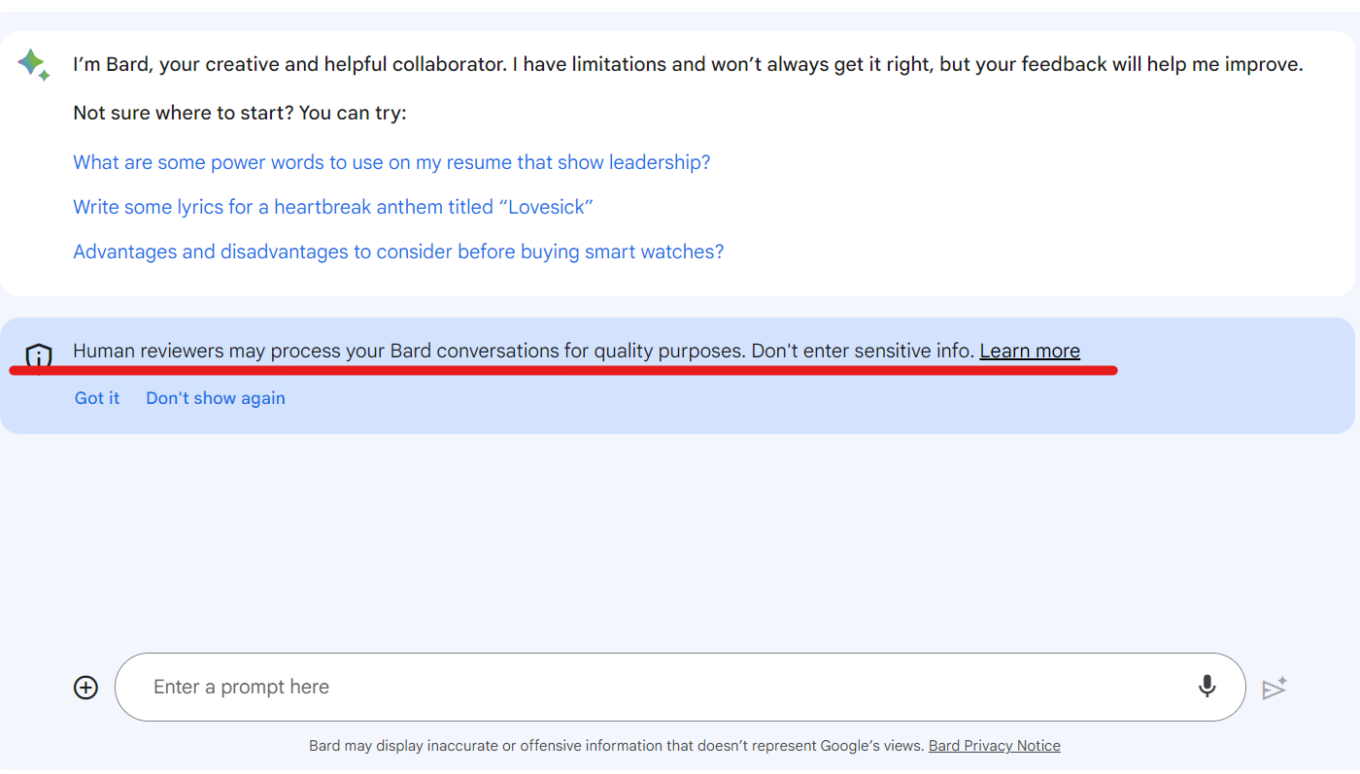
Bard informs users that human reviewers can read their chats

The fact that Google has been forced to make the information about Bard’s data processing readily available to users and offer them more privacy options is a good thing. However, Bard’s privacy policy still remains vague and seems to leave loopholes for Google to continue harvesting data. So, heeding Google’s advice (yes, you heard this right) will be the best option this time: do not entrust Bard with any of your sensitive data.

Tax prep sites leak sensitive user data to Meta and Google

An investigation by US lawmakers has revealed that tax preparation websites have been handing over sensitive personal and financial data to Meta and Google for years, in possible violation of privacy laws. The culprits are TaxAct, H&R Bloсk, and TaxSlayer, who placed Meta and Google’s tracking codes on their websites, giving the big tech giants access to the confidential information of millions of taxpayers.

The report zooms in on Meta’s tracking practices, which were first exposed by The Markup last year. The websites shared all kinds of data with Meta, such as names, email addresses, phone numbers, and gender as hashes, as well as filing status, refund amount, taxes owed, and dependents’ names. Meta even got data on whether users qualified for deductions or exemptions. Meta then used this information to target ads to taxpayers across the web, and to train its AI algorithms. Lawmakers slammed both Meta and Google for their “stunning disregard for taxpayer privacy.” The report also notes that while both companies claimed to have filtering systems in place to prevent the collection of sensitive taxpayer data, those systems were apparently “ineffective.”

The investigation confirmed that Meta and Google exploited tax preparation sites to get their hands on sensitive taxpayer information without their explicit consent or knowledge, which once again shows that their priorities are in data harvesting, not data protection. It’s good to see that US lawmakers are trying to hold big tech companies accountable, and not just the tax prep sites (who claim they didn’t know they were sending the sensitive taxpayer data). Users deserve to have their privacy and data protected, especially their personal and financial information.

Shutterstock allows OpenAI to train AI on its images for 6 more years

The world’s largest stock image site, Shutterstock, will continue allowing OpenAI, the company behind ChatGPT and DALLE-E, to use its vast library of images, videos, music, and associated metadata to train AI. OpenAI and Shutterstock first partnered in 2021, and the partnership has now been expanded and extended for an additional 6 years. Shutterstock’s partnership with OpenAI previously saw the stock photo site directly integrate an DALLE-E image generator into its platform.

Shutterstock promised to compensate those artists whose works would be used for training its generative AI, as well as pay royalties for “newly generated assets.” Last year, Shutterstock became the first in the industry to launch a contributor fund in an attempt to make things right with creators, irate over the fact that their images were being scraped to make AI art. Shutterstock’s approach to AI is drastically different from that of Getty Images, which banned AI-generated images outright over fears of future copyright infringement claims.

AI companies and artists have long been at odds over the use of their work for AI training and generation. The legal and ethical issues are complex and unresolved. Shutterstock is trying to balance both sides by compensating artists and giving them an option to opt out, but it’s hard to say if that’s enough or even enforceable. We will have to wait and see which approach, embracing or rejecting AI art, prevails. In the meantime, OpenAI faces increasing pressure from regulators, including from the US goverment which investigates it for potentially harming consumers through data collection and “hallucinations.”

Google’s replacement for tracking cookies requires consent, says watchdog

We have written and railed extensively about Google’s replacement for third-party cookies in Chrome called “Topics.” Topics are part of Google’s Privacy Sandbox initiative to make targeting for personalized ads more privacy-friendly. Despite widespread criticism that it fails to do so, including from Apple, Mozzila, and AdGuard, Google has moved forward with the implementation of Topics. Since July, Google has been allowing sites to test its features as part of a transition period before it completely deprecates third-party cookies in the second half of 2024.

Now, the French privacy watchdog, CNIL, has clarified the legal obligations of developers who want to test Google’s new tracking method. The watchdog said that, as with cookies before, developers would have to ask users’ permission to track them with the new method.

The French privacy watchdog’s decision is significant because it implies that the new and supposedly privacy-friendly tracking method, Topics, is not foolproof and may not be that drastically different from the old tracking cookie. It also seems to validate our concerns that Topics will not prevent tracking of users by larger platforms, such as Google itself. AdGuard users don’t need to worry though: we’ve already committed to blocking the Topics API.

Google hit with lawsuit after saying it will scrape all Internet to train AI

Google’s attempt to claim that it has every right to scrape everything you post online to train its AI models has backfired, with its now facing a class-action lawsuit for “harvesting data in secret” to create AI products. Google recently updated its privacy policy to state that it “uses publicly available information to help train Google's AI models and build products and features like Google Translate, Bard, and Cloud AI capabilities.”
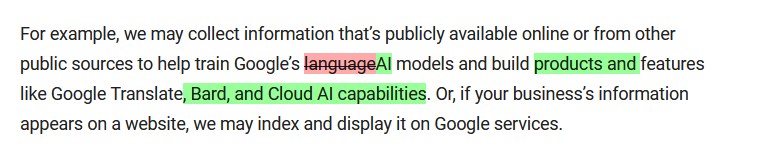
Google’s privacy policy has undergone a troubling update

Historic differences between Google’s old and updated privacy policies. The current version is in green. Source: Google

Such audacity drew a backlash from privacy activists, and now Google is facing a lawsuit seeking billions in punitive damages. The plaintiffs argue that Google’s activities amount to stealing in plain sight, and that it could have obtained the data legally instead. “Google had options other than to steal personal and copyrighted information. Internet data is available for purchase just like any other content or property,” the lawsuit says.

It’s encouraging to see that Google’s ongoing data grab is being challenged and exposed, and that more people are becoming aware of what’s going on behind the scenes. Hopefully, this will deter Google from using online data as its own without compensation or the ability to opt out. Although, we may be hoping for too much.

US and EU agree on deal to transfer personal data across Atlantic

The EU has approved a deal aimed at making the transfer of personal user data between the US and the EU legal again. The deal comes about three years after EU court quashed the previous pact, called “Privacy Shield,” which resulted in a legal void and multimillion-dollar fines for companies that continued to send European data to the US.

But it’s too early to celebrate the deal. Privacy advocates argue that it is not that different from previous proposals that were deemed inadequate by EU bodies. NOYB, a privacy group that has successfully challenged previous deals, called the new agreement “largely a copy of the failed Privacy Shield” and said it would also challenge it in court.

We’ll be following the situation closely, and in the meantime, stock up on popcorn.

Suka postingan ini?
AdGuard VPN DNS AdGuard AdGuard Mail AdGuard Wallet
Layar utama AdGuard untuk Windows
Layar Perlindungan AdGuard untuk Windows, menampilkan fitur dan pengaturan perlindungan
Layar Statistik AdGuard untuk Windows, menampilkan statistik untuk iklan dan pelacak yang terblokir
Layar Pengelolaan aplikasi AdGuard untuk Windows, menampilkan opsi pengelolaan perlindungan untuk aplikasi yang terinstal di perangkat
20.534 20534 ulasan pengguna
Sempurna!

AdGuard untuk Windows — pemblokir iklan untuk PC Anda

AdGuard untuk Windows lebih dari sekadar pemblokir iklan. Ini adalah alat serbaguna yang memblokir iklan, mengontrol akses ke situs berbahaya, mempercepat pemuatan halaman, dan melindungi anak-anak dari konten yang tidak pantas

Dengan mengunduhnya Anda menerima ketentuan Perjanjian lisensi
Microsoft Store
Dengan mengunduhnya Anda menerima ketentuan Perjanjian lisensi
AdGuard untuk Windows v8.0, masa percobaan 14 hari
Layar utama AdGuard untuk Mac
Layar Mode Siluman AdGuard untuk Mac
20.534 20534 ulasan pengguna
Sempurna!

AdGuard untuk Mac — pemblokir iklan seluruh sistem

AdGuard untuk Mac adalah pemblokir iklan unik yang dirancang khusus untuk macOS. Selain melindungi Anda dari iklan yang mengganggu di browser dan aplikasi, ini juga melindungi Anda dari pelacakan, phishing, dan penipuan

Dengan mengunduhnya Anda menerima ketentuan Perjanjian lisensi
Pelajari lainnya
AdGuard untuk Mac v2.19, masa percobaan 14 hari
Layar utama AdGuard untuk Android
Layar Perlindungan pelacakan AdGuard untuk Android
Layar Pengelolaan aplikasi AdGuard untuk Android, menampilkan opsi pengelolaan perlindungan untuk aplikasi yang terinstal di perangkat
Layar Statistik AdGuard untuk Android, menampilkan statistik untuk iklan dan pelacak yang terblokir
Layar utama peramban privat AdGuard untuk Android
Kode QR untuk unduh AdGuard untuk Android
20.534 20534 ulasan pengguna
Sempurna!

AdGuard untuk Android: pemblokir iklan semua aplikasi

Memblokir iklan dan pelacak di semua browser, game, dan aplikasi lainnya. Melindungi privasi Anda dan memungkinkan Anda mengontrol bagaimana aplikasi Anda menggunakan internet. Diinstal melalui APK
Dengan mengunduhnya Anda menerima ketentuan Perjanjian lisensi
Pelajari lainnya
Pindai untuk mengunduh
Gunakan pembaca kode QR yang tersedia di perangkat Anda
AdGuard untuk Android v4.14, masa percobaan 14 hari
Layar utama AdGuard untuk iOS
Layar Perlindungan AdGuard untuk iOS, menampilkan fitur dan pengaturan perlindungan
Layar Statistik AdGuard untuk iOS, menampilkan statistik untuk iklan dan pelacak yang terblokir
Kode QR untuk unduh AdGuard untuk iOS
20.534 20534 ulasan pengguna
Sempurna!

AdGuard untuk iOS — pemblokir iklan di luar Safari

Pemblokir iklan iOS terbaik untuk iPhone dan iPad. AdGuard menghilangkan semua jenis iklan dan pelacak di Safari serta melindungi privasi Anda di semua aplikasi pada tingkat DNS
Dengan mengunduhnya Anda menerima ketentuan Perjanjian lisensi
Pelajari lainnya
Pindai untuk mengunduh
Gunakan pembaca kode QR yang tersedia di perangkat Anda
AdGuard untuk iOS versi 4.5
Layar utama AdGuard Content Blocker
Layar filter AdGuard Content Blocker
Layar pengaturan AdGuard Content Blocker
20.534 20534 ulasan pengguna
Sempurna!

Pemblokir Konten AdGuard

AdGuard Content Blocker menghilangkan semua jenis iklan di browser seluler yang mendukung teknologi pemblokiran konten — yaitu, Samsung Internet dan Yandex Browser. Fitur-fiturnya terbatas dibandingkan dengan AdGuard untuk Android, tetapi gratis, mudah dipasang, dan efisien
Dengan mengunduhnya Anda menerima ketentuan Perjanjian lisensi
Pelajari lainnya
Pemblokir Konten AdGuard versi 2.8
Layar utama AdGuard Browser Extension
Layar Perlindungan pelacakan AdGuard Browser Extension
20.534 20534 ulasan pengguna
Sempurna!

Ekstensi peramban AdGuard

AdGuard adalah ekstensi pemblokiran iklan tercepat dan paling ringan yang secara efektif memblokir semua jenis iklan di semua halaman web! Pilih AdGuard untuk browser yang Anda gunakan dan dapatkan penjelajahan bebas iklan, cepat, dan aman.
Pasang
Dengan mengunduhnya Anda menerima ketentuan Perjanjian lisensi
Pasang
Dengan mengunduhnya Anda menerima ketentuan Perjanjian lisensi
Pasang
Dengan mengunduhnya Anda menerima ketentuan Perjanjian lisensi
Pasang
Dengan mengunduhnya Anda menerima ketentuan Perjanjian lisensi
Pasang
Dengan mengunduhnya Anda menerima ketentuan Perjanjian lisensi
Pelajari lainnya
Pasang
Dengan mengunduhnya Anda menerima ketentuan Perjanjian lisensi
Pelajari lainnya
Ekstensi peramban AdGuard versi 5.5
Layar utama Asisten Peramban
20.534 20534 ulasan pengguna
Sempurna!

Asisten AdGuard

Sebuah ekstensi peramban pendamping untuk aplikasi AdGuard desktop. Ini mengizinkan Anda memblokir item kustom di situs web, menambahkan situs web ke daftar izinkan, dan mengirim laporan langsung dari peramban Anda
Asisten AdGuard versi 1.4
20.534 20534 ulasan pengguna
Sempurna!

AdGuard Home

AdGuard Home adalah solusi berbasis jaringan untuk memblokir iklan dan pelacak. Instal sekali di router Anda untuk mencakup semua perangkat di jaringan rumah Anda — tidak diperlukan perangkat lunak klien tambahan. Ini sangat penting untuk berbagai perangkat IoT yang sering menimbulkan ancaman bagi privasi Anda
AdGuard Home versi 0.107
Layar utama AdGuard Pro untuk iOS
Layar Perlindungan AdGuard Pro untuk iOS, menampilkan fitur dan pengaturan perlindungan
Layar statistik AdGuard Pro untuk iOS, menampilkan statistik untuk iklan dan pelacak yang terblokir
20.534 20534 ulasan pengguna
Sempurna!

AdGuard Pro untuk iOS

AdGuard Pro untuk iOS dilengkapi dengan semua fitur perlindungan pemblokiran iklan canggih. Aplikasi ini menawarkan fitur yang sama dengan versi berbayar AdGuard untuk iOS. Aplikasi ini unggul dalam memblokir iklan di Safari dan memungkinkan Anda menyesuaikan pengaturan DNS untuk perlindungan yang lebih baik. Aplikasi ini memblokir iklan di browser dan aplikasi, melindungi anak-anak Anda dari konten yang tidak pantas, dan menjaga keamanan data pribadi Anda.
Dengan mengunduhnya Anda menerima ketentuan Perjanjian lisensi
Pelajari lainnya
AdGuard Pro untuk iOS versi 4.5
Layar utama AdGuard Mini untuk Mac
Layar perlindungan Safari AdGuard Mini untuk Mac
Layar Buat aturan AdGuard Mini untuk Mac
20.534 20534 ulasan pengguna
Sempurna!

AdGuard Mini untuk Mac — pemblokir iklan Safari

AdGuard Mini untuk Mac adalah pemblokir iklan Safari yang kuat. Aplikasi ringan ini menghapus iklan, memblokir pelacak, dan mempercepat pemuatan halaman. Ini membantu Anda menjelajah Web di Safari tanpa gangguan dan menjaga data Anda tetap pribadi
Pasang
Dengan mengunduhnya Anda menerima ketentuan Perjanjian lisensi
Pelajari lainnya
AdGuard Mini untuk Mac versi 2.3
Layar utama AdGuard untuk Android TV dengan perlindungan diaktifkan
Layar pemblokiran iklan AdGuard untuk Android TV, menampilkan fitur dan pengaturannya
Layar pengaturan AdGuard untuk Android TV
Layar Pengelolaan aplikasi AdGuard untuk Android TV, menampilkan aplikasi tempat iklan dan pelacak terblokir
20.534 20534 ulasan pengguna
Sempurna!

AdGuard untuk Android TV

AdGuard untuk Android TV adalah satu-satunya aplikasi yang memblokir iklan, menjaga privasi Anda, dan bertindak sebagai firewall untuk Smart TV Anda. Dapatkan peringatan tentang ancaman web, gunakan DNS yang aman, dan dapatkan manfaatkan lalu lintas yang terenkripsi. Bersantailah dan selami acara favorit Anda dengan keamanan terbaik dan tanpa iklan!
AdGuard untuk Android TV v4.14, masa percobaan 14 hari
Maskot AdGuard, Agnar, memegang penguin Linux
20.534 20534 ulasan pengguna
Sempurna!

AdGuard untuk Linux

AdGuard untuk Linux adalah pemblokir iklan sistem luas pertama di dunia untuk Linux. Blokir iklan dan pelacak di tingkat perangkat, pilih dari filter yang sudah terinstal sebelumnya, atau tambahkan milikmu sendiri — semuanya melalui antar muka baris perintah
AdGuard untuk Linux versi 1.4
20.534 20534 ulasan pengguna
Sempurna!

AdGuard Temp Mail

Generator alamat e-mail sementara gratis yang membuat Anda tetap anonim dan melindungi privasi Anda. Tidak ada spam di kotak masuk utama Anda!
20.534 20534 ulasan pengguna
Sempurna!

AdGuard VPN

75 Lokasi Di Seluruh Dunia

Akses ke konten apa pun

Enkripsi yang kuat

Tanpa kebijakan log

Koneksi paling cepat

dukungan 24/7

Coba gratis
Dengan mengunduhnya Anda menerima ketentuan Perjanjian lisensi
Pelajari lainnya
20.534 20534 ulasan pengguna
Sempurna!

DNS AdGuard

AdGuard DNS adalah cara yang sangat andal untuk memblokir iklan internet tanpa perlu menginstal aplikasi apapun. Mudah digunakan, sepenuhnya gratis, mudah dipasang di perangkat mana saja, dan menyediakan fungsi minimal yang diperlukan untuk memblokir iklan, penghitung, situs web berbahaya, dan konten dewasa.
20.534 20534 ulasan pengguna
Sempurna!

AdGuard Mail

Lindungi identitas Anda, hindari spam, dan jaga keamanan kotak masuk Anda dengan alias dan alamat e-mail sementara kami. Nikmati layanan penerusan e-mail gratis serta aplikasi untuk semua sistem operasi.
20.534 20534 ulasan pengguna
Sempurna!

AdGuard Wallet

Dompet kripto yang aman dan pribadi yang memberi Anda kendali penuh atas aset Anda. Kelola beberapa dompet dan temukan ribuan mata uang kripto untuk disimpan, dikirim, dan ditukar
Mengunduh AdGuard Klik tombol yang ditujukkan oleh panah untuk memulai instalasi. Pilih "Buka" dan klik "OK", lalu tunggu file diunduh. Di jendela yang terbuka, seret ikon AdGuard ke folder "Aplikasi". Terima kasih telah memilih AdGuard! Pilih "Buka" dan klik "OK", lalu tunggu file diunduh. Di jendela yang terbuka, klik "Install". Terima kasih telah memilih AdGuard!
Instal AdGuard untuk perangkat ponsel juga

















































