VPN use cases: Tinder tricks, cheaper trips, avoiding risks, and more

What is so special about VPN, you might think. It just masks your location. Of course, it’s good to gain access to something unavailable in your country. Or hide something from those greedy for your personal data for no matter what reasons.

But this “digital immigration”, or rather “IP tourism”, can be handy in unexpected (or at least not yet thought about) ways.

VPN is not just good for spoofing your geolocation for websites and apps that happened not to love the original one. It makes your connection secure and encrypted, saves the sensitive private data from abuse, so it is not only your location that you “hide”. Actually, if you connect to a public Wi-Fi network in a cafe or on the subway, you'd better hide anything you can.

We have hand-picked some of the important use cases where you definitely need a VPN. Let's have a look at them.

How VPN makes your life better: a couple of cases out of so many

1. Shopping abroad

Quite a pleasant feeling: to shop while abroad and buy some rare products that are not easy to find back home.

Nowadays you don't really need to physically go abroad, there is a great option of online shopping around the globe while sitting comfortably at home.
But sometimes it's hard because of the difference in payment systems and terms (specific cards are accepted, specific documents are required) for different countries.

Using a VPN and changing your virtual location to the store's country of origin you can avoid these difficulties and make your online shopping experience much more pleasant.

2. Saving money, again: cheaper airline tickets and hotels

Smart algorithms do a lot nowadays, for example, personalize prices for goods and services. An Uber ride becomes more expensive if your battery is low, or it starts to rain, or it’s Friday night, or you have the latest iPhone. How cool, right? You have your own price, made up exclusively for you!

Not quite. There is always a chance robots confuse you with a Rockefeller’s nephew (or you actually are Rockefeller’s nephew, but it is no reason for you to throw money away).

Airlines and booking agencies use your personal data to adjust prices: they want to show you a ticket’s cost not so high you’d go look for a better deal, but not too small as they want to profit. Change you location from a fancy Frisco district to, say, some Canadian outback and see what happens.

Maybe nothing. In this case, try some other locations — VPN services allow you to choose a server in different countries of the world (and it also may be helpful to use an alternative browser or clear the cookies in the one you used and search in the Private or Incognito mode). Search for the same flight day and destination on the same site — a couple of experiments will show you that prices actually differ.
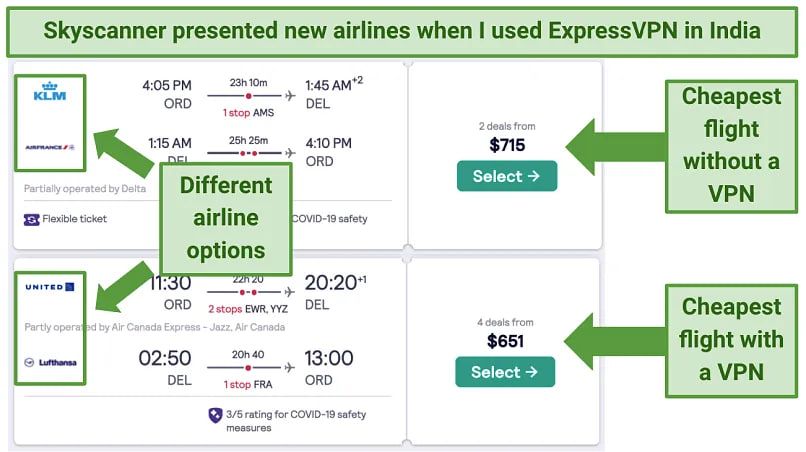
6fgb7vpnusecase

Image by Vpnmentor

A VPN masks not just your IP, it protects other kinds of personal data from being harvested by companies for price personalization. Well, if you are on an air company’s blacklist, it won’t help, so please behave in the air and on earth.

You can encounter price personalization when booking a hotel or renting a car as well. The advice is the same: change location, clear cookies, swap browsers, open a tab in Incognito or Private mode, experiment, finally, google it: people share all sorts of tips and tricks.

3. An escape from corporate slavery into the world of reasonable adults

Offices, schools, campuses, universities, and all types of institutions set up their own networks for people who have to use it. Sometimes they restrict nearly everything except for Wikipedia or work-related resources. If you know you tend to procrastinate and waste your productive hours on Facebook, just reconcile and be grateful to the network administrator. But if you have some things to be done, and a website in need is blocked, help yourself to some VPN.

There is actually another good reason for strict network restrictions: security. Corporate data leaks are a global problem, public organizations suffer too, schools, oh, well, even kindergartens are subjects to cyberthreats. Use VPN to secure your connection and help the network owners be safe: the data will be encrypted.

4. Digital remigration

It’s when you have your body abroad but need your soul to be at home. Superfluous romantic aside, you just might be willing to reach your favorite site or app when being on an abroad vacation or a business trip, but without a VPN it would be impossible.

5. Tinder: more freedom, less money wasted with a VPN

There are at least three ways VPN can help enrich your Tinder experience and solve possible problems.

Change your location to meet people from other countries — without overpaying

By default, you’ll be shown possible matches near you. You can choose a wide range, but you’ll virtually stay in your city or town (with suburbs). If you are in California but want to chat with someone from Paris, just buy Tinder’s paid subscription. But it is more expensive than most VPNs and works only for Tinder, while VPN… see above.

Unfortunately, VPN can help you with that only if you use Tinder via its website tinder.com and have forbidden your browser to detect your location in the settings. Tinder knows when you are using GPS, not IP (when it asks you to "turn on device location for better experience" it means their experience, of course, that’s why you are not allowed to say "no, thanks"). There are some ways for the mobile apps too… But do not count on a VPN in this case.

VPN is not only for pretending to be somewhere else but also for pretending not to be where you are

Tinder may be blocked in your country, in your office, at your school (which is especially upsetting if you are a teacher). Use VPN to get rid of the restrictions. Facebook may also be blocked in some countries or networks. Facebook is not essential for using Tinder, but if you log in via your Facebook account, you need it to be accessible.

Tinder on its side can block you as a user

Not neсesserily because you were naughty and did bad things to other users. Some people get blocked for resetting their account too frequently, for example. Use VPN to try to create another account, although there is no guarantee you’ll succeed: Tinder uses other ways besides IP detection to catch those who try to break back in through the back door.

6. Blocked websites

Why aren’t they letting me in? It is always intriguing — what’s behind the closed door. It may be wiser not to open it if your bluebearded husband asked you not to, but the Internet becomes more and more fragmented, there are some good reasons for it and so many toxic ones. If you find a website inaccessible, VPN may serve as a master key and make the Web more wide and worldly for you.

7. Finally. Security. Again and forever.

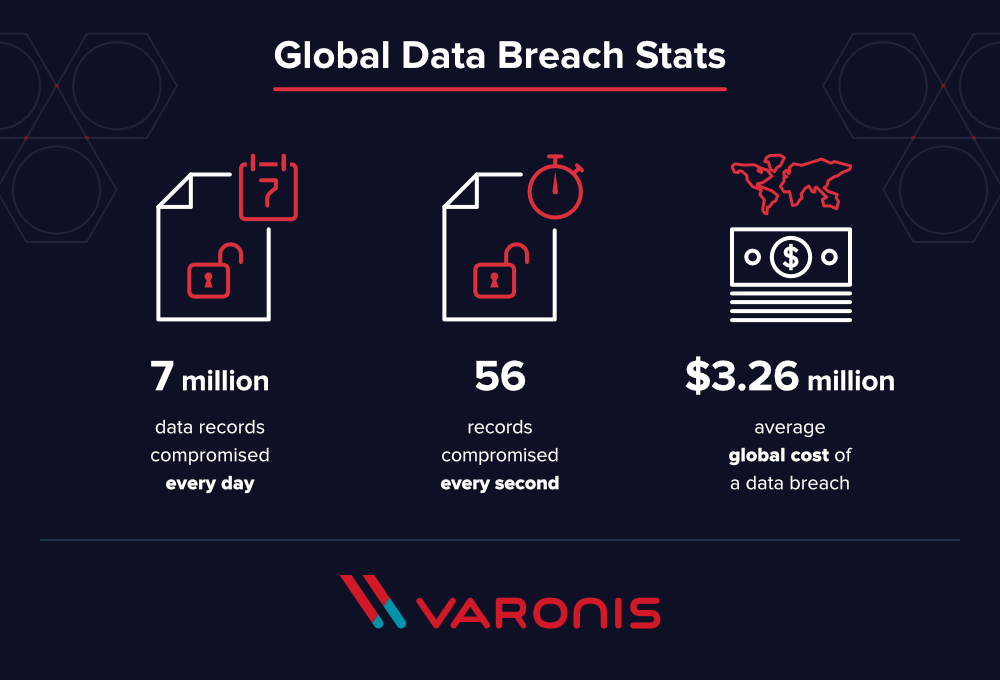
Yes, so boring. Protect your data, save your identity to yourself, do not make yourself and your family vulnerable to scammers and marketing manipulations, bullies and loonies, do not let your company’s data leak, blah blah blah. Every VPN provider keeps talking about how secured encrypted connection through a private network enhances the safety of your digital existence — because it just does.

We at AdGuard know too well how much money and stress nonchalance can cost. AdGuard VPN is made with your well-being in mind.
u9n5ovpnusecases_2

Actually, AdGuard VPN does more than just let you change your location and encrypt the traffic. There are features like Kill Switch, allow- and blocklists, different operation modes, in-house protocol and more. Learn more about all its unique features in this article.


Suka postingan ini?
AdGuard VPN DNS AdGuard AdGuard Mail AdGuard Wallet
Layar utama AdGuard untuk Windows
Layar Perlindungan AdGuard untuk Windows, menampilkan fitur dan pengaturan perlindungan
Layar Statistik AdGuard untuk Windows, menampilkan statistik untuk iklan dan pelacak yang terblokir
Layar Pengelolaan aplikasi AdGuard untuk Windows, menampilkan opsi pengelolaan perlindungan untuk aplikasi yang terinstal di perangkat
20.535 20535 ulasan pengguna
Sempurna!

AdGuard untuk Windows — pemblokir iklan untuk PC Anda

AdGuard untuk Windows lebih dari sekadar pemblokir iklan. Ini adalah alat serbaguna yang memblokir iklan, mengontrol akses ke situs berbahaya, mempercepat pemuatan halaman, dan melindungi anak-anak dari konten yang tidak pantas

Dengan mengunduhnya Anda menerima ketentuan Perjanjian lisensi
Microsoft Store
Dengan mengunduhnya Anda menerima ketentuan Perjanjian lisensi
AdGuard untuk Windows v8.0, masa percobaan 14 hari
Layar utama AdGuard untuk Mac
Layar Mode Siluman AdGuard untuk Mac
20.535 20535 ulasan pengguna
Sempurna!

AdGuard untuk Mac — pemblokir iklan seluruh sistem

AdGuard untuk Mac adalah pemblokir iklan unik yang dirancang khusus untuk macOS. Selain melindungi Anda dari iklan yang mengganggu di browser dan aplikasi, ini juga melindungi Anda dari pelacakan, phishing, dan penipuan
Dengan mengunduhnya Anda menerima ketentuan Perjanjian lisensi
Pelajari lainnya
AdGuard untuk Mac v2.19, masa percobaan 14 hari
Layar utama AdGuard untuk Android
Layar Perlindungan pelacakan AdGuard untuk Android
Layar Pengelolaan aplikasi AdGuard untuk Android, menampilkan opsi pengelolaan perlindungan untuk aplikasi yang terinstal di perangkat
Layar Statistik AdGuard untuk Android, menampilkan statistik untuk iklan dan pelacak yang terblokir
Layar utama peramban privat AdGuard untuk Android
Kode QR untuk unduh AdGuard untuk Android
20.535 20535 ulasan pengguna
Sempurna!

AdGuard untuk Android: pemblokir iklan semua aplikasi

Memblokir iklan dan pelacak di semua browser, game, dan aplikasi lainnya. Melindungi privasi Anda dan memungkinkan Anda mengontrol bagaimana aplikasi Anda menggunakan internet. Diinstal melalui APK
Dengan mengunduhnya Anda menerima ketentuan Perjanjian lisensi
Pelajari lainnya
Pindai untuk mengunduh
Gunakan pembaca kode QR yang tersedia di perangkat Anda
AdGuard untuk Android v4.14, masa percobaan 14 hari
Layar utama AdGuard untuk iOS
Layar Perlindungan AdGuard untuk iOS, menampilkan fitur dan pengaturan perlindungan
Layar Statistik AdGuard untuk iOS, menampilkan statistik untuk iklan dan pelacak yang terblokir
Kode QR untuk unduh AdGuard untuk iOS
20.535 20535 ulasan pengguna
Sempurna!

AdGuard untuk iOS — pemblokir iklan di luar Safari

Pemblokir iklan iOS terbaik untuk iPhone dan iPad. AdGuard menghilangkan semua jenis iklan dan pelacak di Safari serta melindungi privasi Anda di semua aplikasi pada tingkat DNS
Dengan mengunduhnya Anda menerima ketentuan Perjanjian lisensi
Pelajari lainnya
Pindai untuk mengunduh
Gunakan pembaca kode QR yang tersedia di perangkat Anda
AdGuard untuk iOS versi 4.5
Layar utama AdGuard Content Blocker
Layar filter AdGuard Content Blocker
Layar pengaturan AdGuard Content Blocker
20.535 20535 ulasan pengguna
Sempurna!

Pemblokir Konten AdGuard

AdGuard Content Blocker menghilangkan semua jenis iklan di browser seluler yang mendukung teknologi pemblokiran konten — yaitu, Samsung Internet dan Yandex Browser. Fitur-fiturnya terbatas dibandingkan dengan AdGuard untuk Android, tetapi gratis, mudah dipasang, dan efisien
Dengan mengunduhnya Anda menerima ketentuan Perjanjian lisensi
Pelajari lainnya
Pemblokir Konten AdGuard versi 2.8
Layar utama AdGuard Browser Extension
Layar Perlindungan pelacakan AdGuard Browser Extension
20.535 20535 ulasan pengguna
Sempurna!

Ekstensi peramban AdGuard

AdGuard adalah ekstensi pemblokiran iklan tercepat dan paling ringan yang secara efektif memblokir semua jenis iklan di semua halaman web! Pilih AdGuard untuk browser yang Anda gunakan dan dapatkan penjelajahan bebas iklan, cepat, dan aman.
Pasang
Dengan mengunduhnya Anda menerima ketentuan Perjanjian lisensi
Pasang
Dengan mengunduhnya Anda menerima ketentuan Perjanjian lisensi
Pasang
Dengan mengunduhnya Anda menerima ketentuan Perjanjian lisensi
Pasang
Dengan mengunduhnya Anda menerima ketentuan Perjanjian lisensi
Pasang
Dengan mengunduhnya Anda menerima ketentuan Perjanjian lisensi
Pelajari lainnya
Pasang
Dengan mengunduhnya Anda menerima ketentuan Perjanjian lisensi
Pelajari lainnya
Ekstensi peramban AdGuard versi 5.5
Layar utama Asisten Peramban
20.535 20535 ulasan pengguna
Sempurna!

Asisten AdGuard

Sebuah ekstensi peramban pendamping untuk aplikasi AdGuard desktop. Ini mengizinkan Anda memblokir item kustom di situs web, menambahkan situs web ke daftar izinkan, dan mengirim laporan langsung dari peramban Anda
Asisten AdGuard versi 1.4
20.535 20535 ulasan pengguna
Sempurna!

AdGuard Home

AdGuard Home adalah solusi berbasis jaringan untuk memblokir iklan dan pelacak. Instal sekali di router Anda untuk mencakup semua perangkat di jaringan rumah Anda — tidak diperlukan perangkat lunak klien tambahan. Ini sangat penting untuk berbagai perangkat IoT yang sering menimbulkan ancaman bagi privasi Anda
AdGuard Home versi 0.107
Layar utama AdGuard Pro untuk iOS
Layar Perlindungan AdGuard Pro untuk iOS, menampilkan fitur dan pengaturan perlindungan
Layar statistik AdGuard Pro untuk iOS, menampilkan statistik untuk iklan dan pelacak yang terblokir
20.535 20535 ulasan pengguna
Sempurna!

AdGuard Pro untuk iOS

AdGuard Pro untuk iOS dilengkapi dengan semua fitur perlindungan pemblokiran iklan canggih. Aplikasi ini menawarkan fitur yang sama dengan versi berbayar AdGuard untuk iOS. Aplikasi ini unggul dalam memblokir iklan di Safari dan memungkinkan Anda menyesuaikan pengaturan DNS untuk perlindungan yang lebih baik. Aplikasi ini memblokir iklan di browser dan aplikasi, melindungi anak-anak Anda dari konten yang tidak pantas, dan menjaga keamanan data pribadi Anda.
Dengan mengunduhnya Anda menerima ketentuan Perjanjian lisensi
Pelajari lainnya
AdGuard Pro untuk iOS versi 4.5
Layar utama AdGuard Mini untuk Mac
Layar perlindungan Safari AdGuard Mini untuk Mac
Layar Buat aturan AdGuard Mini untuk Mac
20.535 20535 ulasan pengguna
Sempurna!

AdGuard Mini untuk Mac — pemblokir iklan Safari

AdGuard Mini untuk Mac adalah pemblokir iklan Safari yang kuat. Aplikasi ringan ini menghapus iklan, memblokir pelacak, dan mempercepat pemuatan halaman. Ini membantu Anda menjelajah Web di Safari tanpa gangguan dan menjaga data Anda tetap pribadi
Pasang
Dengan mengunduhnya Anda menerima ketentuan Perjanjian lisensi
Pelajari lainnya
AdGuard Mini untuk Mac versi 2.3
Layar utama AdGuard untuk Android TV dengan perlindungan diaktifkan
Layar pemblokiran iklan AdGuard untuk Android TV, menampilkan fitur dan pengaturannya
Layar pengaturan AdGuard untuk Android TV
Layar Pengelolaan aplikasi AdGuard untuk Android TV, menampilkan aplikasi tempat iklan dan pelacak terblokir
20.535 20535 ulasan pengguna
Sempurna!

AdGuard untuk Android TV

AdGuard untuk Android TV adalah satu-satunya aplikasi yang memblokir iklan, menjaga privasi Anda, dan bertindak sebagai firewall untuk Smart TV Anda. Dapatkan peringatan tentang ancaman web, gunakan DNS yang aman, dan dapatkan manfaatkan lalu lintas yang terenkripsi. Bersantailah dan selami acara favorit Anda dengan keamanan terbaik dan tanpa iklan!
AdGuard untuk Android TV v4.14, masa percobaan 14 hari
Maskot AdGuard, Agnar, memegang penguin Linux
20.535 20535 ulasan pengguna
Sempurna!

AdGuard untuk Linux

AdGuard untuk Linux adalah pemblokir iklan sistem luas pertama di dunia untuk Linux. Blokir iklan dan pelacak di tingkat perangkat, pilih dari filter yang sudah terinstal sebelumnya, atau tambahkan milikmu sendiri — semuanya melalui antar muka baris perintah
AdGuard untuk Linux versi 1.4
20.535 20535 ulasan pengguna
Sempurna!

AdGuard Temp Mail

Generator alamat e-mail sementara gratis yang membuat Anda tetap anonim dan melindungi privasi Anda. Tidak ada spam di kotak masuk utama Anda!
20.535 20535 ulasan pengguna
Sempurna!

AdGuard VPN

75 Lokasi Di Seluruh Dunia

Akses ke konten apa pun

Enkripsi yang kuat

Tanpa kebijakan log

Koneksi paling cepat

dukungan 24/7

Coba gratis
Dengan mengunduhnya Anda menerima ketentuan Perjanjian lisensi
Pelajari lainnya
20.535 20535 ulasan pengguna
Sempurna!

DNS AdGuard

AdGuard DNS adalah cara yang sangat andal untuk memblokir iklan internet tanpa perlu menginstal aplikasi apapun. Mudah digunakan, sepenuhnya gratis, mudah dipasang di perangkat mana saja, dan menyediakan fungsi minimal yang diperlukan untuk memblokir iklan, penghitung, situs web berbahaya, dan konten dewasa.
20.535 20535 ulasan pengguna
Sempurna!

AdGuard Mail

Lindungi identitas Anda, hindari spam, dan jaga keamanan kotak masuk Anda dengan alias dan alamat e-mail sementara kami. Nikmati layanan penerusan e-mail gratis serta aplikasi untuk semua sistem operasi.
20.535 20535 ulasan pengguna
Sempurna!

AdGuard Wallet

Dompet kripto yang aman dan pribadi yang memberi Anda kendali penuh atas aset Anda. Kelola beberapa dompet dan temukan ribuan mata uang kripto untuk disimpan, dikirim, dan ditukar
Mengunduh AdGuard Klik tombol yang ditujukkan oleh panah untuk memulai instalasi. Pilih "Buka" dan klik "OK", lalu tunggu file diunduh. Di jendela yang terbuka, seret ikon AdGuard ke folder "Aplikasi". Terima kasih telah memilih AdGuard! Pilih "Buka" dan klik "OK", lalu tunggu file diunduh. Di jendela yang terbuka, klik "Install". Terima kasih telah memilih AdGuard!
Instal AdGuard untuk perangkat ponsel juga

















































