Can GPT-4 block ads better than humans? We put an AI-powered ad blocker to the test

Everyone knows ChatGPT, an AI chatbot based on OpenAI’s latest model, GPT-4. But beyond OpenAI’s own products, GPT-4 has been integrated into many applications and services, from learning and payment apps to Microsoft’s Bing AI and now ad blocking.

A Chrome extension with a rather straightforward name GPT-AdBlocker was launched in April this year on Product Hunt. It is developed by a company called In5 Tech, based in Dubai, UAE. The extension claims to use GPT-4 technology to block all kinds of trackers and ads, including sponsored content inside YouTube videos that your typical ad blocker cannot block. The GPT-AdBlocker team describes the extension as “the ultimate all-in-one solution.” As far as its accuracy goes, they say it’s “very accurate” in detecting ads in videos but “some errors”may creep in. So far, the extension is available only for Chrome, but the team behind it plans to deploy it to “multiple other browsers.”

Intrigued by the new kid on the block, and the AI-powered one at that, we decided to give it a try.

The ideal outcome: achievable or not?

Before we present you the results of our experiments with GPT-AdBlocker, let’s talk a bit about the extension’s features and how it should work in an ideal world.

GPT-AdBlocker has a very clean, if not ascetic interface and only two switches: one for regular ad blocking and one for AI-powered sponsor blocking, which is what we are interested in today. Of course, you can turn off the AI mode and use it as a regular ad blocker, but that’s not what we’re here for. It is with both of its modes enabled at the same time that GPT AdBlocker is supposed to be at its most efficient.
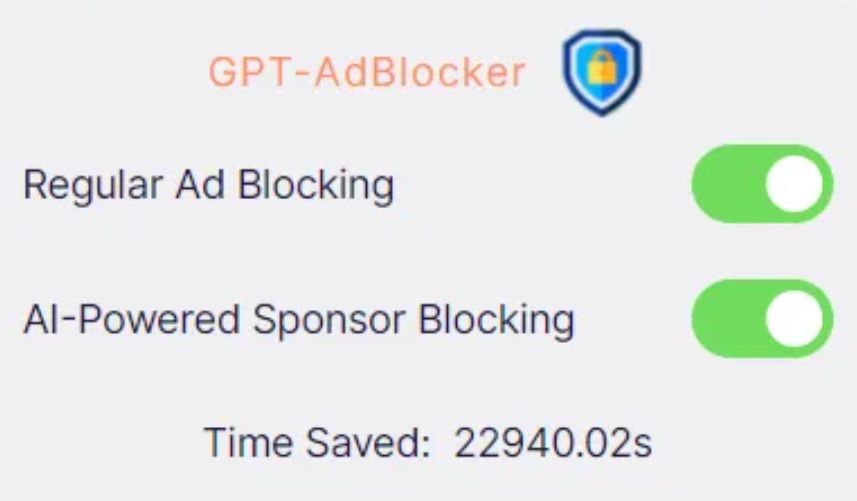
GPT-AdBlocker has a clean and simple interface *mobile

So, in its ideal implementation the GPT-AdBlocker should allow you to skip sponsored content in videos, which are the segments that brands usually pay the content creator directly for.

We imagined it would look something like in the example below, where we used a graphic editor to manually cut the Destroying My RTX 3090 Ti With Incredible Minecraft Graphics YouTube video to remove a sponsored segment.

Some of you might wonder why we had to cut the video manually to demonstrate a ‘near-perfect’ example of how the GPT-AdBlocker is supposed to work. But let’s just say that the results of our interaction with the actual extension to skip sponsored ads were… a very mixed bag. And now we will show you why — with receipts, of course.

The challenges of AI ad blocking: choppy cuts & incomplete sentences

We wanted to test how well the GPT-AdBlocker works on different types of videos that feature at least one sponsored segment. One of these videos was the one that we had manually edited before — now let’s compare it with the version that the AI-powered ad blocker produced.

The difference is not huge, but it is noticeable and not in favor of the extension: after the sponsored segment is skipped, the video resumes abruptly, in the middle of a sentence. However, this by no means a catastrophe and the content is still watchable.

The same cannot be said about videos that feature multiple product placements throughout, which is very common with tutorials, where showing tools, whichever they are, is an inalienable part of the content. When we watched a makeup tutorial with the GPT-AdBlocker on, we counted five skipped segments. The cuts were usually rough, some product placements were removed, some were not. As a result, we missed important parts of the content, which made the video unwatchable. See our compilation of cuts by the extension below (fade in and fade out are done by us).

Sometimes the issue would be just a jagged cut, which made you wonder whether anything valuable was skipped or if it was just how it was supposed to be.

Sometimes it would be just a few words missing, with the video stopping and resuming mid-sentence as in the example below — though, one could argue that even a few words can make a big difference.

Generally, the problems started when the sponsored segment was not a separate part of the video, but an integral part of it. Like in the example below, where AI cropped the video in such a way that the key part of financial advice is missing (we would not weigh in on the merits of that advice, but you get the point).

Oftentimes the extension would not remove the sponsored segment in its entirety, but only parts of it, which is, however, probably still better than removing too much.

Ethical dilemma

In our express analysis on YouTube’s potential ban on ad blockers, we mentioned that content creators are increasingly relying on brand deals, in addition to donations, to support their work. The ways of YouTube when it comes to monetization or demonetization of certain videos and entire channels are generally unsearchable; besides, YouTube takes about 45% of the creators’ ad revenues. Brands, unlike YouTube, pay content creators directly, usually better, and that pay is more stable.

Granted, sponsored segments can be annoying, sketchy and feel too long — but they are still part of the content, so blocking them entirely raises an ethical issue. And as far as we’re concerned, it’s probably unfair to take an axe to all that brand money. Content creators who are transparent about sponsored content in their videos and clearly label it, make it pretty easy to manually skip it. On the other hand, there are plenty of YouTubers who promote junk, but should honest content creators suffer for the unscrupulous ones?

In a nutshell: what we think about AI & ad blocking

The emergence of an AI-powered ad blocking extension is an intriguing and a potentially transformative development in the field. The goal of the extension is to detect and remove sponsored segments from videos, and it does that, but not all of them, and not completely. Sometimes it leaves “leftovers” of sponsored ads, sometimes it cuts the video rather crudely. Sometimes it works nearly perfectly, but rarely.

The approach is interesting and will shape the future of ad blocking to some extent. AI is permeating all areas, and ad blocking, like ad creation, is no exception. However, the current implementation of this technology, exemplified by the GPT-AdBlocker, falls short of providing a reliable and comprehensive solution. Moreover, while the integration of AI into ad blocking is promising, it’s possible that even with additional fine-tuning it won’t be a panacea for all ad-related challenges due to the intricacies of content creation.

In cases where sponsored segments or product placements are seamlessly embedded into a video, GPT-AdBlocker may render the content unwatchable. For example, content genres such as makeup tutorials (or any type of tutorial) can suffer significantly when key segments are omitted.

Nonetheless, AI is already impacting the advertising industry, and it’s only natural that the ad blocking industry will take advantage of its capabilities. The debate is not whether we should use AI, but rather how we should use it.


Suka postingan ini?
AdGuard VPN DNS AdGuard AdGuard Mail AdGuard Wallet
Layar utama AdGuard untuk Windows
Layar Perlindungan AdGuard untuk Windows, menampilkan fitur dan pengaturan perlindungan
Layar Statistik AdGuard untuk Windows, menampilkan statistik untuk iklan dan pelacak yang terblokir
Layar Pengelolaan aplikasi AdGuard untuk Windows, menampilkan opsi pengelolaan perlindungan untuk aplikasi yang terinstal di perangkat
20.534 20534 ulasan pengguna
Sempurna!

AdGuard untuk Windows — pemblokir iklan untuk PC Anda

AdGuard untuk Windows lebih dari sekadar pemblokir iklan. Ini adalah alat serbaguna yang memblokir iklan, mengontrol akses ke situs berbahaya, mempercepat pemuatan halaman, dan melindungi anak-anak dari konten yang tidak pantas
Dengan mengunduhnya Anda menerima ketentuan Perjanjian lisensi
Microsoft Store
Dengan mengunduhnya Anda menerima ketentuan Perjanjian lisensi
AdGuard untuk Windows v8.0, masa percobaan 14 hari
Layar utama AdGuard untuk Mac
Layar Mode Siluman AdGuard untuk Mac
20.534 20534 ulasan pengguna
Sempurna!

AdGuard untuk Mac — pemblokir iklan seluruh sistem

AdGuard untuk Mac adalah pemblokir iklan unik yang dirancang khusus untuk macOS. Selain melindungi Anda dari iklan yang mengganggu di browser dan aplikasi, ini juga melindungi Anda dari pelacakan, phishing, dan penipuan
Dengan mengunduhnya Anda menerima ketentuan Perjanjian lisensi
Pelajari lainnya
AdGuard untuk Mac v2.19, masa percobaan 14 hari
Layar utama AdGuard untuk Android
Layar Perlindungan pelacakan AdGuard untuk Android
Layar Pengelolaan aplikasi AdGuard untuk Android, menampilkan opsi pengelolaan perlindungan untuk aplikasi yang terinstal di perangkat
Layar Statistik AdGuard untuk Android, menampilkan statistik untuk iklan dan pelacak yang terblokir
Layar utama peramban privat AdGuard untuk Android
Kode QR untuk unduh AdGuard untuk Android
20.534 20534 ulasan pengguna
Sempurna!

AdGuard untuk Android: pemblokir iklan semua aplikasi

Memblokir iklan dan pelacak di semua browser, game, dan aplikasi lainnya. Melindungi privasi Anda dan memungkinkan Anda mengontrol bagaimana aplikasi Anda menggunakan internet. Diinstal melalui APK

Dengan mengunduhnya Anda menerima ketentuan Perjanjian lisensi
Pelajari lainnya
Pindai untuk mengunduh
Gunakan pembaca kode QR yang tersedia di perangkat Anda
AdGuard untuk Android v4.14, masa percobaan 14 hari
Layar utama AdGuard untuk iOS
Layar Perlindungan AdGuard untuk iOS, menampilkan fitur dan pengaturan perlindungan
Layar Statistik AdGuard untuk iOS, menampilkan statistik untuk iklan dan pelacak yang terblokir
Kode QR untuk unduh AdGuard untuk iOS
20.534 20534 ulasan pengguna
Sempurna!

AdGuard untuk iOS — pemblokir iklan di luar Safari

Pemblokir iklan iOS terbaik untuk iPhone dan iPad. AdGuard menghilangkan semua jenis iklan dan pelacak di Safari serta melindungi privasi Anda di semua aplikasi pada tingkat DNS

Dengan mengunduhnya Anda menerima ketentuan Perjanjian lisensi
Pelajari lainnya
Pindai untuk mengunduh
Gunakan pembaca kode QR yang tersedia di perangkat Anda
AdGuard untuk iOS versi 4.5
Layar utama AdGuard Content Blocker
Layar filter AdGuard Content Blocker
Layar pengaturan AdGuard Content Blocker
20.534 20534 ulasan pengguna
Sempurna!

Pemblokir Konten AdGuard

AdGuard Content Blocker menghilangkan semua jenis iklan di browser seluler yang mendukung teknologi pemblokiran konten — yaitu, Samsung Internet dan Yandex Browser. Fitur-fiturnya terbatas dibandingkan dengan AdGuard untuk Android, tetapi gratis, mudah dipasang, dan efisien
Dengan mengunduhnya Anda menerima ketentuan Perjanjian lisensi
Pelajari lainnya
Pemblokir Konten AdGuard versi 2.8
Layar utama AdGuard Browser Extension
Layar Perlindungan pelacakan AdGuard Browser Extension
20.534 20534 ulasan pengguna
Sempurna!

Ekstensi peramban AdGuard

AdGuard adalah ekstensi pemblokiran iklan tercepat dan paling ringan yang secara efektif memblokir semua jenis iklan di semua halaman web! Pilih AdGuard untuk browser yang Anda gunakan dan dapatkan penjelajahan bebas iklan, cepat, dan aman.
Pasang
Dengan mengunduhnya Anda menerima ketentuan Perjanjian lisensi
Pasang
Dengan mengunduhnya Anda menerima ketentuan Perjanjian lisensi
Pasang
Dengan mengunduhnya Anda menerima ketentuan Perjanjian lisensi
Pasang
Dengan mengunduhnya Anda menerima ketentuan Perjanjian lisensi
Pasang
Dengan mengunduhnya Anda menerima ketentuan Perjanjian lisensi
Pelajari lainnya
Pasang
Dengan mengunduhnya Anda menerima ketentuan Perjanjian lisensi
Pelajari lainnya
Ekstensi peramban AdGuard versi 5.5
Layar utama Asisten Peramban
20.534 20534 ulasan pengguna
Sempurna!

Asisten AdGuard

Sebuah ekstensi peramban pendamping untuk aplikasi AdGuard desktop. Ini mengizinkan Anda memblokir item kustom di situs web, menambahkan situs web ke daftar izinkan, dan mengirim laporan langsung dari peramban Anda
Asisten AdGuard versi 1.4
20.534 20534 ulasan pengguna
Sempurna!

AdGuard Home

AdGuard Home adalah solusi berbasis jaringan untuk memblokir iklan dan pelacak. Instal sekali di router Anda untuk mencakup semua perangkat di jaringan rumah Anda — tidak diperlukan perangkat lunak klien tambahan. Ini sangat penting untuk berbagai perangkat IoT yang sering menimbulkan ancaman bagi privasi Anda
AdGuard Home versi 0.107
Layar utama AdGuard Pro untuk iOS
Layar Perlindungan AdGuard Pro untuk iOS, menampilkan fitur dan pengaturan perlindungan
Layar statistik AdGuard Pro untuk iOS, menampilkan statistik untuk iklan dan pelacak yang terblokir
20.534 20534 ulasan pengguna
Sempurna!

AdGuard Pro untuk iOS

AdGuard Pro untuk iOS dilengkapi dengan semua fitur perlindungan pemblokiran iklan canggih. Aplikasi ini menawarkan fitur yang sama dengan versi berbayar AdGuard untuk iOS. Aplikasi ini unggul dalam memblokir iklan di Safari dan memungkinkan Anda menyesuaikan pengaturan DNS untuk perlindungan yang lebih baik. Aplikasi ini memblokir iklan di browser dan aplikasi, melindungi anak-anak Anda dari konten yang tidak pantas, dan menjaga keamanan data pribadi Anda.
Dengan mengunduhnya Anda menerima ketentuan Perjanjian lisensi
Pelajari lainnya
AdGuard Pro untuk iOS versi 4.5
Layar utama AdGuard Mini untuk Mac
Layar perlindungan Safari AdGuard Mini untuk Mac
Layar Buat aturan AdGuard Mini untuk Mac
20.534 20534 ulasan pengguna
Sempurna!

AdGuard Mini untuk Mac — pemblokir iklan Safari

AdGuard Mini untuk Mac adalah pemblokir iklan Safari yang kuat. Aplikasi ringan ini menghapus iklan, memblokir pelacak, dan mempercepat pemuatan halaman. Ini membantu Anda menjelajah Web di Safari tanpa gangguan dan menjaga data Anda tetap pribadi
Pasang
Dengan mengunduhnya Anda menerima ketentuan Perjanjian lisensi
Pelajari lainnya
AdGuard Mini untuk Mac versi 2.3
Layar utama AdGuard untuk Android TV dengan perlindungan diaktifkan
Layar pemblokiran iklan AdGuard untuk Android TV, menampilkan fitur dan pengaturannya
Layar pengaturan AdGuard untuk Android TV
Layar Pengelolaan aplikasi AdGuard untuk Android TV, menampilkan aplikasi tempat iklan dan pelacak terblokir
20.534 20534 ulasan pengguna
Sempurna!

AdGuard untuk Android TV

AdGuard untuk Android TV adalah satu-satunya aplikasi yang memblokir iklan, menjaga privasi Anda, dan bertindak sebagai firewall untuk Smart TV Anda. Dapatkan peringatan tentang ancaman web, gunakan DNS yang aman, dan dapatkan manfaatkan lalu lintas yang terenkripsi. Bersantailah dan selami acara favorit Anda dengan keamanan terbaik dan tanpa iklan!
AdGuard untuk Android TV v4.14, masa percobaan 14 hari
Maskot AdGuard, Agnar, memegang penguin Linux
20.534 20534 ulasan pengguna
Sempurna!

AdGuard untuk Linux

AdGuard untuk Linux adalah pemblokir iklan sistem luas pertama di dunia untuk Linux. Blokir iklan dan pelacak di tingkat perangkat, pilih dari filter yang sudah terinstal sebelumnya, atau tambahkan milikmu sendiri — semuanya melalui antar muka baris perintah
AdGuard untuk Linux versi 1.4
20.534 20534 ulasan pengguna
Sempurna!

AdGuard Temp Mail

Generator alamat e-mail sementara gratis yang membuat Anda tetap anonim dan melindungi privasi Anda. Tidak ada spam di kotak masuk utama Anda!
20.534 20534 ulasan pengguna
Sempurna!

AdGuard VPN

75 Lokasi Di Seluruh Dunia

Akses ke konten apa pun

Enkripsi yang kuat

Tanpa kebijakan log

Koneksi paling cepat

dukungan 24/7

Coba gratis
Dengan mengunduhnya Anda menerima ketentuan Perjanjian lisensi
Pelajari lainnya
20.534 20534 ulasan pengguna
Sempurna!

DNS AdGuard

AdGuard DNS adalah cara yang sangat andal untuk memblokir iklan internet tanpa perlu menginstal aplikasi apapun. Mudah digunakan, sepenuhnya gratis, mudah dipasang di perangkat mana saja, dan menyediakan fungsi minimal yang diperlukan untuk memblokir iklan, penghitung, situs web berbahaya, dan konten dewasa.
20.534 20534 ulasan pengguna
Sempurna!

AdGuard Mail

Lindungi identitas Anda, hindari spam, dan jaga keamanan kotak masuk Anda dengan alias dan alamat e-mail sementara kami. Nikmati layanan penerusan e-mail gratis serta aplikasi untuk semua sistem operasi.
20.534 20534 ulasan pengguna
Sempurna!

AdGuard Wallet

Dompet kripto yang aman dan pribadi yang memberi Anda kendali penuh atas aset Anda. Kelola beberapa dompet dan temukan ribuan mata uang kripto untuk disimpan, dikirim, dan ditukar
Mengunduh AdGuard Klik tombol yang ditujukkan oleh panah untuk memulai instalasi. Pilih "Buka" dan klik "OK", lalu tunggu file diunduh. Di jendela yang terbuka, seret ikon AdGuard ke folder "Aplikasi". Terima kasih telah memilih AdGuard! Pilih "Buka" dan klik "OK", lalu tunggu file diunduh. Di jendela yang terbuka, klik "Install". Terima kasih telah memilih AdGuard!
Instal AdGuard untuk perangkat ponsel juga
















































