Cloudflare says Encrypted Client Hello might ‘solve privacy for good’. The reality is not that simple

A cutting-edge technology that is “filling the privacy gap in our existing online security infrastructure” and that, if widely adopted, “might even solve privacy for good.” Sounds promising, right? That’s how Mozilla and Cloudflare describe Encrypted Client Hello (ECH), a protocol that encrypts the entire “hello” message or the first communication between your browser and a website’s server.

We believe ECH is indeed a major element of Internet privacy, and the importance of its support by such major players as Mozilla, Chrome, and Cloudflare cannot be understated. At AdGuard, we have added ECH support in our Windows, Mac, and Android apps, because we believe in the technology’s potential to make browsing more private. AdGuard’s ECH support works across all apps and browsers that AdGuard filters. But is ECH the missing piece of the puzzle that will solve privacy and defeat censorship once and for all? As much as we would like it to, it is unlikely.

And before we pour some cold water on the excitement over ECH and its supposed invincibility to censors, copyright authorities, peeping toms, and other prying eyes, we need to take a step back and cover some basics.

What is ECH and why do we need it?

Imagine you are sending a letter to your friend. You seal the envelope and write their name and address on it. No one can open the envelope and read your letter without breaking the seal. But anyone can see who you are sending the letter to by looking at the address.

That’s kind of how HTTPS, a default protocol that is used by over 84% of websites, works. The first piece of information your browser communicates when establishing an encrypted connection to the website is known as “Client Hello.” Some information in Client Hello, such as SNI (Server Name Indication, which is a way for your browser to tell the server which website it wants to connect to), is not encrypted. This, in turn, means that network operators, including your ISP, can see it. Having received the Client Hello message, the server replies with some information known as “Server Hello” to complete the ‘handshake’ with the device.
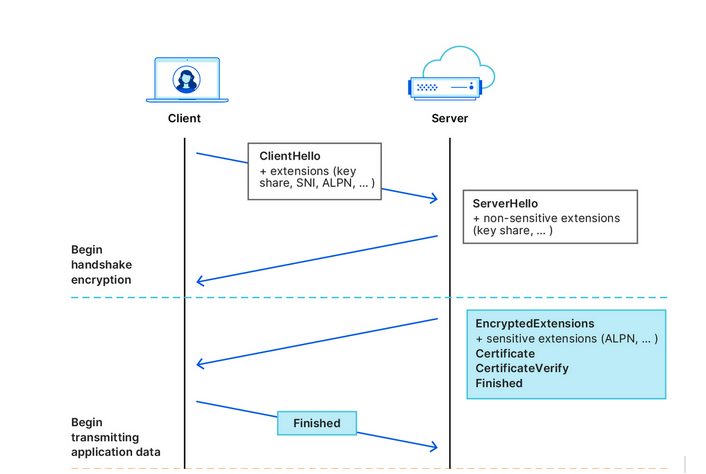
Cloudflare illustrates how the handshake works
Source: Cloudflare

After that first greeting, the data your browser exchanges with the server is encrypted, so that only you and the website can see what’s inside it. But by that point, your internet provider already knows the name of the website you are visiting. For example, if you went to www.google.com, your internet provider couldn’t see what you were searching for, but they could see that you were using Google.

What we’ve described above is how a TLS handshake works. TLS stands for Transport Layer Security, which is a cryptographic protocol that provides end-to-end security for data sent over the Internet. To be more technical, the first “Client Hello” message that your browser sends in clear text to the website’s servers contains not only the SNI, but also the TLS version and an encryption algorithm. But the main point is it’s not encrypted, so anyone who can see the network traffic can also see the website name your browser is requesting.

The question is, how can we shield that first piece of data that is not encrypted and that exposes our browsing habits?

This is where the Encrypted Client Hello protocol comes in. In simple terms, ECH encrypts the Client Hello message containing SNI, which, as we’ve already mentioned, indicates the name of the website you are visiting. Instead of showing the website’s real domain name, like www.google.com, to any external observers, your browser only shows the name of a so-called client-facing server, behind which multiple backend servers with their own domain names are hidden. The client-facing server has a general domain name: for example, Cloudflare uses cloudflare-ech.com as its client-facing server name. But how does your browser know which information to send to it to connect to a specific website?

The client-facing server acts as a middleman that has a special decryption key with which it opens your inner letter and sees your website name. Then it forwards the request to the real domain and sends back the response. This is possible because ECH splits Client Hello into two parts: the outer part contains non-sensitive information like the name of the client-facing server, and the inner part contains the inner SNI indicating the domain name of the backend server, which is the website you want to visit. To continue with our letter analogy: it’s like having the same address written on letters to different recipients, and having to use a magic wand to break the seal to see the inner letter with an actual address.
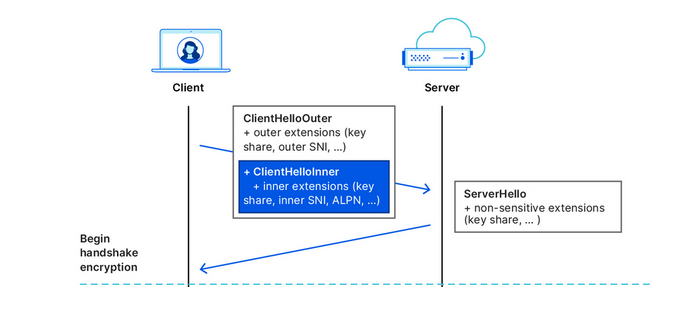
Cloudflare illustrates how the ECH works
Source: Cloudflare

What is the situation like with ECH adoption?

In recent months, more and more industry players have begun to warm up to ECH. Google started shipping the feature in Chrome 117, while Chrome 118 became the first stable release of Google’s browser with ECH support. In Firefox, ECH is on by default as of Firefox 118, but only works if you have DNS-over-HTTPS enabled. Edge is also testing ECH, but has yet to roll it out in a stable version.

However, support for ECH from the browser side means little without being reciprocated from the server side. It only means that a browser can send encrypted ECH messages to the servers that support this protocol. So, the move by Cloudflare, the most popular CDN provider on the market, to also support the protocol has made a big difference in the ECH adoption. Cloudflare, which handles around 20% of all the traffic on the Internet, announced that it began supporting ECH for all customers on free plans at the end of September, and encouraged paid customers to apply for the feature.

The protocol, however, still has a long way to go before it is widely accepted. As of right now, many of Cloudflare’s free domains are missing information about ECH in their DNS records, so Chrome can’t use ECH for those websites. But, since the ECH rollout is still in its early stages, this issue will likely be resolved over time.

So, is privacy solved?

As much as we would like to see it happen, declaring privacy solved is wishful thinking.

On the one hand, the universal adoption of the ECH, if it happens, will render useless some of the tried-and-tested blocking techniques employed by Internet authorities around the world to tackle online piracy, incur geo-fencing, and impose censorship. For one, law enforcement authorities will find it more difficult to target specific websites based on their names, because they will be hidden by the ECH.

However, this does not mean that censors won’t be able to clear this hurdle. It may require some adjustments on their part, but blocking will still be possible.

ECH’s weak spots or potential blocking methods

Now, we’re going to play devil’s advocate and give you some concrete ways that censors can try to block websites despite the implementation of the ECH.

  • One way is to “cut” the ECH from DNS records. To establish an ECH connection with a server, your browser needs a special DNS record from that server. This record tells your browser which domain name and decryption key to use in the outer and inner part of the ECH. However, if your DNS traffic is not encrypted, which is the case for most users, then anyone who can see your DNS queries, such as your ISP or a censor, can also see the ECH record. They can use this record to identify and block your ECH connection. Of course, if users have encrypted their DNS traffic, then this method won’t work.

  • A cruder, but a fairly effective way is to block all known client-facing servers, such as clouflare-ech.com. Realistically, there shouldn’t be many of these servers, so it should not be hard for censors to identify and block them all. But this method is very risky because it could break the Internet for many users. If the censors block all the servers that support ECH, then the browsers will not be able to establish a connection with the websites that have ECH enabled. This may, in turn, prompt Cloudflare to disable ECH for countries with strict internet censorship. It remains to be seen how Cloudflare will react if their client-facing server gets blocked by censors in countries like China or Russia. They will face a difficult choice, for sure. Another pitfall that awaits those banking on ECH as the ultimate solution to all privacy-related problems is a risk that website owners will simply refuse to adopt it or will opt out of the protocol because of the very same reason. If censors target ECH and make websites that enable it unaccessible, then website owners might want to disable the ECH support rather than lose their visitors.

There’s no denying that ECH is an exciting and a very promising technology that aims to make the Internet more private. However, it is not foolproof, and should not be regarded as a panacea against surveillance. Moreover, its widespread adoption favors the use of certain CDN services, such as the one offered by Cloudflare. While these services may not be problematic in and of themselves, their promotion as a side-effect of the ECH adoption risks making the Internet even more centralized than before. Only time will tell if this is for better or worse.


Suka postingan ini?
AdGuard VPN DNS AdGuard AdGuard Mail AdGuard Wallet
Layar utama AdGuard untuk Windows
Layar Perlindungan AdGuard untuk Windows, menampilkan fitur dan pengaturan perlindungan
Layar Statistik AdGuard untuk Windows, menampilkan statistik untuk iklan dan pelacak yang terblokir
Layar Pengelolaan aplikasi AdGuard untuk Windows, menampilkan opsi pengelolaan perlindungan untuk aplikasi yang terinstal di perangkat
20.534 20534 ulasan pengguna
Sempurna!

AdGuard untuk Windows — pemblokir iklan untuk PC Anda

AdGuard untuk Windows lebih dari sekadar pemblokir iklan. Ini adalah alat serbaguna yang memblokir iklan, mengontrol akses ke situs berbahaya, mempercepat pemuatan halaman, dan melindungi anak-anak dari konten yang tidak pantas

Dengan mengunduhnya Anda menerima ketentuan Perjanjian lisensi
Microsoft Store
Dengan mengunduhnya Anda menerima ketentuan Perjanjian lisensi
AdGuard untuk Windows v8.0, masa percobaan 14 hari
Layar utama AdGuard untuk Mac
Layar Mode Siluman AdGuard untuk Mac
20.534 20534 ulasan pengguna
Sempurna!

AdGuard untuk Mac — pemblokir iklan seluruh sistem

AdGuard untuk Mac adalah pemblokir iklan unik yang dirancang khusus untuk macOS. Selain melindungi Anda dari iklan yang mengganggu di browser dan aplikasi, ini juga melindungi Anda dari pelacakan, phishing, dan penipuan
Dengan mengunduhnya Anda menerima ketentuan Perjanjian lisensi
Pelajari lainnya
AdGuard untuk Mac v2.19, masa percobaan 14 hari
Layar utama AdGuard untuk Android
Layar Perlindungan pelacakan AdGuard untuk Android
Layar Pengelolaan aplikasi AdGuard untuk Android, menampilkan opsi pengelolaan perlindungan untuk aplikasi yang terinstal di perangkat
Layar Statistik AdGuard untuk Android, menampilkan statistik untuk iklan dan pelacak yang terblokir
Layar utama peramban privat AdGuard untuk Android
Kode QR untuk unduh AdGuard untuk Android
20.534 20534 ulasan pengguna
Sempurna!

AdGuard untuk Android: pemblokir iklan semua aplikasi

Memblokir iklan dan pelacak di semua browser, game, dan aplikasi lainnya. Melindungi privasi Anda dan memungkinkan Anda mengontrol bagaimana aplikasi Anda menggunakan internet. Diinstal melalui APK
Dengan mengunduhnya Anda menerima ketentuan Perjanjian lisensi
Pelajari lainnya
Pindai untuk mengunduh
Gunakan pembaca kode QR yang tersedia di perangkat Anda
AdGuard untuk Android v4.14, masa percobaan 14 hari
Layar utama AdGuard untuk iOS
Layar Perlindungan AdGuard untuk iOS, menampilkan fitur dan pengaturan perlindungan
Layar Statistik AdGuard untuk iOS, menampilkan statistik untuk iklan dan pelacak yang terblokir
Kode QR untuk unduh AdGuard untuk iOS
20.534 20534 ulasan pengguna
Sempurna!

AdGuard untuk iOS — pemblokir iklan di luar Safari

Pemblokir iklan iOS terbaik untuk iPhone dan iPad. AdGuard menghilangkan semua jenis iklan dan pelacak di Safari serta melindungi privasi Anda di semua aplikasi pada tingkat DNS
Dengan mengunduhnya Anda menerima ketentuan Perjanjian lisensi
Pelajari lainnya
Pindai untuk mengunduh
Gunakan pembaca kode QR yang tersedia di perangkat Anda
AdGuard untuk iOS versi 4.5
Layar utama AdGuard Content Blocker
Layar filter AdGuard Content Blocker
Layar pengaturan AdGuard Content Blocker
20.534 20534 ulasan pengguna
Sempurna!

Pemblokir Konten AdGuard

AdGuard Content Blocker menghilangkan semua jenis iklan di browser seluler yang mendukung teknologi pemblokiran konten — yaitu, Samsung Internet dan Yandex Browser. Fitur-fiturnya terbatas dibandingkan dengan AdGuard untuk Android, tetapi gratis, mudah dipasang, dan efisien
Dengan mengunduhnya Anda menerima ketentuan Perjanjian lisensi
Pelajari lainnya
Pemblokir Konten AdGuard versi 2.8
Layar utama AdGuard Browser Extension
Layar Perlindungan pelacakan AdGuard Browser Extension
20.534 20534 ulasan pengguna
Sempurna!

Ekstensi peramban AdGuard

AdGuard adalah ekstensi pemblokiran iklan tercepat dan paling ringan yang secara efektif memblokir semua jenis iklan di semua halaman web! Pilih AdGuard untuk browser yang Anda gunakan dan dapatkan penjelajahan bebas iklan, cepat, dan aman.
Pasang
Dengan mengunduhnya Anda menerima ketentuan Perjanjian lisensi
Pasang
Dengan mengunduhnya Anda menerima ketentuan Perjanjian lisensi
Pasang
Dengan mengunduhnya Anda menerima ketentuan Perjanjian lisensi
Pasang
Dengan mengunduhnya Anda menerima ketentuan Perjanjian lisensi
Pasang
Dengan mengunduhnya Anda menerima ketentuan Perjanjian lisensi
Pelajari lainnya
Pasang
Dengan mengunduhnya Anda menerima ketentuan Perjanjian lisensi
Pelajari lainnya
Ekstensi peramban AdGuard versi 5.5
Layar utama Asisten Peramban
20.534 20534 ulasan pengguna
Sempurna!

Asisten AdGuard

Sebuah ekstensi peramban pendamping untuk aplikasi AdGuard desktop. Ini mengizinkan Anda memblokir item kustom di situs web, menambahkan situs web ke daftar izinkan, dan mengirim laporan langsung dari peramban Anda
Asisten AdGuard versi 1.4
20.534 20534 ulasan pengguna
Sempurna!

AdGuard Home

AdGuard Home adalah solusi berbasis jaringan untuk memblokir iklan dan pelacak. Instal sekali di router Anda untuk mencakup semua perangkat di jaringan rumah Anda — tidak diperlukan perangkat lunak klien tambahan. Ini sangat penting untuk berbagai perangkat IoT yang sering menimbulkan ancaman bagi privasi Anda
AdGuard Home versi 0.107
Layar utama AdGuard Pro untuk iOS
Layar Perlindungan AdGuard Pro untuk iOS, menampilkan fitur dan pengaturan perlindungan
Layar statistik AdGuard Pro untuk iOS, menampilkan statistik untuk iklan dan pelacak yang terblokir
20.534 20534 ulasan pengguna
Sempurna!

AdGuard Pro untuk iOS

AdGuard Pro untuk iOS dilengkapi dengan semua fitur perlindungan pemblokiran iklan canggih. Aplikasi ini menawarkan fitur yang sama dengan versi berbayar AdGuard untuk iOS. Aplikasi ini unggul dalam memblokir iklan di Safari dan memungkinkan Anda menyesuaikan pengaturan DNS untuk perlindungan yang lebih baik. Aplikasi ini memblokir iklan di browser dan aplikasi, melindungi anak-anak Anda dari konten yang tidak pantas, dan menjaga keamanan data pribadi Anda.
Dengan mengunduhnya Anda menerima ketentuan Perjanjian lisensi
Pelajari lainnya
AdGuard Pro untuk iOS versi 4.5
Layar utama AdGuard Mini untuk Mac
Layar perlindungan Safari AdGuard Mini untuk Mac
Layar Buat aturan AdGuard Mini untuk Mac
20.534 20534 ulasan pengguna
Sempurna!

AdGuard Mini untuk Mac — pemblokir iklan Safari

AdGuard Mini untuk Mac adalah pemblokir iklan Safari yang kuat. Aplikasi ringan ini menghapus iklan, memblokir pelacak, dan mempercepat pemuatan halaman. Ini membantu Anda menjelajah Web di Safari tanpa gangguan dan menjaga data Anda tetap pribadi
Pasang
Dengan mengunduhnya Anda menerima ketentuan Perjanjian lisensi
Pelajari lainnya
AdGuard Mini untuk Mac versi 2.3
Layar utama AdGuard untuk Android TV dengan perlindungan diaktifkan
Layar pemblokiran iklan AdGuard untuk Android TV, menampilkan fitur dan pengaturannya
Layar pengaturan AdGuard untuk Android TV
Layar Pengelolaan aplikasi AdGuard untuk Android TV, menampilkan aplikasi tempat iklan dan pelacak terblokir
20.534 20534 ulasan pengguna
Sempurna!

AdGuard untuk Android TV

AdGuard untuk Android TV adalah satu-satunya aplikasi yang memblokir iklan, menjaga privasi Anda, dan bertindak sebagai firewall untuk Smart TV Anda. Dapatkan peringatan tentang ancaman web, gunakan DNS yang aman, dan dapatkan manfaatkan lalu lintas yang terenkripsi. Bersantailah dan selami acara favorit Anda dengan keamanan terbaik dan tanpa iklan!
AdGuard untuk Android TV v4.14, masa percobaan 14 hari
Maskot AdGuard, Agnar, memegang penguin Linux
20.534 20534 ulasan pengguna
Sempurna!

AdGuard untuk Linux

AdGuard untuk Linux adalah pemblokir iklan sistem luas pertama di dunia untuk Linux. Blokir iklan dan pelacak di tingkat perangkat, pilih dari filter yang sudah terinstal sebelumnya, atau tambahkan milikmu sendiri — semuanya melalui antar muka baris perintah
AdGuard untuk Linux versi 1.4
20.534 20534 ulasan pengguna
Sempurna!

AdGuard Temp Mail

Generator alamat e-mail sementara gratis yang membuat Anda tetap anonim dan melindungi privasi Anda. Tidak ada spam di kotak masuk utama Anda!
20.534 20534 ulasan pengguna
Sempurna!

AdGuard VPN

75 Lokasi Di Seluruh Dunia

Akses ke konten apa pun

Enkripsi yang kuat

Tanpa kebijakan log

Koneksi paling cepat

dukungan 24/7

Coba gratis
Dengan mengunduhnya Anda menerima ketentuan Perjanjian lisensi
Pelajari lainnya
20.534 20534 ulasan pengguna
Sempurna!

DNS AdGuard

AdGuard DNS adalah cara yang sangat andal untuk memblokir iklan internet tanpa perlu menginstal aplikasi apapun. Mudah digunakan, sepenuhnya gratis, mudah dipasang di perangkat mana saja, dan menyediakan fungsi minimal yang diperlukan untuk memblokir iklan, penghitung, situs web berbahaya, dan konten dewasa.
20.534 20534 ulasan pengguna
Sempurna!

AdGuard Mail

Lindungi identitas Anda, hindari spam, dan jaga keamanan kotak masuk Anda dengan alias dan alamat e-mail sementara kami. Nikmati layanan penerusan e-mail gratis serta aplikasi untuk semua sistem operasi.
20.534 20534 ulasan pengguna
Sempurna!

AdGuard Wallet

Dompet kripto yang aman dan pribadi yang memberi Anda kendali penuh atas aset Anda. Kelola beberapa dompet dan temukan ribuan mata uang kripto untuk disimpan, dikirim, dan ditukar
Mengunduh AdGuard Klik tombol yang ditujukkan oleh panah untuk memulai instalasi. Pilih "Buka" dan klik "OK", lalu tunggu file diunduh. Di jendela yang terbuka, seret ikon AdGuard ke folder "Aplikasi". Terima kasih telah memilih AdGuard! Pilih "Buka" dan klik "OK", lalu tunggu file diunduh. Di jendela yang terbuka, klik "Install". Terima kasih telah memilih AdGuard!
Instal AdGuard untuk perangkat ponsel juga

















































