Research says extensions can steal your password from websites. Should you be worried?

Recent research by the University of Wisconsin-Madison found that “a significant percentage” of extensions in Chrome — about 12.5% — have received permissions from users that enable them to access sensitive personal information. The paper mainly focuses on passwords that the researchers say are often stored in plaintext within the source code of even reputable websites. These unprotected passwords, they argue, can become easy targets for malicious data-hungry extensions.

The researchers found that on 15% of the websites they studied — and these are not some obscure and unknown portals, but the likes of Google and Cloudflare (among others) — passwords were “present in plain text in the HTML source code.” In the researchers’ opinion, this careless attitude by website developers combined with relatively lax Chrome rules for extension developers leave the door wide open for attackers to exploit this vulnerability. During their research, they identified 190 extensions that were “directly accessing password fields,” including such popular extensions as AdBlockPlus and Honey — both of them boasting over 10 million downloads.

Exerpt from the research
Source

The researchers said:

“Analyzing the manifest files (the JSON-formatted files that provide important information about the extension’s capabilities and the files it uses), we find that 12.5% (17.3K) extensions have the necessary permissions to extract sensitive information on all web pages.”

While Google Chrome’s new platform for extensions, Manifest V3, has imposed constraints on what extensions can do, the researchers found that these measures did not mitigate risks to security in any substantial way. They said: “Despite MV3’s intended advancements in user privacy and security, content scripts’ operations remain unchanged. This maintains the lack of security boundary between the extension and web page and allows an extension to be loaded on the DOM tree and gain unrestricted access to the webpage, posing security risks for the users.”

Sounds ominous, doesn’t it? So, let’s set things straight.

It’s a trust issue, there’s no getting round it

While it might be true that ad blocking extensions (like many others) require some scary-sounding permissions, it’s not because they are inherently malicious or hell-bent on stealing your data. It’s just they have no other way to do their job. And you have to trust them to do it right.

In fact, it’s by far not the first time that alarm bells have been sounded about the extent to which extensions can access user data. The issue is not specific to Chrome — extensions for other browsers, such as Firefox, have the same capabilities and permissions. Nor is it just about ad blockers: all extensions that need to modify the content of web pages, such as password managers and productivity tools, require broad access to the information on these web pages. The technical reason behind this is that these extensions use JavaScript, a programming language that allows them to read and transform HTML elements on the web page to fulfill their purpose. For example, password managers use JavaScript to insert passwords and usernames into input fields, while productivity tools use it to block distractions, track time, save web pages, etc. So, what about ad blockers?

Ad blockers run JavaScript to scan web pages for ad scripts and other elements that match their blocklist, so that they can block them. It also allows them to hide “ad leftovers” — empty spaces and broken elements that may have been left behind by the blocked ads. This process is called “cosmetic processing.”

In the AdGuard extension description in the Chrome Web Browser Store, we try to be transparent about why we need certain permissions.
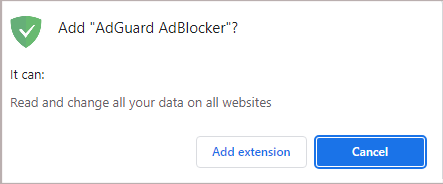
AdGuard permissions

Thus we explain that we need permissions to read and change all your data on all websites (“host permission” in Chrome) and to access tabs (“tabs permission”) in order to block ads, as well as apply cosmetic rules so that web pages look clean and tidy. We also need the webNavigation permission to catch the moment when to inject ad-blocking scriptlets, that is before the page loads any ads.

To sum it up, the AdGuard extension, as well as many others, may require intrusive-sounding permissions to work. Ultimately, it’s up to you if you trust their developers and their justifications for needing these permissions enough to grant them.

So, should you be worried?

Yes, in the grand scheme of things, you should. You should be mindful when installing extensions that can access your data on web pages. Even if rather slim, there’s a chance that the extension you want to install is a malicious one and will steal your password or banking details that are stored in plaintext in a website’s HTML source code. With additional functionality come additional risks, and this applies not only for add-ons, but also for other services and devices: take WiFi-enabled vacuums or modern cars with sensors, for example. So, to cut to the chase, you will have to accept a higher level of risk to your security and privacy when you allow your add-on to work its magic, such as blocking ads. Regardless of whether you think such a trade-off is fair or not, it is just unavoidable.

In 2018, Mozilla devoted an entire blog post to extension permissions, including “scary-sounding ones”, in which it explained why extensions like ad blockers need them for legitimate reasons, but also highlighted the risks of installing them.

However, the Firefox maker noted that such cases, when a malicious developer claims your extension does one thing while it actually does something else, while possible, are still “rare.”
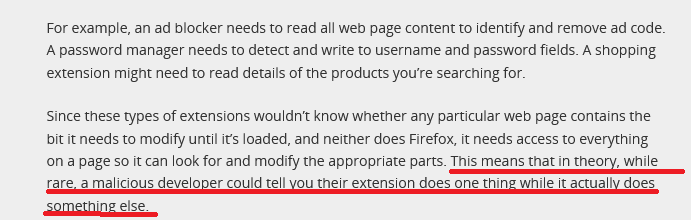
Mozilla's blog

Source: Mozilla

You may argue that even “rare” is sometimes too often. And we agree wholeheartedly — downplaying this problem would do nobody good. A few years ago, we ourselves exposed several malicious ad blocking extensions that ripped off the code of legitimate ones and could change your browser’s behavior in any way. At the time we estimated that over 20,000,000 people could be affected by these fake ad blockers. So now the burning question is, how can you be a little more comfortable giving your extension the ability to see all of your browsing activity?

Well, here’s a checklist that the extension needs to meet to be considered safe in our eyes:

  • The author of the extension is clearly stated, has a physical address, and, ideally, has been in the industry for many years

  • The privacy policy is present, clear, and user-friendly

  • The reasons for permissions are clearly stated, and match the purposes of the extension

  • The extension is open source: you can see the list of all commits and it’s always available (for example, our trusted Chrome ad blocker is free and public)

  • The developer maintains online presence and can be easily contacted by users (via social media, website, or a dedicated support desk) and provides timely responses

  • The extension has positive ratings and favorable reviews. Although these are not an iron-clad guarantee of it being safe, as reviews can be manipulated by bots or left by non-inquisitive casual users who appreciate the fact that the extension works and don’t look any deeper — but that’s another story


Suka postingan ini?
AdGuard VPN DNS AdGuard AdGuard Mail AdGuard Wallet
Layar utama AdGuard untuk Windows
Layar Perlindungan AdGuard untuk Windows, menampilkan fitur dan pengaturan perlindungan
Layar Statistik AdGuard untuk Windows, menampilkan statistik untuk iklan dan pelacak yang terblokir
Layar Pengelolaan aplikasi AdGuard untuk Windows, menampilkan opsi pengelolaan perlindungan untuk aplikasi yang terinstal di perangkat
20.534 20534 ulasan pengguna
Sempurna!

AdGuard untuk Windows — pemblokir iklan untuk PC Anda

AdGuard untuk Windows lebih dari sekadar pemblokir iklan. Ini adalah alat serbaguna yang memblokir iklan, mengontrol akses ke situs berbahaya, mempercepat pemuatan halaman, dan melindungi anak-anak dari konten yang tidak pantas
Dengan mengunduhnya Anda menerima ketentuan Perjanjian lisensi
Microsoft Store
Dengan mengunduhnya Anda menerima ketentuan Perjanjian lisensi
AdGuard untuk Windows v8.0, masa percobaan 14 hari
Layar utama AdGuard untuk Mac
Layar Mode Siluman AdGuard untuk Mac
20.534 20534 ulasan pengguna
Sempurna!

AdGuard untuk Mac — pemblokir iklan seluruh sistem

AdGuard untuk Mac adalah pemblokir iklan unik yang dirancang khusus untuk macOS. Selain melindungi Anda dari iklan yang mengganggu di browser dan aplikasi, ini juga melindungi Anda dari pelacakan, phishing, dan penipuan
Dengan mengunduhnya Anda menerima ketentuan Perjanjian lisensi
Pelajari lainnya
AdGuard untuk Mac v2.19, masa percobaan 14 hari
Layar utama AdGuard untuk Android
Layar Perlindungan pelacakan AdGuard untuk Android
Layar Pengelolaan aplikasi AdGuard untuk Android, menampilkan opsi pengelolaan perlindungan untuk aplikasi yang terinstal di perangkat
Layar Statistik AdGuard untuk Android, menampilkan statistik untuk iklan dan pelacak yang terblokir
Layar utama peramban privat AdGuard untuk Android
Kode QR untuk unduh AdGuard untuk Android
20.534 20534 ulasan pengguna
Sempurna!

AdGuard untuk Android: pemblokir iklan semua aplikasi

Memblokir iklan dan pelacak di semua browser, game, dan aplikasi lainnya. Melindungi privasi Anda dan memungkinkan Anda mengontrol bagaimana aplikasi Anda menggunakan internet. Diinstal melalui APK
Dengan mengunduhnya Anda menerima ketentuan Perjanjian lisensi
Pelajari lainnya
Pindai untuk mengunduh
Gunakan pembaca kode QR yang tersedia di perangkat Anda
AdGuard untuk Android v4.14, masa percobaan 14 hari
Layar utama AdGuard untuk iOS
Layar Perlindungan AdGuard untuk iOS, menampilkan fitur dan pengaturan perlindungan
Layar Statistik AdGuard untuk iOS, menampilkan statistik untuk iklan dan pelacak yang terblokir
Kode QR untuk unduh AdGuard untuk iOS
20.534 20534 ulasan pengguna
Sempurna!

AdGuard untuk iOS — pemblokir iklan di luar Safari

Pemblokir iklan iOS terbaik untuk iPhone dan iPad. AdGuard menghilangkan semua jenis iklan dan pelacak di Safari serta melindungi privasi Anda di semua aplikasi pada tingkat DNS
Dengan mengunduhnya Anda menerima ketentuan Perjanjian lisensi
Pelajari lainnya
Pindai untuk mengunduh
Gunakan pembaca kode QR yang tersedia di perangkat Anda
AdGuard untuk iOS versi 4.5
Layar utama AdGuard Content Blocker
Layar filter AdGuard Content Blocker
Layar pengaturan AdGuard Content Blocker
20.534 20534 ulasan pengguna
Sempurna!

Pemblokir Konten AdGuard

AdGuard Content Blocker menghilangkan semua jenis iklan di browser seluler yang mendukung teknologi pemblokiran konten — yaitu, Samsung Internet dan Yandex Browser. Fitur-fiturnya terbatas dibandingkan dengan AdGuard untuk Android, tetapi gratis, mudah dipasang, dan efisien
Dengan mengunduhnya Anda menerima ketentuan Perjanjian lisensi
Pelajari lainnya
Pemblokir Konten AdGuard versi 2.8
Layar utama AdGuard Browser Extension
Layar Perlindungan pelacakan AdGuard Browser Extension
20.534 20534 ulasan pengguna
Sempurna!

Ekstensi peramban AdGuard

AdGuard adalah ekstensi pemblokiran iklan tercepat dan paling ringan yang secara efektif memblokir semua jenis iklan di semua halaman web! Pilih AdGuard untuk browser yang Anda gunakan dan dapatkan penjelajahan bebas iklan, cepat, dan aman.
Pasang
Dengan mengunduhnya Anda menerima ketentuan Perjanjian lisensi
Pasang
Dengan mengunduhnya Anda menerima ketentuan Perjanjian lisensi
Pasang
Dengan mengunduhnya Anda menerima ketentuan Perjanjian lisensi
Pasang
Dengan mengunduhnya Anda menerima ketentuan Perjanjian lisensi
Pasang
Dengan mengunduhnya Anda menerima ketentuan Perjanjian lisensi
Pelajari lainnya
Pasang
Dengan mengunduhnya Anda menerima ketentuan Perjanjian lisensi
Pelajari lainnya
Ekstensi peramban AdGuard versi 5.5
Layar utama Asisten Peramban
20.534 20534 ulasan pengguna
Sempurna!

Asisten AdGuard

Sebuah ekstensi peramban pendamping untuk aplikasi AdGuard desktop. Ini mengizinkan Anda memblokir item kustom di situs web, menambahkan situs web ke daftar izinkan, dan mengirim laporan langsung dari peramban Anda
Asisten AdGuard versi 1.4
20.534 20534 ulasan pengguna
Sempurna!

AdGuard Home

AdGuard Home adalah solusi berbasis jaringan untuk memblokir iklan dan pelacak. Instal sekali di router Anda untuk mencakup semua perangkat di jaringan rumah Anda — tidak diperlukan perangkat lunak klien tambahan. Ini sangat penting untuk berbagai perangkat IoT yang sering menimbulkan ancaman bagi privasi Anda
AdGuard Home versi 0.107
Layar utama AdGuard Pro untuk iOS
Layar Perlindungan AdGuard Pro untuk iOS, menampilkan fitur dan pengaturan perlindungan
Layar statistik AdGuard Pro untuk iOS, menampilkan statistik untuk iklan dan pelacak yang terblokir
20.534 20534 ulasan pengguna
Sempurna!

AdGuard Pro untuk iOS

AdGuard Pro untuk iOS dilengkapi dengan semua fitur perlindungan pemblokiran iklan canggih. Aplikasi ini menawarkan fitur yang sama dengan versi berbayar AdGuard untuk iOS. Aplikasi ini unggul dalam memblokir iklan di Safari dan memungkinkan Anda menyesuaikan pengaturan DNS untuk perlindungan yang lebih baik. Aplikasi ini memblokir iklan di browser dan aplikasi, melindungi anak-anak Anda dari konten yang tidak pantas, dan menjaga keamanan data pribadi Anda.
Dengan mengunduhnya Anda menerima ketentuan Perjanjian lisensi
Pelajari lainnya
AdGuard Pro untuk iOS versi 4.5
Layar utama AdGuard Mini untuk Mac
Layar perlindungan Safari AdGuard Mini untuk Mac
Layar Buat aturan AdGuard Mini untuk Mac
20.534 20534 ulasan pengguna
Sempurna!

AdGuard Mini untuk Mac — pemblokir iklan Safari

AdGuard Mini untuk Mac adalah pemblokir iklan Safari yang kuat. Aplikasi ringan ini menghapus iklan, memblokir pelacak, dan mempercepat pemuatan halaman. Ini membantu Anda menjelajah Web di Safari tanpa gangguan dan menjaga data Anda tetap pribadi
Pasang
Dengan mengunduhnya Anda menerima ketentuan Perjanjian lisensi
Pelajari lainnya
AdGuard Mini untuk Mac versi 2.3
Layar utama AdGuard untuk Android TV dengan perlindungan diaktifkan
Layar pemblokiran iklan AdGuard untuk Android TV, menampilkan fitur dan pengaturannya
Layar pengaturan AdGuard untuk Android TV
Layar Pengelolaan aplikasi AdGuard untuk Android TV, menampilkan aplikasi tempat iklan dan pelacak terblokir
20.534 20534 ulasan pengguna
Sempurna!

AdGuard untuk Android TV

AdGuard untuk Android TV adalah satu-satunya aplikasi yang memblokir iklan, menjaga privasi Anda, dan bertindak sebagai firewall untuk Smart TV Anda. Dapatkan peringatan tentang ancaman web, gunakan DNS yang aman, dan dapatkan manfaatkan lalu lintas yang terenkripsi. Bersantailah dan selami acara favorit Anda dengan keamanan terbaik dan tanpa iklan!
AdGuard untuk Android TV v4.14, masa percobaan 14 hari
Maskot AdGuard, Agnar, memegang penguin Linux
20.534 20534 ulasan pengguna
Sempurna!

AdGuard untuk Linux

AdGuard untuk Linux adalah pemblokir iklan sistem luas pertama di dunia untuk Linux. Blokir iklan dan pelacak di tingkat perangkat, pilih dari filter yang sudah terinstal sebelumnya, atau tambahkan milikmu sendiri — semuanya melalui antar muka baris perintah
AdGuard untuk Linux versi 1.4
20.534 20534 ulasan pengguna
Sempurna!

AdGuard Temp Mail

Generator alamat e-mail sementara gratis yang membuat Anda tetap anonim dan melindungi privasi Anda. Tidak ada spam di kotak masuk utama Anda!
20.534 20534 ulasan pengguna
Sempurna!

AdGuard VPN

75 Lokasi Di Seluruh Dunia

Akses ke konten apa pun

Enkripsi yang kuat

Tanpa kebijakan log

Koneksi paling cepat

dukungan 24/7

Coba gratis
Dengan mengunduhnya Anda menerima ketentuan Perjanjian lisensi
Pelajari lainnya
20.534 20534 ulasan pengguna
Sempurna!

DNS AdGuard

AdGuard DNS adalah cara yang sangat andal untuk memblokir iklan internet tanpa perlu menginstal aplikasi apapun. Mudah digunakan, sepenuhnya gratis, mudah dipasang di perangkat mana saja, dan menyediakan fungsi minimal yang diperlukan untuk memblokir iklan, penghitung, situs web berbahaya, dan konten dewasa.
20.534 20534 ulasan pengguna
Sempurna!

AdGuard Mail

Lindungi identitas Anda, hindari spam, dan jaga keamanan kotak masuk Anda dengan alias dan alamat e-mail sementara kami. Nikmati layanan penerusan e-mail gratis serta aplikasi untuk semua sistem operasi.
20.534 20534 ulasan pengguna
Sempurna!

AdGuard Wallet

Dompet kripto yang aman dan pribadi yang memberi Anda kendali penuh atas aset Anda. Kelola beberapa dompet dan temukan ribuan mata uang kripto untuk disimpan, dikirim, dan ditukar
Mengunduh AdGuard Klik tombol yang ditujukkan oleh panah untuk memulai instalasi. Pilih "Buka" dan klik "OK", lalu tunggu file diunduh. Di jendela yang terbuka, seret ikon AdGuard ke folder "Aplikasi". Terima kasih telah memilih AdGuard! Pilih "Buka" dan klik "OK", lalu tunggu file diunduh. Di jendela yang terbuka, klik "Install". Terima kasih telah memilih AdGuard!
Instal AdGuard untuk perangkat ponsel juga


















































