Mozilla solves the Manifest V3 puzzle to save ad blockers from Chromapocalypse

Mozilla has made good on its promise to implement Google’s new extension platform, Manifest V3, in a way that does not compromise the functionality of ad blockers. The new version of Firefox, which began rolling out last month, will ensure that users still have access to popular privacy-preserving tools, most notably content-blocking extensions.

On the one hand, by implementing Manifest V3 on its own terms, Mozilla saves developers who are switching to the new platform from having to support two different versions of their extensions (for Google Chrome and Firefox) at the same time. On the other hand, it allows content-blocking extensions that were originally built using the less restrictive Manifest V2 to continue working at full tilt.

Before we go any further, let us remind you what Manifest V3 is, and why it has drawn so much backlash from privacy advocates and content-blocking extension developers including AdGuard.

The troubled Manifest

Manifest V3 is Chrome’s new extension API, first announced in 2018. It is now being implemented across Chromium-based browsers, including, of course, Google Chrome itself.

The API introduces significant changes to the rules that extensions have to follow, such as which browser features an extension has access to and can modify. For example, previously the browser would ask a content-blocking extension what to do with a particular web request, and the extension would respond by either greenlighting, blocking or redirecting it. The new, narrower API gives the right to modify requests to the browser itself, while the extension simply announces or “declares” a set of rules by which the browser should respond. Google notes that this will prevent extensions, including ad blockers, from accessing “potentially sensitive user data,” and will make them “safer to everyone.” The downside is, this change will also cause ad blockers to lose some of their functionality.

You can never have too many rules

The problem with Manifest V3 is that it limits the number of built-in and user-added rules for extensions installed by an individual user. Namely, Chrome has set a guaranteed minimum limit of 30,000 built-in (“static”) rules per extension and a total limit of 330,000 static rules. As for user-added (“dynamic”) rules, they are capped at mere 5,000. Since at the heart of any ad-blocking extension are the filtering rules that ‘teach’ it to detect ads, such restrictions can become a real snag.

The number provided by Google is sufficient if you have only one extension that relies on the declarative NetRequest API in Manifest V3 to block ads. However, if you use more than one extension, this can become an issue: extensions will compete for the remaining rules, and some won’t be able to squeeze into the limit.

Another problem is that Google wants developers to have all the rules already built into the extension at the time of installation. Essentially, developers will have to define what their extension will do with specific requests in advance, and not ad-lib as it used to be before. This means that ad blockers will be slower to respond to changes on the site, as developers will have to upload a new version of the extension each time something changes — and wait till it passes a review, which is not a quick process in itself.

However, there’s still a glimmer of hope that the situation will improve. We have proposed an increase in the number of dynamic rules and rule sets and are championing these changes to Manifest V3 in ongoing discussions between browser vendors and the content blocking community. Hopefully the former will take our arguments into account.

Ultimately, with Chrome being a dominant force in the browser market, once Google deprecates Manifest V2, extension developers will either have to adapt to Manifest V3 or lose users. And we would like to see that transition go as smoothly as possible.
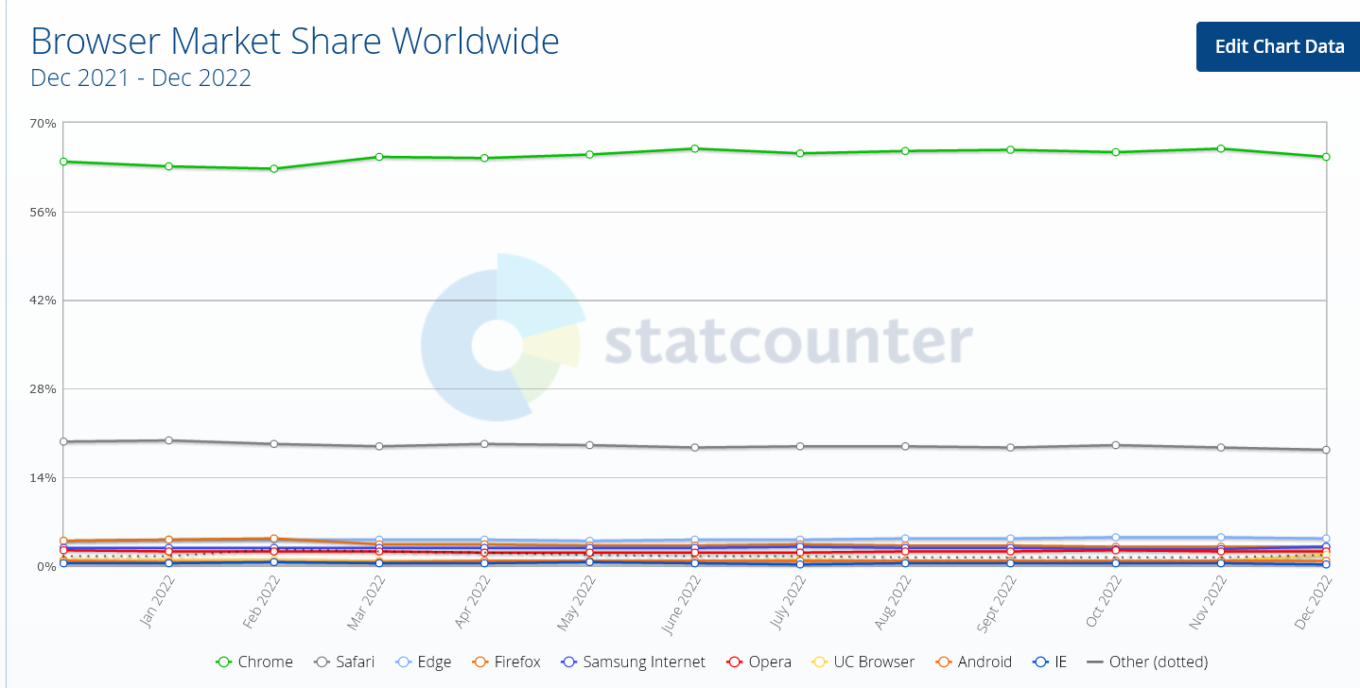
Google Chrome is a dominant force among desktop browsers

The ball in Chrome’s court

Google claims that the changes to the API will make extensions “more secure, performant, and private-respecting by default”. However, lingering concerns over their impact on ad-blocking prevent some experts from embracing the new platform. We too have repeatedly sounded the alarm about the negative impact Manifest V3 may have on Chrome developers and users.

To its credit, though, Google has sought to address these concerns. Being one of the founders of The World Wide Web Consortium’s (W3C) WebExtensions Community Group (on par with Apple, Mozilla, and Microsoft), Chrome solicited feedback on Manifest V3 from extension developers and welcomed criticism.

Still, Google’s response has been too slow and so far has failed to assuage developers’ concerns. Acknowledging these apprehensions, Mozilla announced last year that Firefox would continue to support the webRequest API to block entire categories of HTTP requests in its implementation of Manifest V3, but would also support a compatible version of declarativeNetRequest API, proposed by Google as a replacement for webRequest.

Compared to Firefox users, who will continue to benefit from the full functionality of ad blocking extensions, Chrome's 3 billion users may soon find themselves at a disadvantage when it comes to ad blocking. In the long run, this could become a catalyst for some Chrome users to switch to Firefox.

The sunset that never comes

In November, Mozilla announced that it would continue to support Manifest V2 extensions “for the foreseeable future” and promised to set a timeframe for disabling the old manifest “towards the end of 2023.”

As for Google Chrome, its timeline for pulling the plug on Manifest V2 has been pushed back so many times that it's hard to keep track. In January 2022, Google stopped accepting new extensions based on Manifest V2 to the Chrome Web Store. By June 2023 the tech giant was supposed to be experimenting with turning off support for Manifest V2 extensions in Chrome. However, in December all the remaining deadlines were put under review and all the experiments were postponed indefinitely.
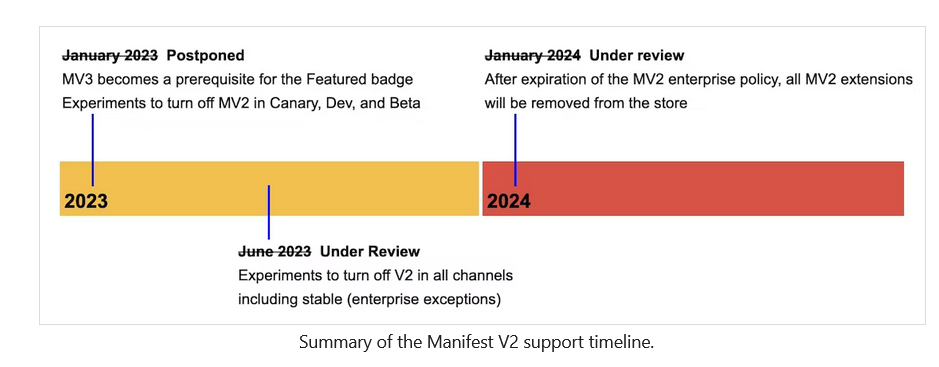
Google has pushed the deadline for sunsetting Manifest V2 a lot of times

That said, the threat of Manifest V2’s eventual demise is real. The doomsday clock for Manifest V2 may have stopped ticking, but Google could resume it at any time, so we thought it was important to have a solution ready if and when that happens.

Ad blocking in the era of Manifest V3

Believing that the chances of a sudden Google U-turn were slim, AdGuard started working on a prototype of a new Manifest V3-compliant extension as early as mid-2021. In August last year, we released an experimental ad blocking extension that met all the requirements of Manifest V3, becoming the first ad blocker to do so. Because it’s based on Manifest V3, with all its unfortunate limitations, this new extension may not be as effective as the old, tried and tested one. The extension will, however, still proactively block requests to trackers, hide social widgets, banners and video ads — in other words, it will do everything you’d expect an ad blocking extension to do.

We may have been the first, but other ad blockers soon followed suit, proving that ad blocking and Manifest V3 may not be a perfect match, but neither its arrival is a death sentence.

A month later, the author of popular ad blocker, uBlock Origin, published an experimental extension uBO Minus, compatible with Manifest V3. AdBlock Plus has also been working on a version of the extension that works on Manifest V3.

Google disappoints, Mozilla saves the day

Google claims that the sole purpose of replacing the old Manifest with a new extension platform that limits ad blocking is to provide greater security and privacy for users. Maybe that’s true, and Google does want to improve the extension platform to make it more secure and private.

Unfortunately, Google has made many decisions about the design of its new platform without taking into account the wishes and concerns of extension developers and, in the end, their own users. As a result, ad blocking extensions will lose some of their functionality. However, we don’t think the company will be too upset about this.

For its part, Mozilla has taken a more measured and less confrontational approach to ad blocking. The Firefox owner has shown that it is not impossible to implement Manifest V3 in a way that does not limit the functionality of ad blockers and at the same time increases security.


Suka postingan ini?
AdGuard VPN DNS AdGuard AdGuard Mail AdGuard Wallet
Layar utama AdGuard untuk Windows
Layar Perlindungan AdGuard untuk Windows, menampilkan fitur dan pengaturan perlindungan
Layar Statistik AdGuard untuk Windows, menampilkan statistik untuk iklan dan pelacak yang terblokir
Layar Pengelolaan aplikasi AdGuard untuk Windows, menampilkan opsi pengelolaan perlindungan untuk aplikasi yang terinstal di perangkat
20.535 20535 ulasan pengguna
Sempurna!

AdGuard untuk Windows — pemblokir iklan untuk PC Anda

AdGuard untuk Windows lebih dari sekadar pemblokir iklan. Ini adalah alat serbaguna yang memblokir iklan, mengontrol akses ke situs berbahaya, mempercepat pemuatan halaman, dan melindungi anak-anak dari konten yang tidak pantas

Dengan mengunduhnya Anda menerima ketentuan Perjanjian lisensi
Microsoft Store
Dengan mengunduhnya Anda menerima ketentuan Perjanjian lisensi
AdGuard untuk Windows v8.0, masa percobaan 14 hari
Layar utama AdGuard untuk Mac
Layar Mode Siluman AdGuard untuk Mac
20.535 20535 ulasan pengguna
Sempurna!

AdGuard untuk Mac — pemblokir iklan seluruh sistem

AdGuard untuk Mac adalah pemblokir iklan unik yang dirancang khusus untuk macOS. Selain melindungi Anda dari iklan yang mengganggu di browser dan aplikasi, ini juga melindungi Anda dari pelacakan, phishing, dan penipuan
Dengan mengunduhnya Anda menerima ketentuan Perjanjian lisensi
Pelajari lainnya
AdGuard untuk Mac v2.19, masa percobaan 14 hari
Layar utama AdGuard untuk Android
Layar Perlindungan pelacakan AdGuard untuk Android
Layar Pengelolaan aplikasi AdGuard untuk Android, menampilkan opsi pengelolaan perlindungan untuk aplikasi yang terinstal di perangkat
Layar Statistik AdGuard untuk Android, menampilkan statistik untuk iklan dan pelacak yang terblokir
Layar utama peramban privat AdGuard untuk Android
Kode QR untuk unduh AdGuard untuk Android
20.535 20535 ulasan pengguna
Sempurna!

AdGuard untuk Android: pemblokir iklan semua aplikasi

Memblokir iklan dan pelacak di semua browser, game, dan aplikasi lainnya. Melindungi privasi Anda dan memungkinkan Anda mengontrol bagaimana aplikasi Anda menggunakan internet. Diinstal melalui APK
Dengan mengunduhnya Anda menerima ketentuan Perjanjian lisensi
Pelajari lainnya
Pindai untuk mengunduh
Gunakan pembaca kode QR yang tersedia di perangkat Anda
AdGuard untuk Android v4.14, masa percobaan 14 hari
Layar utama AdGuard untuk iOS
Layar Perlindungan AdGuard untuk iOS, menampilkan fitur dan pengaturan perlindungan
Layar Statistik AdGuard untuk iOS, menampilkan statistik untuk iklan dan pelacak yang terblokir
Kode QR untuk unduh AdGuard untuk iOS
20.535 20535 ulasan pengguna
Sempurna!

AdGuard untuk iOS — pemblokir iklan di luar Safari

Pemblokir iklan iOS terbaik untuk iPhone dan iPad. AdGuard menghilangkan semua jenis iklan dan pelacak di Safari serta melindungi privasi Anda di semua aplikasi pada tingkat DNS
Dengan mengunduhnya Anda menerima ketentuan Perjanjian lisensi
Pelajari lainnya
Pindai untuk mengunduh
Gunakan pembaca kode QR yang tersedia di perangkat Anda
AdGuard untuk iOS versi 4.5
Layar utama AdGuard Content Blocker
Layar filter AdGuard Content Blocker
Layar pengaturan AdGuard Content Blocker
20.535 20535 ulasan pengguna
Sempurna!

Pemblokir Konten AdGuard

AdGuard Content Blocker menghilangkan semua jenis iklan di browser seluler yang mendukung teknologi pemblokiran konten — yaitu, Samsung Internet dan Yandex Browser. Fitur-fiturnya terbatas dibandingkan dengan AdGuard untuk Android, tetapi gratis, mudah dipasang, dan efisien
Dengan mengunduhnya Anda menerima ketentuan Perjanjian lisensi
Pelajari lainnya
Pemblokir Konten AdGuard versi 2.8
Layar utama AdGuard Browser Extension
Layar Perlindungan pelacakan AdGuard Browser Extension
20.535 20535 ulasan pengguna
Sempurna!

Ekstensi peramban AdGuard

AdGuard adalah ekstensi pemblokiran iklan tercepat dan paling ringan yang secara efektif memblokir semua jenis iklan di semua halaman web! Pilih AdGuard untuk browser yang Anda gunakan dan dapatkan penjelajahan bebas iklan, cepat, dan aman.
Pasang
Dengan mengunduhnya Anda menerima ketentuan Perjanjian lisensi
Pasang
Dengan mengunduhnya Anda menerima ketentuan Perjanjian lisensi
Pasang
Dengan mengunduhnya Anda menerima ketentuan Perjanjian lisensi
Pasang
Dengan mengunduhnya Anda menerima ketentuan Perjanjian lisensi
Pasang
Dengan mengunduhnya Anda menerima ketentuan Perjanjian lisensi
Pelajari lainnya
Pasang
Dengan mengunduhnya Anda menerima ketentuan Perjanjian lisensi
Pelajari lainnya
Ekstensi peramban AdGuard versi 5.5
Layar utama Asisten Peramban
20.535 20535 ulasan pengguna
Sempurna!

Asisten AdGuard

Sebuah ekstensi peramban pendamping untuk aplikasi AdGuard desktop. Ini mengizinkan Anda memblokir item kustom di situs web, menambahkan situs web ke daftar izinkan, dan mengirim laporan langsung dari peramban Anda
Asisten AdGuard versi 1.4
20.535 20535 ulasan pengguna
Sempurna!

AdGuard Home

AdGuard Home adalah solusi berbasis jaringan untuk memblokir iklan dan pelacak. Instal sekali di router Anda untuk mencakup semua perangkat di jaringan rumah Anda — tidak diperlukan perangkat lunak klien tambahan. Ini sangat penting untuk berbagai perangkat IoT yang sering menimbulkan ancaman bagi privasi Anda
AdGuard Home versi 0.107
Layar utama AdGuard Pro untuk iOS
Layar Perlindungan AdGuard Pro untuk iOS, menampilkan fitur dan pengaturan perlindungan
Layar statistik AdGuard Pro untuk iOS, menampilkan statistik untuk iklan dan pelacak yang terblokir
20.535 20535 ulasan pengguna
Sempurna!

AdGuard Pro untuk iOS

AdGuard Pro untuk iOS dilengkapi dengan semua fitur perlindungan pemblokiran iklan canggih. Aplikasi ini menawarkan fitur yang sama dengan versi berbayar AdGuard untuk iOS. Aplikasi ini unggul dalam memblokir iklan di Safari dan memungkinkan Anda menyesuaikan pengaturan DNS untuk perlindungan yang lebih baik. Aplikasi ini memblokir iklan di browser dan aplikasi, melindungi anak-anak Anda dari konten yang tidak pantas, dan menjaga keamanan data pribadi Anda.
Dengan mengunduhnya Anda menerima ketentuan Perjanjian lisensi
Pelajari lainnya
AdGuard Pro untuk iOS versi 4.5
Layar utama AdGuard Mini untuk Mac
Layar perlindungan Safari AdGuard Mini untuk Mac
Layar Buat aturan AdGuard Mini untuk Mac
20.535 20535 ulasan pengguna
Sempurna!

AdGuard Mini untuk Mac — pemblokir iklan Safari

AdGuard Mini untuk Mac adalah pemblokir iklan Safari yang kuat. Aplikasi ringan ini menghapus iklan, memblokir pelacak, dan mempercepat pemuatan halaman. Ini membantu Anda menjelajah Web di Safari tanpa gangguan dan menjaga data Anda tetap pribadi
Pasang
Dengan mengunduhnya Anda menerima ketentuan Perjanjian lisensi
Pelajari lainnya
AdGuard Mini untuk Mac versi 2.3
Layar utama AdGuard untuk Android TV dengan perlindungan diaktifkan
Layar pemblokiran iklan AdGuard untuk Android TV, menampilkan fitur dan pengaturannya
Layar pengaturan AdGuard untuk Android TV
Layar Pengelolaan aplikasi AdGuard untuk Android TV, menampilkan aplikasi tempat iklan dan pelacak terblokir
20.535 20535 ulasan pengguna
Sempurna!

AdGuard untuk Android TV

AdGuard untuk Android TV adalah satu-satunya aplikasi yang memblokir iklan, menjaga privasi Anda, dan bertindak sebagai firewall untuk Smart TV Anda. Dapatkan peringatan tentang ancaman web, gunakan DNS yang aman, dan dapatkan manfaatkan lalu lintas yang terenkripsi. Bersantailah dan selami acara favorit Anda dengan keamanan terbaik dan tanpa iklan!
AdGuard untuk Android TV v4.14, masa percobaan 14 hari
Maskot AdGuard, Agnar, memegang penguin Linux
20.535 20535 ulasan pengguna
Sempurna!

AdGuard untuk Linux

AdGuard untuk Linux adalah pemblokir iklan sistem luas pertama di dunia untuk Linux. Blokir iklan dan pelacak di tingkat perangkat, pilih dari filter yang sudah terinstal sebelumnya, atau tambahkan milikmu sendiri — semuanya melalui antar muka baris perintah
AdGuard untuk Linux versi 1.4
20.535 20535 ulasan pengguna
Sempurna!

AdGuard Temp Mail

Generator alamat e-mail sementara gratis yang membuat Anda tetap anonim dan melindungi privasi Anda. Tidak ada spam di kotak masuk utama Anda!
20.535 20535 ulasan pengguna
Sempurna!

AdGuard VPN

75 Lokasi Di Seluruh Dunia

Akses ke konten apa pun

Enkripsi yang kuat

Tanpa kebijakan log

Koneksi paling cepat

dukungan 24/7

Coba gratis
Dengan mengunduhnya Anda menerima ketentuan Perjanjian lisensi
Pelajari lainnya
20.535 20535 ulasan pengguna
Sempurna!

DNS AdGuard

AdGuard DNS adalah cara yang sangat andal untuk memblokir iklan internet tanpa perlu menginstal aplikasi apapun. Mudah digunakan, sepenuhnya gratis, mudah dipasang di perangkat mana saja, dan menyediakan fungsi minimal yang diperlukan untuk memblokir iklan, penghitung, situs web berbahaya, dan konten dewasa.
20.535 20535 ulasan pengguna
Sempurna!

AdGuard Mail

Lindungi identitas Anda, hindari spam, dan jaga keamanan kotak masuk Anda dengan alias dan alamat e-mail sementara kami. Nikmati layanan penerusan e-mail gratis serta aplikasi untuk semua sistem operasi.
20.535 20535 ulasan pengguna
Sempurna!

AdGuard Wallet

Dompet kripto yang aman dan pribadi yang memberi Anda kendali penuh atas aset Anda. Kelola beberapa dompet dan temukan ribuan mata uang kripto untuk disimpan, dikirim, dan ditukar
Mengunduh AdGuard Klik tombol yang ditujukkan oleh panah untuk memulai instalasi. Pilih "Buka" dan klik "OK", lalu tunggu file diunduh. Di jendela yang terbuka, seret ikon AdGuard ke folder "Aplikasi". Terima kasih telah memilih AdGuard! Pilih "Buka" dan klik "OK", lalu tunggu file diunduh. Di jendela yang terbuka, klik "Install". Terima kasih telah memilih AdGuard!
Instal AdGuard untuk perangkat ponsel juga

















































