If you think your data is safer with big corps, you’re wrong: The story of Lapsus$ hacker group

Today we have somewhat of an unusual digest, we're going to talk about a notorious hacker group called Lapsus$ that's responsible for a number of high-profile cases. And if this topic may seem like it has nothing to do with you — it's only at first glance.

Mr. President

In early January this year, Portuguese mediagroup IMPRESA was targeted by hackers. Mediagroup's child companies — TV channel SIC and newspaper Expresso — were hacked. SIC's streaming got cut off, Expresso's Twitter account was hijacked. Appealing to Expresso's 540,000 followers, the hacker group impertinently declared itself the "new president of Portugal".
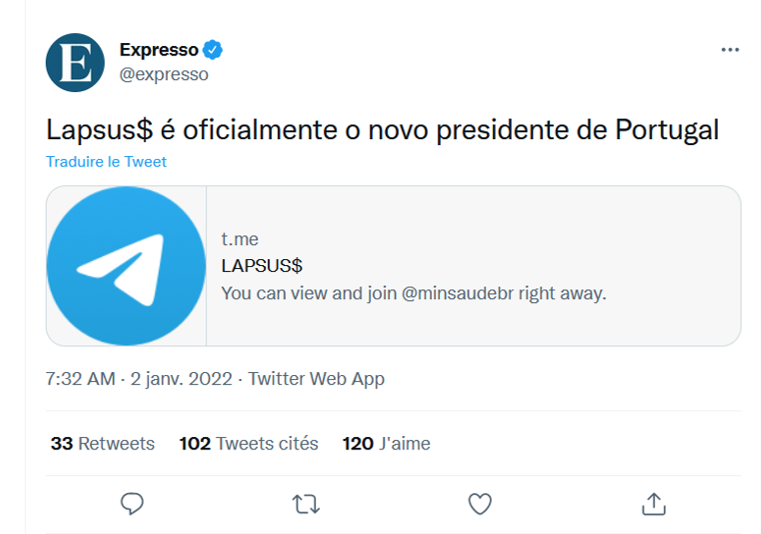
Lapsus$ tweet under the Expresso account
Source: Cyber etc. Twitter account

Next in line was Localiza, the biggest car rental service in Latin America. Anyone who visited their website got redirected to a porn website.

The hackers could have easily redirected users to a fake website, visually identical to the original, where the unsuspecting visitors would have voluntarily left all their personal data such as bank accounts' details. Like, for example, it happened to the hacked Instagram page of the NFT project Bored Ape Yacht Club. The hackers used the account to display phishing information and managed to steal over $1 million.

But Lapsus$, apparently, were more interested in attacking the big corp rather than in stealing the personal data of ordinary users.

Going big...

But this was only the beginning. The news about the NVIDIA hack shocked everyone. Among the stolen data were:

  • source codes for graphics cards' drivers, including the hashrate limiting technology that makes GPUs less desirable for miners;
  • highly confidential information about microchip design, including unreleased ones;
  • credentials of 71,000 NVIDIA employees;
  • source code for the DLSS rendering system;
  • and official code-signing certificates.

The list is long enough but one would think that at least the attack would only affect NVIDIA itself, its competitors, and, perhaps, miners. But this couldn't be further from reality. The signing certificates that were leaked to the web allow to sign any software as NVIDIA's. Any malefactor could use it to sign their virus, for example, and any computer would recognize this virus as perfectly normal NVIDIA software. This has opened a window for all kinds of perpetrators to circumvent Windows' built-in security systems.

And it didn't take long for the stolen certificates to start popping up in the news.
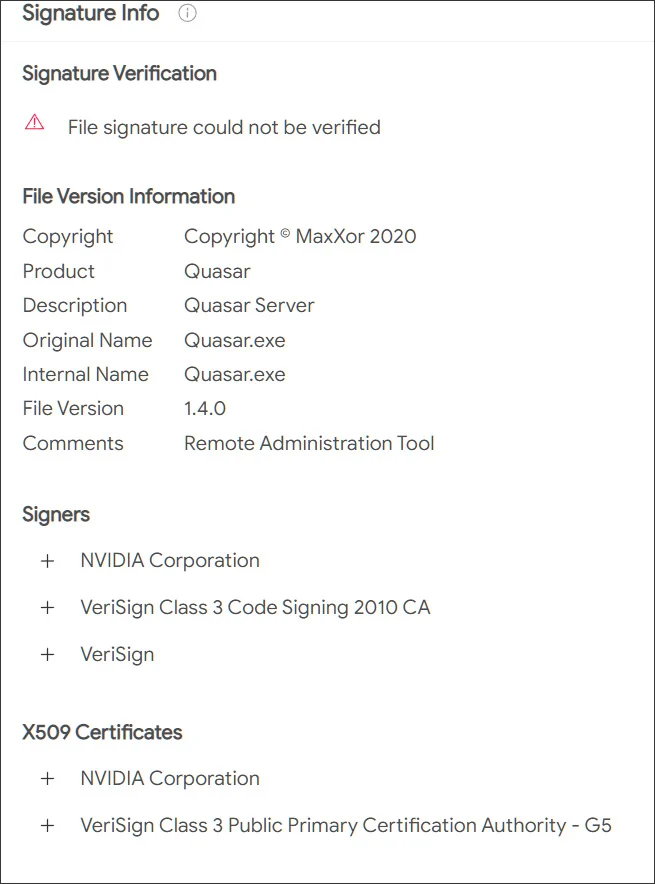
Stolen NVIDIA certificate
Source: Bleeping computer

...and going even bigger

The group expectantly didn't stop there, its appetites only growing. Samsung was destined to become the next victim. Lapsus$ stole source texts for the loader used in all latest devices, as well as the code responsible for biometrics, authentication, and encryption. In addition, confidential data of Qualcomm, one of Samsung's counterparties, was stolen.

The consequences, especially in the context of Samsung devices' security systems, can be quite disastrous. With high certainty, this data is currently being thoroughly scanned for vulnerabilities, and we can expect to hear about a series of Samsung devices being breached, and sooner rather than later. Evidently, even a single company getting hacked can often lead to more subsequent breaches and more data leakages. We all are forced into picking our poison and "trusting" one company or another with our personal data, but do they deserve this trust?

Meanwhile, Lapsus$ was only starting to gain momentum. Vodafone breach resulted in 200GB of data getting stolen. The company states that user data wasn't affected, and it may well be true, as it hasn't emerged anywhere on the darknet yet and wasn't among the files published by the hackers. It seems that the members of Lapsus$ are more interested in intellectual property than personal data. It doesn't mean that the next big hacker group will have the same preferences, we know plenty of examples when cybercriminals extorted money from regular Internet users. Yes, the sums may be smaller, but the number of potential victims compensates for that.

Gamedev was not spared either. Ubisoft became one of the next targets, and again, the company's data was stolen. We don't know yet what data exactly had been acquired by hackers, but Ubisoft initiated a full password reset for all its employees after the fact. It's unclear what was the hackers' goal this time, it may have simply been a stepping stone for performing larger scale attacks in the future. We can only wait and see if any of the clients' information was stolen too.

There was still room for Lapsus$ to go bigger: Microsoft fell prey next, a lot of source code was stolen, including that of Bing search engine and Cortana voice assistant. Hackers may be keeping the juiciest bites for themselves (e.g. credentials to access infrastructure), but even the share that they have decided to make public is enough to find more vulnerabilities in Microsoft products and exploit them in future breaches.

There are examples when hackers were able to cause some serious damage by gaining access to customer support accounts. Imagine what can be achieved when you have access to security engineers' accounts, know private message history and other details.

What's there to come

But the best illustration to the point we're making today is the breach of the single sign-on provider Okta. To carry out the attack, hackers compromised one of the company's contractors and proceeded to use it to get access to Okta systems. According to the company's statements, hackers stole the laptop of an engineer employed by one of Okta's contractors — talk about secure passwords.

It needs to be mentioned that Okta offers its services to over 15,000 companies around the world. Taking into account the fact that among them there are such giants as Peloton, Sonos, T-Mobile, and even The Federal Communications Commission of the US government, it's a safe bet that we're yet to witness how huge the aftermath of this breach can be.

After Okta, there was Globant breach — a key player in the market of software development consulting․ Around 70GB of data were stolen, and you can see from the screenshot below that among the affected companies are such big names as DHL, Facebook, Apple, C-span, Fortune, Arcserve.
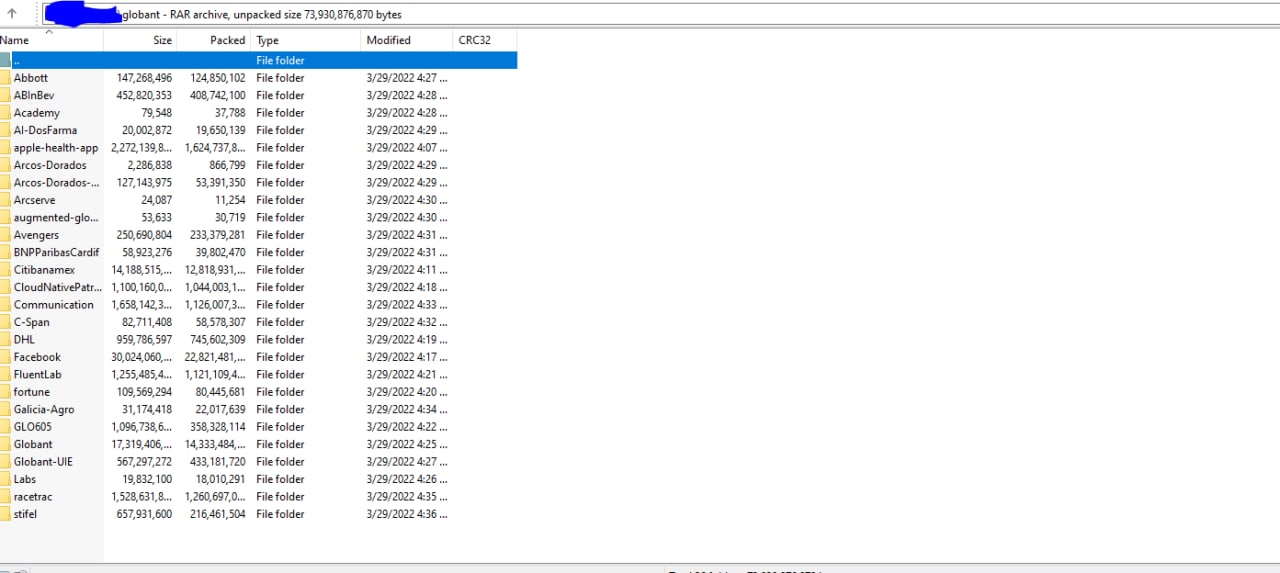
Globant data leak
Source: Lapsus$ Telegram channel

Another counterparty targeted, another case, which scale we'll be able to grasp only in the future. It'll greatly depend on which data exactly had been stolen and what the hackers will decide to do with it.

The prodigy

What makes all of this especially intriguing is the fact that the leader (or how cybersec experts often call him, the mastermind and ideologist) behind the Lapsus$ group allegedly is a 16-year-old teenager. And he's not the only one — according to investigators, some of the other supposed members of the group are teenagers as well, and they often turn their attacks into nothing less than a spectacle. How else would you call hacking and joining Zoom meetings and trolling company representatives? All of this adds spice to the story, but also raises a lot of questions to the hacked corporations and their security systems.

If you thought that we're done and there's nothing else to top the above mentioned breaches, here's another one: Apple and Meta voluntarily transferred user data to hackers who impersonated police representatives. The malefactors managed to hijack a police email account, which opened the door to sending urgent inquiries to obtain all kinds of confidential information, and Meta and Apple duly obliged. Despite the fact that the incident only recently got publicity, and that a different group called Recursion Team was responsible, Lapsus$ leader has employed similar techniques. Part of the Recursion Team's roster even (presumably) joined Lapsus$ later under different nicknames when the original group was disbanded.
And the argument that user data wasn't truly compromised doesn't fly with this breach's case. Ask yourself: do you really want to let the government and megacorps know everything about you?

Conclusion

Quite an impressive record for a group that was founded towards the very end of 2021, isn't it? And we haven't even listed all of their achievements. As you could see, smallish companies and tech giants from the top-10s in their respective fields, all fell victim to a bunch of teenagers with laptops. It's hard to convince yourself that they all were cutting costs at the expense of security. Nonetheless, they were all proven to be absolutely susceptible to hacker attacks.

The entire Lapsus$ story is a perfect example to dispel the myth that the bigger the company, the safer your data is with it. As it turns out, those giant corporations often present the juiciest bite. Companies' employees have access to your data, and with a little help from hackers, it may end up in the wrong hands so very easily. So when you're about to say "I've got nothing to hide anyway" the next time, think twice.


Suka postingan ini?
AdGuard VPN DNS AdGuard AdGuard Mail AdGuard Wallet
Layar utama AdGuard untuk Windows
Layar Perlindungan AdGuard untuk Windows, menampilkan fitur dan pengaturan perlindungan
Layar Statistik AdGuard untuk Windows, menampilkan statistik untuk iklan dan pelacak yang terblokir
Layar Pengelolaan aplikasi AdGuard untuk Windows, menampilkan opsi pengelolaan perlindungan untuk aplikasi yang terinstal di perangkat
20.535 20535 ulasan pengguna
Sempurna!

AdGuard untuk Windows — pemblokir iklan untuk PC Anda

AdGuard untuk Windows lebih dari sekadar pemblokir iklan. Ini adalah alat serbaguna yang memblokir iklan, mengontrol akses ke situs berbahaya, mempercepat pemuatan halaman, dan melindungi anak-anak dari konten yang tidak pantas

Dengan mengunduhnya Anda menerima ketentuan Perjanjian lisensi
Microsoft Store
Dengan mengunduhnya Anda menerima ketentuan Perjanjian lisensi
AdGuard untuk Windows v8.0, masa percobaan 14 hari
Layar utama AdGuard untuk Mac
Layar Mode Siluman AdGuard untuk Mac
20.535 20535 ulasan pengguna
Sempurna!

AdGuard untuk Mac — pemblokir iklan seluruh sistem

AdGuard untuk Mac adalah pemblokir iklan unik yang dirancang khusus untuk macOS. Selain melindungi Anda dari iklan yang mengganggu di browser dan aplikasi, ini juga melindungi Anda dari pelacakan, phishing, dan penipuan
Dengan mengunduhnya Anda menerima ketentuan Perjanjian lisensi
Pelajari lainnya
AdGuard untuk Mac v2.19, masa percobaan 14 hari
Layar utama AdGuard untuk Android
Layar Perlindungan pelacakan AdGuard untuk Android
Layar Pengelolaan aplikasi AdGuard untuk Android, menampilkan opsi pengelolaan perlindungan untuk aplikasi yang terinstal di perangkat
Layar Statistik AdGuard untuk Android, menampilkan statistik untuk iklan dan pelacak yang terblokir
Layar utama peramban privat AdGuard untuk Android
Kode QR untuk unduh AdGuard untuk Android
20.535 20535 ulasan pengguna
Sempurna!

AdGuard untuk Android: pemblokir iklan semua aplikasi

Memblokir iklan dan pelacak di semua browser, game, dan aplikasi lainnya. Melindungi privasi Anda dan memungkinkan Anda mengontrol bagaimana aplikasi Anda menggunakan internet. Diinstal melalui APK
Dengan mengunduhnya Anda menerima ketentuan Perjanjian lisensi
Pelajari lainnya
Pindai untuk mengunduh
Gunakan pembaca kode QR yang tersedia di perangkat Anda
AdGuard untuk Android v4.14, masa percobaan 14 hari
Layar utama AdGuard untuk iOS
Layar Perlindungan AdGuard untuk iOS, menampilkan fitur dan pengaturan perlindungan
Layar Statistik AdGuard untuk iOS, menampilkan statistik untuk iklan dan pelacak yang terblokir
Kode QR untuk unduh AdGuard untuk iOS
20.535 20535 ulasan pengguna
Sempurna!

AdGuard untuk iOS — pemblokir iklan di luar Safari

Pemblokir iklan iOS terbaik untuk iPhone dan iPad. AdGuard menghilangkan semua jenis iklan dan pelacak di Safari serta melindungi privasi Anda di semua aplikasi pada tingkat DNS
Dengan mengunduhnya Anda menerima ketentuan Perjanjian lisensi
Pelajari lainnya
Pindai untuk mengunduh
Gunakan pembaca kode QR yang tersedia di perangkat Anda
AdGuard untuk iOS versi 4.5
Layar utama AdGuard Content Blocker
Layar filter AdGuard Content Blocker
Layar pengaturan AdGuard Content Blocker
20.535 20535 ulasan pengguna
Sempurna!

Pemblokir Konten AdGuard

AdGuard Content Blocker menghilangkan semua jenis iklan di browser seluler yang mendukung teknologi pemblokiran konten — yaitu, Samsung Internet dan Yandex Browser. Fitur-fiturnya terbatas dibandingkan dengan AdGuard untuk Android, tetapi gratis, mudah dipasang, dan efisien
Dengan mengunduhnya Anda menerima ketentuan Perjanjian lisensi
Pelajari lainnya
Pemblokir Konten AdGuard versi 2.8
Layar utama AdGuard Browser Extension
Layar Perlindungan pelacakan AdGuard Browser Extension
20.535 20535 ulasan pengguna
Sempurna!

Ekstensi peramban AdGuard

AdGuard adalah ekstensi pemblokiran iklan tercepat dan paling ringan yang secara efektif memblokir semua jenis iklan di semua halaman web! Pilih AdGuard untuk browser yang Anda gunakan dan dapatkan penjelajahan bebas iklan, cepat, dan aman.
Pasang
Dengan mengunduhnya Anda menerima ketentuan Perjanjian lisensi
Pasang
Dengan mengunduhnya Anda menerima ketentuan Perjanjian lisensi
Pasang
Dengan mengunduhnya Anda menerima ketentuan Perjanjian lisensi
Pasang
Dengan mengunduhnya Anda menerima ketentuan Perjanjian lisensi
Pasang
Dengan mengunduhnya Anda menerima ketentuan Perjanjian lisensi
Pelajari lainnya
Pasang
Dengan mengunduhnya Anda menerima ketentuan Perjanjian lisensi
Pelajari lainnya
Ekstensi peramban AdGuard versi 5.5
Layar utama Asisten Peramban
20.535 20535 ulasan pengguna
Sempurna!

Asisten AdGuard

Sebuah ekstensi peramban pendamping untuk aplikasi AdGuard desktop. Ini mengizinkan Anda memblokir item kustom di situs web, menambahkan situs web ke daftar izinkan, dan mengirim laporan langsung dari peramban Anda
Asisten AdGuard versi 1.4
20.535 20535 ulasan pengguna
Sempurna!

AdGuard Home

AdGuard Home adalah solusi berbasis jaringan untuk memblokir iklan dan pelacak. Instal sekali di router Anda untuk mencakup semua perangkat di jaringan rumah Anda — tidak diperlukan perangkat lunak klien tambahan. Ini sangat penting untuk berbagai perangkat IoT yang sering menimbulkan ancaman bagi privasi Anda
AdGuard Home versi 0.107
Layar utama AdGuard Pro untuk iOS
Layar Perlindungan AdGuard Pro untuk iOS, menampilkan fitur dan pengaturan perlindungan
Layar statistik AdGuard Pro untuk iOS, menampilkan statistik untuk iklan dan pelacak yang terblokir
20.535 20535 ulasan pengguna
Sempurna!

AdGuard Pro untuk iOS

AdGuard Pro untuk iOS dilengkapi dengan semua fitur perlindungan pemblokiran iklan canggih. Aplikasi ini menawarkan fitur yang sama dengan versi berbayar AdGuard untuk iOS. Aplikasi ini unggul dalam memblokir iklan di Safari dan memungkinkan Anda menyesuaikan pengaturan DNS untuk perlindungan yang lebih baik. Aplikasi ini memblokir iklan di browser dan aplikasi, melindungi anak-anak Anda dari konten yang tidak pantas, dan menjaga keamanan data pribadi Anda.
Dengan mengunduhnya Anda menerima ketentuan Perjanjian lisensi
Pelajari lainnya
AdGuard Pro untuk iOS versi 4.5
Layar utama AdGuard Mini untuk Mac
Layar perlindungan Safari AdGuard Mini untuk Mac
Layar Buat aturan AdGuard Mini untuk Mac
20.535 20535 ulasan pengguna
Sempurna!

AdGuard Mini untuk Mac — pemblokir iklan Safari

AdGuard Mini untuk Mac adalah pemblokir iklan Safari yang kuat. Aplikasi ringan ini menghapus iklan, memblokir pelacak, dan mempercepat pemuatan halaman. Ini membantu Anda menjelajah Web di Safari tanpa gangguan dan menjaga data Anda tetap pribadi
Pasang
Dengan mengunduhnya Anda menerima ketentuan Perjanjian lisensi
Pelajari lainnya
AdGuard Mini untuk Mac versi 2.3
Layar utama AdGuard untuk Android TV dengan perlindungan diaktifkan
Layar pemblokiran iklan AdGuard untuk Android TV, menampilkan fitur dan pengaturannya
Layar pengaturan AdGuard untuk Android TV
Layar Pengelolaan aplikasi AdGuard untuk Android TV, menampilkan aplikasi tempat iklan dan pelacak terblokir
20.535 20535 ulasan pengguna
Sempurna!

AdGuard untuk Android TV

AdGuard untuk Android TV adalah satu-satunya aplikasi yang memblokir iklan, menjaga privasi Anda, dan bertindak sebagai firewall untuk Smart TV Anda. Dapatkan peringatan tentang ancaman web, gunakan DNS yang aman, dan dapatkan manfaatkan lalu lintas yang terenkripsi. Bersantailah dan selami acara favorit Anda dengan keamanan terbaik dan tanpa iklan!
AdGuard untuk Android TV v4.14, masa percobaan 14 hari
Maskot AdGuard, Agnar, memegang penguin Linux
20.535 20535 ulasan pengguna
Sempurna!

AdGuard untuk Linux

AdGuard untuk Linux adalah pemblokir iklan sistem luas pertama di dunia untuk Linux. Blokir iklan dan pelacak di tingkat perangkat, pilih dari filter yang sudah terinstal sebelumnya, atau tambahkan milikmu sendiri — semuanya melalui antar muka baris perintah
AdGuard untuk Linux versi 1.4
20.535 20535 ulasan pengguna
Sempurna!

AdGuard Temp Mail

Generator alamat e-mail sementara gratis yang membuat Anda tetap anonim dan melindungi privasi Anda. Tidak ada spam di kotak masuk utama Anda!
20.535 20535 ulasan pengguna
Sempurna!

AdGuard VPN

75 Lokasi Di Seluruh Dunia

Akses ke konten apa pun

Enkripsi yang kuat

Tanpa kebijakan log

Koneksi paling cepat

dukungan 24/7

Coba gratis
Dengan mengunduhnya Anda menerima ketentuan Perjanjian lisensi
Pelajari lainnya
20.535 20535 ulasan pengguna
Sempurna!

DNS AdGuard

AdGuard DNS adalah cara yang sangat andal untuk memblokir iklan internet tanpa perlu menginstal aplikasi apapun. Mudah digunakan, sepenuhnya gratis, mudah dipasang di perangkat mana saja, dan menyediakan fungsi minimal yang diperlukan untuk memblokir iklan, penghitung, situs web berbahaya, dan konten dewasa.
20.535 20535 ulasan pengguna
Sempurna!

AdGuard Mail

Lindungi identitas Anda, hindari spam, dan jaga keamanan kotak masuk Anda dengan alias dan alamat e-mail sementara kami. Nikmati layanan penerusan e-mail gratis serta aplikasi untuk semua sistem operasi.
20.535 20535 ulasan pengguna
Sempurna!

AdGuard Wallet

Dompet kripto yang aman dan pribadi yang memberi Anda kendali penuh atas aset Anda. Kelola beberapa dompet dan temukan ribuan mata uang kripto untuk disimpan, dikirim, dan ditukar
Mengunduh AdGuard Klik tombol yang ditujukkan oleh panah untuk memulai instalasi. Pilih "Buka" dan klik "OK", lalu tunggu file diunduh. Di jendela yang terbuka, seret ikon AdGuard ke folder "Aplikasi". Terima kasih telah memilih AdGuard! Pilih "Buka" dan klik "OK", lalu tunggu file diunduh. Di jendela yang terbuka, klik "Install". Terima kasih telah memilih AdGuard!
Instal AdGuard untuk perangkat ponsel juga

















































