Light-side UX: How we design and write for privacy at AdGuard

💡
This post is based on the talk presented by Sofia Orlova, UX writer at AdGuard, at the Ad-Filtering Dev Summit in October, 2025. Other content about AFDS

At AdGuard, we develop a whole range of privacy tools: an ad blocker, a VPN, a DNS service, an email service, and soon — a crypto wallet. These products do a lot of complex things under the hood — but they need to stay simple and friendly on the outside.

Our users come from all over the world. Many of them don’t speak English natively, many aren’t tech-savvy. And yet we want all of them to feel supported while using our tools.

In this post, I want to show you how we at AdGuard approach UX design and copy:

  • What our writing and design are built on
  • How we handle different levels of user experience
  • How feedback and real-world constraints shape the final result
  • And how you can help us make it better

Let’s begin with the foundation.

What we build on: Our principles

At AdGuard, we like to say that we’re on the light side of the Internet. This idea runs through everything we do.

  • We care about transparency and openness
  • We actively show it — help users, explain things, or just get out of their way when needed
  • We give the control to the user. We believe the product should adapt to the user — not the other way around

Here’s what it looks like in practice.

Transparency → Clean UI, clear copy

We try to keep interfaces as clean as possible, with just enough visual and textual information to help you complete the task.
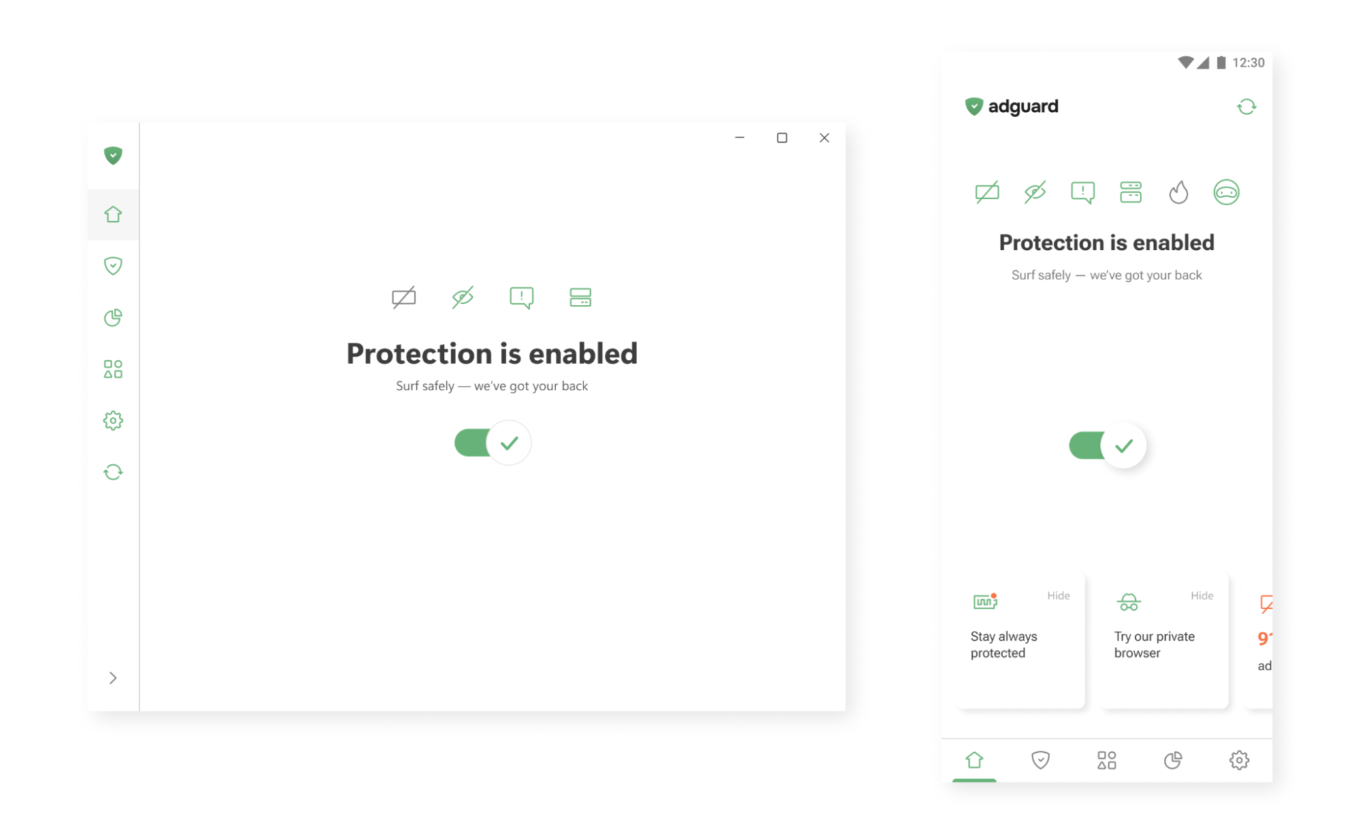
One button to enable protection

Active care → Help that’s always there

In our apps, you’ll often find small hints, tooltips, and summaries. Where needed, we add short explanations or links to longer articles — so you can dive deeper when you want to.
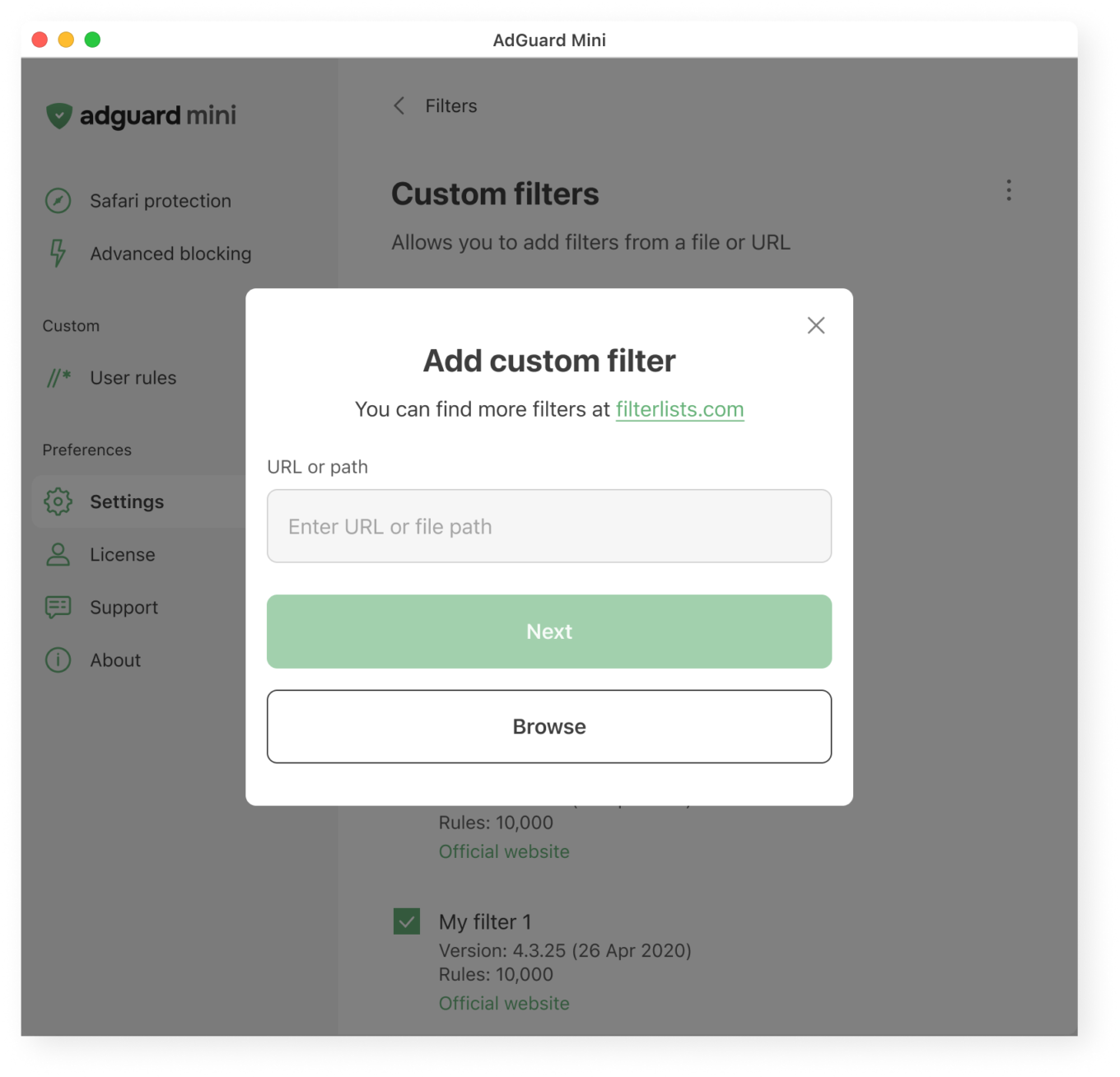
What users see when adding a custom filter

User control → Deep functionality, optional complexity

Most of our apps are layered. If you want to just turn on protection and move on, that’s great. If you want to dig deeper, you’ll find detailed settings, expert modes, and customizations. Your control is not necessary, but if you seek it, we’ll do our best to provide it to you.
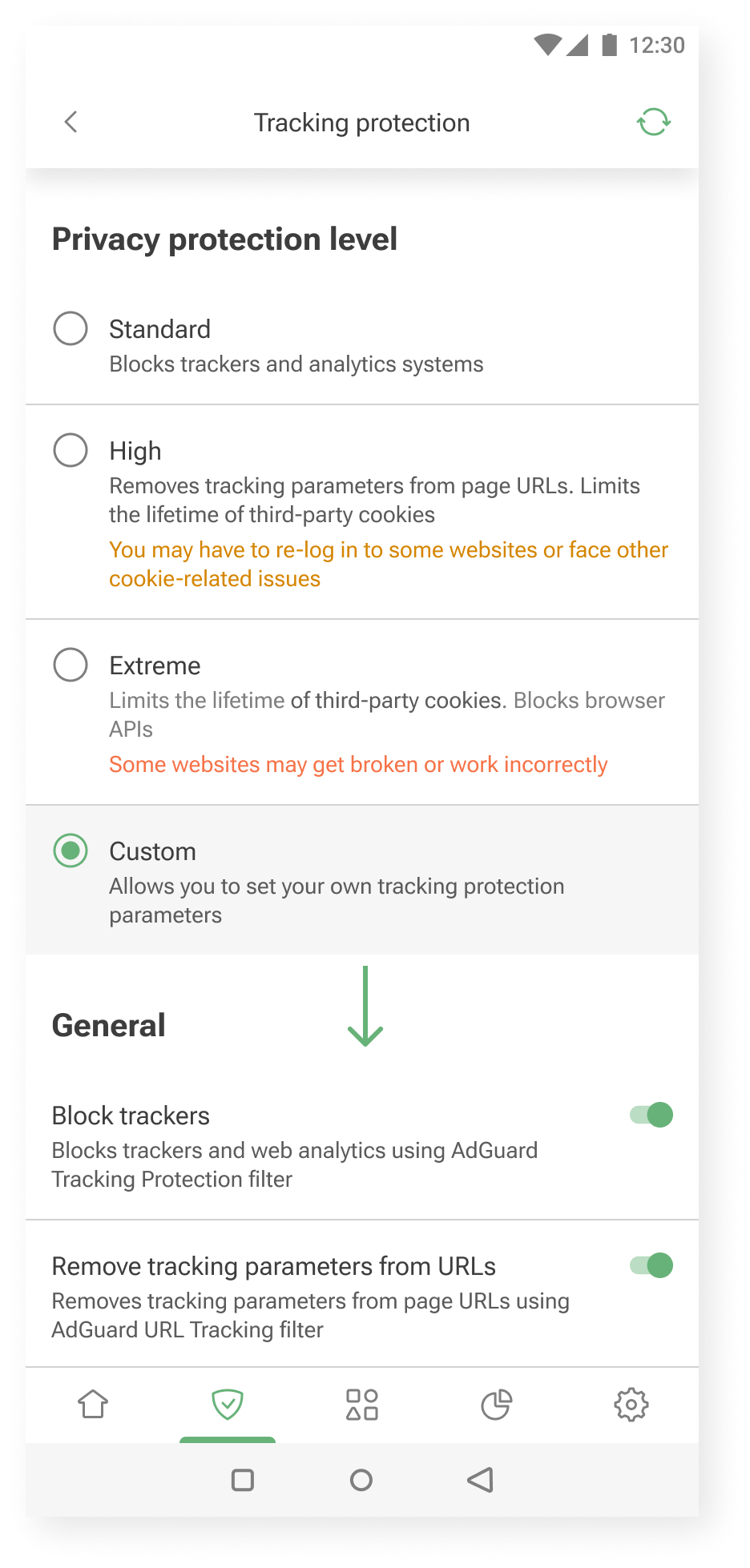
Additional settings are shown when you choose to customize further *mobile
Additional settings are shown when you choose to customize further

Our audience: How we approach different needs

Not everyone uses AdGuard the same way.

Some want to set it and forget it. Others enjoy tweaking settings and learning more about how privacy works. We try to support both.

Here’s how we approach it.

Layered experience

You can think of our apps as layered systems:

  • Simple on the surface — for those who want quick protection
  • Customizable in the middle — for those who are curious to learn and tweak things a bit
  • Deeply configurable — for power users who want full control without hand-holding

This approach helps us keep the UI clean, while still offering depth for those who need it.

One example is our User rules feature — a tool that allows users to create custom filtering rules.

Our previous approach was designed for advanced users only. There was a blank input field and a link to the documentation.
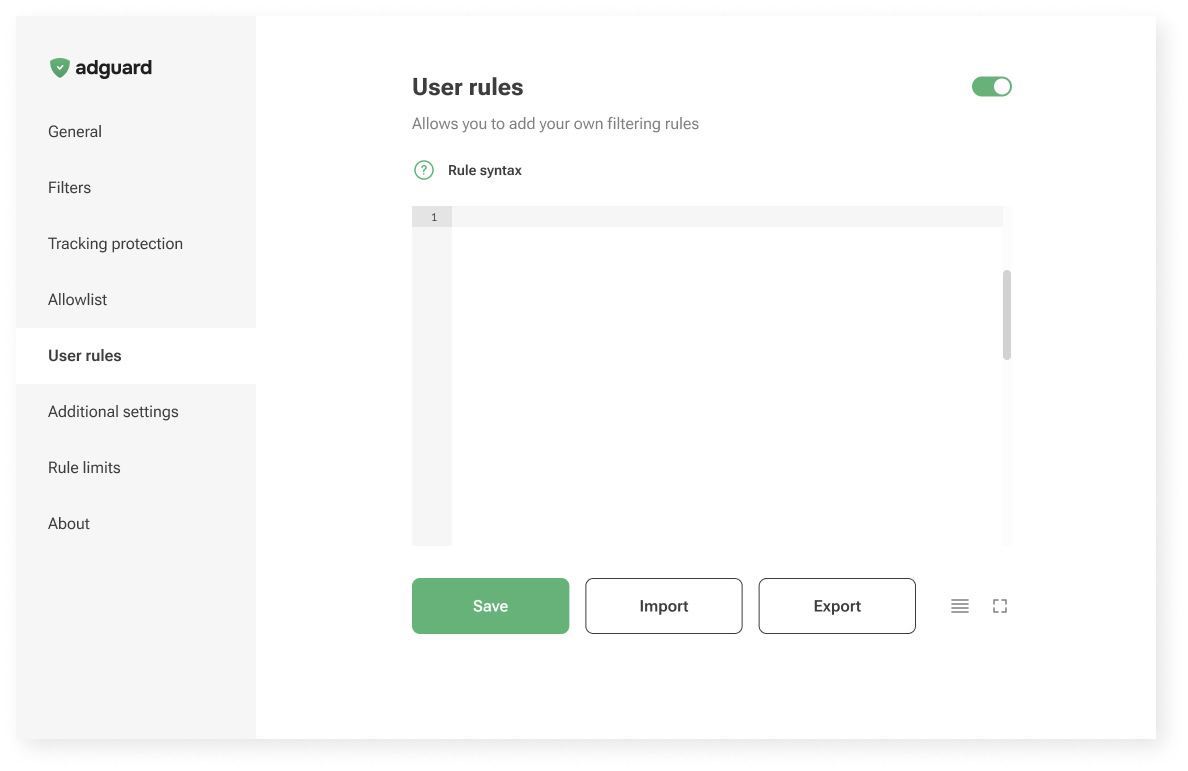
Old User rules unterface

Now, in AdGuard Mini for Mac, we’re trying something new: a guided interface that walks you through the process.
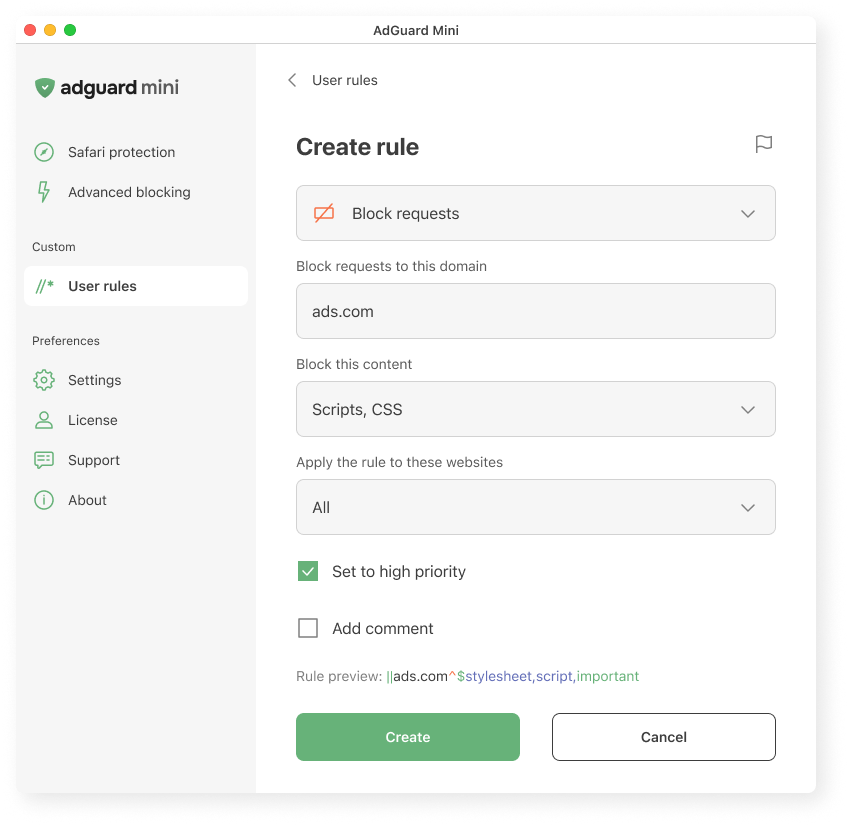
Creating a user rule in AdGuard Mini for Mac
Creating a user rule in AdGuard Mini for Mac

We explain what the rule does, where it applies, and how it works. We hope this makes it easier to get started, even if you’ve never written a rule before.

Let us know what you think: is it clear? Easy to follow? Missing something? Your feedback helps us decide whether to bring this approach to other platforms too.

Vocabulary

To meet users where they are, we adjust the vocabulary based on how familiar they might be with the topic and what they’re trying to achieve.

  • AdGuard protects you from ads and trackers — for those who just want peace of mind online. This works well when the user’s goal is simple: “I want the ads gone,” or “I want to feel safer.”
  • AdGuard blocks known analytics and phishing domains — for users who already understand the basics of online threats and want more transparency: “I know different types of tracking and risks exist, and I want to manage them more consciously.”
  • AdGuard lets you apply advanced cosmetic rules and scriptlets from custom lists — for experienced users who want full control, less explanations and more just tools: “I know what I’m doing; just let me configure it.”

Feedback: Where we learn what works

We’re constantly learning from you — and trying to reflect that in the product.

Sometimes the insights come from anonymous usage data. For example, we noticed that some users were ignoring the “card” about HTTPS filtering on the main screen. Without HTTPS filtering, however, most ads cannot be blocked. So we changed the wording on that “card” — and the result was immediate: the number of users who enabled the feature increased by about one and a half times.
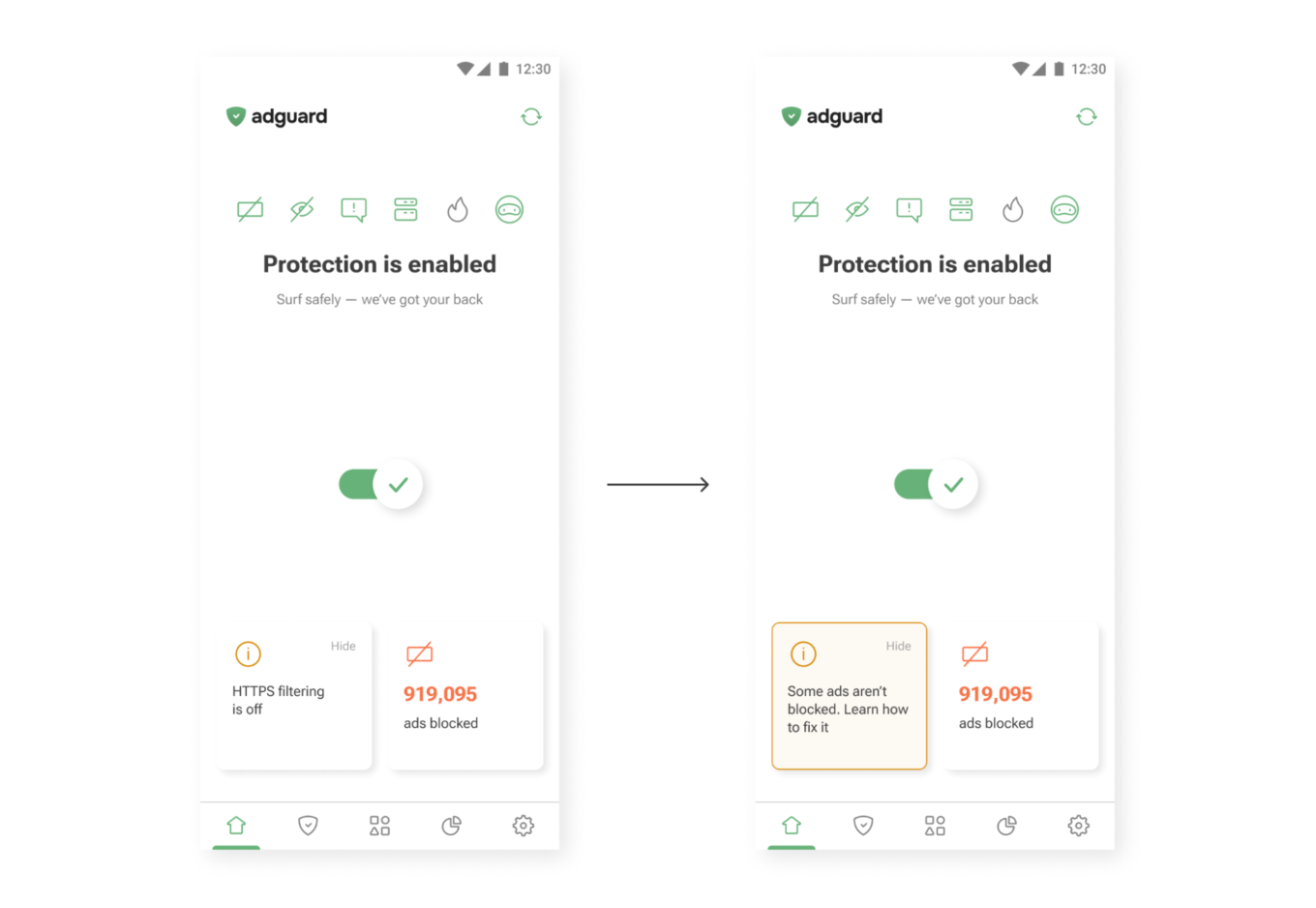
New wording on the main screen
New wording (right) drives more taps than the old one (left)

Sometimes feedback comes from support requests. One user once asked where they could find their VPN license key. The thing is, AdGuard VPN doesn’t use license keys — the subscription is simply tied to the email address used for purchase. So we added a short explanation to the confirmation email that users receive after buying a license. After that, questions about VPN license keys practically disappeared.
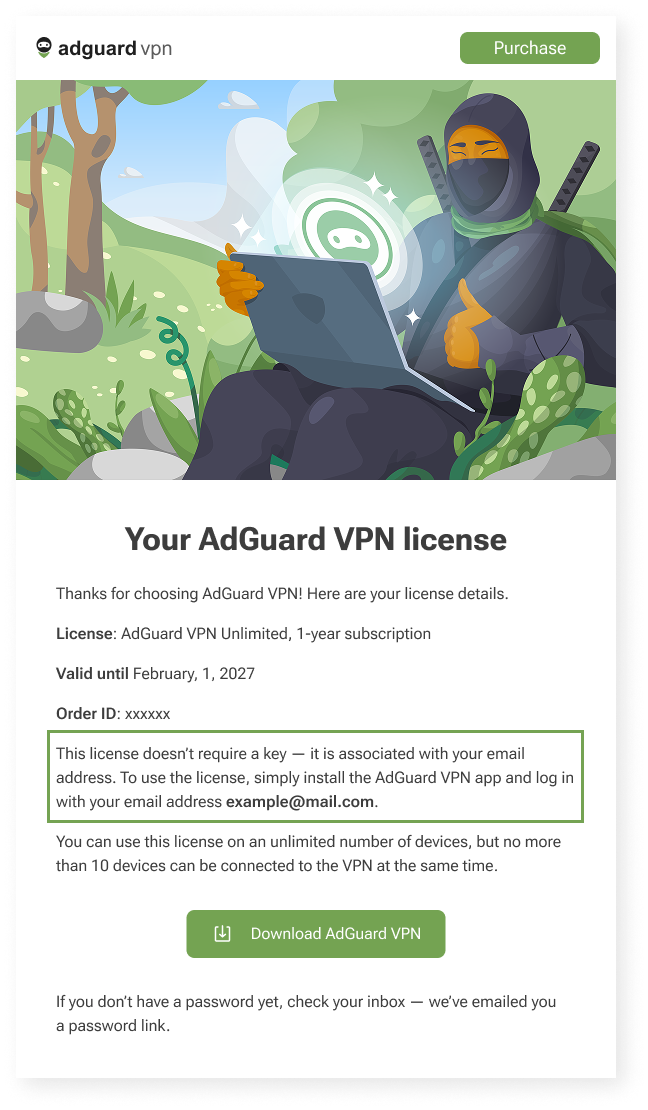
Post-purchase email for AdGuard VPN users *mobile
Post-purchase email for AdGuard VPN users

Constraints

We can’t implement every idea we come up with — and that’s not a bad thing. Constraints shape our work and help us better understand how and what to communicate to users. Here are a few examples of these constraints — and how we deal with them.

We’d love for all our texts to be friendly and concise, but in some cases we need to be legally precise to avoid any ambiguity. That’s why you may come across legal wording in our products — but whenever possible, we also provide a shorter, clearer summary to help you understand it quickly.
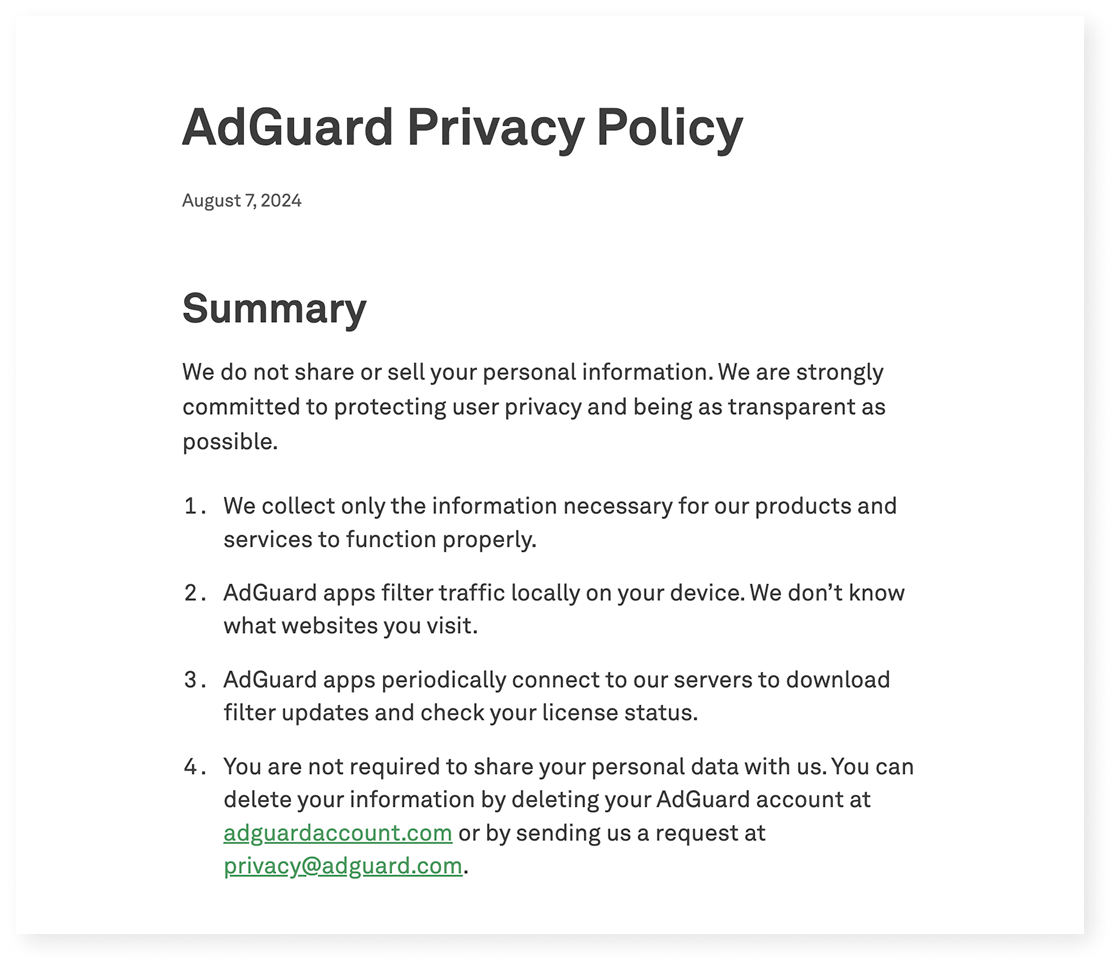
Excerpt from AdGuard’s Privacy policy

Localization

We build products for a global audience, and they are translated into 20+ languages. Even though we try to cover as many languages as possible, there will always be users who interact with our apps in a language that isn’t their native one. That means when we write in English, we have to keep in mind that not only native speakers will read it:

  • Vocabulary and syntax shouldn’t be too complex
  • We avoid local jokes, idioms, and wordplay that only native speakers would understand

Another constraint is how translation works in practice. We have several in-house translators and a group of dedicated volunteers who help us a lot (you can join too — read how). But in some cases, we have to rely on machine translation — and it’s much harder to provide context there.

This leads to a few additional rules:

  • Limit the amount of information in one message — English words are often shorter than their equivalents in other languages
  • Whenever possible, write in full sentences and avoid ending strings with prepositions — this can make translation more difficult

Let’s take another look at the User rules section.

When we were designing it, our initial idea was to make it feel like natural English: “Block request to ads.com.”

But in many languages, that structure wouldn’t work:

  • Slavic languages use grammatical cases
  • Turkic languages use postpositions, not prepositions
  • Asian languages often require more context

So we rewrote it as “Block requests to this domain.” It’s longer, but clearer for most of the users — and translators.
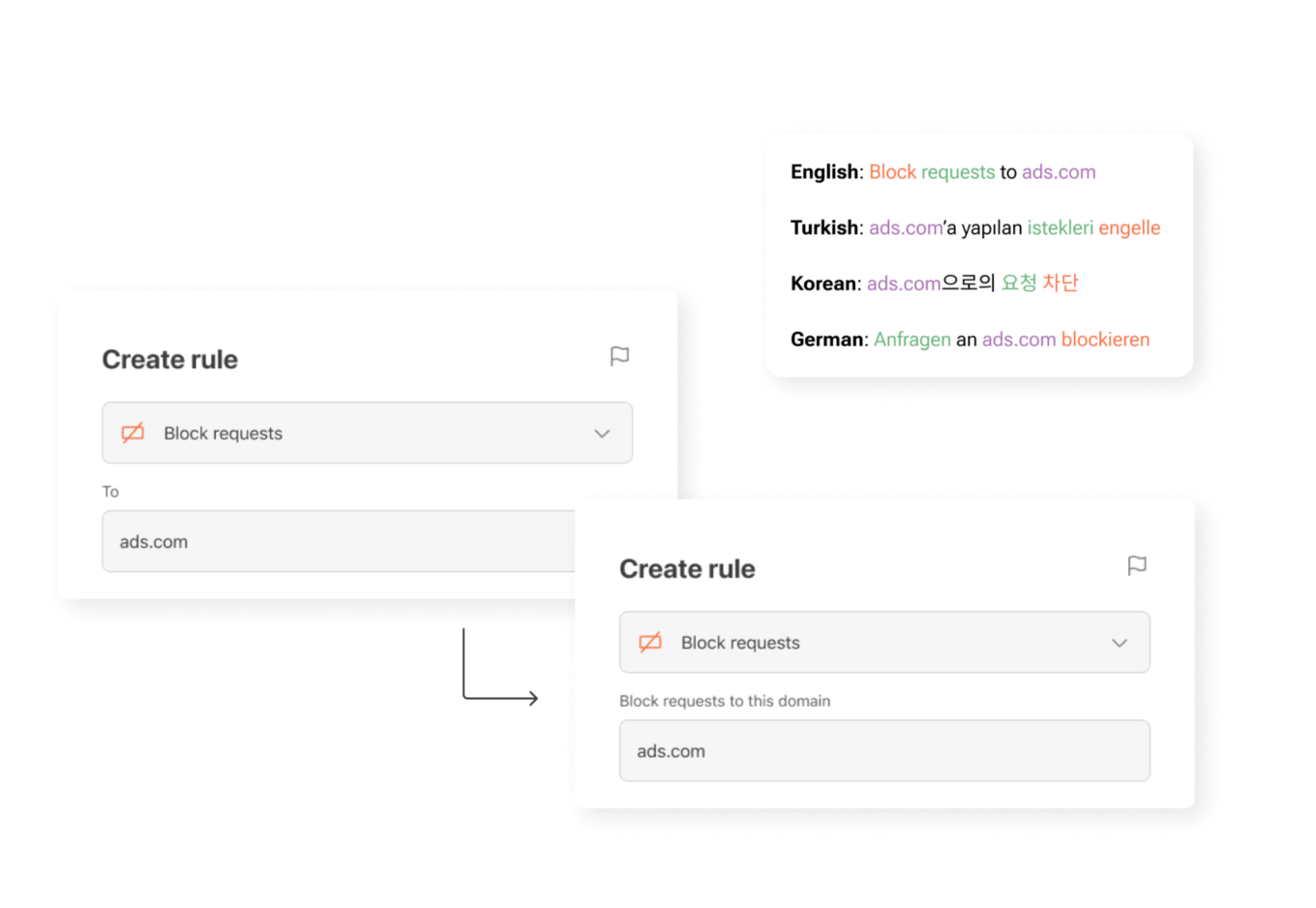
UI element for creating new rules in different languages

What’s next — and how you can help

Here’s a funny paradox: we’re a privacy company, so we collect as little data as possible. But that makes it harder to know which parts of our apps are most useful and which are confusing. We’re working on privacy-friendly ways to learn more about how you use AdGuard — so we can make things simpler, clearer, and more useful.

One small thing you can do to help: turn on the setting called Send anonymized app usage data. You’ll find it in AdGuard Ad Blocker, AdGuard VPN, and AdGuard Mail.

This option doesn’t send anything personal. We don’t collect identifiers, track you, or share your data with anyone. But it does help us see which screens people interact with — and which features need improvement.

Our next step is to rely more on insights like these when making product decisions. They help us see what really matters to users — and guide us in making AdGuard apps even clearer, more intuitive, and more helpful for you.

If you see something confusing — or something that worked well for you on our apps and websites — please let us know by clicking the button below.

We use every opportunity to make our apps clearer, more helpful, and closer to what you actually need!


Suka postingan ini?
AdGuard VPN DNS AdGuard AdGuard Mail AdGuard Wallet
Layar utama AdGuard untuk Windows
Layar Perlindungan AdGuard untuk Windows, menampilkan fitur dan pengaturan perlindungan
Layar Statistik AdGuard untuk Windows, menampilkan statistik untuk iklan dan pelacak yang terblokir
Layar Pengelolaan aplikasi AdGuard untuk Windows, menampilkan opsi pengelolaan perlindungan untuk aplikasi yang terinstal di perangkat
20.534 20534 ulasan pengguna
Sempurna!

AdGuard untuk Windows — pemblokir iklan untuk PC Anda

AdGuard untuk Windows lebih dari sekadar pemblokir iklan. Ini adalah alat serbaguna yang memblokir iklan, mengontrol akses ke situs berbahaya, mempercepat pemuatan halaman, dan melindungi anak-anak dari konten yang tidak pantas
Dengan mengunduhnya Anda menerima ketentuan Perjanjian lisensi
Microsoft Store
Dengan mengunduhnya Anda menerima ketentuan Perjanjian lisensi
AdGuard untuk Windows v8.0, masa percobaan 14 hari
Layar utama AdGuard untuk Mac
Layar Mode Siluman AdGuard untuk Mac
20.534 20534 ulasan pengguna
Sempurna!

AdGuard untuk Mac — pemblokir iklan seluruh sistem

AdGuard untuk Mac adalah pemblokir iklan unik yang dirancang khusus untuk macOS. Selain melindungi Anda dari iklan yang mengganggu di browser dan aplikasi, ini juga melindungi Anda dari pelacakan, phishing, dan penipuan
Dengan mengunduhnya Anda menerima ketentuan Perjanjian lisensi
Pelajari lainnya
AdGuard untuk Mac v2.19, masa percobaan 14 hari
Layar utama AdGuard untuk Android
Layar Perlindungan pelacakan AdGuard untuk Android
Layar Pengelolaan aplikasi AdGuard untuk Android, menampilkan opsi pengelolaan perlindungan untuk aplikasi yang terinstal di perangkat
Layar Statistik AdGuard untuk Android, menampilkan statistik untuk iklan dan pelacak yang terblokir
Layar utama peramban privat AdGuard untuk Android
Kode QR untuk unduh AdGuard untuk Android
20.534 20534 ulasan pengguna
Sempurna!

AdGuard untuk Android: pemblokir iklan semua aplikasi

Memblokir iklan dan pelacak di semua browser, game, dan aplikasi lainnya. Melindungi privasi Anda dan memungkinkan Anda mengontrol bagaimana aplikasi Anda menggunakan internet. Diinstal melalui APK
Dengan mengunduhnya Anda menerima ketentuan Perjanjian lisensi
Pelajari lainnya
Pindai untuk mengunduh
Gunakan pembaca kode QR yang tersedia di perangkat Anda
AdGuard untuk Android v4.14, masa percobaan 14 hari
Layar utama AdGuard untuk iOS
Layar Perlindungan AdGuard untuk iOS, menampilkan fitur dan pengaturan perlindungan
Layar Statistik AdGuard untuk iOS, menampilkan statistik untuk iklan dan pelacak yang terblokir
Kode QR untuk unduh AdGuard untuk iOS
20.534 20534 ulasan pengguna
Sempurna!

AdGuard untuk iOS — pemblokir iklan di luar Safari

Pemblokir iklan iOS terbaik untuk iPhone dan iPad. AdGuard menghilangkan semua jenis iklan dan pelacak di Safari serta melindungi privasi Anda di semua aplikasi pada tingkat DNS
Dengan mengunduhnya Anda menerima ketentuan Perjanjian lisensi
Pelajari lainnya
Pindai untuk mengunduh
Gunakan pembaca kode QR yang tersedia di perangkat Anda
AdGuard untuk iOS versi 4.5
Layar utama AdGuard Content Blocker
Layar filter AdGuard Content Blocker
Layar pengaturan AdGuard Content Blocker
20.534 20534 ulasan pengguna
Sempurna!

Pemblokir Konten AdGuard

AdGuard Content Blocker menghilangkan semua jenis iklan di browser seluler yang mendukung teknologi pemblokiran konten — yaitu, Samsung Internet dan Yandex Browser. Fitur-fiturnya terbatas dibandingkan dengan AdGuard untuk Android, tetapi gratis, mudah dipasang, dan efisien
Dengan mengunduhnya Anda menerima ketentuan Perjanjian lisensi
Pelajari lainnya
Pemblokir Konten AdGuard versi 2.8
Layar utama AdGuard Browser Extension
Layar Perlindungan pelacakan AdGuard Browser Extension
20.534 20534 ulasan pengguna
Sempurna!

Ekstensi peramban AdGuard

AdGuard adalah ekstensi pemblokiran iklan tercepat dan paling ringan yang secara efektif memblokir semua jenis iklan di semua halaman web! Pilih AdGuard untuk browser yang Anda gunakan dan dapatkan penjelajahan bebas iklan, cepat, dan aman.
Pasang
Dengan mengunduhnya Anda menerima ketentuan Perjanjian lisensi
Pasang
Dengan mengunduhnya Anda menerima ketentuan Perjanjian lisensi
Pasang
Dengan mengunduhnya Anda menerima ketentuan Perjanjian lisensi
Pasang
Dengan mengunduhnya Anda menerima ketentuan Perjanjian lisensi
Pasang
Dengan mengunduhnya Anda menerima ketentuan Perjanjian lisensi
Pelajari lainnya
Pasang
Dengan mengunduhnya Anda menerima ketentuan Perjanjian lisensi
Pelajari lainnya
Ekstensi peramban AdGuard versi 5.5
Layar utama Asisten Peramban
20.534 20534 ulasan pengguna
Sempurna!

Asisten AdGuard

Sebuah ekstensi peramban pendamping untuk aplikasi AdGuard desktop. Ini mengizinkan Anda memblokir item kustom di situs web, menambahkan situs web ke daftar izinkan, dan mengirim laporan langsung dari peramban Anda
Asisten AdGuard versi 1.4
20.534 20534 ulasan pengguna
Sempurna!

AdGuard Home

AdGuard Home adalah solusi berbasis jaringan untuk memblokir iklan dan pelacak. Instal sekali di router Anda untuk mencakup semua perangkat di jaringan rumah Anda — tidak diperlukan perangkat lunak klien tambahan. Ini sangat penting untuk berbagai perangkat IoT yang sering menimbulkan ancaman bagi privasi Anda
AdGuard Home versi 0.107
Layar utama AdGuard Pro untuk iOS
Layar Perlindungan AdGuard Pro untuk iOS, menampilkan fitur dan pengaturan perlindungan
Layar statistik AdGuard Pro untuk iOS, menampilkan statistik untuk iklan dan pelacak yang terblokir
20.534 20534 ulasan pengguna
Sempurna!

AdGuard Pro untuk iOS

AdGuard Pro untuk iOS dilengkapi dengan semua fitur perlindungan pemblokiran iklan canggih. Aplikasi ini menawarkan fitur yang sama dengan versi berbayar AdGuard untuk iOS. Aplikasi ini unggul dalam memblokir iklan di Safari dan memungkinkan Anda menyesuaikan pengaturan DNS untuk perlindungan yang lebih baik. Aplikasi ini memblokir iklan di browser dan aplikasi, melindungi anak-anak Anda dari konten yang tidak pantas, dan menjaga keamanan data pribadi Anda.
Dengan mengunduhnya Anda menerima ketentuan Perjanjian lisensi
Pelajari lainnya
AdGuard Pro untuk iOS versi 4.5
Layar utama AdGuard Mini untuk Mac
Layar perlindungan Safari AdGuard Mini untuk Mac
Layar Buat aturan AdGuard Mini untuk Mac
20.534 20534 ulasan pengguna
Sempurna!

AdGuard Mini untuk Mac — pemblokir iklan Safari

AdGuard Mini untuk Mac adalah pemblokir iklan Safari yang kuat. Aplikasi ringan ini menghapus iklan, memblokir pelacak, dan mempercepat pemuatan halaman. Ini membantu Anda menjelajah Web di Safari tanpa gangguan dan menjaga data Anda tetap pribadi
Pasang
Dengan mengunduhnya Anda menerima ketentuan Perjanjian lisensi
Pelajari lainnya
AdGuard Mini untuk Mac versi 2.3
Layar utama AdGuard untuk Android TV dengan perlindungan diaktifkan
Layar pemblokiran iklan AdGuard untuk Android TV, menampilkan fitur dan pengaturannya
Layar pengaturan AdGuard untuk Android TV
Layar Pengelolaan aplikasi AdGuard untuk Android TV, menampilkan aplikasi tempat iklan dan pelacak terblokir
20.534 20534 ulasan pengguna
Sempurna!

AdGuard untuk Android TV

AdGuard untuk Android TV adalah satu-satunya aplikasi yang memblokir iklan, menjaga privasi Anda, dan bertindak sebagai firewall untuk Smart TV Anda. Dapatkan peringatan tentang ancaman web, gunakan DNS yang aman, dan dapatkan manfaatkan lalu lintas yang terenkripsi. Bersantailah dan selami acara favorit Anda dengan keamanan terbaik dan tanpa iklan!
AdGuard untuk Android TV v4.14, masa percobaan 14 hari
Maskot AdGuard, Agnar, memegang penguin Linux
20.534 20534 ulasan pengguna
Sempurna!

AdGuard untuk Linux

AdGuard untuk Linux adalah pemblokir iklan sistem luas pertama di dunia untuk Linux. Blokir iklan dan pelacak di tingkat perangkat, pilih dari filter yang sudah terinstal sebelumnya, atau tambahkan milikmu sendiri — semuanya melalui antar muka baris perintah
AdGuard untuk Linux versi 1.4
20.534 20534 ulasan pengguna
Sempurna!

AdGuard Temp Mail

Generator alamat e-mail sementara gratis yang membuat Anda tetap anonim dan melindungi privasi Anda. Tidak ada spam di kotak masuk utama Anda!
20.534 20534 ulasan pengguna
Sempurna!

AdGuard VPN

75 Lokasi Di Seluruh Dunia

Akses ke konten apa pun

Enkripsi yang kuat

Tanpa kebijakan log

Koneksi paling cepat

dukungan 24/7

Coba gratis
Dengan mengunduhnya Anda menerima ketentuan Perjanjian lisensi
Pelajari lainnya
20.534 20534 ulasan pengguna
Sempurna!

DNS AdGuard

AdGuard DNS adalah cara yang sangat andal untuk memblokir iklan internet tanpa perlu menginstal aplikasi apapun. Mudah digunakan, sepenuhnya gratis, mudah dipasang di perangkat mana saja, dan menyediakan fungsi minimal yang diperlukan untuk memblokir iklan, penghitung, situs web berbahaya, dan konten dewasa.
20.534 20534 ulasan pengguna
Sempurna!

AdGuard Mail

Lindungi identitas Anda, hindari spam, dan jaga keamanan kotak masuk Anda dengan alias dan alamat e-mail sementara kami. Nikmati layanan penerusan e-mail gratis serta aplikasi untuk semua sistem operasi.
20.534 20534 ulasan pengguna
Sempurna!

AdGuard Wallet

Dompet kripto yang aman dan pribadi yang memberi Anda kendali penuh atas aset Anda. Kelola beberapa dompet dan temukan ribuan mata uang kripto untuk disimpan, dikirim, dan ditukar
Mengunduh AdGuard Klik tombol yang ditujukkan oleh panah untuk memulai instalasi. Pilih "Buka" dan klik "OK", lalu tunggu file diunduh. Di jendela yang terbuka, seret ikon AdGuard ke folder "Aplikasi". Terima kasih telah memilih AdGuard! Pilih "Buka" dan klik "OK", lalu tunggu file diunduh. Di jendela yang terbuka, klik "Install". Terima kasih telah memilih AdGuard!


Instal AdGuard untuk perangkat ponsel juga
















































