Mozilla deletes promise to 'never sell' your data. Has it really backed out on its word?

Mozilla, the company behind the open-source Firefox browser, has long prided itself on standing apart from tech giants like Google. Unlike Google, which has a rich history of collecting user data even if you try to say ‘no’, Mozilla has consistently insisted — and generally followed through — that user controls in Firefox aren’t a smokescreen and that it puts privacy front and center. Mozilla’s Privacy FAQ still greets you with a subheading in bold: “We Stand for People over Profit.”

The promise that’s no longer there

In late February, Mozilla updated its Privacy FAQ, Firefox’s own Privacy FAQ and introduced Firefox TOU. All three documents raised a lot of eyebrows, sending the community into frenzy.

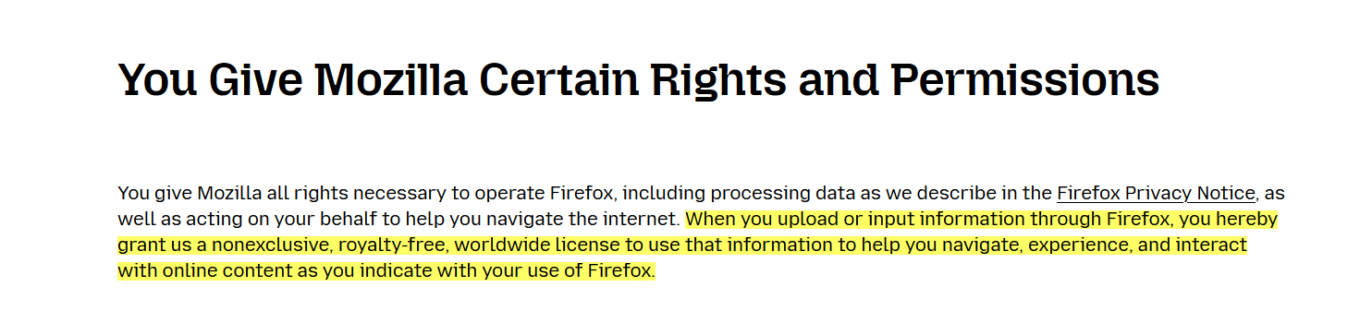
Let’s start with the TOU. The Firefox Terms of Use, released in late February, intially included the language that had many users scratching their heads. Specifically, it stated that “when you upload or input information through Firefox, you hereby grant us a nonexclusive, royalty-free, worldwide license to use that information to help you navigate, experience, and interact with online content as you indicate with your use of Firefox.”
The promise

What appeared to be a new policy triggered a flood of comments on Reddit, with users taking exception to the wording. Some criticized the language for being too vague, while not inherently and necessarily nefarious. Others were ringing alarm bells, and rather loudly: “For frick's sake I don't want you to use information typed in to Firefox, Mozilla. Whatever I type into the browser window is between me and whatever service I'm sending the information to, not you, Mozilla,” one Redditor ranted.

Others were still more willing to give Mozilla the benefit of the doubt: “I believe the Mozilla Foundation is trying to do the right thing, but this kind of language in the terms is ripe for abuse. I hope they clarify it.”

In response to the backlash, Mozilla released a blog post to try and clear things up, saying:

We’ve seen a little confusion about the language regarding licenses, so we want to clear that up. We need a license to allow us to make some of the basic functionality of Firefox possible. Without it, we couldn’t use information typed into Firefox, for example. It does NOT give us ownership of your data or a right to use it for anything other than what is described in the Privacy Notice.

However, this attempt at clarification only seemed to stir the pot further. Mozilla claimed they needed the license to make basic Firefox features work, but didn’t explain why they needed access to what you type in.

A few days later, Mozilla made another attempt at setting the record straight (or at damage control, whichever you prefer).

In a seperate blog post on February 28, it announced that it had changed the TOU once again.

Now the paragraph, that has caused so much controversy, reads like this:

You give Mozilla the rights necessary to operate Firefox. This includes processing your data as we describe in the Firefox Privacy Notice. It also includes a nonexclusive, royalty-free, worldwide license for the purpose of doing as you request with the content you input in Firefox. This does not give Mozilla any ownership in that content.

The apparent goal of this change was to ease users' fears that Mozilla now claims ownership of their typed-in content. However, if anything, the wording is even more vague than before, as it simply directs users to check the Firefox Privacy Notice for details as to how exactly their data will be used.

The TOU was only a small part of the controversy. Mozilla's updated Privacy FAQ and Firefox Privacy FAQ were responsible for the other part.

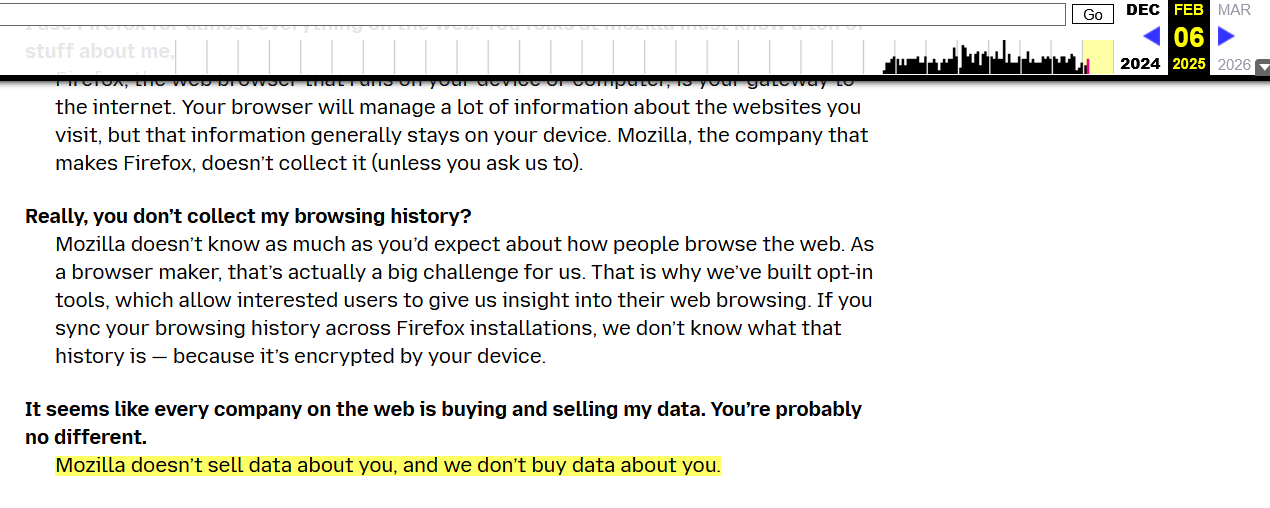
Previously, Mozilla's Privacy FAQ proudly stated that they “don’t sell data about you,” nor do they buy data about you. Below is a screenshot of the FAQ from February 6:
The promise2

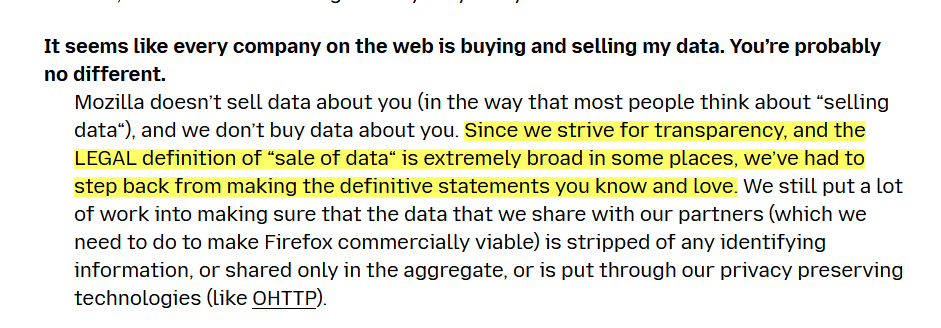
The updated version now reads that Mozilla “does not sell data about you” but “in the way that most people think about “selling data”. This makes you wonder, whether you’re the ‘most people’ and what’s all this really supposed to mean.
The promise
Current version of Mozilla’s Privacy FAQ

In its blog post from February 28, Mozilla justified the new, somewhat vague wording by stating that the current legal definition of what constitutes a sale of data is too "broad and evolving."

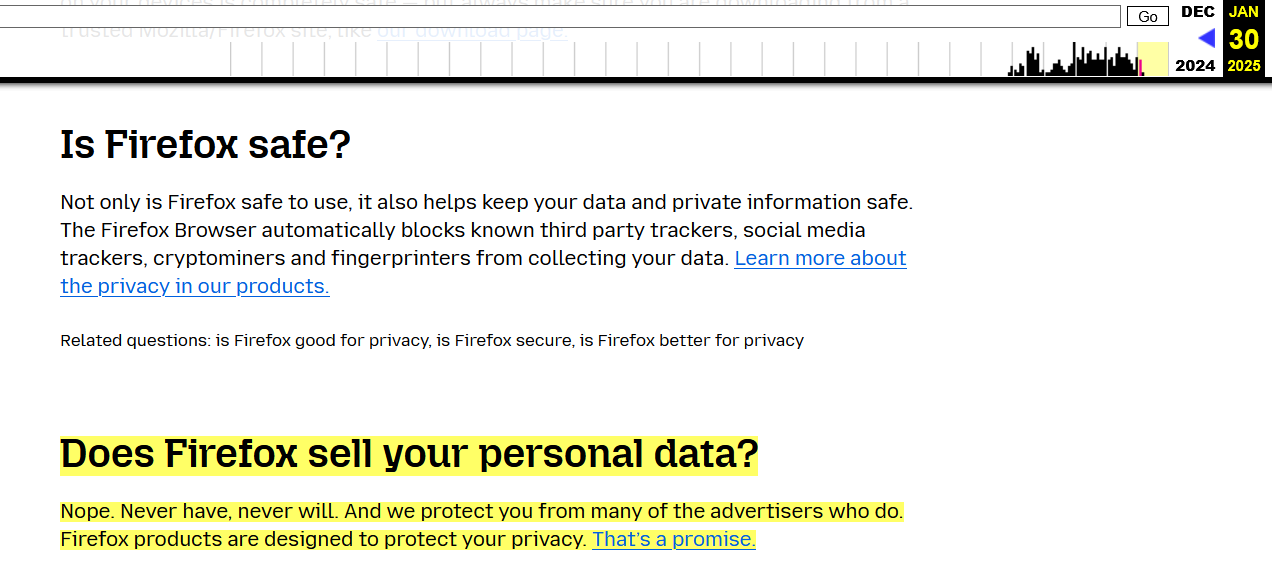
However, even more confusing — and arguably more disheartening for users — was the removal of Mozilla’s bold promise to “never sell your data” from its Firefox Privacy FAQ. Previously, the FAQ had answered the question “Does Firefox sell your personal data?” with a resounding “Nope. Never have, never will. And we protect you from many of the advertisers who do.”
Mozilla's FAQ screenshot

Now (as of the time of writing), the section is missing completely from Firefox’s Privacy FAQ:
The promise

To be fair, the section appears to be under construction, and it’s likely we’ll soon see a replacement to the promise that had been dear to many of Firefox’s users.

And while some might have been taken off guard by an apparent change of heart on behalf of Mozilla, this new language isn't coming as a surprise to those who’ve been paying close attention to Mozilla lately. Here’s why.

Mozilla’s slow descent into ad tech

One of Mozilla’s core principles has always been its commitment to user privacy, with a foundational promise not to sell data. However, over the past few years, and more noticeably, months, that promise has started to fade, and the pillars supporting it have shown signs of crumbling.

Back in October, Mozilla made official what many had been predicting: its move into the ad-tech space. In a blog post, Mozilla president Mark Surman raised a question: “How do we ensure that privacy is not a privilege of the few, but a fundamental right available to everyone?” He went on to suggest that one part of the solution lies in “online advertising,” arguing that the system is “fundamentally broken.” Mozilla, according to Surman, is experimenting with advertising as a way to fix it.

For what it’s worth, Mozilla is following a well-worn path that many tech companies took before it. Much like Google and Microsoft, which have rolled out features like Google’s Protected Audience API and Microsoft’s Ad Selection API, Mozilla is now attempting to blend privacy with advertising. However, advertising has never been a major part of Mozilla’s DNA — until quite recently.

The shift has taken time to shape up, but it’s becoming much clearer now. Just last summer, Mozilla made waves by acquiring Anonym, an ad metrics company. The goal? They claim it will improve ad targeting while safeguarding user data. Not long after, Mozilla rolled out Privacy-Preserving Attribution (PPA), a feature designed to let advertisers track the effectiveness of their ads without crossing the line into intrusive tracking. PPA was enabled by default in Firefox.

Time to ditch Firefox?

The latest changes to Mozilla’s Terms of Service and Privacy FAQs seem to reflect its growing focus on advertising.

As the company becomes more deeply entangled in the ad-tech industry, its long-standing promises about privacy are starting to feel less clear-cut. What once seemed like an unwavering dedication to protecting user data is now being tested by the growing push to make privacy compatible with advertising. For many users, this raises the question: how much is Mozilla really willing to compromise? While the answer is not yet clear, bidding farewell to that bold, albeit idealistic, promise feels sad. It might mark the end of an era — and, even sadder, that end may be inevitable.


Suka postingan ini?
AdGuard VPN DNS AdGuard AdGuard Mail AdGuard Wallet
Layar utama AdGuard untuk Windows
Layar Perlindungan AdGuard untuk Windows, menampilkan fitur dan pengaturan perlindungan
Layar Statistik AdGuard untuk Windows, menampilkan statistik untuk iklan dan pelacak yang terblokir
Layar Pengelolaan aplikasi AdGuard untuk Windows, menampilkan opsi pengelolaan perlindungan untuk aplikasi yang terinstal di perangkat
20.533 20533 ulasan pengguna
Sempurna!

AdGuard untuk Windows — pemblokir iklan untuk PC Anda

AdGuard untuk Windows lebih dari sekadar pemblokir iklan. Ini adalah alat serbaguna yang memblokir iklan, mengontrol akses ke situs berbahaya, mempercepat pemuatan halaman, dan melindungi anak-anak dari konten yang tidak pantas

Dengan mengunduhnya Anda menerima ketentuan Perjanjian lisensi
Microsoft Store
Dengan mengunduhnya Anda menerima ketentuan Perjanjian lisensi
AdGuard untuk Windows v8.0, masa percobaan 14 hari
Layar utama AdGuard untuk Mac
Layar Mode Siluman AdGuard untuk Mac
20.533 20533 ulasan pengguna
Sempurna!

AdGuard untuk Mac — pemblokir iklan seluruh sistem

AdGuard untuk Mac adalah pemblokir iklan unik yang dirancang khusus untuk macOS. Selain melindungi Anda dari iklan yang mengganggu di browser dan aplikasi, ini juga melindungi Anda dari pelacakan, phishing, dan penipuan
Dengan mengunduhnya Anda menerima ketentuan Perjanjian lisensi
Pelajari lainnya
AdGuard untuk Mac v2.19, masa percobaan 14 hari
Layar utama AdGuard untuk Android
Layar Perlindungan pelacakan AdGuard untuk Android
Layar Pengelolaan aplikasi AdGuard untuk Android, menampilkan opsi pengelolaan perlindungan untuk aplikasi yang terinstal di perangkat
Layar Statistik AdGuard untuk Android, menampilkan statistik untuk iklan dan pelacak yang terblokir
Layar utama peramban privat AdGuard untuk Android
Kode QR untuk unduh AdGuard untuk Android
20.533 20533 ulasan pengguna
Sempurna!

AdGuard untuk Android: pemblokir iklan semua aplikasi

Memblokir iklan dan pelacak di semua browser, game, dan aplikasi lainnya. Melindungi privasi Anda dan memungkinkan Anda mengontrol bagaimana aplikasi Anda menggunakan internet. Diinstal melalui APK
Dengan mengunduhnya Anda menerima ketentuan Perjanjian lisensi
Pelajari lainnya
Pindai untuk mengunduh
Gunakan pembaca kode QR yang tersedia di perangkat Anda
AdGuard untuk Android v4.14, masa percobaan 14 hari
Layar utama AdGuard untuk iOS
Layar Perlindungan AdGuard untuk iOS, menampilkan fitur dan pengaturan perlindungan
Layar Statistik AdGuard untuk iOS, menampilkan statistik untuk iklan dan pelacak yang terblokir
Kode QR untuk unduh AdGuard untuk iOS
20.533 20533 ulasan pengguna
Sempurna!

AdGuard untuk iOS — pemblokir iklan di luar Safari

Pemblokir iklan iOS terbaik untuk iPhone dan iPad. AdGuard menghilangkan semua jenis iklan dan pelacak di Safari serta melindungi privasi Anda di semua aplikasi pada tingkat DNS
Dengan mengunduhnya Anda menerima ketentuan Perjanjian lisensi
Pelajari lainnya
Pindai untuk mengunduh
Gunakan pembaca kode QR yang tersedia di perangkat Anda
AdGuard untuk iOS versi 4.5
Layar utama AdGuard Content Blocker
Layar filter AdGuard Content Blocker
Layar pengaturan AdGuard Content Blocker
20.533 20533 ulasan pengguna
Sempurna!

Pemblokir Konten AdGuard

AdGuard Content Blocker menghilangkan semua jenis iklan di browser seluler yang mendukung teknologi pemblokiran konten — yaitu, Samsung Internet dan Yandex Browser. Fitur-fiturnya terbatas dibandingkan dengan AdGuard untuk Android, tetapi gratis, mudah dipasang, dan efisien
Dengan mengunduhnya Anda menerima ketentuan Perjanjian lisensi
Pelajari lainnya
Pemblokir Konten AdGuard versi 2.8
Layar utama AdGuard Browser Extension
Layar Perlindungan pelacakan AdGuard Browser Extension
20.533 20533 ulasan pengguna
Sempurna!

Ekstensi peramban AdGuard

AdGuard adalah ekstensi pemblokiran iklan tercepat dan paling ringan yang secara efektif memblokir semua jenis iklan di semua halaman web! Pilih AdGuard untuk browser yang Anda gunakan dan dapatkan penjelajahan bebas iklan, cepat, dan aman.
Pasang
Dengan mengunduhnya Anda menerima ketentuan Perjanjian lisensi
Pasang
Dengan mengunduhnya Anda menerima ketentuan Perjanjian lisensi
Pasang
Dengan mengunduhnya Anda menerima ketentuan Perjanjian lisensi
Pasang
Dengan mengunduhnya Anda menerima ketentuan Perjanjian lisensi
Pasang
Dengan mengunduhnya Anda menerima ketentuan Perjanjian lisensi
Pelajari lainnya
Pasang
Dengan mengunduhnya Anda menerima ketentuan Perjanjian lisensi
Pelajari lainnya
Ekstensi peramban AdGuard versi 5.5
Layar utama Asisten Peramban
20.533 20533 ulasan pengguna
Sempurna!

Asisten AdGuard

Sebuah ekstensi peramban pendamping untuk aplikasi AdGuard desktop. Ini mengizinkan Anda memblokir item kustom di situs web, menambahkan situs web ke daftar izinkan, dan mengirim laporan langsung dari peramban Anda
Asisten AdGuard versi 1.4
20.533 20533 ulasan pengguna
Sempurna!

AdGuard Home

AdGuard Home adalah solusi berbasis jaringan untuk memblokir iklan dan pelacak. Instal sekali di router Anda untuk mencakup semua perangkat di jaringan rumah Anda — tidak diperlukan perangkat lunak klien tambahan. Ini sangat penting untuk berbagai perangkat IoT yang sering menimbulkan ancaman bagi privasi Anda
AdGuard Home versi 0.107
Layar utama AdGuard Pro untuk iOS
Layar Perlindungan AdGuard Pro untuk iOS, menampilkan fitur dan pengaturan perlindungan
Layar statistik AdGuard Pro untuk iOS, menampilkan statistik untuk iklan dan pelacak yang terblokir
20.533 20533 ulasan pengguna
Sempurna!

AdGuard Pro untuk iOS

AdGuard Pro untuk iOS dilengkapi dengan semua fitur perlindungan pemblokiran iklan canggih. Aplikasi ini menawarkan fitur yang sama dengan versi berbayar AdGuard untuk iOS. Aplikasi ini unggul dalam memblokir iklan di Safari dan memungkinkan Anda menyesuaikan pengaturan DNS untuk perlindungan yang lebih baik. Aplikasi ini memblokir iklan di browser dan aplikasi, melindungi anak-anak Anda dari konten yang tidak pantas, dan menjaga keamanan data pribadi Anda.
Dengan mengunduhnya Anda menerima ketentuan Perjanjian lisensi
Pelajari lainnya
AdGuard Pro untuk iOS versi 4.5
Layar utama AdGuard Mini untuk Mac
Layar perlindungan Safari AdGuard Mini untuk Mac
Layar Buat aturan AdGuard Mini untuk Mac
20.533 20533 ulasan pengguna
Sempurna!

AdGuard Mini untuk Mac — pemblokir iklan Safari

AdGuard Mini untuk Mac adalah pemblokir iklan Safari yang kuat. Aplikasi ringan ini menghapus iklan, memblokir pelacak, dan mempercepat pemuatan halaman. Ini membantu Anda menjelajah Web di Safari tanpa gangguan dan menjaga data Anda tetap pribadi
Pasang
Dengan mengunduhnya Anda menerima ketentuan Perjanjian lisensi
Pelajari lainnya
AdGuard Mini untuk Mac versi 2.3
Layar utama AdGuard untuk Android TV dengan perlindungan diaktifkan
Layar pemblokiran iklan AdGuard untuk Android TV, menampilkan fitur dan pengaturannya
Layar pengaturan AdGuard untuk Android TV
Layar Pengelolaan aplikasi AdGuard untuk Android TV, menampilkan aplikasi tempat iklan dan pelacak terblokir
20.533 20533 ulasan pengguna
Sempurna!

AdGuard untuk Android TV

AdGuard untuk Android TV adalah satu-satunya aplikasi yang memblokir iklan, menjaga privasi Anda, dan bertindak sebagai firewall untuk Smart TV Anda. Dapatkan peringatan tentang ancaman web, gunakan DNS yang aman, dan dapatkan manfaatkan lalu lintas yang terenkripsi. Bersantailah dan selami acara favorit Anda dengan keamanan terbaik dan tanpa iklan!
AdGuard untuk Android TV v4.14, masa percobaan 14 hari
Maskot AdGuard, Agnar, memegang penguin Linux
20.533 20533 ulasan pengguna
Sempurna!

AdGuard untuk Linux

AdGuard untuk Linux adalah pemblokir iklan sistem luas pertama di dunia untuk Linux. Blokir iklan dan pelacak di tingkat perangkat, pilih dari filter yang sudah terinstal sebelumnya, atau tambahkan milikmu sendiri — semuanya melalui antar muka baris perintah
AdGuard untuk Linux versi 1.4
20.533 20533 ulasan pengguna
Sempurna!

AdGuard Temp Mail

Generator alamat e-mail sementara gratis yang membuat Anda tetap anonim dan melindungi privasi Anda. Tidak ada spam di kotak masuk utama Anda!
20.533 20533 ulasan pengguna
Sempurna!

AdGuard VPN

75 Lokasi Di Seluruh Dunia

Akses ke konten apa pun

Enkripsi yang kuat

Tanpa kebijakan log

Koneksi paling cepat

dukungan 24/7

Coba gratis
Dengan mengunduhnya Anda menerima ketentuan Perjanjian lisensi
Pelajari lainnya
20.533 20533 ulasan pengguna
Sempurna!

DNS AdGuard

AdGuard DNS adalah cara yang sangat andal untuk memblokir iklan internet tanpa perlu menginstal aplikasi apapun. Mudah digunakan, sepenuhnya gratis, mudah dipasang di perangkat mana saja, dan menyediakan fungsi minimal yang diperlukan untuk memblokir iklan, penghitung, situs web berbahaya, dan konten dewasa.
20.533 20533 ulasan pengguna
Sempurna!

AdGuard Mail

Lindungi identitas Anda, hindari spam, dan jaga keamanan kotak masuk Anda dengan alias dan alamat e-mail sementara kami. Nikmati layanan penerusan e-mail gratis serta aplikasi untuk semua sistem operasi.
20.533 20533 ulasan pengguna
Sempurna!

AdGuard Wallet

Dompet kripto yang aman dan pribadi yang memberi Anda kendali penuh atas aset Anda. Kelola beberapa dompet dan temukan ribuan mata uang kripto untuk disimpan, dikirim, dan ditukar
Mengunduh AdGuard Klik tombol yang ditujukkan oleh panah untuk memulai instalasi. Pilih "Buka" dan klik "OK", lalu tunggu file diunduh. Di jendela yang terbuka, seret ikon AdGuard ke folder "Aplikasi". Terima kasih telah memilih AdGuard! Pilih "Buka" dan klik "OK", lalu tunggu file diunduh. Di jendela yang terbuka, klik "Install". Terima kasih telah memilih AdGuard!
Instal AdGuard untuk perangkat ponsel juga

















































