Musk versus Apple, Meta employees hijack accounts, as Twitter and WhatsApp (allegedly) leak data. AdGuard’s Digest

In this edition of AdGuard’s digest: Elon Musk criticizes App Store, a tracking tool sends sensitive financial info to Meta, Apple’s tracking accusations escalate, stolen data of millions of Twitter users surfaces up for free, as WhatsApp may or may not have leaked user data.

Elon Musk takes on Apple’s 30% tax and ‘censorship’

Twitter CEO Elon Musk has reignited a feud with Apple, blasting the company for stopping nearly all advertisements on Twitter and criticizing a 30% cut it takes from in-app purchases. On November 28, Musk tweeted that Apple had “threatened” to remove Twitter from the App Store. In another tweet, Musk accused Apple of failing to support free speech on the platform by winding down its ad spend.

Elon Musk has rekindled the row with Apple over its App Store commission

Photo: Brett Jordan/Unsplash

Musk has sparred with Apple over its App Store fee before. In May, Musk argued the 30% cut “literally 10 times higher than it should be”. Musk’s growing frustration with Apple was reportedly part of the reason while he pushed back the launch of the revamped Twitter Blue subsription. However, if there was some beef between Apple and Twitter, Musk called a truce after meeting with Apple’s Tim Cook later that week. “Among other things, we resolved the misunderstanding about Twitter potentially being removed from the App Store,” he said. Apple has since resumed advertising on Twitter. It’s unclear if Apple’s 30% tax was on the agenda of the Musk-Cook meeting.

And while Musk and Cook may have buried the hatchet (at least temporary), the steep fee that iOS developers must pay Apple has long been an issue. As we explained in our recent article, the dominance of the Apple and Google app stores hurts developers and users alike.

Meta employees used internal tool called ‘Oops’ to hijack user accounts

Multiple Meta employees have been found out to have accepted bribes for getting into Instagram and Facebook accounts with a secret internal tool. The tool called “Oops” (short for Online Operations) was designed so that Meta employees and contractors could restore accounts for their friends and family without them needing to reach out to Meta’s support. However, some employees and contractors apparently decided to monetize their privileged access to the shortcut. According to a report in the Wall Street Journal, they offered their recovery services both to legitimate users who’d got locked out of their accounts as well as to hackers.

The Journal reported that some workers and contractors allegedly received “thousands of dollars in bribes” for resetting Facebook accounts. Interestingly, some of those workers were supposed to provide security for Meta. Over two dozen people were either “disciplined or fired” after Meta conducted an internal probe.

Given the scale on which Meta has mishandled user data before, it has long been apparent that the company cares more about collecting user data, than ensuring it is secure, or investing into proper customer service. That and an unclear moderation policy apparently allow Meta employees to play demigods. Thus, earlier this year, an OnlyFans star claimed that she slept with several Meta employees to reverse her Instagram ban.

Meta’s tracking tool sends user financial info to… Meta

Roses are red, violets are blue, Meta is always tracking you. Meta Pixel, a notorious tracking tool that has previously been found sending sensitive health data from hospital websites to Meta, made headlines again. This time, the code was sending financial information from several US tax filing websites to the tech giant. The information sent included email addresses, names, income, refund amounts, and, sometimes, even the names of the dependents, The Markup investigation found.

Meta has been receiving sensitive user financial data from tax filing websites

Photo: Christin Hume/Unsplash

Meta has denied any wrongdoing, blaming the website owners for failing to properly configure the tool. “Advertisers should not send sensitive information about people through our Business Tools,” a Meta spokesperson said. The tech giant has also said that it has special filters in place to prevent it from actually being able to detect the sensitive data. Since the report went live, several tax filing websites have removed the pixel, some saying that they were unaware that it had been sending the data to Facebook.

While Meta argues that it was sent the data by mistake, it’s worth noting that Meta’s lifeline is user data, which it repurposes for targeted advertising — its main source of revenue. So, one has to take with a pinch of salt the company’s assurances that it might have been fed the data against its will.

Apple collects personally identifiable info despite promises not to

The information that Apple’s native apps send to Apple include a permanent ID number that is tied to a user’s name, email, and phone number, independent researchers from the software company Mysk have found. This apparently runs contrary to Apple’s privacy policy, which states that “none of the collected information identifies you personally.”
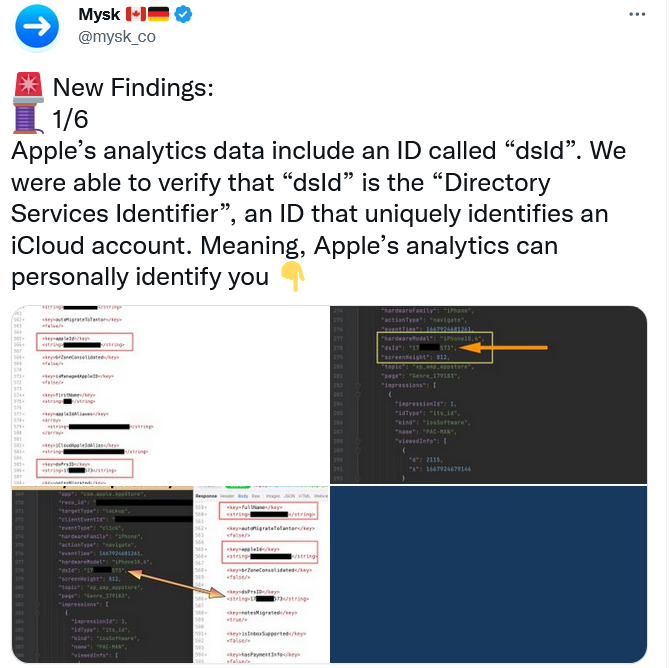
Apple collects data directly linked to your identity, but insists it is not tracking you

The researchers noted that the user has no way to opt out from Apple’s tracking. “All these detailed analytics are going to be linked directly to you. And that’s a problem, because there’s no way to switch it off,”researcher Tommy Mysk told Gizmodo. Earlier, the same researchers found that Apple keeps on collecting detailed real-time usage data even if the user has disabled all personalization options, including “Share iPhone Analytics.” Apple is now facing a class-action lawsuit over allegedly deceiving users with its privacy settings.

Apple has long claimed to prioritize privacy. However, its reputation as a privacy stalwart has been showing more and more cracks as of late. Experts question whether Apple is holding itself to the same standards regarding tracking that it imposes on third parties such as Meta. And as Apple builds its own advertising empire, these privacy concerns only intensify.

Someone is selling 500 million WhatsApp users’ phone numbers… maybe

A hacker has claimed to be selling an up-to-date database containing 487 million WhatsApp user mobile numbers. According to a report by Cybernews that investigated a sample of US and UK telephone numbers from the database, the claim is “likely” true. The bad actor alleged that the dataset contains phone numbers of the residents of 84 countries. Cybernews speculated that the data was most likely obtained by scraping, rather than in the course of an actual hack.

WhatsApp has denied that there has been a data leak. A spokesman for the company said that the report was based “on unsubstantiated screenshots,” even though Cybernews said that they had contacted the seller.

Whether this particular report is true or not, WhatsApp is known to regularly suffer from security vulnerabilities. Not long ago, WhatsApp’s rival Telegram CEO Pavel Durov called WhatsApp a “surveillance tool” commenting on a report about a recent security issue that struck WhatsApp. The issue could have allowed hackers gain “full access” to everything on WhatsApp users’ phones. It’s also not a secret that WhatsApp itself collects vast amounts of unencrypted metadata, including users’ phone numbers, which it can share with Meta and police.

Over 5.4 million Twitter user records offered for free on dark web

While some bad actors want to cash in on the user data, others give it out for free. A large dataset containing 5.4 million of Twitter user records has been posted on a hacker forum, the Bleeping Computer reported. The trove includes user phone numbers and email addresses in addition to Twitter logins, names, locations and IDs. Previously, the same dump was advertised for sale for $30,000.

The data was scraped in December 2021 through a Twitter security vulnerability that has since been patched. The issue, however, is now believed to be way more serious than previously thought. A much larger Twitter dump reportedly consisting of over 17 million records has been uncovered by security researcher Chad Loder. The data in the dump appears to be different from the 5.4 million dataset. The Irish privacy watchdog has started looking into the alleged breach.

While we can assume that Twitter is still suffering from the effects of a vulnerability that has long been fixed, it does not help that some of the platform’s top security and privacy executives resigned following Elon Musk’s Twitter takeover. Unless Musk takes serious steps to protect Twitter’s security and privacy, this probably won’t be the last such incident. The inherent risk is that Twitter collects a lot of personal information and has been known to misuse it.


Suka postingan ini?
AdGuard VPN DNS AdGuard AdGuard Mail AdGuard Wallet
Layar utama AdGuard untuk Windows
Layar Perlindungan AdGuard untuk Windows, menampilkan fitur dan pengaturan perlindungan
Layar Statistik AdGuard untuk Windows, menampilkan statistik untuk iklan dan pelacak yang terblokir
Layar Pengelolaan aplikasi AdGuard untuk Windows, menampilkan opsi pengelolaan perlindungan untuk aplikasi yang terinstal di perangkat
20.535 20535 ulasan pengguna
Sempurna!

AdGuard untuk Windows — pemblokir iklan untuk PC Anda

AdGuard untuk Windows lebih dari sekadar pemblokir iklan. Ini adalah alat serbaguna yang memblokir iklan, mengontrol akses ke situs berbahaya, mempercepat pemuatan halaman, dan melindungi anak-anak dari konten yang tidak pantas
Dengan mengunduhnya Anda menerima ketentuan Perjanjian lisensi
Microsoft Store
Dengan mengunduhnya Anda menerima ketentuan Perjanjian lisensi
AdGuard untuk Windows v8.0, masa percobaan 14 hari
Layar utama AdGuard untuk Mac
Layar Mode Siluman AdGuard untuk Mac
20.535 20535 ulasan pengguna
Sempurna!

AdGuard untuk Mac — pemblokir iklan seluruh sistem

AdGuard untuk Mac adalah pemblokir iklan unik yang dirancang khusus untuk macOS. Selain melindungi Anda dari iklan yang mengganggu di browser dan aplikasi, ini juga melindungi Anda dari pelacakan, phishing, dan penipuan
Dengan mengunduhnya Anda menerima ketentuan Perjanjian lisensi
Pelajari lainnya
AdGuard untuk Mac v2.19, masa percobaan 14 hari
Layar utama AdGuard untuk Android
Layar Perlindungan pelacakan AdGuard untuk Android
Layar Pengelolaan aplikasi AdGuard untuk Android, menampilkan opsi pengelolaan perlindungan untuk aplikasi yang terinstal di perangkat
Layar Statistik AdGuard untuk Android, menampilkan statistik untuk iklan dan pelacak yang terblokir
Layar utama peramban privat AdGuard untuk Android
Kode QR untuk unduh AdGuard untuk Android
20.535 20535 ulasan pengguna
Sempurna!

AdGuard untuk Android: pemblokir iklan semua aplikasi

Memblokir iklan dan pelacak di semua browser, game, dan aplikasi lainnya. Melindungi privasi Anda dan memungkinkan Anda mengontrol bagaimana aplikasi Anda menggunakan internet. Diinstal melalui APK

Dengan mengunduhnya Anda menerima ketentuan Perjanjian lisensi
Pelajari lainnya
Pindai untuk mengunduh
Gunakan pembaca kode QR yang tersedia di perangkat Anda
AdGuard untuk Android v4.14, masa percobaan 14 hari
Layar utama AdGuard untuk iOS
Layar Perlindungan AdGuard untuk iOS, menampilkan fitur dan pengaturan perlindungan
Layar Statistik AdGuard untuk iOS, menampilkan statistik untuk iklan dan pelacak yang terblokir
Kode QR untuk unduh AdGuard untuk iOS
20.535 20535 ulasan pengguna
Sempurna!

AdGuard untuk iOS — pemblokir iklan di luar Safari

Pemblokir iklan iOS terbaik untuk iPhone dan iPad. AdGuard menghilangkan semua jenis iklan dan pelacak di Safari serta melindungi privasi Anda di semua aplikasi pada tingkat DNS

Dengan mengunduhnya Anda menerima ketentuan Perjanjian lisensi
Pelajari lainnya
Pindai untuk mengunduh
Gunakan pembaca kode QR yang tersedia di perangkat Anda
AdGuard untuk iOS versi 4.5
Layar utama AdGuard Content Blocker
Layar filter AdGuard Content Blocker
Layar pengaturan AdGuard Content Blocker
20.535 20535 ulasan pengguna
Sempurna!

Pemblokir Konten AdGuard

AdGuard Content Blocker menghilangkan semua jenis iklan di browser seluler yang mendukung teknologi pemblokiran konten — yaitu, Samsung Internet dan Yandex Browser. Fitur-fiturnya terbatas dibandingkan dengan AdGuard untuk Android, tetapi gratis, mudah dipasang, dan efisien
Dengan mengunduhnya Anda menerima ketentuan Perjanjian lisensi
Pelajari lainnya
Pemblokir Konten AdGuard versi 2.8
Layar utama AdGuard Browser Extension
Layar Perlindungan pelacakan AdGuard Browser Extension
20.535 20535 ulasan pengguna
Sempurna!

Ekstensi peramban AdGuard

AdGuard adalah ekstensi pemblokiran iklan tercepat dan paling ringan yang secara efektif memblokir semua jenis iklan di semua halaman web! Pilih AdGuard untuk browser yang Anda gunakan dan dapatkan penjelajahan bebas iklan, cepat, dan aman.
Pasang
Dengan mengunduhnya Anda menerima ketentuan Perjanjian lisensi
Pasang
Dengan mengunduhnya Anda menerima ketentuan Perjanjian lisensi
Pasang
Dengan mengunduhnya Anda menerima ketentuan Perjanjian lisensi
Pasang
Dengan mengunduhnya Anda menerima ketentuan Perjanjian lisensi
Pasang
Dengan mengunduhnya Anda menerima ketentuan Perjanjian lisensi
Pelajari lainnya
Pasang
Dengan mengunduhnya Anda menerima ketentuan Perjanjian lisensi
Pelajari lainnya
Ekstensi peramban AdGuard versi 5.5
Layar utama Asisten Peramban
20.535 20535 ulasan pengguna
Sempurna!

Asisten AdGuard

Sebuah ekstensi peramban pendamping untuk aplikasi AdGuard desktop. Ini mengizinkan Anda memblokir item kustom di situs web, menambahkan situs web ke daftar izinkan, dan mengirim laporan langsung dari peramban Anda
Asisten AdGuard versi 1.4
20.535 20535 ulasan pengguna
Sempurna!

AdGuard Home

AdGuard Home adalah solusi berbasis jaringan untuk memblokir iklan dan pelacak. Instal sekali di router Anda untuk mencakup semua perangkat di jaringan rumah Anda — tidak diperlukan perangkat lunak klien tambahan. Ini sangat penting untuk berbagai perangkat IoT yang sering menimbulkan ancaman bagi privasi Anda
AdGuard Home versi 0.107
Layar utama AdGuard Pro untuk iOS
Layar Perlindungan AdGuard Pro untuk iOS, menampilkan fitur dan pengaturan perlindungan
Layar statistik AdGuard Pro untuk iOS, menampilkan statistik untuk iklan dan pelacak yang terblokir
20.535 20535 ulasan pengguna
Sempurna!

AdGuard Pro untuk iOS

AdGuard Pro untuk iOS dilengkapi dengan semua fitur perlindungan pemblokiran iklan canggih. Aplikasi ini menawarkan fitur yang sama dengan versi berbayar AdGuard untuk iOS. Aplikasi ini unggul dalam memblokir iklan di Safari dan memungkinkan Anda menyesuaikan pengaturan DNS untuk perlindungan yang lebih baik. Aplikasi ini memblokir iklan di browser dan aplikasi, melindungi anak-anak Anda dari konten yang tidak pantas, dan menjaga keamanan data pribadi Anda.
Dengan mengunduhnya Anda menerima ketentuan Perjanjian lisensi
Pelajari lainnya
AdGuard Pro untuk iOS versi 4.5
Layar utama AdGuard Mini untuk Mac
Layar perlindungan Safari AdGuard Mini untuk Mac
Layar Buat aturan AdGuard Mini untuk Mac
20.535 20535 ulasan pengguna
Sempurna!

AdGuard Mini untuk Mac — pemblokir iklan Safari

AdGuard Mini untuk Mac adalah pemblokir iklan Safari yang kuat. Aplikasi ringan ini menghapus iklan, memblokir pelacak, dan mempercepat pemuatan halaman. Ini membantu Anda menjelajah Web di Safari tanpa gangguan dan menjaga data Anda tetap pribadi
Pasang
Dengan mengunduhnya Anda menerima ketentuan Perjanjian lisensi
Pelajari lainnya
AdGuard Mini untuk Mac versi 2.3
Layar utama AdGuard untuk Android TV dengan perlindungan diaktifkan
Layar pemblokiran iklan AdGuard untuk Android TV, menampilkan fitur dan pengaturannya
Layar pengaturan AdGuard untuk Android TV
Layar Pengelolaan aplikasi AdGuard untuk Android TV, menampilkan aplikasi tempat iklan dan pelacak terblokir
20.535 20535 ulasan pengguna
Sempurna!

AdGuard untuk Android TV

AdGuard untuk Android TV adalah satu-satunya aplikasi yang memblokir iklan, menjaga privasi Anda, dan bertindak sebagai firewall untuk Smart TV Anda. Dapatkan peringatan tentang ancaman web, gunakan DNS yang aman, dan dapatkan manfaatkan lalu lintas yang terenkripsi. Bersantailah dan selami acara favorit Anda dengan keamanan terbaik dan tanpa iklan!
AdGuard untuk Android TV v4.14, masa percobaan 14 hari
Maskot AdGuard, Agnar, memegang penguin Linux
20.535 20535 ulasan pengguna
Sempurna!

AdGuard untuk Linux

AdGuard untuk Linux adalah pemblokir iklan sistem luas pertama di dunia untuk Linux. Blokir iklan dan pelacak di tingkat perangkat, pilih dari filter yang sudah terinstal sebelumnya, atau tambahkan milikmu sendiri — semuanya melalui antar muka baris perintah
AdGuard untuk Linux versi 1.4
20.535 20535 ulasan pengguna
Sempurna!

AdGuard Temp Mail

Generator alamat e-mail sementara gratis yang membuat Anda tetap anonim dan melindungi privasi Anda. Tidak ada spam di kotak masuk utama Anda!
20.535 20535 ulasan pengguna
Sempurna!

AdGuard VPN

75 Lokasi Di Seluruh Dunia

Akses ke konten apa pun

Enkripsi yang kuat

Tanpa kebijakan log

Koneksi paling cepat

dukungan 24/7

Coba gratis
Dengan mengunduhnya Anda menerima ketentuan Perjanjian lisensi
Pelajari lainnya
20.535 20535 ulasan pengguna
Sempurna!

DNS AdGuard

AdGuard DNS adalah cara yang sangat andal untuk memblokir iklan internet tanpa perlu menginstal aplikasi apapun. Mudah digunakan, sepenuhnya gratis, mudah dipasang di perangkat mana saja, dan menyediakan fungsi minimal yang diperlukan untuk memblokir iklan, penghitung, situs web berbahaya, dan konten dewasa.
20.535 20535 ulasan pengguna
Sempurna!

AdGuard Mail

Lindungi identitas Anda, hindari spam, dan jaga keamanan kotak masuk Anda dengan alias dan alamat e-mail sementara kami. Nikmati layanan penerusan e-mail gratis serta aplikasi untuk semua sistem operasi.
20.535 20535 ulasan pengguna
Sempurna!

AdGuard Wallet

Dompet kripto yang aman dan pribadi yang memberi Anda kendali penuh atas aset Anda. Kelola beberapa dompet dan temukan ribuan mata uang kripto untuk disimpan, dikirim, dan ditukar
Mengunduh AdGuard Klik tombol yang ditujukkan oleh panah untuk memulai instalasi. Pilih "Buka" dan klik "OK", lalu tunggu file diunduh. Di jendela yang terbuka, seret ikon AdGuard ke folder "Aplikasi". Terima kasih telah memilih AdGuard! Pilih "Buka" dan klik "OK", lalu tunggu file diunduh. Di jendela yang terbuka, klik "Install". Terima kasih telah memilih AdGuard!
Instal AdGuard untuk perangkat ponsel juga
















































