‘My AI’ is not your friend: How Snap’s AI chatbot spies on you and fuels ad targeting

Snapchat users are accustomed to the idea that most messages, be they texts or snaps, sent in individual chats are deleted by default from Snap’s servers once they’ve been viewed or expired. At least, that’s what Snap’s privacy policy promises. It’s somewhat tempting to transfer this logic to My AI, the company’s own ChatGPT-powered chatbot. First introduced in February this year as a purple-skinned, AI-powered character that can “recommend birthday gift ideas for your BFF, plan a hiking trip for a long weekend, suggest a recipe for dinner” and more, My AI was pitched as a friend that you can shoot a message anytime, anywhere, such as when you’re feeling lonely or bored.
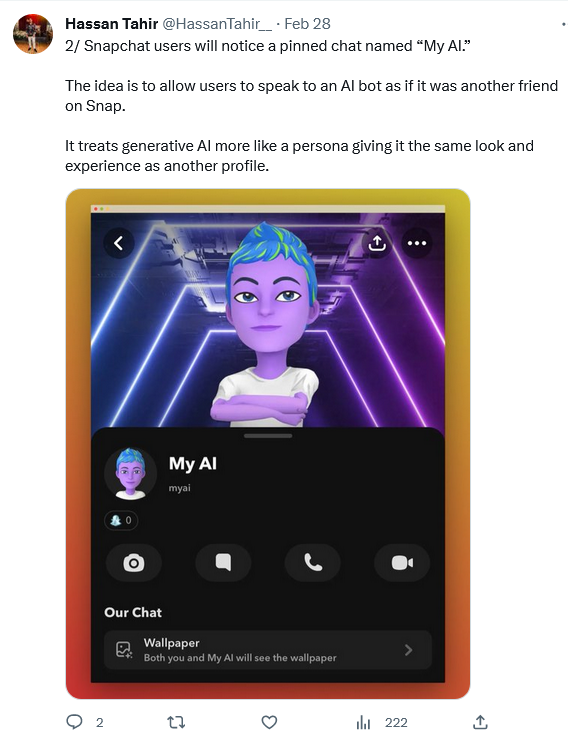
An avatar of 'My AI' chatbot looks friendly enough

But despite its endearing appearance and readiness to “even write a haiku about cheese for your cheddar-obsessed pal,” do not be fooled into believing My AI is your friend: it is nothing but a tattletale. Not only does My AI occasionally hallucinate and make promises it can not keep (such as accessing your location after you specifically tell it not to), but it also logs and hands over everything you told it to Snap so that it can target ads to you.

My AI: A friend who tells on you and cannot be removed

When Snap first unveiled My AI, it rolled it out only to its Snapchat Plus subscribers who pay $3.99 a month. Two months later, Snap, apparently realizing My AI’s potential in boosting its ad revenue, made it accessible to all the users within the app. And, while some users were legitimately excited about playing with yet another AI-powered toy, others were concerned about that way Snap forced My AI on them: the chatbot is pinned to the app chat tab above conversations with friends, and cannot be unpinned or removed. Well, it can, only that it is a paid service(!).
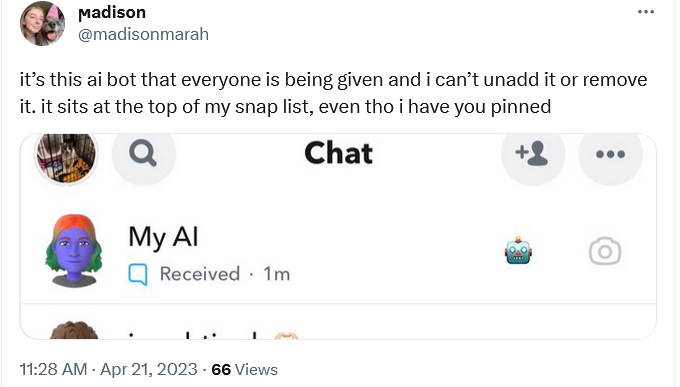
Some users want My AI to be unpinned from their chat tab

Before you start chatting My AI up — and it’s really hard to resist the urge to do so, since Snap made it a permanent eyesore — it will display you a ‘Say Hi to My AI’ privacy notice. In it it will say that all of your messages with your weird-looking AI companion “will be retained unless you delete them and may be used to improve Snap’s products and to personalize your experience, including ads.” With that, it will encourage you to “not share any sensitive or confidential information.”
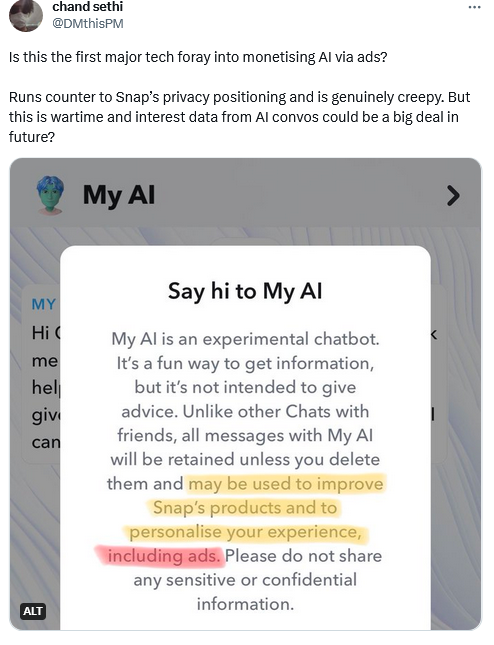
Snap shows a privacy notification before you start communicating with the chatbot

But what about tips on birthday gifts for you ‘BFF,’ personal information on your pals (re:haiku), and advice on trekking routes? Isn’t this information personal enough? In other words, It looks like Snapchat is trying to convince you that ‘My AI’ is no different from your friend — even though it has that bluish tint to its skin — while in the same breath warning you not to trust it with anything sensitive. So, what is it, Snap?

This ambiguity has given rise to confusion, with users surprised to find out that My AI was aware of previous conversations with them.
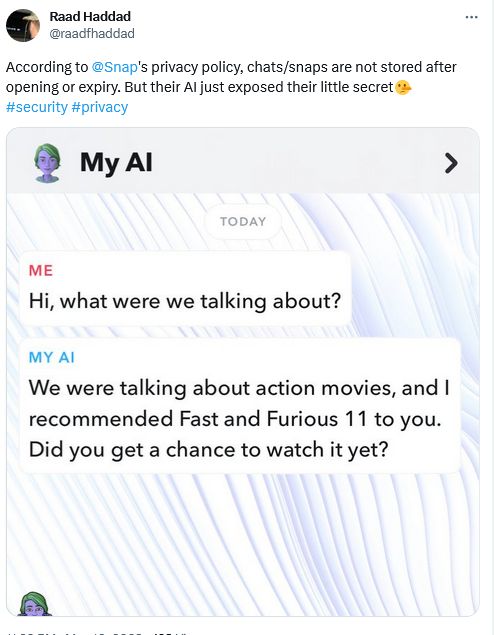
Some users seemed to be confused over why My AI remembers their previous conversations

Snapchat has faced a backlash from users who want the bot be removed — some of them claiming that My AI’s forced addition to their chat list was a “serious invasion of privacy.”

To understand their frustration, imagine having no option to delete a random stranger who was inserted on top of your WhatsApp/Telegram/Signal chats — that would be very annoying. Snap has, however, refused to budge on the issue.

This aggressive promotion combined with inherent user curiosity have made My AI extremely popular among Snapchatters. The latter have shared tons of personal information with it, Snap revealed.

Cars, baby showers, education & pets: things people told My AI

Snap revealed that 150 million people sent over 10 billion messages to My AI, which propelled it to the top tier of consumer chatbots.

In a recent blog post, Snap shared a detailed breakdown of what users asked My AI about — you can check it here. The most popular topics included art and design, birthday, wedding and baby shower planning, tourist tips, education, restaurant recommendations, beauty products, clothing, pets, cars, gadgets, sports, and entertainment. In other words, users asked My AI about everything and anything. It’s likely that while getting tips from My AI, users have shared troves of their personal information with the AI-powered assistant, such as ages of their kids, location of their home, names of their pets, their allergies, shoe sizes — the list goes on. And since my AI is marketed as your friend and its retention policies may have not been crystal clear (more about that later), people may have been more inclined to share personal details of their lives with it than they would with a faceless non-animated service. This data can now be used to personalize ads to them.

Here’s what Snap has to say about this:

We are able to use conversations with My AI to enhance a key optimization that we offer advertisers, called Snapchat Lifestyle Categories (SLCs). These categories are historically based on factors like which content a Snapchatter watches. New signals from conversations with My AI will now help us enhance the quality and depth of SLCs, ultimately boosting the relevance of the ads Snapchatters see on the app.

Snapchat LifeStyle Categories are groups of users with similar interests and behaviors on the app. They allow advertisers to pick the group that suits their ad goals and target it with ads. Thanks to the data it can now extract from users’ chats with My AI, Snap can craft more precise and tailored groups, boosting the effectiveness of ad campaigns and its own ad revenue (especially with ads also coming to My AI chatbot), but also raising privacy concerns for users.

Besides the fact that some Snapchatters may not even realize that their conversations with My AI are not as private as other one-on-one chats, others may have to fear that this data could be shared or sold to third parties, or hacked or leaked. This is a real possibility, especially if users’ chats with My AI are kept by default, as it is now.

Snapchat’s tricky policies: how to stop My AI from snooping on you

There’s a way to reduce Snap’s ability to build a detailed ad profile on you, that could lead to intrusive ads right in the chatbot and elsewhere. According to Snapchat, all the content you share with My AI is “retained until you delete it.”

If the chat with My AI is less than 24-hours old, you can delete it just by long-pressing the message. However, if the message is older than that, you have to jump through some hoops. The deletion pathway for iOS and Android is slightly different, but in both cases you have to go to Settings first and perform at least two more actions. Then you might have to wait up to 30 days (!) for the messages to be deleted from Snapchat servers, based on the timeframe Snap has given itself.

When it comes to users’ location information, there’s a catch. Snap claims that My AI “does not collect any new location information” from users, but it can access location information that the user has already agreed to share with Snap. And if the user opts out of sharing location information with Snapchat, it may take a while for this news to reach My AI. Snapchat admits that “If Snapchatters stop sharing their location with Snapchat, it may take a little time for this to take effect in My AI.” Which is a troubling perspective, especially considering that Snapchat says that privacy is its “foundational value.”
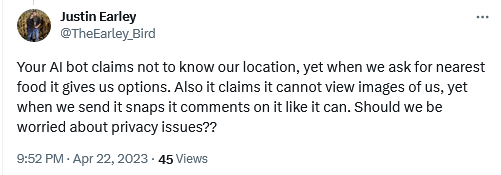
Users seemed to be confused about whether the chatbot has access to location

To sum it up, there may not be a foolproof way to prevent My AI from harvesting data from you, so you may want to think twice when grilling the blue AI-powered avatar about your personal stuff and getting advice on sensitive issues. There’s always a trade-off between risk and reward, or in this case, risk and curiosity, to consider. And everyone has their own meter.

Conclusion: is chatting with My AI worth the privacy risks?

Snapchat’s My AI chatbot may seem like a fun and friendly way to get tips and entertainment from an AI-powered avatar, and a blue one at that. But behind the scenes, Snap is analyzing your chats to serve you personalized ads that may be invasive or inappropriate. This may make you feel violated, especially since My AI is touted as your friend, not a marketing tool.

Moreover, Snap does not make it easy for you to delete the data collected by My AI, which shows that it has little regard to your privacy and cares predominantly about its ad revenue, which is expected to soar with its adoption of AI. There are some ways to mitigate the privacy risks, such as deleting your chats or opting out of location sharing, but they are not foolproof and may not take effect right away. So, before you chat with My AI, you need to ask yourself: is it really worth it? The answer may be different for everyone, but one thing is clear: you should be careful what you tell your chatbot helper, or it can tell on you.


Suka postingan ini?
AdGuard VPN DNS AdGuard AdGuard Mail AdGuard Wallet
Layar utama AdGuard untuk Windows
Layar Perlindungan AdGuard untuk Windows, menampilkan fitur dan pengaturan perlindungan
Layar Statistik AdGuard untuk Windows, menampilkan statistik untuk iklan dan pelacak yang terblokir
Layar Pengelolaan aplikasi AdGuard untuk Windows, menampilkan opsi pengelolaan perlindungan untuk aplikasi yang terinstal di perangkat
20.534 20534 ulasan pengguna
Sempurna!

AdGuard untuk Windows — pemblokir iklan untuk PC Anda

AdGuard untuk Windows lebih dari sekadar pemblokir iklan. Ini adalah alat serbaguna yang memblokir iklan, mengontrol akses ke situs berbahaya, mempercepat pemuatan halaman, dan melindungi anak-anak dari konten yang tidak pantas

Dengan mengunduhnya Anda menerima ketentuan Perjanjian lisensi
Microsoft Store
Dengan mengunduhnya Anda menerima ketentuan Perjanjian lisensi
AdGuard untuk Windows v8.0, masa percobaan 14 hari
Layar utama AdGuard untuk Mac
Layar Mode Siluman AdGuard untuk Mac
20.534 20534 ulasan pengguna
Sempurna!

AdGuard untuk Mac — pemblokir iklan seluruh sistem

AdGuard untuk Mac adalah pemblokir iklan unik yang dirancang khusus untuk macOS. Selain melindungi Anda dari iklan yang mengganggu di browser dan aplikasi, ini juga melindungi Anda dari pelacakan, phishing, dan penipuan
Dengan mengunduhnya Anda menerima ketentuan Perjanjian lisensi
Pelajari lainnya
AdGuard untuk Mac v2.19, masa percobaan 14 hari
Layar utama AdGuard untuk Android
Layar Perlindungan pelacakan AdGuard untuk Android
Layar Pengelolaan aplikasi AdGuard untuk Android, menampilkan opsi pengelolaan perlindungan untuk aplikasi yang terinstal di perangkat
Layar Statistik AdGuard untuk Android, menampilkan statistik untuk iklan dan pelacak yang terblokir
Layar utama peramban privat AdGuard untuk Android
Kode QR untuk unduh AdGuard untuk Android
20.534 20534 ulasan pengguna
Sempurna!

AdGuard untuk Android: pemblokir iklan semua aplikasi

Memblokir iklan dan pelacak di semua browser, game, dan aplikasi lainnya. Melindungi privasi Anda dan memungkinkan Anda mengontrol bagaimana aplikasi Anda menggunakan internet. Diinstal melalui APK
Dengan mengunduhnya Anda menerima ketentuan Perjanjian lisensi
Pelajari lainnya
Pindai untuk mengunduh
Gunakan pembaca kode QR yang tersedia di perangkat Anda
AdGuard untuk Android v4.14, masa percobaan 14 hari
Layar utama AdGuard untuk iOS
Layar Perlindungan AdGuard untuk iOS, menampilkan fitur dan pengaturan perlindungan
Layar Statistik AdGuard untuk iOS, menampilkan statistik untuk iklan dan pelacak yang terblokir
Kode QR untuk unduh AdGuard untuk iOS
20.534 20534 ulasan pengguna
Sempurna!

AdGuard untuk iOS — pemblokir iklan di luar Safari

Pemblokir iklan iOS terbaik untuk iPhone dan iPad. AdGuard menghilangkan semua jenis iklan dan pelacak di Safari serta melindungi privasi Anda di semua aplikasi pada tingkat DNS
Dengan mengunduhnya Anda menerima ketentuan Perjanjian lisensi
Pelajari lainnya
Pindai untuk mengunduh
Gunakan pembaca kode QR yang tersedia di perangkat Anda
AdGuard untuk iOS versi 4.5
Layar utama AdGuard Content Blocker
Layar filter AdGuard Content Blocker
Layar pengaturan AdGuard Content Blocker
20.534 20534 ulasan pengguna
Sempurna!

Pemblokir Konten AdGuard

AdGuard Content Blocker menghilangkan semua jenis iklan di browser seluler yang mendukung teknologi pemblokiran konten — yaitu, Samsung Internet dan Yandex Browser. Fitur-fiturnya terbatas dibandingkan dengan AdGuard untuk Android, tetapi gratis, mudah dipasang, dan efisien
Dengan mengunduhnya Anda menerima ketentuan Perjanjian lisensi
Pelajari lainnya
Pemblokir Konten AdGuard versi 2.8
Layar utama AdGuard Browser Extension
Layar Perlindungan pelacakan AdGuard Browser Extension
20.534 20534 ulasan pengguna
Sempurna!

Ekstensi peramban AdGuard

AdGuard adalah ekstensi pemblokiran iklan tercepat dan paling ringan yang secara efektif memblokir semua jenis iklan di semua halaman web! Pilih AdGuard untuk browser yang Anda gunakan dan dapatkan penjelajahan bebas iklan, cepat, dan aman.
Pasang
Dengan mengunduhnya Anda menerima ketentuan Perjanjian lisensi
Pasang
Dengan mengunduhnya Anda menerima ketentuan Perjanjian lisensi
Pasang
Dengan mengunduhnya Anda menerima ketentuan Perjanjian lisensi
Pasang
Dengan mengunduhnya Anda menerima ketentuan Perjanjian lisensi
Pasang
Dengan mengunduhnya Anda menerima ketentuan Perjanjian lisensi
Pelajari lainnya
Pasang
Dengan mengunduhnya Anda menerima ketentuan Perjanjian lisensi
Pelajari lainnya
Ekstensi peramban AdGuard versi 5.5
Layar utama Asisten Peramban
20.534 20534 ulasan pengguna
Sempurna!

Asisten AdGuard

Sebuah ekstensi peramban pendamping untuk aplikasi AdGuard desktop. Ini mengizinkan Anda memblokir item kustom di situs web, menambahkan situs web ke daftar izinkan, dan mengirim laporan langsung dari peramban Anda
Asisten AdGuard versi 1.4
20.534 20534 ulasan pengguna
Sempurna!

AdGuard Home

AdGuard Home adalah solusi berbasis jaringan untuk memblokir iklan dan pelacak. Instal sekali di router Anda untuk mencakup semua perangkat di jaringan rumah Anda — tidak diperlukan perangkat lunak klien tambahan. Ini sangat penting untuk berbagai perangkat IoT yang sering menimbulkan ancaman bagi privasi Anda
AdGuard Home versi 0.107
Layar utama AdGuard Pro untuk iOS
Layar Perlindungan AdGuard Pro untuk iOS, menampilkan fitur dan pengaturan perlindungan
Layar statistik AdGuard Pro untuk iOS, menampilkan statistik untuk iklan dan pelacak yang terblokir
20.534 20534 ulasan pengguna
Sempurna!

AdGuard Pro untuk iOS

AdGuard Pro untuk iOS dilengkapi dengan semua fitur perlindungan pemblokiran iklan canggih. Aplikasi ini menawarkan fitur yang sama dengan versi berbayar AdGuard untuk iOS. Aplikasi ini unggul dalam memblokir iklan di Safari dan memungkinkan Anda menyesuaikan pengaturan DNS untuk perlindungan yang lebih baik. Aplikasi ini memblokir iklan di browser dan aplikasi, melindungi anak-anak Anda dari konten yang tidak pantas, dan menjaga keamanan data pribadi Anda.
Dengan mengunduhnya Anda menerima ketentuan Perjanjian lisensi
Pelajari lainnya
AdGuard Pro untuk iOS versi 4.5
Layar utama AdGuard Mini untuk Mac
Layar perlindungan Safari AdGuard Mini untuk Mac
Layar Buat aturan AdGuard Mini untuk Mac
20.534 20534 ulasan pengguna
Sempurna!

AdGuard Mini untuk Mac — pemblokir iklan Safari

AdGuard Mini untuk Mac adalah pemblokir iklan Safari yang kuat. Aplikasi ringan ini menghapus iklan, memblokir pelacak, dan mempercepat pemuatan halaman. Ini membantu Anda menjelajah Web di Safari tanpa gangguan dan menjaga data Anda tetap pribadi
Pasang
Dengan mengunduhnya Anda menerima ketentuan Perjanjian lisensi
Pelajari lainnya
AdGuard Mini untuk Mac versi 2.3
Layar utama AdGuard untuk Android TV dengan perlindungan diaktifkan
Layar pemblokiran iklan AdGuard untuk Android TV, menampilkan fitur dan pengaturannya
Layar pengaturan AdGuard untuk Android TV
Layar Pengelolaan aplikasi AdGuard untuk Android TV, menampilkan aplikasi tempat iklan dan pelacak terblokir
20.534 20534 ulasan pengguna
Sempurna!

AdGuard untuk Android TV

AdGuard untuk Android TV adalah satu-satunya aplikasi yang memblokir iklan, menjaga privasi Anda, dan bertindak sebagai firewall untuk Smart TV Anda. Dapatkan peringatan tentang ancaman web, gunakan DNS yang aman, dan dapatkan manfaatkan lalu lintas yang terenkripsi. Bersantailah dan selami acara favorit Anda dengan keamanan terbaik dan tanpa iklan!
AdGuard untuk Android TV v4.14, masa percobaan 14 hari
Maskot AdGuard, Agnar, memegang penguin Linux
20.534 20534 ulasan pengguna
Sempurna!

AdGuard untuk Linux

AdGuard untuk Linux adalah pemblokir iklan sistem luas pertama di dunia untuk Linux. Blokir iklan dan pelacak di tingkat perangkat, pilih dari filter yang sudah terinstal sebelumnya, atau tambahkan milikmu sendiri — semuanya melalui antar muka baris perintah
AdGuard untuk Linux versi 1.4
20.534 20534 ulasan pengguna
Sempurna!

AdGuard Temp Mail

Generator alamat e-mail sementara gratis yang membuat Anda tetap anonim dan melindungi privasi Anda. Tidak ada spam di kotak masuk utama Anda!
20.534 20534 ulasan pengguna
Sempurna!

AdGuard VPN

75 Lokasi Di Seluruh Dunia

Akses ke konten apa pun

Enkripsi yang kuat

Tanpa kebijakan log

Koneksi paling cepat

dukungan 24/7

Coba gratis
Dengan mengunduhnya Anda menerima ketentuan Perjanjian lisensi
Pelajari lainnya
20.534 20534 ulasan pengguna
Sempurna!

DNS AdGuard

AdGuard DNS adalah cara yang sangat andal untuk memblokir iklan internet tanpa perlu menginstal aplikasi apapun. Mudah digunakan, sepenuhnya gratis, mudah dipasang di perangkat mana saja, dan menyediakan fungsi minimal yang diperlukan untuk memblokir iklan, penghitung, situs web berbahaya, dan konten dewasa.
20.534 20534 ulasan pengguna
Sempurna!

AdGuard Mail

Lindungi identitas Anda, hindari spam, dan jaga keamanan kotak masuk Anda dengan alias dan alamat e-mail sementara kami. Nikmati layanan penerusan e-mail gratis serta aplikasi untuk semua sistem operasi.
20.534 20534 ulasan pengguna
Sempurna!

AdGuard Wallet

Dompet kripto yang aman dan pribadi yang memberi Anda kendali penuh atas aset Anda. Kelola beberapa dompet dan temukan ribuan mata uang kripto untuk disimpan, dikirim, dan ditukar
Mengunduh AdGuard Klik tombol yang ditujukkan oleh panah untuk memulai instalasi. Pilih "Buka" dan klik "OK", lalu tunggu file diunduh. Di jendela yang terbuka, seret ikon AdGuard ke folder "Aplikasi". Terima kasih telah memilih AdGuard! Pilih "Buka" dan klik "OK", lalu tunggu file diunduh. Di jendela yang terbuka, klik "Install". Terima kasih telah memilih AdGuard!
Instal AdGuard untuk perangkat ponsel juga

















































