Privacy Sandbox on Android and how it will affect you

AdGuard always keeps a close eye on industry news that affects privacy issues. Google recently introduced the Privacy Sandbox which will largely determine the future of privacy of Android users. And we certainly need to comment on it. This article is a brief overview of the situation made by Andrey Meshkov, CTO and co-founder of AdGuard. Now we are continuing to explore the topic, and a large research article will be published soon. Follow our blog and social media so you don't miss its release.

Google has announced a new suite of technologies called Privacy Sandbox that should (at least theoretically) make Android devices better in terms of privacy. But at the same time, Google is making it clear that they'd like advertisers to keep as many options as possible — and this is a tough balance to strike. Have they managed to do it?

Privacy Sandbox includes several separate technologies. You can dive deep into the matter yourself, but I'll try to describe the key points about each of the new initiatives here.

SDK Runtime

This is an extremely useful technology that will definitely have a positive effect. This SDK — which stands for Software Development Kit — creates a dedicated environment for third-party SDKs to run in.

How it was before

It used to be kind of a lawless land. Developers would insert third-party libraries in their apps (think Facebook, Google), and those libraries would inherit all the permissions that the app itself was granted. For example, let's say that the app has access to the device's location — the library has it too now. Needless to say, libraries' vendors were abusing this scheme left and right, collecting all sorts of data. And this wasn't the only trouble — should some kind of a problem occur with the library, the app was at risk of suffering the consequences too ([1], [2]).
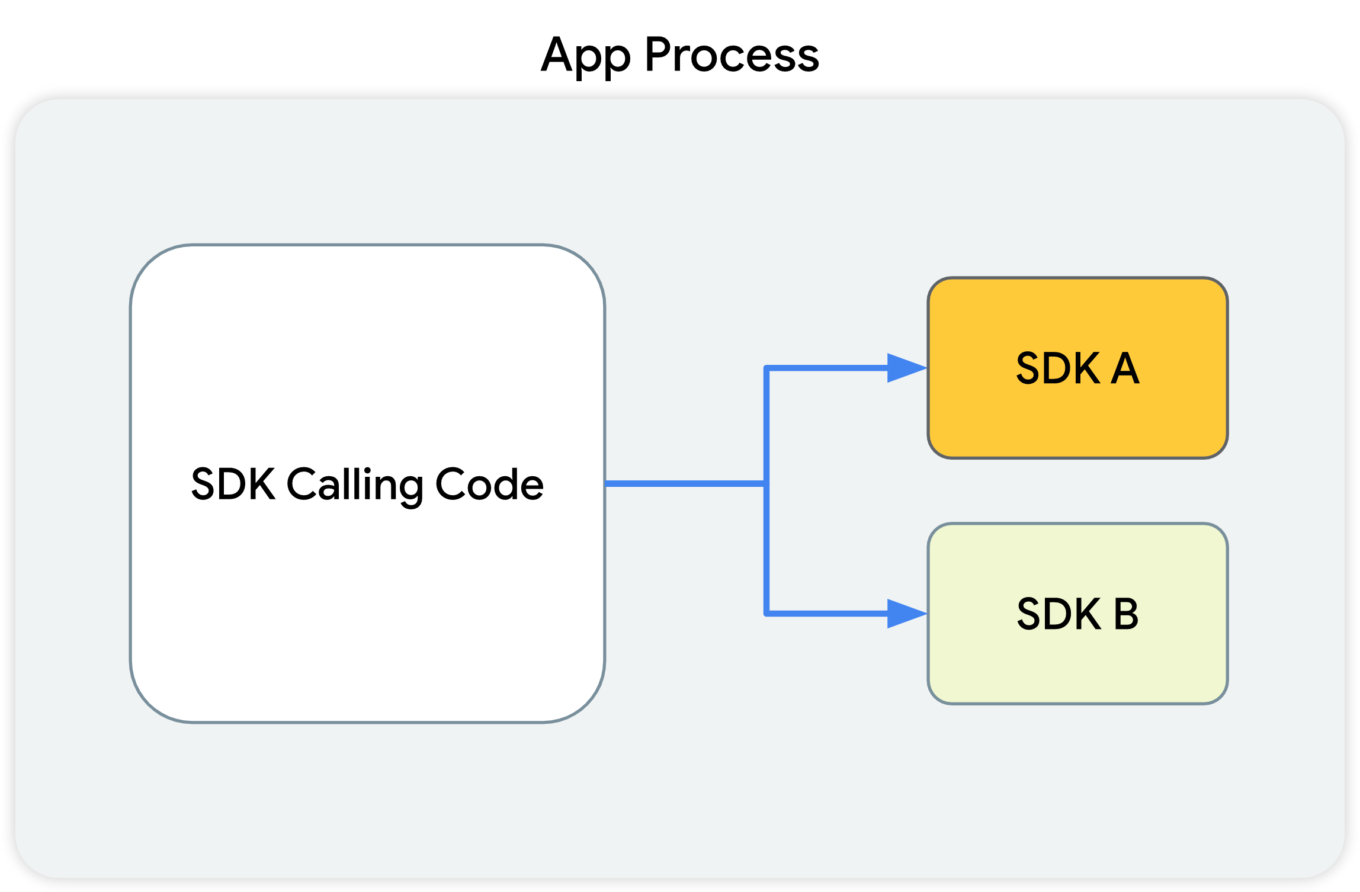
This diagram shows that the SDK-calling code, along with the SDKs that receive the calls from this code, all reside in the app's process.

What Google suggests

With the introduction of SDK Runtime, third-party libraries will operate in a separate, thoroughly monitored and regulated virtual "sandbox", hence the name. The developer will be able to manage the access rights for each of such libraries, including restricting them.
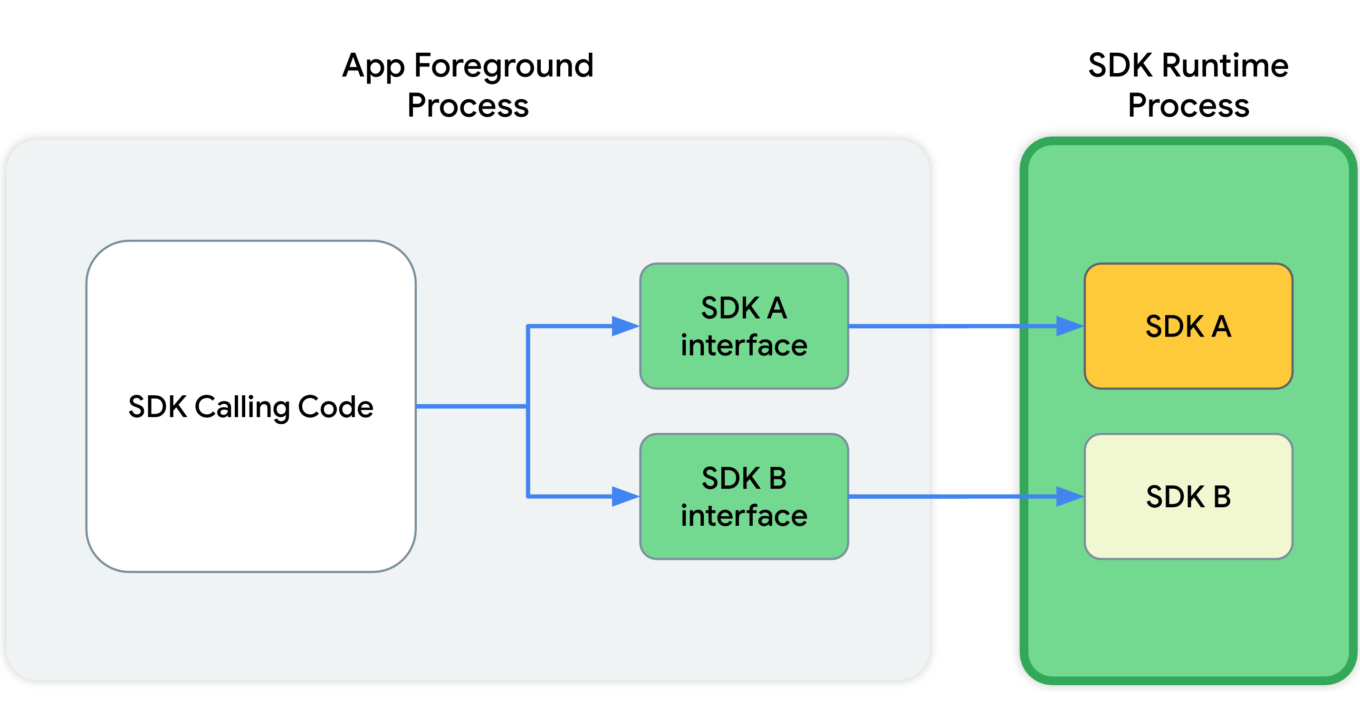
This diagram shows that, in the app's foreground process, the SDK calling code communicates with SDK interfaces. These interfaces then cross a process boundary into the SDK Runtime process to call into the SDKs themselves.

Since all those libraries will be running in a "sandbox" that's detached from the rest of the app's processes, the app won't crash in cases when something goes wrong with one of them.

And last but not least, these libraries will be distributed via a special store that (presumably) will have its own review guidelines.

Read more about SDK Runtime:
https://developer.android.com/design-for-safety/ads/sdk-runtime

Topics

This is the same technology that Google is going to introduce in Chrome. The main idea behind Topics is that the device itself will monitor which apps its owner is using. Based on this data, every week the device will calculate five topics that will have interested the user the most that week.

Apps will be able to get access to some of this data, and different apps will receive different data. This, according to Google, will minimize the risk of using Topics to fingerprint users.

But let's illustrate it with an example:

  1. You have several apps installed on your phone that you use regularly: Facebook, WhatsApp, Instagram, etc.
  2. Each of them receives some part of your topics for the week.
  3. The apps collect this information and use it to supplement your online profile.
  4. Week after week, your profile grows and accretes data.

It's not clear to me why Google has decided that it's OK to share my interests without my consent. Make no mistake, large publishers like Facebook/Meta will not just use this information once and then forget it. They will aggregate it, combine it with other data, and so on.

And that's not the end of it. Lots of apps use SDKs developed by a small pool of companies (you guessed it, Meta is one of them). These companies will receive information streams about you coming from dozens of different apps. From that point, it doesn't take much to construct an excruciatingly detailed profile that has all imaginable data about you.

Read more about Topics for Android:
https://developer.android.com/design-for-safety/ads/topics

FLEDGE on Android

FLEDGE is a mechanism that is meant to be used locally on your device. You will soon see that from a data safety standpoint it compares favorably to the existing alternatives.

How it was before

Currently, ad retargeting is mostly based on the lists of "audiences" that publishers upload. They are often made up of user IDs, or sometimes even straight up emails. This allows publishers to reach these users with ads that they consider relevant to the people from that list.

What Google suggests

When FLEDGE comes into full effect, apps will create such lists themselves with the help of a special API (Application Programming Interface). The key difference is that these lists will be stored locally on the device. The advertising networks will know the names of these lists, and they will upload ads that target specific lists. The process of selecting the ad to display to the user will happen entirely within the device, based on the lists (stored on the same device) and the advertisments uploaded by the ad networks.

Read more about FLEDGE:
https://developer.android.com/design-for-safety/ads/fledge

Attribution Reporting

This is a technology for counting clicks and measuring conversions. Advertisers want to know how their ads perform, and Google suggests doing all the measurements right on the device. Ad networks' SDKs will be able to request an aggregated report, which will, however, be presented with a certain delay. The delay is very important as it greatly complicates potential attempts to identify the user. And the entire mechanism is generously sprinkled with encryption and additional verifications.
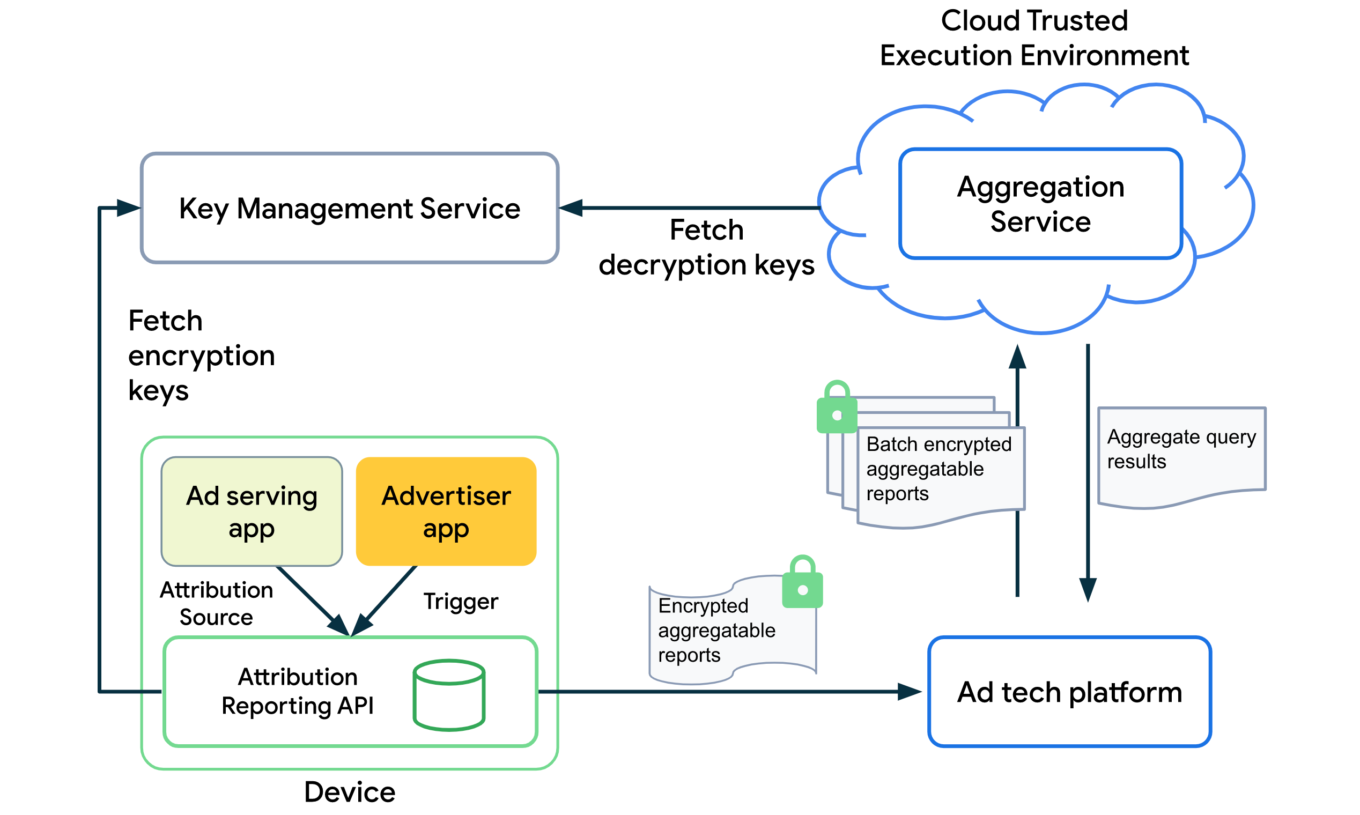
The overall design of how the Attribution Reporting API works looks quite complicated. To better understand the topic, open the link we've posted below.

Read more about Attribution Reporting:
https://developer.android.com/design-for-safety/ads/attribution

Conclusions

In general, all these initiatives (excluding Topics) can be described as improving users' privacy in the context of the ad market. But with one very important condition — ONLY those mechanisms should be used.

As for Topics, it reflects the (completely understandable) desire to keep the ability to utilize information about users' interests for targeting purposes. But this technology further expands the scope of that information instead of reducing it.

But even the good ones still leave a bitter aftertaste: de facto Google will become the single entity to control which ads users see on their Android devices. It was partially true before, but only within Google's own advertising network. Now they are looking to directly influence all other ad networks too, and we know that monopolies rarely end up being good for the consumer. We kind of know what is going to be happening on our smartphones now, and there's no guarantee it will stay that way.

This is the trend that we've been seeing for a while now — advertising networks slowly but steadily moving into our devices. Thinking about buying a new phone? Be ready to get your hands on a highly specialized tool for showing ads instead.


Suka postingan ini?
AdGuard VPN DNS AdGuard AdGuard Mail AdGuard Wallet
Layar utama AdGuard untuk Windows
Layar Perlindungan AdGuard untuk Windows, menampilkan fitur dan pengaturan perlindungan
Layar Statistik AdGuard untuk Windows, menampilkan statistik untuk iklan dan pelacak yang terblokir
Layar Pengelolaan aplikasi AdGuard untuk Windows, menampilkan opsi pengelolaan perlindungan untuk aplikasi yang terinstal di perangkat
20.535 20535 ulasan pengguna
Sempurna!

AdGuard untuk Windows — pemblokir iklan untuk PC Anda

AdGuard untuk Windows lebih dari sekadar pemblokir iklan. Ini adalah alat serbaguna yang memblokir iklan, mengontrol akses ke situs berbahaya, mempercepat pemuatan halaman, dan melindungi anak-anak dari konten yang tidak pantas
Dengan mengunduhnya Anda menerima ketentuan Perjanjian lisensi
Microsoft Store
Dengan mengunduhnya Anda menerima ketentuan Perjanjian lisensi
AdGuard untuk Windows v8.0, masa percobaan 14 hari
Layar utama AdGuard untuk Mac
Layar Mode Siluman AdGuard untuk Mac
20.535 20535 ulasan pengguna
Sempurna!

AdGuard untuk Mac — pemblokir iklan seluruh sistem

AdGuard untuk Mac adalah pemblokir iklan unik yang dirancang khusus untuk macOS. Selain melindungi Anda dari iklan yang mengganggu di browser dan aplikasi, ini juga melindungi Anda dari pelacakan, phishing, dan penipuan
Dengan mengunduhnya Anda menerima ketentuan Perjanjian lisensi
Pelajari lainnya
AdGuard untuk Mac v2.19, masa percobaan 14 hari
Layar utama AdGuard untuk Android
Layar Perlindungan pelacakan AdGuard untuk Android
Layar Pengelolaan aplikasi AdGuard untuk Android, menampilkan opsi pengelolaan perlindungan untuk aplikasi yang terinstal di perangkat
Layar Statistik AdGuard untuk Android, menampilkan statistik untuk iklan dan pelacak yang terblokir
Layar utama peramban privat AdGuard untuk Android
Kode QR untuk unduh AdGuard untuk Android
20.535 20535 ulasan pengguna
Sempurna!

AdGuard untuk Android: pemblokir iklan semua aplikasi

Memblokir iklan dan pelacak di semua browser, game, dan aplikasi lainnya. Melindungi privasi Anda dan memungkinkan Anda mengontrol bagaimana aplikasi Anda menggunakan internet. Diinstal melalui APK
Dengan mengunduhnya Anda menerima ketentuan Perjanjian lisensi
Pelajari lainnya
Pindai untuk mengunduh
Gunakan pembaca kode QR yang tersedia di perangkat Anda
AdGuard untuk Android v4.14, masa percobaan 14 hari
Layar utama AdGuard untuk iOS
Layar Perlindungan AdGuard untuk iOS, menampilkan fitur dan pengaturan perlindungan
Layar Statistik AdGuard untuk iOS, menampilkan statistik untuk iklan dan pelacak yang terblokir
Kode QR untuk unduh AdGuard untuk iOS
20.535 20535 ulasan pengguna
Sempurna!

AdGuard untuk iOS — pemblokir iklan di luar Safari

Pemblokir iklan iOS terbaik untuk iPhone dan iPad. AdGuard menghilangkan semua jenis iklan dan pelacak di Safari serta melindungi privasi Anda di semua aplikasi pada tingkat DNS

Dengan mengunduhnya Anda menerima ketentuan Perjanjian lisensi
Pelajari lainnya
Pindai untuk mengunduh
Gunakan pembaca kode QR yang tersedia di perangkat Anda
AdGuard untuk iOS versi 4.5
Layar utama AdGuard Content Blocker
Layar filter AdGuard Content Blocker
Layar pengaturan AdGuard Content Blocker
20.535 20535 ulasan pengguna
Sempurna!

Pemblokir Konten AdGuard

AdGuard Content Blocker menghilangkan semua jenis iklan di browser seluler yang mendukung teknologi pemblokiran konten — yaitu, Samsung Internet dan Yandex Browser. Fitur-fiturnya terbatas dibandingkan dengan AdGuard untuk Android, tetapi gratis, mudah dipasang, dan efisien

Dengan mengunduhnya Anda menerima ketentuan Perjanjian lisensi
Pelajari lainnya
Pemblokir Konten AdGuard versi 2.8
Layar utama AdGuard Browser Extension
Layar Perlindungan pelacakan AdGuard Browser Extension
20.535 20535 ulasan pengguna
Sempurna!

Ekstensi peramban AdGuard

AdGuard adalah ekstensi pemblokiran iklan tercepat dan paling ringan yang secara efektif memblokir semua jenis iklan di semua halaman web! Pilih AdGuard untuk browser yang Anda gunakan dan dapatkan penjelajahan bebas iklan, cepat, dan aman.
Pasang
Dengan mengunduhnya Anda menerima ketentuan Perjanjian lisensi
Pasang
Dengan mengunduhnya Anda menerima ketentuan Perjanjian lisensi
Pasang
Dengan mengunduhnya Anda menerima ketentuan Perjanjian lisensi
Pasang
Dengan mengunduhnya Anda menerima ketentuan Perjanjian lisensi
Pasang
Dengan mengunduhnya Anda menerima ketentuan Perjanjian lisensi
Pelajari lainnya
Pasang
Dengan mengunduhnya Anda menerima ketentuan Perjanjian lisensi
Pelajari lainnya
Ekstensi peramban AdGuard versi 5.5
Layar utama Asisten Peramban
20.535 20535 ulasan pengguna
Sempurna!

Asisten AdGuard

Sebuah ekstensi peramban pendamping untuk aplikasi AdGuard desktop. Ini mengizinkan Anda memblokir item kustom di situs web, menambahkan situs web ke daftar izinkan, dan mengirim laporan langsung dari peramban Anda
Asisten AdGuard versi 1.4
20.535 20535 ulasan pengguna
Sempurna!

AdGuard Home

AdGuard Home adalah solusi berbasis jaringan untuk memblokir iklan dan pelacak. Instal sekali di router Anda untuk mencakup semua perangkat di jaringan rumah Anda — tidak diperlukan perangkat lunak klien tambahan. Ini sangat penting untuk berbagai perangkat IoT yang sering menimbulkan ancaman bagi privasi Anda
AdGuard Home versi 0.107
Layar utama AdGuard Pro untuk iOS
Layar Perlindungan AdGuard Pro untuk iOS, menampilkan fitur dan pengaturan perlindungan
Layar statistik AdGuard Pro untuk iOS, menampilkan statistik untuk iklan dan pelacak yang terblokir
20.535 20535 ulasan pengguna
Sempurna!

AdGuard Pro untuk iOS

AdGuard Pro untuk iOS dilengkapi dengan semua fitur perlindungan pemblokiran iklan canggih. Aplikasi ini menawarkan fitur yang sama dengan versi berbayar AdGuard untuk iOS. Aplikasi ini unggul dalam memblokir iklan di Safari dan memungkinkan Anda menyesuaikan pengaturan DNS untuk perlindungan yang lebih baik. Aplikasi ini memblokir iklan di browser dan aplikasi, melindungi anak-anak Anda dari konten yang tidak pantas, dan menjaga keamanan data pribadi Anda.
Dengan mengunduhnya Anda menerima ketentuan Perjanjian lisensi
Pelajari lainnya
AdGuard Pro untuk iOS versi 4.5
Layar utama AdGuard Mini untuk Mac
Layar perlindungan Safari AdGuard Mini untuk Mac
Layar Buat aturan AdGuard Mini untuk Mac
20.535 20535 ulasan pengguna
Sempurna!

AdGuard Mini untuk Mac — pemblokir iklan Safari

AdGuard Mini untuk Mac adalah pemblokir iklan Safari yang kuat. Aplikasi ringan ini menghapus iklan, memblokir pelacak, dan mempercepat pemuatan halaman. Ini membantu Anda menjelajah Web di Safari tanpa gangguan dan menjaga data Anda tetap pribadi
Pasang
Dengan mengunduhnya Anda menerima ketentuan Perjanjian lisensi
Pelajari lainnya
AdGuard Mini untuk Mac versi 2.3
Layar utama AdGuard untuk Android TV dengan perlindungan diaktifkan
Layar pemblokiran iklan AdGuard untuk Android TV, menampilkan fitur dan pengaturannya
Layar pengaturan AdGuard untuk Android TV
Layar Pengelolaan aplikasi AdGuard untuk Android TV, menampilkan aplikasi tempat iklan dan pelacak terblokir
20.535 20535 ulasan pengguna
Sempurna!

AdGuard untuk Android TV

AdGuard untuk Android TV adalah satu-satunya aplikasi yang memblokir iklan, menjaga privasi Anda, dan bertindak sebagai firewall untuk Smart TV Anda. Dapatkan peringatan tentang ancaman web, gunakan DNS yang aman, dan dapatkan manfaatkan lalu lintas yang terenkripsi. Bersantailah dan selami acara favorit Anda dengan keamanan terbaik dan tanpa iklan!
AdGuard untuk Android TV v4.14, masa percobaan 14 hari
Maskot AdGuard, Agnar, memegang penguin Linux
20.535 20535 ulasan pengguna
Sempurna!

AdGuard untuk Linux

AdGuard untuk Linux adalah pemblokir iklan sistem luas pertama di dunia untuk Linux. Blokir iklan dan pelacak di tingkat perangkat, pilih dari filter yang sudah terinstal sebelumnya, atau tambahkan milikmu sendiri — semuanya melalui antar muka baris perintah
AdGuard untuk Linux versi 1.4
20.535 20535 ulasan pengguna
Sempurna!

AdGuard Temp Mail

Generator alamat e-mail sementara gratis yang membuat Anda tetap anonim dan melindungi privasi Anda. Tidak ada spam di kotak masuk utama Anda!
20.535 20535 ulasan pengguna
Sempurna!

AdGuard VPN

75 Lokasi Di Seluruh Dunia

Akses ke konten apa pun

Enkripsi yang kuat

Tanpa kebijakan log

Koneksi paling cepat

dukungan 24/7

Coba gratis
Dengan mengunduhnya Anda menerima ketentuan Perjanjian lisensi
Pelajari lainnya
20.535 20535 ulasan pengguna
Sempurna!

DNS AdGuard

AdGuard DNS adalah cara yang sangat andal untuk memblokir iklan internet tanpa perlu menginstal aplikasi apapun. Mudah digunakan, sepenuhnya gratis, mudah dipasang di perangkat mana saja, dan menyediakan fungsi minimal yang diperlukan untuk memblokir iklan, penghitung, situs web berbahaya, dan konten dewasa.
20.535 20535 ulasan pengguna
Sempurna!

AdGuard Mail

Lindungi identitas Anda, hindari spam, dan jaga keamanan kotak masuk Anda dengan alias dan alamat e-mail sementara kami. Nikmati layanan penerusan e-mail gratis serta aplikasi untuk semua sistem operasi.
20.535 20535 ulasan pengguna
Sempurna!

AdGuard Wallet

Dompet kripto yang aman dan pribadi yang memberi Anda kendali penuh atas aset Anda. Kelola beberapa dompet dan temukan ribuan mata uang kripto untuk disimpan, dikirim, dan ditukar
Mengunduh AdGuard Klik tombol yang ditujukkan oleh panah untuk memulai instalasi. Pilih "Buka" dan klik "OK", lalu tunggu file diunduh. Di jendela yang terbuka, seret ikon AdGuard ke folder "Aplikasi". Terima kasih telah memilih AdGuard! Pilih "Buka" dan klik "OK", lalu tunggu file diunduh. Di jendela yang terbuka, klik "Install". Terima kasih telah memilih AdGuard!
Instal AdGuard untuk perangkat ponsel juga
















































