The big brother in your pocket: TeleSign’s ‘reputation score’ system explained

What if there’s a hidden system tracking and scoring you based on every phone call you make or take? It sounds like something from a Black Mirror episode and may remind you of the controversial China’s social credit system. But surprisingly, half of the world’s mobile phone users are already part of such a system, and many are Europeans, who are supposed to enjoy strong privacy protections.

How profiling works and why it’s problematic

NOYB, a privacy advocacy group, has filed a lawsuit against the US company TeleSign, a Belgian telecom provider BICS, and their parent Proximus. They claim these companies are unauthorizedly profiling billions of phone users to assign them a ‘reputation’ or ‘trust’ score.

This score can affect your access to online services: If your score is bad, you may be blocked from accessing certain online platforms, or be subject to additional checks which those with better scores won’t have to go through. These restrictions are imposed by TeleSign’s partners, which reportedly include Microsoft, TikTok, Skype, LinkedIn, and SalesForce. So, who are BICS and TeleSign and what do they do exactly?

BICS is a Belgian telecom giant, which connects networks of mobile phone providers in over 200 countries. By doing so, BICS gains access to personal information of billions of customers. BICS gets to know how often people make calls, how long they talk, for how long they don’t use their phones, where they are, and when they receive calls and from whom. This data is then shared with TeleSign, which assigns ‘reputation scores’ to phone numbers and sells this data as a fraud prevention tool, called ‘Intelligence API’. Per month, TeleSign says it “verifies over five billion phone numbers,” which represents “half of the world’s mobile users,” and “gives critical insight into the remaining billions.”

The problem? Phone users that trust their mobile operators with their information are not aware of this scheme.

The lawsuit points out that the system is problematic also because TeleSign falls under US surveillance laws, which means that the US government can access the data. Sending European personal data across the Atlantic is technically illegal without a valid EU-US data transfer agreement. The old agreement, called the Privacy Shield, was scrapped in 2020 in part because the US laws were deemed too intrusive, and the existing privacy protections in the US not on par with the GDPR standards in the EU. The resulting legal vacuum has left many big tech companies like Meta facing hefty fines for continuing to transfer European user data to the US. In early July, the EU and US finally hammered out the details of a deal that should replace it, but its fate is still uncertain as it is likely to face legal challenges.

What data does TeleSign access to determine a reputation score?

Exactly how the reputation score is calculated is anyone’s guess. On its website, TeleSign claims that the reputation score is assessed on various factors, but the exact methodology is proprietary. Some of the things TeleSign says it uses to assign a score to phone numbers are phone number data and analytics, data from organizations that allow it to check whether a phone number belongs to a known fraudster, patterns in phone usage, frequency of usage (which can also indicate fraud, for example, if it is used every few minutes), and machine learning predictions.

Because the methodology is proprietary, there’s no way to know how these things add up to a high or low trust score. Users can ask TeleSign for a copy of their data, and some have found they received a “medium-low” risk rating.

While users can obtain their data from TeleSign, mobile operators seem unaware that their customer data is being sent to TeleSign, according to NOYB.

So, in a nutshell, your access to a particular online service may be blocked due to an opaque, privately-operated scoring system that assigns you a rating based on an arbitrary set of criteria and works behind the scenes without your knowledge.

Legal basis: what BICS and Telesign say?

The GDPR lists six lawful grounds for processing personal data, namely consent, contract, vital interests, public duty, and legitimate interests. The latter is the most flexible, and it lets companies use data without asking the user directly. For instance, OpenAI uses “legitimate interests” as an excuse to collect and use publicly available personal information to train AI models like GPT, which powers ChatGPT. This justification is highly questionable, and OpenAI’s habit of grabbing personal and other data from the Web has been met with mounting pile of lawsuits accusing it of profiting from privacy violations.

BICS and TeleSign both claim ‘legitimate interests’, specifically, detection or prevention of fraud as their legal basis of data processing.
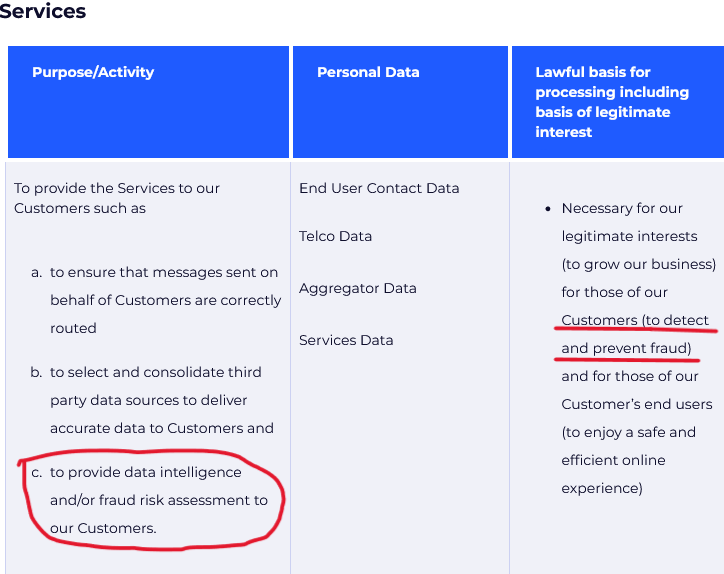
TeleSign claims it processes user data to detect fraud
Source: TeleSign privacy policy

Speaking to Belgian newspaper Le Soir last year, Proximus, which owns both BICS and TeleSign, said that all transferred data is “end-to-end encrypted” while telephone numbers “are masked to prevent individual identification.” As for how it manages privacy risks stemming from transfer of data to the US, which by this day still lacks a federal privacy law, it says that it “has taken additional measures to prevent the identification of individuals should the data end up in the hands of an authority or should a data breach occur.” But how these companies ensure the data does not fall into the wrong hands is unclear.

The lawsuit alleges that BICS and TeleSign’s activities go beyond fraud prevention, and are disproportionate, mainly meant to generate revenue. BICS has never informed users of the data processing, which potentially violates its transparency obligation under article 14 of GDPR.

Something rings a bell?

What the TeleSign system does is basically evaluate your reputation, or in other words, your trustworthiness, based on your phone behavior. To some extent, such a system is reminiscent of China’s social credit system in that they both assess trustworthiness based on behavior data, and can reward or punish individuals based on this data. This should ring alarm bells for privacy-conscious users.
Of course, It would be a stretch to equate the activities of TeleSign and BICS with those of the Chinese government. Firstly, because China’s social credit system is a government policy and not a commercial product, and secondly, it is way wider in scope, as it presumes tracking and scoring people based on a large variety of their online and offline activities.

How the system can negatively affect you

Despite assurances from Proximus, BICS, and TeleSign, the data is not safe with them. There is the obvious danger in the data being processed in the US, where data protection laws are weak, while the safeguards proposed in the newly proposed US-EU transfer agreement have yet to withstand a legal challenge. The collected data could also be exposed by a breach or a leak, leading to identity theft. In addition, and perhaps most importantly, the system can deny services to mobile users based on their reputation scores, which are calculated without their knowledge and consent, and which they have no way of correcting, deleting, or challenging, simply because they are unaware of their existence.

What can you do

Thanks to NOYB exposing the practice, more people will get to know about it and their right to request, rectify, and delete their data from TeleSign. This can be done through a form on TeleSign’s website. According to its privacy policy, it’s possible to opt out of all personal data selling and sharing, including for profiling purposes.

TeleSign privacy policy allows some users to opt out of profiling

Source: TeleSign privacy policy

To avoid being profiled by TeleSign or similar companies, some general recommendations are to use multiple phone numbers for different purposes, or to use a virtual number instead of your real one for online services. For example, if you do cold-calling, you may want to have a separate phone for that, so you won’t be mistaken for a scammer and denied access to certain services.

Moreover, you should be aware of the data protection laws that you can benefit from, such as by asking for the data that companies have on you and requesting its deletion. You should also take other measures to protect your privacy, including using a VPN, limiting the personal information you share online, and being careful with app permissions. These steps won’t stop phone-based profiling directly, but they will add an extra layer of privacy to your browsing.


Suka postingan ini?
AdGuard VPN DNS AdGuard AdGuard Mail AdGuard Wallet
Layar utama AdGuard untuk Windows
Layar Perlindungan AdGuard untuk Windows, menampilkan fitur dan pengaturan perlindungan
Layar Statistik AdGuard untuk Windows, menampilkan statistik untuk iklan dan pelacak yang terblokir
Layar Pengelolaan aplikasi AdGuard untuk Windows, menampilkan opsi pengelolaan perlindungan untuk aplikasi yang terinstal di perangkat
20.534 20534 ulasan pengguna
Sempurna!

AdGuard untuk Windows — pemblokir iklan untuk PC Anda

AdGuard untuk Windows lebih dari sekadar pemblokir iklan. Ini adalah alat serbaguna yang memblokir iklan, mengontrol akses ke situs berbahaya, mempercepat pemuatan halaman, dan melindungi anak-anak dari konten yang tidak pantas

Dengan mengunduhnya Anda menerima ketentuan Perjanjian lisensi
Microsoft Store
Dengan mengunduhnya Anda menerima ketentuan Perjanjian lisensi
AdGuard untuk Windows v8.0, masa percobaan 14 hari
Layar utama AdGuard untuk Mac
Layar Mode Siluman AdGuard untuk Mac
20.534 20534 ulasan pengguna
Sempurna!

AdGuard untuk Mac — pemblokir iklan seluruh sistem

AdGuard untuk Mac adalah pemblokir iklan unik yang dirancang khusus untuk macOS. Selain melindungi Anda dari iklan yang mengganggu di browser dan aplikasi, ini juga melindungi Anda dari pelacakan, phishing, dan penipuan
Dengan mengunduhnya Anda menerima ketentuan Perjanjian lisensi
Pelajari lainnya
AdGuard untuk Mac v2.19, masa percobaan 14 hari
Layar utama AdGuard untuk Android
Layar Perlindungan pelacakan AdGuard untuk Android
Layar Pengelolaan aplikasi AdGuard untuk Android, menampilkan opsi pengelolaan perlindungan untuk aplikasi yang terinstal di perangkat
Layar Statistik AdGuard untuk Android, menampilkan statistik untuk iklan dan pelacak yang terblokir
Layar utama peramban privat AdGuard untuk Android
Kode QR untuk unduh AdGuard untuk Android
20.534 20534 ulasan pengguna
Sempurna!

AdGuard untuk Android: pemblokir iklan semua aplikasi

Memblokir iklan dan pelacak di semua browser, game, dan aplikasi lainnya. Melindungi privasi Anda dan memungkinkan Anda mengontrol bagaimana aplikasi Anda menggunakan internet. Diinstal melalui APK
Dengan mengunduhnya Anda menerima ketentuan Perjanjian lisensi
Pelajari lainnya
Pindai untuk mengunduh
Gunakan pembaca kode QR yang tersedia di perangkat Anda
AdGuard untuk Android v4.14, masa percobaan 14 hari
Layar utama AdGuard untuk iOS
Layar Perlindungan AdGuard untuk iOS, menampilkan fitur dan pengaturan perlindungan
Layar Statistik AdGuard untuk iOS, menampilkan statistik untuk iklan dan pelacak yang terblokir
Kode QR untuk unduh AdGuard untuk iOS
20.534 20534 ulasan pengguna
Sempurna!

AdGuard untuk iOS — pemblokir iklan di luar Safari

Pemblokir iklan iOS terbaik untuk iPhone dan iPad. AdGuard menghilangkan semua jenis iklan dan pelacak di Safari serta melindungi privasi Anda di semua aplikasi pada tingkat DNS
Dengan mengunduhnya Anda menerima ketentuan Perjanjian lisensi
Pelajari lainnya
Pindai untuk mengunduh
Gunakan pembaca kode QR yang tersedia di perangkat Anda
AdGuard untuk iOS versi 4.5
Layar utama AdGuard Content Blocker
Layar filter AdGuard Content Blocker
Layar pengaturan AdGuard Content Blocker
20.534 20534 ulasan pengguna
Sempurna!

Pemblokir Konten AdGuard

AdGuard Content Blocker menghilangkan semua jenis iklan di browser seluler yang mendukung teknologi pemblokiran konten — yaitu, Samsung Internet dan Yandex Browser. Fitur-fiturnya terbatas dibandingkan dengan AdGuard untuk Android, tetapi gratis, mudah dipasang, dan efisien
Dengan mengunduhnya Anda menerima ketentuan Perjanjian lisensi
Pelajari lainnya
Pemblokir Konten AdGuard versi 2.8
Layar utama AdGuard Browser Extension
Layar Perlindungan pelacakan AdGuard Browser Extension
20.534 20534 ulasan pengguna
Sempurna!

Ekstensi peramban AdGuard

AdGuard adalah ekstensi pemblokiran iklan tercepat dan paling ringan yang secara efektif memblokir semua jenis iklan di semua halaman web! Pilih AdGuard untuk browser yang Anda gunakan dan dapatkan penjelajahan bebas iklan, cepat, dan aman.
Pasang
Dengan mengunduhnya Anda menerima ketentuan Perjanjian lisensi
Pasang
Dengan mengunduhnya Anda menerima ketentuan Perjanjian lisensi
Pasang
Dengan mengunduhnya Anda menerima ketentuan Perjanjian lisensi
Pasang
Dengan mengunduhnya Anda menerima ketentuan Perjanjian lisensi
Pasang
Dengan mengunduhnya Anda menerima ketentuan Perjanjian lisensi
Pelajari lainnya
Pasang
Dengan mengunduhnya Anda menerima ketentuan Perjanjian lisensi
Pelajari lainnya
Ekstensi peramban AdGuard versi 5.5
Layar utama Asisten Peramban
20.534 20534 ulasan pengguna
Sempurna!

Asisten AdGuard

Sebuah ekstensi peramban pendamping untuk aplikasi AdGuard desktop. Ini mengizinkan Anda memblokir item kustom di situs web, menambahkan situs web ke daftar izinkan, dan mengirim laporan langsung dari peramban Anda
Asisten AdGuard versi 1.4
20.534 20534 ulasan pengguna
Sempurna!

AdGuard Home

AdGuard Home adalah solusi berbasis jaringan untuk memblokir iklan dan pelacak. Instal sekali di router Anda untuk mencakup semua perangkat di jaringan rumah Anda — tidak diperlukan perangkat lunak klien tambahan. Ini sangat penting untuk berbagai perangkat IoT yang sering menimbulkan ancaman bagi privasi Anda
AdGuard Home versi 0.107
Layar utama AdGuard Pro untuk iOS
Layar Perlindungan AdGuard Pro untuk iOS, menampilkan fitur dan pengaturan perlindungan
Layar statistik AdGuard Pro untuk iOS, menampilkan statistik untuk iklan dan pelacak yang terblokir
20.534 20534 ulasan pengguna
Sempurna!

AdGuard Pro untuk iOS

AdGuard Pro untuk iOS dilengkapi dengan semua fitur perlindungan pemblokiran iklan canggih. Aplikasi ini menawarkan fitur yang sama dengan versi berbayar AdGuard untuk iOS. Aplikasi ini unggul dalam memblokir iklan di Safari dan memungkinkan Anda menyesuaikan pengaturan DNS untuk perlindungan yang lebih baik. Aplikasi ini memblokir iklan di browser dan aplikasi, melindungi anak-anak Anda dari konten yang tidak pantas, dan menjaga keamanan data pribadi Anda.
Dengan mengunduhnya Anda menerima ketentuan Perjanjian lisensi
Pelajari lainnya
AdGuard Pro untuk iOS versi 4.5
Layar utama AdGuard Mini untuk Mac
Layar perlindungan Safari AdGuard Mini untuk Mac
Layar Buat aturan AdGuard Mini untuk Mac
20.534 20534 ulasan pengguna
Sempurna!

AdGuard Mini untuk Mac — pemblokir iklan Safari

AdGuard Mini untuk Mac adalah pemblokir iklan Safari yang kuat. Aplikasi ringan ini menghapus iklan, memblokir pelacak, dan mempercepat pemuatan halaman. Ini membantu Anda menjelajah Web di Safari tanpa gangguan dan menjaga data Anda tetap pribadi
Pasang
Dengan mengunduhnya Anda menerima ketentuan Perjanjian lisensi
Pelajari lainnya
AdGuard Mini untuk Mac versi 2.3
Layar utama AdGuard untuk Android TV dengan perlindungan diaktifkan
Layar pemblokiran iklan AdGuard untuk Android TV, menampilkan fitur dan pengaturannya
Layar pengaturan AdGuard untuk Android TV
Layar Pengelolaan aplikasi AdGuard untuk Android TV, menampilkan aplikasi tempat iklan dan pelacak terblokir
20.534 20534 ulasan pengguna
Sempurna!

AdGuard untuk Android TV

AdGuard untuk Android TV adalah satu-satunya aplikasi yang memblokir iklan, menjaga privasi Anda, dan bertindak sebagai firewall untuk Smart TV Anda. Dapatkan peringatan tentang ancaman web, gunakan DNS yang aman, dan dapatkan manfaatkan lalu lintas yang terenkripsi. Bersantailah dan selami acara favorit Anda dengan keamanan terbaik dan tanpa iklan!
AdGuard untuk Android TV v4.14, masa percobaan 14 hari
Maskot AdGuard, Agnar, memegang penguin Linux
20.534 20534 ulasan pengguna
Sempurna!

AdGuard untuk Linux

AdGuard untuk Linux adalah pemblokir iklan sistem luas pertama di dunia untuk Linux. Blokir iklan dan pelacak di tingkat perangkat, pilih dari filter yang sudah terinstal sebelumnya, atau tambahkan milikmu sendiri — semuanya melalui antar muka baris perintah
AdGuard untuk Linux versi 1.4
20.534 20534 ulasan pengguna
Sempurna!

AdGuard Temp Mail

Generator alamat e-mail sementara gratis yang membuat Anda tetap anonim dan melindungi privasi Anda. Tidak ada spam di kotak masuk utama Anda!
20.534 20534 ulasan pengguna
Sempurna!

AdGuard VPN

75 Lokasi Di Seluruh Dunia

Akses ke konten apa pun

Enkripsi yang kuat

Tanpa kebijakan log

Koneksi paling cepat

dukungan 24/7

Coba gratis
Dengan mengunduhnya Anda menerima ketentuan Perjanjian lisensi
Pelajari lainnya
20.534 20534 ulasan pengguna
Sempurna!

DNS AdGuard

AdGuard DNS adalah cara yang sangat andal untuk memblokir iklan internet tanpa perlu menginstal aplikasi apapun. Mudah digunakan, sepenuhnya gratis, mudah dipasang di perangkat mana saja, dan menyediakan fungsi minimal yang diperlukan untuk memblokir iklan, penghitung, situs web berbahaya, dan konten dewasa.
20.534 20534 ulasan pengguna
Sempurna!

AdGuard Mail

Lindungi identitas Anda, hindari spam, dan jaga keamanan kotak masuk Anda dengan alias dan alamat e-mail sementara kami. Nikmati layanan penerusan e-mail gratis serta aplikasi untuk semua sistem operasi.
20.534 20534 ulasan pengguna
Sempurna!

AdGuard Wallet

Dompet kripto yang aman dan pribadi yang memberi Anda kendali penuh atas aset Anda. Kelola beberapa dompet dan temukan ribuan mata uang kripto untuk disimpan, dikirim, dan ditukar
Mengunduh AdGuard Klik tombol yang ditujukkan oleh panah untuk memulai instalasi. Pilih "Buka" dan klik "OK", lalu tunggu file diunduh. Di jendela yang terbuka, seret ikon AdGuard ke folder "Aplikasi". Terima kasih telah memilih AdGuard! Pilih "Buka" dan klik "OK", lalu tunggu file diunduh. Di jendela yang terbuka, klik "Install". Terima kasih telah memilih AdGuard!
Instal AdGuard untuk perangkat ponsel juga

















































