Elon, what the ad?? Unmarked ads flood X

Since he took over Twitter a year ago, Elon Musk has made a lot of unpopular decisions. The billionaire has turned the once-coveted verification check into a pay-for-play feature, restricted (presumably temporarily) the number of posts users can see, ended free access to the Twitter API, and is seriously considering introducing $1 annual fee for all new users. And, lest we forget, he rebranded the blue, homey Twitter into a bland black-and-white “X,” a symbol straight out of the Aughts (hi, XTina and X-men) that Musk has long been obsessed with.

Musk’s grand vision of turning X into an “everything app,” similar to China’s WeChat, has been met with skepticism at best, while X’s ad revenue, the company’s main source of income by far, has been falling 55% each month year-on-year.

This alone makes for a pretty dismal record for the first year of Musk’s reign.

While previous moves have been controversial, but one could argue not completely unjustified, the latest one should, and hopefully will, draw universal condemnation. Apparently, X is now experimenting with removing “ad” labels from regular ads as well as introducing ads that cannot be reported at all.

Undercover ads

Since early September, users have been reporting en masse that some of the ads they saw in their algorithmic “for me” feed and “following” feed were missing ad labels.

The only difference between these unlabelled and regular ads was that they were not marked as such. If the user was shrewd enough to figure out that an unlabelled post was in fact an ad and not an organic result, they could click on a three-dot menu in the top right corner of the post and report it.
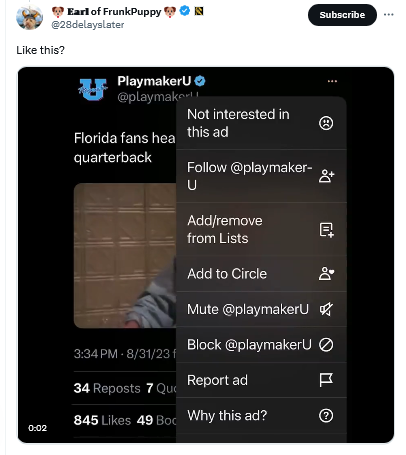
An unmarked X ad

Mashable was first on the story. It noted, giving Musk the benefit of the doubt, that it was “unclear if X, under owner Elon Musk, decided to remove these ad labels or if this is a temporary glitch.”

Judging by how the situation evolved over the next several weeks, the theory that it was a simple glitch seems increasingly unlikely.

About a month later, X users began noticing an even less transparent and more spammy ad format. These low-quality ads were posted by inactive accounts with no username and a profile picture that was a cropped version of the image in the post. The three-dot menu was also missing, making it impossible for users to block or report these ads.
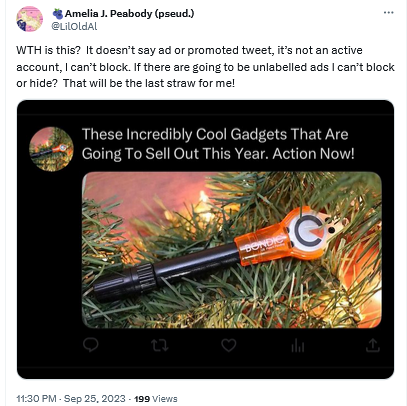
A spammy X ad without labels

We have not seen such ads ourselves, but according to Mashable, clicking on any part of these ads would redirect users to a third-party website. Mashable also reported that there was no mention of this new ad format in X’s ad inventory, which suggested that the ads came from a server of an external ad provider, not from X’s own servers.

X has not provided any explanation as to what is happening to its ads, but it is definitely something fishy. The Wired pointed out, the failure of X to clearly mark ads as ads can land it in trouble with the law, specifically the US Federal Trade Commission Act. The law requires companies to accompany ads with relevant disclosures to prevent that from being “deceptive.” And in the case of Twitter’s new ad formats these disclosures are nowhere to be seen, which makes the ads potentially illegal.

How it all started

X’s experiment with new ad formats and labeling (or rather, the lack thereof) did not come out of the blue. It’s been a slow progression from more obvious labels — to less obvious — and now, to no labels at all.

In fact, Twitter’s ad labels had not changed much for about ten years. When the platform first introduced ads in 2011, they were accompanied by the tag “Promoted” and a yellow arrow in the bottom left corner.
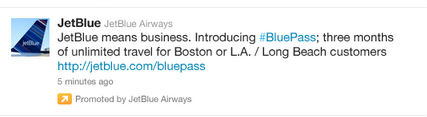
An old Twitter ad

Source: TechCrunch

These ads were displayed only to those users who already followed the advertiser’s account.

In the years that followed, the arrow lost its distinctive yellow color and took on a more subtle gray hue.

Twitter made the yellow arrow grey

And earlier this year, X changed the look of its ad labels again. It replaced the “promoted” tag in the bottom left corner with the tiny “ad” label in the top right corner, and got rid of the arrow. The new, much more subtle label was not well received by users, who argued that it was harder to spot, but the change stuck.
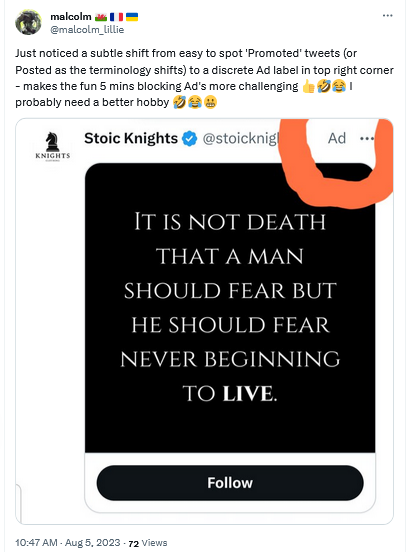
X replaced the 'promoted' tag with the 'ad' tag

It’s not that X is doing something unprecedented by making ad labels less prominent and promoted results less indistinguishable from organic results. Google has been at the forefront of this trend for years. But no one before has had the audacity to get rid of ad labels altogether (federal regulators, anyone?). And this is where X could set a precedent that, if they are allowed to set it, many will be tempted to follow.

Why is X doing that?

There are several possible explanations for X’s Schrödinger labels, and the most obvious one is that by removing the labels, X wants to increase engagement with the ads. The bet is that people who are misled into thinking that the ads are regular posts will click on them, which in turn will increase the click-through rate (CTR) and thus X’s ad revenue.

At first glance, this seems like a desperate move. But Musk, or whoever is in charge of this test, probably thinks that desperate times call for desperate measures. And what are desperate times if not when the majority of advertisers who returned to X reportedly spend 90% less than before. Add to that Musk’s increasing desire to blame X’s ad woes on someone else: first it was the Anti-Defamation League, and now the war in the Middle East.

As for where these spammy ads without handles might be coming from, Mashable pointed out that they are likely being seeded by X’s new third-party ad partners. These are Google and inMobi. Last month, Google confirmed that X would be using its programmatic platform, Google Ad Manager, to sell some of the unclaimed ad space on X’s home feed.

A less likely explanation for X’s new ad labels is a series of terrible glitches that the company (for some reason) has been unable to fix for over a month. While this explanation may seem preposterous, we would not rule it out: remember, we’re still talking about the company which at one point laid off 80% of its employees.

Another one is that Musk is probably testing the waters with regulators. In other words, X may want to see how far it can push the envelope with the government until it gets a slap on the wrist, or something more painful.

Are they possible to block?

X’s testing of these two new ad formats is a worrying development, as it makes ads more intrusive and less transparent. We hope that the regulators take notice, and intervene soon. We also hope that other platforms will not follow X’s example.

The AdGuard Ad Blocker app can block regular ads if X is opened in your browser, including on mobile devices. Note that if you have an Android device, you can block ads in any browser with AdGuard. As for iOS devices, you can only block ads in Safari with AdGuard.

Keep in mind: AdGuard DNS, or any other ad-blocking DNS for that matter, won’t be able to block ads on Twitter (or similar services like YouTube or Instagram) because Twitter uses the same DNS server to serve both ads and all other content.

We have not encountered X’s new ad formats yet, but based on the reports we’ve seen, we cannot rule out that AdGuard may not be able to block unlabelled ads that still have a three-dot menu with the existing filtering rules. However, we’re fairly confident that as soon as X rolls out this new ad format for a wider audience, we will be able to adapt and block these ads as well.

As for the “spammy-looking” ads that are presumably served by third-party networks, AdGuard should be able to block them with current filtering rules.


Suka postingan ini?
AdGuard VPN DNS AdGuard AdGuard Mail AdGuard Wallet
Layar utama AdGuard untuk Windows
Layar Perlindungan AdGuard untuk Windows, menampilkan fitur dan pengaturan perlindungan
Layar Statistik AdGuard untuk Windows, menampilkan statistik untuk iklan dan pelacak yang terblokir
Layar Pengelolaan aplikasi AdGuard untuk Windows, menampilkan opsi pengelolaan perlindungan untuk aplikasi yang terinstal di perangkat
20.534 20534 ulasan pengguna
Sempurna!

AdGuard untuk Windows — pemblokir iklan untuk PC Anda

AdGuard untuk Windows lebih dari sekadar pemblokir iklan. Ini adalah alat serbaguna yang memblokir iklan, mengontrol akses ke situs berbahaya, mempercepat pemuatan halaman, dan melindungi anak-anak dari konten yang tidak pantas

Dengan mengunduhnya Anda menerima ketentuan Perjanjian lisensi
Microsoft Store
Dengan mengunduhnya Anda menerima ketentuan Perjanjian lisensi
AdGuard untuk Windows v8.0, masa percobaan 14 hari
Layar utama AdGuard untuk Mac
Layar Mode Siluman AdGuard untuk Mac
20.534 20534 ulasan pengguna
Sempurna!

AdGuard untuk Mac — pemblokir iklan seluruh sistem

AdGuard untuk Mac adalah pemblokir iklan unik yang dirancang khusus untuk macOS. Selain melindungi Anda dari iklan yang mengganggu di browser dan aplikasi, ini juga melindungi Anda dari pelacakan, phishing, dan penipuan
Dengan mengunduhnya Anda menerima ketentuan Perjanjian lisensi
Pelajari lainnya
AdGuard untuk Mac v2.19, masa percobaan 14 hari
Layar utama AdGuard untuk Android
Layar Perlindungan pelacakan AdGuard untuk Android
Layar Pengelolaan aplikasi AdGuard untuk Android, menampilkan opsi pengelolaan perlindungan untuk aplikasi yang terinstal di perangkat
Layar Statistik AdGuard untuk Android, menampilkan statistik untuk iklan dan pelacak yang terblokir
Layar utama peramban privat AdGuard untuk Android
Kode QR untuk unduh AdGuard untuk Android
20.534 20534 ulasan pengguna
Sempurna!

AdGuard untuk Android: pemblokir iklan semua aplikasi

Memblokir iklan dan pelacak di semua browser, game, dan aplikasi lainnya. Melindungi privasi Anda dan memungkinkan Anda mengontrol bagaimana aplikasi Anda menggunakan internet. Diinstal melalui APK
Dengan mengunduhnya Anda menerima ketentuan Perjanjian lisensi
Pelajari lainnya
Pindai untuk mengunduh
Gunakan pembaca kode QR yang tersedia di perangkat Anda
AdGuard untuk Android v4.14, masa percobaan 14 hari
Layar utama AdGuard untuk iOS
Layar Perlindungan AdGuard untuk iOS, menampilkan fitur dan pengaturan perlindungan
Layar Statistik AdGuard untuk iOS, menampilkan statistik untuk iklan dan pelacak yang terblokir
Kode QR untuk unduh AdGuard untuk iOS
20.534 20534 ulasan pengguna
Sempurna!

AdGuard untuk iOS — pemblokir iklan di luar Safari

Pemblokir iklan iOS terbaik untuk iPhone dan iPad. AdGuard menghilangkan semua jenis iklan dan pelacak di Safari serta melindungi privasi Anda di semua aplikasi pada tingkat DNS
Dengan mengunduhnya Anda menerima ketentuan Perjanjian lisensi
Pelajari lainnya
Pindai untuk mengunduh
Gunakan pembaca kode QR yang tersedia di perangkat Anda
AdGuard untuk iOS versi 4.5
Layar utama AdGuard Content Blocker
Layar filter AdGuard Content Blocker
Layar pengaturan AdGuard Content Blocker
20.534 20534 ulasan pengguna
Sempurna!

Pemblokir Konten AdGuard

AdGuard Content Blocker menghilangkan semua jenis iklan di browser seluler yang mendukung teknologi pemblokiran konten — yaitu, Samsung Internet dan Yandex Browser. Fitur-fiturnya terbatas dibandingkan dengan AdGuard untuk Android, tetapi gratis, mudah dipasang, dan efisien
Dengan mengunduhnya Anda menerima ketentuan Perjanjian lisensi
Pelajari lainnya
Pemblokir Konten AdGuard versi 2.8
Layar utama AdGuard Browser Extension
Layar Perlindungan pelacakan AdGuard Browser Extension
20.534 20534 ulasan pengguna
Sempurna!

Ekstensi peramban AdGuard

AdGuard adalah ekstensi pemblokiran iklan tercepat dan paling ringan yang secara efektif memblokir semua jenis iklan di semua halaman web! Pilih AdGuard untuk browser yang Anda gunakan dan dapatkan penjelajahan bebas iklan, cepat, dan aman.
Pasang
Dengan mengunduhnya Anda menerima ketentuan Perjanjian lisensi
Pasang
Dengan mengunduhnya Anda menerima ketentuan Perjanjian lisensi
Pasang
Dengan mengunduhnya Anda menerima ketentuan Perjanjian lisensi
Pasang
Dengan mengunduhnya Anda menerima ketentuan Perjanjian lisensi
Pasang
Dengan mengunduhnya Anda menerima ketentuan Perjanjian lisensi
Pelajari lainnya
Pasang
Dengan mengunduhnya Anda menerima ketentuan Perjanjian lisensi
Pelajari lainnya
Ekstensi peramban AdGuard versi 5.5
Layar utama Asisten Peramban
20.534 20534 ulasan pengguna
Sempurna!

Asisten AdGuard

Sebuah ekstensi peramban pendamping untuk aplikasi AdGuard desktop. Ini mengizinkan Anda memblokir item kustom di situs web, menambahkan situs web ke daftar izinkan, dan mengirim laporan langsung dari peramban Anda
Asisten AdGuard versi 1.4
20.534 20534 ulasan pengguna
Sempurna!

AdGuard Home

AdGuard Home adalah solusi berbasis jaringan untuk memblokir iklan dan pelacak. Instal sekali di router Anda untuk mencakup semua perangkat di jaringan rumah Anda — tidak diperlukan perangkat lunak klien tambahan. Ini sangat penting untuk berbagai perangkat IoT yang sering menimbulkan ancaman bagi privasi Anda
AdGuard Home versi 0.107
Layar utama AdGuard Pro untuk iOS
Layar Perlindungan AdGuard Pro untuk iOS, menampilkan fitur dan pengaturan perlindungan
Layar statistik AdGuard Pro untuk iOS, menampilkan statistik untuk iklan dan pelacak yang terblokir
20.534 20534 ulasan pengguna
Sempurna!

AdGuard Pro untuk iOS

AdGuard Pro untuk iOS dilengkapi dengan semua fitur perlindungan pemblokiran iklan canggih. Aplikasi ini menawarkan fitur yang sama dengan versi berbayar AdGuard untuk iOS. Aplikasi ini unggul dalam memblokir iklan di Safari dan memungkinkan Anda menyesuaikan pengaturan DNS untuk perlindungan yang lebih baik. Aplikasi ini memblokir iklan di browser dan aplikasi, melindungi anak-anak Anda dari konten yang tidak pantas, dan menjaga keamanan data pribadi Anda.
Dengan mengunduhnya Anda menerima ketentuan Perjanjian lisensi
Pelajari lainnya
AdGuard Pro untuk iOS versi 4.5
Layar utama AdGuard Mini untuk Mac
Layar perlindungan Safari AdGuard Mini untuk Mac
Layar Buat aturan AdGuard Mini untuk Mac
20.534 20534 ulasan pengguna
Sempurna!

AdGuard Mini untuk Mac — pemblokir iklan Safari

AdGuard Mini untuk Mac adalah pemblokir iklan Safari yang kuat. Aplikasi ringan ini menghapus iklan, memblokir pelacak, dan mempercepat pemuatan halaman. Ini membantu Anda menjelajah Web di Safari tanpa gangguan dan menjaga data Anda tetap pribadi
Pasang
Dengan mengunduhnya Anda menerima ketentuan Perjanjian lisensi
Pelajari lainnya
AdGuard Mini untuk Mac versi 2.3
Layar utama AdGuard untuk Android TV dengan perlindungan diaktifkan
Layar pemblokiran iklan AdGuard untuk Android TV, menampilkan fitur dan pengaturannya
Layar pengaturan AdGuard untuk Android TV
Layar Pengelolaan aplikasi AdGuard untuk Android TV, menampilkan aplikasi tempat iklan dan pelacak terblokir
20.534 20534 ulasan pengguna
Sempurna!

AdGuard untuk Android TV

AdGuard untuk Android TV adalah satu-satunya aplikasi yang memblokir iklan, menjaga privasi Anda, dan bertindak sebagai firewall untuk Smart TV Anda. Dapatkan peringatan tentang ancaman web, gunakan DNS yang aman, dan dapatkan manfaatkan lalu lintas yang terenkripsi. Bersantailah dan selami acara favorit Anda dengan keamanan terbaik dan tanpa iklan!
AdGuard untuk Android TV v4.14, masa percobaan 14 hari
Maskot AdGuard, Agnar, memegang penguin Linux
20.534 20534 ulasan pengguna
Sempurna!

AdGuard untuk Linux

AdGuard untuk Linux adalah pemblokir iklan sistem luas pertama di dunia untuk Linux. Blokir iklan dan pelacak di tingkat perangkat, pilih dari filter yang sudah terinstal sebelumnya, atau tambahkan milikmu sendiri — semuanya melalui antar muka baris perintah
AdGuard untuk Linux versi 1.4
20.534 20534 ulasan pengguna
Sempurna!

AdGuard Temp Mail

Generator alamat e-mail sementara gratis yang membuat Anda tetap anonim dan melindungi privasi Anda. Tidak ada spam di kotak masuk utama Anda!
20.534 20534 ulasan pengguna
Sempurna!

AdGuard VPN

75 Lokasi Di Seluruh Dunia

Akses ke konten apa pun

Enkripsi yang kuat

Tanpa kebijakan log

Koneksi paling cepat

dukungan 24/7

Coba gratis
Dengan mengunduhnya Anda menerima ketentuan Perjanjian lisensi
Pelajari lainnya
20.534 20534 ulasan pengguna
Sempurna!

DNS AdGuard

AdGuard DNS adalah cara yang sangat andal untuk memblokir iklan internet tanpa perlu menginstal aplikasi apapun. Mudah digunakan, sepenuhnya gratis, mudah dipasang di perangkat mana saja, dan menyediakan fungsi minimal yang diperlukan untuk memblokir iklan, penghitung, situs web berbahaya, dan konten dewasa.
20.534 20534 ulasan pengguna
Sempurna!

AdGuard Mail

Lindungi identitas Anda, hindari spam, dan jaga keamanan kotak masuk Anda dengan alias dan alamat e-mail sementara kami. Nikmati layanan penerusan e-mail gratis serta aplikasi untuk semua sistem operasi.
20.534 20534 ulasan pengguna
Sempurna!

AdGuard Wallet

Dompet kripto yang aman dan pribadi yang memberi Anda kendali penuh atas aset Anda. Kelola beberapa dompet dan temukan ribuan mata uang kripto untuk disimpan, dikirim, dan ditukar
Mengunduh AdGuard Klik tombol yang ditujukkan oleh panah untuk memulai instalasi. Pilih "Buka" dan klik "OK", lalu tunggu file diunduh. Di jendela yang terbuka, seret ikon AdGuard ke folder "Aplikasi". Terima kasih telah memilih AdGuard! Pilih "Buka" dan klik "OK", lalu tunggu file diunduh. Di jendela yang terbuka, klik "Install". Terima kasih telah memilih AdGuard!
Instal AdGuard untuk perangkat ponsel juga

















































