YouTube ads in Safari: you see them now, will you see them in the future?
Lately, we've been receiving an increasing amount of complaints about missed YouTube ads on iOS. What's important, the complaints were specifically about watching YouTube inside the Safari browser. As it turned out, YT has employed a new algorithm for showing ads to authorized users, and it had a negative effect on ad blocking quality. De facto, right now YouTube loads ad clips almost the same way as regular videos, making it harder to block YouTube ads in Safari.
We found a solution that works for Safari on iOS, but it leaves much to be desired compared to other platforms and browsers. Simply speaking, we're blocking short videos (99.99% of them are ads).
UPDATE: turns out, there's a better way! Learn how to block YouTube ads in Safari on iOS from our fresh article.
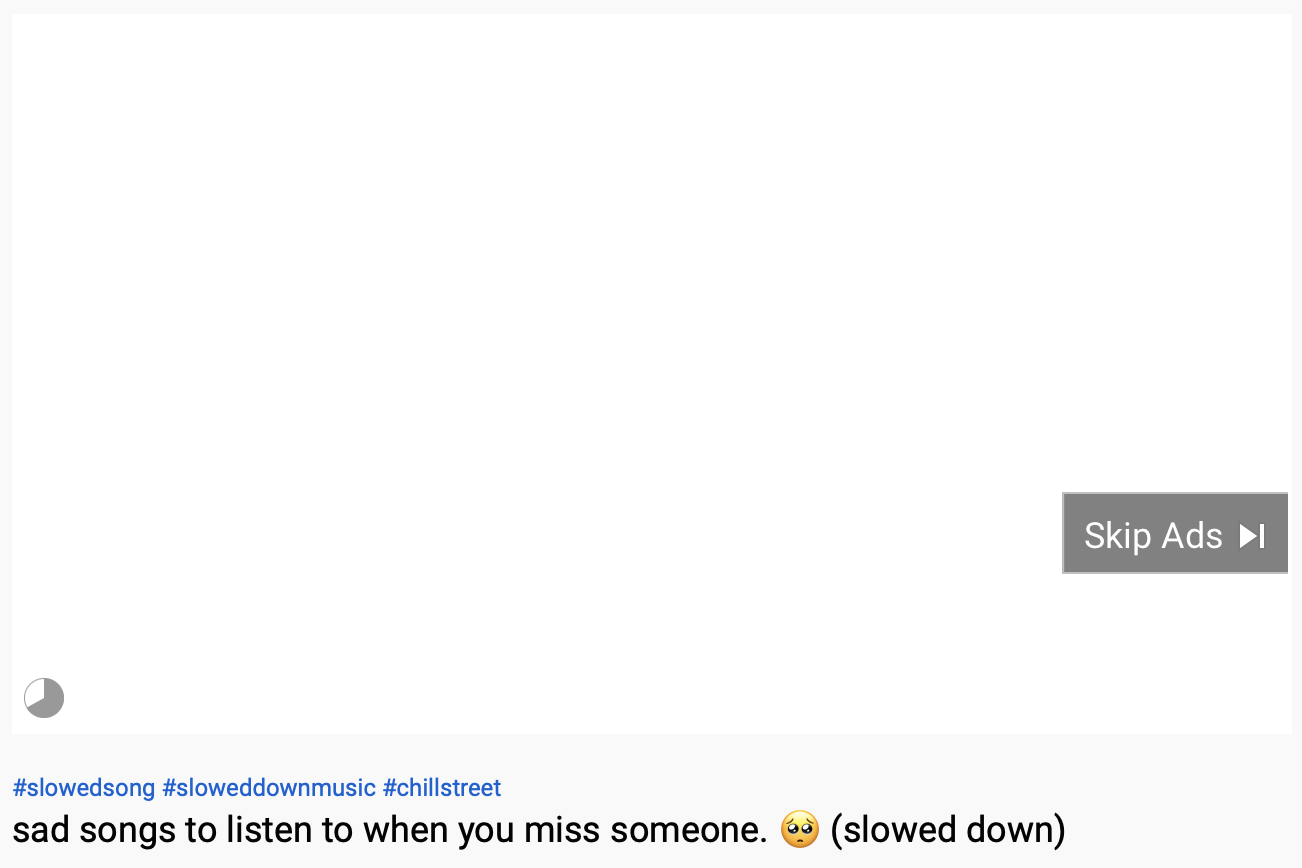
But with such approach user experience takes a real hit: either there's a noticeable delay before the video loads or there's a placeholder in place of the video ad:
Short version
A few months ago YouTube started using the same way to show video ads to Chrome users, but we were able to handle it without much trouble. What's different about Safari? Unfortunately, Safari Content Blocking is severely limited compared to full-scale content blockers for other browsers. There were not many changes to Safari Content Blocking API since it was introduced in 2015.
Depending on your OS, here's what you can expect:
- iOS/iPadOS: the current solution is the best solution that can be provided right now under the circumstances. We'll have to live with it unless Apple makes drastic changes (more on that later)
- On macOS:
- If you're using the standalone AdGuard for Mac app, you're not affected at all. You probably haven't noticed these ads in the first place.
- If you're using AdGuard for Safari, make sure that "Advanced Blocking" extension is enabled. This extension makes up for some of the functionality that Safari Content Blocking misses. Unfortunately, it cannot be ported to iOS/iPadOS.
If Safari wants to stay relevant in terms of content blocking, some things need to be improved. We are ready to help and provide whatever expertise that might be needed. In fact, we have submitted multiple bug reports and feature requests for the last years.
Now, if you want to learn what's exactly wrong with Safari Content Blocking, read further. This may require some technical background so if you don't have it, feel free to scroll down to the last chapter.
How Safari content blocking works
Before talking about the limitations of Safari and how we at AdGuard mitigate them, it would be better to first learn how Safari Content Blocking works in the first place.
Content Blocker is basically an extension of your app that runs in a separate process, and the only purpose of this extension is to serve a JSON file with the list of content blocking rules. These rules are then used by Safari to actually do the 'blocking' part of the job.
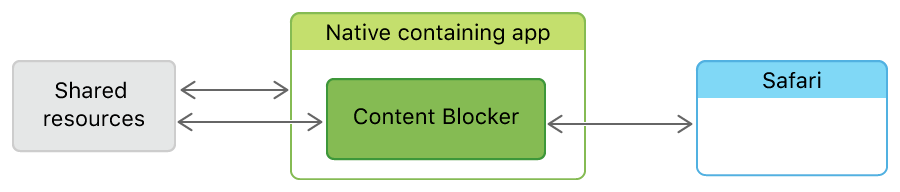
This diagram illustrates how content blockers work in Safari
Each content blocking rule is a JSON object that consists of 2 parts: "trigger" and "action".
The "trigger" part defines what requests the rule should be applied to. And the "action" part, as the name suggests, defines what exactly will be done to this matching request.
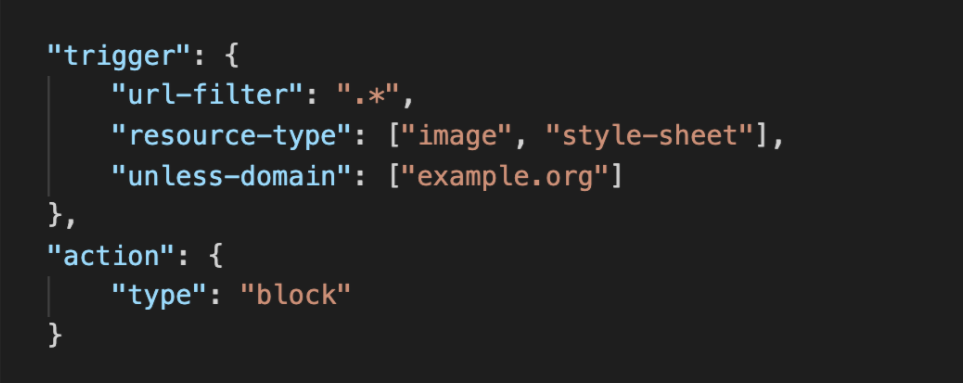
What a blocking rule looks like in Safari
There are also cosmetic rules that hide page elements matching the specified CSS selector:
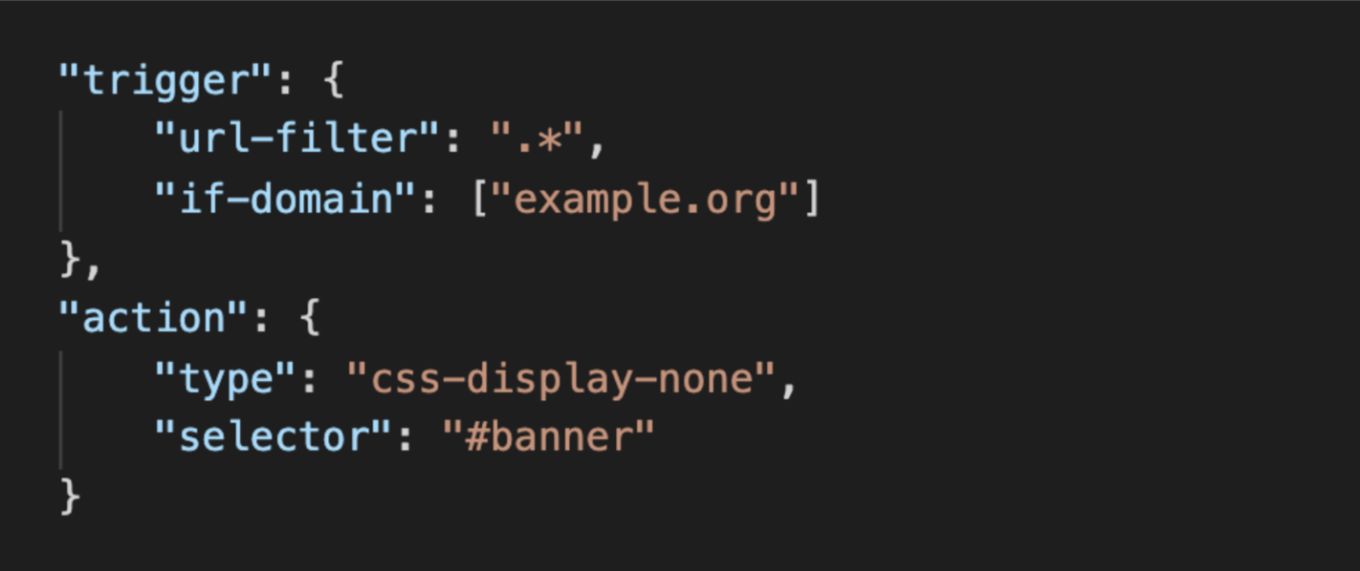
Cosmetic rule in Safari
We have only reviewed 2 types of actions: "blocking a request" or "hiding an element", but there are a few more:
- One that allows disabling other matching rules
- One for blocking cookies
- Another one for upgrading connection to HTTPS
Now that we know what Safari Content Blocking is and how it works, let's talk about its limitations.
Limitations
Here's a short list of limitations that bothers us (as ad blocking community) the most. Some of them can be mitigated to an extent, but we're still talking about workarounds and not proper solutions.
- No debugging tools
- Different syntax (can be partially solved)
- Slow compilation
- 50k rules per content blocker limit (huge pain, but we learned to live with it)
- Limited regular expressions support
- Content Blocking is a low priority for Safari team
Let's analyze each of these problems.
No debugging tools
We'll kick things off with something that's simple yet has no solutions. To create effective filtering rules, developers need to debug them, and that requires debugging tools. Now, Safari content blocking comes with no debugging tools. The only tool that is of any help for filter maintainers is the browser Console, where they can see which requests were blocked. It's impossible to understand which rule is blocking this or that request and figuring it out may be a very tiresome process. There's also no suitable way of debugging cosmetic rules.
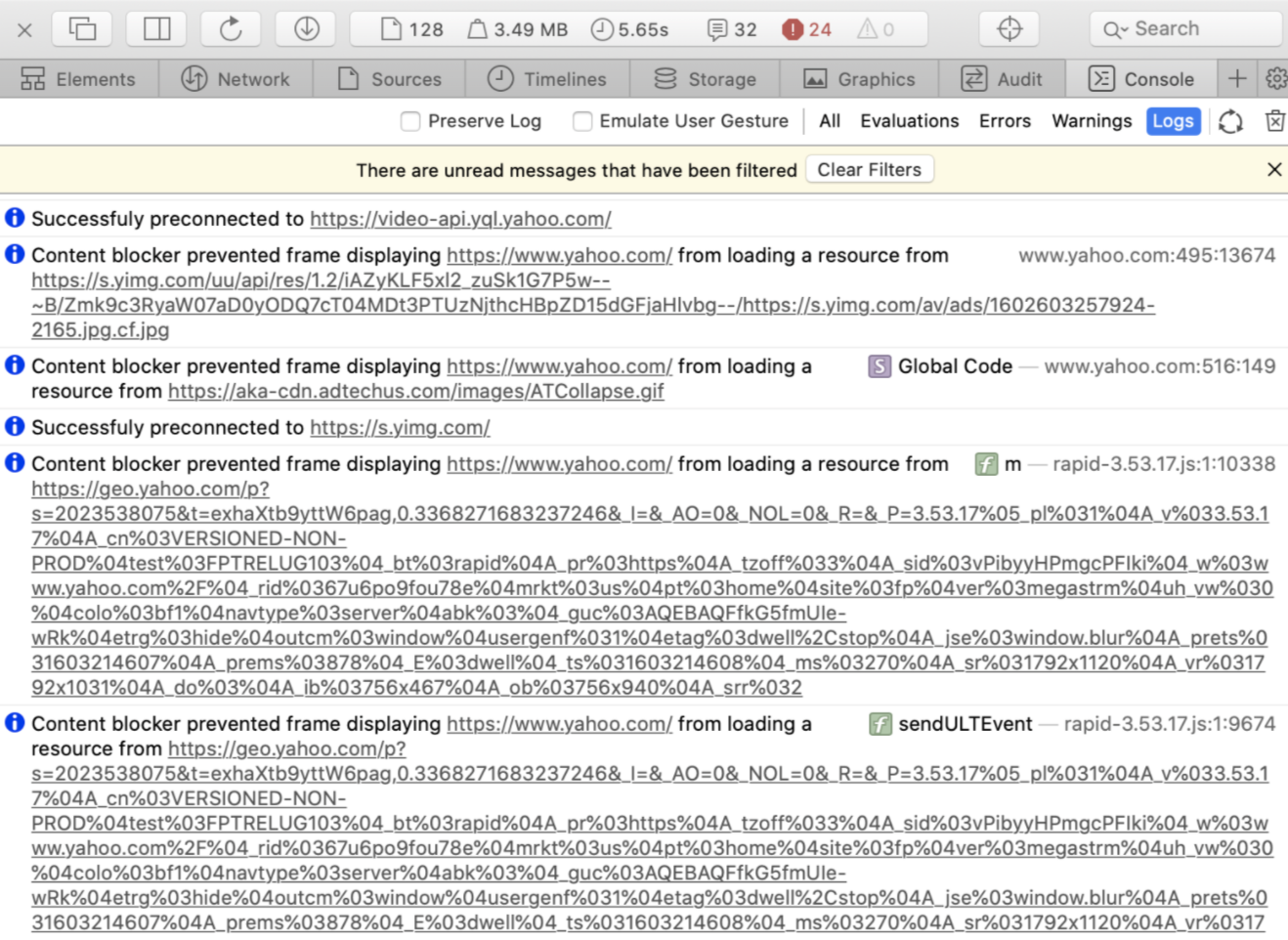
Browser console in Safari
This makes developing filters for Safari a very ineffective process, and many filters maintainers prioritize other browsers over Safari when it’s possible when it comes to creating a filtering rule. This, in turn, leads to poor quality of Safari filter lists compared to other browsers.
Different syntax
AdGuard filters, EasyList and uBlock filters are all based on the original Adblock Plus core syntax. It was extended, but the "core" part of it is the same among all popular content blockers.
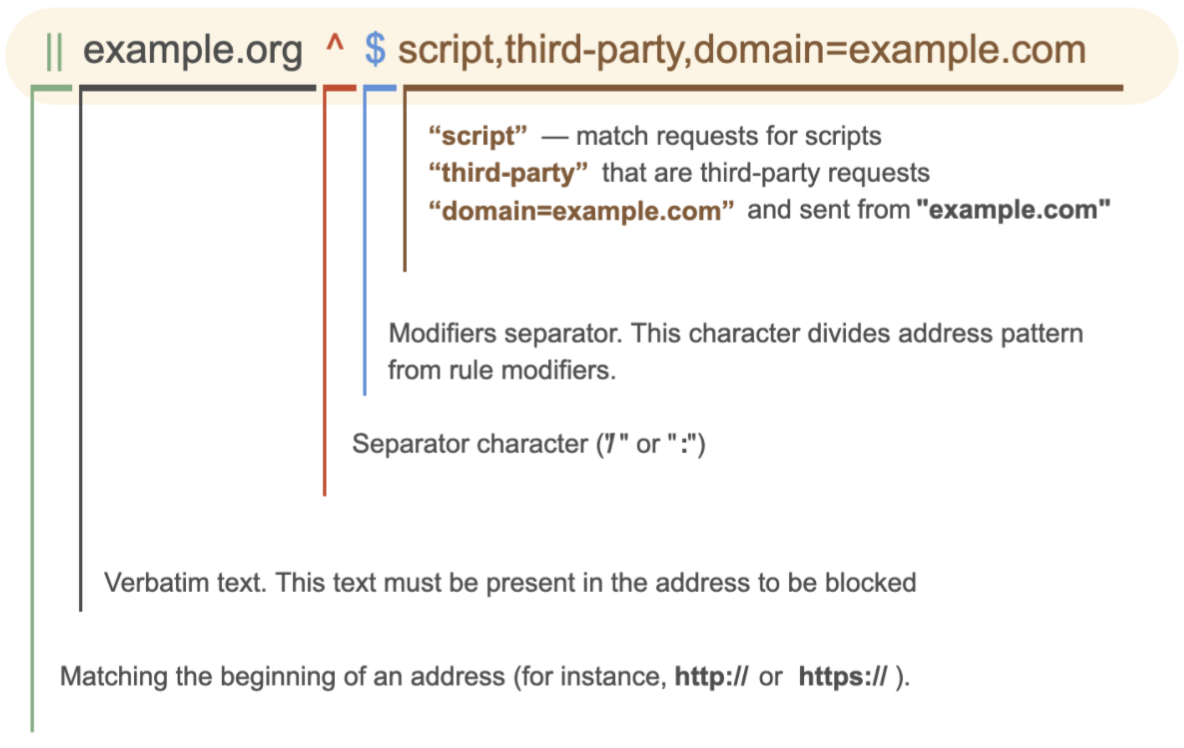
Common filtering rule anatomy
And as you saw on the previous illustrations, Safari blocking rules have nothing in common with this syntax. And this is a problem because we don't want to create special "Safari-only" filter lists. It's not about us being lazy: Safari just does not provide good enough tools for developing these kind of lists.
What we want is using the good old traditional filter lists like AdGuard filters and EasyList.
Our solution
The obvious solution is to automatically convert our rules into Safari content blocking rules. AdGuard does exactly that in real time right on your device.
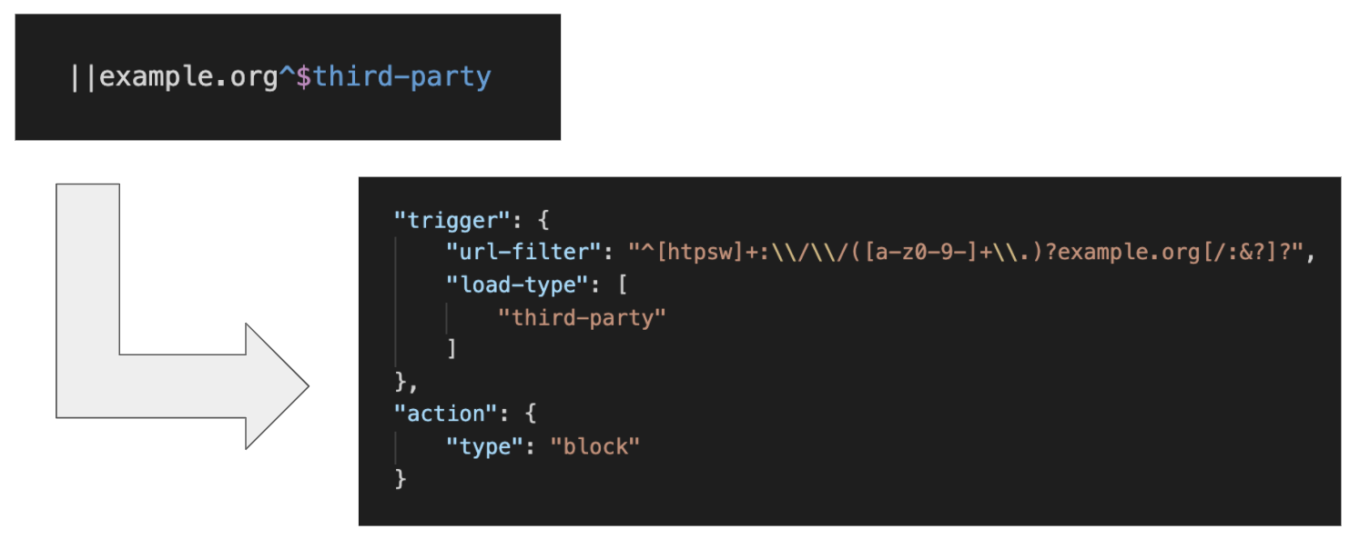
Possible solution for Safari syntax issues
You can imagine that it's extra work that doesn't make ad blockers more efficient.
Slow compilation
Safari compiles every content blocker JSON into a "prefix tree" that speeds up the lookups.
But compiling this prefix tree is slow. For example, you can see the output from the profiler, it takes over two seconds on a new MacBook Pro to compile a JSON with just a little over 30k rules (a vrey realistic size for a filter).

Compilation times in Safari
And this is slow. Compare it to content blockers on other platforms: it takes less than a second for AdGuard for Android app to parse and compile a list with over 100k rules. The obvious difference, though is that our Android app uses different syntax that is not as complicated as regular expressions, maybe not that flexible, but it is optimized specifically for matching URLs.
Users don't see any of this and they are not directly affected, but this aspect is actually pretty massive because it is the choke point that causes other limitations.
50k rules limit
Now that we know that the compilation is quite slow, it is easy understand the next limitation. A single content blocker cannot contain more than 50,000 rules, and this is a hard-coded limit for Safari. Apple developers confirmed that the main reason for this limitation is how slow the compilation is. They may increase the limit a little bit because new devices are faster, but this will not magically solve all problems.
There is no room for substantial improvement as long as the rules are based on using regular expressions. And don't let a seemingly high number trick you: for instance, AdGuard Base filter + EasyList have 100,000 rules in total, and that's only two filters. It's not uncommon for users on other platforms to have 5-10 filters simultaneously and even more.
Our solution
In fact, there's a complex of solutions. Sadly, even when combined, they all don't provide the desired result. However, they aren't worth nothing.
Filter optimization
As filter developers, we try to optimize our filters specifically for Safari. One of the things we do is combine similar element-hiding rules into a single one. As you can see in this example, five different rules are combined in just two:
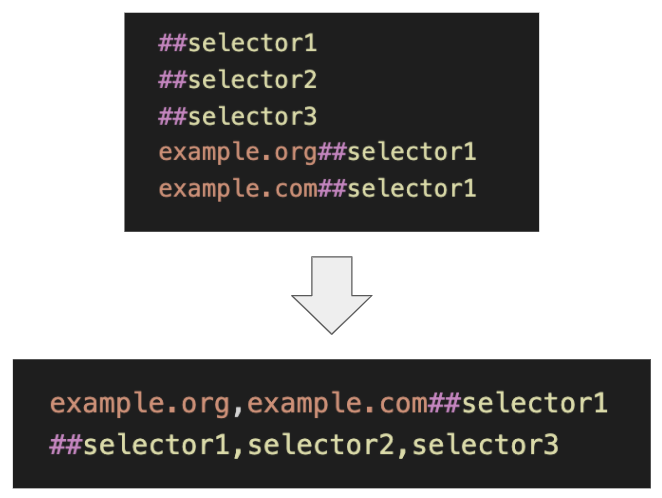
Filter optimization in Safari
This helps a lot, but it’s still not enough.
Removing obsolete rules
Another thing we do is remove obsolete and rarely used rules from these optimized versions of filters. Thanks to those AdGuard Browser Extension users who volunteer to share anonymous filter usage statistics (this is disabled by default), we know which rules are used less heavily than the rest. We build special versions of the popular lists (like AdGuard Base filter) without obsolete and rarely used rules.

Filters maintainers can use special "hints" to control what rules should be kept despite the "optimization" process
Yes, it makes filters smaller, but in the end, the cost is lower ad blocking quality. Also, this method is not bulletproof: some rules we just don't have the stats on because they are not used in the browser extension, some filter developers will not put such hints next to their rules, etc.
Multiple content blockers
One more workaround that almost all developers of Safari ad blockers resort to is to divide the ad blocker into several independent content blockers.
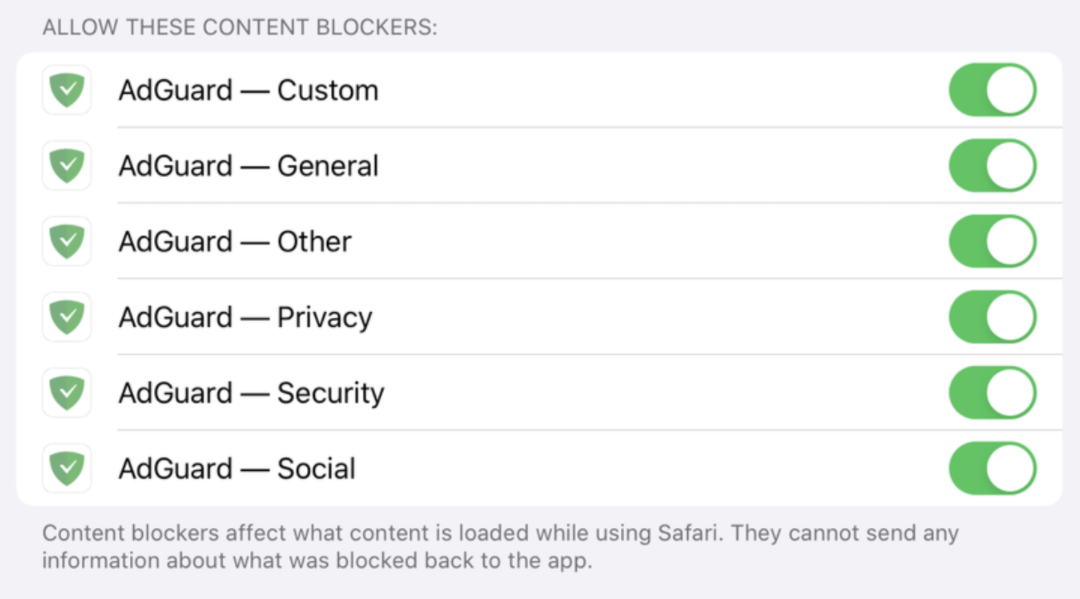
AdGuard for iOS consists of 6 content blockers
Technically, each of them has less than 50k rules, yet in total they wield much more. But in ad blocking, 50k times 6 doesn't make 300km for several reasons:
- It's not uncommon when one filter addresses rules from some other one. But with this approach different Safari content blockers are completely independent, and the rules in them cannot influence each other.
- If any filter ever has more than 50k rules, you won't be able to add it at all.
We'll still continue to cut AdGuard into pieces to fit the Safari limitations, but you can see now why it's no fun.
Low development priority
We saved this one for last, because it's quite illustrative. Here's a changelog for Safari Content Blocking API over the last 6 years:
2015 — Safari Content Blocking is implemented
2016 — Added one new feature (make-https) and a couple of major bugs were fixed
2017 — Added one more new feature (if-top-url) — which is almost unusable — and added content blockers to WKWebView, fixed a couple of bugs
2018 — fixed a couple of bugs, code refactoring
2019 — fixed a couple of bugs
2020 — no significant changes
It's clear that with that rate it's impossible to catch up with the newest ad insertion technologies. Something has to change. We hope that priorities of Safari developers will shift towards fixing these problems, and we're ready to provide any help that's needed.
What to do
The ad blocking community has been sounding the alarm for years. Here are just some examples of feature requests that have been filed:
This one is particularly interesting as it would help fix the problem with YouTube ads.
- Feedback on the most pressing issues by content blocking tools developers
- Feature request to allow blocking by CNAMEs
- A feature request to increase the rules limit to 300k
- A request for a better debugging tool
There are many more, these are just some of the most pressing issues. Being a part of this community, we believe that we've done more than enough to draw Apple's attention to the problem. If more assistance of any kind is required, we'd be happy to provide any help we can.
We're at the point where changes absolutely have to come. Otherwise, everyone will lose — except for ad providers.
UPD: it seems things are changing in 2021. For instance, the 50k limit was raised to 150k, and that's not all.




















































