YouTube rolls out 30-second unskippable ads, reviving the TV experience viewers once fled

YouTube has made 30-second unskippable ads part of the viewing experience for those watching the platform on TV. In a blog post on March 2, the Google-owned company announced that the format is now rolling out globally.

It’s not YouTube’s first rodeo with this particular format. Almost 10 years ago, the platform decided to retire 30-second unskippable ads, since at the time they were widely seen as a relic of traditional TV. That was something that everyone, including the tech leaders of the day, was eager to leave behind. Well, how the times have changed…

The return of the once discarded format was first announced back in 2023, and it took YouTube a whole three years to reintroduce it.

At 30 seconds, the new format officially becomes the longest standard unskippable ad YouTube offers. That said, there has been plenty of anecdotal evidence of much longer unskippable ads appearing on the platform, with reports ranging from several minutes to an eye-watering (sic) 58 minutes.

An hour-long unskippabe ad
Source: Reddit

However alarming these reports may sound — and the mere thought of an hour-long ad is enough to make anyone shudder — YouTube has either dismissed them as glitches or declined to comment altogether.

For now, the 30-second spots coming to connected TVs are the longest officially recognized format, and they appear to be here to stay.

Where the ads will be shown

In the blog post, YouTube says that VRC non-skip ads (VRC stands for Video Reach Campaign) are designed specifically to run on Connected TV (CTV) devices, like smart TVs, streaming devices (Roku, Fire TV, Apple TV, Chromecast), and other internet-connected big screens in living rooms. The longer, 30-second non-skippable spots are CTV-only, while Google’s AI dynamically mixes in 6-second bumper ads and 15-second standard non-skippable ads across other YouTube environments such as mobile, desktop, and tablets.

The rationale behind this is that viewers who watch YouTube on big screens will be more tolerant towards long commercials than those who watch YouTube on their PC or phones. That seems to be a fair assumption, but it nevertheless brings us back to where we started, and we’re talking about the era before streaming services and YouTube took off.

Back to the old but not-so-good times

This new addition inevitably brings back memories of the era when long commercial breaks were simply part of watching TV. Anyone who grew up with traditional broadcasting will remember the routine: the moment the screen faded to a commercial break, you would get up from the couch, grab some popcorn, maybe pour yourself a coffee, and return a few minutes later hoping the show had just resumed. It was a shared experience, something almost everyone went through at some point.

The problem is that very few people actually want to repeat it. Streaming and online video platforms became popular precisely because they moved away from that model. And yet with these longer, unskippable ads, YouTube seems to be edging back toward the same viewing habits many viewers were happy to leave behind. Nostalgia for the “good old days” is one thing, but this feels less like a throwback and more like a regression.

There is also another important difference. In traditional television, shows rarely cut off randomly for commercials. The breaks were usually deliberate — often placed at moments designed to keep viewers hooked, sometimes even right on a small cliffhanger. That could still be annoying, of course, but at least there was some structure and intention behind it. Today’s streaming viewers, on the other hand, have become used to a far more seamless experience. And in that context, the idea of returning to long, unavoidable interruptions feels like an unwelcome step backward.

More ads, fewer escapes: YouTube tightens the screws

The addition of a new ad format is in line with a trend that has defined YouTube’s broader strategy in the past few years: maximizing ad revenue. By that measure, YouTube has been enormously successful. According to estimates from research firm MoffettNathanson, reported by The Hollywood Reporter, the platform pulled in a staggering $40.4 billion in ad revenue in 2025, surpassing the combined ad revenue of Disney, NBCUniversal, Paramount, and Warner Bros. Discovery, which together generated $37.8 billion.

Another strategy that complements this approach (and ultimately serves the same goal) is cracking down on ad blockers to drive the subscription revenue. As we’ve reported earlier, YouTube has recently begun discouraging ad-blocking users by intentionally worsening user experience. It is doing so by hiding video descriptions and comments until the blocker is disabled.

Only this year, YouTube appears to have tightened several other loose screws as well. One example is background playback, a feature officially reserved for YouTube Premium subscribers but previously accessible through a loophole: watching videos through alternative mobile browsers like Samsung Internet, Brave, Vivaldi, or Microsoft Edge, often paired with ad blockers. Earlier this year, many users reported that the workaround suddenly stopped working. Minimizing the browser or turning off the screen now cuts the audio. A Google spokesperson later confirmed to Android Authority that YouTube had updated the experience to ensure background playback remains exclusive to Premium across all platforms.

Earlier this year, free YouTube users also reported seeing a new form of persistent advertising inside the mobile apps. These banners appear in the bottom-left corner of the video, and in some cases cannot be dismissed unless the viewer exits the video and restarts playback.
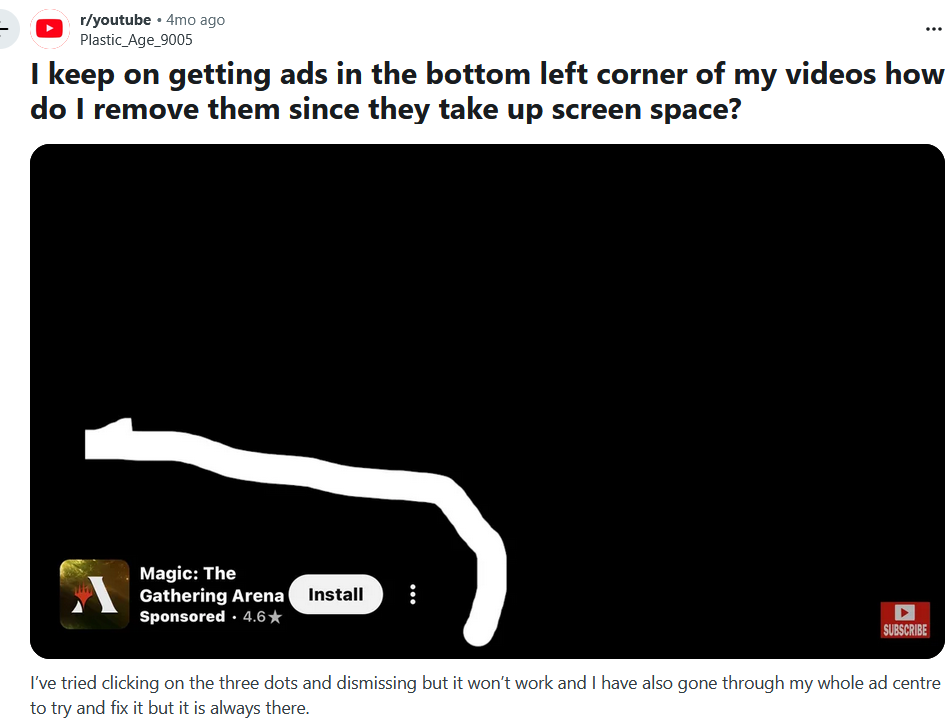
New type of ads in YouTube mobile app
Source: Reddit

The perils of YouTube Premium subscriptions

By the look and sound of it, YouTube’s broader goal seems fairly obvious: discourage users from turning on ad blockers and nudge them towards premium subscriptions — all at the same time. That would fit neatly into the wider subscription economy that has taken hold across industries, from streaming services to printers, and even cars.

The push also comes at a time when the original free YouTube experience is becoming increasingly difficult to enjoy, thanks to constant interruptions. The most straightforward solution would be to subscribe to Premium — at least that’s how it looks on paper. In reality, there have been multiple reports over the years of users still encountering ads even after switching to Premium. Google typically attributes these cases to glitches or user-side issues — such as watching videos while logged out — but the reports keep surfacing, with some users claiming they still see ads on the homepage and other parts of the platform).

And then there’s the price. A full Premium subscription currently costs $13.99 per month for individuals or $22.99 for a family plan, which is not exactly trivial for many viewers. Unsurprisingly, some users look instead to Premium Lite, available in the U.S. for $7.99 a month. The catch, however, is that it only offers a mostly ad-free experience — ads can still appear on music content, Shorts, and during browsing or search.

Given the trajectory YouTube seems to be on, it would not be surprising to see the number of subscription tiers expand even further, with a completely ad-free experience gradually turning into something of a luxury. After all, from a business perspective the ideal scenario would be to keep both revenue streams flowing: ads and subscriptions alike.

Some observers think the situation could escalate even further. As one commenter on X put it: “Soon you'll get ‘reduced ads’ with Premium, and will need a ‘Supreme’ account for actual ad-free. And so on.” While that prediction may be somewhat tongue-in-cheek, it is not entirely difficult to imagine a future where the lines between free, paid, and “premium-premium” tiers become increasingly blurred.
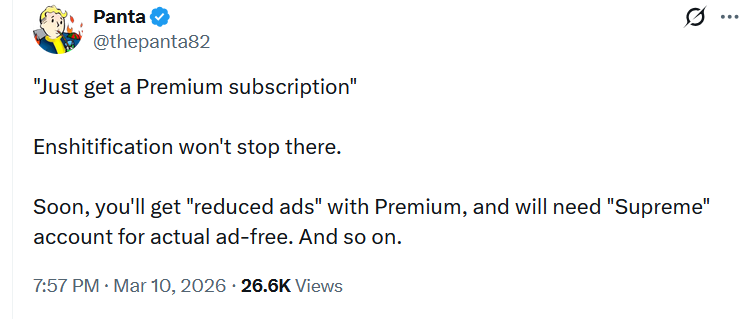
A tweet predicting YouTube subscription formats

Alternative — ad blockers, where possible

There is also another reason why YouTube’s advertising push is increasingly focused on connected TVs. Compared to PCs or smartphones, smart TVs offer far fewer ways to avoid ads in the first place. Traditional browser-based ad blockers simply cannot be installed on most TV platforms. That leaves network-level approaches such as DNS filtering as one of the few available options. However, even those methods have significant limitations. Because YouTube often serves ads from the same domains as the video content itself, DNS-based blockers generally cannot filter them out without also breaking video playback. In practice, that makes YouTube ads far harder to block on smart TVs than on desktop or mobile devices.

For many users, the combination of longer ads, tighter platform restrictions, and an increasingly aggressive push towards Premium leaves one obvious alternative: turning to ad blockers — at least on the devices where they still work reliably. AdGuard and other ad-blocking solutions have long been locked in a classic cat-and-mouse game with YouTube, as the platform continuously introduces new measures designed to detect and discourage ad blocking. The crackdown may be intensifying, but the other side of that equation is constantly adapting its approaches as well.

And given the current trade-offs, it is not hard to see why people keep turning to them. When Premium subscriptions continue to rise in price, occasional glitches still let ads slip through, and even cheaper tiers remain partially ad-supported, the balance can start to feel a little unfair. In the meantime, the goal remains simple: make YouTube watchable, like it used to be once, even if the platform itself seems determined to make that harder.


Suka postingan ini?
AdGuard VPN DNS AdGuard AdGuard Mail AdGuard Wallet
Layar utama AdGuard untuk Windows
Layar Perlindungan AdGuard untuk Windows, menampilkan fitur dan pengaturan perlindungan
Layar Statistik AdGuard untuk Windows, menampilkan statistik untuk iklan dan pelacak yang terblokir
Layar Pengelolaan aplikasi AdGuard untuk Windows, menampilkan opsi pengelolaan perlindungan untuk aplikasi yang terinstal di perangkat
20.534 20534 ulasan pengguna
Sempurna!

AdGuard untuk Windows — pemblokir iklan untuk PC Anda

AdGuard untuk Windows lebih dari sekadar pemblokir iklan. Ini adalah alat serbaguna yang memblokir iklan, mengontrol akses ke situs berbahaya, mempercepat pemuatan halaman, dan melindungi anak-anak dari konten yang tidak pantas
Dengan mengunduhnya Anda menerima ketentuan Perjanjian lisensi
Microsoft Store
Dengan mengunduhnya Anda menerima ketentuan Perjanjian lisensi
AdGuard untuk Windows v8.0, masa percobaan 14 hari
Layar utama AdGuard untuk Mac
Layar Mode Siluman AdGuard untuk Mac
20.534 20534 ulasan pengguna
Sempurna!

AdGuard untuk Mac — pemblokir iklan seluruh sistem

AdGuard untuk Mac adalah pemblokir iklan unik yang dirancang khusus untuk macOS. Selain melindungi Anda dari iklan yang mengganggu di browser dan aplikasi, ini juga melindungi Anda dari pelacakan, phishing, dan penipuan
Dengan mengunduhnya Anda menerima ketentuan Perjanjian lisensi
Pelajari lainnya
AdGuard untuk Mac v2.19, masa percobaan 14 hari
Layar utama AdGuard untuk Android
Layar Perlindungan pelacakan AdGuard untuk Android
Layar Pengelolaan aplikasi AdGuard untuk Android, menampilkan opsi pengelolaan perlindungan untuk aplikasi yang terinstal di perangkat
Layar Statistik AdGuard untuk Android, menampilkan statistik untuk iklan dan pelacak yang terblokir
Layar utama peramban privat AdGuard untuk Android
Kode QR untuk unduh AdGuard untuk Android
20.534 20534 ulasan pengguna
Sempurna!

AdGuard untuk Android: pemblokir iklan semua aplikasi

Memblokir iklan dan pelacak di semua browser, game, dan aplikasi lainnya. Melindungi privasi Anda dan memungkinkan Anda mengontrol bagaimana aplikasi Anda menggunakan internet. Diinstal melalui APK
Dengan mengunduhnya Anda menerima ketentuan Perjanjian lisensi
Pelajari lainnya
Pindai untuk mengunduh
Gunakan pembaca kode QR yang tersedia di perangkat Anda
AdGuard untuk Android v4.14, masa percobaan 14 hari
Layar utama AdGuard untuk iOS
Layar Perlindungan AdGuard untuk iOS, menampilkan fitur dan pengaturan perlindungan
Layar Statistik AdGuard untuk iOS, menampilkan statistik untuk iklan dan pelacak yang terblokir
Kode QR untuk unduh AdGuard untuk iOS
20.534 20534 ulasan pengguna
Sempurna!

AdGuard untuk iOS — pemblokir iklan di luar Safari

Pemblokir iklan iOS terbaik untuk iPhone dan iPad. AdGuard menghilangkan semua jenis iklan dan pelacak di Safari serta melindungi privasi Anda di semua aplikasi pada tingkat DNS
Dengan mengunduhnya Anda menerima ketentuan Perjanjian lisensi
Pelajari lainnya
Pindai untuk mengunduh
Gunakan pembaca kode QR yang tersedia di perangkat Anda
AdGuard untuk iOS versi 4.5
Layar utama AdGuard Content Blocker
Layar filter AdGuard Content Blocker
Layar pengaturan AdGuard Content Blocker
20.534 20534 ulasan pengguna
Sempurna!

Pemblokir Konten AdGuard

AdGuard Content Blocker menghilangkan semua jenis iklan di browser seluler yang mendukung teknologi pemblokiran konten — yaitu, Samsung Internet dan Yandex Browser. Fitur-fiturnya terbatas dibandingkan dengan AdGuard untuk Android, tetapi gratis, mudah dipasang, dan efisien

Dengan mengunduhnya Anda menerima ketentuan Perjanjian lisensi
Pelajari lainnya
Pemblokir Konten AdGuard versi 2.8
Layar utama AdGuard Browser Extension
Layar Perlindungan pelacakan AdGuard Browser Extension
20.534 20534 ulasan pengguna
Sempurna!

Ekstensi peramban AdGuard

AdGuard adalah ekstensi pemblokiran iklan tercepat dan paling ringan yang secara efektif memblokir semua jenis iklan di semua halaman web! Pilih AdGuard untuk browser yang Anda gunakan dan dapatkan penjelajahan bebas iklan, cepat, dan aman.

Pasang
Dengan mengunduhnya Anda menerima ketentuan Perjanjian lisensi
Pasang
Dengan mengunduhnya Anda menerima ketentuan Perjanjian lisensi
Pasang
Dengan mengunduhnya Anda menerima ketentuan Perjanjian lisensi
Pasang
Dengan mengunduhnya Anda menerima ketentuan Perjanjian lisensi
Pasang
Dengan mengunduhnya Anda menerima ketentuan Perjanjian lisensi
Pelajari lainnya
Pasang
Dengan mengunduhnya Anda menerima ketentuan Perjanjian lisensi
Pelajari lainnya
Ekstensi peramban AdGuard versi 5.5
Layar utama Asisten Peramban
20.534 20534 ulasan pengguna
Sempurna!

Asisten AdGuard

Sebuah ekstensi peramban pendamping untuk aplikasi AdGuard desktop. Ini mengizinkan Anda memblokir item kustom di situs web, menambahkan situs web ke daftar izinkan, dan mengirim laporan langsung dari peramban Anda
Asisten AdGuard versi 1.4
20.534 20534 ulasan pengguna
Sempurna!

AdGuard Home

AdGuard Home adalah solusi berbasis jaringan untuk memblokir iklan dan pelacak. Instal sekali di router Anda untuk mencakup semua perangkat di jaringan rumah Anda — tidak diperlukan perangkat lunak klien tambahan. Ini sangat penting untuk berbagai perangkat IoT yang sering menimbulkan ancaman bagi privasi Anda
AdGuard Home versi 0.107
Layar utama AdGuard Pro untuk iOS
Layar Perlindungan AdGuard Pro untuk iOS, menampilkan fitur dan pengaturan perlindungan
Layar statistik AdGuard Pro untuk iOS, menampilkan statistik untuk iklan dan pelacak yang terblokir
20.534 20534 ulasan pengguna
Sempurna!

AdGuard Pro untuk iOS

AdGuard Pro untuk iOS dilengkapi dengan semua fitur perlindungan pemblokiran iklan canggih. Aplikasi ini menawarkan fitur yang sama dengan versi berbayar AdGuard untuk iOS. Aplikasi ini unggul dalam memblokir iklan di Safari dan memungkinkan Anda menyesuaikan pengaturan DNS untuk perlindungan yang lebih baik. Aplikasi ini memblokir iklan di browser dan aplikasi, melindungi anak-anak Anda dari konten yang tidak pantas, dan menjaga keamanan data pribadi Anda.
Dengan mengunduhnya Anda menerima ketentuan Perjanjian lisensi
Pelajari lainnya
AdGuard Pro untuk iOS versi 4.5
Layar utama AdGuard Mini untuk Mac
Layar perlindungan Safari AdGuard Mini untuk Mac
Layar Buat aturan AdGuard Mini untuk Mac
20.534 20534 ulasan pengguna
Sempurna!

AdGuard Mini untuk Mac — pemblokir iklan Safari

AdGuard Mini untuk Mac adalah pemblokir iklan Safari yang kuat. Aplikasi ringan ini menghapus iklan, memblokir pelacak, dan mempercepat pemuatan halaman. Ini membantu Anda menjelajah Web di Safari tanpa gangguan dan menjaga data Anda tetap pribadi
Pasang
Dengan mengunduhnya Anda menerima ketentuan Perjanjian lisensi
Pelajari lainnya
AdGuard Mini untuk Mac versi 2.3
Layar utama AdGuard untuk Android TV dengan perlindungan diaktifkan
Layar pemblokiran iklan AdGuard untuk Android TV, menampilkan fitur dan pengaturannya
Layar pengaturan AdGuard untuk Android TV
Layar Pengelolaan aplikasi AdGuard untuk Android TV, menampilkan aplikasi tempat iklan dan pelacak terblokir
20.534 20534 ulasan pengguna
Sempurna!

AdGuard untuk Android TV

AdGuard untuk Android TV adalah satu-satunya aplikasi yang memblokir iklan, menjaga privasi Anda, dan bertindak sebagai firewall untuk Smart TV Anda. Dapatkan peringatan tentang ancaman web, gunakan DNS yang aman, dan dapatkan manfaatkan lalu lintas yang terenkripsi. Bersantailah dan selami acara favorit Anda dengan keamanan terbaik dan tanpa iklan!
AdGuard untuk Android TV v4.14, masa percobaan 14 hari
Maskot AdGuard, Agnar, memegang penguin Linux
20.534 20534 ulasan pengguna
Sempurna!

AdGuard untuk Linux

AdGuard untuk Linux adalah pemblokir iklan sistem luas pertama di dunia untuk Linux. Blokir iklan dan pelacak di tingkat perangkat, pilih dari filter yang sudah terinstal sebelumnya, atau tambahkan milikmu sendiri — semuanya melalui antar muka baris perintah
AdGuard untuk Linux versi 1.4
20.534 20534 ulasan pengguna
Sempurna!

AdGuard Temp Mail

Generator alamat e-mail sementara gratis yang membuat Anda tetap anonim dan melindungi privasi Anda. Tidak ada spam di kotak masuk utama Anda!
20.534 20534 ulasan pengguna
Sempurna!

AdGuard VPN

75 Lokasi Di Seluruh Dunia

Akses ke konten apa pun

Enkripsi yang kuat

Tanpa kebijakan log

Koneksi paling cepat

dukungan 24/7

Coba gratis
Dengan mengunduhnya Anda menerima ketentuan Perjanjian lisensi
Pelajari lainnya
20.534 20534 ulasan pengguna
Sempurna!

DNS AdGuard

AdGuard DNS adalah cara yang sangat andal untuk memblokir iklan internet tanpa perlu menginstal aplikasi apapun. Mudah digunakan, sepenuhnya gratis, mudah dipasang di perangkat mana saja, dan menyediakan fungsi minimal yang diperlukan untuk memblokir iklan, penghitung, situs web berbahaya, dan konten dewasa.
20.534 20534 ulasan pengguna
Sempurna!

AdGuard Mail

Lindungi identitas Anda, hindari spam, dan jaga keamanan kotak masuk Anda dengan alias dan alamat e-mail sementara kami. Nikmati layanan penerusan e-mail gratis serta aplikasi untuk semua sistem operasi.
20.534 20534 ulasan pengguna
Sempurna!

AdGuard Wallet

Dompet kripto yang aman dan pribadi yang memberi Anda kendali penuh atas aset Anda. Kelola beberapa dompet dan temukan ribuan mata uang kripto untuk disimpan, dikirim, dan ditukar
Mengunduh AdGuard Klik tombol yang ditujukkan oleh panah untuk memulai instalasi. Pilih "Buka" dan klik "OK", lalu tunggu file diunduh. Di jendela yang terbuka, seret ikon AdGuard ke folder "Aplikasi". Terima kasih telah memilih AdGuard! Pilih "Buka" dan klik "OK", lalu tunggu file diunduh. Di jendela yang terbuka, klik "Install". Terima kasih telah memilih AdGuard!
Instal AdGuard untuk perangkat ponsel juga
















































