Apple’s new EU terms: accept and lose money, or reject and stay within the walled garden

Apple’s ecosystem has always been known as a walled garden because of the restrictions it imposed on app developers and users. Developers had no choice but to list their apps on Apple’s App Store if they wanted an iOS user to install them. And if they wanted the user to buy something from them, they had to process payments through Apple’s own payment mechanism.

Such a closed system made life difficult not only for developers, who had to pay Apple’s 30% standard fee on in-app purchases (or 15% for small businesses), but also for users. The latter had less of a choice when it came to apps and download options than the users of the Android-based phones, since Google has always allowed sideloading.

This situation is about to change. The culprit is the EU’s upcoming antitrust law, known as the Digital Markets Act (DMA). In September 2023, App Store, iOS operating system, and Safari browser, all owned by Apple, received gatekeeper status under the DMA. This means that by March 6, 2024, Cupertino will have to open them up to competitors or face hefty fines of up to 10% of the company’s total global turnover.

As the deadline draws closer, Apple has come up with a plan for how it’s going to comply with the DMA. And after taking a look at this plan, it’s clear as day to us that Apple intends to comply with the legislation in letter, but definitely not in spirit. Essentially, Apple offers developers a false choice: either they agree to stay within the iOS ecosystem’s confines, or they can explore alternative payment methods and app stores — and risk going under in the process.

What’s wrong with Apple’s new business terms in Europe?

The dilemma that developers face right now is the following: they can either stay on the official App Store under the current terms, or accept the new terms and be subject to the new Core Technology Fee (CTF) that may cost them a fortune. Before we zoom in on the CTF and what it means for developers, especially those of free and freemium apps, we will briefly list the other parts of Apple’s DMA compliance plan.
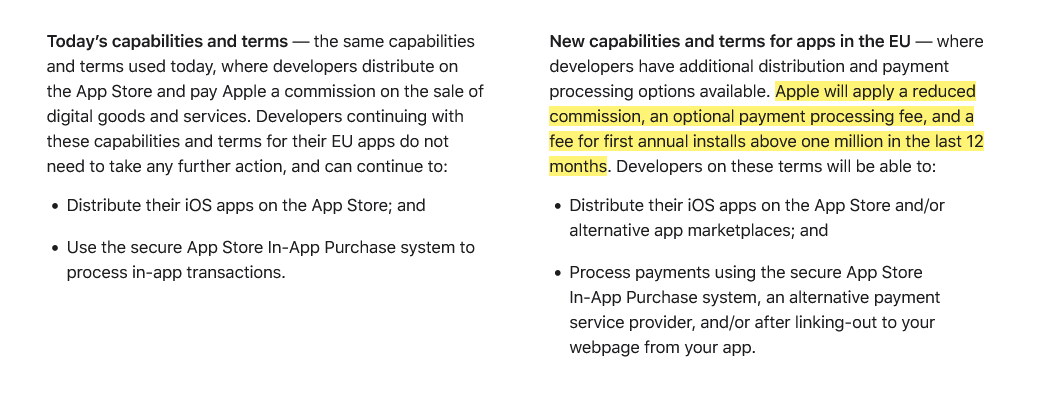
Apple introduces new terms for developers in the EU

Screenshot: Apple gives developers in the EU two options: stay on the current terms or accept the new news. Source: Apple

Under the plan, Apple says it will apply a “reduced commission” to in-app purchases. Developers in Apple’s small business program will pay a 10% fee instead of 15%, regardless of the payment method they choose. Others will pay a 17% fee instead of the standard 30% commission. If developers choose to continue using Apple as their payment processor, they’ll pay an additional 3% payment processing fee. But if they decide to ditch Apple and switch to an alternative payment system or redirect users to their own site for payment, they won’t have to pay Apple any additional fees.

So far so good, right?

It’s when we move to the third part of this masterplan, the Core Technology Fee, that things stop being pretty. In fact, they are starting to look pretty ugly.
The Core Technology Fee (CTF) is the fee that will apply only to the iOS apps whose developers accepted the new business terms. Importantly, it will apply both to iOS apps distributed on the App Store, as well as to the apps that are distributed through alternative app stores, or “marketplaces” as Apple calls them.

The definition of the 'first annual install' is not that straightforward

Subject to the fee are the developers whose apps will clock in over 1 million first annual installs in the past 12 months. They will have to pay a €0.50 fee to Apple for each user over 1 million who installed their app for the first time in a year. After these 12 months, developers will have to pay the fee again, and it does not have to be an install per se. The developer terms state that “app updates,” for instance, are also counted as new installs, “as long as they start a new 12-month period.”
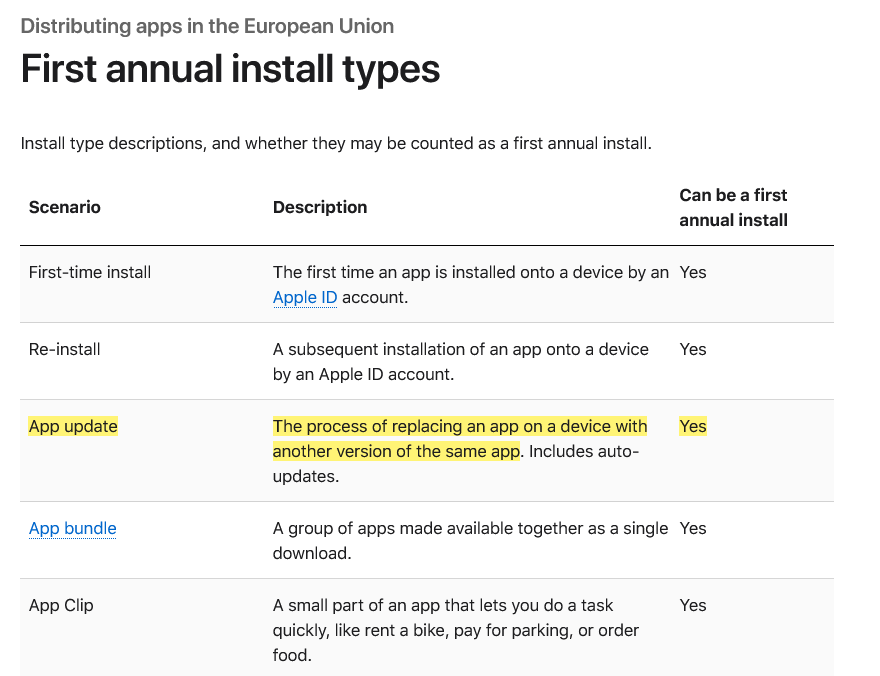
Types of first annual install under Apple's new terms

Marketplace apps or alternative app stores will have it even worse under Apple’s new and supposedly more competition-friendly rules. The developers who will create and distribute their own app stores for iOS apps in the EU are due a €0.50 CTF to Apple for each user who installs their app store for the first time in a year even if it happens before the developer racks up one million installs in total.

Go DMA and go broke: what CTF means in practice

If any of the “big guns,” meaning apps that get more than 1 million downloads in a year, could afford such a fee, it would be the paid apps. However, when it comes to free apps that make money by showing ads, or to freemium apps that offer part of their functionality for free, the fee is insurmountable.

Needless to say, Apple’s masterplan did not strike a chord with developers. Spotify did not hold back, calling the CTF “extortion, plain and simple.”

A key issue raised by Spotify in its scathing response to Apple’s plan is the vulnerable position it puts free app developers in: “How will a developer pay Apple back if its free app goes viral — multiple millions of accounts install that free app, and then that developer owes Apple millions?” Indeed, if a developer of a free or freemium app makes the unfortunate decision to accept Apple’s new terms in the EU, and then has a breakthrough and sees the app gain popularity, the last thing on their mind would be celebrating their achievement, because the first thing they should be thinking about is how to pay Apple back the fees they would owe. And, as Spotify points out, there is nothing preventing Apple from raising the fees at any time they deem fit.

To be fair, Apple has made no big secret of how punitive the new terms could be for some developers. Anyone can estimate how much they’ll pay Apple under its DMA compliance plan using its fee calculator. So let’s take a game that hit the sweet spot and went moderately viral, reaching 2 million installs in the EU in 12 months. Under the new terms, it would have to pay Apple $45,290 per month, whereas under the old terms, it would have to pay nothing. The choice seems a no-brainer to us.
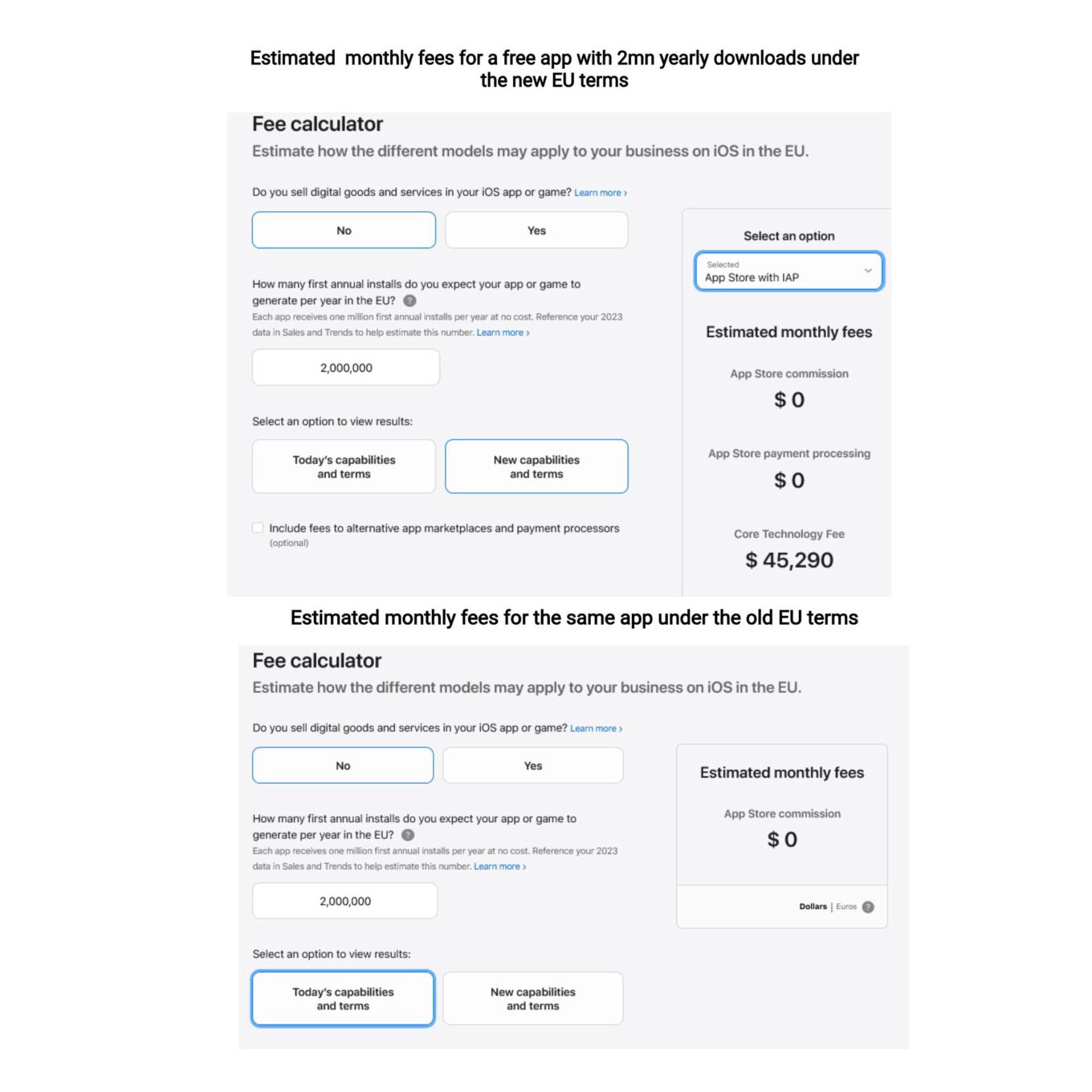
You can use a calculator to estimate your potential CTF

What Apple is effectively doing is trying to discourage developers from switching to the new terms, where they would have had more freedom to choose distribution and payment options. They are betting, and rightly so, that not so many would be willing to risk going into the red if their app takes off or experiences a sudden surge in popularity.

So, while Apple allows alternative stores de jure, de facto there is a prohibitive Core Technology Fee that blocks the way for free and freemium apps to enter alternative stores. In AdGuard’s case, we cannot take advantage of this offer either, simply because we do not have enough resources to pay the Core Technology Fee, and we are not alone in this. The only option left on the table is to make the app fully paid — which we have no intention of doing.

Will the EU regulators buy it?

It remains to be seen whether the DMA-focused changes that Apple plans to introduce will raise an issue with the EU regulators. As TechCrunch points out, the Article 6(12) of the DMA states that “the gatekeeper shall apply fair, reasonable, and non-discriminatory general conditions of access for business users to its software application stores, online search engines and online social networking services.” Is the Core Technology Fee fair? We don’t think so.

Apple’s plan to comply with the DMA is a clever attempt to spin the regulation to its own advantage, and to pressure developers into sticking with the old terms. By imposing the Core Technology Fee on apps that exceed a certain threshold of downloads, Apple is effectively penalizing developers who want to explore alternative distribution and payment options. This is a false choice and a mockery of real freedom and real competition in the digital sector. We hope that the EU regulators will not be fooled by Apple’s cosmetic changes and will insist that the DMA is enforced in a way that truly benefits consumers and developers.


Vond je dit bericht leuk?
AdGuard VPN AdGuard DNS AdGuard Mail AdGuard Wallet
Het hoofdscherm van AdGuard voor Windows
Het beschermingsscherm van AdGuard voor Windows, met de beschermingsfuncties en -instellingen
Het statistiekenscherm van AdGuard voor Windows, met statistieken over geblokkeerde advertenties en volgers
Het appbeheerscherm van AdGuard voor Windows, met de opties voor beschermingsbeheer van apps die op het apparaat zijn geïnstalleerd
20.557 20557 gebruikersbeoordelingen
Uitstekend!

AdGuard voor Windows: advertentieblokker voor pc

AdGuard voor Windows is meer dan een advertentieblokker. Het is een multifunctioneel hulpmiddel dat advertenties blokkeert, de toegang tot gevaarlijke sites regelt, het laden van pagina's versnelt en kinderen beschermt tegen ongepaste inhoud
Door het programma te downloaden accepteer je de licentievoorwaarden
Microsoft Store
Door het programma te downloaden accepteer je de licentievoorwaarden
AdGuard voor Windows v8.0, 14 dagen proefperiode
Het hoofdscherm van AdGuard voor Mac
Het Incognitomodus-scherm van AdGuard voor Mac
20.557 20557 gebruikersbeoordelingen
Uitstekend!

AdGuard voor Mac: systeembrede advertentieblokker

AdGuard voor Mac is een unieke advertentieblokker die is ontworpen met macOS in gedachten. Het beschermt je niet alleen tegen vervelende advertenties in browsers en apps, maar beschermt je ook tegen volgen, phishing en fraude
Door het programma te downloaden accepteer je de licentievoorwaarden
Meer lezen
AdGuard voor Mac v2.19, 14 dagen proefperiode
Het hoofdscherm van AdGuard voor Android
Het scherm 'Bescherming tegen volgers' van AdGuard voor Android
Het appbeheerscherm van AdGuard voor Android, met de opties voor beschermingsbeheer voor apps die op het apparaat zijn geïnstalleerd
Het statistiekenscherm van AdGuard voor Android, met statistieken over geblokkeerde advertenties en volgers
Het hoofdscherm van de privébrowser van AdGuard voor Android
De QR-code om AdGuard voor Android te downloaden
20.557 20557 gebruikersbeoordelingen
Uitstekend!

AdGuard voor Android: advertentieblokker voor alle apps

Blokkeert advertenties en volgers in alle browsers, spellen en andere apps. Beschermt je privacy en geeft je controle over hoe jouw apps internet gebruiken. Geïnstalleerd via APK
Door het programma te downloaden accepteer je de licentievoorwaarden
Meer lezen
Scannen om te downloaden
Gebruik een QR-codelezer die beschikbaar is op je apparaat
AdGuard voor Android v4.14, 14 dagen proefperiode
Het hoofdscherm van AdGuard voor iOS
Het beschermingsscherm van AdGuard voor iOS, dat de beschermingsfuncties en -instellingen toont.
Het statistiekenscherm van AdGuard voor iOS, met statistieken over geblokkeerde advertenties en volgers
De QR-code om AdGuard voor iOS te downloaden
20.557 20557 gebruikersbeoordelingen
Uitstekend!

AdGuard: advertentieblokker voor iOS

De beste advertentieblokker voor iOS op iPhone en iPad. AdGuard verwijdert alle soorten advertenties en volgers in Safari en beschermt je privacy in alle apps op DNS-niveau
Door het programma te downloaden accepteer je de licentievoorwaarden
Meer lezen
Scannen om te downloaden
Gebruik een QR-codelezer die beschikbaar is op je apparaat
AdGuard voor iOS v4.5
Het hoofdscherm van AdGuard Inhoudsblokker
Het filterscherm van AdGuard Inhoudsblokker
Het instellingenscherm van AdGuard Inhoudsblokker
20.557 20557 gebruikersbeoordelingen
Uitstekend!

AdGuard Content Blocker

AdGuard Content Blocker elimineert allerlei soorten advertenties in mobiele browsers die technologie voor het blokkeren van inhoud ondersteunen, namelijk Samsung Internet en Yandex Browser. De functies zijn beperkt in vergelijking met AdGuard voor Android, maar het is gratis, eenvoudig te installeren en efficiënt
Door het programma te downloaden accepteer je de licentievoorwaarden
Meer lezen
AdGuard Content Blocker v2.8
Het hoofdscherm van de AdGuard-browseruitbreiding
Het scherm 'Bescherming tegen volgers' van AdGuard-browseruitbreiding
20.557 20557 gebruikersbeoordelingen
Uitstekend!

AdGuard Browserextensie

AdGuard is de snelste en lichtste advertentieblokkering uitbreiding die alle soorten advertenties op alle webpagina's effectief blokkeert! Kies AdGuard voor uw browser om advertentievrij, snel en veilig te surfen.
Installeren
Door het programma te downloaden accepteer je de licentievoorwaarden
Installeren
Door het programma te downloaden accepteer je de licentievoorwaarden
Installeren
Door het programma te downloaden accepteer je de licentievoorwaarden
Installeren
Door het programma te downloaden accepteer je de licentievoorwaarden
Installeren
Door het programma te downloaden accepteer je de licentievoorwaarden
Meer lezen
Installeren
Door het programma te downloaden accepteer je de licentievoorwaarden
Meer lezen
AdGuard Browserextensie v5.5
Het hoofdscherm van AdGuard Assistant
20.557 20557 gebruikersbeoordelingen
Uitstekend!

AdGuard Assistant

Een bijbehorende browseruitbreiding voor AdGuard desktop-apps. Het stelt je in staat om aangepaste items op websites te blokkeren, websites toe te voegen aan de toelatingslijst en rapporten rechtstreeks vanuit je browser te versturen
AdGuard Assistant v1.4
20.557 20557 gebruikersbeoordelingen
Uitstekend!

AdGuard Home

AdGuard Home is een netwerkgebaseerde oplossing voor het blokkeren van advertenties en volgers. Installeer het één keer op je router om alle apparaten in je thuisnetwerk te beschermen — geen extra clientsoftware vereist. Dit is vooral belangrijk voor verschillende IoT-apparaten die vaak een bedreiging vormen voor je privacy

AdGuard Home v0.107
Het hoofdscherm van AdGuard Pro voor iOS
Het beschermingsscherm van AdGuard Pro voor iOS, met de beschermingsfuncties en instellingen
Het statistiekenscherm van AdGuard Pro voor iOS, met statistieken over geblokkeerde advertenties en trackers
20.557 20557 gebruikersbeoordelingen
Uitstekend!

AdGuard Pro voor iOS

AdGuard Pro voor iOS wordt geleverd met alle geavanceerde beschermingsfuncties voor het blokkeren van advertenties. Het biedt dezelfde tools als de betaalde versie van AdGuard voor iOS. Het blinkt uit in het blokkeren van advertenties in Safari en laat je DNS-instellingen aanpassen om je bescherming aan te passen. Het blokkeert advertenties in browsers en apps, beschermt je kinderen tegen ongepaste inhoud en houdt je persoonlijke gegevens veilig


Door het programma te downloaden accepteer je de licentievoorwaarden
Meer lezen
AdGuard Pro voor iOS v4.5
Het hoofdscherm van AdGuard Mini voor Mac
Het Safari-beschermingsscherm van AdGuard Mini voor Mac
Het 'Regel aanmaken'-scherm van AdGuard Mini voor Mac
20.557 20557 gebruikersbeoordelingen
Uitstekend!

AdGuard Mini voor Mac — Safari-advertentieblokker

AdGuard Mini voor Mac is een krachtige Safari-advertentieblokker. Deze lichtgewicht app verwijdert advertenties, blokkeert volgers en versnelt het laden van pagina's. Het helpt je om in Safari zonder afleiding op het web te surfen en je gegevens privé te houden
Installeren
Door het programma te downloaden accepteer je de licentievoorwaarden
Meer lezen
AdGuard Mini voor Mac v2.3
Het hoofdscherm van AdGuard voor Android TV met ingeschakelde bescherming
Het advertentieblokkeringsscherm van AdGuard voor Android TV, met zijn functies en instellingen
Het instellingenscherm van AdGuard voor Android TV
Het appbeheer-scherm van AdGuard voor Android TV, waarop de apps worden getoond waar advertenties en volgers worden geblokkeerd
20.557 20557 gebruikersbeoordelingen
Uitstekend!

AdGuard voor Android TV

AdGuard voor Android TV is de enige app die advertenties blokkeert, jouw privacy bewaakt en fungeert als firewall voor je Smart TV. Ontvang waarschuwingen over webbedreigingen, gebruik veilige DNS en profiteer van gecodeerd verkeer. Ontspan en duik in je favoriete programma's met eersteklas beveiliging en zonder advertenties!
AdGuard voor Android TV v4.14, 14 dagen proefperiode
De AdGuard-mascotte, Agnar, houdt de Linux-pinguïn vast
20.557 20557 gebruikersbeoordelingen
Uitstekend!

AdGuard voor Linux

AdGuard voor Linux is 's werelds eerste systeem-brede AdGuard Advertentieblokker. Blokkeer advertenties en volgers op apparaatsniveau, kies uit vooraf geïnstalleerde filters, of voeg je eigen toe - allemaal via de interface
AdGuard voor Linux v1.4
20.557 20557 gebruikersbeoordelingen
Uitstekend!

AdGuard Temp Mail

Een gratis tijdelijke e-mailadresgenerator die je anoniem houdt en jouw privacy beschermt. Geen spam in je hoofdinbox!
20.557 20557 gebruikersbeoordelingen
Uitstekend!

AdGuard VPN

75 locaties wereldwijd

Toegang tot alle inhoud

Sterke versleuteling

Geen logboekregistratie

Snelste verbinding

24/7 ondersteuning

Gratis proberen
Door het programma te downloaden accepteer je de licentievoorwaarden
Meer lezen
20.557 20557 gebruikersbeoordelingen
Uitstekend!

AdGuard DNS

AdGuard DNS is een alternatieve oplossing voor advertentieblokkering, privacybescherming en ouderlijk toezicht. Het is eenvoudig in te stellen en gratis te gebruiken, biedt een minimum aan optimale bescherming tegen online advertenties, volgers en phishing, ongeacht welk platform en welk apparaat je gebruikt.
20.557 20557 gebruikersbeoordelingen
Uitstekend!

AdGuard Mail

Bescherm je identiteit, vermijd spam en houd je Postvak IN veilig met onze aliassen en tijdelijke e-mailadressen. Geniet van onze gratis service voor het doorsturen van e-mail en apps voor alle besturingssystemen
20.557 20557 gebruikersbeoordelingen
Uitstekend!

AdGuard Wallet

Een veilige en privé crypto-wallet die je volledige controle geeft over jouw activa. Beheer meerdere wallets en ontdek duizenden cryptocurrencies om op te slaan, te verzenden en te ruilen
Downloaden AdGuard Klik op het door de pijl aangegeven bestand om AdGuard te installeren. Selecteer "Open" en klik op "OK" - wacht even tot het bestand gedownload is. Sleep dan in het geopende venster het AdGuard icoontje naar de "Applications" map. Dank u dat u voor AdGuard gekozen heeft. Selecteer "Open" en klik op "OK" - wacht even tot het bestand gedownload is. Klik dan in het geopende venster op "Installeren". Dank u dat u voor AdGuard gekozen heeft.
AdGuard op je mobiele apparaat installeren















































