Behind the complaints: Our investigation into the suspicious pressure on Archive.today

The FBI has been investigating Archive.is (also known as Archive.today), as was recently revealed. The agency issued a subpoena to the site’s domain registrar, asking for information about the person behind it, citing a “federal criminal investigation.”

Archive.is was launched in 2012 by someone using the name Denis Petrov — though whether that’s their real identity remains unclear. The site lets users save “snapshots” of web pages by submitting URLs, which makes it a valuable tool for preserving content that might otherwise disappear. But because it can also be used to bypass paywalls, it’s long been a thorn in the side of many media organizations.

While the exact nature of the FBI investigation hasn’t been confirmed, it is speculated it can be related to copyright or CSAM (child sexual abuse material) dissemination issues. Altogether, the situation suggests growing pressure on whoever runs Archive.is, and on intermediaries that help make its service accessible. AdGuard DNS, as it turns out, may have just become one such pressure point.

How we got entangled

A few weeks ago, we were contacted by a representative of an organization called the Web Abuse Association Defense, a French group claiming to fight against child pornography. Their website is webabusedefense.com, and here is the archived version as of November 7.

They demanded that we block the domain archive.today (and its mirrors) in AdGuard DNS, alleging that the site’s admin had refused to remove illegal content since 2023. To be clear, Archive.today allows users to take “snapshots” of any webpages, including potentially illegal material. In such cases, it’s the site admin’s job to respond to complaints and promptly remove that content.
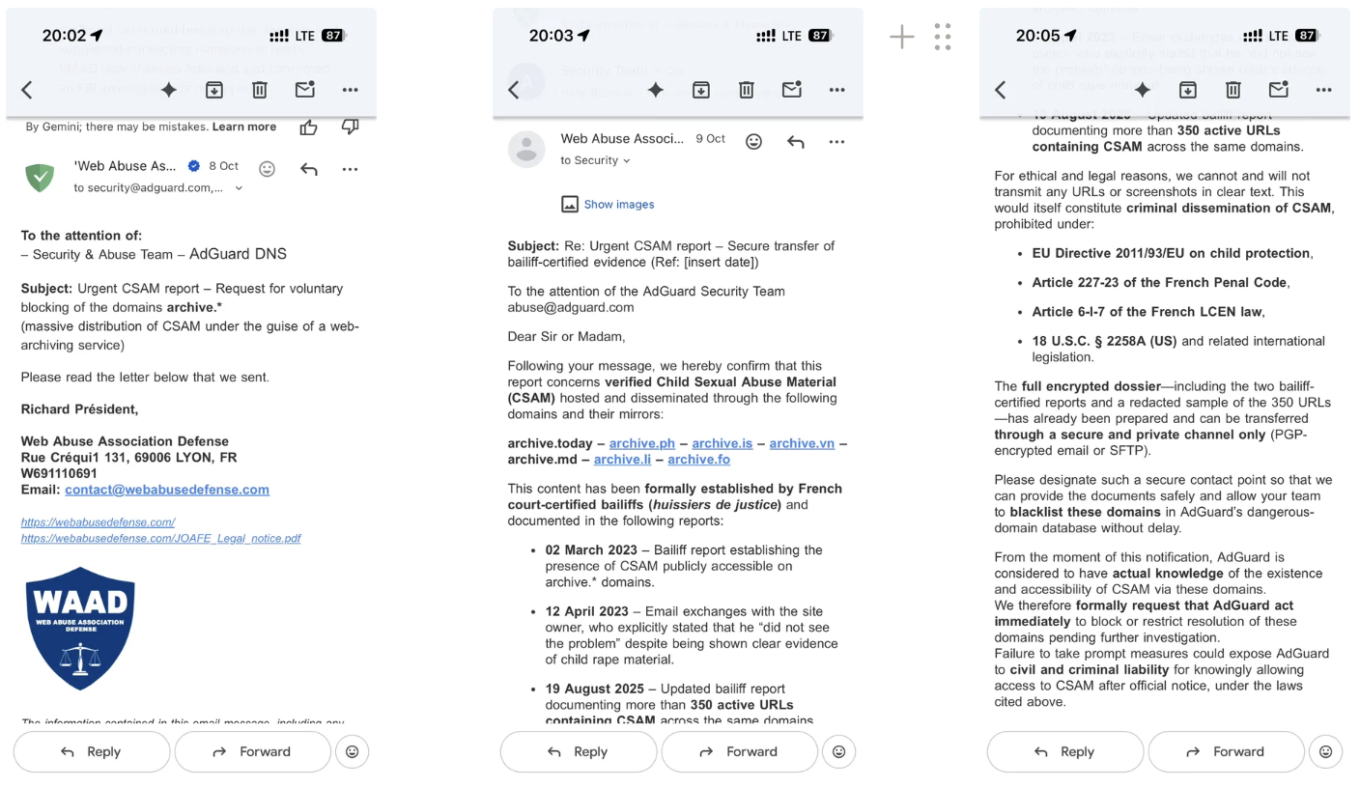
The email we received from WAAD

This struck us as strange — we’re not a hosting provider, and it seemed unusual for an infrastructure-level service like ours to be asked to take action like this.

Soon after, the situation escalated into what we could only describe as direct threats:
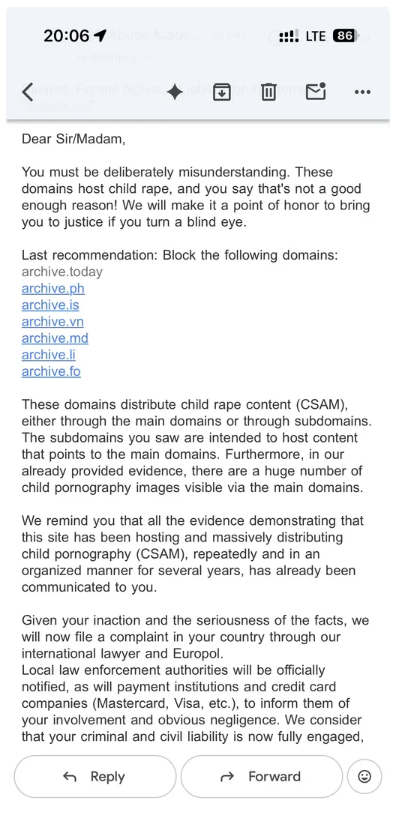
One of the follow-up emails we received

We won’t share all the screenshots here, but there were several similar messages.

We sought legal advice, and unfortunately discovered that French law, specifically Article 6-I-7 of the Loi pour la Confiance dans l'Économie Numérique (LCEN), might actually require us to respond and apply blocking measures, at least for French users.

That said, this whole situation shows just how inadequate this regulation is. Such decisions should be made by a court — a private company shouldn’t have to decide what counts as “illegal” content under threat of legal action.

Even so, the story didn’t quite add up. Since someone was trying to pressure us into taking action, we decided to contact the other side, Archive.today, directly.

We sent an email to Archive.today’s contact address and asked two simple questions:

  1. Can they remove the illegal content from the URLs we were informed about?
  2. Is it true that they refused to remove such content in the past, and had they been notified about it before?

They replied within a few hours. The response was straightforward: the illegal content would be removed (and we verified that it was), and they had never received any previous notifications about those URLs.

Moreover, they hinted that Archive.today had been targeted by a campaign of “serial” complaints, supposedly from French organizations, sent to various companies and institutions that could potentially harm the site. They even shared a link demonstrating a complaint similar to the one we had received.

At that point, things were looking increasingly odd, so we decided to dig deeper into the “complainant.”

The Web Abuse Association Defense website references several well-known organizations — Europol, OFAC, NCA — yet provides no details or evidence of any cooperation with them.

A screenshot taken on the WAAD website

The association itself was registered in February–March 2025, around the same time its website appeared. There is very little public information about it. Interestingly, registering an association in France can apparently be done entirely online and does not require proof of identity.

The association is registered at an address used for mass company registration, which isn’t inherently problematic but it does indicate that the entire registration process could have been carried out online by a single person.

Its Twitter/X account appeared only recently — in August 2025. It has just four followers, and its feed consists of just a few reposts.

WAAD X account

None of this proves anything by itself, but something still doesn’t add up. In their first email, the “head” of the association claimed that their correspondence with Archive.today started with a bailiff report from 2023. That timeline simply doesn’t fit.

We examined the so-called “bailiff reports” they had sent us as evidence. It’s important to note that these aren’t bailiff reports in the English sense — they’re “constat d’huissier sur Internet,” official records of online content such as webpages, posts, or videos. These particular reports were ordered online via the service called Qualijuris, and, based on the timestamps, most of them were also created in August 2025 — not 2023.

Only two of these bailiff reports were ordered in 2023 from a similar service. What’s interesting is that they weren’t ordered by WAAD. The name of the person who ordered these bailiff reports matches the name that appears in the correspondence shared with us by the Archive.today administrator — the same one he wrote about on X in 2024. In that case, the complaint appeared to come from a real lawyer — but someone had registered a domain with the lawyer’s surname, containing nothing but a redirect to the lawyer’s actual website, and did it on the same day the complaint was sent. The domain was used solely to send the emails and it is not active anymore. Interestingly, that email also invoked the LCEN law.

So what is the link between WAAD and that lawyer from before? Are these bailiff reports real and could it be that this is a case of impersonation of a real person? We don’t know yet, but we hope to discover the truth soon enough.

Unfortunately, we couldn’t dig any deeper about who exactly is behind WAAD. The domain webabusedefense.com is registered with name.com, but ownership information (including historical records) is hidden. They use ProtonMail for email, so that’s another dead end. The site itself is behind Cloudflare, making further tracing impossible.

What we have in the end

With everything said and done, here’s where things stand now:

  1. The illegal content was promptly removed from Archive.today after we notified them.
  2. The complaints against the site look extremely suspicious. In our case, they came from an organization that was only recently registered that seems deliberately set up to hide the identities of those behind it.
  3. The sample complaint shared by Archive.today’s admin shows signs of impersonating a real person. We have contacted the person in question and are currently waiting for a reply.
  4. In both our case and that other example, the recipients were pressured to act under the French LCEN law. However, that same law also provides penalties for false reports:

    Art. 6-I-4 LCEN:
    4. Any person who presents content or activity to the persons referred to in paragraph 2 as being illegal with the aim of having it removed or its dissemination stopped, when they know this information to be inaccurate, shall be punished by one year’s imprisonment and a fine of €15,000.

  5. We believe there are indications of criminal behavior here that should be investigated by law enforcement. Therefore, we will file an official complaint with the French police, including all relevant details.
  6. All this is unfolding amid reports of an FBI investigation into the owner of Archive.today. It seems that this investigation may be related to CSAM hosting. While we can’t confirm any connection between that case and ours, the timing is certainly suspicious.

Nov 14, 2025 UPD: We have updated the article with more information on the bailiff reports sent to us and the person who ordered them.

Nov 18, 2025 UPD: We learned that at least two reports were forged, and WebAbuseDefense’s official response still fails to reveal who is behind the association.


Vond je dit bericht leuk?
AdGuard VPN AdGuard DNS AdGuard Mail AdGuard Wallet
Het hoofdscherm van AdGuard voor Windows
Het beschermingsscherm van AdGuard voor Windows, met de beschermingsfuncties en -instellingen
Het statistiekenscherm van AdGuard voor Windows, met statistieken over geblokkeerde advertenties en volgers
Het appbeheerscherm van AdGuard voor Windows, met de opties voor beschermingsbeheer van apps die op het apparaat zijn geïnstalleerd
20.556 20556 gebruikersbeoordelingen
Uitstekend!

AdGuard voor Windows: advertentieblokker voor pc

AdGuard voor Windows is meer dan een advertentieblokker. Het is een multifunctioneel hulpmiddel dat advertenties blokkeert, de toegang tot gevaarlijke sites regelt, het laden van pagina's versnelt en kinderen beschermt tegen ongepaste inhoud
Door het programma te downloaden accepteer je de licentievoorwaarden
Microsoft Store
Door het programma te downloaden accepteer je de licentievoorwaarden
AdGuard voor Windows v8.0, 14 dagen proefperiode
Het hoofdscherm van AdGuard voor Mac
Het Incognitomodus-scherm van AdGuard voor Mac
20.556 20556 gebruikersbeoordelingen
Uitstekend!

AdGuard voor Mac: systeembrede advertentieblokker

AdGuard voor Mac is een unieke advertentieblokker die is ontworpen met macOS in gedachten. Het beschermt je niet alleen tegen vervelende advertenties in browsers en apps, maar beschermt je ook tegen volgen, phishing en fraude

Door het programma te downloaden accepteer je de licentievoorwaarden
Meer lezen
AdGuard voor Mac v2.19, 14 dagen proefperiode
Het hoofdscherm van AdGuard voor Android
Het scherm 'Bescherming tegen volgers' van AdGuard voor Android
Het appbeheerscherm van AdGuard voor Android, met de opties voor beschermingsbeheer voor apps die op het apparaat zijn geïnstalleerd
Het statistiekenscherm van AdGuard voor Android, met statistieken over geblokkeerde advertenties en volgers
Het hoofdscherm van de privébrowser van AdGuard voor Android
De QR-code om AdGuard voor Android te downloaden
20.556 20556 gebruikersbeoordelingen
Uitstekend!

AdGuard voor Android: advertentieblokker voor alle apps

Blokkeert advertenties en volgers in alle browsers, spellen en andere apps. Beschermt je privacy en geeft je controle over hoe jouw apps internet gebruiken. Geïnstalleerd via APK

Door het programma te downloaden accepteer je de licentievoorwaarden
Meer lezen
Scannen om te downloaden
Gebruik een QR-codelezer die beschikbaar is op je apparaat
AdGuard voor Android v4.14, 14 dagen proefperiode
Het hoofdscherm van AdGuard voor iOS
Het beschermingsscherm van AdGuard voor iOS, dat de beschermingsfuncties en -instellingen toont.
Het statistiekenscherm van AdGuard voor iOS, met statistieken over geblokkeerde advertenties en volgers
De QR-code om AdGuard voor iOS te downloaden
20.556 20556 gebruikersbeoordelingen
Uitstekend!

AdGuard: advertentieblokker voor iOS

De beste advertentieblokker voor iOS op iPhone en iPad. AdGuard verwijdert alle soorten advertenties en volgers in Safari en beschermt je privacy in alle apps op DNS-niveau
Door het programma te downloaden accepteer je de licentievoorwaarden
Meer lezen
Scannen om te downloaden
Gebruik een QR-codelezer die beschikbaar is op je apparaat
AdGuard voor iOS v4.5
Het hoofdscherm van AdGuard Inhoudsblokker
Het filterscherm van AdGuard Inhoudsblokker
Het instellingenscherm van AdGuard Inhoudsblokker
20.556 20556 gebruikersbeoordelingen
Uitstekend!

AdGuard Content Blocker

AdGuard Content Blocker elimineert allerlei soorten advertenties in mobiele browsers die technologie voor het blokkeren van inhoud ondersteunen, namelijk Samsung Internet en Yandex Browser. De functies zijn beperkt in vergelijking met AdGuard voor Android, maar het is gratis, eenvoudig te installeren en efficiënt
Door het programma te downloaden accepteer je de licentievoorwaarden
Meer lezen
AdGuard Content Blocker v2.8
Het hoofdscherm van de AdGuard-browseruitbreiding
Het scherm 'Bescherming tegen volgers' van AdGuard-browseruitbreiding
20.556 20556 gebruikersbeoordelingen
Uitstekend!

AdGuard Browserextensie

AdGuard is de snelste en lichtste advertentieblokkering uitbreiding die alle soorten advertenties op alle webpagina's effectief blokkeert! Kies AdGuard voor uw browser om advertentievrij, snel en veilig te surfen.
Installeren
Door het programma te downloaden accepteer je de licentievoorwaarden
Installeren
Door het programma te downloaden accepteer je de licentievoorwaarden
Installeren
Door het programma te downloaden accepteer je de licentievoorwaarden
Installeren
Door het programma te downloaden accepteer je de licentievoorwaarden
Installeren
Door het programma te downloaden accepteer je de licentievoorwaarden
Meer lezen
Installeren
Door het programma te downloaden accepteer je de licentievoorwaarden
Meer lezen
AdGuard Browserextensie v5.5
Het hoofdscherm van AdGuard Assistant
20.556 20556 gebruikersbeoordelingen
Uitstekend!

AdGuard Assistant

Een bijbehorende browseruitbreiding voor AdGuard desktop-apps. Het stelt je in staat om aangepaste items op websites te blokkeren, websites toe te voegen aan de toelatingslijst en rapporten rechtstreeks vanuit je browser te versturen
AdGuard Assistant v1.4
20.556 20556 gebruikersbeoordelingen
Uitstekend!

AdGuard Home

AdGuard Home is een netwerkgebaseerde oplossing voor het blokkeren van advertenties en volgers. Installeer het één keer op je router om alle apparaten in je thuisnetwerk te beschermen — geen extra clientsoftware vereist. Dit is vooral belangrijk voor verschillende IoT-apparaten die vaak een bedreiging vormen voor je privacy
AdGuard Home v0.107
Het hoofdscherm van AdGuard Pro voor iOS
Het beschermingsscherm van AdGuard Pro voor iOS, met de beschermingsfuncties en instellingen
Het statistiekenscherm van AdGuard Pro voor iOS, met statistieken over geblokkeerde advertenties en trackers
20.556 20556 gebruikersbeoordelingen
Uitstekend!

AdGuard Pro voor iOS

AdGuard Pro voor iOS wordt geleverd met alle geavanceerde beschermingsfuncties voor het blokkeren van advertenties. Het biedt dezelfde tools als de betaalde versie van AdGuard voor iOS. Het blinkt uit in het blokkeren van advertenties in Safari en laat je DNS-instellingen aanpassen om je bescherming aan te passen. Het blokkeert advertenties in browsers en apps, beschermt je kinderen tegen ongepaste inhoud en houdt je persoonlijke gegevens veilig
Door het programma te downloaden accepteer je de licentievoorwaarden
Meer lezen
AdGuard Pro voor iOS v4.5
Het hoofdscherm van AdGuard Mini voor Mac
Het Safari-beschermingsscherm van AdGuard Mini voor Mac
Het 'Regel aanmaken'-scherm van AdGuard Mini voor Mac
20.556 20556 gebruikersbeoordelingen
Uitstekend!

AdGuard Mini voor Mac — Safari-advertentieblokker

AdGuard Mini voor Mac is een krachtige Safari-advertentieblokker. Deze lichtgewicht app verwijdert advertenties, blokkeert volgers en versnelt het laden van pagina's. Het helpt je om in Safari zonder afleiding op het web te surfen en je gegevens privé te houden
Installeren
Door het programma te downloaden accepteer je de licentievoorwaarden
Meer lezen
AdGuard Mini voor Mac v2.3
Het hoofdscherm van AdGuard voor Android TV met ingeschakelde bescherming
Het advertentieblokkeringsscherm van AdGuard voor Android TV, met zijn functies en instellingen
Het instellingenscherm van AdGuard voor Android TV
Het appbeheer-scherm van AdGuard voor Android TV, waarop de apps worden getoond waar advertenties en volgers worden geblokkeerd
20.556 20556 gebruikersbeoordelingen
Uitstekend!

AdGuard voor Android TV

AdGuard voor Android TV is de enige app die advertenties blokkeert, jouw privacy bewaakt en fungeert als firewall voor je Smart TV. Ontvang waarschuwingen over webbedreigingen, gebruik veilige DNS en profiteer van gecodeerd verkeer. Ontspan en duik in je favoriete programma's met eersteklas beveiliging en zonder advertenties!
AdGuard voor Android TV v4.14, 14 dagen proefperiode
De AdGuard-mascotte, Agnar, houdt de Linux-pinguïn vast
20.556 20556 gebruikersbeoordelingen
Uitstekend!

AdGuard voor Linux

AdGuard voor Linux is 's werelds eerste systeem-brede AdGuard Advertentieblokker. Blokkeer advertenties en volgers op apparaatsniveau, kies uit vooraf geïnstalleerde filters, of voeg je eigen toe - allemaal via de interface
AdGuard voor Linux v1.4
20.556 20556 gebruikersbeoordelingen
Uitstekend!

AdGuard Temp Mail

Een gratis tijdelijke e-mailadresgenerator die je anoniem houdt en jouw privacy beschermt. Geen spam in je hoofdinbox!
20.556 20556 gebruikersbeoordelingen
Uitstekend!

AdGuard VPN

75 locaties wereldwijd

Toegang tot alle inhoud

Sterke versleuteling

Geen logboekregistratie

Snelste verbinding

24/7 ondersteuning

Gratis proberen
Door het programma te downloaden accepteer je de licentievoorwaarden
Meer lezen
20.556 20556 gebruikersbeoordelingen
Uitstekend!

AdGuard DNS

AdGuard DNS is een alternatieve oplossing voor advertentieblokkering, privacybescherming en ouderlijk toezicht. Het is eenvoudig in te stellen en gratis te gebruiken, biedt een minimum aan optimale bescherming tegen online advertenties, volgers en phishing, ongeacht welk platform en welk apparaat je gebruikt.
20.556 20556 gebruikersbeoordelingen
Uitstekend!

AdGuard Mail

Bescherm je identiteit, vermijd spam en houd je Postvak IN veilig met onze aliassen en tijdelijke e-mailadressen. Geniet van onze gratis service voor het doorsturen van e-mail en apps voor alle besturingssystemen
20.556 20556 gebruikersbeoordelingen
Uitstekend!

AdGuard Wallet

Een veilige en privé crypto-wallet die je volledige controle geeft over jouw activa. Beheer meerdere wallets en ontdek duizenden cryptocurrencies om op te slaan, te verzenden en te ruilen
Downloaden AdGuard Klik op het door de pijl aangegeven bestand om AdGuard te installeren. Selecteer "Open" en klik op "OK" - wacht even tot het bestand gedownload is. Sleep dan in het geopende venster het AdGuard icoontje naar de "Applications" map. Dank u dat u voor AdGuard gekozen heeft. Selecteer "Open" en klik op "OK" - wacht even tot het bestand gedownload is. Klik dan in het geopende venster op "Installeren". Dank u dat u voor AdGuard gekozen heeft.
AdGuard op je mobiele apparaat installeren
















































