You can hide, but you can't escape: how fingerprinting revolutionized online tracking
Nobody likes being followed. Safe to say you'd be extremely concerned if a group of strangers followed you in real life. In the online world, it's not much different — trackers lurk in the shadows of each and every website and follow you around the Internet.
Tracking: not only cookies
When you click on a website you have never visited, your browser downloads small text files from it. They are saved on your hard drive and contain information about what you've done on the website, your log, your location, your preferred language as well as what items you've added to your cart. The browser will send these files back to the site the next time you open it. "Oh, that's my buddy Jacque from Marcel”, the site will think, opening in French to the returning user. These small files are called cookies, and they can be placed by the site or by its partners. The latter are easy to spot: they are usually ad banners or like buttons. Advertisers can track users across all pages where they have placed their banners. They do this to gather information about user interests to bombard them with highly specific ads.
Thus, third-party cookies act like a bunch of paparazzi waiting to jump on you as soon as you get out of a limo open a website. What's more, these paparazzi are inviting themselves to your PC: it's much easier to click "Accept All" than "Manually Manage Cookies" and toil with the settings. It could piss you off, but you couldn't do much about it. Until recently.
As users became more aware of privacy issues stemming from the use of cookies, lawmakers and even beneficiaries of this technology — tech giants like Google — have taken steps to rein them in. Under the EU General Data Protection Regulation (GDPR) users must explicitly consent to the use of cookies, unless they are essential to the functionality of the site. The consent can be withdrawn at any time, and, supposedly, with ease. Google took it a step further, proposing to replace third party cookies with Topics, the new attempt at reconciling the interests of advertisers and those of privacy-conscious users. Spoiler: a failed one. Google's users in Europe are already able to reject cookies with one click. You can clear your cookies, surf in an incognito mode, use a browser that blocks third-party cookies by default, go on a diet and quit eating cookies cold turkey. Phew, you are anonymous? Not so soon.

In fact, the issue is much more complicated than that. Cookies are just the tip of the iceberg, and even if they are discarded to the dustbin of history in the near future, it will still be easy to identify you. The thing is that cookies are only part of your digital footprint and there are much more conniving tracking techniques. One of such techniques is known as "fingerprinting".
Fingerprinting trackes the user through the parameters of their browser and operating system. The accuracy of the method stems from the fact that we are not prone to change the parameters of our OS very often. Besides, unlike cookies that are stored on the device, your browser fingerprint is stored server-side, which means you cannot "clear" it, but only alter.
Browser fingerprinting: What is it?
As we've already mentioned, fingerprinting is the process of identifying a user through secondary characteristics related to his hardware, software and their configuration.
Who and when can fingerprint you
Your browser provides some information to the web-server when you request a website's address. The site needs to know what your screen resolution, your location, language, font and OS are to display properly. At the same time a fingerprinting library, such as FingerprintJS, may be questioning your browser about all the parameters and characteristics of your device. The end result of this questionnaire is the hash sum of all the data your browser spurted out during this more or less voluntary process. The hash sum is a unique 32-bit number, for example: ba4f31d70cc306fcd736y81cd6d74a7a.
What is your fingerprint made of?
Your device fingerprint or browser fingerprint (we will be using these two terms interchangeably for the purpose of this article) can consist of dozens of parameters. You can check to what extent is your fingerprint unique and what it is made of on one of these services: AmIUnique, Fake Vision, CoverYouTracks. Or you can keep on reading.
So, what is 'a fingerprint' made of? Let's see.
- HTTP headers attributes. A HTTP-header is a list of strings sent by your browser to the server when trying to access a site. This is a sort of a short bio read by a special program installed on a server so that it can properly display the website for you.
- Browser type and version
- Confidentiality settings
- Content language
- Operating system
- Supported media formats
- Supported compression methods
- Information obtained through the embedded JavaScript code
- List of plug-ins
- Timezone offset: Time difference between the Greenwich Mean Time and the local time in minutes
- Cookie settings
- Screen size and color depth
- Content language
- List of fonts
- Platform (for instance, Windows 32)
- Use of Adblock
- Touch support
- Microphones, cameras, headphones present
- Do Not Track: whether users allow websites to track their preferences
- Navigator properties
- Hardware concurrency: number of processors
- Device memory in gigabytes
- Java enabled or not
- Permissions: notifications, access to geolocation, push, persistent storage
- Connection (for instance, WiFi 4 G)
- Gyroscope (for mobile devices)
- Accelerometer (for mobile devices)
- Battery
- Keyboard layout (QWERTY or AZERTY)
- Browser build identifier
- Proximity sensor (for mobile devices)
- Supported audio and video formats
In addition to that, the information about installed fonts, language, screen resolution and platform can be obtained through FLASH.
The fact that your browser blocks cookies may make your fingerprint more unique. The same is true for the Do Not Track function. If you choose to enable it, you should bear in mind that it may make you more unique in the eyes of fingerprinting scripts.
OK, but how about covering your tracks by using multiple browsers at the same time? That method was effective in its day. However, since cross-browser fingerprinting has become a thing and hardware-focused methods have evolved, juggling three or four browsers at a time has become less effective.
But this is not all. In order to identify the characteristics of your device with more accuracy, different APIs can force it to take part in an audition: to generate an image in 2D, to draw a triangle in 3D and sing an inaudible song. Yes, we're not joking.
- The first technique uses Canvas API. The browser is instructed to "draw" a line of text with superimposed effects, for instance, an emoji. The fingerprinting script captures how the browser has rendered the image. The result depends on the combination of GPU, video card, video drivers and installed fonts. Perhaps, the difference between two devices won't be obvious to a naked eye, but judges (trackers) will recognize your work.

- The second technique uses JavaScript API for rendering 3D and 2D graphics — WebGL. The browser is instructed to generate a triangle in 3D with superimposed effects. As in the case with Canvas, the result depends on GPU, video card, and drivers.

- The third technique uses AudioContext API. The browser is instructed to generate a low-frequency signal from your device's audio stack. The resulting signal depends on the audio card and drivers.
The results of the abovementioned tests are returned to the server as hashes — unique identifiers of your device, by which the server will recognize you.
We have mentioned some of the most popular fingerprinting techniques. The list is not exhaustive. For instance, a browser can be tricked into sending various information in response to CSS requests. There is also a seperate API that provides information about the device's battery charge level. The list can go on.
What is fingerprinting used for?
The original purpose of browser fingerprinting was to stop financial fraud. Preventing fraud still remains one of its top uses. If we take a look at the list of FingerprintJS, we can see an e-commerce giant Ebay, Booking.com, payments solution provider Checkout.com, cryptocurrency exchange Coinbase, international money transfer system Western Union, and major banks.
Fingerprinting can be used to deny a bot access to a bank account when it fails to generate a canvas fingerprint. More sophisticated bots that use headless browsers (i.e. browsers without a graphic user interphace — such as PhantomJS) may be identified on the basis of both their fingerprint and behavior, for instance, by multiple login attempts. Fingerprinting can also help to protect phished accounts. A website can require a user to complete two-factor authentication or confirm an email address if they attempt to log in with a new fingerprint.
Online stores use fingerprinting techniques to stop coupon promo abuse, flag users who dispute payments even if they received the product or service. In the gaming and gambling industries fingerprinting is used to prevent cheating through creating multiple accounts. Moreover, certain characteristics of a fingerprint may suggest that a user will attempt fraudulent behavior.
Advertisers have shown a keen interest in browser fingerprinting as well. But why, you may ask, do they need the information about my screen resolution or a GPU model? First, a technology store may want to target you with ads suggesting you buy a better monitor or a more advanced GPU.
Second, a browser fingerprint can be enriched with data from databases and, again, be used to target users with highly personalized ads. For instance, an advertiser can try to match your fingerprint with your real name, the make of your car, your physical and IP addresses. Back in 2012, CEO of BlueCava, a company that used to specialize in fingerprinting, called it "the next generation of online advertising". BlueCava could also do cross-device fingerprinting, that is to match a smartphone and a PC fingerprint to the same person. In 2016 BlueCava merged with Qualia, a company that tracked users' "intent" to buy something in real time through social media. In 2018 Qualia was bought by a marketing company with a telltale name, IDify. Today, it is part of Adstra marketing agency, which sells massive amounts of identifiable data online and counts Amazon Advertising, Snapchat and Facebook among its clients. It looks like the future is already there.
It should be mentioned that fingerprinting can also be used in law enforcement. Its methods can allow governments to track dissidents and censor free speech, among other things.
Fingerprinting techniques become more sophisticated
Fingerprinting methods evolve constantly. The newest breakthrough in the field is technique, named 'DrawnApart', which can be used on sites that support WebGL API. WebGL is a cross-platform API for rendering 2D and 3D graphics in the browser. It is implemented in all major browsers, including Chrome, Firefox, Edge and Safari.
The technique, designed by a group of researchers from France, Israel and Australia, allowed them to create distinct fingerprints of seemingly identical GPUs. The fingerprinting techniques that we've discussed in the previous section had one major disadvantage or advantage: they are not sensitive enough to draw a distinction between GPUs of the same make and type. The challenge may indeed seem insurmountable: imagine, you meet identical twins — will you be able to tell them apart at once? Hardly.
The researchers say that "even nominally identical hardware devices have slight differences induced by their manufacturing process", and that their fingerprinting technique trigger these differences.
As part of the experiment, they counted the number and speed of execution units (EUs) in the GPU, and saw how much time it takes for them to complete rendering and stall functions. As a result, they were able to collect 50 traces from each GPU. Each of these 50 traces consisted of 176 measurements taken from 16 points. The difference between raw traces of two Gen 3 graphical units is obvious even to the naked eye.
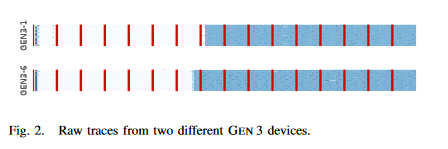
The new technique has made a known state-of-the-art tracking approach FP-STALKER 67% more effective. Combined with Drawn Apart, FP-STALKER was able to track a fingerprint for 28 days, as opposed to 17.5 days for FP-STALKER alone.
While this method might not be bulletproof, its implementation may further undermine user privacy. The researchers believe that the technique will become even more accurate in the new versions of WebGL. The researchers enabled WebGL 2.0 support in Chrome and conducted the experiment once again. They were able to identify a GPU with "a near-perfect classification accuracy of 98%" while the test itself was much faster to run, taking only 150 milliseconds.
How unique is your 'unique fingerprint' actually?
Fingerprinting techniques have become more advanced, but the big question is how easy will it actually be to identify an individual user. It's one thing when there are millions of the exact same fingerprints as mine, and a completely different one if there are only thousands of my digital lookalikes.
There have been several major surveys studying the uniqueness of a device fingerprint.
In 2010 the Electronic Frontier Foundation (EFF) studied fingerprints from a sample of 470,761 browsers as part of the Panopticlick project. The participants of the survey knowingly handed over their fingerprints by visiting a website, which would scan their fingerprints. The researchers focused on a narrow set of data. Namely, they retrieved the information about OS version, language, toolbars, browser type and version, screen resolution, timezone, plugins, system fonts, whether cookies were enabled or not.
The conclusion was alarming. Some 83.6% of the browsers had an "instantaneously unique fingerprint". That meant that among 286,777 browsers there was only one pair of identical fingerprints at best. Moreover, the algorithm was able to track fingerprint changes and identify a "progenitor" of a fingerprint in 99,1% of all cases.
In 2016 another group of researchers studied a sample of 118,934 browser fingerprints that privacy-savvy volunteers provided through https://amiunique.org website. 89,4% of them turned out to be unique. Compared to the 2010 survey, the list of the parameters increased, and more sophisticated fingerprinting techniques, including Canvas and WebGL API, were employed. The researchers took into account the use of an adblocker, the status of Do Not Track function and the information about a graphic processor and a graphics card. For the first time the researchers assessed the uniqueness of a mobile fingerprint, identifying it with 81% accuracy.
In 2018, the largest fingerprint study to date called 'Hiding in the Crowd' was conducted. The researchers analyzed a mammoth sample of 2,067,942 browsers that visited a popular French website. The result was encouraging: only 33.6% of fingerprints were unique. The number of unique fingerprints obtained from PCs was 35.7%, while only 18.5% of mobile fingerprints were unique. The researchers used the same set of parameters as in the 2016 survey. But the tests themselves became more complex. For example, they forced the browsers to draw an abstract image below, an improvement from a string of characters with an emoji.
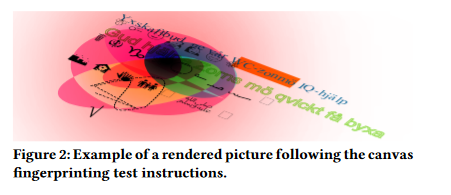
The researchers themselves explained such a huge gap between their findings and those of the previous two surveys by participants' background. While people who joined the 2010 and 2016 surveys knowingly agreed to become part of the experiment, the participants of the French study were just regular users. The researchers behind 'Hiding in the Crows' argue that their result is more representative of the general population, because the fingerprints they had collected did not come from some privacy-obsessed geeks who had been "enticed to play with their browsers to change their configuration".
However, it should be noted that in all these surveys the researchers had looked at a relatively small number of parameters. And as fingerprinting methods become ever more sophisticated, the uniqueness of one's fingerprint will inevitably increase. As such, the developers of FingerprintJS library claim that their method allows to identify a mobile and a desktop device with 99.5% accuracy.
Overall, the effectiveness of fingerprinting methods rely on two parameters:
- Persistency
- Uniqueness
The more often we change the configuration of our system and browser parameters, the less persistent or stable is our fingerprint. But at the same time it can become more unique! We have to bear that in mind while trying to evade tracking scripts. Essentially, users are stuck between a rock and a hard place.
What can be done?
As we can see, the bulk of identifiable information сomes from plugins, fonts and the Canvas hash. On the surface of it, the problem can be solved by disabling JavaScript — a fingerprinting script will not be able to detect the list of plugins or fonts. However, this approach has one major defect: the overwhelming majority of websites use JavaScript, and hence, they will break for you. Break free and break the internet — not the most appealing solution.
Brave Browser. Chromium-based Brave randomizers fingerprint parameters by default. Thus, every new website sees you differently. This technology will protect you from cross-site tracking. A user can also upgrade his anti-fingerprinting protection to "maximum". In this case, the program will not only slightly change your fingerprint, but will give you a total makeover, which means that your fingerprint will consist of parameters that are not based on real values but are completely random. The latter approach, however, may break many sites.
Tor Browser. Anonymous Tor browser took it one step further. It makes all fingerprints look the same. It does not matter what your device and browser parameters are, a website will see every user the same way.
There are also services the likes of FingerprintSwitcher that add "noise" to your fingerprint or swap your fingerprint with a real one from their own base.
Google Privacy Budget. This solution was proposed by Google as part of its Privacy Sandbox initiative (we have recently written about the Privacy Sandbox itself, its pros and cons). Privacy Budget is supposed to decrease the amount of information a website can receive from the browser. If your browser is requested to provide information beyond a certain threshold or "budget", the request returns an error or a site receives a generic value.
You can also block fingerprinting scripts from downloading on the page. In this case, you won't let fingerprinting programs harvest data about your device. However, this will work only for those scripts that you know about. You also will have to monitor and update the list of trackers to block.
AdGuard prevents the most popular fingerprinting libraries from running. Besides, to use a fingerprint you need to send it somewhere. AdGuard blocks known tracking domains — this means that it will be impossible to send your fingerprint to the servers and use it for targeting.




















































